
- How to get past Roblox age verification with a VPN
- Our recommended VPNs to bypass Roblox age verification
- How does Roblox age verification work?
- How to bypass Roblox age verification: step-by-step guide
- Is it legal to use a VPN to bypass Roblox age verification?
- What you need to know about the UK’s new Online Safety Act
- Final tips for bypassing age verification on Roblox
- FAQ
As of July 25, 2025, Roblox users must complete age verification to access the “trusted connections” feature. This is due to the UK’s Online Safety Act 2023, which introduced mandatory age verification for adult and sensitive content. Roblox is using age-estimation software to let users aged between 13 and 17 connect with their peers in unfiltered private chats. While private messages were historically filtered, Roblox introduced this feature to facilitate less restricted chats on the Roblox platform.
However, Roblox’s age verification software can fail to accurately estimate a user’s age. Unless users go through additional verification involving ID document upload, this can lead to permanent account limitations. What’s more, while all age verification systems carry an inherent privacy risk, Roblox’s implementation is even more concerning as it handles minors’ data.
Currently, there are two ways to use all Roblox features: verify your age as requested, or bypass the system using a VPN if you’re 17 years old or older. Based on my tests, using a VPN is the easiest, most effective, and most privacy-friendly way to bypass Roblox age verification. It also avoids the risk of a failed verification that can limit your account. A VPN changes your digital location, allowing adults to bypass the UK’s age verification requirements entirely. Keep reading to understand how the process works.

Disclaimer
This article discusses the requirement to share personal data when accessing adult websites in the UK, from the perspective of individuals who wish to remain anonymous. The content is provided for informational purposes only and is not, under any circumstances, intended for minors seeking to bypass restrictions in order to access material that may be harmful or inappropriate for them. We do not promote, encourage, or endorse such bypassing. Your use of the content herein is entirely at your own risk.
How to get past Roblox age verification with a VPN
If you try to use Roblox without age verification, you won’t be able to access voice chat and certain multiplayer features. You’ll also face limitations on avatar customization and the kinds of games that you can access. If a game is rated 13+ or 17+, you won’t be able to play until you’ve proven your age – a measure put in place to protect minors from harmful content on Roblox. However, there’s a risk of your account being permanently limited or locked if you try to bypass these requirements improperly, such as with a fake ID or an AI-generated image, even if you’re of Roblox-legal age. In summary, the most effective and secure way for users of appropriate age to bypass the Roblox ID check and age verification without being banned is to use a VPN.
- Get a reliable VPN for Roblox that has robust anonymity features and servers outside the UK. I recommend Proton VPN, which has 20700 worldwide servers.
- Install the VPN software on the device you use to play Roblox.
- Clear your cache and cookies so old location data doesn’t expose your true location.
- Connect to a VPN server in a region where Roblox doesn’t require verification.
- Relaunch the game to continue using Roblox without needing to submit your ID. Just be aware that you won’t be able to use the new trusted connections feature.
Best countries to connect to for bypassing Roblox blocks: I tested a number of VPN locations to find the best countries to bypass Roblox ID checks. I recommend connecting to Ireland, the Netherlands, Germany, Poland, Romania, or Switzerland. Choose the country located geographically closest to you for the best speeds, such as Ireland if you’re located in the United Kingdom.
Our recommended VPNs to bypass Roblox age verification
To effectively bypass Roblox identity and age verification, your chosen VPN needs servers in regions where Roblox isn’t required to verify users’ ages. It also needs to offer robust anonymity features that evade detection and keep your true location hidden, like leak protection and obfuscation. Based on my tests with 25 VPNs and Roblox, these are my recommendations to bypass Roblox ID verification:
-
1.Proton VPN: best VPN to bypass Roblox age verification in 2026 thanks to 20700 VPN servers worldwide, including unrestricted locations like Ireland, Germany, and the Netherlands. Proton VPN’s Secure Core architecture and audited no-logs policy keep your identity hidden while reliably bypassing Roblox’s age-check system.
-
2.TotalVPN: best budget VPN to avoid Roblox age checks with fast global servers and simple apps. TotalVPN reliably masks your Australian or UK location, helping adults bypass Roblox age verification without slowdown.
-
3.IPVanish: fast and reliable VPN to bypass Roblox age checks, offering strong encryption and a large pool of rotating IPs. IPVanish keeps your true location hidden and delivers smooth Roblox gameplay without verification interruptions.
How does Roblox age verification work?
Roblox age verification relies on AI-assisted facial recognition software through a third-party called Persona. This software estimates a user’s age to confirm that they’re 13 or older. You may also be asked to upload an official government ID. Slowly introduced in 2021, the process gained traction in 2023, before becoming mandatory as of July 25, 2025 under the Online Safety Act. Now, users must prove their age to access voice chat, the new trusted connections feature, and age-rated games that require you to be 13+ or 17+ – all to protect underage players from inappropriate content and features.

To avoid losing access to features as a result of changes in UK law, you’ll have to use Roblox’s age verification process. If you choose to start age verification from within your profile, you’ll be expected to go through the full verification process immediately using an official government ID. Here’s how it works:
- Log into your Roblox account and go to Settings.
- Click on the Account Info tab.
- Click on “Verify My Age” beneath your date of birth,
- Scan the QR code with your phone when the pop-up appears.
- Click “Begin Verifying” to complete the age verification process on the next screen.
- Click on “Start Session” and complete the ID document scan and selfie capture.
- Wait for verification to complete so you can access age-restricted features.
This process is risky, as it involves submitting personal information including selfies to a third-party data processor. It’s also made even more privacy-unfriendly by the fact it handles data belonging to minors. Using a VPN is the only way to bypass Roblox age verification in 2026 and keep yourself and your data secure and anonymous – as long as you fit the age required for the Roblox tier you’re trying to access. I recommend using Proton VPN, which has powerful encryption and privacy features.
I can’t verify my age on Roblox
If you can’t verify your age on Roblox, there could be a number of causes. I researched the most common reasons for age verification failing on Roblox, checking sources like Reddit. Some users report problems with the process, while others say that Roblox has told them they cannot help when the process fails.
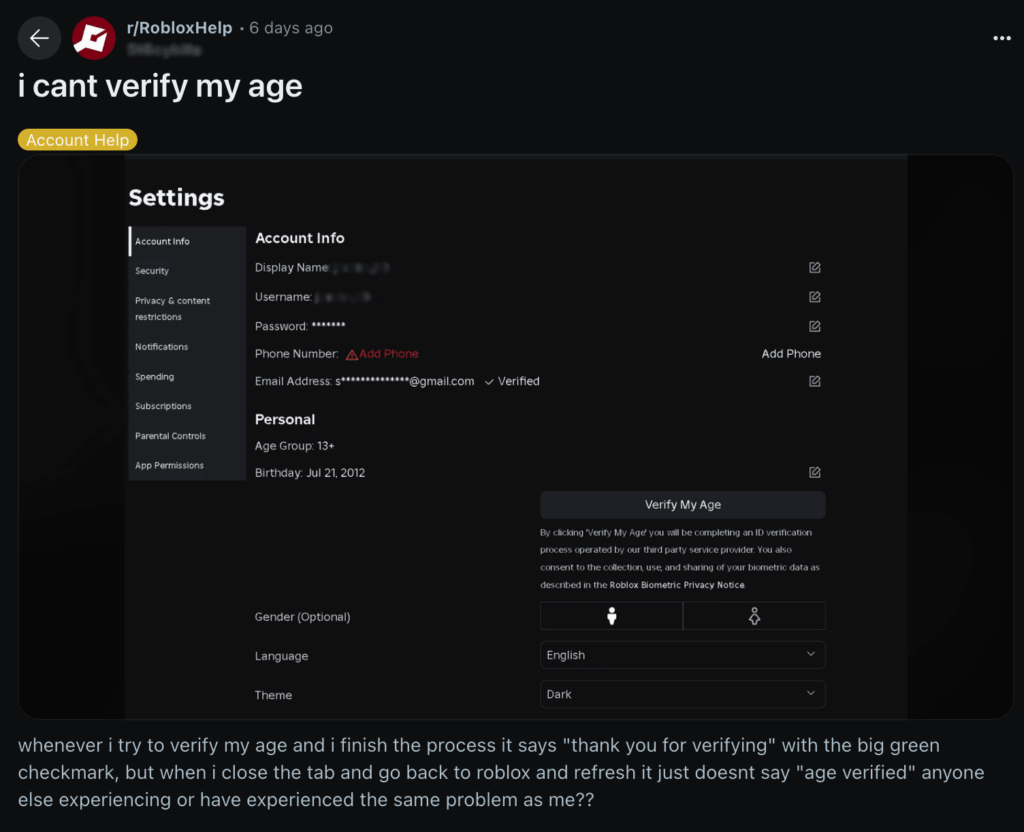
Problems can result from blurry or expired identification, changing information during the verification process, or issues with Roblox or Persona’s servers. Here are some quick troubleshooting steps you can try if you can’t verify your age on Roblox:
- Check your ID: Make sure that the ID you’re using is valid and hasn’t expired, and check the document is clean and clearly readable.
- Position your ID correctly: Check that your entire document is visible in the camera frame and not being clipped at the edges.
- Try another form of identification: If one ID isn’t working, try another. For example, a passport or driver’s license, or another national ID if you’re not old enough to drive.
- Restart the validation process: Since changes to your age or other details can cause validation to fail, try restarting the process from scratch.
- Contact support: If all else fails, contact persona support; this is the company that handles the Roblox age verification process.
If you still can’t get age verified by Roblox, although you mean the legal requirements, using a VPN is the only solution. It’s also much more efficient and ensures you don’t have to share sensitive personal information with a third-party data processor. I recommend Proton VPN for the best chance of bypassing Roblox verification process, as proven in my in-house tests.
How to bypass Roblox age verification: step-by-step guide
Download a reliable VPN to bypass Roblox ID and age verification and continue using the Roblox game tiers meant for your age without risking your privacy. I tested more than 20 VPNs to find the best VPN services that could evade identification checks without exposing your true location.
Step 1. Get a reliable VPN
First, choose a reliable VPN that can bypass Roblox geo-blocks. Your chosen VPN also needs leak protection and a kill switch to ensure your true location remains hidden. Based on my tests, I suggest Proton VPN, which has lots of servers in locations without identification checks, like Ireland, Germany, and the Netherlands. It also has robust anonymity and privacy protections that include a built-in kill switch, 256-bit encryption, and DNS and IP leak protection.
A solid cybersecurity and privacy package with a whopping 70% off
Step 2. Download and install the VPN app
Once you’ve chosen your VPN, create an account and download the VPN software on your Roblox device. Log into your VPN account for full server list access. Proton VPN is currently the best VPN to bypass Roblox ID verification. Currently, you can use a free trial of Proton VPN, but for the best experience there’s a 30-day money-back guarantee available on every platform for a month of risk-free testing.
Step 3. Connect to a server outside the UK
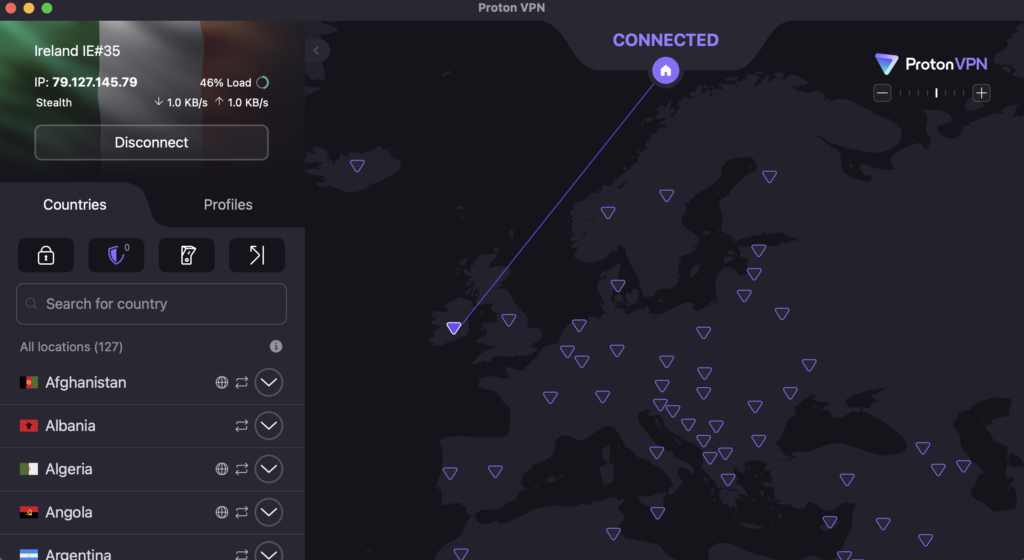
Next, connect to the closest UK-neighboring country for the best connection speeds. For me, I saw the fastest speeds while testing when I connected to Proton VPN’s Dublin, Ireland server. However, Germany and the Netherlands were also good choices to bypass Roblox age verification and maintain strong connection speeds for lag-free gaming.
Step 4. Open Roblox and create or access your account
Log into your Roblox account, or if your Roblox account is locked due to age restrictions, register again with your real age. I also recommend disabling location services on your browser and your device. Finally, clear your cache and cookies to avoid Roblox linking old location data to your account.
Step 5. Enjoy full access without verifying your age
Now, you should be able to access Roblox without seeing any age verification prompts, keeping your personal data safe and private. Make sure that you keep your VPN connected, as Roblox routinely checks your IP address. If it detects a change and sees your true location, you could start seeing the age prompts again.
Is it legal to use a VPN to bypass Roblox age verification?
Yes, using a VPN in the UK is legal, and while using a VPN to bypass Roblox age verification isn’t illegal, it may violate the platform’s terms of service. There are currently no UK laws that prevent the use of a VPN to access Roblox. But evading Roblox’s age checks could be considered a breach of the game service’s rules. These checks are in place to help Roblox comply with the new Online Safety Act 2023 regulations aimed at protecting minors online, and platforms can face heavy penalties unless they adequately verify users’ ages. Therefore, Roblox may lock your account if you use a VPN to bypass age checks. That’s why it’s crucial to choose a reliable VPN like Proton VPN that offers strong anonymity and anti-detection software.
What you need to know about the UK’s new Online Safety Act
The UK’s Online Safety Act originated in 2023, but the requirements that force adult and sensitive content platforms to validate users’ ages came into effect on July 25, 2025. These changes are intended to prevent minors from accidentally or intentionally accessing adult content online. As a result, I’ve seen similar age verification checks introduced on a wide variety of social media, dating, and streaming sites and apps.
While the move is a positive step toward protecting minors, it also limits adults’ internet freedom. Now, you can’t freely access a number of websites and apps in the UK that were previously unrestricted, including PornHub, xVideos, Tinder, Bumble, Grindr, and many more. Sharing personal ID and biometric data with a third party will always carry inherent privacy risks, which is why so many UK users are now turning to VPNs to bypass Roblox age verification and age checks on other websites.
Final tips for bypassing age verification on Roblox
Roblox introduced new age verification that is required to fully unlock a number of features on the platform, such as voice chat and age-rated games. This is to ensure that the platform complies with new regulations under the UK’s Online Safety Act 2023. But sharing personal, sensitive information with a third party is a risk to your privacy, and the age verification process is subject to glitches and age estimation that often fails.
This is why many users now turn to a VPN to change their IP address and bypass Roblox age verification entirely. Based on my tests with the game platform and 20+ VPNs, I recommend using Proton VPN to connect to a server in Ireland, the Netherlands, or Germany, if you fit the age required for the Roblox tier you want to access. This will assign you a new IP address that isn’t subject to UK laws, allowing you to avoid Roblox age checks and keep your private information safe. This will assign you a new IP address that isn’t subject to UK laws, allowing you to avoid Roblox age checks and keep your private information safe.
Related articles:
- How to get unblocked from Roblox in 2026
- How to bypass Reddit age verification in the UK
- How to bypass Tinder age verification
- YouTube’s new AI age checks
- Telegram age verification in the UK
- How to get around age verification on X with a VPN
FAQ
No, minors should not use a VPN or any similar tool to get around Roblox’s age verification system. These checks are in place to protect younger players from potentially unsafe or inappropriate experiences on the platform. Trying to bypass them not only breaks Roblox’s rules but can also expose minors to content that isn’t meant for their age group. Age verification helps keep the community safer for everyone, so it’s important that minors follow these guidelines instead of using VPNs to avoid them.
To verify your child’s age on Roblox, you first need to link your own Roblox parent account to their Roblox account. Then, you can verify your age using a government-issued form of ID or a credit card in your name. Start the process from your Roblox profile and scan the QR code that appears to scan and validate your document.
Yes, you need to be 13+ years old and verify your age to use Roblox’s voice chat feature. Go into your profile on your Roblox account, click on “Verify My Age,” and follow the prompts on screen to upload a government-issued form of ID and prove your age.
Roblox age verification relies on software provided by a third-party company called Persona. When you upload a copy of a government-issued ID and a selfie, the information is analyzed by Persona’s AI-assisted software to estimate your age. Since this is a privacy-invasive process, I recommend using a VPN like Proton VPN to bypass Roblox age verification instead.
No, I wouldn’t recommend trusting newly-introduced age verification processes like Roblox age verification because of inherent privacy concerns. While the process is designed to improve user safety and offer age-appropriate content, sharing personal biometric and identification data with a third party will always carry some risk. Instead, many users choose to use Proton VPN or another reliable VPN to bypass Roblox age verification requirements.
Yes, you can verify your age on Roblox without ID by using a VPN to bypass Roblox ID and age verification completely. Get a reliable VPN, connect to a server in an unrestricted location like Ireland or Germany, and relaunch Roblox to avoid age verification prompts. During my tests, Proton VPN was the best VPN for Roblox that easily bypassed the need for ID checks.

