- Bypass Roblox ban instantly: step-by-step overview
- Roblox ban explained: why did Roblox ban me for no reason?
- 3 ways to get your Roblox account unbanned
- The best VPNs to unblock a Roblox account
- Can I use a free VPN to get unbanned from Roblox?
- Why did you get banned on Roblox?
- Final thoughts: get your Roblox account back with a VPN
- FAQ
Did you recently experience an unexpected ban from Roblox for no reason? You’re not the only one. Roblox is an online platform where users can play and even create their own games, but many people are unable to play them smoothly due to the common Roblox bans. The ban should be imposed due to violating Roblox’s Terms of Use, including account theft, sharing your account with other banned users, and similar reasons. However, more and more people have noticed being banned for no apparent reason.
Luckily, there are a few easy ways to get unbanned from Roblox. You can wait until your ban ends or file an appeal to play Roblox again. However, the fastest and most reliable way to get unbanned from Roblox is by using a robust VPN provider, which will change your IP address. Continue reading to learn more about how to get unbanned on Roblox in 2026.
Bypass Roblox ban instantly: step-by-step overview
If you want to get unbanned from Roblox, you can wait for the ban to be over, submit an appeal, turn your phone into a router, or use a VPN to change your IP address. While all these should work, not all can guarantee instant access to Roblox. The ban might take time, and even if you submit an appeal, it’s not guaranteed to succeed. If you don’t want to wait until the ban ends, the only way to get access to Roblox immediately is by using a robust VPN provider. By doing so, you will be granted access to Roblox, bypassing the ban as the service tracks users by checking their IP address.
- Choose and subscribe to a reliable VPN provider. I recommend NordVPN, now 75% off.
- Download and install the VPN on your preferred device.
- Connect to a VPN server to change your IP address.
- Reinstall Roblox while connected to the VPN.
- Enjoy playing games on Roblox, bypassing the ban!
If you’re successfully connected to the VPN but still can’t bypass the Roblox ban, try connecting to a different VPN server, as the current IP address might already be detected by Roblox. If you’re using a mobile device, try switching from Wi-Fi to mobile data, which will also give you a fresh IP address. Lastly, I would recommend avoiding using the same banned social accounts.
Roblox ban explained: why did Roblox ban me for no reason?
A Roblox ban might occur due to several reasons. Your account will be banned if you violate the service’s Terms of Use, engage in bullying or harassment, create or distribute exploits, or create explicit adult games. While such actions breach Roblox’s guidelines, some users are banned without engaging in such activity. Since the bans are automatic, it’s common for the automated moderation system to make errors, especially when dealing with context-specific situations.
The duration of the Roblox ban is also very individual, as the ban might be a simple one-day ban or even a permanent account termination. The duration depends on the severity and frequency of the violation. Usually, users get one-day, three-day, seven-day, or fourteen-day bans. However, if it’s not the first time you’re being banned or the violation is serious, you will most likely be banned for a long time, possibly leading to permanent termination.

Luckily, you can bypass the ban by submitting an appeal, turning your mobile phone into a router to get a different network, or using a VPN, which will change your IP address. I tested each method, and while all of the work, the only way to get unbanned without waiting is by using a reliable VPN provider, as the system will no longer recognize your real IP address.
3 ways to get your Roblox account unbanned
If, for some reason, you have a banned Roblox account, the best way to get back into playing is by using a good VPN.
1. Use a VPN to get a different IP address
Roblox bans users’ IP addresses instead of their accounts. An IP ban means you won’t be able to access the service using a specific network. This prevents repeated Terms of Use violations, ban evasion, and cheating. Even if you create a new account, you won’t be able to access Roblox while connected to the same network. The best way to bypass the ban is by using a VPN, as it will mask and change your IP address, meaning that Roblox will not be able to track you. Here are the steps on how to get unbanned from Roblox with a VPN:
- Choose and install a robust VPN. I recommend NordVPN, now with a 75% discount!
- Connect to a VPN server to get a completely new IP address.
- Clear your browser or Roblox app cache before logging in.
- Log in to Roblox while connected to the VPN and bypass the IP ban!
Using a VPN and a different IP is the fastest way to overcome a Roblox ban. And from my testing, I found that NordVPN was the best choice to unblock Roblox. It has 8900 servers in 149 countries, so you can expect great speeds no matter where you are. Plus, you can get it for 75% off with our link below.

2. Turn your mobile phone into a router
If you don’t want to play on your phone but still need a different network, you can turn your mobile phone into a router. The process will vary a lot based on your phone brand, but here’s how you can usually do it:
- Go to your phone’s settings. They’re usually available in your main menu.
- Open the “Connections” or “Network” menu. Most smartphones have something similar.
- Look for the “Mobile hotspot” settings.
- Turn on your Mobile hotspot.
- Set a password and name for your connection.
Pro Tip:
Most phones also let you turn them into a router from the notification screen. Just scroll down from the top of your screen and look for a hotspot icon.
If everything goes right, you should now be able to connect to your phone from any other device and have a different IP address. I’ve done this a few times to use the internet on the go, but remember, you’re still relying on your mobile data. Make sure you have enough data to play Roblox on your mobile phone.
3. Appeal your Roblox ban
To appeal your Roblox ban, head to its support page and log in to your account. Find the Bans tab, locate your ban, and select the Appeal option. From my experience, it’s essential to provide as much detail as possible, explaining why the ban was unjustified. If you have any relevant evidence, such as screenshots, be sure to include them as well. Also, staying polite and patient is a must for a smooth and efficient solution. Below, you can find a more detailed guide on how to appeal a Roblox ban:
- Log in to your banned Roblox account or enter your birthday. Only the owner of an account can contact Roblox support for this.

- Fill out your contact information. If you’re underage, make sure you have a parent present.

- Select the device you usually play Roblox on.

- Choose “Moderation” under the “Type of help category.”

- Make an argument for your banned Roblox account under “Description of issue.” For example, if you believe your ban was unfair, you can explain it here. Roblox users who are making a ban appeal should be respectful throughout this process. When formulating your response, try to convince Roblox that you won’t break the Roblox Terms of Service and Community Standards again.

- Click “Submit” and wait for the Roblox support team to reply.
You can expect an answer to your Roblox appeal between 12 hours and seven days, depending on how busy the support team is. Don’t be afraid to go through this process, even if you have a permanent ban. Roblox has unbanned terminated accounts before, so it’s always a possibility that you’ll be able to get your account back.
If their appeals team decides to overturn your player’s account ban, you can install Roblox and start playing the game again! Otherwise, you’re not allowed to appeal the decision for the rest of the ban duration.
The best VPNs to unblock a Roblox account
Gaming VPNs are the best way to unblock a Roblox account, but not all of them are up to the task. I’ve tested VPNs that couldn’t get around IP bans or had a suite of other problems. So, I recommend you only use one of these VPNs that I’ve researched and had a lot of success with.
Top 1. NordVPN: overall best VPN for unblocking a Roblox account
- Fastest VPN on the market right now (no worries about lag while playing Roblox)
- Great history of circumventing IP bans
- 8900 servers in 149 countries
- Easy to install and use
NordVPN is my top VPN for Roblox, which successfully bypasses the IP ban and guarantees total security online. During my NordVPN tests, I found that it could unblock different news, streaming, and gaming platforms, including Roblox, and successfully hide my IP address. It’s also one of the fastest VPNs, which is important if you want to play Roblox without any lag. When I tested NordVPN, the average download speed was 468Mbps, which was even more than I expected. To ensure fast speeds and a lag-free Roblox experience, I recommend using the in-house NordLynx protocol.
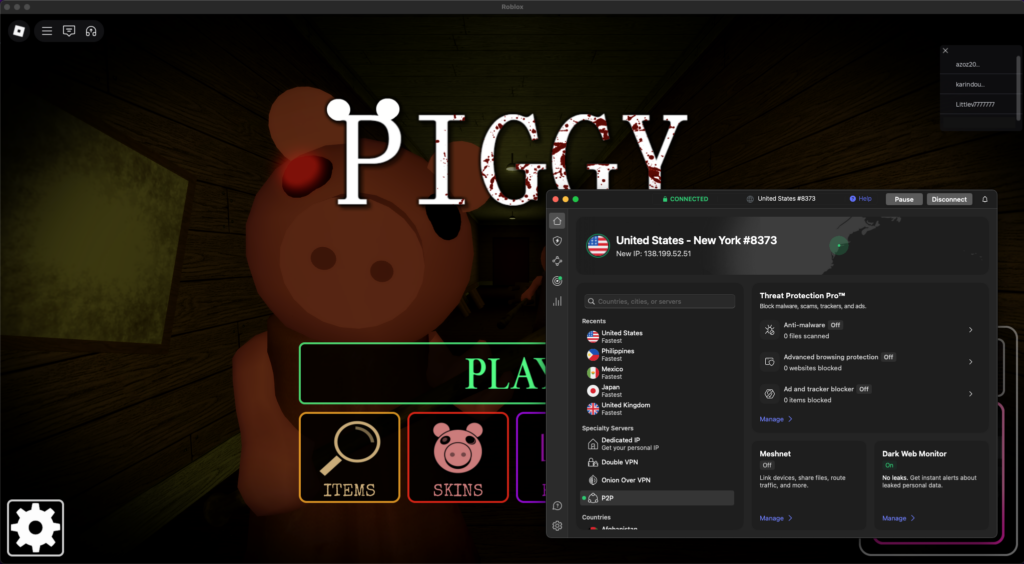
The service provider has 8900 servers spread out across 149 countries worldwide, which means that most people can use it with Roblox without worrying about ping. You will also get access to a wide selection of extra features, such as a kill switch, which will disconnect the internet in case of any VPN interruptions. If you only need the VPN for Roblox, I recommend using the split tunneling feature. For extra privacy, I always enable Double VPN whenever I use NordVPN, as it routes my traffic through two VPN servers at once. You can also try it without committing to a plan thanks to NordVPN’s 30-day money-back guarantee and the 3-day free trial. And if you subscribe right now, you can get it for $ 3.49/month with a 75% discount!
Find out more in our NordVPN review.
Top 2. Surfshark: affordable Roblox VPN to use on an unlimited number of devices
- Second-fastest VPN, right after NordVPN
- Very affordable for a premium VPN: only $ 2.49 per month
- Seven-day free trial if you sign up via mobile
- Strong track record of unblocking online restrictions
If you’re looking for the most budget-friendly yet premium option, Surfshark is the best Roblox VPN for you. While reviewing Surfshark, I found it to be just as fast as NordVPN, with an average download speed of 466Mbps, which made it easy to play Roblox without any lag. To maintain fast speeds at all times, I suggest using Surfshark’s WireGuard protocol. You can also use it on an unlimited number of devices, so you can play Roblox simultaneously with your friends and family.
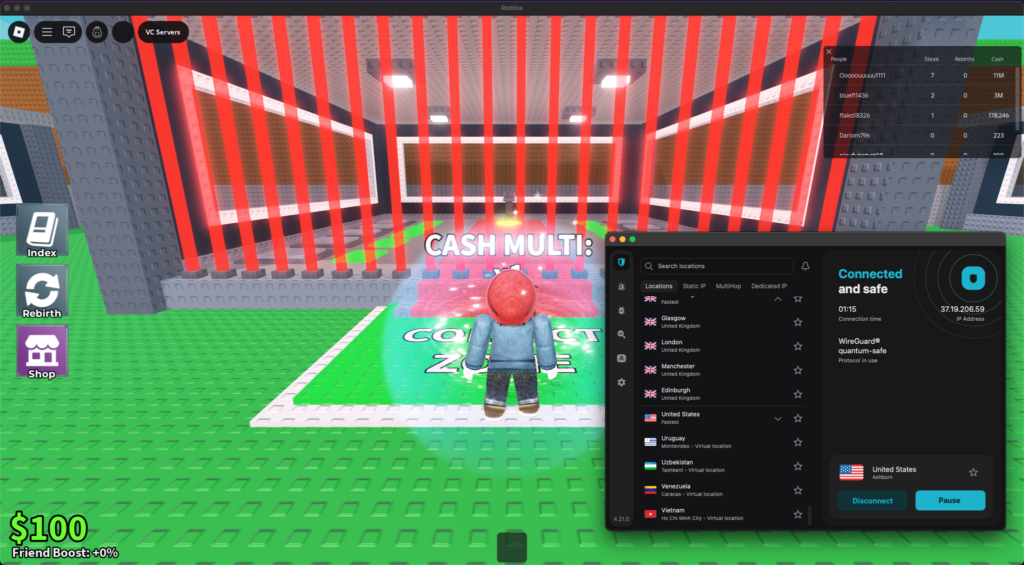
Surfshark has 4500 servers in 100 countries, so you can easily use it from any location to get around a moderation action. You can also use additional features like a kill switch, split tunneling, and CleanWeb, which will block any malicious ads and websites online. I also often use IP Rotator as it changes the IP address every 5 to 10 minutes, making it almost impossible to track you. Moreover, Surfshark has some of the best deals and a 7-day free trial that you can get before committing to a long-term plan. If you act fast, you can also get an 85% discount on your subscription and get it for only $ 2.49/month.
Get the full story in our Surfshark review.
Can I use a free VPN to get unbanned from Roblox?
Free VPNs attract a lot of people, especially if they just want to get around temporary bans. While I can see the appeal of a free VPN, I don’t recommend you use one with a banned Roblox account. Free VPNs often lack crucial privacy and security features. Not to mention, they’re slow and can’t unblock sites effectively.
Chances are, you won’t be able to remove Roblox IP bans with a free VPN. Roblox Studio will probably figure out what you’re doing, and they won’t let you back on the game.
Instead, I recommend you use a cheap VPN like Surfshark. Despite its low price, it’s a good option if you want to resume regular gameplay on Roblox after account moderation.
Why did you get banned on Roblox?
A ban on Roblox can seem like it came from nowhere. However, there are many potential reasons for account restrictions, from cheating to cyberbullying. Here are some of the reasons Roblox might ban a user’s account:
- Cheats and exploits
- Dating or romantic exchanges between players
- Discriminatory language
- Bullying or harassment
- Spamming large volumes of messages
- Sharing content with sexual connotations
When you’re notified of a ban, you usually get a short explanation of what triggered it. But if you’re still unsure about why you have received a ban, send a Roblox appeal through a support form and ask them the reasons behind the ban.
If they don’t overturn the decision, they might at least explain what happened. Just remember that you can’t appeal the same moderation action twice, so don’t spam the Roblox support team if you broke the service and community guidelines and your appeal is unsuccessful.
If you don’t make a successful appeal, at least prevent subsequent bans by reading and understanding the Community Rules of Roblox.
Levels of Roblox bans
Based on the Community Rules and Roblox’s Terms of Use, sanctions range from an account suspension that can last for short or long periods (with some being permanent), depending on how severe the violation of the user was. I have listed the different levels of Roblox bans in the table below.
| Type of Roblox ban | What happens during this ban |
|---|---|
| In-experience ban (in-game ban) | You can get kicked out of a game permanently if you go against Roblox rules, and you may be unable to rejoin |
| Voice chat ban | Your IP address will not be able to access the Roblox platform, Player, or Studio |
| Warning | Roblox blocks your device from using the platform, Roblox Player, and Studio |
| 1-day ban | Your account is suspended for 24 hours from when the ban started |
| 3-day ban | Your account is suspended for 72 hours from when the ban started |
| 1-week ban | Your account is suspended for 7 days (168 hours) from when the ban started |
| Custom ban | You will not be able to use your Roblox account for an unspecified amount of time (can be 30 days or more) |
| Permanent ban | Your account is deleted permanently |
| Poison ban | This ban can last for 1 year or be permanent (you won’t be able to create a new account), and any accounts linked to yours or played from the same device will also be banned |
| Mac Address ban (and Serial/HWID ban) | You won’t have access to the Roblox platform, Player, or Studio from your device |
| 7-day IP ban | You cannot access Roblox for 7 days using your IP (other users in your home accessing Roblox with that IP will not be able to use it either) |
| Permanent IP ban (Invalid credentials) | Your IP address will not be able to access the Roblox platform, Player, or Studio |
Final thoughts: get your Roblox account back with a VPN
While there are ways to gain access again, it’s important to ensure that you won’t get banned in the future. To do so, be sure to read and adhere to Roblox’s Terms of Use and guidelines, and be respectful while using the service. In case you get banned, you can get access to the service again by appealing the ban or using your phone as a router, but it might take some time, and the appeal might not be successful. Luckily, you can bypass a Roblox ban by using a VPN, following the steps below:
- Subscribe to a reliable VPN provider, such as NordVPN.
- Connect to a VPN server in your preferred location.
- Clear Roblox’s cache while connected to the VPN.
- Enjoy Roblox again without the ban!
To successfully bypass the Roblox ban, I recommend using NordVPN. With servers in 149 countries, your IP address will be changed, which will grant you access to Roblox again. It’s also one of the fastest VPNs on the market, so you’ll be able to play games without any slowdowns or lag. Besides, NordVPN offers extra features and uses all necessary security measures for a private browsing and gaming experience.
If you want to know more about how to overcome bans with other popular services, check out our detailed guides below:
- How to bypass Roblox age verification in 2026
- How to Get Unbanned From TikTok
- Get Unbanned from OmeTV
- Get Unbanned from Hinge
- Get Unbanned from Snapchat
- Get Unbanned from Bumble
FAQ
Still not sure about how to overcome a Roblox ban? The FAQ section below should help. If you have any other questions, feel free to drop us a comment!
Roblox banned you for 1 day because the automated system caught your account. This usually happens if you violated Roblox’s guidelines, but it is also possible that your account was banned without any serious reason. Sometimes, Roblox bans accounts accidentally. It is even possible that your account was flagged if another account on the same network was banned.
To appeal the Roblox ban, visit its support page and locate the Ban tab. Once you’re there, select your specific ban and click on the Appeal button. When filling in the appeal, it’s essential to provide as much detail as possible, including any evidence you have. Be sure also to indicate that you understand Roblox’s guidelines and that you won’t violate them again in the future.
Yes, Roblox can IP ban you. If your IP address gets banned, you won’t be able to use Roblox, even if you use a different account or a different device, as the service will recognize your IP address. The only reliable way to bypass the Roblox ban is by using a robust VPN, such as NordVPN.
To bypass the Roblox ban with a VPN, subscribe to a reliable VPN provider like NordVPN. Install the VPN app on your device and connect to a VPN server in your preferred location. After that, clear your browser’s cache or reinstall the Roblox app while connected to the VPN. Once that is done, you’ll be able to play Roblox games again.
I’m not a legal expert, so this is not legal advice. But from my research, I found that it is legal to use a VPN to bypass a Roblox ban. However, it might be against Roblox’s terms of service. Make sure you understand all the terms you agree to before using a VPN for anything.


