- How to get past Xbox age verification in the UK for adults
- Our recommended VPNs to bypass Xbox age verification process
- How does Xbox age verification work in the UK?
- How to bypass Xbox age verification in 4 easy steps: my detailed guide for adults
- How to verify your identity on Xbox across different devices?
- Explaining the UK’s New Online Safety Act
- Final tips for bypassing age verification on Xbox
- FAQ
As of July 25, 2025, Xbox users in the UK may now be prompted to complete identity verification to keep full access to social features. Microsoft introduced this change to comply with the UK’s Online Safety Act, targeting all users who list their age as 18+ on Xbox accounts. If the identity is not verified, access to features like voice chat, messaging, and game invites will be restricted. And while verification is optional for now, Xbox has announced that it will become mandatory by early 2026, with Microsoft hinting that similar rules may roll out to other countries as well.
To verify your identity and age on Xbox, you must provide one of the following: a government-issued ID, your mobile number, a credit card, or complete an AI-based facial scan. A third-party service, Yoti, handles the checks, and while Microsoft promises encryption and no data storage, many users are uncomfortable handing over personal or biometric data.
That said, there are two ways to use Xbox in the UK without limits:
- Verify your identity and age as requested
- Use a VPN to bypass Xbox ID checks
Based on our tests, using a VPN is the easiest and most effective way to bypass Xbox age checks. By connecting to a country outside the UK where Xbox doesn’t request ID verification, you can bypass regional restrictions. Keep reading to learn more about these new rules and how a VPN can help.

How to get past Xbox age verification in the UK for adults
A VPN can bypass Xbox identity verification in the UK by hiding your real IP address and making it look like you’re connecting from a country where Xbox ID checks aren’t required. As a result, many people use VPNs to get past the UK’s Online Safety Act restrictions and access platforms like Reddit, PornHub, and even Spotify.
- Get a VPN with a global server network. I recommend Proton VPN, now 70% off.
- Download and install the VPN on your mobile, desktop, or router.
- Connect to a server outside the UK, like Ireland. You’ll be assigned a new IP address, tricking Xbox into thinking that you’re not from the UK.
- Sign in to Xbox and enjoy full access without ID checks!
Best countries to connect to for bypassing identity verification.
Based on my tests, the best VPN locations for bypassing Xbox identity verification are Ireland (close to the UK, low latency), Switzerland (strong privacy laws), Netherlands (internet freedom), Iceland (minimal data retention), and Romania (fast, secure servers).
Our recommended VPNs to bypass Xbox age verification process
To bypass Xbox ID verification in the UK, the fastest and easiest way is to use a VPN with servers in neighbouring countries, like Ireland, Iceland, France, or Switzerland. Since these locations are close, servers there are capable of maintaining fast speeds while also avoiding the UK’s identity verification system. But server location shouldn’t be the only thing to consider: your VPN also needs to have strong encryption, no-logs policies for data privacy, and offer high-speed performance to avoid lag during gameplay or voice chat.
Here are the best VPNs for bypassing Xbox identity verification from the UK:
-
1.Proton VPN: Best VPN for bypassing Xbox verification. With servers in 149+ countries, including Ireland and France, Proton VPN delivers extremely fast speeds with modern tunneling protocols.
-
2.TotalVPN: Affordable VPN for avoiding Xbox ID checks. It comes with stable servers across 90++ locations and easy-to-use interface, making TotalVPN a great VPN for beginners.
-
3.IPVanish: Secure VPN to skip Xbox restrictions in UK. Known for privacy, IPVanish offers advanced security features, high encryption, and excellent speeds for streaming and gaming
How does Xbox age verification work in the UK?
To comply with the UK’s Online Safety Act, Xbox now requires users to verify their identity to keep using all of the platform’s features, like voice chat, messaging, and game invites. The purpose of these changes is to protect minors from exposure to harmful or inappropriate content. So while anyone can continue playing Xbox games, players have to be at least 18 years old to complete the verification process and unlock the full list of social features.
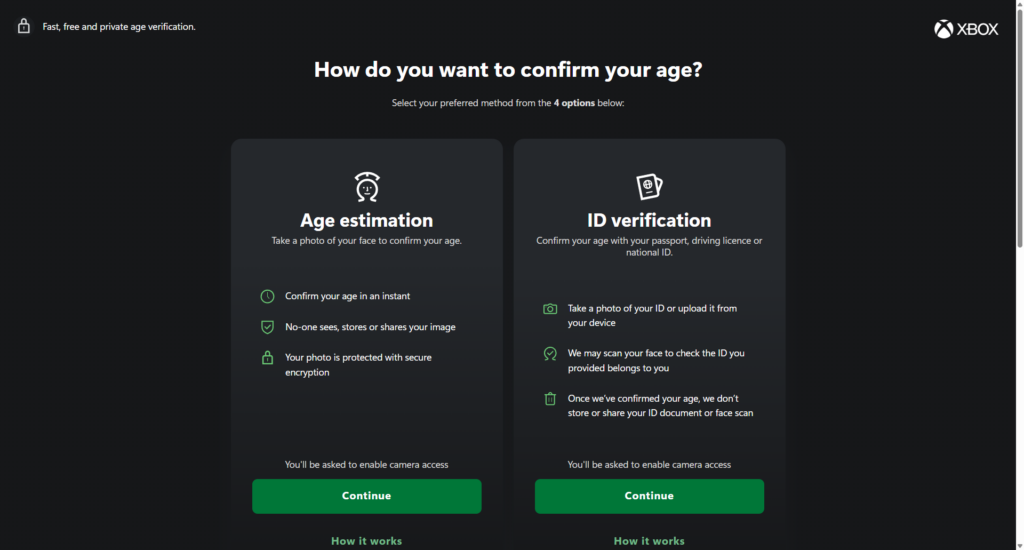
There are several ways to complete the Xbox verification process: you can upload your government-issued ID, complete an AI facial scan, enter a mobile number, or use a credit card. All verification checks are performed by a third-party service called Yoti, and while Microsoft claims that the data gets encrypted and is not stored, this still raises serious privacy concerns. Things like identity theft, data breaches, or mishandling or leak of personal information are a few of the possible risks.
In turn, many Xbox users actively seek safer alternatives to maintain unrestricted access without compromising their data. As of now, the most reliable method is to use a VPN for UK. With it, you can hide your real IP address when connected to a country where Xbox checks don’t apply. This lets you skip the verification process altogether while also protecting your identity and data.
Disclaimer
This article discusses the requirement to share personal data when accessing adult websites in the UK, from the perspective of individuals who wish to remain anonymous. The content is provided for informational purposes only and is not, under any circumstances, intended for minors seeking to bypass restrictions in order to access material that may be harmful or inappropriate for them. We do not promote, encourage, or endorse such bypassing. Your use of the content herein is entirely at your own risk.
Is it legal to use a VPN to bypass Xbox ID verification in the UK?
It is legal to use a VPN in the UK, however, using it to bypass Xbox’s ID verification may violate Microsoft’s terms of service. In general, while there are no UK laws that prohibit VPN use to access platforms like Xbox, evading ID checks that are placed there to comply with the UK’s Online Safety regulations could potentially act as a breach of platform rules.
So, bypassing these restrictions, which are placed there to protect minors, could be seen as breaching Xbox’s user agreement. That said, thousands of users turn to VPNs daily to keep their data safe, especially when verification methods involve uploading IDs or submitting facial scans to third-party companies. In short: using a VPN is legal in the UK, but how you decide to use it matters. If your goal is to prioritize the safety and privacy of your personal info, you need to keep in mind the risks and make informed decisions.
How to bypass Xbox age verification in 4 easy steps: my detailed guide for adults
To bypass Xbox ID verification in the UK, the easiest and most reliable way is to use a VPN. With it, you can hide your real IP address, change your virtual location, and make it look like you’re accessing Xbox from outside the UK – no ID checks required. That said, here’s a quick step-by-step guide to get you started.
Step 1. Get a reliable VPN
Begin by choosing a VPN with a wide server network and strong privacy protections. For a VPN to reliably bypass Xbox restrictions, it must offer servers in locations where UK laws don’t apply and follow strict no-logs policies. My recommendation is Proton VPN – it has over 20700 servers in 149+ countries, is based in privacy-friendly Switzerland, and undergoes regular independent audits to ensure its no-logs policy’s transparency. You’ll also get excellent speeds, top-tier privacy tools, and reliable unblocking performance.
A solid cybersecurity and privacy package with a whopping 70% off
Step 2. Download and install the VPN app on your device
After subscribing to your VPN provider, download and install it on your preferred device. However, you need to keep in mind that most VPNs don’t offer native apps for Xbox. As a result, you’ll have to either set it up on a supported router or share a VPN connection from another device (like your PC or laptop). But if you’re using Xbox services on your mobile or desktop devices, then just download the VPN from the provider’s official website or app store, install it, and log in using your account credentials.
Step 3. Connect to a server outside the UK
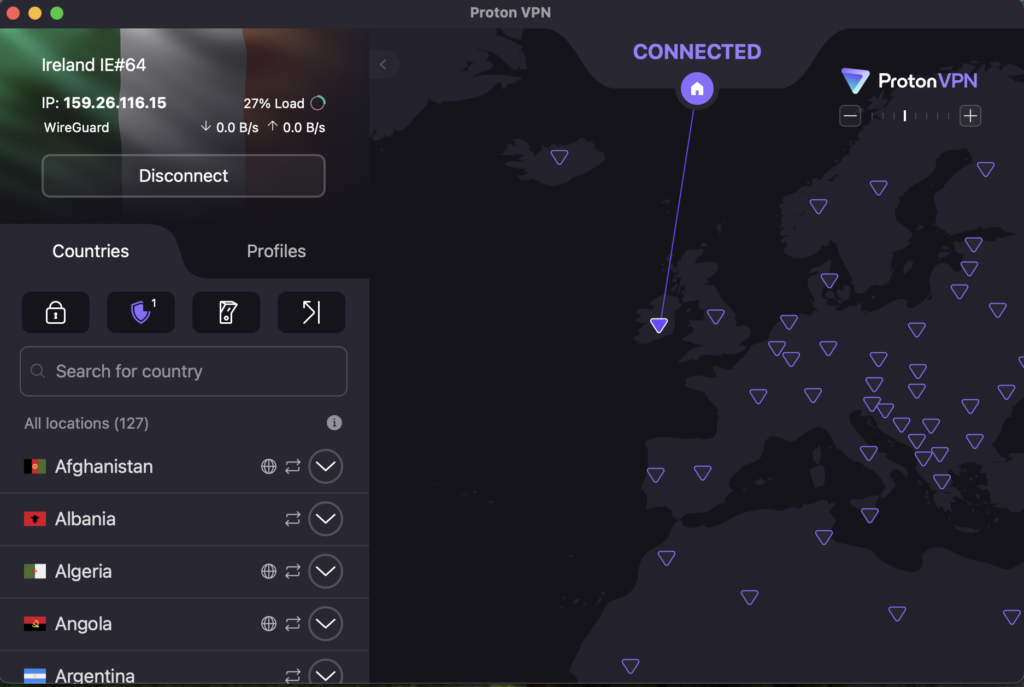
After setting up the VPN, connect to a server closest to the UK, like Ireland, France, or the Netherlands, for the best speed and reliability. During my tests, Ireland showed the best results when bypassing the Xbox verification process in the UK. Plus, aim for the newer and least loaded servers on the list, especially if it’s indicated in the app. You can also switch the connection protocol to WireGuard for faster, more stable performance.
Step 4. Launch Xbox and check if verification prompts are gone
Once you’re connected to a non-UK server through your VPN, launch the Xbox app or sign into your Xbox console. If your Microsoft account isn’t tied to a UK region, then the ID verification prompts should now be gone. However, if you’re still being asked to verify your identity, your account region may be set to the UK. In that case, you can either update your region in your Microsoft account settings or use a verified account registered outside the UK.
How to verify your identity on Xbox across different devices?
To verify your identity on Xbox on different devices, you’ll need a Microsoft account and just follow a short process via either a browser or the Xbox mobile app. Overall, it’s a simple process, but the methods slightly differ depending on the device that you’re using. Here’s how it works on each one:
How do I verify my identity on Xbox using the web?
To verify your identity on Xbox using the web, go to Microsoft’s official portal: https://aka.ms/XboxUKAgeVerification. There, you’ll need to sign in with your Microsoft account that is linked to your Xbox profile. From there, Microsoft will prompt you to complete the check via the third-party provider, Yoti, using one of the following four verification methods:
- Government-issued ID (driver’s license or passport)
- Face scan for age estimation (can be done using a webcam or phone selfie)
- Credit card check (using your payment info)
- Mobile provider check (using your phone number)
According to Microsoft, none of the provided information is stored, and the verification process is encrypted. Also, if you’re on a console or PC, you can scan the QR code shown on the official Xbox support page to switch to mobile.
How do I verify my identity on Xbox mobile app?
To verify your identity on Xbox using your phone, you won’t need to use the main Xbox app or the Xbox Family Settings app. Instead, the process is done through a secure mobile web portal. To access it, you can either scan the QR code shown on Xbox’s official support page or head directly to https://aka.ms/XboxUKAgeVerification on your mobile browser.
After signing in with your Microsoft account, you’ll be redirected to Yoti, Xbox’s third-party age verification service. From there, you can pick one of four options:
- Facial age estimation (via AI using a selfie)
- Government-issued ID (passport or driver’s license)
- Credit card check (using your payment info)
- Mobile number check (verifies your age through your mobile network)
Even though Microsoft says that all data is encrypted and not stored, many users still prefer not to share personal or biometric details. Instead, they use a VPN like Proton VPN, which lets you skip the Xbox verification process altogether and protects your privacy, while also unlocking other perks like streaming, betting, and porn access.
Explaining the UK’s New Online Safety Act
The UK’s Online Safety Act came into effect in October 2023. It introduced a wide range of rules for online platforms to better protect users, especially minors. The law requires tech companies to take stronger action against harmful content, put stricter age restrictions, and hand users more control over what content they see.
The Online Safety Act’s protections are rolled out in phases, and it applies to services that are accessible in the UK, host user-generated content, or allow interactions between users. That said, a key enforcement date was July 25, 2025; then the focus shifted specifically on illegal content and identity verification for pornography. This is when major platforms like Xbox, PlayStation, YouTube, Telegram, Tinder, and various adult content sites, forums, and certain streaming sites have been affected.
Under the Act, platforms must ensure that users who are under 18 years of age don’t access content that is deemed harmful, which ranges from explicit material to violent or addictive content. For everyday users, this means more pop-ups requiring you to verify your identity for access, and even restrictions if the age can’t be confirmed. While the goal is user safety, many find the enforcement invasive, and even brushing upon censorship aspects, where certain news material and healthcare information gets locked behind an ID check. That’s why tools like VPNs are becoming increasingly popular, since they let users retain control over their browsing experience without compromising privacy and being cut off from the rest of the world.
Final tips for bypassing age verification on Xbox
If you’re a tourist in the UK or a permanent resident who wants to avoid uploading sensitive data just to access Xbox’s social features, then a VPN is your best workaround for ID checks. It’s legal to use in the UK, and when you connect to neighbouring countries – like France or Ireland – you can skip Xbox’s verification process without risking your personal info.
Just make sure you’re using a reliable VPN provider that has fast, secure servers outside the UK. Based on my tests, Proton VPN is the top VPN choice for bypassing Xbox’s age restrictions: it offers fast speeds, strong privacy, and works seamlessly on both routers and mobile devices.
Just keep in mind that bypassing Xbox ID checks with a VPN might go against Microsoft’s terms of service. Most importantly, if you do decide to verify your age through official channels, always double-check where your data goes and who handles it.
Related articles:
- Best UK PornHub VPN
- Best VPN for UK porn
- How to bypass Grindr age verification
- How to bypass Twitter (X) age verification
- How to bypass US porn ban
FAQ
No, minors should not use a VPN or any other method to bypass age verification systems. These laws are specifically designed to protect young people from accessing content that could be harmful or inappropriate for their age. By bypassing these checks, minors would not only be violating the rules but also putting themselves at risk of exposure to explicit material that can have negative effects. Age verification exists to create a safer online environment, and it’s important for minors to respect these boundaries and avoid tools like VPNs to get around them.
Yes, Xbox now requires ID verification in the UK for users with Microsoft accounts listed as 18 or older. If the verification process is not complete, access to Xbox social features like messaging, voice chat, and game invites will be restricted. This change takes full effect in early 2026.
You can try using mobile data, DNS tweaks, or proxy extensions to bypass Xbox age verification, but these methods are often unreliable. Unlike VPNs like Proton VPN, they don’t fully hide your IP or change your virtual location. As a result, Xbox may still see that you’re in the UK and block certain features.
The best countries to connect to for bypassing Xbox ID verification are Ireland, France, the Netherlands, and Switzerland. These locations are close to the UK, offer fast VPN speeds, and, most importantly, don’t require ID checks on Xbox, making them ideal for avoiding restrictions without lag. Plus, many VPN providers, like Proton VPN, host servers in these regions.