- How to bypass Spotify age verification with a VPN
- How does Spotify’s age verification work?
- Can I use a VPN to bypass Spotify’s age verification?
- My recommended VPNs to get around Spotify age verification
- How to bypass Spotify age verification in the UK: my detailed steps
- How to verify your age on Spotify without a VPN
- Spotify age verification not working: fix
- Conclusion on Spotify UK age verification
- FAQ
Since July 25, 2025, Spotify users in the UK are required to complete the age verification process before streaming music on the platform. Following the recent introduction of the UK’s Online Safety Act, users must prove their age using official ID, like a passport or driver’s license, often paired with a selfie for complete verification. Since Spotify’s minimum age requirement is 13 under parental consent, and 18+ for unrestricted individual use, this aims to protect younger audiences. However, the ID check also raises serious privacy concerns, especially for those uncomfortable handing over sensitive documents to third-party verifiers.
Right now, if you’re in the UK, you only have two options: verifying your age by submitting an ID document, or entirely avoiding the process by using a VPN. Based on my own testing, I’ve found that a VPN is by far the easiest and most effective way to bypass Spotify’s age verification. It’s quick and doesn’t require uploading personal documents and facial data. Read on to see exactly how to do it for instant and safe Spotify access.
How to bypass Spotify age verification with a VPN
To bypass Spotify’s age verification in the UK, I used a VPN to make it look like I was connecting from another country where verification isn’t required. The process is straightforward as long as you’re following these steps below.
- Install a reliable VPN app on your device. I recommend NordVPN now 78% off
- Open the VPN and connect to a server outside the UK – for example, a location in Germany.
- Launch the Spotify app or website as you normally would.
- Since your IP now shows as being outside the UK, you shouldn’t get any ID upload or age verification prompts.

How does Spotify’s age verification work?
Spotify’s age verification system was introduced in the UK following the Online Safety Act, a law aiming to protect underage users from harmful content. As of mid-2025, if you’re trying to sign up for or access Spotify from a UK IP address, you’ll likely be prompted by the system to verify your age. This isn’t just a checkbox or simple birthdate entry anymore. Instead, Spotify now requires official proof – a government-issued ID, like a passport or driver’s license. In many cases, you also have to submit a live selfie to confirm that the ID is yours.
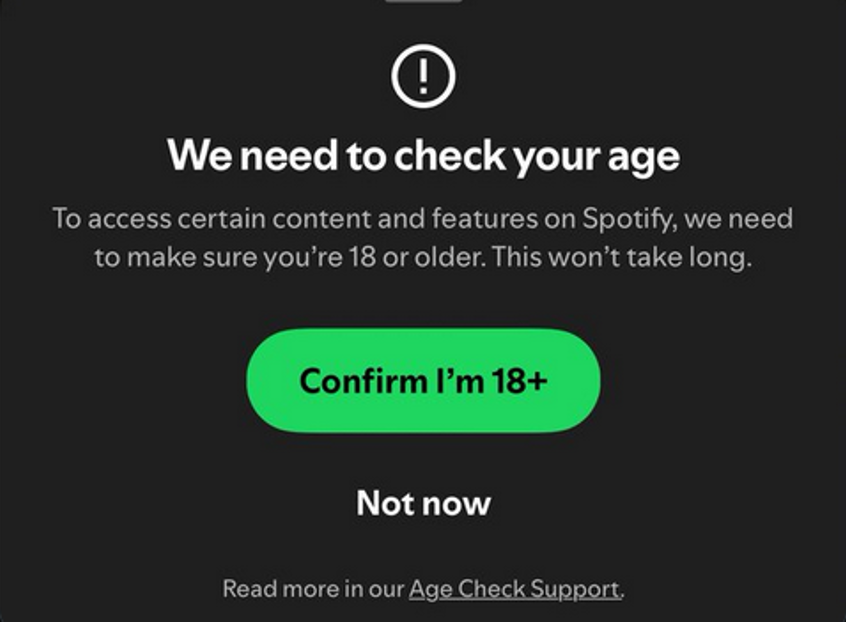
The process is handled through a third-party verification service, which ensures compliance by checking if the documents match your details. While this system is meant to improve safety, it has also raised worrying concerns. Many users have publicly expressed they’re not comfortable sharing sensitive ID documents just to listen to music, especially when it involves third-party data processing. For users who value their privacy or those who can’t stand going through the frustrating process, the new requirement can be a major roadblock. That’s why many are turning to VPNs as a safer, non-invasive way to keep listening to music on Spotify without handing over personal information.
Can I use a VPN to bypass Spotify’s age verification?
Luckily, I can confirm that with a VPN, you can easily bypass Spotify’s age verification. When I connect to a VPN server outside the UK, my IP address says I’m located in another country where the UK’s age verification law doesn’t apply. This lets me access Spotify freely, without needing to upload my ID or go through any digital age-check procedure. It’s worth noting that the UK government has stated that platforms can’t promote or implement workarounds. That said, I mainly use a VPN for privacy and security reasons. So, I strongly recommend using one to protect your online presence, especially with today’s intrusive internet policies.
My recommended VPNs to get around Spotify age verification
To effectively bypass Spotify’s age verification, a VPN should offer fast speeds, strong encryption, and reliable servers outside the UK. It’s also important that the VPN is capable of hiding your UK IP address and avoiding detection by streaming platforms. After testing multiple services, NordVPN, Surfshark, and Proton VPN came out as the most effective VPNs for staying private and getting around ID checks on platforms like Spotify.
- NordVPN – my top pick for skipping Spotify’s ID check. It runs on a huge server network of 8900 servers worldwide, with many fast and stable options outside the UK. Its advanced encryption and Obfuscated Servers are great at getting around geo-blocks and detection systems.
- Surfshark – an excellent choice if you want a flexible yet affordable VPN. Surfshark lets you use unlimited devices with one subscription, includes useful security tools for enhanced privacy, and has a sleek app design that’s very intuitive to navigate.
- Proton VPN – best suited for privacy-focused users. The VPN doesn’t keep logs, has a trustworthy reputation, and runs secure, reliable servers that work smoothly with Spotify, even on the free plan.
If you’re looking for speed, privacy, or the best value, these VPNs have you covered. With a powerful VPN like NordVPN, you can enjoy full access to Spotify without dealing with age checks or giving up your personal information.

How to bypass Spotify age verification in the UK: my detailed steps
Ready to get started? In this section, I’ll walk you through exactly how I bypassed Spotify’s age verification in the UK using a VPN. The steps are simple, even if you’ve never used a VPN before. Just follow the steps below, and you’ll be using Spotify without ID verification in minutes.
Step 1. Get a reliable VPN
The first step is choosing a trusted VPN that actually works with Spotify’s platform reliably. NordVPN is the one I recommend in 2025, because to bypass age verification, your VPN must offer plenty of servers in countries where these checks aren’t enforced (like the US, Germany, or Ireland). NordVPN has thousands of global servers, making it easy to choose optimal servers to connect to outside the UK. It also has a strict no-logs policy, meaning your activity isn’t tracked or stored, which is crucial for privacy. Plus, it consistently delivers fast, stable speeds, so you can enjoy streaming music without buffering or disconnections. It’s reliable, secure, and a perfect Spotify VPN to bypass the UK ID check. You can get NordVPN with a discount now:
Step 2. Connect to a server outside the UK
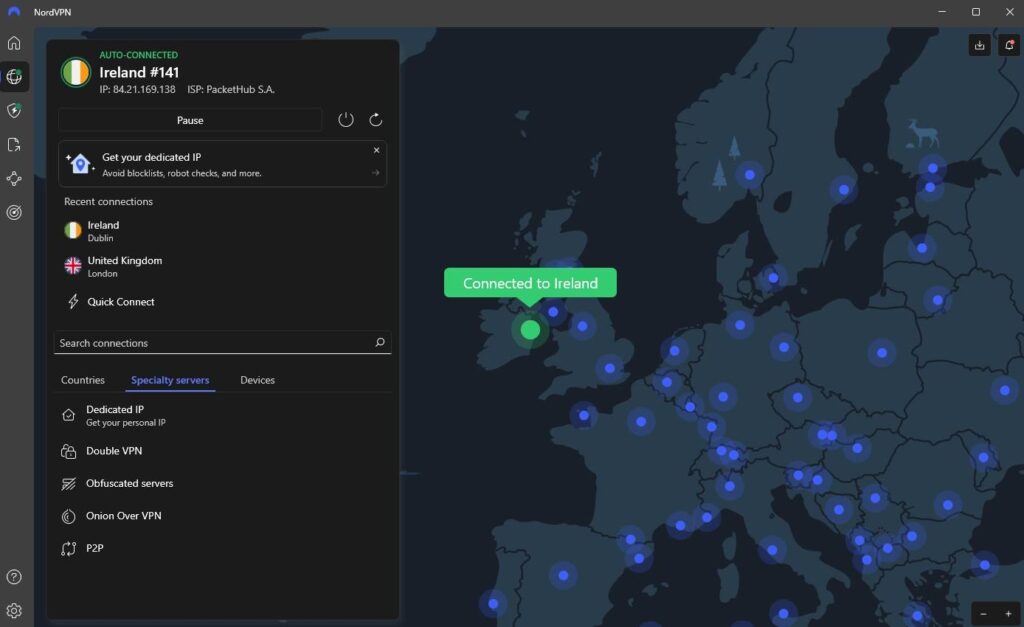
Once you’ve chosen and installed your VPN, open the app and connect to a server in a country where Spotify doesn’t require age verification, like Ireland or the Netherlands. I usually go for a server in a nearby country like Ireland because the speeds are great and Spotify works smoothly. As your IP address is changed, you will appear as if you’re accessing the platform from that country. Once connected, go to the Spotify website or open the app. If the VPN is working correctly, you shouldn’t see any prompts asking for ID or age verification.
Step 3. Open Spotify and start listening
With your VPN connected to a location outside the UK, open the Spotify app or visit the website. You should be able to browse, sign up, or log in without being asked to verify your age or upload any ID. If everything’s set up correctly, you can now enjoy full access to Spotify just like before, with no restrictions or documentation requirements.
Step 4. Keep your VPN active while using Spotify
To avoid triggering Spotify’s age check again, make sure your VPN stays connected whenever you use the app or site. If your VPN disconnects and your IP switches back to the UK, you could be restricted and prompted to verify your age again. I recommend enabling auto-connect in your VPN settings so you’re always protected and uninterrupted while streaming.
How to verify your age on Spotify without a VPN
If you’d rather not use a VPN, you can still access Spotify by going through the official age verification process, and I tested this route to see what it involved. While it works, it’s not the quickest or most private method. The process usually takes anywhere from a few minutes to a couple of hours, depending on how fast your documents are reviewed. Here’s how it went for me:
- Log in to Spotify. I signed in as usual and was immediately prompted to verify my age.
- Click the verification link. This opened a third-party age-check page powered by a government-approved ID service.
- Upload an official ID. I submitted a photo of my passport, but other options, like a driver’s license, also work.
- Take a selfie. To confirm it was me, I was asked to take a clear, real-time selfie.
- Submit and wait. After uploading, I waited around 30 minutes for verification, though your experience may vary.
It worked, but I wasn’t comfortable handing over personal details just to stream music. That’s why I ended up sticking with the VPN method – it’s faster and keeps my data protected.
Spotify age verification not working: fix
Sometimes, even if you’re ready to go through Spotify’s age verification process willingly, it doesn’t always work as expected. I’ve had cases where the system couldn’t read my ID clearly, the selfie failed to match, or the verification page just kept freezing. If you get stuck in a similar situation, here are a few fixes you can try:
- Clear your browser cache. This often helps if the verification page isn’t loading properly.
- Use a different device or browser. Sometimes the issue is specific to the browser you’re using.
- Double-check your photo ID. Make sure your document is valid, well-lit, and not cropped or blurry.
- Try again with the selfie. Good lighting and a neutral expression help avoid facial data mismatching.
If all else fails, and it sometimes does, the easiest fix I’ve found is simply using a VPN. By connecting to a country where age checks aren’t enforced, you can skip the process in the first place and just use Spotify as normal. It’s not only quicker but also avoids the frustration of an unreliable system that doesn’t always do what it’s supposed to.
Conclusion on Spotify UK age verification
Spotify’s age verification in the UK, introduced under the Online Safety Act, has caused some resistance from users, especially those uncomfortable sharing personal ID just to stream music. While you can comply and verify your age officially by uploading documents, the process isn’t always smooth and raises privacy concerns for many, including myself.
If you’re looking for a more straightforward and private way to access Spotify, using a reliable VPN like NordVPN is the most effective solution. It allows you to bypass the age check by connecting through a country where these restrictions don’t apply while keeping your data secure. Just remember that while VPNs are legal in the UK, using them to beat platform restrictions is a grey area, so always use caution first. Ultimately, staying safe and protecting your personal information online should be the top priority. A good VPN helps you do exactly that.
You may also want to read:
Bypass Reddit age verification in the UK
Bypass Twitter (X) age verification
How to bypass porn site age verification in the UK
How to watch PornHub in the UK: bypass PornHub ban
Watch porn in the US
Best VPNs for streaming
How to bypass Bumble age verification
How to bypass Xbox age verification
FAQ
Spotify is asking for an ID to comply with the UK’s Online Safety Act, which requires platforms to verify users’ ages to limit access to adult or potentially harmful content. This means proving you’re 13 or older by uploading a government-issued ID and a selfie for identity confirmation.
Yes, if you’re in the UK and don’t use a VPN, Spotify will ask you to verify your age before you can use the platform. This usually means uploading a photo ID and a selfie to confirm it’s you. Without it, you may be blocked from using the service or accessing certain features.
No, Spotify is not currently asking US users to submit IDs or selfies for age verification like in the UK. The age-check requirement is a part of compliance with the UK’s Online Safety Act and applies only there. As of now, Spotify does not enforce such verification for accessing content in the US.
Yes, you can bypass Spotify’s age verification in the UK by using a reliable VPN like NordVPN. It will mask your IP address and make it appear that you’re accessing from a country where the age check isn’t enforced. This approach lets you avoid uploading ID or selfies. While VPN use is legal in the UK, even under the Online Safety Act, platforms aren’t allowed to openly encourage such workarounds. Keep in mind that bypassing age checks may violate Spotify’s terms of service and could cause account suspension.
Currently, Spotify’s age verification checks are only enforced in the UK under the new Online Safety Act. While France, Germany, and Australia are exploring or piloting similar laws, these checks are not yet widely implemented. In most countries, including the US and Canada, Spotify does not require age verification for access, unless you’re in the UK or accessing UK-targeted content. As of today, the platform treats you as usual if you’re outside of the UK, so you can stream content without needing to prove your age.
At the moment, there is no ID requirement for using Spotify in the US. While Spotify is lobbying US authorities to shift verification responsibilities to Apple and Google, there’s no widespread ID requirement in the US. Some states, like Utah, are experimenting with broader age verification laws, but Spotify itself has not introduced these requirements across the US as of yet.
To verify your age on Spotify in the UK, follow the prompts when accessing restricted content. You’ll be directed to a secure age-check portal where you first try facial age estimation. If that fails, upload a valid ID and take a selfie. After submission, wait for confirmation to get full access.