
- How to bypass Roblox’s age verification with a VPN?
- Our recommended VPN to bypass Roblox age verification
- How does Roblox’s age verification work?
- What to do if Roblox’s age verification fails?
- How to get voice chat on Roblox without an ID?
- Is it legal to use a VPN to bypass Roblox’s age verification?
- Final tips to safely bypass Roblox age checks
- Frequently asked questions
Roblox announced that mandatory age checks will go live in Australia, New Zealand, and the Netherlands in the first week of December, with a worldwide rollout extending into early January. Governments are increasingly pressuring platforms, such as social apps, gaming platforms, and streaming services, to protect young users from unsafe content and unfiltered chat. Particularly since Australia is preparing to introduce a nationwide age-verification law that will apply to all major digital services.
Roblox’s new system uses age-estimation tools to decide who can access unfiltered chats, private groups, and other mature features. However, these tools can misread your age, and users who refuse to upload ID risk long-term feature limitations. That creates real privacy concerns, especially for teens who don’t want to share sensitive documents online.
Right now, the simplest way to bypass Roblox’s age verification is to use a VPN to change your virtual location. Using this method, you can avoid the regions where Roblox’s age checks are enforced first. Below, I’ll explain how to bypass Roblox’s age verification safely and how the process works.

How to bypass Roblox’s age verification with a VPN?
If you try to use Roblox without completing age verification, voice chat, and certain multiplayer features will go offline, and you’ll face limits on avatar customization and access to 13+ or 17+ rated games. However, bypassing them improperly, for example, using fake IDs or AI-generated images, can lock or permanently limit your account, even if you’re of legal age. Overall, the safest and most effective way to bypass Roblox age checks on PC, Mac, Android, or iPhone is with a VPN.
- Get a reliable VPN for Roblox. I recommend Proton VPN, with 20688+ obfuscated servers to securely mask your location and bypass Roblox age verification.
- Install the VPN app on your device where you play Roblox.
- Clear your cache and cookies so older location data doesn’t reveal your real region.
- Connect to a VPN server in a country where Roblox hasn’t launched age checks yet.
Relaunch Roblox to access your game without uploading your ID. Just note that if you bypass age verification with a VPN, Roblox won’t recognize your account as verified. That means you can play games and access most features, but you won’t be able to use trusted connections or unfiltered chat until you complete age verification properly.
As of early January 2026, Roblox implements age checks globally, so you’ll need a fast and reliable VPN to play the game without interruptions. That’s why I recommend Proton VPN. It delivers an average download speed of 714Mbps, zero leaks, and 100% website accessibility. Roblox needs speed and reliability to avoid lags, connection drops, and verification blocks while gaming on PC, Mac, Android, or iPhone.
Our recommended VPN to bypass Roblox age verification
Starting in January 2026, Roblox will require age verification globally, so the goal is to use the fastest, most secure VPN rather than relying on specific regions. The VPN should offer robust anonymity features, such as obfuscation, leak protection, and IP masking, to conceal your location and prevent verification issues. It also needs fast servers that maintain smooth gameplay on PC, Mac, Android, and iPhone. Based on my testing, I explored 24 VPNs to find the best ones that work with Roblox, and here are my top picks:
-
1.Proton VPN: best VPN to bypass Roblox age verification in 2025: It is also the fastest VPN I have ever tested, with an average speed of 714Mbps, zero leaks, and minimal system impact. With 20688+ servers worldwide, strong anonymity tools like obfuscation and zero leaks, and smooth performance on PC, Mac, Android, and iPhone.
-
2.TotalVPN: budget-friendly VPN option for Roblox facial age checks: With stable speeds and an easy-to-use interface for beginners, it is ideal for casual gaming. With reliable encryption, basic leak protection, and support for Windows, macOS, Android, and iOS, it covers the essentials at a low price.
-
3.IPVanish: privacy-focused VPN for accessing Roblox without a face scan: It offers secure servers, strong leak protection, and strict no-logs privacy, keeping your connection safe while playing Roblox.
How does Roblox’s age verification work?
Roblox uses AI-assisted facial recognition through third-party verification from Persona, which checks your age and identity by analyzing your ID and a selfie. Persona captures a photo of your government ID, then scans your selfie and compares the face geometry in both images. It also estimates your facial age and matches it against the date of birth on your ID. This process is designed to confirm your identity, verify your age, and detect fraud securely before unlocking features like voice chat and age-rated games (13+ or 17+), protecting underage players from inappropriate content.
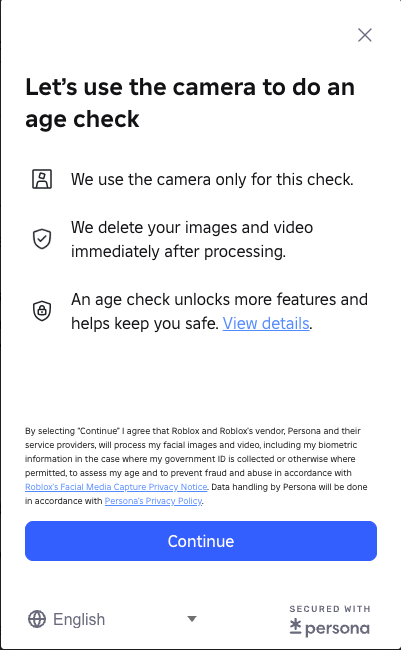
Here’s how it works:
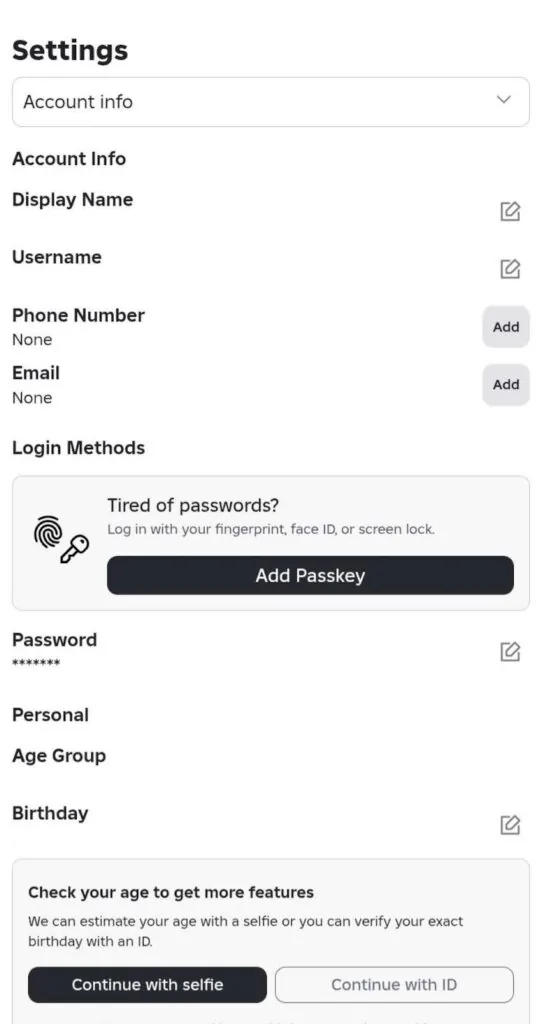
- Log in to your Roblox account and go to Settings.
- Select the Account Info tab.
- Under your birthday and age group, click the Continue with ID button.
- You will be directed to begin the age verification process.
- Following the instructions, click Continue to allow camera access.
- Scan your ID. Roblox will automatically detect the document type, and if it has a barcode on the back, you’ll need to scan it as well.
- You’ll then take a quick selfie, which Roblox uses to confirm that your face matches the photo on your ID.
- Reopen your Roblox tab to see status updates. Once the check finishes, you’ll get a pass or fail result, usually within a few minutes.
This process is privacy-sensitive, as it shares personal information and biometric data with a third-party service provider. The fact that it handles personal information of minors makes it even riskier. However, the best way to bypass Roblox’s age verification, if you meet the age requirement, is to use a VPN. A VPN masks your location and keeps your data secure and anonymous. In this situation, I recommend Proton VPN, which provides strong encryption and leak protection, ensuring fast and private access to Roblox on every device.
What to do if Roblox’s age verification fails?
If Roblox’s age verification fails, there are several common causes. Common issues include blurry or expired IDs, changes to personal information during the process, or temporary server problems with Roblox or Persona. Moreover, official Roblox support notes that unclear images, poorly framed IDs, or mismatched selfies can trigger verification errors. Plus, Reddit and Roblox forums report that some users encounter failed attempts even with valid documents. Here are the steps you can try to fix it:
- Check your ID. Make sure it’s valid, unexpired, and clearly readable.
- Position your ID correctly. Ensure the entire document fits within the frame without any edges being cut off.
- Try another ID. A passport, driver’s license, or other national ID may work better.
- Restart the process. Start from scratch if you have recently updated your age or other details.
- Contact support. Reach out to Persona, the company handling Roblox age verification. They are the only ones who can resolve technical lockouts.
If these steps still fail, use a VPN as the fastest and safest alternative. Also, you won’t need to share sensitive personal information with third parties. That’s why I recommend Proton VPN. It delivers fast servers, robust encryption, and leak protection, and provides a reliable Roblox access with no lag or downtime while playing.
How to get voice chat on Roblox without an ID?
From the first week of December, Australia, New Zealand, and the Netherlands will require ID verification to access voice chat and other age-restricted features on Roblox. This update is part of the global enforcement, which starts in January 2026. While these checks aim to protect underage users, there’s a privacy risk when submitting personal documents to third-party processors like Persona. However, the fastest, safest way to access Roblox’s voice chat without submitting an ID is to use a VPN. Here is how to voice chat on Roblox Mobile and Roblox PC:
- Get a reliable VPN
Choose a fast, reliable VPN that bypasses Roblox age checks. I recommend Proton VPN as it’s the fastest and the best option. It has 20688 servers worldwide, strong privacy features such as 256-bit encryption, DNS and IP leak protection, and a built-in kill switch for complete anonymity.
2. Install a VPN on your device
Download the app from the official website for PC, Mac, iOS, or install it on your smartphone from the Google Play Store or Apple Store. Then, log in or sign in to create a new account.
3. Verify your email address or phone number
After logging in, cancel the age verification prompt. Then, click the three-dot menu in the bottom-left corner and scroll down to Settings. Go to Account Info and add your phone number or email address. Check your email inbox and confirm the email address by pressing verify.
4. Connect to a server where voice chat is available
Voice Chat is currently available to all eligible 13+ users in these countries: Argentina, Australia, Austria, Belgium, Bolivia, Brazil, Bulgaria, Canada, Chile, Colombia, Columbia, Costa Rica, Croatia, Cyprus, Czech Republic, Denmark, Dominican Republic, Ecuador, El Salvador, Finland, France, Germany, Great Britain, Greece, Guatemala, Honduras, Hungary, Ireland, Italy, Japan, Malaysia, Mexico, Moldova, Netherlands, New Zealand, Nicaragua, Norway, Panama, Paraguay, Peru, Portugal, Puerto Rico, Romania, Serbia, Slovakia, South Korea, Spain, Sweden, Switzerland, Ukraine, United States, Uruguay, and Venezuela. Just keep in mind to always have your VPN connected to avoid age verification prompts.
5. Enable the microphone for Voice Chat
Go to Roblox Settings, select Privacy and content restrictions, and choose Communication. Go to Voice Chat and switch the Enable Microphone selector to ON.
6. Enjoy full Voice Chat access on Roblox
Enjoy full Voice Chat access on Roblox without ID verification, with all features unlocked while keeping your personal data safe and your location private.
Is it legal to use a VPN to bypass Roblox’s age verification?
Yes, using a VPN to access Roblox is legal, but bypassing age verification may violate Roblox’s Terms of Service. Roblox enforces these checks to comply with Online Safety Act regulations and mandatory age verification laws in Australia, New Zealand, and the Netherlands, starting in December 2025, with global rollout in early January 2026. While VPN use is legal, bypassing Roblox age checks could put your account at risk of being locked or restricted. That’s why it’s crucial to use a reliable VPN like Proton VPN, which offers fast servers, strong encryption, and anti-detection features to play safely and privately.
Final tips to safely bypass Roblox age checks
From the beginning of December, Australia, New Zealand, and the Netherlands will enforce the Online Safety Act requirements, forcing all users to verify their age using ID documents and facial scans. Moreover, global enforcement will follow in January 2026. While this law aims to protect minors from explicit content, it also exposes users to potential privacy risks. Sharing sensitive personal information with a third-party service provider can lead to data breaches, and the verification process is vulnerable to errors or incorrect age estimations.
After thorough testing, I recommend Proton VPN as the fastest and most reliable VPN in the industry. It offers fast-speed servers, robust encryption, and leak protection to keep your connection secure. Plus, it allows you to access all Roblox features safely without exposing your private data.
Related articles:
How to get unblocked from Roblox in 2025
How to bypass Reddit age verification in the UK
Telegram age verification in the UK
How to get around age verification on X with a VPN
How to bypass Google age verification in Australia
Frequently asked questions
No, minors should not use a VPN or any tool to bypass Roblox’s age verification. These checks are designed to protect young players from unsafe or inappropriate content and create a safer community. Attempting to circumvent them violates Roblox’s rules and can expose minors to material not intended for their age.
You can access Roblox Voice Chat without ID by using a reliable VPN, like Proton VPN, and verifying your account via a phone number or email instead. First, connect to a VPN server in the US, Canada, or Germany to access Voice Chat on Roblox. Then, log in and cancel any age verification prompts. Then, go to Settings > Account Info and add a phone number or email address. Confirm it, and you’ll have full Voice Chat access without sharing any sensitive ID documents. Using a VPN ensures your connection stays private while bypassing Roblox’s ID check.
Roblox age verification can fail because you are using a blurry or expired ID, submitted incorrect information, or are having technical issues with Roblox’s or Persona’s servers. Sometimes, some changes to your account details can also trigger errors. If the process fails repeatedly, try using a different ID and positioning it clearly in the camera frame. You can also restart the verification or contact Persona support.
Roblox’s facial age recognition system works most of the time, but it is not 100% accurate. It estimates your age by comparing your selfie to your ID, but lighting, image quality, and facial features can affect results. Misclassification is most likely to occur among teens who are close to verification thresholds. While useful for safety, the system can still produce errors or false results.
Persona is the third-party company Roblox uses for age verification. It captures a photo of your ID and a selfie, then compares your facial geometry to confirm that your age matches the one on your ID. The system also checks for fraud and ensures the ID is valid. This process is required to access age-restricted games, voice chat, and other features on Roblox.
Yes, if you don’t complete Roblox’s age verification, you won’t be able to use Voice Chat or other age-restricted features. Aside from that, certain games and avatar customization may also be restricted. These features can only be used by users of the appropriate age after verification.
Proton VPN is the best VPN for bypassing Roblox’s age checks. It provides strong encryption and consistent, reliable performance across all devices, ensuring smooth Roblox gameplay.

