
- How to bypass Sony PlayStation age verification with a VPN
- How does Sony PlayStation age verification work?
- Can I use a VPN to bypass Sony PlayStation age verification?
- How to bypass PlayStation age verification in the UK: a step-by-step guide
- My recommended VPNs to get around PlayStation age verification
- How to verify your age on PlayStation without a VPN
- Sony PlayStation age verification not working fix
- Conclusion on PlayStation UK age verification
- FAQ
As of April 2026, PlayStation users in the UK need to pass age verification checks when creating new adult accounts. These new regulations have been introduced in compliance with the UK’s Online Safety Act; as a result, according to Sony’s terms, you must be at least 18 years old to use all platform features. That said, while the limitations are not as strict as Xbox’s, it’s only a matter of time before such restrictions get applied to other PlayStation features.
The current verification process asks users to provide a government-issued ID, a mobile number, or, alternatively, perform a facial scan via Yoti, a third-party provider. Naturally, this raises serious privacy concerns, especially for users who deem personal document sharing with outside services uncomfortable.
At the moment, there are two reliable ways to bypass PS age verification:
- Verify your age through official channels
- Avoid age verification by using a VPN
Based on my tests, using a VPN is the easiest and most effective method to bypass PlayStation age verification. With a strong provider, you can get around these restrictions in seconds; it doesn’t require ID, and, on top of it all, protects your data and privacy. Keep reading to learn how it works.
How to bypass Sony PlayStation age verification with a VPN
- Subscribe to a VPN with global servers. I recommend Proton VPN, now 70% off.
- Download and install the VPN on your laptop, phone, or router.
- Connect to a server outside the UK. By doing so, you’ll change your IP address, making PlayStation think you’re in a different region.
- Create a new PlayStation account or log into your existing one, without triggering age verification.
- Enjoy full access to PlayStation features without uploading ID or facial scans!

How does Sony PlayStation age verification work?
PlayStation’s age verification system in the UK was introduced in response to the Online Safety Act. Under these rules, access to adult features, like adult account creation, requires users to complete a verification process to prove they’re 18 or older.
For now, these requirements apply only to those creating new adult accounts. While PlayStation hasn’t set a deadline as to when such 18+ restrictions will extend to other features, it’s highly likely that unverified users may eventually be blocked from launching certain apps, making purchases, or accessing certain online features.
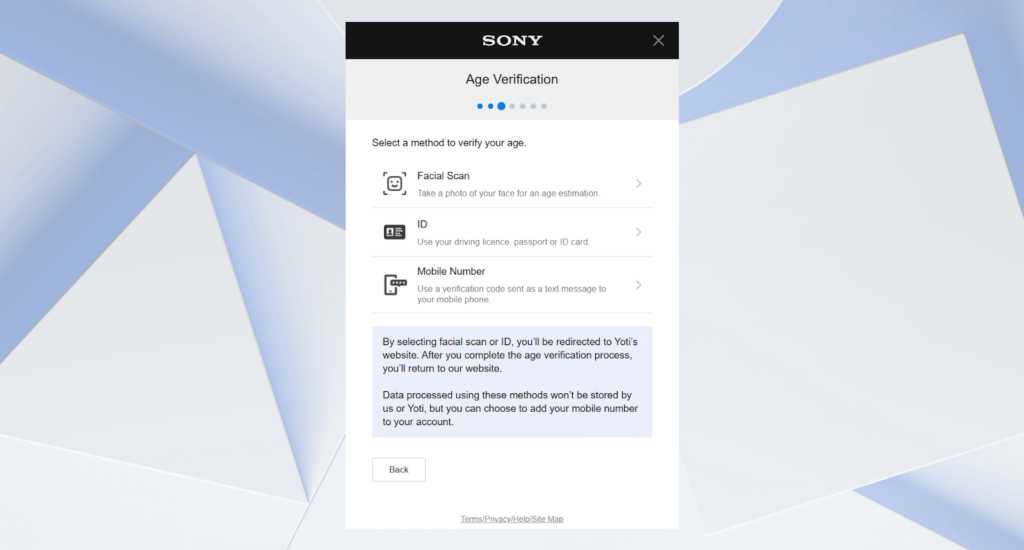
To pass verification, users must provide either a government-issued ID, a mobile number, or complete a facial scan through a third-party service like Yoti. However, many users have raised concerns regarding data privacy, especially when it comes to biometric scans and ID uploads that get handled by external providers. As a result, those who prefer not to hand over personal documents have started exploring alternative solutions, like using a VPN for UK to bypass adult content restrictions altogether.
Can I use a VPN to bypass Sony PlayStation age verification?
Yes, you can bypass age verification on platforms like PlayStation by using a VPN (virtual private network). Many sites – like streaming services, government portals, and gaming platforms – use your IP address to determine your current location to enforce various geo-blocks, including age restrictions. So, when you connect to a VPN server outside the UK, you automatically get assigned a non-UK IP address, making it seem as if you’re browsing from a country where age verification laws don’t apply. As a result, you can access not only Sony’s 18+ features but also various porn websites, without uploading your ID or using other verification methods.
While the UK government has emphasized that sites cannot implement or promote workarounds, I recommend using a VPN like Proton VPN not only for internet freedom but also for the security and privacy of your online identity.
How to bypass PlayStation age verification in the UK: a step-by-step guide
If you want to bypass PlayStation age verification in the UK, the most reliable method is to use a VPN. A VPN masks your real IP address and changes your virtual location, making it seem as if you’re browsing from outside the UK, where age verification laws don’t apply. Below, you’ll find a quick step-by-step guide to help you get started.
Step 1. Get a reliable VPN
Start by choosing a VPN that actually works with PlayStation ID checks. A strong and reliable VPN must have servers in countries where age verification isn’t required, while also ensuring user data privacy. For that, I highly recommend Proton VPN, which offers over 8900 servers in 149+ countries, including regions that don’t enforce UK age verification laws. On top of that, it delivers excellent speeds, industry-leading privacy tools, and a strict no-logs policy. Its top-tier performance not only helps you bypass UK age restrictions on PlayStation but also on platforms like Reddit and X (formerly Twitter). Watching porn in the UK has also become tricky – another area where a trustworthy VPN can help.
Step 2. Install and set up the VPN
Once you’ve chosen your UK VPN provider, install it on your preferred device. Keep in mind that if you’re using PlayStation directly, you won’t find a native VPN app. So, you’ll either need to share the VPN connection from another device (like your PC or laptop) or set it up on a supported router to cover every device on your network. Alternatively, if you’re using mobile, tablet, or desktop devices, simply download the VPN app from the official site or app store, install it, and sign in.
Step 3. Connect to a server outside the UK
After you’re done with your VPN setup, connect to a server outside the UK. This will change your IP address and make it look like you’re browsing from another country, so PlayStation won’t trigger the UK’s age verification process. To do so, simply launch the VPN app and pick a server in Canada, Germany, or any other non-UK location. Alternatively, if you’re using a router, pick a non-UK server configuration file during VPN setup.
Step 4. Enjoy PlayStation without uploading your ID
Now that you’re connected, you can use PlayStation just like normal, without scanning your face or sharing any personal info. Just don’t forget to reconnect to your VPN whenever you access age-restricted content. That said, for peace of mind and best results, I recommend using a premium VPN like Proton VPN, which offers native apps for various devices and supports a wide range of router models.
My recommended VPNs to get around PlayStation age verification
To find the best VPNs to bypass PlayStation age verification in the UK, I tested around 20 providers. A reliable VPN for the job has to offer fast speeds, servers outside the UK, a no-logs policy, and robust security features. In the end, my top three VPNs to get around PlayStation ID checks are Proton VPN, TotalVPN, and IPVanish.
- Proton VPN: It’s the overall best VPN to bypass PlayStation age verification. Proton VPN offers lightning-fast speeds, military-grade encryption, obfuscated servers and tools to get around age restrictions. Plus, it comes with a huge network of over 20700 servers in dozens of countries outside the UK. It also supports all major operating systems, lets you share a VPN connection from other devices to your PS, and allows router setups.
- TotalVPN: An affordable VPN for bypassing PlayStation’s ID checks and a perfect choice for multi-device users. It supports unlimited simultaneous connections, so you can protect all your devices at once. TotalVPN also offers stable and fast servers across 90++ locations, a CleanWeb feature for blocking ads and trackers, and Camouflage Mode to hide your VPN usage.
- IPVanish: A privacy-focused VPN for avoiding PlayStation age verification. It’s follows a strict no-logs policy, and includes Secure Core servers that route traffic through multiple locations for enhanced privacy. It’s a great choice if you want to maintain anonymity while accessing PlayStation and other geo-restricted platforms securely.

How to verify your age on PlayStation without a VPN
If you decide to go through PlayStation’s official age verification process in the UK, there are three ways to do it: uploading your government-issued ID, using a mobile number, or completing a facial scan. Yoti, a third-party provider, handles all the verification.
Here’s how to verify your age on PlayStation without a VPN:
- Head to PlayStation and begin creating a new account.
- When prompted, select your preferred age verification method.
- Upload your ID (passport or driver’s license), enter your mobile number, or complete a facial scan using your device’s camera.
- Follow the on-screen instructions to confirm and submit.
- Wait for the verification to complete.
Keep in mind that verification processing times vary. For instance, ID verification can take between 3 and 6 minutes. While Sony hasn’t confirmed this officially, user reports suggest that facial scans or mobile number checks can take around 90 seconds.
On a side note, there have been reports of users bypassing facial scans using video games. Most notably, many have used Death Stranding 2’s photo mode to capture facial expressions from the main character, Sam Porter Bridges, during verification. However, since the word’s spread, this is no longer a guaranteed or reliable workaround. In the end, if you’re privacy-conscious and want a faster, more consistent method to get around PS ID checks, using a VPN like Proton VPN remains the most effective alternative.
Sony PlayStation age verification not working fix
Even if you agree to complete PlayStation’s ID checks, the process can sometimes fail. It’s not an uncommon issue, and it can happen due to technical or environmental factors.
That said, here’s why age verification might not work:
- Poor scan/photo quality. Blurry or poorly lit images often fail.
- Bad lighting or background obstructions. For facial scans, uneven lighting or additional faces in the frame can cause errors.
- Invalid documents. Using an unaccepted or expired ID will naturally result in immediate failure.
- Browser/camera issues. Unsupported browsers, ad blockers, or blocked camera permissions can interrupt the process.
Here’s how you can fix PlayStation’s age verification issues:
- Improve lighting. Make sure that your face is well-lit and in the camera frame.
- Use a supported browser. Chrome, Edge, and Firefox are often compatible; just make sure you allow camera access.
- Try another method. If the facial scan fails, switch to ID or mobile number verification.
- Contact support. If all else fails, don’t hesitate to reach out to PlayStation support or click “Verify Age Later.”
In the end, the simplest and most reliable workaround is a VPN. VPNs like Proton VPN let you skip age verification in the UK altogether when you’re connected to a region where age restrictions don’t apply.
Conclusion on PlayStation UK age verification
The UK’s Online Safety Act has introduced strict age verification requirements regarding mature content. As a result, platforms like PlayStation now require UK users to prove they’re 18 or older. While you can verify your age with an ID, mobile number, or a facial scan to access adult features, many users are understandably concerned about privacy and data security, especially when third-party tools like Yoti are involved.
In case the verification process fails, or you simply don’t want to share your data, using a VPN is the easiest way to bypass PlayStation’s age checks. VPN providers like Proton VPN let you connect to servers outside the UK and get around these restrictions without putting your privacy at risk.
Just remember that while bypassing regional restrictions with a VPN is legal in many countries, it may go against PlayStation’s terms of service. Always prioritize your digital safety, use a trusted VPN provider, and make informed decisions when navigating age verification systems.
Related articles:
How to bypass Grindr age verification
How to bypass Hinge age verification
How to bypass Tinder age verification
Best UK PornHub VPN
Best VPN for UK porn
How to bypass US porn ban
FAQ
PlayStation is asking for your ID to comply with the UK’s Online Safety Act. If you’re creating an adult account or trying to access 18+ features, you’ll need to verify your age through a PlayStation ID check. To do so, you’ll need to upload a government-issued ID, mobile number, or complete a facial scan.
Yes, if you’re in the UK and want to access adult content and features, age verification on PlayStation is required. However, many users choose a VPN like Proton VPN to bypass ID checks, avoid facial scans, and protect their private data while still using the platform normally.
Yes, you can bypass PlayStation age verification by using a VPN like Proton VPN. It hides your UK IP address by routing your connection through another country, where such age restrictions don’t apply. This lets you access PlayStation’s mature features without uploading your ID or completing a facial scan.
As of now, PlayStation age verification is enforced only in the UK because of the Online Safety Act. Most other countries, like the US, Canada, Germany, and Australia, do not require ID checks to access mature features on PlayStation. That said, to bypass age checks, many UK users connect to VPN servers in these regions via services like Proton VPN.
To verify your age on PlayStation, start by selecting your preferred verification method. You can choose whether you wish to upload a government-issued ID, verify your mobile number, or perform a facial scan. Afterwards, simply follow the on-screen instructions and wait until the verification process is complete.
It’s possible that PlayStation will require an ID in the US at some point. As of now, PlayStation age verification with ID or facial scans is only mandatory in the UK and Ireland, while in the US, Sony still uses a family management system. However, with new state-level age verification laws emerging, stricter ID requirements could roll out in the future.

