- How to bypass a paywall using a VPN
- Can I read articles behind a paywall for free?
- The best way to bypass a paywall – use a VPN
- How to read articles behind a paywall: my detailed guide
- Alternative ways to bypass the paywall for free
- Why a VPN is the best way to bypass a paywall
- How to read articles behind a paywall on the most popular news sites
- Conslusion
- FAQ
The only way to bypass a paywall for free is with a reliable VPN. You can use a VPN to access paywall-free countries and read any news site without a subscription.
Tired of clicking on a news headline only to hit a paywall? You’re not alone. In 2025, more and more major outlets, from The New York Times to The Telegraph, lock their best stories behind subscriptions, making it hard to stay informed without paying. Luckily, there are still ways to read these articles for free. After testing different news outlets, browsers, and countries, I found one method that consistently works: using a VPN. By changing your virtual location, you can bypass regional paywalls and access full articles that are free in another country. Here’s how it works with a straightforward VPN approach.
How to bypass a paywall using a VPN
- Get a reliable VPN. Choose a trusted service like NordVPN, now 78% off.
- Connect to Ukraine. Open the VPN app and select a Ukrainian server to change your IP address.
- Read freely. Head to news sites like The New York Times or Daily Mail and enjoy unrestricted access to their full articles.
Can I read articles behind a paywall for free?
A paywall is a digital barrier that limits access to online news articles, requiring a subscription after a certain point. In 2025, many major publishers, including The New York Times, Daily Mail, and The Washington Post, use paywalls to monetize their content. The New York Times typically allows a few free articles each month before prompting readers to subscribe. At the same time, the Daily Mail often locks premium or long-form pieces, and The Washington Post continues to restrict most in-depth reports to paid users.

These paywalls help sustain high-quality journalism and fund newsroom operations. Still, readers frequently look for ways to explore content without committing to a full subscription. Techniques like reading in incognito mode or clearing cookies sometimes help temporarily, but the most consistent and effective method to access paywalled content is by using a good VPN to change your virtual location and unlock unrestricted access.

The best way to bypass a paywall – use a VPN
I’ve found that the easiest and most reliable way to bypass paywalls and read articles for free is by using a VPN. A Virtual Private Network hides and masks your real IP address and lets you appear as if you’re browsing from another country. Paywalls typically track users through their IP or browser cookies to enforce reading limits or regional restrictions. By connecting to a VPN server, let’s say in Ukraine, you refresh your digital identity, allowing unrestricted access to sites like The Telegraph or The Washington Post.
How to read articles behind a paywall: my detailed guide
If you’re frustrated with “Subscribe to continue reading” pop-ups, this detailed guide will show you exactly how to get past them safely and effectively. After testing numerous major websites in 2025, I’ve found the VPN method to be the most reliable for accessing premium content from anywhere. Follow these simple steps to unlock paywalled articles and enjoy full access to your favorite news outlets.
Step 1. Get a reliable VPN
Start by choosing a trusted VPN provider like NordVPN. It’s fast, secure, and offers servers in over 8900 countries – perfect for bypassing region-based paywalls.

Step 2. Install and open the VPN app
Once you’ve signed up, download the VPN app on your device and log in to your account. The setup usually takes just a few minutes.
Step 3. Connect to a different country
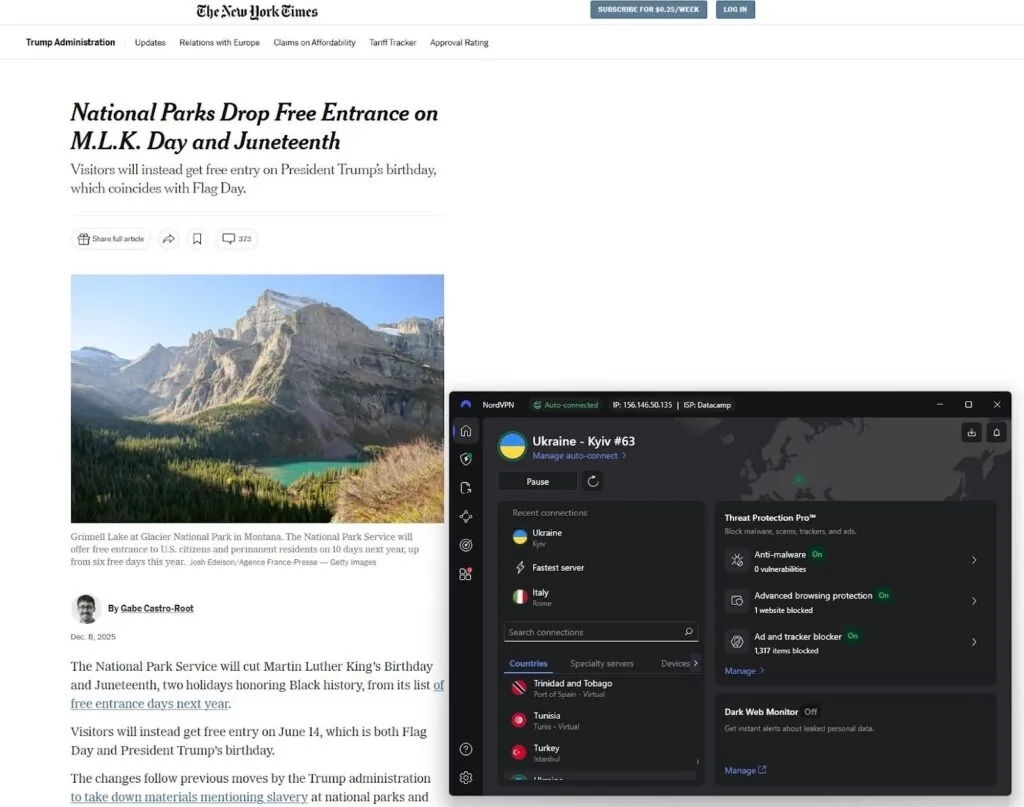
Change your IP address by connecting to a VPN server in a country where the article is free – Ukraine works best for most sites in 2025.
Step 4. Visit the news website again
With your virtual location changed, return to the article page. In most cases, the paywall disappears, allowing full access to the content.
Step 5. Browse safely and read freely
You can now read premium news articles without limits while maintaining your online privacy. For consistent unblocking results, keep your VPN active whenever you browse.
Alternative ways to bypass the paywall for free
Not everyone wants to use a VPN, and that’s perfectly fine – there are several other ways to bypass paywalls and access premium content for free. However, keep in mind that while these techniques occasionally work, they’re often less reliable and more time-consuming than simply using a VPN. Still, if you’re looking to experiment, here are some effective alternatives to try:
Browser modes
One of the quickest tricks is to open an Incognito or Private browsing window. This resets your browsing session, allowing you to access a few additional free articles before hitting the paywall again.
Another simple method is to delete your browser cookies, which can clear stored data that paywalls use to track your article limit. Similarly, enabling Reader Mode in browsers like Safari or Firefox can sometimes strip away paywall banners, providing a clean reading experience.
Archives and libraries
You can also try using the Wayback Machine, a free internet archive that stores snapshots of web pages. By entering a paywalled article’s URL, you may find an earlier cached version available to view. Some users gain access to premium content through public or university libraries, many of which provide digital subscriptions to major newspapers.
Browser extensions and ad-blockers
For more tech-savvy approaches, tools like the 12ft Ladder or the Bypass Paywalls Clean browser extension automatically attempt to remove soft paywalls on popular sites. Likewise, ad blockers such as uBlock Origin can occasionally hide or disable paywall overlays that rely on JavaScript. Another option, the Bypass Paywalls extension, offers customizable settings for specific websites, though its effectiveness can vary widely.
Other browsing tools
If you prefer mobile browsing, you can experiment with iOS Shortcuts that reload pages in alternate viewing modes, or check automation tools like Bardeen, which can mirror web content outside its original frame. Privacy-focused browsers such as Tor also provide an alternative. By masking your IP and using random exit nodes, Tor sometimes bypasses regional restrictions naturally. For a quick trick, try adding a Facebook redirect URL (for example, “facebook.com/l.php?u=”) before the website link, as this occasionally bypasses paywall scripts.
The easiest method: using a VPN
While these options might open access temporarily, they’re inconsistent and may stop working as publishers update their software. For a long-term, stable solution that works across the majority of sites, using a reliable VPN remains the most reliable and easy method.
Why a VPN is the best way to bypass a paywall
Methods like Google Cache, Archive.org, browser extensions, or other tools and tricks can sometimes let you read articles for free, but only under ideal circumstances. Cached or archived pages often miss the latest updates, and extensions like Bypass Paywalls Clean or 12ft Ladder can stop working when a site updates its code.
In contrast, a VPN bypasses restrictions at the source by changing your IP address and making you appear as a new reader, regardless of the site or article. It offers a repeatable, long‑term solution rather than a temporary workaround. Instead of searching for saved versions of pages, you can simply connect to a server in another country and access articles instantly. This same trick works across multiple platforms, from The Times and Financial Times to The New York Times and The Economist. This makes one VPN subscription useful for dozens of paywalled news sources worldwide.
Beyond convenience, a high‑speed VPN like NordVPN ensures smooth and secure browsing. Pages load quickly, no scripts break, and your real identity stays private at all times. Unlike ad blockers or cookie‑clearing methods, a VPN doesn’t just open access – it protects your online data too. For anyone serious about reading unlimited news in 2025 and beyond, a VPN remains a smart, reliable, and safe choice.
How to read articles behind a paywall on the most popular news sites
After testing over multiple major publications in 2025 using different IP locations, I discovered that connecting to a Ukrainian or UK server via VPN unblocks most paywalls effectively. Below is a quick reference table showing which sites open up and the best method for each.
| News site | Can VPN bypass the paywall? | Best method |
| 1. The Economist | ✅ Yes | Unblock with Ukrainian IP |
| 2. LA Times | ✅ Yes | Unblock with UK IP |
| 3. Financial Times | ✅ Yes | Unblock with UK IP |
| 4. The Spectator | ⚠️ Partially | Partial access with US/Ukrainian IP |
| 5. Daily Mail | ✅ Yes | Unblock with US/Ukrainian IP |
| 6. The Sunday Times | ⚠️Partially | Partial access with US IP (account needed) |
| 7. The Telegraph | ✅ Yes | Unblock with Ukrainian IP |
| 8. The New York Times | ✅ Yes | Unblock with Ukrainian IP |
| 9. The Washington Post | ✅ Yes | Unblock with Ukrainian IP |
| 10. Bloomberg | ✅ Yes | Unblock with Ukrainian IP |
| 11. INews | ✅ Yes | Unblock with UK/Ukrainian IP |
Conslusion
In 2025, most major news sites use strict paywalls to monetize their content, but there are still ways to read articles without paying. From browser tricks and archives to extensions, several free methods work temporarily, but none match the consistency of a VPN. A powerful VPN like NordVPN effortlessly bypasses paywalls and geo-restrictions, refreshes your access limits, and keeps your browsing private. Whether you want to catch up on The New York Times or The Telegraph, NordVPN remains the smartest, fastest, and most secure option for accessing premium content without limits.
Related articles:
Best VPNs for geo-blocking
Best VPNs for streaming
Best VPNs to change location
Best VPNs for porn
Best VPNs for online gambling
FAQ
Yes, it’s possible to bypass some paywalls for free using tools like a strong VPN, such as NordVPN, or incognito mode. By changing your IP or clearing cookies, you can reset article limits and access more premium content without subscribing.
You can access many news sites without a paywall by using a reliable VPN like NordVPN to change your location. Connecting to regions where that content is free, like Ukraine or the UK, often removes access restrictions instantly.
To read an article behind a paywall, use a powerful VPN like NordVPN and connect to a different server location. Once your IP changes, reload the article page, and the paywall may disappear, letting you read the full story without limits.
NordVPN is currently the overall best VPN to bypass paywalls. It offers fast servers worldwide, top security, and effective unblocking for major news outlets like The New York Times and The Economist.
Yes, and although bypassing paywalls may violate a website’s terms of service, using a VPN itself is legal. Always respect publisher policies and consider subscribing to support quality journalism.