- Cheapest country to buy PokéCoins
- Why do PokéCoins have different prices in different countries?
- Our recommended Pokémon GO coins VPNs
-
How to get cheap PokéCoins with a VPN: detailed guide
- Step 1. Get a VPN with servers in countries with cheap PokéCoins
- Step 2. Download and install the VPN on your device
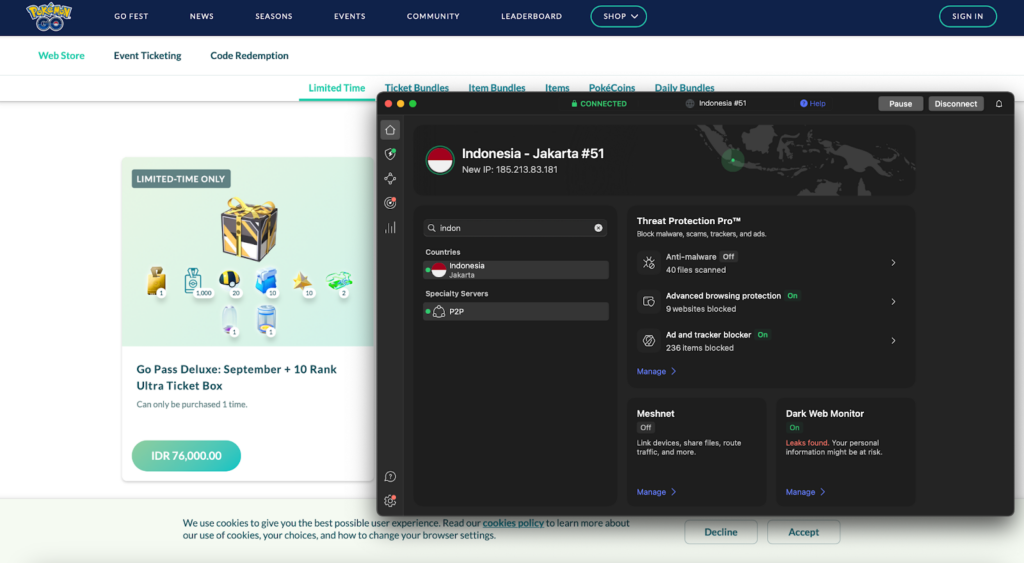
- Step 3. Connect to a server in a country with cheap Pokémon GO coins
- Step 4. Use an Incognito Window to go to the Pokémon GO Web Store
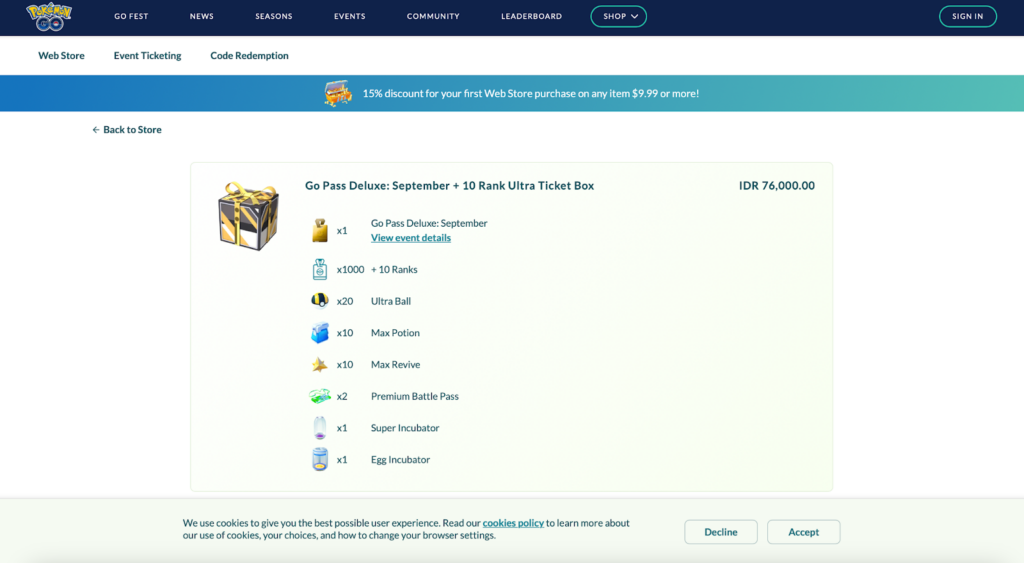
- Step 5. Choose PokéCoin bundle, sign up, and complete payment
- How to get cheap PokéCoins on Android
- Can you get banned for buying cheap PokéCoins?
- Can you get PokéCoins for free?
- Final tips for buying cheap Pokémon GO Coins
- FAQ
You can get PokéCoins by defending gyms in Pokémon GO, or you can buy PokéCoins from the in-game store using real money. However, the price of these coins isn’t the same everywhere. Costs vary by region, meaning that players in some countries pay significantly less for the same number of Pokémon Go coins. So, how can you get cheap PokéCoins in 2026?
The easiest way to get cheap PokéCoins is to buy them from Niantic’s Web Store while connected to a VPN. Simply connect to a VPN server in a country with cheap PokéCoins, like Indonesia or India, go to the Web Store in an Incognito or Private Browsing session, and complete the checkout process.
Currently, the cheapest country to buy PokéCoins is Indonesia, at around $1.61 for 600 coins. But you can also get cheap PokéCoins from countries like Vietnam and India. Keep reading to find out how to get cheap PokéCoins in 2026 based on my real-world tests and results.
Note:
PokéCoins are cheaper on the web store because Niantic, the game’s developer, does not have to pay the 30% commission that Apple and Google collect on in-app purchases made through the App Store and Google Play Store.

Cheapest country to buy PokéCoins
Based on my research, Indonesia currently has the cheapest PokéCoins. In Indonesia, 600 PokéCoins costs around $1.61, making it one of the cheapest countries to buy PokéCoins. The priciest bundle gives you 15,500 coins for around $32.74. Similarly, India is a cheap PokéCoins country, with 600 coins costing around $1.79 and 15,500 coins around $34.85.
| Cheapest country to buy PokéCoins | 600 PokéCoins | 2,700 PokéCoins | 15,500 PokéCoins |
|---|---|---|---|
| Indonesia | IDR 25 000 (~$1.61) | IDR 101 000 (~$6.54) | IDR 505 000 (~$32.74) |
| India | ₹ 149 (~$1.79) | ₹ 589 (~$7.08) | ₹ 2 899 (~$34.85) |
| Vietnam | ₫ 45 000 (~$1.84) | ₫ 180 000 (~$7.37) | ₫ 909 000 (~$37.23) |
| Brazil | R$9.90 (~$2.05) | R$37.90 (~$7.85) | R$191.90 (~$39.75) |
| Colombia | COP 9 500 (~$2.48) | COP 38 000 (~$9.92) | COP 191 900 (~$50.10) |
| Thailand | THB 99 (~$2.89) | THB 379 (~$11.09) | THB 1 920 (~$56.20) |
| Hong Kong | HK$ 38 (~$4.86) | HK$ 148 (~$18.94) | HK$ 788 (~$100.84) |
| USA | $4.99 | $19.99 | $99.99 |
| UK | £ 4.99 (~$6.38) | £ 19.99 (~$25.57) | £ 99.99 (~$127.94) |
| Poland | PLN 29.99 (~$7.69) | PLN 119.99 (~$30.80) | PLN 599.99 (~$154) |
Note:
Be aware that these prices are susceptible to change on a daily basis, based on fluctuations in local currencies.
How to buy cheap PokéCoins from Indonesia
A VPN lets you change your digital location, making it seem as if you’re logging into Pokémon Go from a different country. When you connect to a VPN server in a country with lower PokéCoin pricing, you can typically buy PokéCoins at a discounted price. Here’s how to buy cheap PokéCoins from Indonesia:
- Choose a reliable Pokémon GO VPN. I recommend NordVPN, now 78% off.
- Download and install the VPN software.
- Connect to a server in Indonesia to change your IP address.
- Go to the Pokémon GO Web Store in an incognito browser.
- Choose a bundle and complete the checkout process.
Why do PokéCoins have different prices in different countries?
PokéCoin prices differ between countries based on Niantic’s pricing model, which takes into account local cost of living and other economic factors. The cheaper prices in other countries can also be a marketing tactic to attract players in areas where the player base is smaller. Here’s a breakdown of the main reasons why PokéCoins have different prices in different regions:
- Regional economic differences: Niantic bases prices on a country’s economic stability and the country’s purchasing power, ensuring that PokéCoins aren’t overpriced and won’t dissuade players.
- Marketing strategies: Reducing PokéCoin prices in some countries can help Niantic attract new players in areas where there are fewer.
- Local taxation and fees: Government taxes and other commercial fees can influence the final cost of digital goods like PokéCoins.
- App store policies: Apple and Google’s app stores take a cut of digital product sales, and these agreements can vary from one country to the next, influencing the final price of PokéCoins.
- Pricing experimentation: Niantic originally began fluctuating prices of PokéCoins as an experiment to understand player bases in different countries, but the strategy has become more permanent.
Our recommended Pokémon GO coins VPNs
Getting cheaper PokéCoins is simple with the right VPN, but not every VPN can bypass geographic detection on the Pokémon GO website. I tested 23 VPN providers and found that NordVPN, Surfshark, and Proton VPN have the best server availability in the countries offering the cheapest PokéCoins. This includes Indonesia, India, and Vietnam.
Each of these VPNs allowed me to bypass Niantic’s region-detection software and purchase cheaper PokéCoins. They have servers in the cheapest countries for PokéCoins, as well as the fastest connection speeds for lag-free gaming without disconnects. Each of these VPNs also has built-in obfuscation features and other anonymity tools that help you avoid detection to minimize the chance of your account being penalized by Niantic.
How to get cheap PokéCoins with a VPN: detailed guide
For each of the 23 VPNs I tested with Pokémon GO, I attempted to unblock the local Pokémon GO Web Store for the cheapest PokéCoins countries. Here’s a guide to getting cheap PokéCoins using your VPN.
Step 1. Get a VPN with servers in countries with cheap PokéCoins
Indonesia is the cheapest country to buy PokéCoins as of March, 2026. If you want to buy PokéCoins cheaper, you’ll need to get a reliable VPN that has servers in Indonesia or other countries with cheaper PokéCoins, such as India or Brazil. Based on my tests, I recommend NordVPN, which has servers in all of these countries and lets me get PokéCoins cheaper with my VPN connection.
NordVPN is the best VPN to get cheaper Pokémon thanks to having 8900 servers in countries that include Brazil, Indonesia, and India, where Pokémon are cheapest. At the same time, it offers robust security and anonymity protections to help you avoid suspicion from Niantic. It offers 11+ servers in Indonesia, 20+ Brazilian VPN servers, and 14 servers in India.

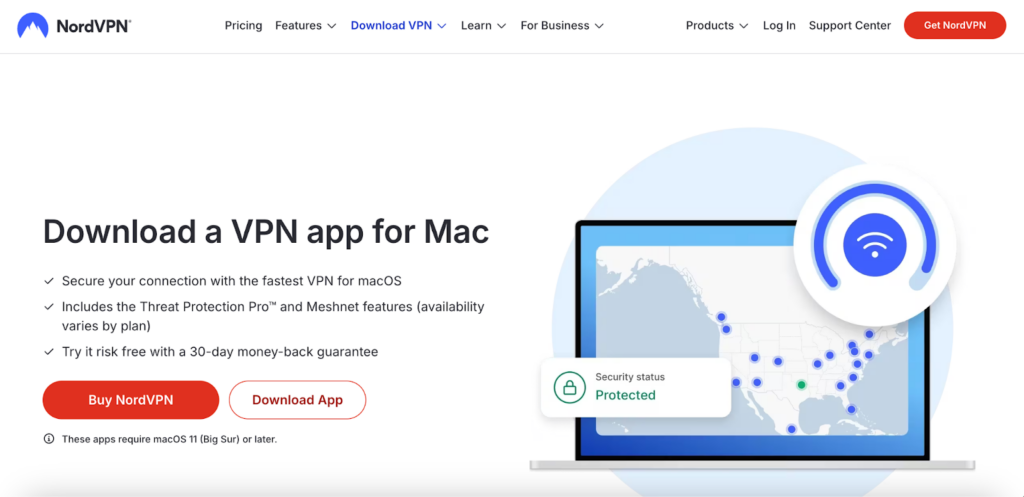
Step 2. Download and install the VPN on your device
Next, download and install the VPN on the device you use for Pokémon Go. NordVPN offers a 3-day free trial for Android, plus a 30-day money-back guarantee so that you can try it out for yourself risk-free. Once you’ve activated it on your phone, you can also use it on your computer. This is essential, as you’ll need to access the Pokémon Go Web Store to buy cheaper PokeCoins after connecting to your VPN.
Step 3. Connect to a server in a country with cheap Pokémon GO coins
Now, connect to a server in a country that has cheap Pokémon GO coins. The cheapest countries for PokéCoins are Brazil, Indonesia, and India. Indonesia has the cheapest coins, at around $1.61 for 600 coins and around $32.74 for 15,500 coins. India is next, offering 600 coins for around $1.79 and 15,500 coins for around $34.85. Vietnam follows next, at around $1.84 for 600 coins and around $37.23 for 15,500 coins.
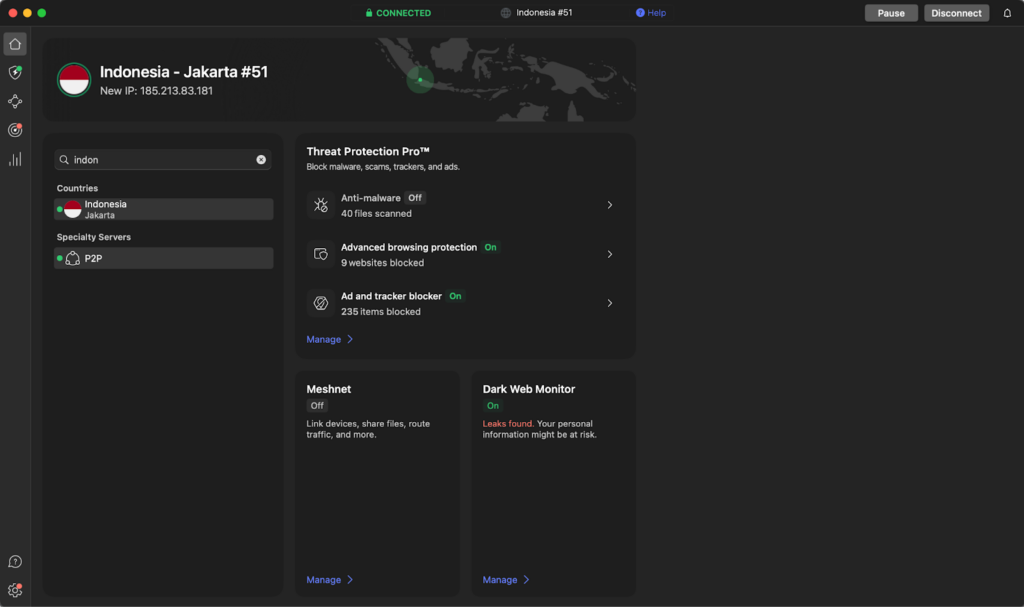
These numbers are based on my 2026 tests, in which I used NordVPN to connect to a VPN server in each country and change my IP address. In total, I tested 25 different countries to find these locations. Using your VPN, you can connect to the same country to change your Pokémon GO region and access cheaper PokéCoins.
Step 4. Use an Incognito Window to go to the Pokémon GO Web Store
Before opening the store, it’s a good idea to quickly check that your VPN isn’t leaking your real location (for example, via an IP, DNS, or WebRTC leak test). This helps confirm that the website will only see the VPN location you selected.
Next, open an Incognito or Private Browsing window to go to the Pokémon GO Web Store. It’s important to use a form of private browsing here, as being signed into other services like Google can result in your true location being revealed. You may also want to clear your browser’s cookies and cache as this can have the same effect.
Step 5. Choose PokéCoin bundle, sign up, and complete payment
Finally, choose your desired PokéCoin bundle and complete the checkout process. Bundle sizes vary by region and platform, but the most common packages include small (100 to 600), medium (550 to 2,500), and large (5,000 to 15,500) bundles. Thanks to a third-party payment processor, you can access more payments on the Web Store, including credit cards, cash app cards, and PayPal.
If you don’t see your coins in the app, try force‑closing and reopening it, and check your purchase history. If you’re still stuck, you can contact Niantic with your order number. If the VPN isn’t working, try switching to another server, clearing your browser cookies, or opening the Web Store in an incognito window before completing the purchase.
How to get cheap PokéCoins on Android
Pokémon GO relies on your mobile device’s GPS to determine your location, so the best way to change your location and get cheap PokéCoins is by using a VPN. Connecting to a VPN instantly changes your IP address, letting you spoof your location, hide your identity from trackers, and buy cheaper PokéCoins. Here’s how to get cheap PokéCoins on Android:
- Spoof your device location to India. I achieved this using the FakeGPS app.
- Download and install a reliable VPN for Android. I recommend using NordVPN, but Surfshark also has a built-in GPS spoofing feature for Android.
- Log into your account or create a new one.
- Connect to a server in India or Indonesia for cheaper PokéCoins.
- Go to the Niantic store in your phone’s browser, but make sure you use Incognito or Private Browsing.
- Click on the PokéCoin bundle and you should be prompted to sign in.
- Choose PayPal checkout to pay for your coins.
Once you’ve completed the checkout process, you should see that the PokéCoins have been credited to your account.
Can you get banned for buying cheap PokéCoins?
Yes, you can get banned for buying cheap PokéCoins using unofficial ways to change your location. Niantic’s terms of service explicitly state that you shouldn’t use third-party vendors, modified apps, or unauthorized PokéCoin sellers. Even if you don’t change your location with a VPN, using unofficial PokéCoin vendors outside of the App Store or Google Play Store can result in your account being flagged for suspicious behavior.
Based on my research, Niantic may simply not credit your account with the unofficial coins if you’re detected. However, repeated violations can lead to your account being suspended or banned. This is why it’s essential to use a highly secure VPN like NordVPN, with built-in anti-detection features, if you choose to change your location.
That said, you should always check whether VPN usage is allowed in your country, as some regions restrict or regulate VPN services.
Can you get PokéCoins for free?
Yes, you can get PokéCoins for free, though it can be quite time consuming. I’ve researched the best ways to get free PokéCoins and listed them below:
- Defender Bonus: By leaving your Pokémon in the team’s gym, you can earn 1 PokéCoin for every 10 minutes that it remains inside the gym as a defender. However, you can only earn a maximum of 50 PokéCoins per day through this method.
- In-game events: Niantic runs limited-time events in the game that allow you to earn free items, which sometimes includes PokéCoins.
- Special promotions: If you get your hands on a promo code from social media or a limited-time promotion, they can often be redeemed for items like Poké Balls, Incense, and PokéCoins.
- Seasonal bonuses: During the holidays or around major game updates, the shop often includes heavily discounted bundles that can include PokéCoins.
- Partner promotions: Niantic often partners with third-party companies, local carriers, and shops to offer special rewards that can include free PokéCoins.
While none of these methods are particularly efficient and can be infrequent, they’re good ways to get PokéCoins for free and boost your balance when they happen.
Final tips for buying cheap Pokémon GO Coins
PokéCoins can be obtained through in-game defender bonuses, limited-time in-game events, special promotions, and holiday bonuses. However, collecting PokéCoins through these methods can be slow, and many players want to know how to buy cheap PokéCoins. You can buy cheaper PokéCoins by connecting to a VPN server in a country like Indonesia, India, or Vietnam.
Bear in mind that Niantic can confiscate coins if it suspects you bought them through such methods. What’s more, Niantic may suspend or ban Pokémon GO accounts for repeated violations. That’s why it’s crucial to use incognito mode and to choose a VPN with reliable anti-detection software. I recommend NordVPN, which excelled at changing my location with high-speed connections while avoiding detection.
You might also like to read:
- How to use a VPN to buy things cheaper
- How to buy cheap TikTok coins
- How to use a VPN for cheaper flights
- How to get YouTube Premium cheaper
- Get Netflix for cheaper in 2026
- Get Spotify Premium cheaper
FAQ
Yes, you can buy cheap PokéCoins outside of the app by using Niantic’s official Pokémon GO Web Store at store.pokemongo.com. Here, you can access discounted bundles and special promotions. Note that you can’t buy PokéCoins outside of the app from unofficial sources. This is against Niantic’s terms of service and could result in account suspensions or bans.
The countries with the cheapest PokéCoins include Indonesia, India, and Brazil. Prices vary widely across regions based on a location’s cost of living and currency, so you can get cheap PokéCoins by changing your digital location. I used NordVPN to successfully change my location to Indonesia and purchase PokéCoins at a discount. Just be aware that it’s against Niantic’s terms of service.
To buy PokéCoins cheaper in another country, use a VPN to connect to a server like Brazil or Indonesia. This changes your IP address, allowing you to access the Pokémon Go Web Store as if you were browsing from a country where PokéCoins are cheaper. You can also change your app store region by setting up a new payment profile, but this is a more complicated method than using a VPN and is less likely to succeed. I recommend using NordVPN, which worked for me during my tests.
India has some of the cheapest PokéCoins at around ₹2899 ($34.85) for 15,500 PokeCoins. This is why many players use a VPN to change their location to India and buy cheap PokéCoins.
To buy PokéCoins in India, if you’re not located in the country, use a VPN to change your IP address and a reliable GPS spoofing app to change your device’s GPS location. During tests, I used NordVPN to change my location and FakeGPS to spoof my GPS. However, if you’re on Android, you could use Surfshark, which has a built-in GPS spoofing feature.
Indonesia has some of the cheapest PokéCoins, costing around IDR 25,000 for 600 coins, which is equivalent to around $1.61. This is cheaper than many other countries, such as the US, where 600 PokéCoins costs around $4.99. This is why many players use a VPN like NordVPN to change their location to Indonesia and access cheaper PokéCoins from the web store.
You can’t change your currency directly in the Pokémon GO Web Store because it uses your local currency, determined by your digital location. If you want to change your Pokémon GO Web Store currency, use a VPN like NordVPN to change your IP address and spoof your location with the FakeGPS app. While you can also change your app store region, you’ll need a local payment method and address, so the VPN solution is far easier and usually more effective.