
Sportsnet is a Canadian sports streaming service that offers comprehensive coverage of NHL, NBA, MLB, and more events. However, this sports fan favorite platform is only available within Canada due to broadcast agreements and content copyright laws. Luckily, you can stream Sportsnet+ (formerly Sportsnet NOW) in the US using a VPN. Simply connect to a Canadian server and access the site using your new IP address as if you were local.
However, not all VPNs are capable of unblocking Sportsnet from abroad. The streaming service uses robust VPN detection methods to prevent users outside Canada from accessing its content. These detection methods can only be bypassed by using a high-quality VPN with servers in Canada.
After testing 19 VPNs, I found that NordVPN proved to be the best VPN for Sportsnet. The service offers loads of secure servers in Canada, capable of bypassing all VPN detection methods, plus the fast connection speeds ensured I could stream in excellent quality. Continue reading this guide and learn how to use a VPN to access Sportsnet from the US.

How to watch Sportsnet outside of Canada with a VPN
A VPN is necessary to bypass Sportsnet geo-restrictions and access the platform outside of Canada. However, remember that a VPN only changes your location, and you will still need a valid Sportsnet+ subscription to stream NHL, NBA, MLB, and other sports content on the site.
- Choose a trustworthy streaming VPN with servers located in Canada. I recommend NordVPN, now 75% off, as it has 480+ servers in 3 Canadian cities.
- Download and install the VPN on your device.
- Launch the VPN and connect to a server in Canada to mask your real location.
- Head to Sportsnet+, subscribe, and start streaming your favorite team’s matchups!
Why do you need Sportsnet VPN
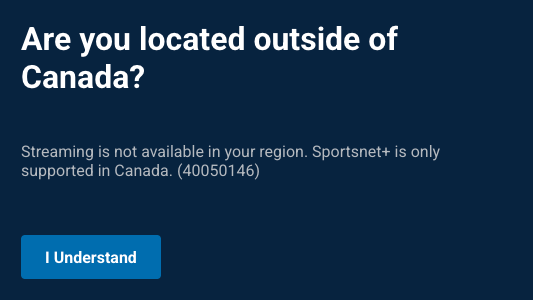
Sportsnet is one of the most popular sports streaming platforms in Canada. Unfortunately, the service’s content is only available within Canada due to licensing restrictions. This means that Sportsnet’s live NHL broadcasts, MLB, NBA, and other sports are geo-locked to users in Canada only. If you try to stream Sportsnet from abroad, for instance, when traveling or living in the US, you’ll find that sports broadcasts, such as Toronto Maple Leafs or Montreal Canadiens matchups, or the Stanley Cup playoff matches are unavailable in your location. This is because Sportsnet checks your IP address, and if it sees a location outside of Canada, the platform automatically blocks your access.
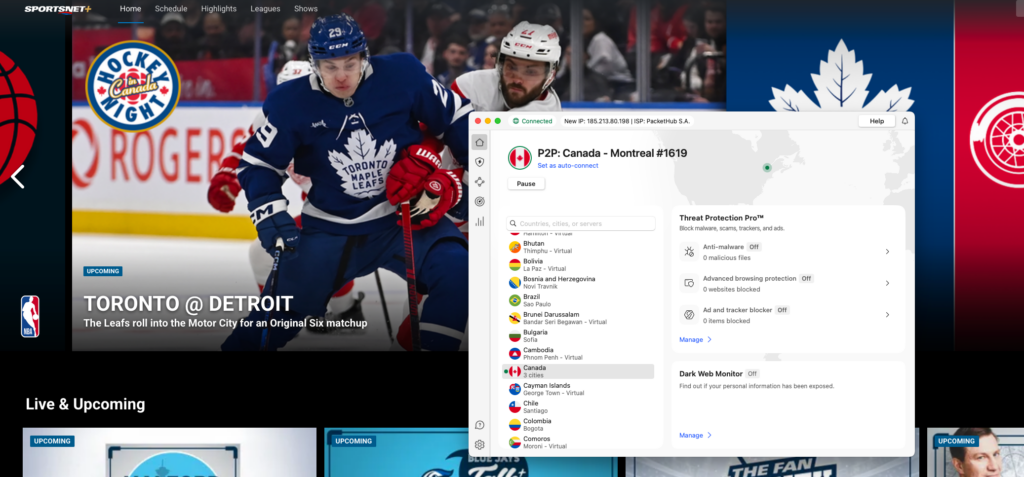
Using a VPN (Virtual Private Network) is the easiest way to bypass these geo-restrictions and access Sportsnet from anywhere. A VPN works by routing your network traffic through a server in another country. So, if you connect to a server in Canada, you will get a Canadian IP address, which will make it appear as though you’re actually located in the country. This will allow you to unblock and stream Sportsnet content without restrictions, even if you’re located in another country.
In addition to unblocking Sportsnet and bypassing geo-restrictions, VPNs can also enhance your safety online by encrypting your traffic and protecting your privacy from ISPs and onlookers. Overall, VPNs are multi-use cybersecurity tools that can give you a much safer and smoother browsing experience.
Best VPNs for Sportsnet in 2025
To find the best VPNs for accessing Sportsnet, I tested 19 different services. I looked for VPNs with exceptionally fast connection speeds for smooth streaming, plenty of Canadian servers, and a proven ability to unblock geo-restricted content. Ultimately, I found my top 3 best VPNs for Sportsnet in 2025 – NordVPN, Surfshark, and Proton VPN. All of these services easily unblocked Sportsnet from abroad and showed excellent performance in Canada. Below, you’ll find my detailed descriptions of all three VPN providers:
Top 1. NordVPN – the best VPN to watch Sportsnet outside Canada
- Rating: 9.3 ⭐⭐⭐⭐⭐
- Canadian servers: 480+ in Vancouver, Montreal, and Toronto
- Price: From $ 3.49/month + 3-day free trial
NordVPN is the overall best Sportsnet VPN, as it offers the fastest connection speeds with its servers in Canada and is unbeatable at bypassing geo-restrictions. Additionally, NordVPN offers very fairly-priced subscriptions, offering the use of numerous advanced VPN features, including Smart DNS for streaming and obfuscated servers for bypassing restrictions.
NordVPN currently has over 480 servers in Canada, across three main cities – Vancouver, Toronto, and Montreal. When I used NordVPN to access NHL games on Sportsnet, I found the servers to be in excellent working order and had no issues entering the platform on the first try.
I also used Canadian NordVPN servers for my speed tests and used them with the fastest available tunneling protocol, NordLynx. Ultimately, I got an average connection speed of around 779Mbps with an 86.5% initial speed retention rate. This meant I could stream live games on Sportsnet in excellent quality and without lags or buffering.
Upon inspecting NordVPN’s security features, I found several that made bypassing Sportsnet restrictions and VPN detection methods so easy. For instance, NordVPN uses AES-256 encryption to make my traffic anonymous and protects my real IP address with strong leak protection measures. Plus, I could always choose one of the obfuscated servers or turn on the NordWhisper tunneling protocol to bypass even the most robust attempts at blocking. Lastly, NordVPN is compatible with routers and offers a SmartDNS feature, which is an excellent choice if your streaming device does not support regular VPN usage.
I found NordVPN to be the best choice for Sportsnet, and if you’d like to try it, too, you can get a subscription for as low as $ 3.49/month. You can also try the service for free during a 3-day trial for Android devices, or extend the period of unpaid use with the 30-day money-back guarantee.
Pros
- Over 480 servers in 3 Canadian locations
- Bypasses Sportsnet restrictions undetected
- Offers the fastest connection speeds for smooth streaming of live sports events
Cons
- Only up to 10 simultaneous connections
Top 2. Surfshark – an affordable Sportsnet VPN with Canadian servers
- Rating: 9.0 ⭐⭐⭐⭐⭐
- Canadian servers: Undisclosed number in Vancouver, Toronto, and Montreal
- Price: From $ 2.49/month + 7-day free trial
Surfshark is the best Sportsnet VPN for users who want an inexpensive, yet fast and capable service. The service also offers servers in three Canadian locations, which are perfect for accessing Sportsnet from the US.
Although Surfshark does not disclose the exact number of its Canadian servers, I easily located them on its server list. I tested servers in Vancouver, Toronto, and Montreal, and easily bypassed Sportsnet geo-restrictions every time.
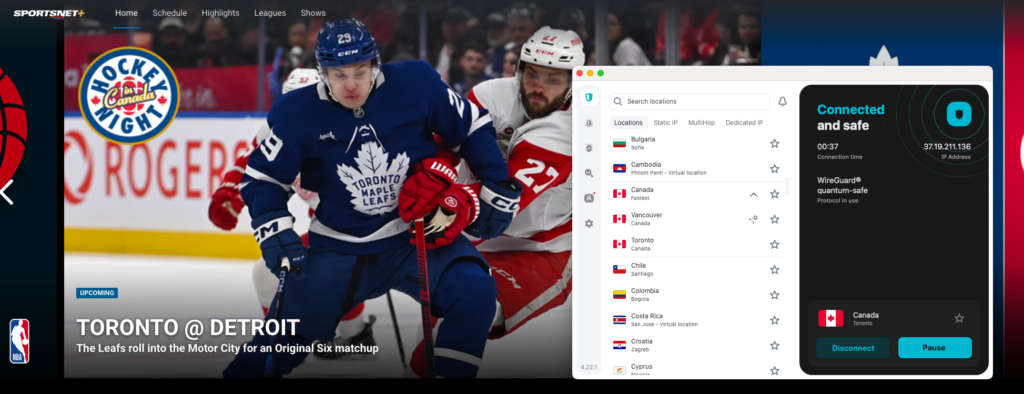
I was curious to find out how fast Surfshark really is, so I used the speediest available tunneling protocol – WireGuard – and connected to Canadian servers to test it out. Ultimately, I got a nice average connection speed of around 775Mbps with an 84.5% initial speed retention rate. Such speeds meant that I could livestream NHL games on Sportsnet in excellent video quality and without interruptions.
Surfshark security features make it easy to bypass Sportsnet restrictions. For instance, it has NoBorders and Camouflage modes, which secure your traffic and mask the fact that you are using a VPN; perfect for bypassing VPN detection methods. Additionally, Surfshark offers streaming-optimized servers in Canada, and you should always choose them for the smoothest experience. Lastly, you can opt for router setup or SmartDNS if your streaming device does not support conventional VPN use.
As I mentioned in the beginning, Surfshark is a really affordable VPN service, with subscriptions starting at only $ 2.49/month, and it also offers unlimited simultaneous connections. You can try the service for free during a 7-day free trial or subscribe immediately risk-free with the 30-day money-back guarantee.
Pros
- Offers fast and secure servers in 3 Canadian locations
- Great at bypassing Sportsnet restrictions
- Very affordable subscriptions
Cons
- Some features cost extra
Top 3. Proton VPN – a user-friendly VPN for streaming Sportsnet in the US
- Rating: 8.9 ⭐⭐⭐⭐⭐
- Canadian servers: 500+ in Montreal, Toronto, and Vancouver
- Price: From $ 2.99/month + free version
Proton VPN is a user-friendly and robust VPN service to bypass Sportsnet geo-restrictions. Additionally, it offers plenty of servers in Canada and abroad, making it a universal choice if you also want to unblock other streaming services.
Proton VPN has around 500 servers in three Canadian locations such as Toronto, Vancouver, and Montreal. I tested several of the servers in every location and each time accessed Sportsnet without the platform detecting that I was using a VPN service, which allowed me to stream NHL games from the US without restrictions.
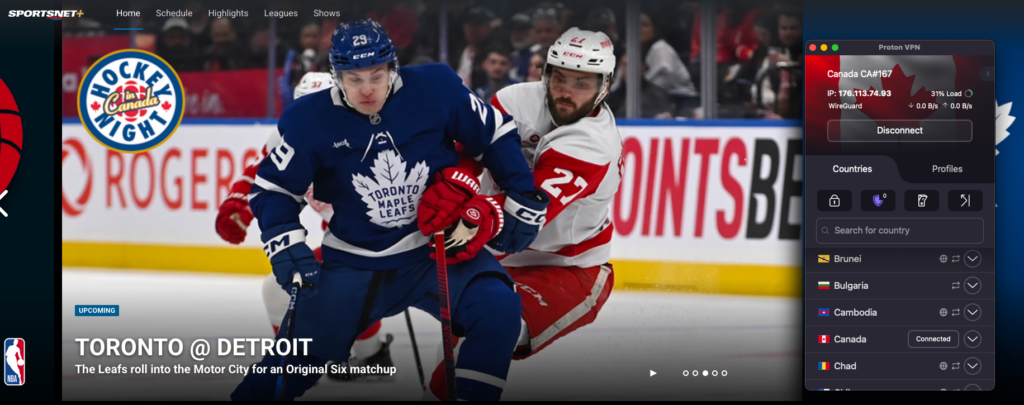
Same as with the other Sportsnet VPN providers, I also tested Proton VPN’s speed using its Canadian servers and the fastest available tunneling protocol – WireGuard. Ultimately, I found out that Proton VPN is the slowest of my top 3 Sportsnet VPNs, with an average connection speed of about 770Mbps with an 83% initial speed retention rate. However, I could still use the service to stream live sports without much lagging and buffering, as such speeds are not bad at all; just not the fastest.
Then, it was time for me to inspect Proton VPN’s security features. I found several of them that are particularly handy for streaming, such as AES-256 encryption to turn my network traffic private and prevent ISP bandwidth throttling. The service also offers obfuscated servers for extra stealth, and an actual Stealth mode to bypass even the strongest restrictions. Similar to my other Sportsnet VPN choices, you can use Proton VPN with routers or rely on the SmartDNS option.
However, as good as Proton VPN is for unblocking Sportsnet in the US, it is also a bit more expensive, with subscriptions starting at $ 2.99/month. The service does not offer a free trial, but a free version instead. It’s not suitable for streaming, but you can still use it for casual browsing. If you decide to purchase, you can rely on the 30-day money-back guarantee if the need arises.
Pros
- Great at unblocking Sportsnet in the US
- Has around 500 servers in 3 Canadian cities
- Offers a great package of security features
Cons
- Slightly more expensive
Compare the top 3 Sportsnet VPNs
| VPN for Sportsnet | Rating | Works with Sportsnet? | Canadian servers | Speed | Price | Free trial | Money-back guarantee |
| 1. NordVPN | 9.3⭐⭐⭐⭐⭐ | ✅ Yes | ✅ Yes, 480+ in Toronto, Montreal, Vancouver | 779Mbps | $ 3.49 | ✅ Yes, 3-day free trial | ✅ Yes, 30 days |
| 2. Surfshark | 9.0 ⭐⭐⭐⭐⭐ | ✅ Yes | ✅ Yes, undisclosed number in Toronto, Montreal, Vancouver | 775Mbps | $ 2.49/month | ✅ Yes, 7-day free trial | ✅ Yes, 30 days |
| 3. Proton VPN | 8.9 ⭐⭐⭐⭐⭐ | ✅ Yes | ✅ Yes, 500+ in Toronto, Montreal, Vancouver | 770Mbps | $ 2.99/month | ✅ Yes, free version | ✅ Yes, 30 days |
How to watch Sportsnet in the US: detailed guide
Using a VPN to watch Sportsnet in the US is a pretty straightforward process, requiring just a couple of additional steps to your normal streaming routine. Below, you’ll find my guide with the VPN process broken down into simple steps. Follow them to get Sportsnet streaming on your device in the US in no time:
Step 1. Get a reputable VPN service
Because Sportsnet uses robust VPN detection methods, it is very important to choose only a reliable and capable streaming VPN that will get you into the platform undetected. Based on my experience, NordVPN is the best VPN to access Sportsnet in the US, as it offers plenty of secure servers in Canada and can bypass the geo-restrictions with ease.
I do not recommend using free VPNs for Sportsnet, as such services usually have a very poor server choice, which often gets congested and blacklisted. This means they simply won’t work at bypassing Sportsnet VPN detection methods. Instead, you can try to use a VPN with a free trial or a money-back guarantee to test it risk-free. For example, my top Sportsnet VPN, NordVPN, offers a 3-day Android trial and a 30-day money-back guarantee, while Surfshark has a 7-day free trial.
Step 2. Download and install a VPN app
Once you choose your VPN provider, download the correct app depending on the device you want to access Sportsnet on. For instance, you can get a VPN app for Windows and Mac laptops, iOS or Android smartphones, Fire TV Stick, smart TVs, gaming consoles, and even routers. I always recommend downloading any app directly from the official source, such as NordVPN.com website, Apple App Store, or the Google Play Store, to prevent accidental downloads of unverified software.
Step 3. Connect to a Canadian server
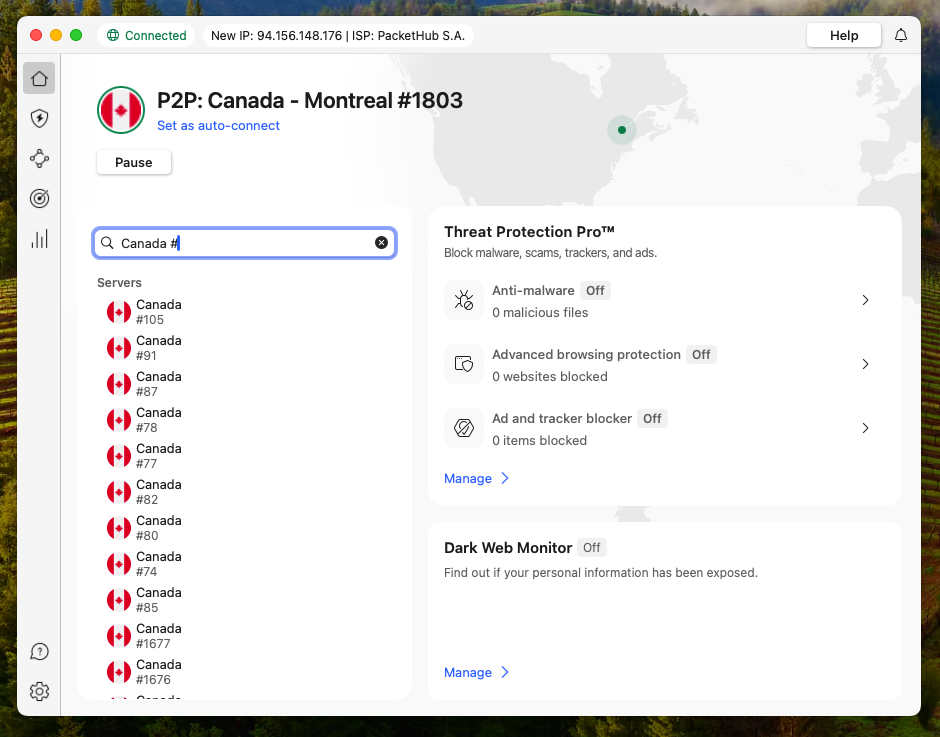
Now launch your VPN app and select a server located in Canada, for instance, in Toronto, Vancouver, or Montreal. Connecting to a Canadian server masks your real location and makes Sportsnet think you are accessing the platform from Canada. Before proceeding to Sportsnet, check the VPN status until it shows “Connected.” Some VPNs may also display your current IP location, and if you see it listed as in Canada, it means your virtual location has been successfully changed.
Troubleshooting tip: If one Canadian server is too slow for streaming or Sportsnet is still blocked, try connecting to another server in Canada – it usually solves this problem. If you experience connection drops, don’t forget to reconnect to your VPN service.
Step 4. Log in to Sportsnet and start streaming
After connecting to a VPN server in Canada, head to the Sportsnet website or launch the Sportsnet app. Now, you should be able to access it without any restrictions.
Remember that if you already have a Sportsnet+ subscription, you will have to log in. If not, you will have to create a new account and purchase a subscription. This procedure may require a Canadian billing address for payment.
Once the steps are completed, you will be able to browse Sportsnet’s 24/7 NHL live streams and on-demand NBA, MLB matchups as if you were in Canada.

How to watch Sportsnet live streams for free
Sportsnet does not offer a free way to watch its full live streams. Before, Sportsnet NOW used to have a free trial, but now the platform requires to purchase a paid subscription upfront. However, you can try a couple of workarounds to save on your Sportsnet live streams:
- Use a free trial VPN or a VPN with a money-back guarantee to get temporary access without paying for a VPN subscription. For instance, you can sign up to NordVPN or Surfshark, watch Sportsnet for a few days, and then cancel the VPN subscription within 30 days for a refund if you want to.
- Watch highlight clips or local broadcasts instead. Some NHL highlights may be available on YouTube or other free sports sites; however, only Sportsnet may have access to live games.
Ultimately, access to Sportsnet live streams and on-demand content requires a paid Sportsnet+ plan, and there’s no legal way to stream full games on Sportsnet for free. Currently, you can subscribe to Sportsnet+ for $29.99/month with the Standard plan or $42.99/month with the Ultimate plan.
Final thoughts on Sportsnet live streaming abroad
Accessing Sportsnet with a VPN from abroad is very straightforward and secure. A streaming-optimized VPN easily bypasses Sportsnet’s geo-restrictions and allows you to stream NHL, NBA, MBA, or any other sports live without any interruptions. With a VPN, you never have to miss an important game, such as NHL playoffs or major baseball games, just because you’re outside Canada.
After testing several VPNs, I found that NordVPN is the best VPN for Sportsnet overall. I found the service very easy to use, and its exceptional geo-block bypassing capabilities meant I could always access Sportsnet, no matter my location. Lastly, I enjoyed streaming live games in high video quality, which is made possible by NordVPN’s fast connection speeds.
You may also want to read:
- How to watch NBC Sports online
- How to watch blackout games with a VPN
- Best NHL free streams: stream NHL online for free
- How to watch the Premier League with a VPN
- How to watch F1 without Apple TV in the US
FAQ
No, you cannot watch Sportsnet in the US as the platform is only available in Canada. However, you can bypass these geo-restrictions with a reliable streaming VPN, like NordVPN. All you have to do is connect to one of its servers in Canada to change your IP address and access Sportsnet in the US without restrictions, as if you were located in Canada.
NHL games may be blacked out on Sportsnet due to a local network holding exclusive rights to stream the specific team’s matchups. If that happens to you, use a VPN, like NordVPN, and connect to a server in Canada outside of your current location. For instance, if you are in Montreal, try connecting to a server in Vancouver. Changing your IP address to a location outside of the NHL blackout area will restore your access to the restricted NHL games you are trying to stream.
The easiest way to get rid of regional restrictions on Sportsnet is to use a VPN. First, select a VPN with lots of servers in different Canadian locations, such as NordVPN. Then, launch the app and connect to a server in a Canadian location different from the current one you are in. For instance, if you’re in Toronto, connect to a server in Vancouver. This will change your IP address and will allow you to get rid of regional restrictions on Sortsnet.
To watch Sportsnet in Norway, you will have to use a VPN to change your virtual location. Get a reliable streaming VPN with lots of servers in Canada, such as NordVPN. Download, install, and launch the app. Connect to a server in Canada – this will give you a local Canadian IP address. Then, head to the Sportsnet website, create an account, purchase a plan, and start streaming as if you were a local.
To watch Sportsnet in Israel, you will have to use a VPN to bypass the platform’s geo-restrictions. Select a VPN with secure servers in Canada, such as NordVPN. Once you have the app, launch it and connect to a server in Canada – this will change your virtual location. With the VPN connected to Canada, open the Sportsnet site or app, log in or create an account, purchase a subscription, and start streaming Sportsnet in Israel without restrictions.
Although Sportsnet is restricted to Canada, you can use a VPN to watch Sportsnet in the US or anywhere else in the world. Remember to select a reliable, streaming-optimized VPN, such as NordVPN, that will be capable of bypassing Sportsnet’s geo-blocks and provide you with a smooth streaming experience. Once you have your VPN, connect to a server in Canada to change your virtual location and access Sportsnet from the US or anyplace else.