
- How NordVPN’s free trial works
- How NordVPN’s free trial works
- How to get NordVPN 3-day free trial on Android
- How to get a NordVPN 30-day free trial on any device
- Free VPN vs. VPN free trial: which is better?
- What happens after NordVPN’s free trial ends?
- Why you should use NordVPN
- NordVPN vs. Other VPN Providers
- FAQ
NordVPN is not free, but it offers a 30-day money-back guarantee and a 3-day free trial for Android users, accessible through the Google Play Store. Previously, NordVPN provided a 7-day free trial, but this has recently been reduced to just 3 days. Although NordVPN provides its 3-day free trial exclusively to Android users via Google Play, once the app is activated on an Android device, you can use NordVPN on any other device with the same account.
- Go to NordVPN‘s official website.
- Click on “Get NordVPN” and choose any plan.
- Create your account with the necessary information.
- Download NordVPN and enjoy browsing anonymously and unblocking websites abroad.
- Cancel your account within 3 days before the free trial period expires.
While NordVPN doesn’t offer a free trial for purchases made through its official website, it does provide a 30-day money-back guarantee with all subscription plans. This policy allows you to get a full refund within 30 days of purchase if you decide the service is not a good fit.
Remember, NordVPN refunds are only available for purchases made through the official NordVPN website. They are not available for purchases made via the Apple App Store, Amazon App Store, Google Play Store, or when using cryptocurrencies. Additionally, the money-back guarantee does not apply to renewal plans.
Keep reading for more details on how to get the NordVPN 3-day free trial and use the 30-day money-back guarantee for subscription refunds.

How NordVPN’s free trial works
I found it very easy to get and activate NordVPN’s 3-day free trial, and once I got it, it worked seamlessly for the duration. Here are my key takeaways on how the NordVPN free trial works:
- Availability and activation. NordVPN 3-day free trial activation for Android users takes no additional steps, and I activated it simply by creating an account. I also found it easy to use the 3-day free trial on other devices, like Windows, Mac, and iOS, once my account was activated on the Android device. The free NordVPN trial can be used on up to 10 devices simultaneously.
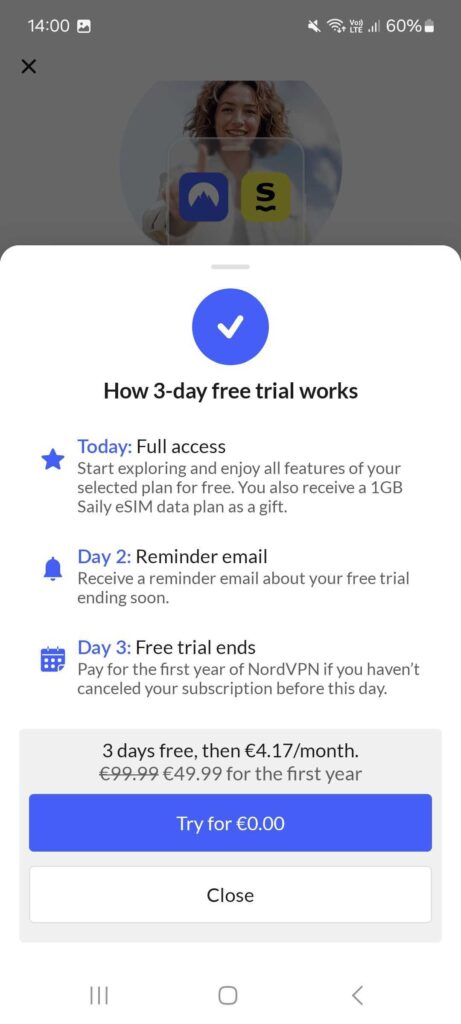
- Payment info. As for payment info, you need a payment method linked to your Google Play Store account, but no charges are made for the 3-day free trial. However, remember to cancel it; otherwise, you will be charged for a NordVPN plan subscription. If that happens, there’s no need to worry as you can use the 30-day money-back guarantee.
- Cancellation policy. The cancellation policy for this trial asks to cancel it via the Google Play Store and not through the NordVPN official website. However, to cancel any paid plan and to be eligible for the 30-day money-back guarantee, you have to cancel it via the customer service available on NordVPN’s official site.

- Trial limitations. Only new users are eligible for the 3-day free trial, which can be accessed only via the Google Play Store for Android device users. The free trial does not work for plan renewals, and NordVPN offers no free version, only time-limited access to the full premium service.
How NordVPN’s free trial works
The NordVPN’s 30-day money-back guarantee works with all paid plans and allows you to try any subscription of your choice risk-free for up to a month. The money-back guarantee applies to all NordVPN plan purchases, including the 1-month, 1-year, and 2-year plan options. Overall, it creates an excellent opportunity to try NordVPN’s all available features for an extended period of time, which is perfect for thorough testing.
I must note that there exist situations where the 30-day money-back guarantee does not apply. For instance, purchases made with cryptocurrencies are not eligible for a refund. Additionally, it is very unlikely you’ll get a refund once the 30-day period has passed. Lastly, plans purchased via any third-party resellers are also non-refundable.
Remember that the money-back guarantee offer may change over time, so it is a good idea to check NordVPN’s terms of service before subscribing. However, as of January 2026, this is the info listed on the official NordVPN website regarding refunds:

How to get NordVPN 3-day free trial on Android
Getting the NordVPN 3-day trial for Android device users is very straightforward and only requires a few steps, like downloading the app and creating an account. Here’s a detailed guide on how to get a NordVPN free trial:
Step 1: Download the NordVPN app
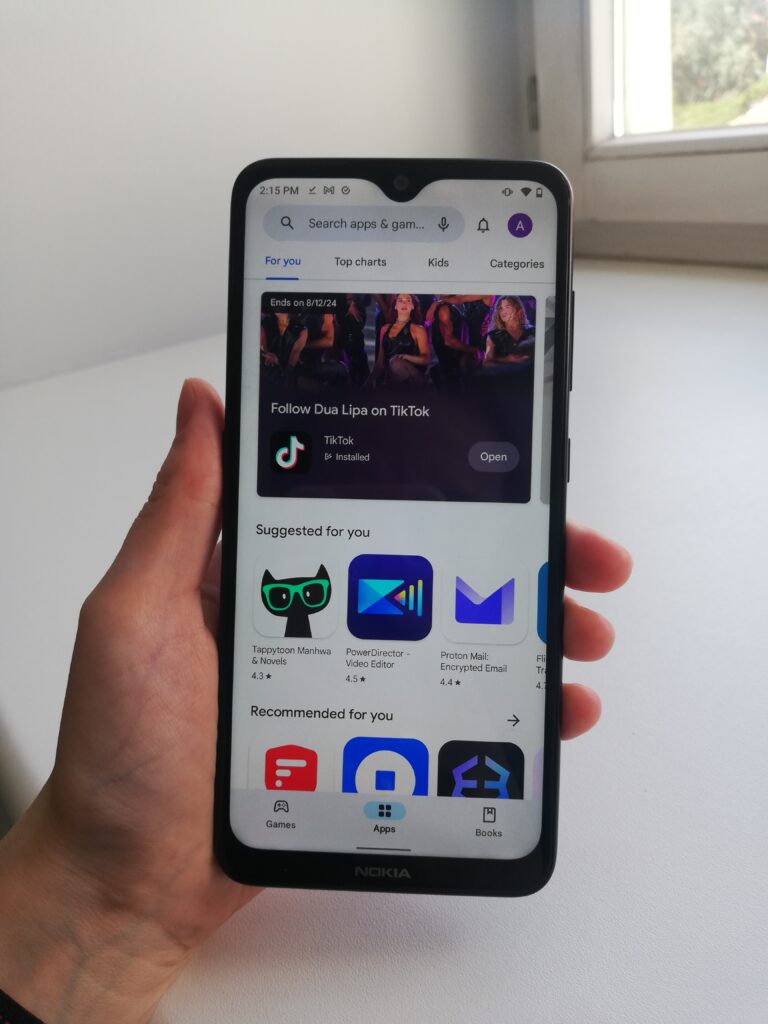
NordVPN free trial is only available for Android devices and to activate it, you have to download the app from the Google Play Store. To get the app, go Google Play on your Android device, search for NordVPN, and download it.
Step 2: Select a plan and activate your free trial
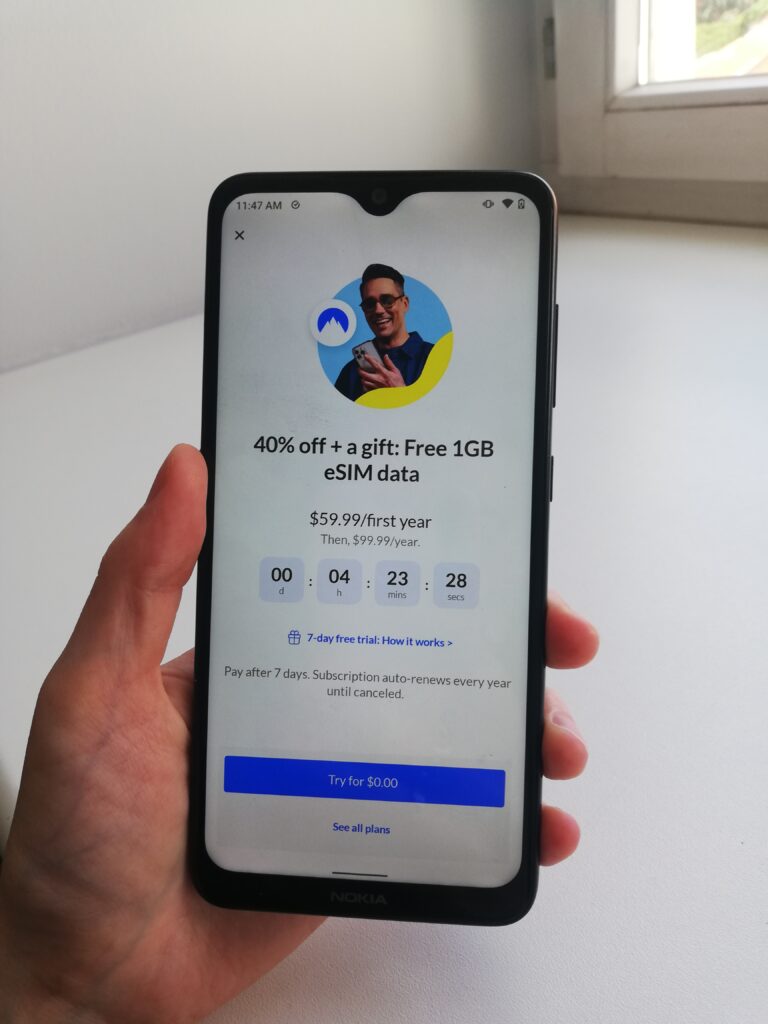
Once you have the app on your Android device, open it and follow the prompts to create a new account. Alternatively, you can create an account on the NordVPN website, but using the app is simpler. After logging in, choose a plan to start your 3-day free trial. You’ll be asked to confirm the trial through your Google Play payment method, but you won’t be charged.
Does NordVPN offer a free trial with no credit card required?
Yes, you can get a NordVPN free trial without a credit card. The 3-day free trial is available for Android users with payments going through the Google Play Store. The app store accepts payment methods such as PayPal, Google Play Balance, and mobile phone billing in the US, which means a credit card is not necessary for the free NordVPN trial.
Step 3: Use your NordVPN free trial across all devices
After successfully setting up your NordVPN free trial on an Android device, you can use it on 10 devices simultaneously. This is not limited to Android devices; you can use the same free trial on Windows, Mac, and iOS devices, too. To do so, download the NordVPN app from the official website or Apple App Store and log in with the same account you created on your Android device.
There are two ways to cancel the NordVPN free trial, depending on where you initially signed up for it. If you signed up through the NordVPN website, you can cancel your free trial by logging into your Nord Account and heading to the Billing section. Then, select the Subscriptions tab and click “Cancel” next to the Auto-renewal option. If you got your free trial via the Google Play Store, you will need to cancel it through the Google Play Store’s subscription management.
How to get a NordVPN 30-day free trial on any device
NordVPN provides two risk-free ways to test their service: a 3-day free trial exclusively for Android users and a 30-day money-back guarantee available for all subscribers. Both options grant full access to NordVPN’s premium features. Therefore, after enjoying your first few weeks of NordVPN, you might decide to cancel your subscription and get your money back. Here’s how to cancel your NordVPN 30-day trial:
Step 1. Head to the official NordVPN site and launch the live chat
Visit NordVPN’s website and go to the “Help” section. Launch the live chat by clicking on the speech bubble with the question mark in the lower right corner.
Step 2. Ask for a refund in the live chat
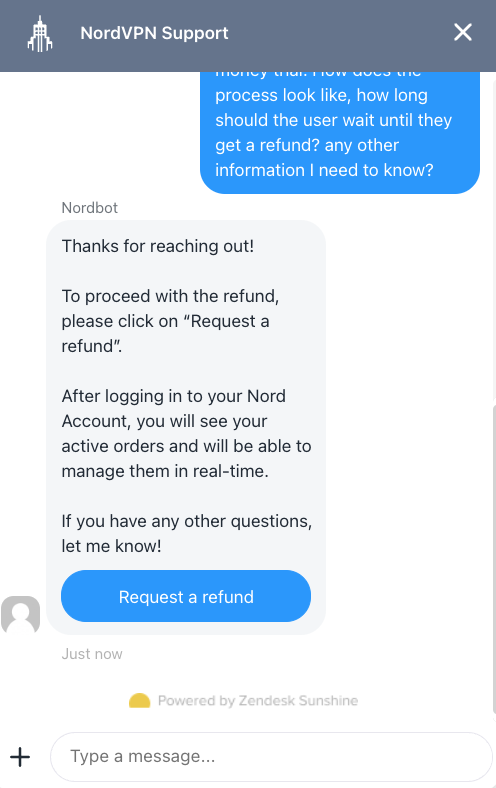
In the live chat, ask the chatbot for a payment refund for your subscription. You’ll be transferred to an agent.
Tell support that you want to cancel and request a refund. Give them any payment details or account details requested. Customer support might ask you why you’re canceling, but NordVPN’s money-back guarantee isn’t dependent on your response. They just use this information as feedback to improve their services.
Step 3. Get your refund in up to 10 business days
Wait five to ten business days for the money to be returned to your account. When I tried the procedure, I got my money back within the first few days. If the refund does not arrive after ten business days, contact customer support again.
Free VPN vs. VPN free trial: which is better?

NordVPN’s free trial gives access to all of its features, over 8900 servers, and does not limit bandwidth or data. Meanwhile, free VPNs usually come with limited features, only a few servers, and are generally unsafe to use. Here’s why I recommend choosing NordVPN’s free trial instead of a free VPN:
- Free VPN limitations: Such VPNs usually come with bandwidth limitations or daily data caps that are insufficient for anything more than casual browsing. And since the daily data cap might be around 200MB a day, there’s no chance of using it for streaming.
- Limited server choices: Free VPNs often have only a few servers in a couple of countries, which limits their usability. Additionally, the servers often get congested, and their IP addresses are quickly blacklisted by geo-locked streaming services.
- Free VPNs often lack customer support: If you have trouble using the app, you might not have anywhere to turn for help.
- Some free VPNs can be dangerous: Unpaid VPNs still have to make money somehow, and they often do so by selling user data to third parties. So, free VPNs can be exploiting your data instead of protecting your privacy.
If you’ve come as far as looking for VPN free trials, then chances are you have a specific use in mind. Give NordVPN‘s risk-free trial period a chance to benefit from the full protection of a premium VPN and avoid potentially risky free services.
What happens after NordVPN’s free trial ends?
After your NordVPN trial ends, you will be charged for your chosen subscription plan if you do not cancel it before the trial expires. NordVPN offers several paid plan options called Basic, Plus, Complete, and Prime, which you can subscribe to for 1 month, 1 year, or 2 years. The longer the subscription period you choose, the better the price you get. Below, you can see the pricing for the most popular NordVPN Basic plan:

- NordVPN 24 months $ 3.49mth Deal View offer
- NordVPN 12 months $ 4.99mth View offer
- NordVPN Monthly $ 12.99mth View offer
Alternatively, you can choose the Plus plan, which includes Threat Protection Pro, a powerful ad and tracker blocker. For it, the subscription prices are $13.99 for a monthly subscription, $5.99/month with a 1-year subscription, and $4.39/month with a 2-year subscription.
Another subscription tier up, there’s the NordVPN Complete subscription plan, which includes the VPN itself, Threat Protection Pro, a password manager, and a data breach scanner. This plan costs $14.99 with the monthly subscription, $6.99/month with a 1-year subscription, and $5.39/month with a 2-year subscription.
Lastly, there’s the NordVPN Prime plan, which includes everything in the lower subscription tiers, plus 1TB of encrypted cloud storage space and access to NordProtect identity theft protection service. The Prime plan costs $17.99 with the monthly subscription, $8.99/month with a 1-year subscription, and $7.39/month with a 2-year subscription.
Overall, NordVPN is a mid-range VPN service price-wise, with some competitors, like Surfshark, offering slightly cheaper subscriptions, and some offering a bit more expensive ones, as is the case with Astrill VPN. Below, you can find comparisons between free trial periods and basic plan subscription prices of the top 3 VPNs on the market:
| VPN provider | Rating | 1-year price | 2-year price | Free trial | Credit card details | Free trial restrictions | Money-back guarantee |
| 1. NordVPN | 9.3 ⭐⭐⭐⭐⭐ | $4.99/month | $ /month | ✅ Yes, 3 days | Required | Only available through Google Play Store and Android devices | ✅ Yes, 30 days |
| 2. Surfshark | 9.0 ⭐⭐⭐⭐⭐ | $1.99/month | $ 2.49/month | ✅ Yes, 7 days | Required | Trial must be started through mobile app stores | ✅ Yes, 30 days |
| 3. Proton VPN | 8.9 ⭐⭐⭐⭐⭐ | $3.99/month | $ /month | ✅ Yes, free version | Not required | Limited server access and features, slower speeds, not compatible with streaming | ✅ Yes, 30 days |
Why you should use NordVPN

NordVPN is our number-one choice for protecting your online security and anonymity, offering you greater internet freedom. Some of the benefits NordVPN offers include:
- Strict no-logs policy, meaning your data won’t be stored and your online activity will remain hidden
- Robust security features, including 256-bit AES encryption used by governments and militaries alike and an automatic kill switch that will keep your connection secure even if your VPN connection drops
- Up to six simultaneous connections, so you can protect the whole family with NordVPN
- 5,600+ VPN servers worldwide, allowing you to unblock streaming services and other websites
- Specialized servers dedicated to streaming, torrenting, and Tor over VPN: NordVPN’s servers are geared toward unblocking and streaming on Netflix, Hulu, BBC iPlayer, and Disney+ from anywhere in the world
While unverified VPN services might put roadblocks in your way when claiming a refund, NordVPN won’t. We’ve tested the process and can assure you that NordVPN will honor its risk-free 30-day money-back guarantee. All you have to do is make sure you contact them before the month’s up.
Note that cancelling your NordVPN subscription may lock you out of huge deals. For information on how to circumvent this, read our resource on renewing your NordVPN discount.
NordVPN vs. Other VPN Providers
NordVPN isn’t the only top-ranking, premium VPN on the market. Surfshark, Proton VPN, CyberGhost, and PIA are also excellent services. We’ve compared these VPNs against each other to help you make the right choice:
Better still, each of these providers has its own money-back guarantee. With a VPN free trial available for each, you can effectively get months’ worth of free VPN use! Check out our free trial VPNs below:
Curious about all the other VPNs you could choose from? Our collection of reviews will tell you everything you need to know. You can also visit our review of the other product under Nord: NordPass.
FAQ
Make sure to check out our frequently asked questions below if you’re unsure about NordVPN and its risk-free period. Click on a question to view the answer.
No, NordVPN is not free, but it offers a 3-day free trial and a 30-day money-back guarantee. During the free trial, you can access NordVPN’s full server fleet and all of its advanced features. The trial is available through the Google Play Store and needs to be set up using an Android device. After the initial set up, the free trial can be also used on Windows, Mac, and iOS devices.
NordVPN doesn’t offer a free unlimited version but provides a 3-day free trial for Android users and a 30-day money-back guarantee for all plans. To access the NordVPN free trial, you will need to download the app from the Google Play Store and set it up on an Android device. Download the app, create an account, select your plan, and the 3-day free trial will be activated automatically. Once you’ve activated the trial, you can use NordVPN for free for three days on up to 10 devices, including Windows, Mac, and iOS.
There are two ways to cancel your NordVPN free trial – (1) through NordVPN official website or (2) Google Play Store. If you’ve initially registered your account on the NordVPN website, head to your Nord Account, find Billing, and toggle off the Auto Renewal option before your trial expires. If you’ve created an account on the app, head to the Google Play Store, open Subscription Management and cancel the free trial.
No, the NordVPN money-back policy only works within the 30 days after purchasing a subscription. After the 30 days have passed, you will probably need a serious technical issue for your purchase to be refunded.
Yes, NordVPN offers a 30-day money-back guarantee and will refund your purchase if you request it within 30 days. To use the 30-day money-back guarantee, head to the official NordVPN website and launch the live chat. There, ask for a refund on your subscription and provide with any details the custom support agent may ask for. Once this is done, you should get your refund in up to 10 business days.
To get a 30-day refund on NordVPN, head to the official NordVPN website. There, find the customer support live chat at the right bottom corner of the site. Click on it and start a chat asking for a refund. You’ll be connected to a customer support specialist who may ask you a couple of questions about the reason you want a refund. After the process is done, you will get your money back in up to 10 business days. Remember that the money-back guarantee only applies for the first 30 days after purchasing a subscription.