Where you can stream the 2026 FIFA World Cup depends largely on your location. Broadcasting rights are sold on a country-by-country basis, so available platforms differ by region, and free World Cup streaming is not available everywhere.
Some countries, including the UK and Australia, have fully free FIFA coverage via public broadcasters or ad-supported platforms. However, in other countries, such as the US and Canada, access is limited or requires a paid subscription to watch the World Cup. What’s more, most official FIFA streaming services are geo-restricted, meaning that access hugely depends on your location.
In this article, you’ll find a list of free official streaming services by country. I’ll also explain how to access the free streams while traveling abroad.
Is the FIFA World Cup free to watch?
Yes, you can watch the FIFA World Cup for free on the BBC iPlayer and ITVX in the UK, SBS and SBS On Demand in Australia, NOS in the Netherlands, and more, but to access these free streaming services, you may have to be located in their country of origin.
Most free World Cup 2026 streaming platforms are available only in specific countries due to licensing agreements and use geo-blocking to protect their content. For example, the free broadcasters may only allow access in the UK, Australia, Canada, and select European countries. Meanwhile, if you are currently traveling abroad, the free streaming service you’d usually use may become unavailable outside the supported region.
⚠️You should also remember that some free streaming services, such as BBC iPlayer and ITVX in the UK, or tabii in Türkiye, require creating a free account to access the livestreams, while others, like Play SRF in Switzerland, can be accessed without registering. Lastly, while some free services may offer full tournament coverage, others will only provide highlights or limited matches.
Where to watch the FIFA World Cup 2026 for free
FIFA sells its World Cup broadcasting rights on a country-by-country basis. This means that viewing options may vary depending on the country you are located in.
For example, in the US, coverage is typically available only through paid broadcasters, while countries such as the UK, Australia, Poland, and the Netherlands offer free World Cup livestreams through public or free broadcasters. These broadcasters usually make major sporting events widely available as part of their public access commitments.
To help you watch the 2026 FIFA World Cup legally and reliably for free, I’ve only included official free streaming services that hold the rights to stream the event.
| Country | FIFA World Cup 2026 broadcaster | Is it free? | Commentary language |
| The UK | BBC iPlayer and ITVX | ✅ Yes, free coverage shared between the two broadcasters | English |
| Ireland | RTÉ and RTÉ Player | ✅ Yes, free coverage | English |
| Australia | SBS and SBS On Demand | ✅ Yes, free coverage | English |
| Brazil | CazéTV via YouTube | ✅ Yes, free coverage via YouTube | Portuguese |
| Belgium | RTBF Auvio and VRT MAX | ✅ Yes, free coverage | French and Dutch |
| Poland | TVP Sport | ✅ Yes, free coverage | Polish |
| The Netherlands | NOS | ✅ Yes, free coverage | Dutch |
| Switzerland | Play SRF, Play RSI, and Play RTS | ✅ Yes, free coverage | German, Italian, and French |
| Türkiye | TRT World and tabii | ✅ Yes, free coverage | Turkish |
How to watch the World Cup online for free
To watch the 2026 FIFA World Cup online for free, you need to use a reliable VPN service, like NordVPN. Install the app, connect to a server in a country with free World Cup livestreams, such as Australia or the UK, visit the official broadcaster website, like BBC iPlayer or SBS On Demand, sign in, and start streaming.
Step 1. Subscribe to a reliable VPN service
Most free 2026 FIFA World Cup streaming services are geo-blocked and unavailable outside their countries. To access them while traveling, you will need a VPN with fast and secure servers in countries with free World Cup broadcasts, such as the UK, Australia, Ireland, or Poland.
Based on my tests and real-world experience, NordVPN is the best VPN for watching the World Cup for free from anywhere. The service consistently accessed BBC iPlayer, ITVX, RTÉ Player, and other free streaming sites without buffering or geo-blocking errors. NordVPN’s UK and Ireland servers worked faultlessly, while some other VPNs required reconnecting several times before I could access the livestream.

Step 2. Download and install the VPN app
After you subscribe to your selected VPN service, download the app directly from the official website or app stores. Once you have it, install the VPN app on your device, allow all permissions if prompted, and log in using your credentials.
To avoid downloading corrupted, unsafe, or modified VPN apps, you should only download them directly from official provider websites, such as www.nordvpn.com, or official app stores.
Step 3. Connect to a VPN server
Quite a few countries offer free streaming of the 2026 FIFA World Cup via local broadcasters and ad-supported platforms. The list includes countries such as the UK, Australia, Ireland, Poland, the Netherlands, Brazil, and more.
Once you launch your VPN app, connect to a server in a country where the World Cup is available to watch for free. For example, connect to the UK to access BBC iPlayer and ITVX, Ireland for RTÉ Player, Australia for SBS On Demand, or Poland for TVP Sport. After the server connection is established, it changes your IP address so it appears you are actually streaming from that region. Ultimately, this will allow you to access your chosen platform while you are traveling abroad.
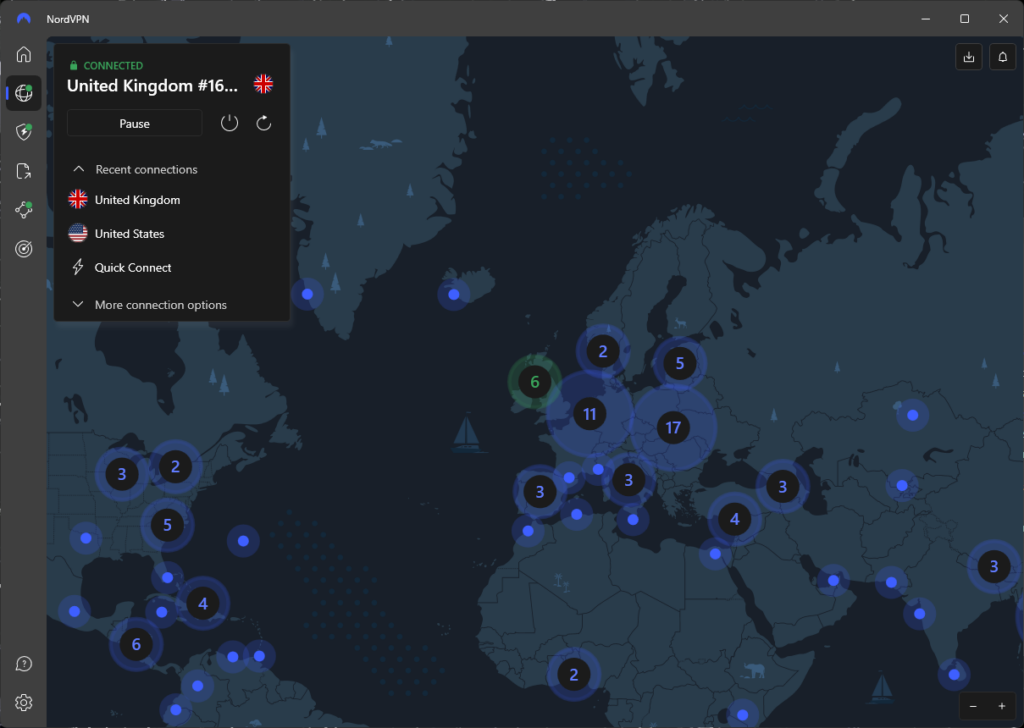
Step 4. Visit a free World Cup broadcasting platform
With your VPN securely connected, head to the official free 2026 World Cup broadcasting site of your choice. Now you should be able to livestream the event without any blocks or errors.
However, if you’re still seeing an incompatible geolocation message, you may want to delete your browser cookies and cache. Stored browser data may expose your real location even with a VPN connection. Delete it, reconnect to a VPN server, and try again.
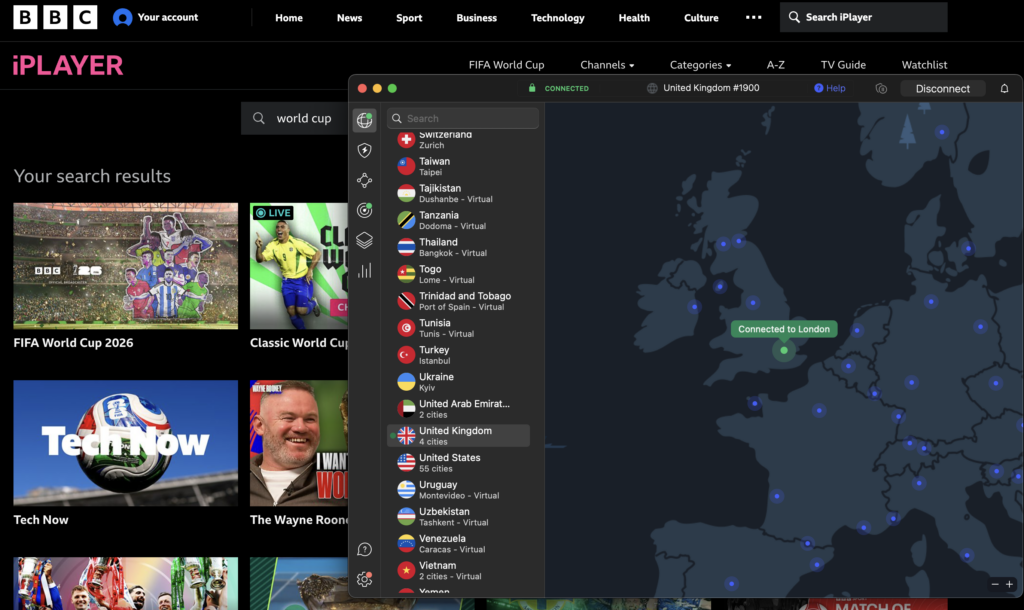
Can you watch the World Cup abroad?
Most free World Cup streaming platforms restrict access by location to protect their broadcasting rights and licensing agreements. Because of this, you may find your usual World Cup streaming service unavailable as streaming libraries live sports coverage, and available channels change when you cross a country border.
Although some services do work internationally, others may display geo-blocking messages or location errors when you try to access them from outside their licensed region. This can apply to both free and subscription-based platforms.
If you are currently traveling abroad and want to access your usual streaming service, a VPN may become very useful. The technology can route your connection through a server in your country, allowing you to access the site. However, keep in mind that availability may still vary depending on the streaming site’s policies and technical measures. So, before you rely on a VPN to access content abroad, remember to check the platform’s terms of service and local regulations.
VPN not working with World Cup streaming services: troubleshooting guide
2026 FIFA World Cup free streaming platforms, such as BBC iPlayer, ITV, SBS On Demand, and RTÉ Player, use location monitoring measures to comply with broadcasting agreements. If a platform detects you are using a VPN, sees conflicting location information, or a connection coming from an unsupported region, it may block your access or display an error message.
Here are the steps you can take if your VPN is not working with World Cup streaming services:
- Switch to a different VPN server. Streaming services may blacklist and block specific IP addresses if they are known to be associated with VPNs. Connecting to a different server in the same location will provide a different IP address, solving this issue.
- Clear your browser cookies and cache. Stored browser data may expose your location even with a VPN connection. Clearing cookies and cache removes old data, allowing the VPN to work properly.
- Check your device’s location settings. Some apps and browsers use GPS, Wi-Fi, or device location data. If it doesn’t match your VPN location, the streaming platform may detect a discrepancy. In this case, disable the location settings and try again.
- Try a different browser or device. Browser extensions, stored cookies, or app settings can sometimes interfere with streaming. If you suspect this, try using another browser or device to stream the World Cup.
- Update your VPN app. VPN providers regularly update their networks and apps to improve reliability and compatibility with streaming services. Ensure you have the latest update installed and active.
- Contact customer support. If you tried all of the above, but the issue persists, contact your VPN provider’s customer support. They may recommend a specific server for you to try or troubleshoot the issue further.
Conclusion
Many broadcasters offer free livestreams of the 2026 FIFA World Cup, including BBC iPlayer and ITV in the UK, SBS On Demand in Australia, and RTÉ Player in Ireland. However, most of these streaming platforms are only available in their licensed regions, which means users trying to access livestreams from abroad may have their attempts blocked.
If you are currently traveling abroad and would like to access your usual free World Cup streaming platform, a VPN can become very useful. VPNs can route your connection to any country of your choice, including one where the World Cup is available to stream for free. From my experience, NordVPN is the best World Cup VPN, as it allows access to free FIFA livestreams from abroad without buffering or location errors.
Related articles:
- 10 best free football streaming sites
- How to watch BBC iPlayer abroad
- How to watch RTE in the UK
- How to watch ITVX outside the UK
- VPNs for accessing gambling sites during the World Cup 2026
- Free VPNs for Linux
FAQ
You can watch the FIFA World Cup 2026 in the US on Fox, Fox Sports 1, and Fox Sports 2 with English commentary, and on Telemundo and Universo with Spanish commentary. If you don’t have a cable, TV package, a subscription, or a currently traveling abroad and cannot access your preferred free World Cup streaming service, you can use a VPN, such as NordVPN to route your network traffic through a server in your home country.
Yes, the FIFA World Cup is streamed free on the CazéTV channel in Brazil. However, if you are currently outside of the country, you may find that the channel is geo-blocked due to your location. If you’d like to access the CazéTV YouTube channel from abroad, you can use a VPN, like NordVPN, to change your virtual location to Brazil via a server connection.
In the US, the World Cup 2026 will be broadcast on Fox, Fox Sports 1, and Fox Sports 2, as well as Telemundo and Universo. In the UK, the World Cup will be available for free on BBC iPlayer and ITVX, in Ireland on RTÉ Player, in Australia on SBS On Demand, and in many other countries. If you are currently traveling and would like to access your usual free World Cup streaming service, you can use a VPN, like NordVPN, to route your network through a server in your chosen country.
You can watch the World Cup for free on BBC iPlayer in the UK, RTÉ Player in Ireland, SBS on Demand in Australia, TVP Sport in Poland, NOS in the Netherlands, TRT World and tabii in Türkiye, CazéTV via YouTube in Brazil, and more. However, all of these free streaming sites are geo-restricted, and to access them abroad when traveling, you will need to use a VPN, such as NordVPN. Connect to a server in your preferred country, and your IP address will match it, allowing you to access your usual streaming sites from abroad.
NordVPN is the best VPN for World Cup 2026. The service reliably accesses popular free World Cup streaming sites, including BBC iPlayer and SBS on Demand, with no buffering or location errors. Additionally, thanks to its fast servers, livestreaming is very smooth. You can try NordVPN with the 3-day free trial or subscribe immediately risk-free with the 30-day money-back guarantee.