
- How to bypass NBA League Pass blackout with a VPN
- NBA League Pass blackout map
- How to watch out-of-market NBA games with a VPN on desktop
- How to get around NBA League Pass blackouts on mobile
- Why is NBA TV blocked in my area
- Check NBA blackouts by your IP location
- Steps to take if the NBA League Pass VPN isn’t working
- Our recommended VPNs for NBA League Pass
- Final thoughts
- FAQ
There are several ways you can watch blacked-out NBA games – by subscribing to a paid cable package on a regional sports network, streaming through national networks like ESPN or TNT, or by using a VPN to change your virtual location to bypass local blackouts on NBA League Pass. The NBA League Pass is the official NBA streaming service with live and on-demand out-of-market games. However, fans will still run into blacked-out games on NBA League Pass if a local or regional network owns exclusive rights to broadcast certain games in a specific location.
Luckily, you can bypass NBA League Pass blackouts using a VPN. The technology allows you to change your virtual location through a server connection in your chosen area, which will allow you to access all blacked-out NBA League Pass games. In this article, I’ll share my tips on using a VPN service to access NBA blackout games on laptops and smartphones and recommend the best NBA League Pass VPNs for a guaranteed restriction bypass.

How to bypass NBA League Pass blackout with a VPN
The only way to bypass NBA League Pass blackouts is by using a VPN to mask your IP address and appear to be in a different location where the game is available. This NBA blackouts workaround is perfect for desktops, but mobile devices may require a VPN with GPS spoofing capabilities.
- Subscribe to a reliable NBA League Pass VPN. I recommend NordVPN, now 75% off, as it has over 2,240 servers in the US alone.
- Download and install the VPN on your device.
- Launch the VPN and connect to a server where the NBA game you want to watch is not blacked out.
- Head to the NBA League Pass, sign up, and start streaming!
The NBA League Pass mobile app uses your phone’s GPS location to enforce blackouts, in addition to your IP address. A standard VPN service is not capable of preventing GPS detection. If you want to stream blackout NBA League Pass games on your mobile device, I recommend using a VPN with a built-in GPS spoofing function, such as Surfshark. Toggle the GPS spoofing feature in the Surfshark app’s advanced settings, and it will override your GPS location.
NBA League Pass blackout map
The NBA blackout games happen due to a local or national TV network owning exclusive rights to air certain NBA games in specific areas. For instance, local affiliates or networks, such as ESPN, TNT, ABC, and NBA TV, may have particular broadcast deals with local NBA teams to air their games. Because of this, NBA League Pass blocks live streams of games airing in your region, even if you have a fully paid subscription to the League Pass platform. Naturally, these NBA blackouts are very frustrating to the fans as they often miss their local team’s live games on League Pass.
This NBA blackout map highlights regions where local games are unavailable on League Pass:

Here’s how to read the NBA League Pass blackout map: if a city is shaded for the Celtics, it means viewers there can’t watch live Celtics games on NBA League Pass. However, the blackout zones don’t always match the state borders, so it is always a good idea to check this visual guide when picking the correct VPN server to bypass the blackouts.
Overall, using a VPN to bypass NBA League Pass blackouts is a very straightforward process. To change my location to avoid the blackout zone, I only had to pick the correct server, connect to it, and it instantly masked my real location. This made the NBA League Pass think I was accessing the live games from an entirely different location, which allowed me to watch the otherwise restricted games. However, I also found that it is essential to use only the best VPNs for the NBA, as poorer quality services can get detected by the platform and are not capable of bypassing the blackouts.
How to watch out-of-market NBA games with a VPN on desktop
Watching out-of-market NBA games with a VPN on a desktop or a laptop is a very straightforward process that does not require a lot of additional steps, as you’d typically use the NBA League Pass. In a nutshell, all you need to do is subscribe to NBA League Pass, choose a VPN, connect to a server outside the blackout area, and start streaming.
Step 1. Subscribe to NBA League Pass
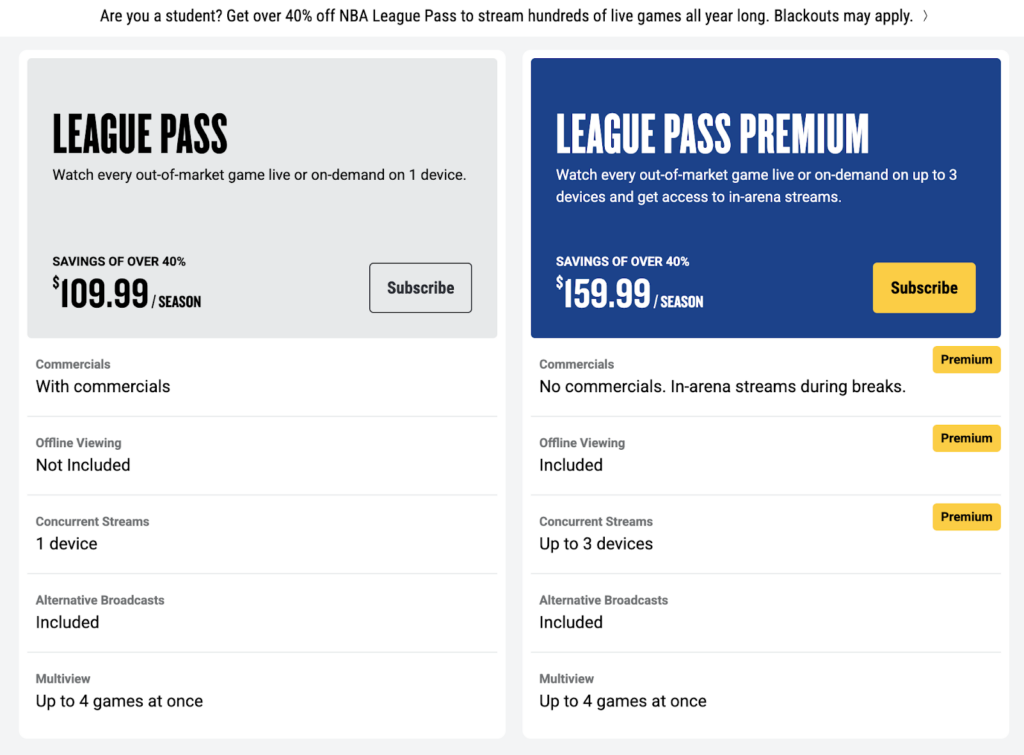
To begin with, you will need to have an active NBA League Pass account. The League Pass Standard subscription costs $16.99/month or $109.99/season and gives access to live out-of-market games. The Premium subscription stands at $24.99/month or $159.99/season and includes DVR quality, and allows downloading the games to watch offline. The NBA League Pass usually covers every out-of-market live game, but local teams are always blacked out, which is why using a VPN service is necessary to watch the blackout games.
Step 2. Select and install a reliable VPN
To have guaranteed access to NBA League Pass blackout games, make sure to choose a VPN known to work with the service. When selecting, prioritize high connection speeds, a wide server network, and strong encryption to bypass League Pass VPN detection. From my experience, I can recommend NordVPN as the best NBA League VPN, as it has thousands of servers in the US and has proven to unblock NBA live streams during the time I’ve used it.
NordVPN is the best NBA League Pass VPN as it has over 2,240 servers in the US, which makes it easy to change your virtual location to avoid blackout restrictions. Additionally, the service has the fastest connection speeds for smooth live streaming and uses AES-256 encryption to stay undetected.

Step 3. Connect to a server outside your region
Once you’ve subscribed to a VPN service and installed the app, launch it and connect to a US server in a different state or market than your local team, where the game is not blacked out. After you’ve connected to your chosen server, your IP address will reflect that location, effectively masking your real one. For instance, if you are in Los Angeles and want to stream a Lakers game, which is blacked out for LA IP addresses on NBA League Pass, connect to a server in New York or Chicago, and the NBA platform will think you’re accessing the live stream from there. If League Pass still blocks you, simply try another server in the same US location or a neighboring state, since some IP ranges may get flagged and blocked by the streaming service.
Lastly, you may want to clear your browser cookies and cache, as the stored data may expose your real location even through a VPN connection.
Step 4. Open NBA League Pass and stream the game
With the VPN connected, head to nba.com or open the League Pass app in your browser. Now, you should have full access to live games without the restrictions of local blackouts. Select the game you want to stream and enjoy unrestricted streaming!
How to get around NBA League Pass blackouts on mobile
On mobile devices, such as smartphones or tablets, League Pass can use GPS to verify your location. This means that using a VPN only, which changes your IP address but not your GPS location, may not be enough to bypass NBA blackouts. However, to avoid this, you can disable your device’s location services so the NBA app only sees your VPN server-assigned IP address, or use a VPN with built-in GPS-spoofing. For instance, some VPNs, such as Surfshark, have a GPS Override feature.
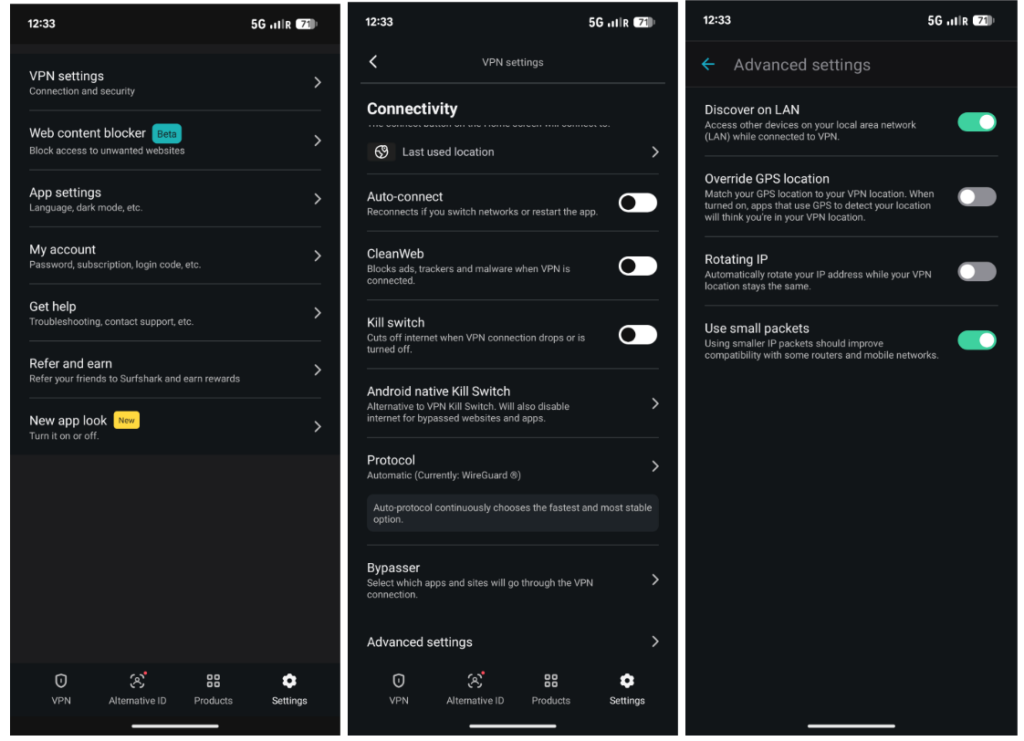
Here’s a breakdown on how to get around the NBA League Pass blackouts on mobile using a VPN with a built-in GPS spoofer:
- Choose a reliable VPN with a built-in GPS spoofing feature. I recommend using Surfshark, as it has a GPS Override feature and works great at bypassing NBA blackouts.
- Download and install the VPN app on your device.
- Launch the app and turn on the Override GPS Location feature. This will match your GPS location to the VPN server you are connected to.
- Connected to a VPN server in a location where blackout restrictions do not apply.
- Clear your device’s cache to prevent the exposure of your real location.
- Open the NBA League Pass app, log in, and start streaming!
Why is NBA TV blocked in my area
NBA TV, a cable network included in the League Pass package, is subject to the same blackout rules as the NBA League Pass. If your local team’s game is airing on NBA TV or any local or regional network, League Pass will black it out in your area. For instance, if the Dallas Mavericks game is on NBA TV and you live in Texas, League Pass will display a blackout notice because local broadcast rights apply.
The NBA TV blackout restrictions are not a bug, but a policy that applies all over the US, and not only in your specific location. The restrictions are there to protect the broadcasters’ exclusive rights to air certain games, so the blackouts on NBA TV are expected behavior under the NBA’s rules.
However, a VPN can help you bypass NBA TV blackouts by changing your virtual location. All you have to do is pick a reliable NBA VPN, connect to a server outside the blackout area to mask your location, and unlock the otherwise blocked games.
Check NBA blackouts by your IP location
The League Pass determines your location by checking your IP address for desktop devices or your GPS on smartphones and tablets. To see which games are blacked out in your location, you can use tools or official NBA blackout checkers.
For example, the NBA site allows you to check blackout restrictions by zip code. If you head to the official NBA League Pass purchase site and enter your zip code, you will get detailed information on blackouts applicable to you. However, to make it easier for you, I created a table with NBA blackout checker information on IP location, all in one place:
| IP address location | NBA blacked out team | Recommended VPN server location |
|---|---|---|
| Arizona | Phoenix Suns | Nevada or Oregon |
| California | Golden State Warriors, Los Angeles Lakers, LA Clippers, Sacramento Kings | Oregon or Washington |
| Colorado | Denver Nuggets | Utah or Kansas |
| Florida | Miami Heat, Orlando Magic | Georgia or South Carolina |
| Georgia | Atlanta Hawks | Florida or North Carolina |
| Illinois | Chicago Bulls | Indiana or Wisconsin |
| Louisiana | New Orleans Pelicans | Texas or Mississippi |
| Massachusetts | Boston Celtics | New York or Pennsylvania |
| Michigan | Detroit Pistons | Ohio or Indiana |
| Minnesota | Minnesota Timberwolves | Iowa or Wisconsin |
| New York | New York Knicks, Brooklyn Nets | Pennsylvania or Massachusetts |
| North Carolina | Charlotte Hornets | South Carolina or Georgia |
| Ohio | Cleveland Cavaliers | Pennsylvania or Michigan |
| Oklahoma | Oklahoma City Thunder | Texas or Kansas |
| Oregon | Portland Trail Blazers | Washington or California |
| Pennsylvania | Philadelphia 76ers | New Jersey or New York |
| Tennessee | Memphis Grizzlies | Kentucky or Alabama |
| Texas | Dallas Mavericks, Houston Rockets, San Antonio Spurs | Oklahoma or New Mexico |
| Utah | Utah Jazz | Colorado or Nevada |
| Wisconsin | Milwaukee Bucks | Illinois or Minnesota |
| District of Columbia (DC) | Washington Wizards | Virginia or Pennsylvania |
| Toronto (Canada) | Toronto Raptors | Anywhere in the US, for instance, New York |
| Iowa (no home team) | Chicago Bulls, Milwaukee Bucks, Minnesota Timberwolves, Oklahoma City Thunder, Denver Nuggets, Memphis Grizzlies | Oregon or New York |
| Nebraska (no home team) | Denver Nuggets, Oklahoma City Thunder, Minnesota Timberwolves | Illinois or Colorado |
| Kansas (no home team) | Oklahoma City Thunder, Denver Nuggets | Missouri or Illinois |
| Nevada (no home team) | Golden State Warriors, Sacramento Kings, Los Angeles Lakers, LA Clippers, Phoenix Suns | Oregon or Washington |
| New Mexico (no home team) | Phoenix Suns, Oklahoma City Thunder, Denver Nuggets, Dallas Mavericks, San Antonio Spurs | Oregon or New York |
| Alaska (no home team) | Occasionally affected by West Coast blackouts (Warriors/Lakers region) | New York or Florida |
To live stream your NBA team’s games online on League Pass, simply connect to a VPN server in one of my recommended locations. For instance, if your location shows the Celtics game as blacked out, connect to a location outside Boston’s market, such as New York or Pennsylvania.
Steps to take if the NBA League Pass VPN isn’t working
Sometimes, a VPN IP address may get detected by the NBA League Pass, which will cause the service not to work properly with the streaming platform. If League Pass blocks you, try connecting to another VPN in the same location, and it may fix the issue.
If you run into an issue while using the NBA League Pass, you are likely to see an error message and a code on your screen. Here are some of the most often NBA League Pass error codes and what they mean:
- Error 7027 (Out of Country block) means the VPN IP address was detected. If that’s the case, try connecting to a different server in the same location.
- Error 3312 (Still in Blackout) means your IP address is still in a blackout zone. If that’s the case, try another server in a different location where blackouts to your home team do not apply.
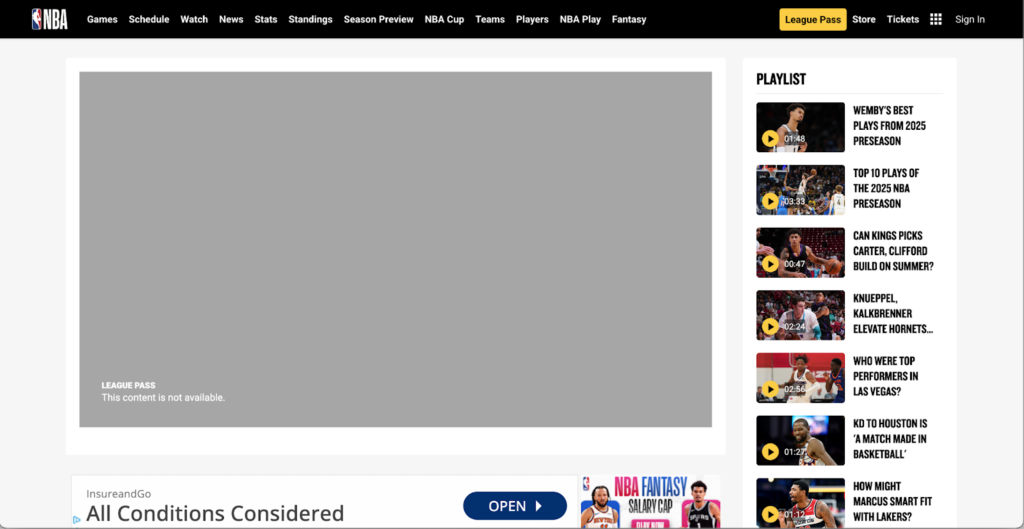
If the error codes keep appearing even though you are connected to a VPN, here are additional steps you can take if your VPN is still not working with League Pass:
- Restart your VPN app. Sometimes a simple reconnection solves temporary issues.
- Use incognito mode or clear browser data. Clear cookies and cache or use private browsing mode, as the stored data may expose your real location.
- Check VPN settings. If problems persist, try changing the VPN tunneling protocol. For instance, reset to the default protocol or select WireGuard instead of OpenVPN.
- Check if obfuscation is in use. Try toggling on the Obfuscation mode if your VPN has it, as it may make it easier to bypass League Pass VPN detection methods.
However, if you keep running into issues with your current VPN service, it may be time to upgrade to a premium NBA VPN. I recommend trying NordVPN, as it has never let me down in bypassing NBA blackouts and giving me a great live stream experience.
Our recommended VPNs for NBA League Pass
-
1.NordVPN: This is the best NBA League Pass VPN overall, offering over 2,240 servers in the US with incredibly fast NordLynx protocol speeds. Additionally, NordVPN ensures easy access to any team’s games, thanks to robust encryption and security features.
-
2.Surfshark: This excellent NBA VPN has over 600 servers in 22 US cities, perfect for avoiding blackouts. Additionally, Surfshark has fast WireGuard speeds, offers unlimited device connections and affordable subscriptions, making it a great budget-friendly choice.
-
3.Proton VPN: A Privacy-first VPN with strong security features and thousands of servers in the US. Proton VPN makes a great NBA League Pass VPN choice, easily handling HD live streams with its premium plans.
Final thoughts
Although NBA League Pass is the go-to platform for live NBA out-of-market games, fans will still run into blackout restrictions when trying to stream their home team’s games. However, blackouts are not an issue if you use a good NBA VPN to bypass the restrictions and enjoy an uninterrupted live streaming experience of all NBA games.
For the best experience and guaranteed NBA League Pass blackouts bypass, make sure to choose only a tried-and-tested NBA VPN with fast connection speeds and plenty of US servers. From my experience, NordVPN is the overall best NBA League Pass VPN, thanks to its blackouts bypass capabilities and fast servers in the US for an easy location change.
You may also want to read:
- How to watch NBC Sports online
- How to watch NHL blackout games
- Best VPN for MLB TV
- How to watch WWE live from anywhere
FAQ
Yes, NBA League Pass has blackouts. The restrictions appear when a local or regional broadcaster owns the rights to air specific NBA teams’ games in a certain area, making them unavailable on League Pass. Luckily, you can avoid NBA blackouts by using a VPN, like NordVPN, to change your location. Simply connect to a server outside the blackout zone, and it’ll make the League Pass think you’re accessing the live stream from an unrestricted area.
The NBA League Pass has blackouts to protect the local or regional networks that own the rights to air your home team’s games. However, you can bypass the blackouts by using a VPN to change your virtual location and access the live streams as if from outside your home market. Simply get a reliable VPN, like NordVPN, connect to a server in an area with no NBA blackouts, and stream the games without restrictions.
There isn’t a single mainstream NBA streaming service without regional blackouts. To avoid this, you can avoid blackouts by using services that include national broadcasts. However, the easier way to bypass NBA blackouts is by using NBA League Pass and a VPN service to change your virtual location. Get a reliable NBA VPN, like NordVPN, connect to a server outside the blackout restrictions zone, head to NBA League Pass, and stream the game.
You can watch out-of-market NBA games without DirecTV by subscribing to NBA League Pass, which offers live out-of-market games. However, home team games will still be blacked out on the League Pass. To avoid this inconvenience, use a VPN, like NordVPN, to change your virtual location anytime you run into blackouts, to enjoy unrestricted access to live NBA games.
Yes, NBA TV has blackouts that occur when you try to stream your home team’s game. You can bypass these blackouts and stream all NBA games by using a VPN to change your location. Choose a solid NBA VPN, like NordVPN, connect to a server outside of your home market, and stream the otherwise blacked out games on NBA TV.
No, free VPNs are not capable of bypassing NBA League Pass blackouts. Such services usually have only a few available servers with IP addresses often blacklisted by League Pass. Additionally, free VPNs have poor connection speeds unsuitable for streaming and fewer security features to bypass any restrictions. Instead of using a poor-quality free VPN, try using a premium one, like NordVPN or Surfshark, and take advantage of the free trials and money-back guarantees to use the services for a limited time for free.