- Top 5 VPNs for ESPN Plus: shortlist
- Does ESPN+ work with a VPN?
- Best ESPN+ VPNs in 2026: detailed list
- Compare best VPNs for ESPN+
- Does ESPN block VPN?
- Is it legal to watch ESPN with a VPN?
- 6 fixes for ESPN+ not working with a VPN
- How to get around blackouts on ESPN+?
- How to watch ESPN without cable?
- Our VPN testing methodology
- Final tips
- FAQ
ESPN+ is a US-based streaming service that uses geo-restrictions to block IP addresses from other countries and adhere to its licensing and distribution agreements. As a result, users outside the US can encounter messages stating that content is unavailable. This can even impact viewers inside the US trying to access NFL, UFC, or other sports streams subject to blackout restrictions.
Thankfully, choosing a reliable ESPN+ VPN can help you bypass geo-blocks and access ESPN+ from anywhere in the world. Connecting to a US VPN server changes your IP address and makes it look like you’re located in the United States. This unblocks the platform and live sports streams, even if you’re in Europe or Asia.
But note that ESPN and ESPN+ services actively block VPN usage to enforce their regional content restrictions. The services use techniques like deep packet inspection (DPI) to detect and block VPN traffic, and they blacklist known VPN IP addresses. This is why it’s crucial to choose a tried-and-tested VPN with powerful obfuscation software that disguises your VPN traffic.

Top 5 VPNs for ESPN Plus: shortlist
After testing 23 premium VPN services with ESPN+, NordVPN, Surfshark, Proton VPN, IPVanish, and ExpressVPN excelled above the competition as the best VPNs for ESPN+. Each offers robust unblocking and anonymity features, and fast HD and 4K streaming speeds for sports and other content.
Does ESPN+ work with a VPN?
Yes, ESPN+ can work with a VPN, but it’s not guaranteed because ESPN+ actively detects and blocks VPN traffic. It does so to ensure that it isn’t breaking its licensing agreements by airing content to people outside of the US. To make sure your VPN works with ESPN+, it’s important to choose a reliable VPN service that has the right features needed to bypass these strong geo-restrictions and VPN detection software.
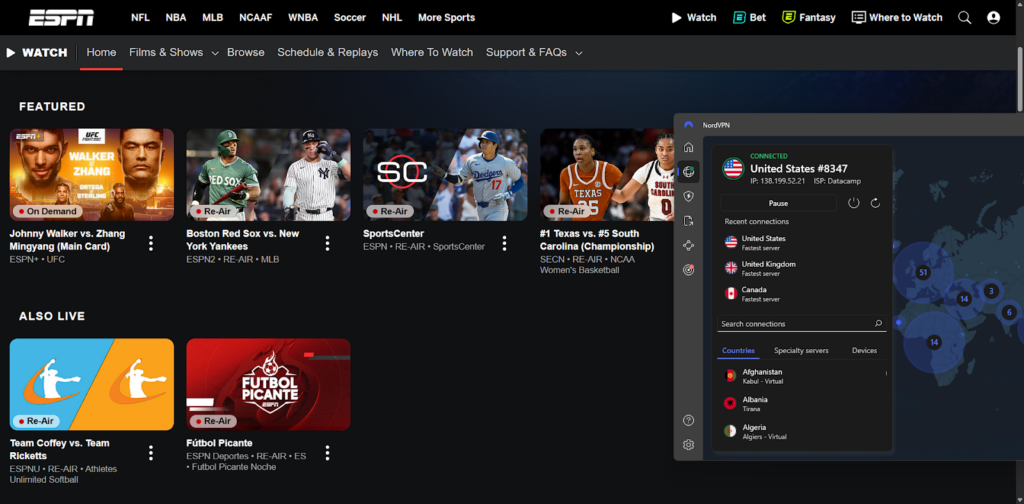
Following my tests with 23 premium VPNs, I recommend using NordVPN as the best VPN for ESPN+. NordVPN has obfuscated servers that disguise your VPN traffic to look like regular internet traffic. This is how I was able to evade ESPN’s VPN detection software and unblock the website outside the US.
How to use a VPN with ESPN+
- Choose a reliable VPN for ESPN+. I recommend NordVPN for its obfuscated servers and high-speed HD and 4K streaming speeds.
- Install the VPN app on your streaming device.
- Log into your account or create one via the dashboard.
- Connect to a VPN server in the US.
- Go to ESPN+ and you should be able to stream sports, even if outside the US.
Best ESPN+ VPNs in 2026: detailed list
To find the best ESPN+ VPNs, I tested each potential service for its unblocking power, speed, security, and privacy. I also verified whether each VPN had obfuscation features to offer the best chance of bypassing ESPN+ blocks. While testing, I encountered many ESPN errors due to weak VPN IP-masking software, which led me to the following conclusions about which VPNs work with ESPN+:
| VPNs that work with ESPN+ | VPNs that don’t work with ESPN+ |
|---|---|
| 1. ✅ NordVPN | 1. ❌ Mullvad VPN |
| 2. ✅ Surfshark | 2. ❌ Private Internet Access |
| 3. ✅ Proton VPN | 3. ❌ TunnelBear |
| 4. ✅ IPVanish | 4. ❌ VyprVPN |
| 5. ✅ ExpressVPN | 5. ❌ CyberGhost |
NordVPN, Surfshark, Proton VPN, IPVanish, and ExpressVPN worked best with ESPN+, reliably bypassing geo-blocks outside the US and sports blackouts within the US.
Top 1. NordVPN: best overall VPN for ESPN+
- Rating: 9.3 ⭐⭐⭐⭐⭐
- Works with ESPN+?: ✅ Yes
- US servers: 2,870+ servers in 50 states
- Current deal: Get NordVPN, now 75% off!
NordVPN is the overall best VPN for ESPN+ due to a huge US server network, powerful obfuscation for easy unblocking, and the fastest streaming speeds. With NordVPN’s anonymity features, I bypassed ESPN geo-blocks during my tests using a fleet of 2,870+ US VPN servers. This expansive server fleet also makes blacklisting rare and ensures congestion won’t slow speeds. In total, NordVPN’s worldwide server network comprises 8900 servers in 149+ countries.
During my tests, NordVPN’s connection speeds exceeded 700 Mbps while connected to a US VPN server. NFL and NHL streams loaded for me in HD and 4K without any lag or buffering. Even without obfuscated servers, NordVPN’s extensive US server fleet allowed me to bypass ESPN+ restrictions in many different locations across the US. This included bypassing sports blackouts in affected states.
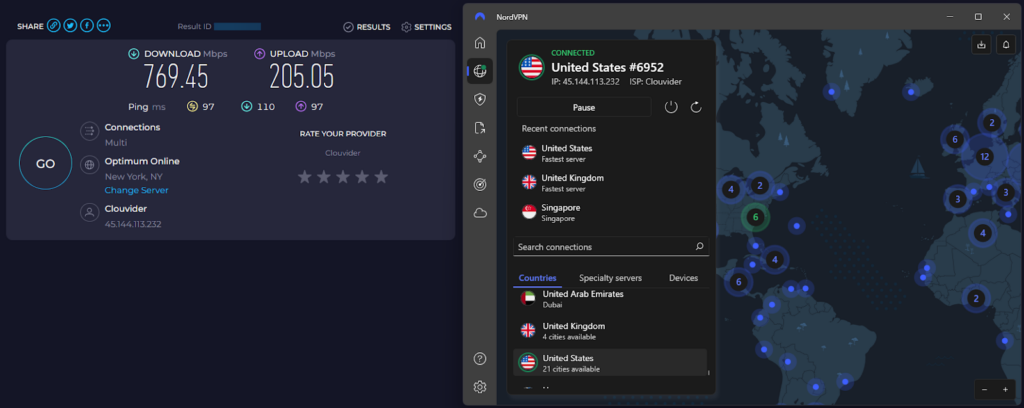
NordVPN is adept at avoiding ESPN’s VPN detection software. Built-in leak protection and a kill switch effectively hide your IP address while connected. Once I connected to a US server, I never saw error messages so long as my VPN remained connected. NordVPN’s strict no-logs policy has also been independently audited and guarantees your data and activity won’t be tracked.
NordVPN is compatible with every major OS, including Windows, macOS, Linux, Android, and iOS. I tested each of these operating systems, and performance and ESPN+ unblocking capabilities on every device was consistent. What’s more, I noticed you can get a 3-day free trial of NordVPN if you download the official Google Play Store app. But all platforms have access to a 30-day money-back guarantee for risk-free testing, and pricing starts at $ 3.49/month.
What I liked
- Fastest HD streaming speeds for ESPN
- 2,870+ US VPN servers
- Obfuscated servers to avoid detection
- Built-in kill switch and leak protection
What I didn’t like
- Max 10 simultaneous connections
- Free trial only available on Android
Top 2. Surfshark: most affordable ESPN Plus VPN
- Rating: 9.0 ⭐⭐⭐⭐⭐
- Works with ESPN+?: ✅ Yes
- US servers: 600+ servers in 24 cities (19 states)
- Current deal: Get Surfshark, now 85% off!
Surfshark is the best VPN for ESPN+ for those on a budget, still offering fast speeds across unlimited simultaneous connections. Surfshark’s fleet of 4500 VPN servers in 100+ countries, including 600 in the US, makes it easy to find high-speed connections. Based on my tests, these can bypass sports blackouts and evade ESPN’s geo-blocks. While smaller than NordVPN’s US presence, it gave me plenty of options to connect from different states.
Surfshark’s speeds averaged 428 Mbps during my tests, averaged across 10 international VPN servers. Sports streams on ESPN+ loaded in HD and 4K without any lag, allowing me to stream NFL and UFC outside the US in my test circuit. I also noted that Surfshark has rotating IP addresses, which can help you avoid server blacklisting that can lead to blocks.
Surfshark’s Camouflage Mode is also an obfuscation feature that helps to evade ESPN+ blocks. I recommend this to anyone living in restrictive regions or trying to access ESPN on a network that has content or VPN filtering, as it disguises your traffic to look like regular traffic. I also noted that Surfshark provides dedicated IP addresses for an extra charge, helping you to avoid congestion and blacklisting more easily. Surfshark also has a GPS spoofing feature for Android, which can help avoid mobile device geolocation.

I tested Surfshark on all its compatible platforms, including Windows, macOS, Linux, iOS, and Android. The free trial is a little more generous, with 7 days free for up to 3 devices. There’s also a 30-day money-back guarantee, and pricing impressed me, starting at just $ 2.49/month.
What I liked
- Unlimited simultaneous connections
- Camouflage Mode to avoid detection
- Cheapest VPN to bypass ESPN+ blocks
- Up to 428 Mbps average test speeds
What I didn’t like
- Fewer US servers than NordVPN
- Dedicated IPs cost extra
Top 3. Proton VPN: highly secure VPN for streaming ESPN+ anywhere
- Rating: 8.9 ⭐⭐⭐⭐⭐
- Works with ESPN+?: ✅ Yes
- US servers: 6,015+ servers in 22 cities
- Current deal: Get Proton VPN, now 70% off!
Proton VPN is a top ESPN+ VPN as it has a truly-free and unlimited subscription tier, as well as around 6,015+ servers in the US. Premium users get full access to 20700 servers in 149+ countries, though the free tier also includes connections in the United States. That said, I recommend choosing Premium if you want to stream on ESPN+, as free tier speeds are slower and you’re unlikely to be able to unblock ESPN+ with the free connection.
Proton VPN’s Premium speeds averaged 428 Mbps during my speed test circuit with Ookla Speedtest. This gave me uninterrupted, lag-free streams in both HD and 4K when I unblocked ESPN+ and accessed NHL, NFL, and UFC streams. Proton VPN’s entire server network consists of Secure Core servers that use privacy-friendly routing options in Switzerland, ensuring your data and activity remain hidden.

During my tests with Proton VPN, ESPN+ never detected my true location. A built-in kill switch and IP and DNS leak protection kept my true location secure while the VPN was connected. I tested both during my review, and Proton VPN kept my location hidden at all times with no IP leaks.
Proton VPN supports all major operating systems, including macOS, Windows, iOS, Android, and Linux. While there’s no free trial available alongside the free version, new users get a 30-day money-back guarantee to test the service. Pricing is a little steeper than competitors at around price $ 2.99/month.
What I liked
- Unlimited free subscription tier
- 6,015+ US VPN servers for ESPN+
- Strong HD and 4K streaming speeds
What I didn’t like
- Free US connection commonly blacklisted
- Free speeds are slower
Top 4. IPVanish: reliable VPN to bypass ESPN+ blackouts
- Rating: 8.5 ⭐⭐⭐⭐
- Works with ESPN+?: ✅ Yes
- US servers: 1,500+ servers in 23 US cities
- Current deal: Get IPVanish, now 85% off!
IPVanish is a reliable VPN for ESPN+ thanks to a strong US presence with numerous servers to choose from and high-speed connections on unlimited devices. In total, IPVanish has 3400 servers in 113 countries, with 1,500+ of those servers in the US. I was easily able to bypass ESPN+ blockades and sports blackouts using these servers.
IPVanish’s speeds averaged around 460 Mbps during my tests, which made it easy to stream the Premier League, NFL, and other sports in HD. With unlimited simultaneous connections, IPVanish can also be used across mobile and desktop simultaneously. Using the OpenVPN protocol, I also had access to the powerful Scramble obfuscation feature, which ensured I stayed hidden.
Privacy and security wise, IPVanish keeps your location hidden with tried-and-tested IP and DNS leak protection, and a built-in kill switch. Throughout my tests, I didn’t see an ESPN+ blocked message, and I could access NFL, NHL, UFC, and other sports events without getting disconnected. It also has an audited no-logs policy for peace of mind. My only drawback was that IPVanish is headquartered in the US, a Five-Eyes country.
With fast speeds and robust unblocking power, IPVanish is suited to Windows, macOS, Android, and iOS users. There’s a 7-day free trial for mobile devices, and you can get a 30-day money-back guarantee too. After that, IPVanish pricing starts at $ 2.19/month.
What I liked
- Unlimited simultaneous connections
- Scramble feature helps evade detection
- Fast streaming in HD and 4K
What I didn’t like
- Smaller server network than competitors
- US-based jurisdiction isn’t privacy friendly
Top 5. ExpressVPN: user-friendly VPN for streaming sports on ESPN+
- Rating: 8.5 ⭐⭐⭐⭐
- Works with ESPN+?: ✅ Yes
- US servers: Undisclosed number of servers in 62 US locations
- Current deal: Get ExpressVPN, now 80% off!
ExpressVPN is one of the best VPNs for ESPN+ because it offers lightning-fast speeds and a beginner-friendly app to unblock ESPN+. While pricier than competitors, ExpressVPN’s long track record has led to a highly usable app with optimized connections for unblocking ESPN+ and other sites.
ExpressVPN offers very fast streaming speeds that averaged 455Mbps during my tests. This is supported by the proprietary Lightway VPN protocol, which is highly secure and ensures lag-free HD and 4K streaming. I could unblock and access streams like NFL, NHL, and MBA from abroad without being detected or blocked. The only drawback of note is that despite a premium price tag, ExpressVPN’s server network covers 3000 servers in 113 countries, fewer than more affordable competitors.
ExpressVPN’s interface impressed me, offering a simple but powerful dashboard that’s approachable to even VPN beginners. One-click connections can get you a US IP address that unblocks ESPN+ in seconds, and features like leak protection and a kill switch ensure that you aren’t detected and blocked by ESPN for using a VPN.
You can get ExpressVPN apps on Windows, macOS, Android, iOS, and Linux. ExpressVPN also supports router installations to connect your smart TV and watch the NHL and NFL on your smart TV if it lacks a native app. There’s also a 3-day free trial on mobile, while new ExpressVPN subscribers can fall back on a 30-day money-back guarantee. Pricing starts from $ 2.99/month for the basic plan.
What I liked
- Simple, beginner-friendly dashboard app
- Lightning-fast streaming connections
- US servers can unblock ESPN+
- MediaStreamer Smart DNS for non-native devices
What I didn’t like
- Most plans pricier than competitors
- Up to 8 simultaneous connections
Compare best VPNs for ESPN+
| VPN for ESPN Plus | Rating | Works with ESPN+? | Servers in US | Speed | Simultaneous connections | Price |
|---|---|---|---|---|---|---|
| 1. NordVPN | 9.3 ⭐⭐⭐⭐⭐ | ✅ Yes | 2,870+ servers in 50 states | Very fast | 10 | From $ 3.49/month |
| 2. Surfshark | 9.0 ⭐⭐⭐⭐⭐ | ✅ Yes | 600+ servers in 24 cities (19 states) | Very fast | Unlimited | From $ 2.49/month |
| 3. Proton VPN | 8.9 ⭐⭐⭐⭐⭐ | ✅ Yes | 6,015+ servers in 22 cities | Fast | 10 | From $ 2.99/month |
| 4. IPVanish | 8.5 ⭐⭐⭐⭐ | ✅ Yes | 1,500+ servers in 23 cities | Fast | Unlimited | From $ 2.19/month |
| 5. ExpressVPN | 8.5 ⭐⭐⭐⭐ | ✅ Yes | Undisclosed numbers of servers in 62 locations | Very fast | 8 | From $ 2.99/month |
Can I use a free VPN for ESPN Plus?
You can use a free VPN for ESPN Plus, but it’s unlikely to work as most free VPNs lack necessary security features, offer poor speeds, or harvest user data. I tried using Proton VPN’s free tier for ESPN+ and couldn’t unblock the platform. The more limited server choice meant that the only available US connection had already been identified and blocked. This is why you need a reliable VPN with a vast server network to succeed.
Instead of relying on a free VPN for ESPN+, I recommend choosing NordVPN or Surfshark and utilizing the 30-day money-back guarantee available from both. NordVPN offers a 3-day free trial for Android via the Google Play Store, while Surfshark has a 7-day free trial for up to 3 devices through its official site. With these deals, you can use a premium VPN for ESPN+ for over a month risk-free.
Does ESPN block VPN?
ESPN constantly monitors for VPN usage using techniques like deep packet inspection (DPI) to detect and block VPN services. When the service detects a VPN connection, it can then add the VPN server’s IP address to a blacklist, preventing future connections. This means that a reliable ESPN+ VPN needs strong obfuscation to disguise VPN traffic, and it needs to routinely update its IP addresses to avoid blacklisting.
NordVPN is exceptionally good at evading such blocks, as it uses obfuscated servers to disguise VPN traffic. It also refreshes its IP addresses regularly and offers thousands of US server options, making it harder for ESPN+ to detect and block its connections. This is why NordVPN ranks at the top of our best ESPN+ VPNs list, though Surfshark also offers a rotating IP address feature, making it a solid second choice.
Is it legal to watch ESPN with a VPN?
It’s not illegal to unblock and watch ESPN+ with a VPN, and in the vast majority of countries, VPNs are legal. However, using a VPN with ESPN+ is against the platform’s Terms of Service. If you’re detected, there is a small chance that ESPN could suspend your account for breaking its rules. This carries no legal consequences, but it can be frustrating. That’s why it’s essential to choose one of the best VPNs for ESPN+ that has powerful anti-detection software, like NordVPN. Throughout my tests, none of my recommended VPNs were detected or blocked.
6 fixes for ESPN+ not working with a VPN
If you get the “ESPN+ isn’t available in your region” error with a VPN, there are several quick solutions you can try to bypass the problem.
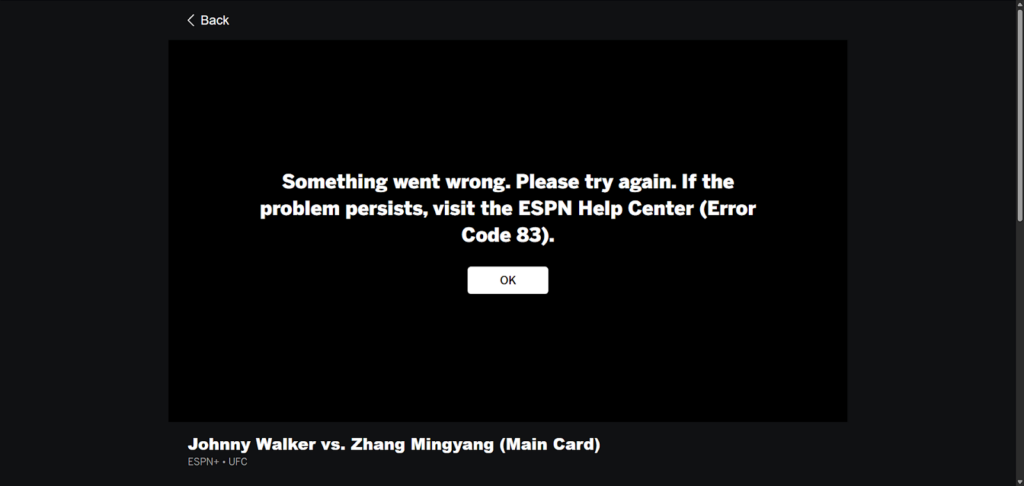
Here’s what to do if ESPN+ isn’t working with your VPN:
- Change servers: Try a different US server, as yours may have been blacklisted.
- Clear your browser’s cookies and cache: Old location data in your browser or app can give away your true IP address.
- Enable obfuscation: Try using your VPN’s obfuscated servers or features to disguise your VPN traffic.
- Update your VPN app: Outdated apps could be missing key features and result in a lower chance of succeeding.
- Try a different VPN protocol: While WireGuard is typically fastest, OpenVPN or your VPN’s proprietary protocol may resolve the issue.
- Contact your VPN’s support: Support usually responds quickly, and you should be able to resolve your issue this way if all else fails.
Remember, I was able to bypass ESPN+ restrictions in every instance using NordVPN, Surfshark, Proton VPN, IPVanish, and ExpressVPN. Choosing one of these recommended VPNs means that any issues you encounter will be resolvable.
How to get around blackouts on ESPN+?
ESPN+ uses a blackout policy that means some live games won’t be available in your area due to regional broadcasting rights. If you try to watch a blacked-out game, you’ll see a message telling you the stream isn’t available in your location. The easiest way to bypass this is by using a VPN to change your IP address to a location where the game is accessible.
- Choose a reliable ESPN+ VPN like NordVPN, which has a broad US server network and the most reliable unblocking power.
- Download and install the VPN app.
- Connect to a server in a US city where the game isn’t restricted.
- Open ESPN+ in your browser and start streaming.
Unblocking ESPN+ is more complicated on a mobile device. The mobile app enforces GPS location tracking, which means it can work out your true position even on a VPN connection. So, you need to combine a GPS spoofer with a VPN, which will trick ESPN+ into thinking your phone is located within the US too. Based on my tests, Surfshark is the best VPN for ESPN+ if you need GPS spoofing.
- Install the Surfshark app and log in or create an account.
- Enable the GPS spoofing feature in Surfshark’s settings.
- Connect to a US city outside of the blacked out states.
- Launch the ESPN+ app to stream without blackout restrictions.
Note:
Surfshark’s GPS spoofing feature only works on Android, so if you’re an iOS user, you’ll have to get a reliable third-party GPS spoofing tool. Based on testing, I recommend choosing an app like FakeGPS in combination with NordVPN or Surfshark.
Can you watch NFL on ESPN+?
Yes, though ESPN+ doesn’t stream every NFL game. Typically, I could find out-of-market games, highlights, and analysis breakdowns during my tests. What’s more, local NFL blackouts apply on ESPN+, so you’ll need a VPN like NordVPN to bypass restrictions and increase your access to live content on ESPN.
Can you watch Monday Night Football on ESPN Plus?
No, Monday Night Football isn’t on ESPN+ and instead is shown on ESPN’s main cable TV network. You’ll need an active ESPN subscription or a subscription to a platform like YouTube TV or Hulu + Live TV to watch Monday Night Football online. A VPN won’t solve this issue, but it can help to unblock YouTube and Hulu from outside the US.
Can you watch UFC on ESPN+?
Yes, you can watch UFC on ESPN+ as it is the exclusive holder of rights to UFC events in the US. This means you can unblock ESPN+ with a VPN to access streams for Fight Nights and PPV events, though blackouts may apply. Use a VPN like NordVPN to bypass blackouts by connecting to a US city outside of the blackout catchment area.
How to watch ESPN without cable?
ESPN’s service isn’t just available on ESPN+, as the network partners with other streaming services to provide access. However, all of these services are region-locked to the US. Here’s a full list of places to watch ESPN without cable TV:
- ESPN+: ESPN’s official streaming service with a cost of around $6.99/month or $69.99/year.
- WatchESPN: ESPN’s website that offers some streaming functionality but requires an ESPN subscription login.
- Hulu + Live TV: Hulu’s official streaming service. ESPN via Hulu costs $9.99/month for the ad-supported plan or between $11.99-$82.99/month for other plans inclusive of ESPN.
- FuboTV: Carries an expensive price tag of $64.99/month, but it gives you access to ESPN, NFL Network, CBS Sports, and more.
- Sling TV: ESPN is available under the Sling Orange plan, which costs around $35/month.
- YouTube TV: Offers a number of live sports channels at a price of $64.99/month, which includes both ESPN and ESPN2. Includes unlimited DVR storage for recordings and a maximum of six household accounts.
These are all very expensive options and require a US IP address to unblock. I recommend using a VPN like NordVPN to unblock ESPN+ if you’re outside of the country or want to bypass blackouts.
Our VPN testing methodology
Working with the VPN Overview research team, I tested over 25 VPNs to find the best VPNs for ESPN+ against specific criteria:
- US server fleet size (30%): I focused on VPNs that offer a broad US server network, as well as testing every VPN to ensure it could reliably unblock ESPN+.
- Connection speeds (30%): Using Ookla Speedtest, I benchmarked VPN speeds across 10 international VPN servers and tested HD and 4K streaming speeds on ESPN’s platform while connected to each VPN.
- Security features (25%): My main concerns were strong encryption, obfuscation features, a kill switch, and leak protection, ensuring your true location stays hidden so that you aren’t blocked.
- Pricing (15%): I researched and provided the best ESPN+ VPNs across different price points, ensuring affordable and more premium options to suit each budget. I also took into account free trials and money-back guarantees.
Final tips
ESPN+ is ESPN’s online streaming service and shows live events from NFL, NHL, UFC, and more, but it’s region-locked to the United States. This means you’ll see an error like “ESPN+ isn’t available in your region” if you try to access it from another country. What’s more, many sports events are blacked out in certain states, preventing you from accessing the streams.
Fortunately, you can use a reliable ESPN+ VPN to unblock the platform and bypass blackouts from anywhere. During my tests, NordVPN was the fastest streaming VPN for ESPN+ sports, as well as having a vast US server presence and powerful privacy features to evade the platform’s VPN-detection software.
You might also like to read:
- How to watch College Football without cable from anywhere
- Watch blackout NBA games on NBA League Pass
- How to watch NFL Thursday Night Football online
- How to watch the Superbowl online for free
- How to access DAZN with a VPN
- How to watch TSN in USA
- VPNs to watch Made in Chelsea in the US
- Watch Shoresy Season 5 in the US
- Top 10 free football streaming websites
FAQ
Using a VPN to connect to ESPN will stop your ISP from throttling your connection. Internet service providers use throttling to limit overuse, so it can be common when you’re streaming a lot of content online and using lots of data. But since a VPN hides your activity from third parties, including your ISP, it stops them throttling you. I recommend using NordVPN to ensure you don’t hamper your speeds and can stream ESPN content without lag while remaining hidden.
ESPN+ is only available in the US unless you use a VPN to change your location from within another country. For example, while I’m natively blocked from ESPN+ due to my location in the United Kingdom, I bypassed ESPN+ blocks using NordVPN in my tests. NordVPN changed my UK IP address to a US IP address, which allowed me to access NFL, NHL, and UFC streams I ordinarily wouldn’t be able to watch.
If you want to watch ESPN from an unsupported location, you can use a VPN to trick ESPN’s location-detection software and unblock the platform. Connect to a US VPN server to change your IP address and gain access. I recommend NordVPN, which has powerful security features like obfuscation and AES-256 encryption to keep your true location hidden.
NordVPN works best with ESPN+ based on my tests, as it has 2,870+ US VPN servers, the fastest streaming speeds, and powerful anti-detection features. ESPN+ detects and blocks VPNs, so remaining undetected is crucial. Surfshark and Proton VPN ranked in second and third place during my tests, offering alternatives to unblock ESPN’s platform.
Yes, you can watch ESPN without a TV provider by accessing ESPN+ from within the US. Alternatively, use a reliable VPN like NordVPN to watch ESPN without cable from outside the US. You can access ESPN content on websites like YouTube TV, Hulu, and FuboTV, but these are all expensive options and are also region-locked to the United States.
Yes, ESPN+ blacks out local games to adhere to broadcasting agreements. If you’re restricted by blackouts, you can use a VPN to change your IP address to one in another US city. It’s important to choose a VPN that offers a vast number of US servers and lets you specify which city you want to connect to. NordVPN was best for these reasons during my extensive tests with ESPN+, and it can easily bypass blackout restrictions on the NHL, NFL, and more.