
Despite popular belief, iPhones are not immune to malicious spyware and other cyberthreats. Spyware is a type of malware (malicious software) that tracks your online activity on your device without your knowledge. These threats, including keystroke loggers, can then transmit that data to a central server where third-party internet service providers, hackers, and scammers can exploit the information.
Signs of a spyware infection on iPhone devices include overheating, rapid battery drain, or high data usage. If you notice such behaviors from your iPhone, you need to remove the virus immediately to avoid further risks. The best way to remove spyware on an iPhone is by using a reliable antivirus. This software can check your device for unusual activity and unrecognized programs before quarantining and removing them.
This guide will help you to quickly and effectively remove spyware from your iPhone before it can compromise your accounts or lead to identity theft. It will also help you to understand the best preventative measures to take if you want to avoid further infections.
Norton 360 is the best antivirus software to remove spyware on an iPhone, as it offers a powerful suite of features, specifically designed for iOS. This includes real-time protection and robust removal tools to protect your device from spyware.
Signs of spyware on iPhone
Signs of spyware on an iPhone can include unusually fast battery drain, overheating, rising data usage, and slow performance. You might also see odd pop-ups, unfamiliar apps, unexpected changes in your settings, and microphone or camera indicators activating by themselves. Your device may even connect to networks you don’t recognize.
- Fast battery drain: Spyware runs quietly in the background and repeatedly transmits data to its owner, causing your battery level to drop faster than usual.
- Overheating: Excessive background activity from spyware can result in your iPhone heating up even when you’re not using it.
- Higher data usage: Since spyware transmits stolen data to remote servers, it can cause spikes in the amount of data your device uses.
- Slow performance: These hidden processes can take up system resources, making your iPhone feel slower, freeze up, or crash unexpectedly.
- Pop-ups or dialog boxes: Unexpected ads or odd notifications can be a sign that adware or spyware is lurking on your device.
- Unfamiliar or duplicate apps: Some spyware disguises itself inside apps that appear legitimate, or they can hide themselves as an app you don’t remember downloading.
- Suspicious text messages: Spyware may send or receive unusual SMS messages automatically when transmitting to a remote server controlled by a hacker.
- Connections to strange networks: Spyware can force your device to link to unknown servers or networks, which may appear in your Wi-Fi or VPN settings.
How to detect hidden spyware on iPhone
Rapidly draining batteries, overheating devices, and sluggish iOS software often indicate the beginning of a spyware infection on iPhones. That said, these issues can be caused by other problems, like software glitches, apps that consume a lot of resources, and even high temperatures in some countries. To be sure that your iPhone is suffering a spyware infection, you need to detect it using reputable security tools like Norton Mobile Security.
Unfortunately, Apple users are limited by Apple’s security model, and apps downloaded from the App Store only have limited access to the ring-fenced iOS system and critical functions. This is why iPhone antivirus software can’t perform deep scans like a traditional computer. However, based on my tests, Norton’s mobile antivirus is still useful to iOS users. Malicious website blocking, phishing protection, and device security optimization are all useful features to have.
- Launch the Norton Mobile Security app on your iPhone.
- Start a Smart Scan: On the main dashboard, tap Run Smart Scan to start running a security check on your device.
- Review the security report: Norton will scan for risks like an outdated iOS version, unsafe Wi-Fi networks, malicious links in messages, and other vulnerabilities.
- Follow the recommended actions: Any suggestions will appear on the Security screen. Tap each item to fix or update the relevant setting.
- Repeat scans regularly: Running Smart Scan regularly helps ensure that your device remains secure.
How to remove spyware from iPhone
To remove spyware from your iPhone, run a malware scan, ensure your device is not connected to the internet, delete unusual, unrecognized apps, and check your security settings while removing harmful app permissions. If you’re still having problems, you may need to reboot your device to clear out any cached, problematic data. Here’s a more detailed look at the steps required to delete iPhone spyware:
Step 1. Get rid of spyware on iPhone with an antivirus
The easiest way to deal with spyware on your iPhone is to run a spyware scan with a reliable antivirus. These security checks detect and can remove malicious tracker software from your iPhone. Norton’s spyware scanner links to a regularly updated threat database that can identify emerging spyware, and it can be set to run automatically or triggered on demand to help you keep spyware off your device.
Here’s how to remove spyware on iPhone with Norton Mobile Security:
- Open the Norton app from your iPhone’s home screen.
- Tap Run Smart Scan to scan for spyware and security threats.
- Check the results on the Security screen for any detected issues.
- Follow Norton’s recommendations to remove threats and secure your settings.
- Run another Smart Scan to confirm the spyware is completely gone.
Step 2. Update your iOS software
Ensuring you have the latest version of iOS installed is crucial, as some iPhone spyware exploits zero-day vulnerabilities and iOS security flaws. Hackers continually look for vulnerabilities, but Apply regularly fixes flaws using security patches. Updating your iOS can also help you to remove ransomware from your iPhone.
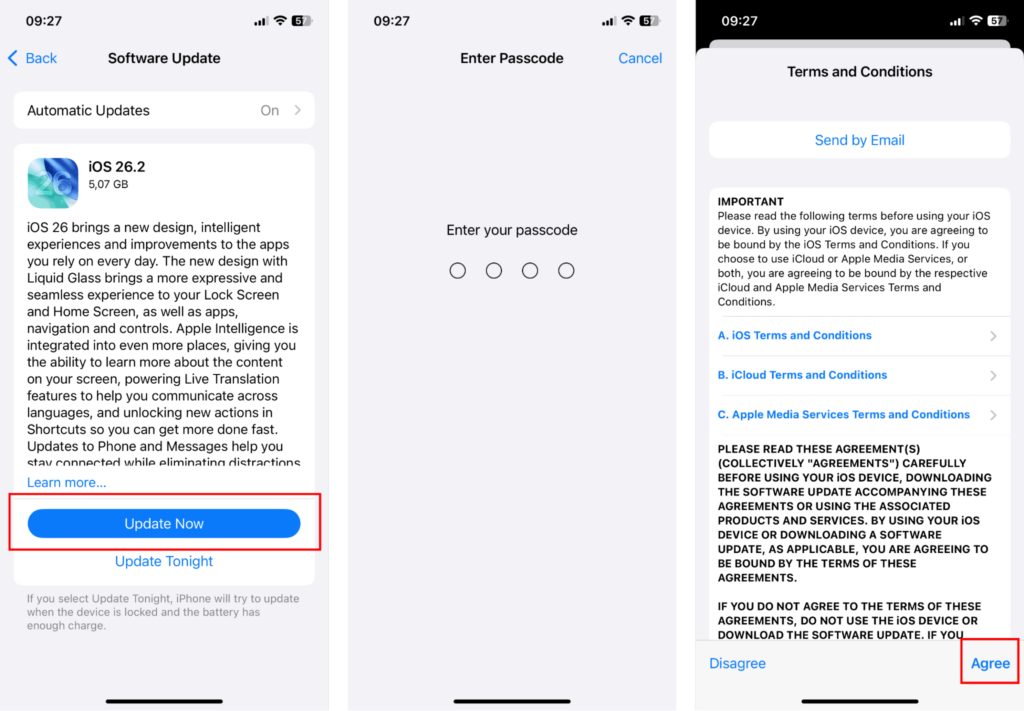
Your iPhone will show a red notification badge on the Settings app when a new update is available. You can also check manually by going to Settings then General then Software Update. You’ll see if an update is ready to download and install.
- Open the Settings app on your iPhone.
- Tap General to open system settings.
- Tap Software Update to check for available updates.
- Tap Download and Install if you see a new version.
- Enter your passcode if your device requests it.
- Wait for your iPhone to restart and complete the installation.
Step 3. Delete suspicious apps
Spyware can hide inside apps you don’t recognize, especially if you don’t remember installing them. These unwanted apps can come from phishing links, fake app download pages, malicious ads, or by exploiting security vulnerabilities in old versions of iOS. Removing suspicious apps immediately stops the spyware from being able to run on your device, helping protect your data and stop any monitoring.

To delete a suspicious app on your phone, press and hold the app icon until a menu appears, then tap Remove App. Confirm by selecting Delete App again to fully remove it from your device.
Step 4. Clear browsing data and history
Spyware can reinfeect your device if it modifies your browser or embeds malicious code in your browser that can download the spyware again after removal. Make sure you clear your cache and browsing history to ensure you’ve removed all traces of spyware. Here’s how to clean the browsing data on your iPhone:
- Open the Settings app on your iPhone.
- Scroll down and open Safari, or another browser if you use something else.
- Tap Clear History and Website Data.
- Confirm by tapping Clear History and Data.
- Repeat for your other browsers, such as Chrome or Firefox, if installed.

Step 5. Perform a factory reset
If deleting spyware with an antivirus, updating iOS, removing suspicious apps, and clearing browsing data hasn’t worked, my final recommendation is to perform a factory reset. This will completely erase your iPhone data, removing any hidden spyware that may have evaded other approaches. Because a factory reset deletes all data, you should back up your iPhone to iCloud or iTunes before wiping it.
To fully eliminate spyware, it’s important to restore your iPhone from a backup created before the spyware was installed. Restoring from a more recent backup can reinfect your device with the same malicious files, making the reset pointless. If you’re unsure when the infection occurred or lack older backups, it’s safest to set up the iPhone as a new device:
- Open the Settings app on your iPhone.
- Tap General, then choose Transfer or Reset iPhone.
- Tap on Erase All Content and Settings.
- Tap Continue.
- Enter your passcode and Apple ID password to confirm.
- Wait for the reset to complete, then set up your iPhone as a new device or restore from a clean backup.

Best anti spyware for iPhone
While iPhones are generally secure, spyware, phishing attacks, and unsafe networks can still threaten your privacy. No antivirus software can perform a deep system-level scan on an iPhone due to Apple developer limitations, but Norton Mobile Security offers the most comprehensive protection you can get for iOS devices:
- Scam protection: Norton can detect and block suspicious links in apps like iMessage, the app exploited by the notorious Pegasus spyware that required no user interaction to infect an iPhone. It also blocks other, more standard phishing attacks.
- Wi-Fi security: Norton will warn you if you connect to an unsafe, unsecured network that could put your data at risk through lack of encryption or password protection. This helps keep you safe from man-in-the-middle attacks.
- Device optimization: Norton routinely checks your iPhone for common security issues, including outdated iOS software, weak device passwords and settings, and dangerous app permissions that could expose your data.
- Web browsing security: Norton’s software protects you from malicious websites and calendar links that can harbor malware designed to capture your credentials or steal other data from your device.
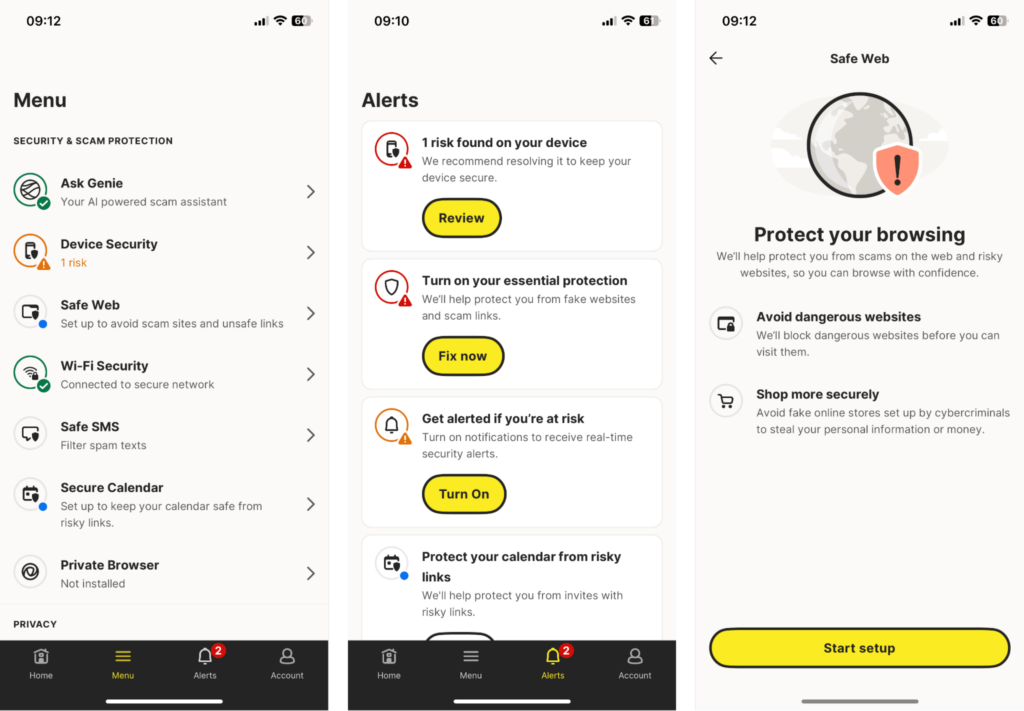
Norton is also a highly reputable company and trusted cybersecurity vendor, which is one reason why it currently stands at the top of our ranking of best antivirus software. Also, Norton offers an extended 60-day money-back guarantee, double that of most other antivirus solutions, giving you extra time for risk-free testing.
Can someone spy on my iPhone without me knowing
Yes, a family member, friend, former partner, employer, company, or malicious actors can access your iPhone remotely if they manage to infect your device with spyware. Spyware can lie hidden on your device while tracking your real-time location, monitoring your phone’s camera feed, recording your keypad inputs, and listening to and reading your calls, texts, emails, and other information entered into the device.
- Hidden apps and malicious software: Spyware can be installed discreetly in the background if somebody has physical access to your phone or tricks you into installing a malicious app. These apps run silently and can be remotely controlled and monitored to record your activity.
- Compromised iCloud account: If somebody gains access to your Apple ID and password, they can get into your device backups, stored photos, notes, and GPS location history. This type of spyware doesn’t need any installation and simply abuses your synced iCloud data.
- Fake or altered app updates (“masque” attacks): Attackers can disguise spyware to look like a legitimate app update. If you install it, the malicious update behaves like the real app to cover its tracks, but it secretly records everything you do on your phone.
What is Pegasus spyware on iPhone
Pegasus is a spyware tool developed by NSO Group that can infect an iPhone without any interaction from its user. Once installed, it lets an attacker have full access to your call history, iMessage history, stored photos, microphone, camera, and GPS location. Pegasus has been linked to controversial monitoring of journalists, activists, political opponents, and human-rights workers around the world.
Detecting a Pegasus infection is very difficult due to its state-level, professional design. It’s designed to operate quietly under the radar, while erasing its own tracks. Apple has previously issued warnings to iPhone owners who it believes have been targeted by this kind of spyware, and some forensic tools, for example Amnesty International’s Mobile Verification Toolkit (MVT), can scan device logs to identify common signs of such spyware. Because Pegasus relies on exploiting vulnerabilities in iMessage and iOS in general, keeping your device software up to date is one of the most effective ways to protect yourself.
- Update iOS immediately: Install the latest version of iOS to avoid potential vulnerability exploits used by Pegasus.
- Back up only essential items manually: Avoid full iCloud or device backups because they could preserve infected data.
- Erase all content and settings: Carry out a complete factory reset to clear your device and reset it to its factory defaults.
- Set up the iPhone as new: Sign in to your account and reinstall apps manually rather than restoring the device from backup.
- Reinforce your security: Turn on automatic updates, enable Lockdown Mode if required, and secure your Apple ID with a strong password and two-factor authentication.
Protect your iPhone from spyware with Norton
Norton Mobile Security is one of the best antivirus tools to protect your iPhone from spyware, phishing attempts, unsecured Wi-FI networks, and other threats. No antivirus can scan iOS at a deep system level to detect exploits and malware, because unlike Android, iOS ring fences critical system functionality and disallows development access. However, Norton protects you on a number of fronts by blocking malicious sites and links, warning you about unsafe Wi-Fi networks, and recommending ways to shore up your device’s security. However, Norton’s software is best when used in conjunction with good online habits:
- Download apps exclusively from the App Store: Avoid downloading apps from any source except for the official App Store.
- Exercise caution with links and attachments: Don’t open unexpected or suspicious email or iMessage links, as they could be phishing attacks loaded with spyware.
- Keep iOS up to date: Install iOS updates as soon as they’re available, and consider turning on automatic updates, as this helps protect against spyware like Pegasus.
- Enable two-factor authentication (2FA): Using 2FA across all of your accounts heavily minimizes the risk of a hacker gaining access to your iCloud or other accounts.
- Use a VPN for public Wi-Fi: Even on unsecured networks, a VPN boosts your protection on public Wi-Fi thanks to powerful encryption and secure routing.
You may also want to read:
- Best VPN for iPhone and iPad
- 14 ways to improve your iPhone and iPad’s security settings
- 12 tips for improving your Mac’s privacy settings
- Setting up a VPN on your iPhone or iPad
- How to remove Apple security alert scam from your iOS
- How to remove fake McAfee pop-ups
FAQ
Spyware on iPhone is a type of malware that can infiltrate your device and siphon off personal information, including credentials, payment information, and photos. It could also monitor phone calls or spy on you using your device’s camera. While Apple’s operating system is mostly impervious to common threats faced by Windows or Android devices, it is still susceptible to spyware that could cause common signs like faster battery drain, overheating, and higher than usual data usage.
Yes, iPhones can get spyware that exploits zero-day vulnerabilities in Apple’s operating system or through phishing attacks and malicious website infections. Spyware on an iPhone can monitor iMessage, phone calls, and other applications or could spy on you through your device’s camera. You can protect yourself by keeping iOS up to date and installing a reliable mobile antivirus like Norton.
The best way to find spyware on your iPhone is by using a robust mobile antivirus like Norton that can detect and remove spyware. You might have spyware on your iPhone if you see suspicious apps you don’t recognize, have unusually high battery drain, see your device regularly overheating, or experience abnormally high data usage.
To check for spyware on your iPhone, look for unknown apps, unusual battery drain, or high data usage, then use built-in tools like Settings > Privacy & Security > Safety Check, review Settings > General > iPhone Storage for odd apps, check VPN & Device Management for malicious profiles, and verify Location Services/Camera/Microphone permissions; if suspicious, update iOS, remove apps, and as a last resort, factory reset.
Remove spyware from your iPhone by deleting suspicious apps, clearing out your browsing data, keeping your iOS up to date, and using a robust mobile antivirus like Norton. In more extreme cases, you may need to perform a factory reset to ensure your device is free from spyware infections. However, you should create a backup of important data and files first to ensure that you don’t lose them.
You can prevent spyware on an iPhone by keeping your iOS up to date, only installing official apps from the App Store, using two-factor authentication and strong passcodes, and avoiding malicious websites and phishing links. You can also use a robust mobile antivirus like Norton to offer greater protection and spyware detection moving forward.
Yes, a factory reset will typically remove most spyware from an iPhone because it reverts the operating system back to its original state and deletes all data. In some cases, sophisticated spyware can embed itself in your device’s firmware, such as in state-sponsored spyware attacks. Examples include Pegasus, ResidentBat, and BoneSpy. In these cases, restoring to a backup taken prior to the infection can remove the spyware.