
- Top 5 iPhone antivirus apps
- Does an iPhone need an antivirus?
- How to remove malware from an iPhone using an antivirus app?
-
Best antivirus for iPhone in 2026: detailed list
- Top 1. Norton – best iPhone antivirus for secure mobile protection
- Top 2. Bitdefender antivirus – reliable iPhone virus protection with advanced features
- Top 3. TotalAV – all-in-one antivirus app for iPhone with extra security tools
- Top 4. Avira – reliable antivirus app for iOS with decent free version
- Top 5. Surfshark CleanWeb – strong malware protection for iPhone and online safety
- Compare the top 5 iPhone antivirus apps
- Benefits of iPhone antivirus apps
- What is the best anti-spyware for iPhone?
- How to run an antivirus scan on an iPhone
- Is there a free antivirus for iPhone?
- Final thoughts on using antivirus on iPhone
- FAQ
After personally testing 18 different antivirus apps, I found that Norton, Bitdefender, TotalAV, Avira, and Surfshark CleanWeb are the best antivirus apps for iPhone users. They combine simplicity, strong privacy tools, and reliable device protection that actually feels made for iOS.
I’ve always trusted my iPhone to be secure, but over time I’ve realized that even Apple’s strong defenses can’t fully protect against threats that we’re being bombarded with today: phishing, malicious websites, and fake Wi-Fi networks. While iPhones don’t allow antivirus apps to perform a full iPhone virus scan (since Apple’s design keeps apps isolated), some strong security tools can still do a lot.
The best antivirus for iPhone focuses on smart protection features, like real-time phishing alerts, Wi-Fi security checks, and active monitoring to spot suspicious activity before it causes trouble. That’s crucial when you’re trying to figure out how to remove malware from an iPhone or prevent data leaks in the first place. That’s why I tested and selected top security apps, including free antivirus for iPhone options, for real-time protection, safe browsing, and extra layers beyond Apple’s built-in defenses.
Top 5 iPhone antivirus apps
-
1.Norton: top overall antivirus app for iOS
-
2.Bitdefender antivirus: trusted iPhone protection with robust features
-
3.TotalAV: secure antivirus one-stop shop for iOS users
-
4.Avira: dependable iPhone security with a solid free plan
-
5.Surfshark CleanWeb: smart iPhone app with reliable real-time protection
Does an iPhone need an antivirus?
When I first asked myself, “Does iPhone need antivirus?”, I assumed Apple’s built-in security was enough – and to a large extent, it is. While iOS offers strong built-in protections like app sandboxing, end-to-end encryption, and strict App Store review, it’s not completely immune to online threats. iPhones can still be exposed to phishing links, malicious websites, unsecured Wi-Fi networks, and aggressive data tracking. That’s where a reliable antivirus for iPhone comes in.
Even though iOS prevents apps from scanning the entire system like a PC antivirus, modern iPhone antivirus apps focus on protecting what iOS alone doesn’t. They block phishing attempts, warn against harmful websites, secure data through built-in VPNs, and help protect personal information from online threats.
In short, an iPhone antivirus doesn’t just detect malware – it provides proactive, smarter protection, complementing Apple’s built-in security to keep your device and data safe.
How to remove malware from an iPhone using an antivirus app?
If you suspect your iPhone is infected, or simply want to be on the safe side, using a trusted antivirus app like Norton is a smart decision. Follow these steps to clean and protect your device:
- Download and install the Norton 360 app from the App Store.
- Open the app and log in or create an account.
- Run a full device scan to detect malware or suspicious files.
- Follow Norton’s on-screen guidance to remove any detected threats.
- Reboot your iPhone and keep Norton’s real-time protection enabled to prevent future malware infections.
Best antivirus for iPhone in 2026: detailed list
I personally tested 18 iOS security apps on my iPhone 15 Pro to find which ones truly deliver the protection in 2026. Each app was evaluated for malware and phishing protectionusing real-world test URLs, along with its effect on battery life and device performance. I also considered lab-test results and extra features like built-in VPNs, identity protection tools, and customer support quality. The following list highlights the best iPhone antivirus apps that impressed me across these key areas.
To find the best antivirus software for iPhone in 2026, I tested each app hands-on over several weeks using my iPhone 15 Pro. My goal was to see how well each one balanced security, performance, and everyday usability. Here’s how I evaluated them:
- In-house threat tests (40%). I visited known phishing and malware URLs to check how quickly and accurately each app detected and blocked potential threats.
- Performance (20%). I monitored battery drain and system slowdown during scans and background protection, aiming for security that doesn’t compromise day-to-day use.
- Features (20%). I compared extras like secure VPNs, identity monitoring, and ad blockers to see which apps offered the most complete protection package.
- Lab results (15%). Whenever possible, I reviewed independent lab scores from AV-Test and AV-Comparatives to confirm real-world protection levels on iOS.
- Support (5%). I reached out to each app’s customer service to gauge response times and helpfulness, including 24/7 availability for bonus points.
This approach ensured that every iOS app I recommended not only blocked threats effectively but also fit seamlessly into regular iPhone use.
Top 1. Norton – best iPhone antivirus for secure mobile protection
- Rating: 8.7 ⭐⭐⭐⭐⭐
- Key features: Wi-Fi Security, Web Protection, identity protection, built-in VPN
- Price: $29.99/year + 7-day free trial
Norton 360 for iOS is the best all-in-one antivirus for iPhone I tested. It isn’t just an antivirus – it’s a full mobile protection suite designed for users who want complete peace of mind. What makes Norton antivirus stand out is how seamlessly it guards against evolving mobile threats while keeping performance relatively smooth and battery use minimal. During my tests on iPhone, Norton’s multi-layer defense impressed me the most. Its Wi-Fi Security instantly alerted me when I joined an unprotected network, and the built-in AI-powered Scam Protection feature blocked several phishing sites before they even loaded. The identity protection tools also gave me real-time breach alerts, which is a feature that’s missing in many competitors like McAfee Mobile Security or Avast One for iOS. I particularly liked the built-in VPN, which encrypted my data while streaming or shopping on public Wi-Fi without slowing browsing speed.
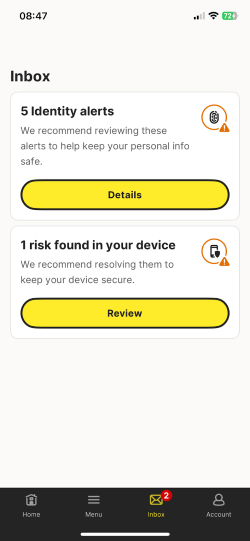
Norton’s antivirus for iPhone has a simple, easy-to-use interface. You can quickly check threat reports and control features like the spam call blocker. Plans start at $29.99/year, with a 7-day free trial and a 60-day money-back guarantee. Norton has also started its Black Friday offers, making this a good time to subscribe.
What I liked:
- Fast scans
- Strong real-time threat protection
- 60-day money-back guarantee
What I didn’t like:
- Split features across multiple apps
Top 2. Bitdefender antivirus – reliable iPhone virus protection with advanced features
- Rating: 8.4 ⭐⭐⭐⭐⭐
- Key features: Web Protection, Account Privacy, Email Check, built-in VPN
- Price: $24.99/year + 30-day free trial
Bitdefender stands out as one of the most balanced iPhone antivirus apps I’ve tried this year. Its lightweight design and strong focus on privacy make it a smart pick for anyone who wants protection without performance slowdowns. What I appreciated most was how effortlessly it monitors potential threats without cluttering the iOS experience or draining battery life.
In my tests, Bitdefender Mobile Security’s Web Protection immediately blocked phishing and malicious sites in Safari and Chrome, which is why Bitdefender ranks among the best antivirus for iPhone. The Account Privacy feature scanned my email addresses for known breaches, letting me know when passwords might be at risk. Compared with Norton, Bitdefender feels slightly more streamlined and minimalist, ideal for users who prefer simplicity over extra layers of tools. I also tested its built-in VPN, which auto-activates on unsafe Wi-Fi networks, and while the daily data cap is lower on basic plans, its connection speed stayed consistently fast.
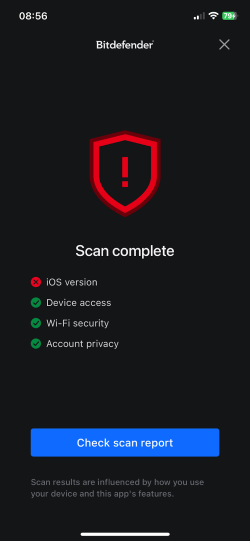
Bitdefender is a top iPhone antivirus that combines sleek design, smooth performance, and reliable protection from a trusted cybersecurity brand. Plans start at $24.99 per year, and new users can try it risk-free with a free trial that also serves as a 30-day money-back guarantee, making it an affordable choice for iPhone security. Plus, it now offers special Black Friday deals with up to 80% off, so don’t miss your chance to get premium protection at a fraction of the price.
What I liked:
- Easy-to-use
- Low impact on performance
- Robust phishing protection
What I didn’t like:
- VPN has daily limits unless you pay extra
Top 3. TotalAV – all-in-one antivirus app for iPhone with extra security tools
- Rating: 8.0 ⭐⭐⭐⭐
- Key features: WebShield, Device Security, Photo Cleaner, Battery Manager, built-in VPN
- Price: $19/year + 7-day free trial
TotalAV has become one of my go-to iPhone security apps for users who want a combination of antivirus protection, privacy tools, and easy performance management. It feels designed for everyday use – fast, simple, and surprisingly feature-rich for its price point. While it doesn’t carry the same long-term reputation as Norton or Bitdefender, my testing showed it performs impressively well in essential protection areas.TotalAV is a powerful antivirus for iPhone, with its WebShield feature effectively blocking phishing links and scam websites in real time, even in Safari’s private browsing mode. I also tested the app’s Device Security, which checked for vulnerabilities and outdated settings that could expose my iPhone. The built-in VPN provided secure connectivity on public Wi-Fi hotspots, and I appreciated that speed losses were minimal during HD streaming. TotalAV also includes handy tools like a Photo Cleaner and Battery Manager, which noticeably improved storage usage and background performance – features that Norton and Bitdefender don’t emphasize as much.
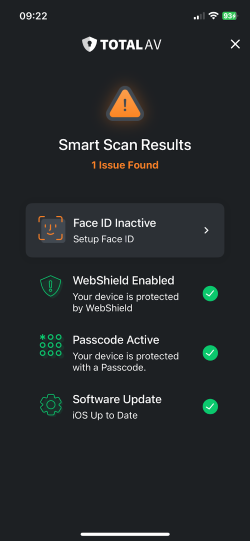
TotalAV plans start at $19.00 per year and include a 7-day free trial as well as a 30-day money-back guarantee. It’s an excellent choice for iPhone users looking for an affordable, comprehensive antivirus that protects against malware, phishing, and other mobile threats.
What I liked:
- Simple interface
- Good cleanup tools
- Solid web protection
What I didn’t like:
- Upsells for extra features
Top 4. Avira – reliable antivirus app for iOS with decent free version
- Rating: 7.2 ⭐⭐⭐⭐
- Key features: Web Protection, Privacy Manager, Identity Safeguard, anti-theft, VPN
- Price: $59.99/year with 30-day free trial + free version available
Avira has always impressed me with how much value it delivers, especially through its free iOS version. It’s one of the few iPhone antivirus apps that manages to stay quite lightweight while still providing meaningful security tools. When I tested it, what stood out most was how quietly it runs in the background, keeping performance decent even on older iPhone models.The Security Scanner quickly assessed my system settings and flagged weak points like outdated iOS versions or risky privacy options. Web Protection, included in the paid Avira antivirus plan, did a great job blocking phishing pages and malicious URLs in Safari. I also appreciated the Privacy Manager, which lets you manage Siri data collection, and the Identity Safeguard that scans email addresses against known data breaches. While Avira’s free version is more limited than Bitdefender’s or TotalAV’s full packages, its free VPN (with daily data limits) and anti-theft features make it a great starting point for lighter, casual users.
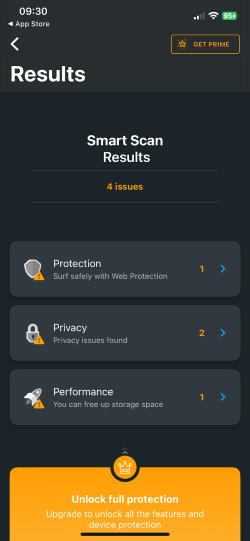
Upgrading to the premium at a yearly $59.99 price unlocks faster VPN speeds, unlimited browsing data, and better automation, yet plans still remain affordable. Plus, you can find even cheaper plans during Black Friday sale. The antivirus has a quite liberal 30-day free trial on its Prime plan, and includes a whole 60-day money-back guarantee on annual subscriptions. Avira is best for iPhone users who want a secure, minimalist app with generous free tools and flexible upgrade options.
What I liked:
- Decent free version
- Clear privacy tools
- Extra features
What I didn’t like:
- Some features require separate installations
Top 5. Surfshark CleanWeb – strong malware protection for iPhone and online safety
- Rating: 8.3 ⭐⭐⭐⭐
- Key features: Ad/malware/tracker blocker, private DNS, VPN package
- Price: $1.99/month or $53.73/year + 7-day free trial
Surfshark’s CleanWeb feature turns its already powerful VPN into a complete iPhone protection tool. In my testing, it stood out not just for its encryption strength but for how effectively it blocked harmful domains and intrusive ads while browsing. It’s a great choice for users who prioritize online privacy but still want malware defense built right into their VPN experience. With CleanWeb 2.0, Surfshark automatically filtered out phishing links, trackers, and malicious websites before pages even loaded, which is noticeably faster than many standard iOS web filters. I also used its real-time safe browsing notifications, which warned me about compromised sites and fake shopping links. Pairing this with Surfshark’s AES-256 encryption and private DNS protection created an impressively secure web environment. Speeds remained excellent, even when streaming or connecting to distant servers, outperforming many antivirus-based VPN bundles like TotalAV’s.
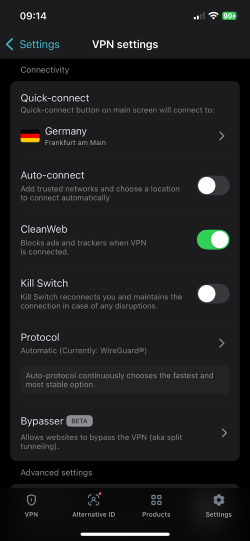
Surfshark includes unlimited device connections under one subscription and offers a 7-day free trial through the App Store, with a 30-day money-back guarantee. It’s an ideal pick for iPhone users who want fast, reliable browsing protection combined with strong VPN security in one easy-to-manage app.
What I liked:
- Strong ad and malware blocking
- Breach alerts
- Top-notch VPN security
What I didn’t like:
- No dedicated antivirus engine
Compare the top 5 iPhone antivirus apps
| Antivirus for iPhone | Rating | Real-time protection | Performance impact | Extra features | Free version available? | Price |
| 1. Norton | 8.7 ⭐⭐⭐⭐⭐ | ✅ Yes | Medium | VPN, Scam Filter, Dark Web Monitor, Safe Web, SMS Filter | ✅ 7-day free trial | Starting $29.99/year |
| 2. Bitdefender | 8.4 ⭐⭐⭐⭐⭐ | ✅ Yes | Light | VPN, Anti-Phishing, Web Protection, Email Check | ✅ 7-day free trial | Starting $24.99/year |
| 3. TotalAV | 8.0 ⭐⭐⭐⭐ | ✅ Yes | Light | VPN, WebShield, Photo Cleanup, Breach Scan, QR Code Check | ✅ 7-day free trial | Starting $19/year |
| 4. Avira | 7.2 ⭐⭐⭐⭐ | ✅ Yes | Medium | VPN, Call Blocker, Identity Protection, Network Scanner, Privacy Advisor | ✅ Free version available | Starting $59.99/year for paid plan |
| 5. Surfshark CleanWeb | 8.3 ⭐⭐⭐⭐ | ✅ Yes | Light | Ad Blocker, Tracker Blocker, Phishing Block, Data Alerts, Cookie Block | ✅ 7-day free trial | Starting $1.99/month or $53.73/year |
Benefits of iPhone antivirus apps
Recently, I’ve learned that having a security app on my iPhone isn’t just about peace of mind. It’s about staying one step ahead of threats that slip past iOS’s built-in protections. Even with strong default security, an antivirus app adds extra control and real-time defense that the iPhone alone can’t provide.
Here’s what I personally find most valuable:
- Enhanced phishing protection. I’ve had scam SMS messages and “iPhishGuard” style attacks where fake login pages looked almost real. iPhone antivirus apps like Norton and Bitdefender instantly flag these sites before I can accidentally hand over my info.
- Safe browsing on Wi‑Fi. Public Wi‑Fi at airports or coffee shops can put your data at risk. iPhone antivirus apps with built-in VPNs encrypt your connections and alert you if a network is unsafe, keeping your personal information secure.
- Ad, tracker, and malware blocking. Avira and Surfshark block malware domains quietly in the background, while TotalAV’s WebShield stops me from visiting infected websites entirely.
- Identity and breach alerts. Bitdefender notified me when an email I used was exposed in a 2026 retail breach. Without that, I’d never have known my data was floating around online.
- Anti-spam call and SMS filter. Annoying robocalls get blocked before they even ring, and suspicious texts are diverted out of sight.
- Device location and anti-theft tools. If I lose my iPhone, these apps help me track it or remotely wipe private data before anyone else gets in and misuses it.
For me, it’s not just extra protection – it’s active prevention.
What is the best anti-spyware for iPhone?
When I started exploring anti-spyware for iPhone, I quickly realized that Apple’s own design is the real shield here. iOS has powerful built-in privacy protections, strict sandboxing that keeps apps isolated, and frequent system updates that patch vulnerabilities before most spyware can reach users. Because of these restrictions, even top security apps can’t fully detect or remove highly advanced spyware like Pegasus, as it simply isn’t possible within Apple’s controlled ecosystem.
The most effective “anti-spyware” strategy is, therefore, a mix of good habits: keeping iOS updated, avoiding jailbreaking, regularly reviewing the Privacy Report, and limiting unnecessary app permissions. Some antivirus tools, like Norton, offer useful privacy features that can alert you if an app uses your microphone or camera unexpectedly, acting as a practical early warning system. Still, no single product can guarantee total spyware removal; it’s all about introducing smart habits on top of trusted tools.
How to run an antivirus scan on an iPhone
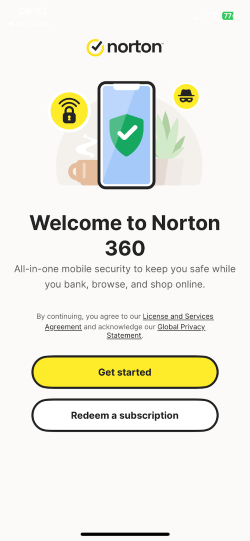
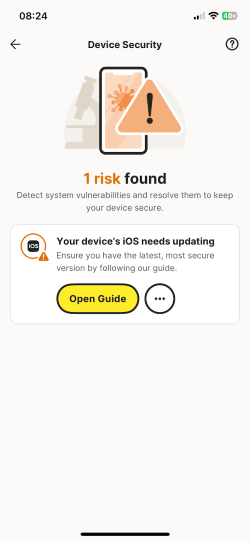
Even though iPhones don’t allow a traditional full-device scan like on a PC, you can still use an antivirus app to check for threats in specific areas, such as unsafe websites, risky Wi‑Fi networks, and suspicious app activity. Here’s how I run a quick scan with Norton on my iPhone:
- Download and install Norton 360 from the App Store.
- Open the app and sign in with your Norton account.
- Tap “Device Security” on the main screen to access scanning tools
- Run the Web Protection check to scan for phishing and dangerous URLs.

- Use the Wi‑Fi Security feature to test your current network for vulnerabilities.
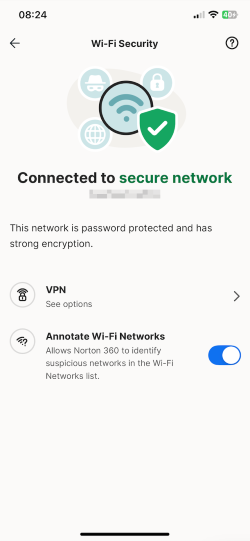
- Review alerts for any suspicious activity and follow Norton’s recommended actions.
It’s fast, simple, and works best when you keep the app active in real time.
Is there a free antivirus for iPhone?
I’ve seen plenty of “free antivirus for iPhone” apps in the App Store and on the web, and while they sound appealing, free doesn’t always mean safe or effective. Some of them offer very basic features, and a few even collect unnecessary data, which is the last thing you want from a security app. In my experience, free iPhone antivirus tools often lack real-time phishing protection, secure VPNs, or proper web filtering, so they’re not capable of giving your device the defense it truly needs. That’s why I avoid them and focus on trusted, well-reviewed options instead. If you want to test a free antivirus for iPhone without spending money, I recommend trying the Norton Antivirus free trial. It gives you full access to its phishing filters, Wi‑Fi checks, and privacy tools so you can see exactly how an iPhone antivirus should work without cutting corners on your security.
Final thoughts on using antivirus on iPhone
iPhones are already among the most secure smartphones thanks to Apple’s strong privacy features, sandboxing, and regular updates, but that doesn’t mean extra protection is unnecessary. Without an antivirus app, you’re more exposed to phishing scams, unsafe Wi‑Fi networks, malicious websites, and potential identity leaks that iOS alone may not catch quickly, but will cost you your online profile.
A good security app adds those missing layers, keeping threats from slipping through in everyday use. After testing many options, I recommend Norton as the best antivirus for iPhone in 2026. It combines powerful phishing filters, Wi‑Fi security checks, and privacy alerts in a lightweight app that works seamlessly with iOS’s protections. For me, it’s about making sure my device stays safe, not just from technical exploits but from the human mistakes that cybercriminals depend on.
You may also want to read:
FAQ
Yes, you can get malware on an iPhone, although it’s rare, thanks to Apple’s security design that limits malware infections. Most threats come from phishing, unsafe links, or compromised networks rather than traditional viruses, so an additional antivirus app for iOS is recommended for safer browsing.
iPhone does not exactly have a built-in antivirus. iPhones rely on built-in security features like sandboxing, app vetting, and real-time threat prevention instead of a separate antivirus program. These defenses protect against most malware automatically.
Norton is the best antivirus for iPhone thanks to its robust phishing protection, Wi‑Fi scanner, and privacy tools. It enhances Apple’s built-in security with layered protection and reliable alerts.
Yes, Surfshark’s antivirus and security app works on iPhone. It includes VPN encryption, web protection, and malware-domain blocking, strengthening privacy and online safety.
Go to the App Store, search for a trusted antivirus (like Norton or Bitdefender), download it, and follow the setup instructions. Log in or create an account to activate real-time protection features.