You might have noticed that most website addresses start with http:// or https://. Modern web browsers usually hide these prefixes to keep the address bar looking clean, but you can reveal them with just a double-click.
They aren’t just there for decoration – they serve an important function that you can read all about in the article below!
What are HTTP and HTTPS
Hypertext Transfer Protocol (HTTP) is a protocol for the communication between a web client and a webserver. Though it is essential to our browsing, it works, for the most part, without us noticing it. The downside to this protocol is that the traffic isn’t encrypted, which means that, in theory, anyone can see what you do when you visit a website.
When we started communicating more and more vulnerable information online, HTTPS was created. This is a secured version of HTTP, which makes sure you are dealing with a legitimate website and you don’t leak any personal information.
For a website to get an HTTPS certificate they have to be checked by a Certificate Authority (CA). If your browser sees that a website has a certificate from a CA it will indicate this by putting a tune icon (two horizontal sliders) next to the website’s address.
The communication with HTTPS is protected by Transport Layer Security (TLS). It offers end-to-end encryption, which means that it encrypts all the traffic between your devices and the website. While HTTPS was first incorporated by websites that handled transactions or banking data, it has become the new norm.
How can I see if a website is secure?
The first way to determine whether a website is secure or not is to see if the web address starts with http:// or with https://. However, a lot of browsers hide this part of a web address. In these cases, you can check what it says to the left of the web address in the address bar. When a website is secure and has a valid certificate you will see a green padlock. In some browsers it might even say: “Secure”, as you can see in the picture below.
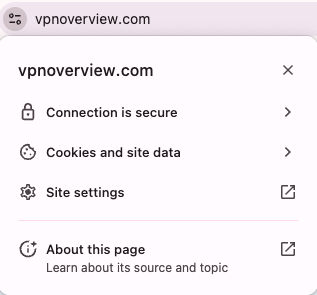
If you are interested you can gain even more information about the certificate a website has by clicking on the padlock and selecting “Certificate”. Here you can find information like who issued the certificate and for what time period.
When a website does not have a valid certificate, you will see a little information logo. You can see an example of that in the picture below. When you click on this information icon you can see why the website isn’t secure and what information is visible to others.
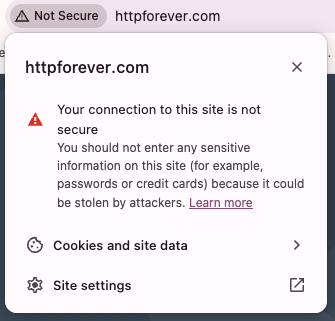
You might encounter different ways of indicating whether or not a website is secure. However, as a rule, you can click on the icon next to the web address. This will provide you with extended information about the certificate or the lack thereof.
How safe is HTTPS?
It might sound like HTTPS secures all your browsing, but unfortunately it doesn’t. It is very useful to determine whether a website is valid or not and if they offer a general protection of your data. Moreover, while it makes it more difficult for prying eyes to see what pages you visit on a website, they will still be able to see that you visited that website. Hackers have actually managed to create HTTPS websites that are there to trick you. So, even though it does create a safer internet environment, it isn’t foolproof.
The Certificate Authorities are mostly trustworthy authorities,but it only takes one corrupted CA to create false certificates. As always on the internet, it is still best to use your common sense and don’t trust to easily.
Only visit HTTPS websites with HTTPS Everywhere
We move from website to website these days, and being the busy people that we are, we don’t have time to check if a website is secure, every time we access a new one. Luckily, there is an initiative called HTTPS Everywhere, which will do all the work for you. HTTPS Everywhere is a browser extension that was created by the Electronic Frontier Foundation in collaboration with the Tor Project. The extension checks every website so you won’t have to. It is available for Chrome, Firefox, and Opera and can be easily downloaded from their website.
HTTPS Everywhere will make sure you only get to see secure websites. If you try to access an HTTP website, it will notify you of the danger. If there is a safe HTTPS version of a website, the extension will automatically send you there instead.
Some VPN providers have started adding a similar function to their service. With these VPN providers you are protected with a premium VPN and you are send to HTTPS websites automatically if these exist. An example of a VPN provider with this added service is NordVPN.

Black Friday offer! Get 78% OFF NordVPN + 3 months free
Final thoughts
HTTP and HTTPS transport data from a server to your device screen. HTTP is the original protocol, followed by HTTPS, which provides more secure connections, hence the S in its name. Now, using HTTPS has become the standard procedure for websites, so user information is encrypted and protected.
Checking whether a website has this added layer of protection is as easy as searching for a tune icon located in the far left corner of the URL bar. You can also double-click on the address bar or use free browser extensions like HTTPS Everywhere that will stop you from visiting insecure websites.