
NordVPN Review (August 2026): The Best VPN of 2026

Why trust our review process 
We may earn affiliate commissions for the recommended products. Learn more.
NordVPN remains one of the best VPNs in 2026, combining fast speeds, robust privacy, reliable unblocking, and a vast global server network. As a long-term user, I’ve tested it extensively with browsing, streaming, on public Wi-Fi, and over censorship-heavy networks. NordVPN’s standout features include AES-256 encryption, the lightning-fast NordLynx protocol, a strict no-logs policy that’s been independently audited multiple times, and Threat Protection to block ads and malware. It reliably unblocks Netflix US, BBC iPlayer, and other major streaming services, with simple, easy-to-use apps. While split tunneling is missing on iOS, NordVPN’s balance of speed, security, and reliability still makes it the best all-round VPN in 2026 for secure, high-speed streaming and online protection.
| NordVPN rating: | 9.3 ⭐⭐⭐⭐⭐ |
| Servers: | 8900 servers in 149+ countries |
| Speed: | 468 Mbps average |
| No-logs policy: | ✅ Independently audited |
| Price: | From $ 3.49/month |
| Free trial: | ✅ 3-day Android + 30-day money-back guarantee |
| Simultaneous connections: | 10 |
| Current deal: | Get NordVPN, now 75% off! |
How much does NordVPN cost per month?
NordVPN is one of the best cheap VPNs available, though not quite as affordable as Surfshark VPN. Plans start from $ 3.49/month with annual billing, though as with other premium VPNs, the best value for money comes from choosing a long-term subscription. This is because NordVPN pricing varies significantly depending on the plan term that you choose. Plans include 1-month, 1-year, and 2-year commitments, with each offering different features and price points. I used the premium NordVPN Complete plan for the purposes of my testing and writing this NordVPN review, which includes all premium and additional features. However, I have also reviewed and analyzed the provider’s other plans.
✅ Basic plan: from $ 3.49/month
| VPN plan duration | 2-year | 1-year | 1-month |
|---|---|---|---|
| NordVPN Basic | $ 3.49 | $4.99 | $12.99 |
NordVPN’s Basic plan provides you with full, unrestricted access to 8900 worldwide servers in 149+ countries. Regardless of your plan, you’ll have unlimited data and uncapped speeds that delivered 96% download speed retention during my tests, or 468Mbps on a 500Mbps connection according to Ookla speedtest. The Basic plan also includes all VPN protocols, including NordLynx, AES-256 encryption, a kill switch, access to obfuscation features, split tunneling and Threat Protection Lite. This is a lightweight version of NordVPN’s security suite, and the Basic version will protect you against malicious websites and intrusive ads – but only when connected to a VPN server.
✅ Plus plan: from $4.39/month
| VPN plan duration | 2-year | 1-year | 1-month |
|---|---|---|---|
| NordVPN Plus | $4.39 | $5.99 | $13.99 |
NordVPN Plus offers a solid array of security enhancements that I recommend for complete protection. Threat Protection Pro builds on the ad and website blocker in the Basic plan, providing enhanced malware and browsing protection. It’ll pre-scan any files you intend to download for malware, block ads and trackers, and block malicious websites, while checking apps for vulnerabilities. Crucially, it’s always-on, even if you’re not connected to a VPN server. There’s also a built-in password manager that not only suggests and stores your passwords securely, but also scans for data breaches that include your information.
✅ Complete Plan: from $5.39/month
| VPN plan duration | 2-year | 1-year | 1-month |
|---|---|---|---|
| NordVPN Complete | $5.39 | $6.99 | $14.99 |
NordVPN Complete adds 1TB of encrypted cloud storage via NordLocker, and while it’s the only enhancement in this plan, it’s a powerful security boon. This secure cloud storage is a zero-knowledge cloud solution that fully encrypts any stored files, and you are the only person who holds those encryption keys. Even if the server was breached, the files wouldn’t be readable without your personal decryption keys as NordLocker encrypts your devices locally on your device, before they’re uploaded to the cloud. This is in addition to all of the powerful VPN features and security tools included in NordVPN Basic and Plus.
✅ Prime Plan: from $7.39/month
| VPN plan duration | 2-year | 1-year | 1-month |
|---|---|---|---|
| NordVPN Complete | $7.39 | $8.99 | $17.99 |
NordVPN Prime includes all of the aforementioned NordVPN tools while adding a number of personal identity protection solutions. This includes Dark Web Monitoring, credit monitoring features, a regular VantageScore 3.0 credit score from TransUnion, identity theft and cyber extortion insurance, and the ability to freeze your credit. Since December 10, 2025, this plan also includes new NordProtect features, such as 3-Bureau credit monitoring, TransUnion credit lock, Short-term loan monitoring, and Financial account monitoring, among other useful features. Given the higher cost of this plan, I recommend Prime mostly to people who are seriously concerned about or have recently been a victim of identity theft or credit fraud.
You can also check out the best NordVPN deals to get the most value for your subscription.
Does NordVPN have a free trial?
Yes, NordVPN offers a 3-day free trial, previously 7 days, but only for Android devices when you sign up via the official app in the Google Play Store. If you’re on any other operating system, you can still get a 30-day money-back guarantee, which is effectively a 30-day free trial since you can claim a NordVPN refund. In my experience, doing so via NordVPN’s customer support is quick and hassle-free. During my NordVPN review, I signed up through the Google Play store to test the free trial, before upgrading to NordVPN Complete and claiming a refund within 30 days once my tests were complete.
❗NordVPN free trial available only via Android signup
NordVPN’s 3-day free trial can be activated by downloading the app from the Google Play Store on an Android device and signing up for an account within the application. There are no limitations on the free trial in terms of features or connection speeds, which makes it a very useful way to try the full NordVPN service for free. While I personally decided to continue using the service after the NordVPN trial due to its excellent service, users that want to avoid a charge should remember to cancel their subscription before it expires. If you don’t cancel the trial in time, you’ll be automatically upgraded and billed for the plan you chose.
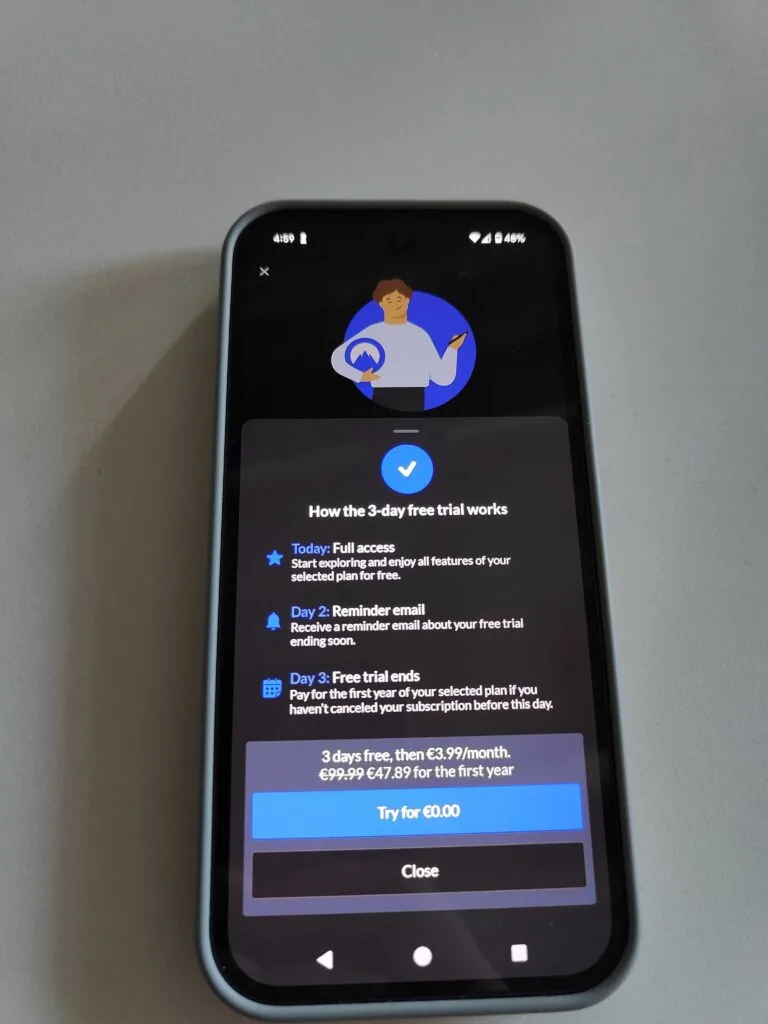
Important:
To cancel the NordVPN free trial on an Android device, open your Google Play Store app, tap on your profile icon, then Payments & subscriptions > Subscriptions. Select NordVPN and choose Cancel Subscription. Make sure to cancel at least 24 hours before the trial expires to avoid being charged.
How many servers does NordVPN have?
NordVPN has an extensive server fleet of 8900 VPN servers in 149+ countries worldwide, which includes multiple cities within the same continent for the USA, Canada, UK, Germany, Australia, and more. In the US alone, NordVPN has over 2,150 servers in 13 states from the East Coast to the West Coast, including New York, Los Angeles, Chicago, Dallas, Miami, Seattle, and Salt Lake City.
During tests, this made it easier to choose the closest server for optimum speeds and choose specific servers to bypass blackout restrictions on NHL and NFL games and tournaments. Based on personal tests, having such a vast server fleet is a major boon that also allowed me to avoid server overcrowding and keep my latency down, particularly during peak hours or major events that attract a higher volume of users.
Overall, NordVPN’s fast and well-optimized servers demonstrate exceptional connection speeds, averaging just 0.66 seconds across locations tested by West Coast Labs, an independent security testing and research organization.
🌎 With 8900 servers across 149+ countries, NordVPN bypasses geo-blocks effortlessly
NordVPN’s expansive server network and support for such a broad range of countries mean that NordVPN can easily bypass geo-restrictions. During tests, this gave me unrestricted access to streaming platforms like Netflix in the US and UK, Hulu in the US, BBC iPlayer in the UK, and Optus Sport in Australia. With servers in different locations, such as the East Coast (New York) and West Coast (LA) of the US, and many other states, it also meant I could bypass blackout restrictions on MLB and NBA games.
Aside from streaming, it’s also the best VPN for gambling and the best VPN for accessing porn. Recent sweeping changes to legislation in the United States mean that many adult sites of this nature are blocked. With NordVPN, I easily bypassed those blocks and porn age checks to continue accessing websites without pause.
📍NordVPN specialty servers include Tor over VPN, Double VPN, and obfuscation
Among NordVPN’s vast server fleet are specialty servers that include Double VPN, Tor over VPN, obfuscated servers, and P2P servers optimized for torrenting. Double VPN provides an extra layer of security by routing your traffic through two encrypted VPN servers instead of one, while Tor over VPN routes your connection through a NordVPN server and then through the Tor network. Obfuscated servers disguise VPN traffic to look like regular internet traffic, and P2P servers offer fast, secure connections for torrenting.
When traveling in restrictive countries with internet surveillance and censorship, I relied on these servers for seamless, uninterrupted internet access. I also personally use obfuscated servers to unblock Netflix US at home so that my VPN isn’t detected and blocked. Double VPN servers are usually my go-to if I’m connecting to an unsecured public Wi-Fi network.
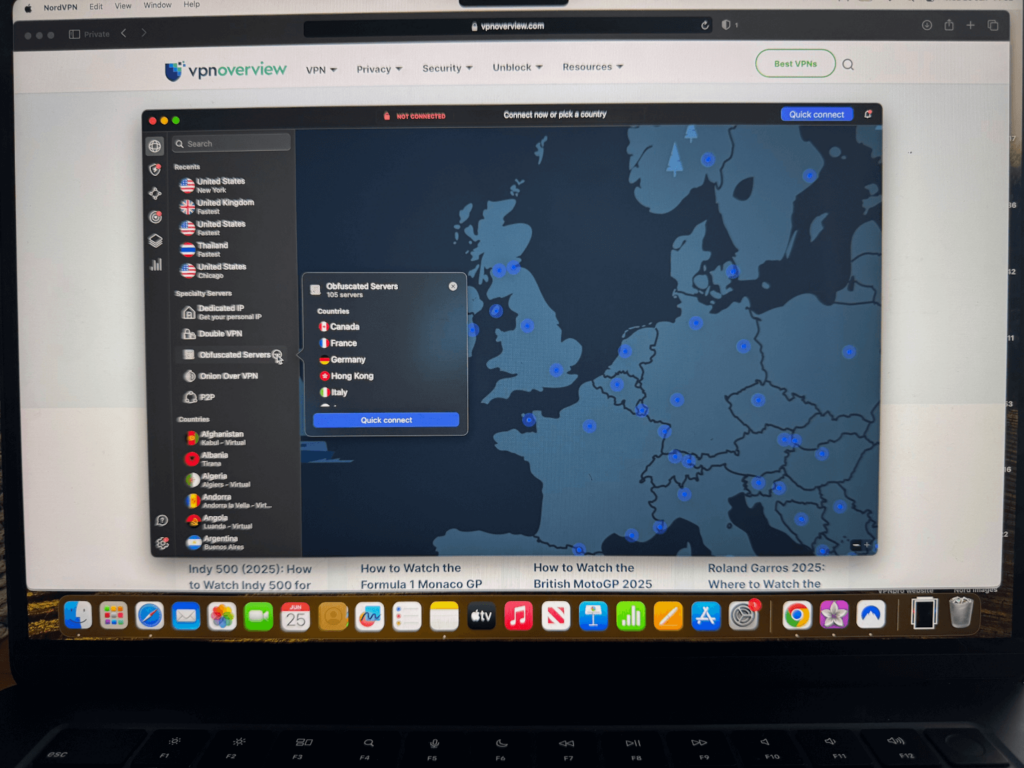
Overall, these speciality servers cover pretty much any use case you can think of for a VPN, ensuring fast connections and enhanced anonymity when you need it most.
How reliable is NordVPN for streaming services like Netflix?
NordVPN is extremely reliable for unblocking Netflix and other popular streaming services thanks to its vast global server network and advanced SmartPlay DNS feature. During our tests, I successfully unblocked Netflix in the US, UK, and Canada. I also unblocked other streaming services, such as BBC iPlayer in the United Kingdom to watch the Premier League for free. The SmartPlay feature meant I could use NordVPN to enjoy these benefits on my smart TV too, even though it doesn’t support NordVPN’s native application.
Switching servers to find one compatible with your streaming service is also quick and took mere seconds during our test circuit, ensuring any blocks or speed dips were resolved quickly. Though connecting to distant servers occasionally caused small speed drops, the average speed test result from Ookla of 468Mbps proves NordVPN’s infrastructure can support reliable streaming globally.
📺 NordVPN offers reliable streaming for Netflix, Hulu, Disney+, and more
My tests confirmed that NordVPN reliably unblocks a wide range of Netflix libraries, including the US, UK, Canada, Japan, Germany, and Australia, providing full access to exclusive regional content without proxy errors.

Throughout my tests, NordVPN maintained consistently high speeds averaging 468Mbps, which ensured a stable, lag-free connection in both HD and 4K, with minimal buffering regardless of device. My tests spanned smart TVs, smartphones, desktop computers, and games consoles. Since my Playstation 5 and Xbox do not support the native app either, I tested a router installation and could still enjoy the same high-speed connections when gaming or streaming on a console connected to the network.
Is NordVPN good for torrenting?
NordVPN is one of the best VPNs for torrenting owing to its lightning-fast connection speeds, P2P-optimized servers, and robust security features that protect your true identity from your torrent swarm. Its strict no-logs policy ensures there’s no record of your download history or IP address, while AES-256 encryption ensures that your ISP and other torrent users can’t see your location. Obfuscated servers are also available for torrenting in regions that restrict VPN or torrent client usage, and a kill switch protects your connection in case your VPN drops out in the middle of a download.
💻 NordVPN excels at torrenting with dedicated P2P servers and no logs
In my hands-on tests over a two-week period, NordVPN reliably delivered stable download speeds that averaged 468Mbps on a 500Mbps baseline connection while using servers located geographically close to my location. However, in some cases it even exceeded those speeds including during my torrenting tests. Even during peak hours, I never saw my ISP throttle my speed once, and all major torrent clients like qBittorrent and uTorrent connected without an issue. I also ensured that the kill switch worked correctly when simulating a dropped connection, and I conducted IP, DNS, and WebRTC leak tests that all passed without a flaw.
Below, I’ve included an image of the speeds I saw from NordVPN while torrenting BigBuckBunny – a short, open-license animated film that’s available publicly under Creative Commons from torrent platforms. I was extremely impressed with the result, which saw me achieving almost 550 Mbps while downloading a torrent file.
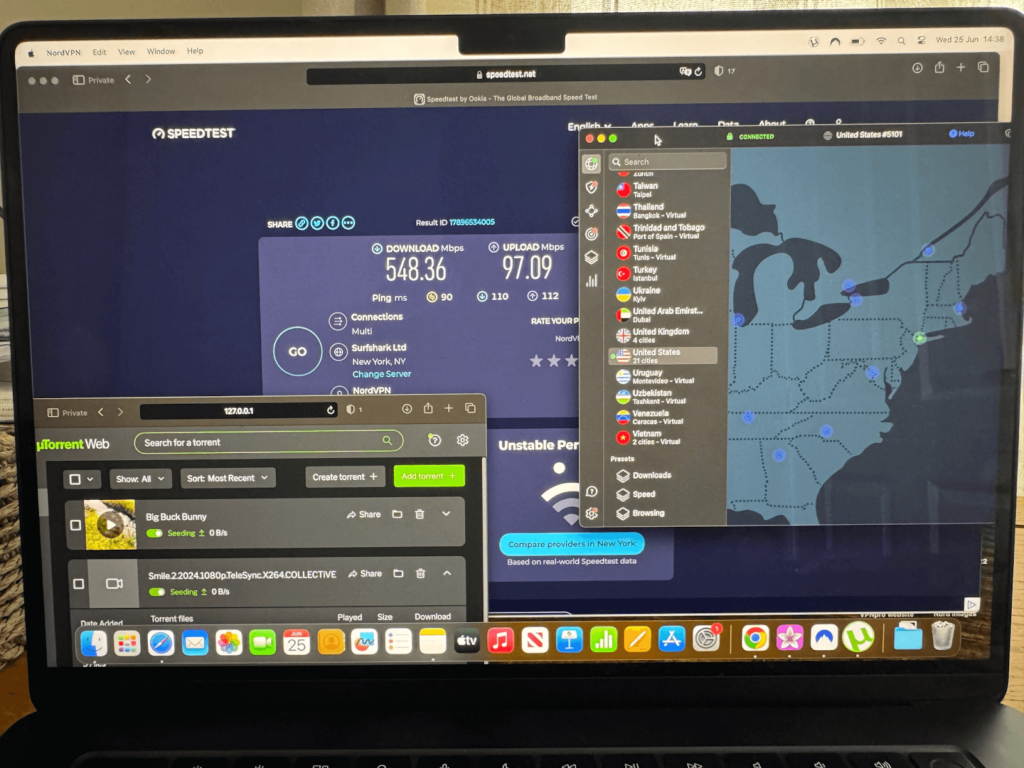
To ensure you get the best results, I suggest enabling the “P2P’ filter so that you’re automatically connected to the fastest torrenting server when you initiate a connection. Also, choose the NordLynx protocol in NordVPN’s settings for the fastest speeds and lowest latency, and enable DNS leak protection and the built-in kill switch before you launch your torrent client. With these adjustments, I enjoyed lag-free connections and full encryption during my test circuit.
How fast is NordVPN: speed test results
NordVPN is the fastest VPN in 2026, delivering lightning-fast speeds that can easily support lag-free streaming in HD and 4K, video calls, torrenting, and gaming. In my 2026 speed tests with the proprietary NordLynx protocol, NordVPN consistently delivered impressive results. On a 600 Mbps baseline connection, I recorded the following results:
- Local server (US): 769 Mbps download and 203 Mbps upload speed
- Mid-distance (US to UK): 863 Mbps download and 491 Mbps upload speed
- Long-distance (US to Japan): 685 Mbps download and 82 Mbps upload speed
NordVPN shocked me further during torrenting tests for this NordVPN review, achieving 538 Mbps download speeds while connected to a 1 GB line within the UK. Throughout all of these tests, NordVPN also maintained a low ping, and those high speeds were consistent as opposed to being outliers. Across 10 international VPN servers, NordVPN averaged 779.9 Mbps in my 2026 test circuit.
Independent evaluation by West Coast Labs also yielded similar results. Their tests showed NordVPN’s fastest average speed to be at 817 Mbps, which means it outperforms competitors between 29 Mbps and 92 Mbps.
At such high speeds, you can easily stream in 4K without any lag or buffering, torrent large files extremely quickly, and connect to gaming lobbies for online games like Valorant and League of Legends without suffering from a high ping.
🚀 NordVPN ranked among the fastest VPNs available
VPN Overview continuously tests VPN speeds in different scenarios, and according to our latest 2026 speed tests, NordVPN remains the fastest VPN service among all VPNS.
| VPN provider | Local download (US) | UK server | Japan server | Latency (avg) |
|---|---|---|---|---|
| 1. NordVPN | 468 Mbps | 465 Mbps | 410 Mbps | 66 ms |
| 2. Surfshark | 403 Mbps | 468 Mbps | 343 Mbps | 64 ms |
| 3. Proton VPN | 444 Mbps | 358 Mbps | 344 Mbps | 70 ms |
Overall, I tested more than 20 premium VPNs to narrow down the list to the top 3 fastest VPNs. Each of my speed tests was performed with the VPN service connected to WireGuard, using Ookla speedtest to benchmark my connection speed before commencing the test, as well as my speed while connected to a US, UK, and Japan VPN server.
While Surfshark was neck and neck with NordVPN on a UK server, Surfshark’s speeds tend to dip on faraway servers. For example, as with Proton VPN, I saw Surfshark’s speed dip when connecting to the Japanese VPN server. However, even over long distances, NordVPN retains a high degree of download speed.
Is NordVPN safe?
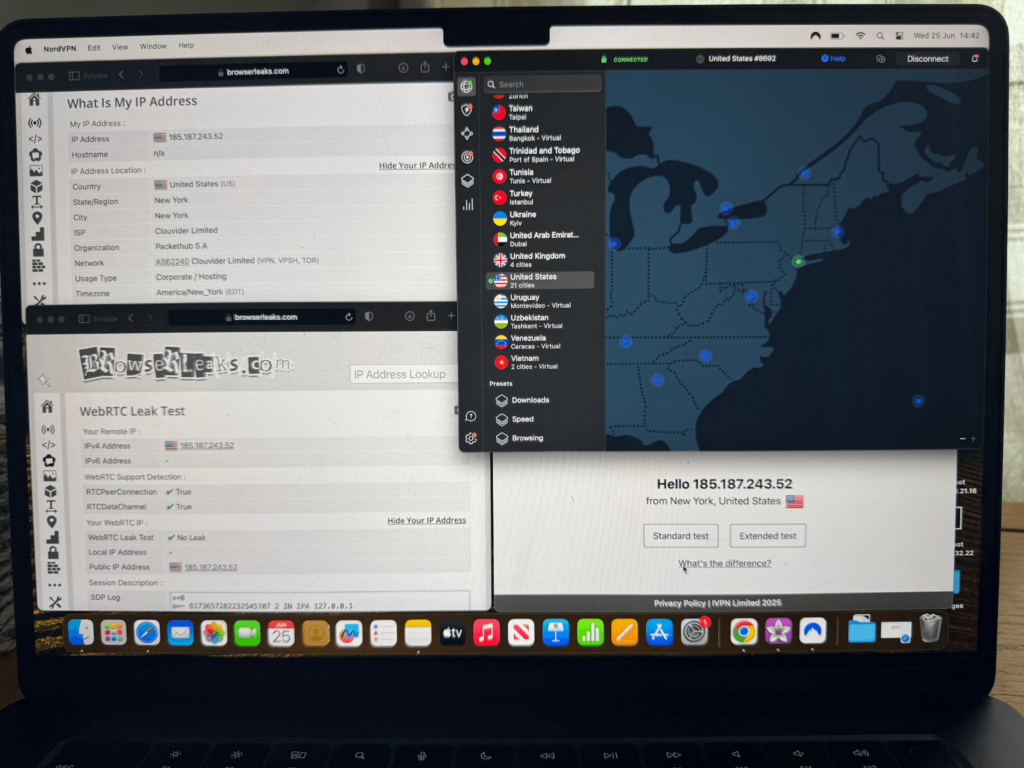
NordVPN is a safe, highly secure, and privacy-focused VPN that has passed multiple independent audits conducted by the likes of PwC, Cure53, Deloitte, and, just recently, West Coast Labs. Since its headquarters are based in Panama, a privacy-friendly country with no mandatory data retention laws and that sits outside of the Five Eyes alliance, I’m confident that your data is in safe hands. This is backed by AES-256 encryption and RAM-only servers that cannot store user information. Independent audits and my in-house tests confirm that NordVPN suffers no DNS, IPv6, or WebRTC leaks that could expose your location.
I also researched any historic data breaches involving NordVPN to ensure complete fairness. In 2018, a data breach involving a single NordVPN server occurred, but no user data was compromised as a result. What’s more, NordVPN responded by cutting ties with the breached data center, rolling out their new RAM-only servers, launching a public bug bounty program, and initiating additional independent auditing.
Throughout my tests, NordVPN maintained a secure and reliable connection, even when I switched servers, changed my protocols, or simulated connection drops. Every leak test that I undertook uncovered no evidence of IP or DNS leakage, proving to me that NordVPN is a safe and secure VPN, particularly when considering their commitment to improvements following a minor security incident.
🛡️NordVPN secures your data with military-grade encryption and a strict no-logs policy
NordVPN uses powerful, military-grade AES-256-GCM encryption with 2048-bit DH keys to ensure industry-standard protection. It supports the fastest, most secure protocols like OpenVPN, IKEv2/IPsec, and WireGuard, but it builds on the lightning-fast WireGuard protocol with its own proprietary NordLynx protocol, which is designed to cut out inefficiencies in in WireGuard and offer even faster speeds. When testing each of these protocols in isolation, I found them all to be fast and secure with no IP leaks.
NordVPN also includes a kill switch, DNSleakprotection, splittunneling, and multi–factorauthentication (MFA) features, which perform correctly and consistently, offering further security. The provider gathers no personally identifiable information (PII), and you can even sign up with cryptocurrency and a throwaway email address for complete anonymity.
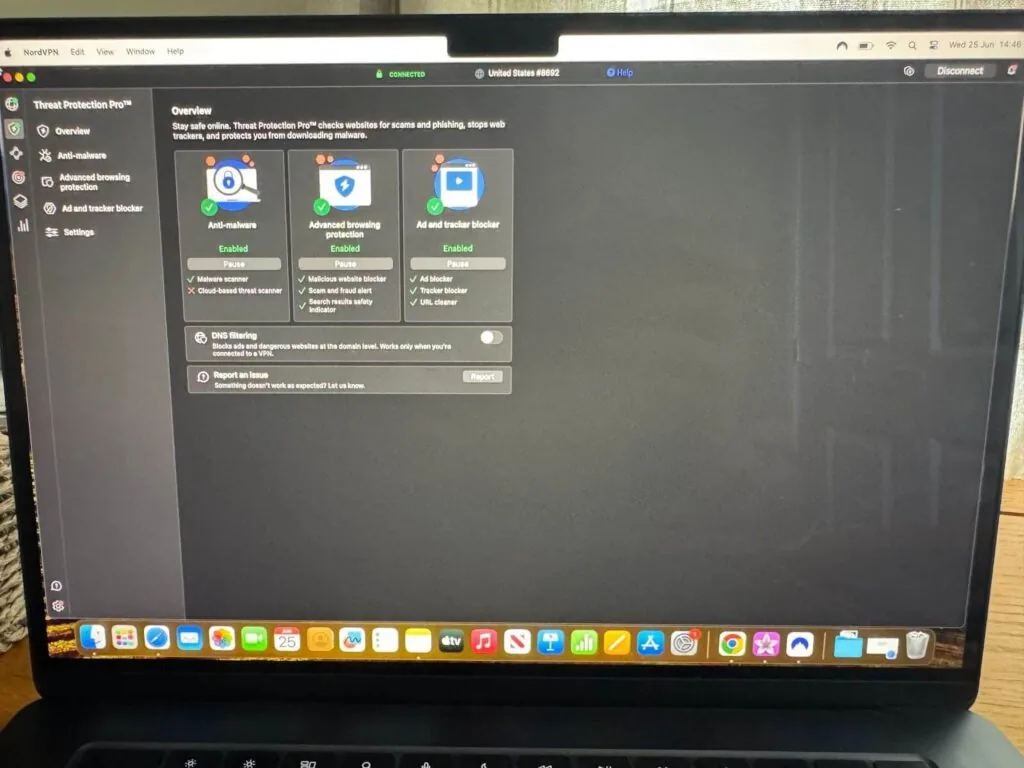
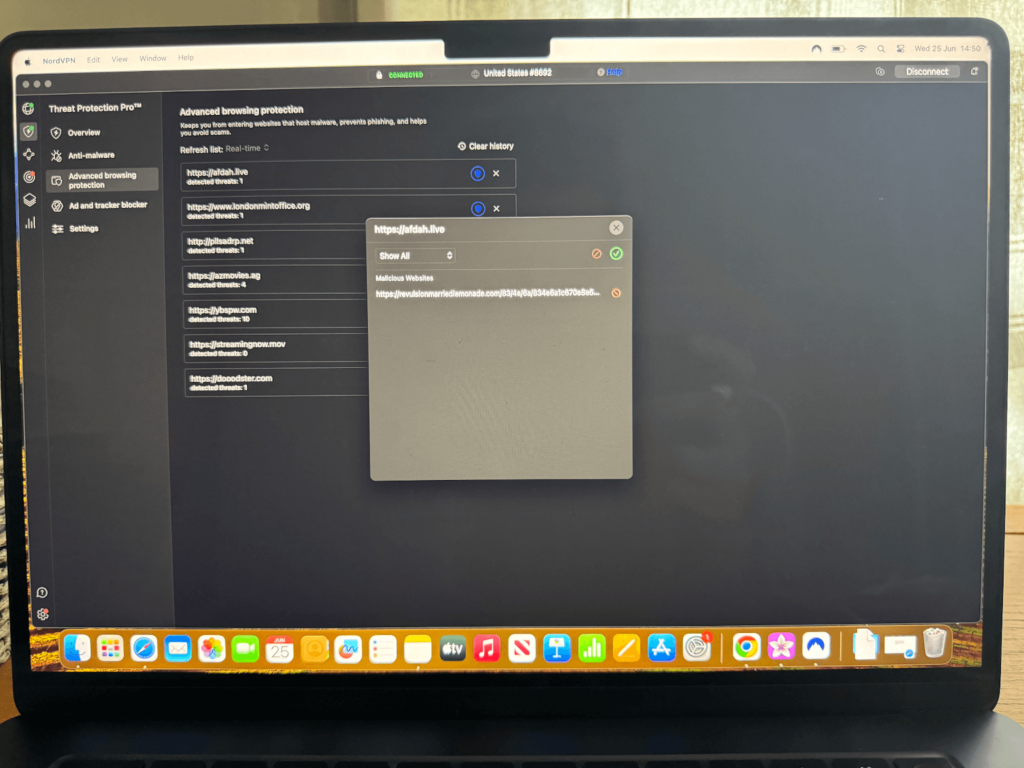
NordVPN’s Threat Protection Pro provides advanced security features, including ad and tracker blocking, malicious website protection, and blocks phishing links within emails and SMS messages. During my in-house tests, it blocked 10/10 of known malware threats that I simulated using EICAR (European Institute for Computer Anti-Virus Research) test malware files. NordVPN also effectively blocked every malicious website I attempted to load, including numerous free movie streaming sites that serve up malicious ads and illegal content.
How many devices can I use with NordVPN?
NordVPN allows you to secure up to 10 simultaneous devices on a single subscription. This includes all compatible operating systems: Windows, macOS, Linux, Android, iOS, Android and smart TVs via dedicated apps, and browser extensions for Chrome, Firefox, and Edge.
I tested devices running each compatible operating system to ensure a fair test. First, I performed streaming and torrenting tests on a Macbook and Windows PC, before switching to mobile devices on Android and iOS to test video calls on Microsoft Teams and Slack. Using an Android smart TV, I was able to change my location and unblock Netflix US, and I also installed NordVPN on my router for whole-household protection across every device I tested. Regardless of my test, I observed stable speeds and lag-free connections regardless of my device.
📱Secure up to 10 devices simultaneously with a single subscription
Use NordVPN on up to 10 devices simultaneously by installing the NordVPN app from an official source, such as the website or within your respective app store, then sign into your account and tap the connect button to establish a connection.
Advanced tip:
Install your NordVPN app directly onto your router. This way, you can bypass the 10-device limit since the router counts as a single installation. However, any device connected to your router will be fully protected by NordVPN and capable of bypassing geographical content restrictions.
I also recommend using split tunneling on desktop devices if you want to optimize your speeds across all connected devices. Split tunneling allows you to specify which applications use your VPN connection and which use your regular connection. For example, when testing NordVPN, I was able to protect uTorrent traffic while allowing other applications to use my regular connection. This ensured that bandwidth was reserved for torrenting, preventing other applications from slowing down my downloads.
NordVPN Reddit review: what real users are saying?
Reddit is a popular social media platform that allows users to share honest feedback and troubleshooting assistance about NordVPN. Since I regularly use Reddit to seek feedback on any product I use, I looked for NordVPN reviews to find real experience from subscribed users.
Reddit users tend to be very positive about NordVPN’s fast speeds, usability, and effective unblocking for streaming platforms like Netflix, Disney+, and Hulu. Security is another strong point for NordVPN, with users reporting positive feedback for its no-logs policy and advanced security features like encryption. I agree that I found NordVPN to be consistently fast and reliable with unblocking, aligning with most positive user reviews.
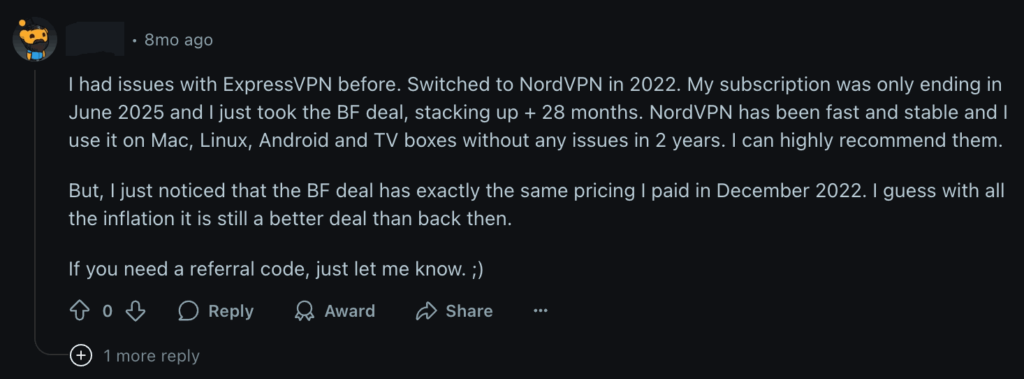
In terms of drawbacks, Reddit users have reported server connectivity issues or slowdowns during peak times, though this is an issue shared among all premium VPNs. Also, some users prefer opting for a cheaper VPN with Surfshark. Reddit users frequently talk about Surfshark’s affordability when comparing long-term plans from both this service and NordVPN.
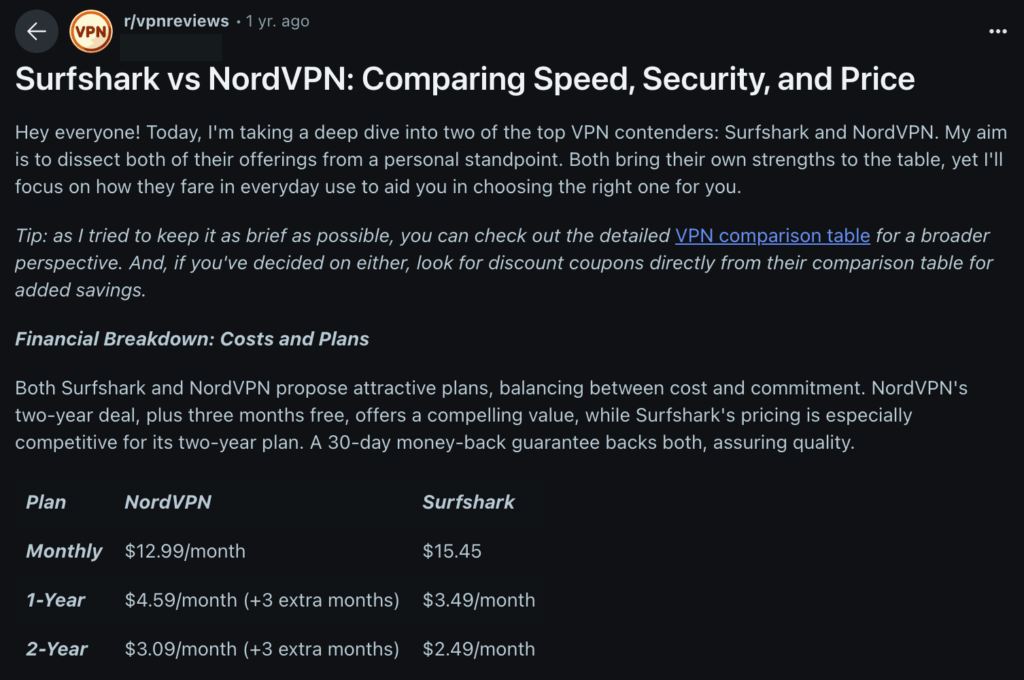
While I have seen similar slowdowns on highly congested servers, switching your server usually resolves any issues quickly. Additionally, while more expensive than some competitors, I find that NordVPN’s value for money is better thanks to more robust security, faster speeds and unique features such as Meshnet. Overall, Reddit users rate NordVPN highly and find it trustworthy for streaming, torrenting, and privacy.
Final verdict
Following comprehensive speed, security, streaming, compatibility, and privacy tests with NordVPN, I can confirm it’s one of the best VPNs for any purpose that offers solid value for money. While it has minor drawbacks, such as a 10-device limit, it generally surpasses other premium VPNs in every area. Connection speeds with NordVPN are the fastest I’ve seen after testing more than 100 VPNs, even when torrenting on P2P-optimized servers. Security and privacy are airtight too, with zero data leaks, an independently audited no-logs policy, and secure protocols.
NordVPN has only suffered a single breach, and even then, it affected just 1 server and revealed no user data. I’m also impressed with the response from Nord Security despite zero data loss, which saw the company immediately cut ties with the affected data center and bolster security in a number of areas. These changes, such as RAM-only servers, are part of what continues to contribute to NordVPN’s excellent security today.
Overall, if you’re looking for the absolute cheapest VPN, NordVPN isn’t it. Otherwise, for absolute online protection and speed, this is the VPN to choose.
Here are the main strengths of NordVPN:
- NordVPN offers affordable subscriptions, starting from $ 3.49/month for unrestricted VPN access, speed, and unblocking.
- NordVPN provides robust security, including basics like AES-256 encryption and a strict no-logs policy, but also advanced features like RAM-only servers and Meshnet.
- NordVPN offers the fastest VPN speeds seen in my tests, averaging 468Mbps during tests and peaking at 538Mbps.
- NordVPN provides secure VPN protocols, including OpenVPN and WireGuard, as well as its proprietary and speedy NordLynx.
- NordVPN can unblock any streaming service, including Netflix in the US, UK, Canada, Japan, and other regions.
NordVPN supports all major operating systems, as well as allowing you to install the app on routers for full-household protection that bypasses the 10-device limit.
You might also like to read:
- NordVPN vs Surfshark vs ExpressVPN
- NordVPN vs Norton VPN
- NordVPN vs IPVanish
- NordVPN vs Mozilla VPN
- NordVPN vs McAfee VPN
- NordVPN vs Mullvad VPN
- NordVPN vs Windscribe
- NordVPN vs PureVPN
FAQ
Cybersecurity company Nord Security owns and operates NordVPN, as well as other products that include NordPass and NordLocker. Based in Panama, its founders are Tom Okman and Eimantas Sabaliauskas.
NordVPN is based in Panama, a jurisdiction with no mandatory data protection laws, which ensures that the service enjoys strong security backing. As a result, NordVPN is not subject to intrusive international surveillance alliances like Five Eyes.
Yes, most users agree that NordVPN offers strong value for money thanks to robust security features, the fastest connection speeds, and a vast global server network. Other tools like Threat Protection, Double VPN, and Meshnet provide an edge over VPN competitors. While not the cheapest VPN service, it offers further best value for money thanks to unique and proprietary features like NordLynx.
NordVPN cannot easily be tracked due to AES-256 encryption and a strict no-logs policy backed by Panamanian law, where there are no mandatory data retention rules. NordVPN doesn’t store any information about your activities online, making it hard for police or any other authorities to trace your web browsing activity. That said, bear in mind that committing serious crimes using a VPN could attract attention, and any authorities with sufficient time, resources, and motivation could trace you through alternative methods, including account information, device identifiers, or payment details.
Yes, NordVPN is extremely safe for banking thanks to powerful AES-256 encryption, zero data logging, and its location in Panama, which places it outside of international data-sharing alliances. Not only will encryption keep your credentials hidden while using unsecured networks, but its anti-malware tools block phishing attacks designed to capture your sensitive financial data including online banking credentials.
NordVPN’s disadvantages include not being the absolute cheapest VPN service, having features that can be complex to understand, and having a 10-device connection limit where some competitors offer unlimited connections. While some users have reported speed dips on further-away servers, our speed tests still place NordVPN as the fastest VPN available in 2026.
Yes, NordVPN works on Linux and even supports a command-line application that works across various Linux distros, including Fedora, Debian, and Ubuntu. It’ll allow you to connect to a VPN server, manage your NordVPN settings, and use features like Threat Protection Lite by interacting with the terminal. Alternatively, you can set NordVPN up manually on Linux via WireGuard or OpenVPN for greater control over your VPN configuration.
No, NordVPN has a strict no-logs policy that has been audited and verified by routine independent audits from auditing giants like Deloitte on five consecutive occasions. Since NordVPN is based in Panama, it is also exempt from international data-sharing alliances like Five Eyes, making your data extremely secure while connected to a NordVPN server.
Yes, NordVPN is good for gaming and delivered the fastest connection speeds during my in-house tests, with 96% download speed retention (468 Mbps), all while maintaining a low ping. While connected to a NordVPN server, you can bypass regional content locks, protect yourself against DDoS attacks, and potentially even improve latency.
Nice