- Surfshark Antivirus Short Review
- Surfshark Antivirus Specifications and Subscriptions
- Security: Can Surfshark Antivirus Keep Your Devices Safe?
- Privacy: How Does Surfshark One Antivirus Handle Your Data?
- Usability: How User-Friendly Is Surfshark One Antivirus?
- Final Verdict: Is Surfshark Antivirus Enough for Your Device?
- FAQ
Surfshark Antivirus is a powerful anti–malware tool that protects devices from viruses, trojans, ransomware, and other harmful programs. It’s part of Surfshark’s all-in-one security suite, called Surfshark One, including Surfshark Alert, Surfshark Search, and the popular Surfshark VPN.
Surfshark VPN is one of the best premium VPNs I’ve reviewed. Surfshark Antivirus represents the company’s efforts to expand its digital product line and offer a more inclusive online security suite to users. But does Surfshark live up to expectations?
In this Surfshark Antivirus review, I dig into the antivirus software to answer the titular question: Is Surfshark One worth it?
Surfshark Antivirus Short Review
Subscribe If You:
- Want an affordable antivirus
- Are looking for real-time monitoring
- Want the option to schedule and customize scans
- Need a VPN too (Surfshark VPN is included in the package)
- Want an antivirus solution that you can try for free (30-day money-back guarantee)
Don't Subscribe If You:
- Prefer an antivirus with a firewall
- Require a wide variety of features (no password manager or file protection)
Surfshark Antivirus is an effective antivirus solution that protects against viruses and other malware. It’s not as feature-rich as some of the best antivirus software, lacking features like a firewall, and parental controls – but it still holds its own.
Surfshark One’s basic antivirus protection meets my expectations. It has also now been verified by industry lab tests and is effective in protecting against widespread, prevalent malware and 0-day malware attacks. The software is lightweight and can work in the background without slowing down or heating up your device.
Try Surfshark One risk–free for 30 days using the button below, or get a full refund if you’re not happy with your purchase.
Surfshark Antivirus Specifications and Subscriptions
If you want access to Surfshark’s antivirus, you’ll need to purchase the entire Surfshark One cybersecurity bundle. Luckily, Surfshark has a very attractive package when you sign up for two years, which ends up costing just $ 2.79 a month.

- Surfshark One 24 months $ 2.79mth Deal View offer
- Surfshark One 12 months $3.39mth View offer
- Surfshark One 1 month $18.95mth View offer
Besides Surfshark One, there are two other plans with different features. Surfshark One+ includes its Incogni data removal service, while Surfshark Starter is a bare-bones package that only contains the VPN and adblocker.
| Feature | Surfshark One | Surfshark One+ | Surfshark Starter |
|---|---|---|---|
| Pricing | From $ 2.79 per month | From $ 4.49 per month | From $ 2.49 per month |
| Smart & Fast VPN | ✔ | ✔ | ✔ |
| Ad Blocker (Cleanweb) | ✔ | ✔ | ✔ |
| Alternative ID | ✔ | ✔ | ✔ |
| Real-Time Antivirus | ✔ | ✔ | ✖ |
| Webcam Protection | ✔ | ✔ | ✖ |
| Private Browsing (Search) | ✔ | ✔ | ✖ |
| Dark Web Monitoring (Alert) | ✔ | ✔ | ✖ |
| Data Removal (Incogni) | ✖ | ✔ | ✖ |
| Download Link | Get Surfshark One | Get Surfshark One+ | Get Surfshark Starter |
Overall, Surfshark One lacks some features compared to other antivirus software. But all of the antivirus essentials I expected are there. Considering that one of the best VPNs on the market is bundled in, it’s a good bargain.
You can use one Surfshark Antivirus to protect up to five devices, so it’s a good choice if you want to share your subscription with your family. You can pay for your subscription with credit card, PayPal, Amazon Pay, Google Pay, and even cryptocurrencies.
If you want the best discounts on Surfshark, check out our exclusive Surfshark Antivirus deals and coupon codes, and choose a plan that fits your needs at the biggest discount.
Security: Can Surfshark Antivirus Keep Your Devices Safe?
Overall, Surfshark offers useful antivirus features to safeguard your device. Its basic antivirus protection meets my core expectations for an antivirus solution. Here’s a summary of what I discovered during my research and testing:
- The scanning feature is effective at spotting malware.
- Real-time scanning is available for Mac, Windows, and Android.
- You can receive alerts when your personal data is leaked.
- Webcam-protection will prevent hackers from spying on you.
- Surfshark One doesn’t have a dedicated firewall.
As a result, I awarded Surfshark Antivirus an 8/10 for security. It’s also fallen into our No. 1 slot of best VPNs with antivirus.
Security testing: How well does Surfshark Antivirus detect cyber threats?
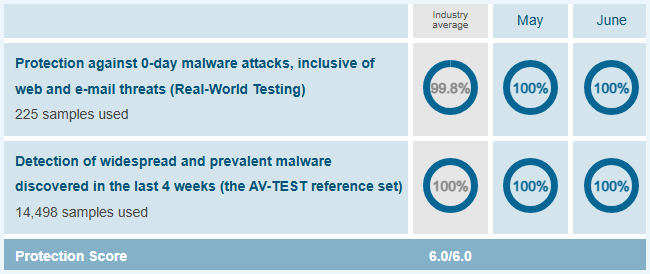
Independent lab testing is my first port of call in my antivirus reviews. Recently, AV–Test scored Surfshark Antivirus, allowing us to see the software put through rigorous testing. The results are impressive.
In this round of testing, Surfshark got a 6.0/6.0. It managed to block 100% of the 0-day malware attacks, scoring even better than the industry average. I also blocked 100% of the widespread malware discovered in the last 4 weeks. These are impressive test results.
I also put Surfshark One Antivirus through my own tests during this review, introducing a dummy malware file to my Windows computer. I downloaded the malware test file from the European Institute for Computer Antivirus Research (EICAR) and ran quick and full scans to see if Surfshark Antivirus could detect the threat.
The test results were very good. Surfshark Antivirus easily picked out the dummy malware file during each scan. It also gave us the option to delete the file. My only gripe was that the antivirus didn’t offer much detail on the malware file except categorizing it as “riskware.”

Real-time protection and web protection
Real-time protection means that an antivirus will run in the background, monitoring and detecting threats like Trojans in your device. Previously, Surfshark Antivirus’ real-time protection only worked on Android. But the feature is now available to Windows and macOS users.
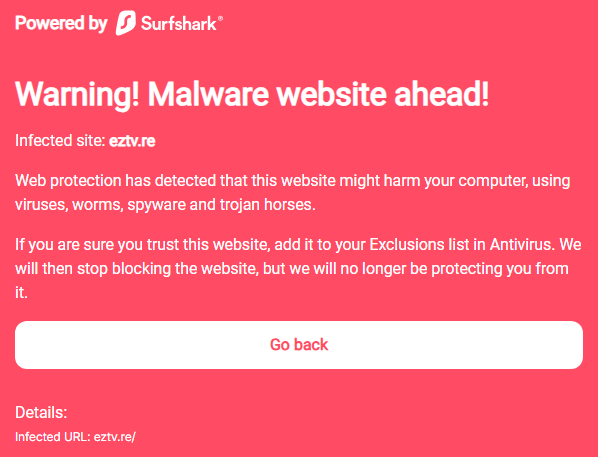
Web protection checks websites and stops threats even before they can reach your device. I tried the feature on an Android device as well as a Windows. It worked well, alerting me whenever it suspected any virus, malware, or spyware.
Device scanning
Antivirus software tends to offer different scans, and I was happy to see that Surfshark’s antivirus supports the features we’d expect. You can tailor scans to your needs based on three options:
- Quick scan: A quick surface-level scan of the device’s file system. I find these scans useful when you need to continue using your device. After the scan, Surfshark Antivirus shows you a list of the threats and allows you to delete them.
- Full scan: Surfshark Antivirus’ full scan digs deep into your entire device to discover threats. It’s an excellent option to fish out computer viruses and malware that a quick scan may have missed, though I find that it’s better saved until you’re away from the device.
You can schedule scans to make sure your device gets a proper check down every once in a while. It is possible to adjust the settings for external devices, like USB sticks, allowing Surfshark to check them every time they are connected.
You can also run a custom scan by dragging and dropping files into the Surfshark window. This is a useful feature since it allows you to scan specific files and folders without running a full or quick scan.
Webcam protection
Surfshark One offers webcam protection. Toggling the feature allowed me to choose which apps could access my built–in camera, such as programs for online meetings. This feature ensures that only apps that really need access to your camera can use it.
This prevents cyber criminals from hacking your webcam and spying on you. This is a much more convenient solution than taping or unplugging your webcam.
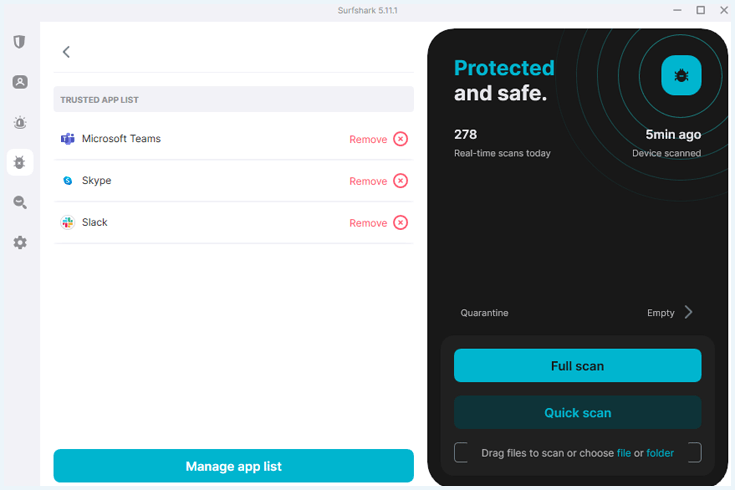
What you don’t get with Surfshark One
Surfshark Antivirus lacks some features that other antivirus programs do offer. These are the features that are not part of the Surfshark One subscription:
- A firewall to block incoming traffic. This doesn’t have to be a problem if you combine Surfshark with another firewall, such as Microsoft Defender. On the other hand it is remarkable Surfshark doesn’t offer this extra layer of protection as most other antivirus programs do offer a firewall.
- Parental controls to block certain types of websites. Although this is not a must have feature, some competitors do offer parental controls. Who is looking for an antivirus with parental controls is better of with Norton Family.
- Tune Up to increase the performance of your device: some antivirus programs do not only keep your device safe, but they also delete unnecessary files which can slow down your computer. If you need this, AVG Tune Up might be suited for you.
I think it would be an improvement if Surfshark offered a firewall as well. For the other features, it’s a matter of preference. Surfshark might not have parental controls and tune up, but it does offer a lot of privacy features that competitors don’t have.
Privacy: How Does Surfshark One Antivirus Handle Your Data?
The best antivirus programs treat user data with great care. Surfshark scored high marks, specifically a 9/10, in this department during my Surfshark One Antivirus review. I wouldn’t expect anything less from an industry–leading, no–logs VPN provider.
To date, there’s no record of any data breaches or scandals. That’s impressive. Here’s my roundup of Surfshark One’s key privacy points:
- Surfshark is located in the Netherlands and complies with the GDPR.
- The company follows a strict no-logs policy, avoiding storage of any personal data.
- Surfshark Search offers a privacy–focused search engine experience.
- You can receive alerts about compromised credentials.
- Surfshark’s RAM-only servers ensure your data is wiped upon every reboot.
Surfshark One Antivirus privacy policy
Surfshark excels in privacy. The company has a strict no-logs policy, meaning it doesn’t log your online activity. That includes your IP addresses, browsing history, bandwidth, time stamps, and network traffic. Surfshark runs RAM-only servers. As a result, your data is only stored temporarily to deliver your service.
Surfshark was established in the Netherlands. The country doesn’t require information storage or reporting and complies with the General Data Protection Regulation (GDPR). As such, while Surfshark gathers some account information, like your email address, registration date, and password, this is common among all VPNs and is of no concern.
Surfshark One gathers more information than Surfshark Starter. This includes:
- The number of connections to make sure Surfshark Antivirus is not used on more than 5 devices.
- Statistics about the malware detected, including user ID. This will be anonymized after 1 year.
- E-mail address and credit card information if you turn on dark web monitoring for these details.
- The number of search queries if you use Surfshark Search.
To examine Surfshark One’s policy yourself, check out our article on spotting privacy risks in user agreements and privacy policies.
Privacy protection features
Aside from Surfshark Antivirus, the Surfshark One bundle gives you access to Surfshark VPN, Alert, Search and Alternative ID. If you opt for One+, this extends to their data–deletion service, Incogni. Let’s take a closer look at these features:
| Feature | Explanation |
|---|---|
| Surfshark VPN | Surfshark VPN is one of the top VPNs on the market, offering some of the best–in–class speeds. The ‘no log’-policy and strong encryption make sure your connection remains private. We’ve tested Surfshark extensively. |
| Surfshark Search | Think of Search as a true incognito mode that helps you browse the web completely anonymously. This private search engine prevents tracking. What’s more, you won’t see any ads while browsing. |
| Surfshark Alert | Surfshark Alert is a data breach monitoring tool that notifies you when your personal information appears online. It scours the internet to see if your email address, credit card details, and personal identification number have appeared in breached online databases. |
| Alternative ID | Alternative ID allows you to create a second online identity, including an email address. if you use this alternative ID for online accounts, you will protect your identity. |
| Incogni | Incogni will help you delete your online data by sending automated deletion requests to data brokers. While conducting the Incogni review, my colleagues found that this service is very effective at online data removal. |
Usability: How User-Friendly Is Surfshark One Antivirus?
We’ve always found that Surfshark products excel in usability. And I was happy to see that during my Surfshark Antivirus review, Surfshark One’s apps were all easy to install, intuitive, and user-friendly. Here’s a snapshot of my experience with Surfshark One:
- Surfshark One is easy to download and install.
- Surfshark Antivirus is easy to use.
- You can get a full refund within 30 days of your purchase.
- Surfshark’s customer support is responsive and helpful.
- It doesn’t have a user community.
Based on these observations, I determined that Surfshark One Antivirus scores an 8 out of 10 for usability.
How do I install Surfshark Antivirus?
Surfshark Antivirus is part of the Surfshark VPN app. To download and install Surfshark Antivirus, follow these steps:
- Visit Surfshark’s website. The website is well laid out, attractive, and easy to navigate.
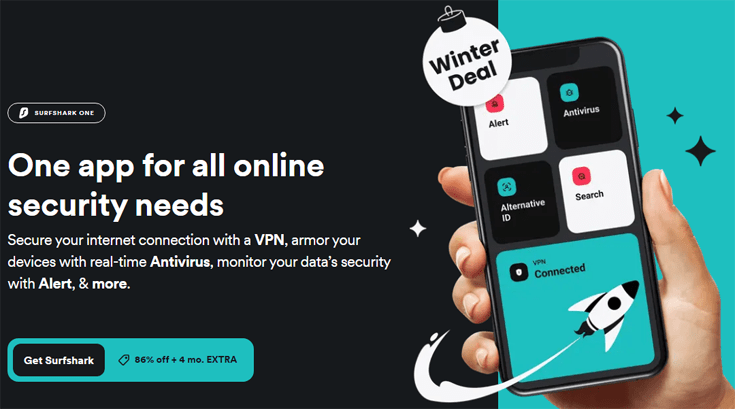
- Click on ‘Get Surfshark’.
- Choose a plan. You will need Surfshark One or One+ to use Surfshark Antivirus.
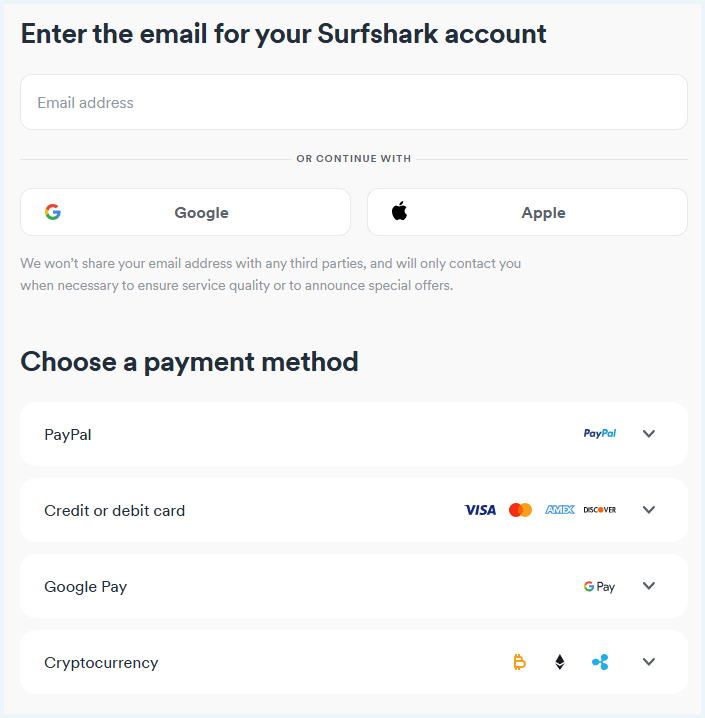
- Fill in your email address and select a payment method.
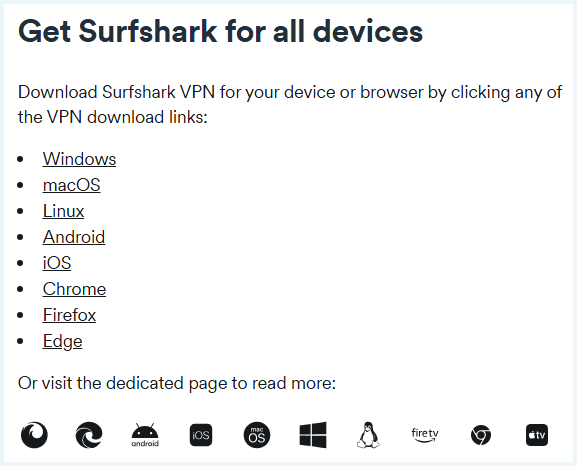
- Now you are ready to download Surfshark. You can find the setup files on Surfshark’s website. Choose your operating system and download the setup file for the Surfshark app.
- Run the application and follow Surfshark’s prompts until the program is successfully installed.
- Open the Surfshark app.
- Navigate to the Antivirus menu by clicking on the little bug on the left side.
- Click on the blue button with ‘Install Antivirus’.
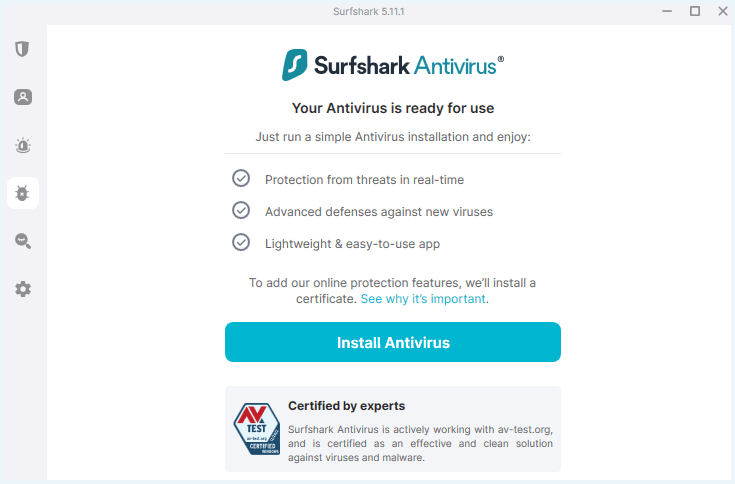
- The installation will take place automatically and you will get a notice when it’s done.
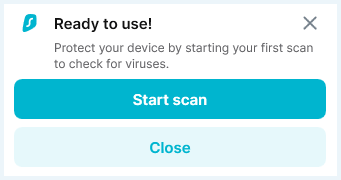
Overall, I found the installation process quick and efficient. The app was up and running in a matter of minutes.
Surfshark Antivirus software
I found the Surfshark One software very user-friendly during my Surfshark Antivirus review. All products (VPN, Alert, Search, Antivirus) are gathered in one app. This combined app with all features is available for Windows, Mac and Android.
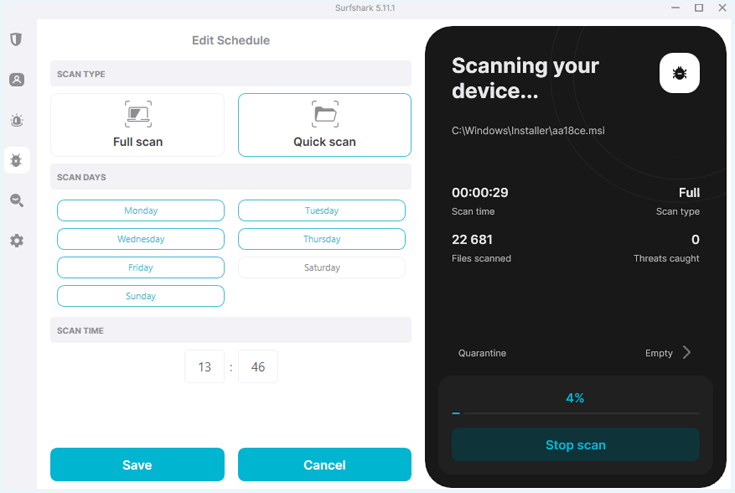
I clicked on the “Antivirus” tab to access it and was presented with various customization options.
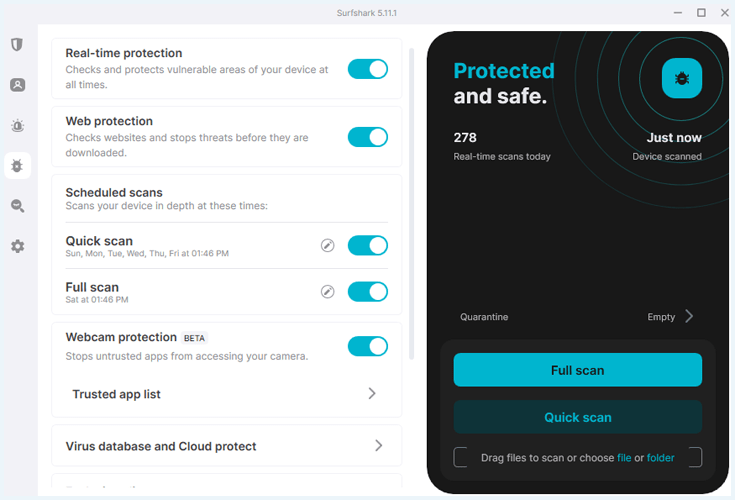
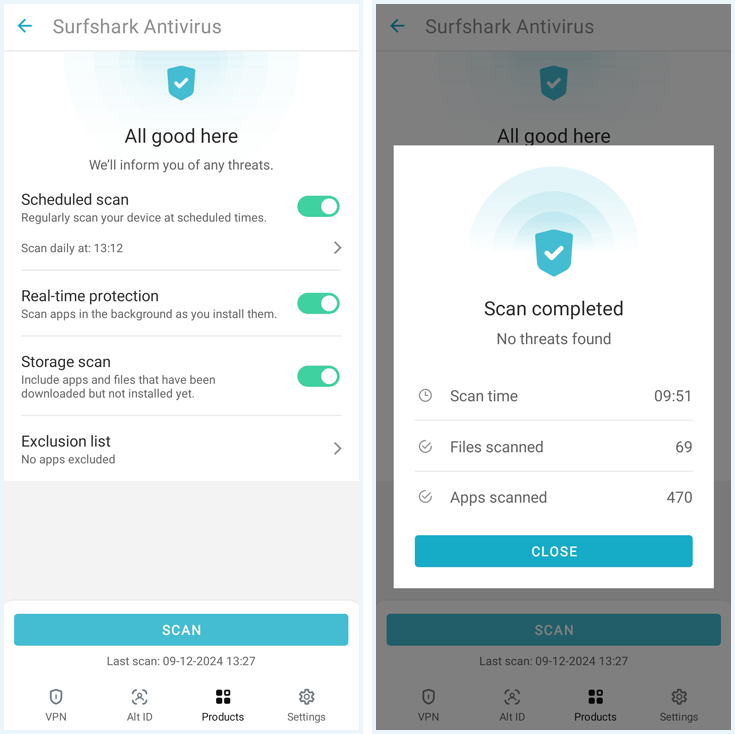
Here, you can run a scan immediately or schedule scans at fixed times. Even if you don’t run a scan, real time protection and web protection have your back as long as you keep them turned on.
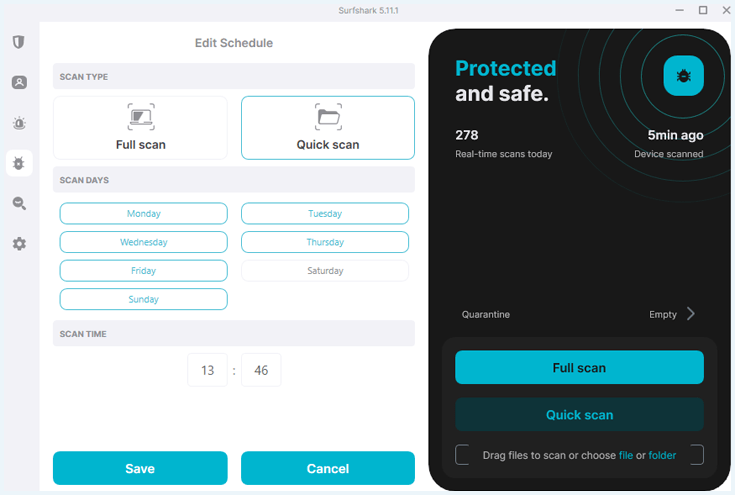
If you decide to schedule a scan, you can make the following choices:
- Do you want a full scan or a quick scan?
- On which days do you want the scan to run?
- At what time do you want the scan to start?
The Android app is even easier and only offers one type of scan. It would be an improvement if more options became available to customize the scans for mobile devices. In addition, an iOS app would be an asset.
Surfshark One Antivirus customer support
Surfshark One offers these types of customer support:
| Option | Available |
|---|---|
| Knowledge base | ✔ |
| E-mail support | ✔ |
| Live chat | ✔ |
| Phone support | ✖ |
| Community | ✖ |
Surfshark has a knowledge base dedicated to its antivirus. I launched it directly from the dashboard. In my previous Surfshark One review, I noted only four FAQs – the help section has since expanded vastly. Surfshark is clearly committed to developing its antivirus solution.

You can also reach out to Surfshark’s customer support agents through email or a live chat. I tested the live chat feature, and I was impressed by the timely and helpful response.
An actual agent, rather than the bot, responded to us in less than a minute and provided all the information I needed. Unfortunately, there’s no user community to help you with your questions.
How easy is it to cancel Surfshark Antivirus?
You can cancel your Surfshark One subscription at any time. You can also get a full refund if you request it from customer support within 30 days. Canceling Surfshark One is just as easy as canceling Surfshark VPN.
Surfshark may consider refunds beyond 30 days if the service was unavailable or unusable. You’ll be expected to have made sufficient efforts to contact Surfshark without a solution. There’s a maximum of two refunds per user, and claims must be at least six months apart.
Overall, I found it extremely easy to go through the process for a refund. It meant I could scan for threats and still get my money back, knowing my machine was malware-free. There’s really no risk in trying Surfshark One for 30 days to check that there are no hidden keyloggers or other malicious programs lurking.
Speed and Performance: Will Surfshark One Antivirus Slow Down My System?
An antivirus can slow down your system, especially during full scans. Overall, Surfshark antivirus has little impact on your system speed. Here’s a summary of my findings when I tested it:
- Surfshark Antivirus doesn’t consume much memory or CPU resources.
- The full scan will take no longer than fifteen minutes, depending upon your file system.
Based on these conclusions, I gave Surfshark One Antivirus 8 out of 10 for performance.
How long does a scan take?
The length of a scan depends on many factors, including the size of your drive, your RAM, and your CPU resources. For my testing, I used a device with the following specifications: AMD Ryzen 7 5000 series processor, 16B of RAM, and a solid-state drive (SSD) with Windows 11 Pro 64-bit system (English).
Surfshark managed to perform the scan rather quickly:
- The quick scan needed just a few seconds to scan 19.332 files.
- The full scan needed about 12 minutes to scan 625.651 files.
This is a lot quicker than we expected. For example, Avira needed a minute for a quick scan and more than half an hour for a full scan. Bitdefender needed five minutes for a quick scan and almost 4.5 hours to complete a full scan.
How does Surfshark Antivirus impact my CPU?
The good news is that the Surfshark Antivirus full scan does not require a lot of processing power. During my testing, the antivirus used around 90MB of working memory and 10-20% of CPU resources.
This means you can still use your PC normally even while performing a full scan, and you don’t have to worry about the scan slowing down or heating up your device. We could listen to music, stream a YouTube video or keep working on an article during the scan.
However, Surfshark can still get better when it comes to CPU usage. For example, Sophos used only 4% of CPU resources while I was reviewing the software.
Final Verdict: Is Surfshark Antivirus Enough for Your Device?
While Surfshark Antivirus is still relatively new, all the signs we’ve seen during my review are positive. It covers the antivirus essentials, with routine scanning, real–time protection, and file scanning functions.
Surfshark Antivirus has been industry vetted, and the last results were pretty impressive. We can conclude Surfshark offers a trustworthy antivirus, and the Surfshark One Suite is a perfect solution for those who value online security and privacy.
Surfshark Antivirus scores 8.3/10 overall for its security suite. I think Surfshark One is a solid choice for anyone who’s privacy–minded, especially because it comes with Surfshark’s industry–leading VPN service. With Surfshark One Antivirus, you can be confident that your device will be protected from online threats.

Get Surfshark’s full security suite with 87% off + 3 months free!
If you want to check out other antivirus solutions on the market, take a look at the other articles below:
FAQ
Below, you’ll find common questions people are asking about Surfshark Antivirus. Simply click on a question to reveal the answer.
Surfshark One has all the essentials we’d expect from an antivirus solution. According to AV-test Surfshark detected up to 100% of the prevalent and widespread malware. It also passed our tests using spoofed malware files, and we’re confident in the protection it offers.
With AV-Test’s Real-World Testing Surfshark Antivirus managed to detect 100% of all malware. Malwarebytes on the other hand detected 99,2% of the malware. That leads us to the conclusion that Surfshark offers better antivirus than Malwarebytes.
Both Avast and Surfshark detected 100% of the cyber threats in AV-Test’s Real-World Testing. We can conclude both are good solutions if you want to keep your devices safe online.
Surfshark VPN doesn’t block malware and viruses. When you subscribe to Surfshark One, you will also get Surfshark Antivirus. In the latest AV-tests Surfshark Antivirus detected 100% of the widespread malware.