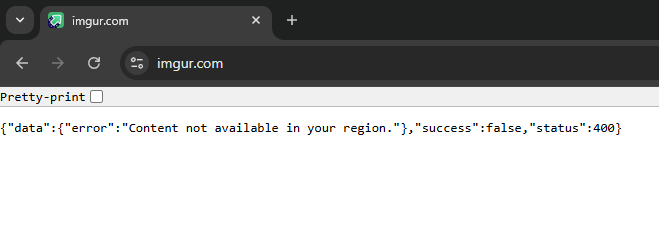
In September 2025, Imgur stopped working in the UK. Millions of users suddenly found that Imgur is blocked: you can’t log in, view images, or even see your own uploaded photos. Instead, the site shows an Imgur error message: “Content not available in your region.”
This isn’t a server issue, as Imgur has banned UK users. The block is linked to the Online Safety Act, which forces platforms to add strict age checks and content filters. Rather than comply, Imgur chose to geo-block the UK.
That means:
- Imgur is not down worldwide, as it only fails in the UK.
- UK users cannot access their photos or Imgur embeds on Reddit, forums, or blogs.
- There’s no timeline for Imgur to return.
The solution: use a VPN (Virtual Private Network). A VPN lets you change your IP address, bypassing the UK block, so you can recover lost photos and use Imgur normally.
How to unblock Imgur in the UK with a VPN?
- Get a reliable Imgur VPN. I recommend NordVPN, now 75% off, proven to unblock Imgur.
- Download the VPN app and install it.
- Connect to a server outside the UK, like US or Ireland.
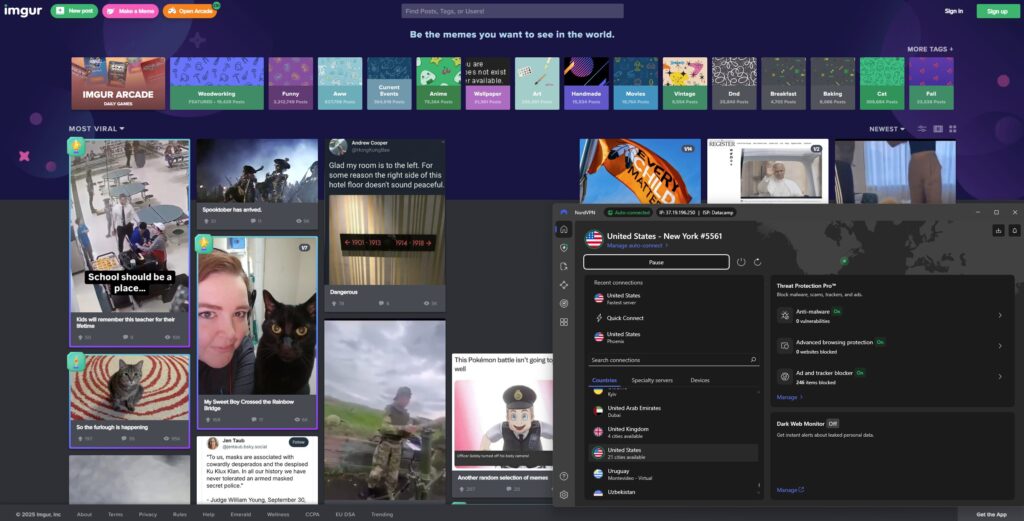
- Visit Imgur – the “not available in your region” error disappears.

Why is Imgur blocked in the UK?
Imgur is not down — it’s deliberately blocked in the UK. Since September 30, 2025, UK visitors see the error “Imgur content not available in your region.”
The reason: the Online Safety Act 2023. This law requires platforms to verify ages and moderate harmful content. Rather than adapt, Imgur banned UK IP addresses to avoid fines. As a result:
- UK users cannot access their own accounts or photos.
- Imgur images embedded on Reddit or blogs also fail.
- The block is indefinite, with no return date.
For now, the only way to bypass this block and restore access is to use a VPN, which makes Imgur think you’re browsing from another country.
How to access Imgur in the UK: a detailed guide
If you’re in the UK and want to continue using Imgur, a VPN is the best solution. By connecting through a VPN, you obtain an IP address from a country where Imgur isn’t blocked, thereby bypassing the UK restrictions. Below is a detailed guide on how to get Imgur working again with a VPN:
Step 1. Subscribe to a reliable VPN service
To regain access to Imgur, start by choosing a trustworthy VPN provider. I strongly recommend NordVPN for this task. NordVPN has a vast network of servers in dozens of countries (including the US and Europe), which means you’ll have plenty of options for an IP address outside the UK. It also offers excellent security features and the fastest connection speeds in the industry – useful for quickly loading images and albums. Once you’ve picked your VPN (NordVPN is our top choice), go to the official website, select a subscription plan, and create your account.
Step 2. Download and install the VPN app
Next, download the VPN application for your device. If you’re on a PC or Mac, get the app from the VPN provider’s website. For mobile devices like smartphones or tablets, you can find the VPN’s app on the Google Play Store (Android) or Apple App Store (iOS). After downloading, run the installer and install the VPN app following the prompts. (If the app asks for permissions, grant them so it can function properly.) Once installed, launch the VPN app and log in using the account credentials you created in Step 1.
Step 3. Launch the VPN and connect to a server outside the UK
With the app installed, open it and connect to a VPN server in a country where Imgur is not blocked. For example, you might choose a server in the United States, France, or Ireland – any location outside the UK will work. Hit the “connect” button and wait for the VPN to establish the connection. After connecting, your internet traffic will now be routed through that country, and you’ll be browsing with a non-UK IP address. This makes it appear to websites (like Imgur) that you are visiting from the VPN’s country. Pro tip: If you still encounter the region error on Imgur, try clearing your browser’s cache and cookies. These files can sometimes reveal your previous location, so deleting them ensures Imgur only sees your new foreign IP.

Step 4. Head to Imgur and access your images
Now that your VPN is active and your virtual location is set outside the UK, it’s time to visit Imgur. Open your web browser and go to imgur.com, or launch the Imgur app if you have it installed. You should find that Imgur loads normally – the “not available in your region” message will no longer appear. Log in to your Imgur account (if needed) and you’ll be able to view, upload, and share images just as you did before the block. Essentially, with the VPN’s help, you’re pretending to be in an allowed country, so Imgur functions perfectly. Enjoy your images and galleries on Imgur in the UK, thnaks of your VPN connection!
Best VPNs to unblock Imgur in the UK
Not all VPNs are equal when it comes to bypassing region blocks and maintaining fast, reliable connections. I tested and identified the top 3 VPN services for accessing Imgur in the UK. These VPNs consistently succeed in unblocking Imgur, offer strong privacy features, and provide high-speed servers for smooth image browsing:
- NordVPN: The best overall VPN to unblock Imgur in the UK. NordVPN has a huge server network worldwide and delivers exceptional speeds. It easily bypasses geoblocks (including Imgur’s) and keeps your browsing private with robust encryption.
- Surfshark: a fast and affordable VPN for Imgur. Surfshark offers unlimited simultaneous connections, so you can secure all your devices. It has plenty of servers outside the UK and reliably unblocks Imgur and other sites, all at a budget-friendly price.
- Proton VPN: a privacy-first VPN with a free plan. Proton VPN is known for its strong security and a strict no-logs policy. It has servers in many countries and even provides a free version that can work for unblocking Imgur (with some speed/data limits). It’s a great choice for users who prioritize privacy, though the paid plans offer much better performance.
All three of these VPNs will allow you to access Imgur from the UK, but NordVPN stands out as the top recommendation. In our tests, NordVPN had the most consistent success in bypassing the block and provided the fastest load times for Imgur’s content. It’s also very user-friendly. You can try NordVPN risk-free (it offers a 3-day free trial on some platforms, and a 30-day money-back guarantee for all plans), which makes it easy to see if it meets your needs.

Is it legal to use a VPN to access Imgur in the UK?
Yes. It is perfectly legal to use a VPN in the UK, and that includes using one to access Imgur. The Online Safety Act and related UK internet laws put obligations on companies like Imgur to manage content, but they do not criminalize individuals for using VPNs or for viewing content through a VPN.
VPN usage in general is lawful in the UK – many people use VPNs for privacy, streaming, or security reasons. So, you won’t be breaking any laws by changing your virtual location to bypass Imgur’s block. (Of course, any content that was illegal to view before remains illegal, but Imgur in itself is a legitimate site.)
Conclusion
Imgur is blocked in the UK under the Online Safety Act. For UK users, this means broken images, lost photos, and the error “content not available in your region.”
A VPN, like NordVPN, is the only way to fix this. By connecting to a server outside the UK, you instantly restore Imgur access, recover lost images, and bypass censorship.
Related articles:
- Bypass age verification for adults in UK
- How to watch porn in the UK privately
- Best VPNs to access UK porn sites
- How to bypass YouTube’s age verification
- How to bypass Roblox age verification
- How to bypass Spotify age verification
FAQ
To unblock Imgur in the UK, you need to use a VPN. Simply install a trusted VPN service (for example, NordVPN), connect to a server outside the UK, and then visit Imgur. Your connection will appear to be coming from another country, allowing you to see Imgur content without the “not available in your region” error.
Imgur decided to block access in the UK due to new British online safety regulations. The Online Safety Act 2023 requires platforms to implement strict age verification and data protection measures for users. Rather than comply with these requirements (and amid an investigation by the UK’s ICO into Imgur’s handling of children’s data), Imgur made a business decision to withdraw from the UK market. This is why UK users now see “Content not available in your region” when trying to use Imgur.
Yes, using a VPN to access Imgur is legal. VPNs are legal in the UK, and there’s no law against circumventing geo-blocks for personal use. You won’t get in trouble for using a VPN to view Imgur or any other legitimately accessible website. It’s simply a method to protect your privacy and regain access to content.
Based on our experience, NordVPN is the best VPN for accessing Imgur from the UK. It has a large network of fast servers around the world, which makes it easy to bypass Imgur’s region block. NordVPN also offers strong encryption and privacy features, ensuring that your browsing remains secure while you enjoy Imgur.
You can try a free VPN, but most free services come with limitations in speed, data, or security. One of the more reputable free options is Proton VPN’s free plan, which can work for unblocking Imgur (it has servers in a few countries and no data cap). However, free VPNs often have crowded servers and slower connections. For a smoother, more reliable experience with Imgur, a paid VPN like NordVPN or Surfshark is recommended – they offer much better performance and unlimited usage.
If you’re in the UK, Imgur images embedded on Reddit, forums, or any other site won’t load because Imgur is blocking UK IPs. Those broken image links are a result of Imgur’s UK-wide block. When you try to view an embedded Imgur picture, your browser still has to fetch it from Imgur’s servers – which refuse the request if you’re in the UK. The solution is the same: use a VPN and connect to a non-UK location. Once your IP address is outside the UK, those Imgur images will load normally on Reddit and elsewhere.

