
- Bypass the Grindr ban: a quick guide
- Grindr ban explained: can you bypass Grindr ban?
- How to get unbanned from Grindr right away: 3 key steps
- Recover your Grindr account by filing an appeal: a step-by-step guide
- Best VPN for Grindr: NordVPN
- Reasons for Grindr bans: How to avoid being banned on Grindr
- Final thoughts: get back on Grindr today
- FAQ
- Some Grindr bans are temporary while others are permanent, depending on the severity of the violation.
- Using a VPN is the quickest and most secure way to get unbanned from Grindr because it changes your IP address and lets you create a new account without filing an appeal.
- Based on my tests, NordVPN stood out as the best VPN to get around a Grindr ban thanks to its large network of IP addresses and strong privacy features.

Grindr is the leading social networking app for the LGBTQ+ community. As of 2026, it relies on AI and community reports to spot accounts that break its rules. You might get banned for using offensive language, posting inappropriate public photos, or acting like a bot. Sometimes, these systems mistakenly ban users, which can be confusing if you are trying to figure out how to get unbanned from Grindr.
One of the easiest and safest ways to get around a Grindr ban is by using a VPN. Grindr usually tracks your IP address to stop you from coming back, but a VPN lets you change your online location to another country or city. This hides your connection and makes it harder for Grindr to connect you to your old, banned account. In this guide, I’ll explain exactly how to bypass the Grindr ban and access your account.
Bypass the Grindr ban: a quick guide
To bypass the Grindr ban, you can try either signing up for a new account or submitting an appeal through Grindr’s official support page. However, an appeal doesn’t always work and is time-consuming (can take 24 hours or longer). Here’s a quick guide on how to get unbanned from Grindr right away:
- Delete the Grindr app from your device and restart your phone.
- Get a reliable VPN. I recommend NordVPN at 75% off!
- Download and install the VPN app on your device.
- Open the VPN and connect to a country where Grindr is available, such as the US, Canada, or the UK.
- Optionally, reset your advertising ID (Android) or disable tracking (iOS) (make sure to follow our instructions!).
- Reinstall Grindr and create a new account.
Most of the time, a combination of these methods gets you the best results. This is because Grindr bans accounts on multiple levels.
According to our tests, NordVPN is the best VPN for Grindr, offering robust obfuscation and IP cloaking tools that ensure you won’t be linked to your previously banned account. NordVPN also has 8900 IP addresses from server locations all around the world to choose from.
Grindr ban explained: can you bypass Grindr ban?
Yes, it’s possible to bypass a Grindr ban. There are generally two main options: creating a new account or filing an appeal.
- Creating a new Grindr account may let you get back on the app. However, you may need to first get a new email address or phone number and reset your device ID.
- Filing an appeal might help to get your Grindr account back, too. However, it’s not guaranteed that Grindr will grant your appeal, and it may take up to 24 hours for your appeal to be reviewed.
Types of Grindr bans
Grindr uses different types of bans to enforce its rules and keep the platform safe for users. Depending on how serious the violation is, restrictions can be temporary or permanent and may even block the device being used:
- Temporary bans usually last from 24 hours up to 30 days. These are often triggered by automated systems or user reports, such as sending a rude message or breaking a minor rule. In most cases, the restriction is lifted automatically after a set time, and you can log back in normally.
- Permanent bans happen after serious violations of Grindr’s Terms of Service, such as lying about your age or breaking the rules repeatedly. These bans block your email, phone number, IP address, and sometimes your device.
- Device bans are even stricter. Grindr may block your phone, so you cannot make new accounts, especially if you try to get around a previous ban.
How to get unbanned from Grindr right away: 3 key steps
To get unbanned from Grindr right away, you should follow 3 key steps to hide your previous identity from the app’s tracking system. For the best results, I recommend combining all of these steps to bypass the Grindr ban. Here’s how to regain access quickly and safely:
Note:
When you’re trying to get unbanned from Grindr, I recommend deleting the app from your phone first. This will ensure that there aren’t any traces left on your device that can potentially link back to the ban. Once you’ve done this, you can re-install the app and try out any of the following suggestions.
Step 1. Get a different IP: use a VPN
One of the main reasons people can’t get back on Grindr after a ban is their IP address. When Grindr bans your IP address, the app recognizes your connection and blocks you again, even if you create a new account.
Luckily, you can replace your banned IP address with a new one by using a VPN. I recommend NordVPN because it worked reliably in my tests and it offers thousands of new IP addresses. As soon as you connect to one of its servers, NordVPN gives you a new IP address. This makes it look like you’re accessing Grindr from a different location. Plus, the IP is different, so Grindr is much less likely to link you to your previously banned account. A VPN also keeps your browsing private and helps if you’re in a country where Grindr is restricted, such as Iran or Turkey.
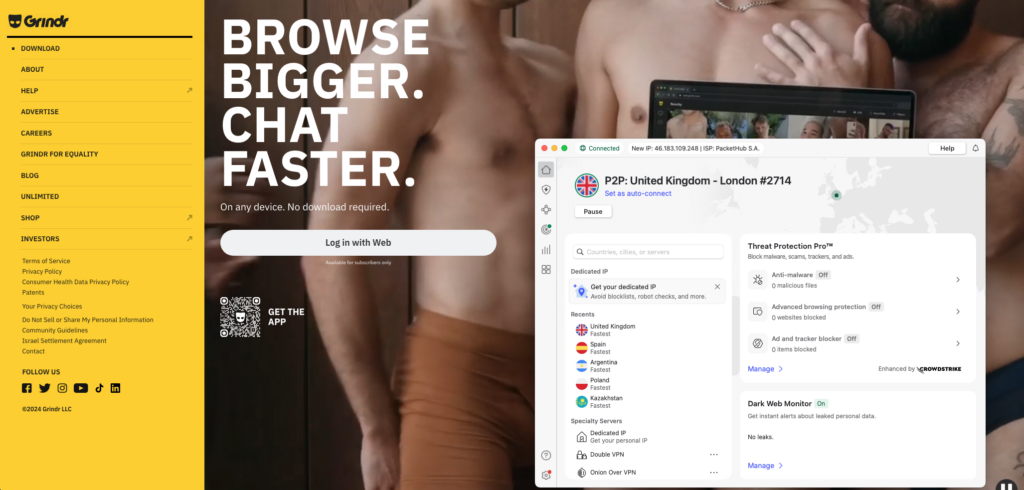
A VPN is a type of software that does two key things that are relevant for Grindr users:
- It hides your real IP address and replaces it with a virtual IP connected to a VPN server. This will allow you to get unbanned from Grindr.
- It creates an encrypted tunnel between your device and the internet that keeps all your data private. In other words, your internet service provider or any other party won’t know you’re using Grindr.
NordVPN is the best VPN to get unbanned on Grindr because it assigns you a new IP address and hides your real location, making it much harder for the app to link you to your previous banned account. Based on my tests, NordVPN worked immediately without triggering another block, giving me stable access with a fresh IP address.
It also includes advanced security features and obfuscated servers, which hide your IP more effectively than regular servers. This prevents Grindr from detecting your connection and issuing another ban. On top of that, NordVPN encrypts your internet traffic and follows a strict no‑logs policy, which means your activity isn’t stored or shared. This reduces the risk of your real location being tracked or identified while you use the app.

Step 2. Change your Android or iOS settings
Grindr might also have banned your device ID to keep you off the app. To bypass a Grindr device ban, you’ll have to dive into the settings of your phone.
Grindr bans accounts at a device level to address Terms of Service violations or security concerns. This means that your SIM number and any accounts associated with that device can also be banned. While Grindr can also simply ban individual accounts, device-level bans are usually a last resort for serial offenders or serious infractions and can be temporary or permanent.
Note:
Always make sure you’ve backed up your phone before performing any factory reset! Save anything you don’t want to lose somewhere else.
Grindr device ban fix on Android
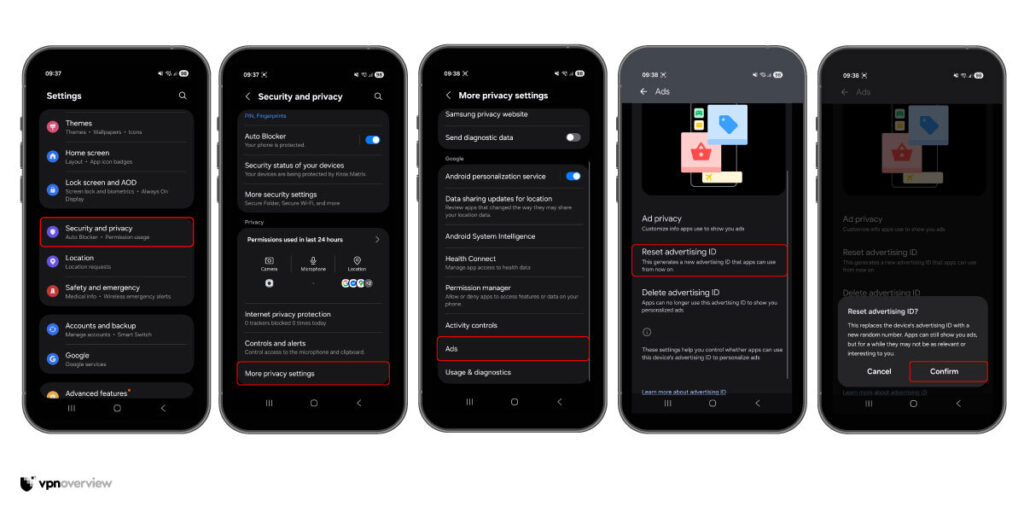
To bypass a Grindr device ban on an Android phone, you need to get a new advertising ID. This is the easiest method and doesn’t delete your photos or messages. It simply swaps your old, banned ID for a brand-new one. Here are the steps you need to follow:
- Open Settings on your Android phone.
- Tap on Security and Privacy.
- Select More privacy settings.
- Click on Ads.
- Tap Reset Advertising ID and confirm.
- For an extra layer of safety, you can also tap Delete Advertising ID and then create a new one.
How to bypass grindr ban on iPhone
You can reduce tracking linked to your previous account by adjusting the iOS privacy settings if you’re trying to bypass the Grindr ban on iPhone. Firstly, turn off app tracking:
- Open the Settings.
- Tap Privacy & Security.
- Select Tracking and turn off tracking for apps.
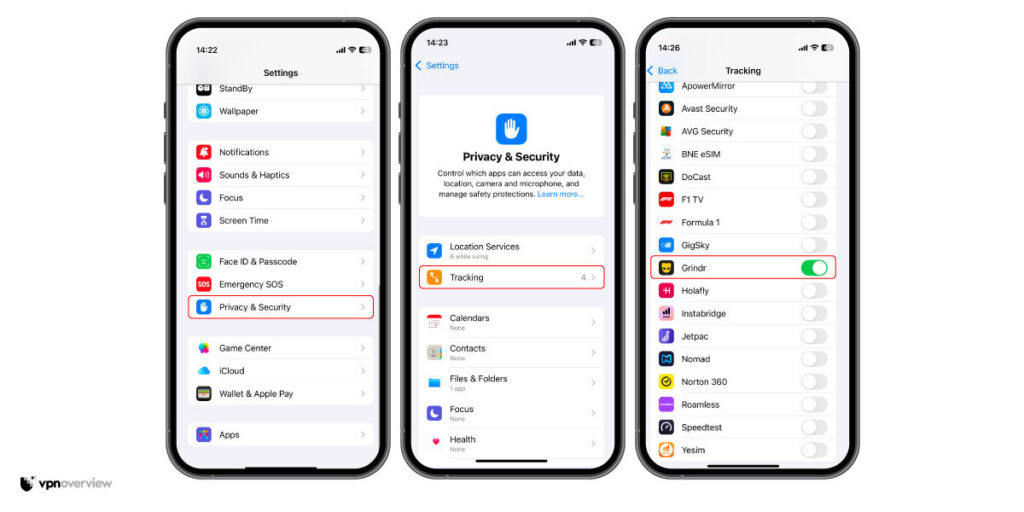
This limits how apps identify your device. If your Grindr account is still banned, you can reset your iPhone to factory settings and set up a fresh device. However, before doing this, back up your important data and check your iCloud storage:
- Go to Settings.
- Click on Apple ID.
- Select iCloud.
- Press on Manage Storage.
- Then, find the Grindr app and delete any stored app data.
Step 3. Set up a new Grindr account
In many cases, Grindr blocks your email address and phone number after a ban. That means you’ll need new login details to create another account. To solve this issue, I recommend creating a new email address with Proton Mail, which also lets you create multiple email accounts.

Then, use a new phone number if Grindr requires verification. You can get one through services like Tossable Digits, which offers virtual numbers in many countries. You can also buy a new SIM card, as free number apps, like TextMeNow, often don’t work because many numbers are already blocked.
In addition, you can have multiple Grindr accounts, but you can only link up to five accounts to a single phone number.
Recover your Grindr account by filing an appeal: a step-by-step guide
If you want to retrieve your Grindr account and regain access to your previous conversations, your only course of action is to file a Grindr ban appeal.
However, this method works best if you haven’t violated any Grindr community guidelines, whether intentionally or accidentally. Otherwise, Grindr may refuse your appeal. It can also be quite time-consuming. Here are the steps on how to fill an appeal to unban your Gridr account:
- Go to Grindr’s submit a request page.
- Confirm that you want to appeal a ban and enter your email address.

- Specify how you created your Grindr account and your device type (iOS or Android).

- For the Subject line, your response can be as straightforward as: “Appealing my Grindr ban.”
- Now it’s time to write your appeal. In the box “Tell us what’s happening”, you can explain the reasons your account should not have been banned. Make sure to keep it clear and professional. Include important details.

- Check off each Community Guideline box. There are nine in total.
- At the bottom of the page, you can add any attachments if necessary. Click “Submit” to send off your appeal.

Best VPN for Grindr: NordVPN
NordVPN is the best VPN to get around a Grindr ban because it offers a massive network of over 8900 RAM-only servers across 149 countries. Since RAM-only servers store no data on hard drives, all information is wiped clean every time the server reboots, ensuring that your digital footprint stays hidden from Grindr’s tracking systems.
Additionally, NordVPN features obfuscated servers that disguise the fact that you are using a VPN, making your encrypted connection appear like regular web traffic, while Double VPN routes your data through two separate servers for double the security.
NordVPN uses military-grade 256-bit encryption to scramble your data and includes a built-in kill switch that acts as a safety net. This means that if your VPN connection drops for a split second, the kill switch instantly cuts off your internet to prevent your real IP address from leaking into the app. It also follows a strict no-logs policy, which means your private activities are never recorded or shared with third parties. Plus, Threat Protection blocks malicious ads and trackers that could compromise your privacy.
The service is compatible with Android, iOS, and desktop, allowing you to secure up to 10 simultaneous connections on a single account. NordVPN prices start at $ 3.49/month, and you can get a 3-day free trial on Android. Plus, there is a 30-day money-back guarantee, so you can test all these features risk-free.
Pros
- 8900+ servers in 149 countries
- Advanced security features, including malware protection and obfuscation to hide VPN usage
- Unblocks apps and websites without issue
Cons
- Only 10 simultaneous connections
Never want to worry about Grindr bans again? Use NordVPN’s 30-day trial to get back on Grindr today.
Reasons for Grindr bans: How to avoid being banned on Grindr
If you’ve been banned from Grindr, you’ve most likely violated the community guidelines that guide acceptable behavior on the platform. Grindr does not allow harassment, sexual content, drug–related content, or content featuring minors on its platform.
On top of that, your account can get suspended if you share too much sensitive personal data, like your phone number, home address, bank details, or if you impersonate someone else.
To protect its community, Grindr may suspend or ban accounts for several reasons, including:
- Harassment, including persistent unwanted contact and misuse of the reporting system.
- Hate, violence, and offensive content: any content Grindr deems too graphic, offensive, or insensitive, and hurtful.
- Nudity and sexual content on public profiles.
- Drug-related content, specifically mentions of buying or selling drugs.
- Content featuring minors: the app is for adults only, and Grindr is absolutely clear about it.
- Fake profiles and impersonation are not allowed to prevent catfishing.
- Posting personally identifiable information, such as phone numbers, addresses, and financial information, can lead to a Grindr ban for safety reasons.
Finally, if you’re using Grindr to organize events, this behavior can be interpreted as spam. Grindr doesn’t allow any business advertising on the platform, so keep that in mind, and don’t spam people in any way. Overall, I recommend reviewing your Grindr privacy settings to make sure you’re not at risk on the platform.
Final thoughts: get back on Grindr today
If you’ve been banned from Grindr, you could be facing a temporary or permanent ban. This is common for users who violate the community guidelines. Regardless, trying to bypass a Grindr ban can result in any further accounts you create being banned, and possibly your device being banned as well.
Changing your IP address with NordVPN, resetting your device’s advertising ID, or disabling tracking means your new account can’t be tied to your old one. What’s more, you’ll be able to use NordVPN to bypass restrictions in countries where Grindr is banned. Start with a 3-day free trial on Android and get up to 30 days more free thanks to NordVPN’s money-back guarantee.
Don’t forget to check out our general tips for safe online dating and other resources:
- How to Get Unbanned From Facebook: Complete Guide
- How to Get Unbanned From Instagram: A Step-by-Step Guide
- How to Get Unbanned From Tinder
- How to Get Unbanned from OmeTV
- How to get unbanned from Snapchat in 2026
FAQ
You can get unbanned from Grindr without filing an appeal by using a VPN, like NordVPN, to change your IP address and create a new account. A VPN gives you a new IP address, which makes it look like you’re connecting from a different location. First, delete the app, then install the VPN app and connect to a new server. Afterward, reinstall the app, then register with a new email address and phone number if necessary.
Yes, you can get back on Grindr after being banned, but it depends on the type of ban. If it’s a temporary ban, you simply need to wait until the restriction is lifted. If it’s a permanent ban tied to your email or IP address, you’ll need to create a new account with fresh details and use a VPN to get a new IP address.
If Grindr has banned you based on your IP address, using a VPN is usually enough to get you back on the app. A VPN gives you a new IP address, which prevents Grindr from recognizing your previous connection. However, Grindr may also block your account details or device in some cases. If that happens, you’ll need to delete the app, reinstall it, and create a new account with a different email address and phone number. In more serious cases, resetting your device’s advertising ID or disabling tracking settings may help, just make sure you back up your phone before doing so.
A Grindr ban can range from seven days to 24 hours to six months. Usually, it’s unclear how long Grindr will ban your account for. However, you can easily get unbanned from Grindr by using a VPN like NordVPN. Otherwise, you can change your device ID or create a new account with a new phone number and email.
To get around a Grindr ban using a VPN, the first step is to choose a reliable provider like NordVPN. Its obfuscated servers are specifically designed to bypass strict app filters, making it much harder for Grindr to detect a VPN. After installing the VPN, connect to a server in a country or city, like the US, Canada, or the UK, where Grindr is available. Next, uninstall Grindr from your device to clear out any hidden tracking data or cache files. Once the app is removed, you should also reset your advertising ID to hide your hardware’s digital fingerprint. Finally, reinstall the app while your VPN is active, then create a new account. Be sure to use a brand-new email address and phone number that have never been linked to your previously banned profile to ensure a clean start.
Yes, you can use a VPN to get unbanned from Grindr if the ban is based on your IP address. Grindr often bans your IP address, so you’ll need to use a VPN like NordVPN to change it.
There are several reasons why you might be unable to create a new Grindr account. Common reasons include using an email address already tied to an existing account, being in a region where Grindr is restricted, or experiencing temporary technical issues such as needing to update Grindr, force-close the app, or restart your device. What’s more, Grindr may have banned your IP address or flagged your device as spam if your previous account violated their community guidelines.
Install a VPN on your iPhone and try servers in several countries where Grindr is available. If one country does not work, disconnect and test another server location before giving up. A VPN may bypass regional restrictions, but it cannot remove a Grindr account ban.
Grindr primarily bans accounts, but it can also block IP addresses and identify linked devices or account details. Changing your IP with a VPN may resolve a regional/IP block, but it usually won’t bypass an account ban. If banned, submit an official appeal.


Hello Axel! To appeal a ban on Grindr, go to this page and follow the steps. Good luck!
Hi Alex!
Yes, that would indeed be the best way to go about it. On top of that, using a VPN for your daily internet use is a pretty good idea, anyway, for privacy and security reasons.
Using a VPN constantly does affect your battery a little bit, but the difference is minimal. A test from Surfshark actually showed that, when constantly using your phone for a full hour, the additional drain of the VPN is between 7% (for iPhone) and 1% (for Android). So, especially if you're using an Android phone, it shouldn't make much of a difference!
Hi Shawn,
If you don’t know why you were blocked, you can file an appeal by heading to this page. Check out our article above for help in filling out the form. Grindr should be able to provide you with an answer and unban your account if it was blocked by mistake.
Hello Chockalingam,
Thank you for your comment. Have you used any of the methods mentioned in our article to get your account unbanned? We have detailed step-by-step guides on how to overcome a Grindr ban. Let us know if any of the methods mentioned do not work for you.
Hi Lyon,
Those are indeed the steps to go about it. Did you try all of these at the same time? It could be that a trace is left if you, for example, use a new email but with an old Apple ID, and then get a new Apple ID but use that same new email address (which will now be connected to that old Apple ID).
Hi Dan! If you don't know why you were banned, you can file an appeal by heading to this page. If you need help filling out the form, have a look at the guide in our article above. Grindr should get back to you and unban your account if it was banned in error.