
While Snapchat might accept an appeal, most bans are final. However, you can try each of the methods I’ve outlined below to either get your account back or create a new one.
I tested all these options myself:
- Wait for your ban to expire if it was temporary.
- Try submitting an appeal as it’s the only way to recover a permanently banned account.
- Use a VPN, a dynamic IP address, your phone’s hotspot, or another internet network to bypass IP address blocks.
- Reset your device ID to get around a device ban.
You might have to try more than one method, as Snapchat uses different types of bans to block accounts — or even whole households!
Most people get unbanned from Snapchat by using a VPN to change their IP address. For this, I recommend NordVPN, which boasts more than 8900 VPN servers around the world.

Read the full step-by-step guide to getting unbanned from Snapchat below.
Snapchat moderates its app using its terms of service and community guidelines, and violating the Snapchat terms of service or guidelines can get your Snapchat account banned. Harassment, bullying, hate speech, sharing private information without the user’s consent, and posting inappropriate or illegal content are all actions that can result in a ban.
The good news? A Snapchat ban isn’t always permanent. Even if Snapchat bans your IP address, there’s a solution. Let’s dive into the details — I’ve tested all your options for getting unbanned from Snapchat.
Can you get unbanned from Snapchat?
Yes, you can get unbanned from Snapchat under certain circumstances. Currently, the only official way to recover your banned account is by submitting an appeal through the Snapchat app.
If your appeal is denied or unavailable, you can create a new account as an alternative; however, it comes with risks. Snapchat tracks your device ID, phone number, and IP address, so simply creating another account without taking precautions can result in your new account being banned as well.
In some cases, Snapchat bans your IP address. You can bypass an IP ban from Snapchat by using a virtual private network (VPN). This won’t unlock a permanently locked Snapchat account, but it will help you create a new account if Snapchat has banned your network.
Essentially, the type of ban that’s applied to your account generally determines how soon you can get back in, as well as your chances of being unbanned from Snapchat as a whole.
Types of Snapchat bans
Snapchat’s punishment of suspected offenders varies. Your ban could be short-lived, or it could be permanent:
- Temporary bans last from a few hours to several days. They are usually triggered by actions like using third-party plugins or apps, abusive or inappropriate behavior, rapidly adding new friends, and violating community guidelines.
- Permanent bans on Snapchat are applied to accounts that commit serious or repeated violations of the platform’s rules. Once banned, you won’t be able to access your account unless your appeal is successful – but Snapchat does not guarantee approval.
- Snapchat IP address bans block your internet network’s digital identifier, preventing access to the app. However, you can bypass these bans using a VPN, which lets you create and access a new account.
- Device (IMEI) bans are the strictest kind of Snapchat bans, stopping you from using any Snapchat account on your device altogether.
For temporary or permanent bans, start by submitting an appeal in the Snapchat app with a clear explanation of why you believe the ban was a mistake. If you can’t see an option to appeal or it gets denied, you can still try to regain access by using a VPN to change your IP address. While an appeal is the preferred route, as it’s essentially a “second chance,” the best VPNs for Snapchat provide a fallback option.
Seven ways to get unbanned from Snapchat
There are several ways to unlock Snapchat for your account. Users have reported success across the internet in trying one or more of these techniques.
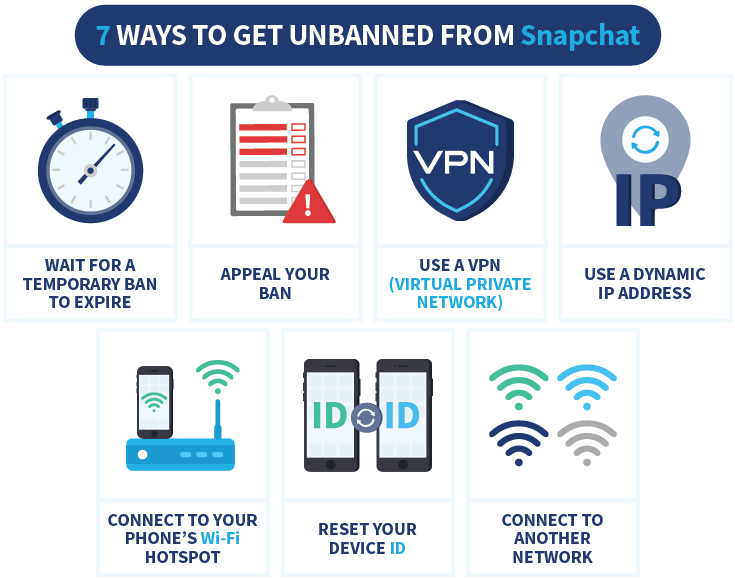
From my experience, using a VPN was by far the fastest and most reliable method to bypass Snapchat’s IP address ban. Switching to NordVPN’s servers allowed me to quickly create a new account and regain access without waiting days or going through the uncertainty of an appeal. It saved me a lot of hassle and got me back on Snapchat in no time. If you want to know how to get unbanned from Snapchat, here’s a detailed guide to the four best methods:
Method 1. Wait for a temporary ban to expire
This step is more designed for people who have suffered the ultimate punishment — the device ban. Snapchat fingerprints your device’s unique IMEI number, meaning any new accounts created on that device can be banned, too.
I’ve seen multiple reports on Reddit of users having new accounts banned. However, the same community claims that after six months, they could use that device to create a new account without having it banned.
So, one option is to simply wait. If your ban’s temporary, you can wait it out. If it’s not temporary, but you don’t want to try the above steps, you could avoid Snapchat until the ban is a distant memory and start anew.
Method 2. Appeal your Snapchat ban
If your ban isn’t temporary — or even if it is — an appeal could be your best bet to have Snapchat unblocked. It’s also the only way of recovering a permanently banned Snapchat account.
Just follow the steps below. While there’s no guarantee of success, you aren’t risking anything by submitting an appeal. Here is how to do it:
- Open the Snapchat app and try to log in to your account.
- Tap on “Appeal decision” on the pop-up screen.
- Explain your reasoning for why you think your Snapchat account should be unbanned.
- Provide any relevant detail, but don’t admit to violations you didn’t commit.
- Submit your appeal, and wait for a response.
Method 3. Use a VPN
The simplest way to get unbanned from Snapchat in the face of an IP address ban is by using a VPN. This will allow you to create a new account with a different IP address. It is important to always use a VPN when you use your new account, otherwise it might get banned as well.
When you connect to the internet with a VPN, your IP address changes. Instead of your usual IP address, websites, and apps will see the VPN server’s IP address. Any bans against your IP address will become ineffective — in other words, you’ll be able to access Snapchat.
It’s important to choose the right VPN service. A handful of countries ban Snapchat by default, and free VPNs, for example, might not have servers that support the app. I recommend getting unbanned from Snapchat by using NordVPN’s powerful but affordable service.
Here’s a quick guide to getting unbanned from Snapchat with NordVPN:
- Delete Snapchat from your smartphone or tablet.
- Choose a reliable VPN and create an account. I recommend NordVPN whose vast server network and robust anonymity features let me bypass a Snapchat ban during testing
- Install the VPN app on your device.
- Connect to a VPN server in a different region. I recommend using a U.S. or European VPN server.
- While connected to the VPN, reinstall Snapchat, but don’t log in with your old account!
- Create a new account with your new IP address to avoid being banned.
NordVPN can also help you to get access to Snapchat if you’re using a network on which Snapchat is unavailable, for example at school or work.

Note:
A VPN cannot unlock a permanently locked Snapchat account, but it can prevent your future accounts from being banned. If you ever log into Snapchat with a new account using the network IP that was banned, your new accounts could be at risk, too. So, be sure to use your VPN subscription every time you use Snapchat.
Method 4. Use a dynamic IP address
A dynamic IP address can achieve the same result as a VPN. In this context, dynamic means “changing” — a dynamic IP address changes from time to time. Usually, this is when you restart your router or reset it to factory default.
Your internet service provider might already use dynamic IP addresses by default. If in doubt, get in touch with them to check whether yours is dynamic or static (a.k.a. fixed).
If you have a dynamic IP address, unbanning Snapchat could be as simple as rebooting your router. With most ISPs, this can be achieved by inputting 192.168.1.1 into your browser’s address bar and logging into the router.
Method 5. Connect to your phone’s Wi-Fi hotspot
If you usually connect to Snapchat from a desktop device, you could be in luck. By using the Wi-Fi hotspot option on your phone, you can bypass an IP address ban. Your phone’s hotspot will have a different IP address than your home Wi-Fi network.
Here’s how to switch from your home Wi-Fi to a hotspot on Android:
- Open the “Settings” app and select “Connections“.
- Now select “Mobile Hotspot & Tethering“.
- Tap on “Mobile Hotspot“.
- Set up a network, then give it a name and password for security.
- Connect to the hotspot from the device you usually use for Snapchat.
- You should now have access to Snapchat to create a new account.
Here’s the same process for setting up a hotspot, but for iPhone:
- Go to “Settings” and tap on the “Personal Hotspot” button.
- From your desktop device, connect to the hotspot network.
- Now, you should be able to access Snapchat and create a new account without being banned.
Method 6. Reset your device ID
If nothing’s worked so far, there’s a chance your device ID has been blacklisted. While a VPN can change your IP address, they won’t bypass a device ban, as Snapchat uses other identifiers to link accounts to users including your device ID, and a Snapchat device ban is far harder to circumvent. The only way to get a device unbanned is to appeal the decision through Snapchat’s in-app appeals process where possible, or reset your device ID. You won’t be able to create any new accounts until you reset it.
A device ban is usually paired with an IP ban, so you will need to change both your IP address and your device ID. If it is not clear how long a device ban lasts, it is probably permanent.
Resetting your Android phone’s device ID is simple. You just need to revert your phone back to factory settings. Here’s how to get your device unbanned from Snapchat by resetting your device ID:
- Open “Settings,” then tap on “General Management“.
- Tap on “Reset” and choose “Factory Data Reset“.
- Select “Erase All Data“.
Like Android, iOS device bans require you to revert to factory defaults. There’s also an additional step to go through on an iPhone or iPad – I’ve outlined the steps below:
- Go to your “Settings” app.
- Tap on the “General” section.
- Scroll down until you see “Transfer or Reset iPhone“, and tap on it.
- Tap on “Reset All Contents and Settings“.
If you’re still having no joy creating a new Snapchat account, you might have to purge your iCloud app settings. If so, go to “Settings” > “Apple ID” > “iCloud” > “Manage Storage“. Look for Snapchat, then erase all data.
Bear in mind that you’ll have to go through setup for your device again. But at least you’ll be able to create a new account with Snapchat.
Method 7. Connect to a different Wi-Fi network
Along the same lines as the above tip, you can simply use a different Wi-Fi network to get around your IP address ban.
I didn’t list this step higher for two reasons. First, it’s just inconvenient — I want to use my favorite apps from the comfort of my own homes, not a coffee shop. Secondly, there are risks associated with public Wi-Fi that make them less safe than being at home on a network you control.
Based on my tests, NordVPN is the easiest way to get around a Snapchat ban
During tests to bypass a Snapchat ban, I used NordVPN because it offers a broad range of 8900 worldwide servers that can assign you a new IP in seconds. I specifically used an obfuscated server, which offers greater protection against anti-VPN measures, and I enabled NordVPN’s NordLynx protocol that offers the fastest and most stable connections.
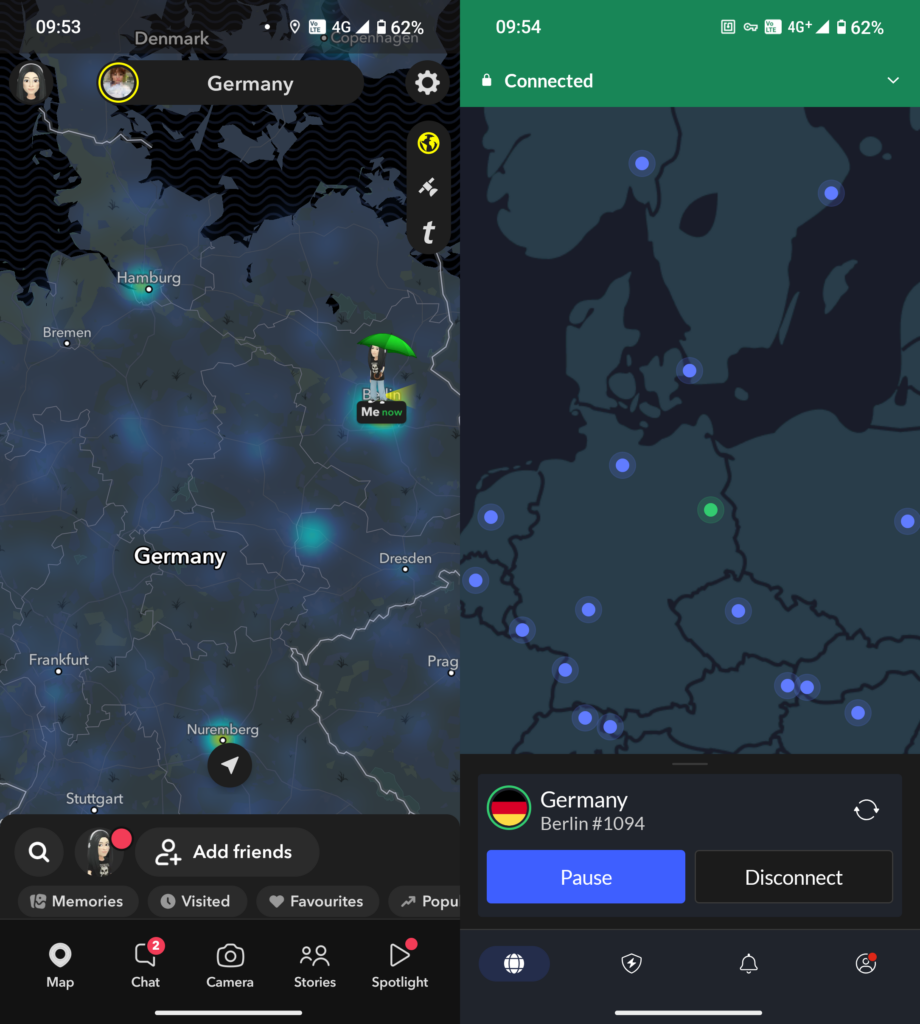
NordVPN subscribers get 30 days of use for free, with an ironclad money-back guarantee that I’ve used personally in the past. If you’re using Snapchat on an Android device, then you can also start with a 3-day free trial from the Google Play Store. Collectively, this is more than enough time to see whether NordVPN can get you unbanned from Snapchat. (Spoiler: It can.)
Pros
- Bypasses any IP ban, including Snapchat's IP ban
- Split tunneling allows to ensure you won't use Snapchat without a VPN
- Unblocks Netflix and other streaming services
- 8900 servers in 149 countries
- 30-day money-back guarantee
Cons
- Amount of features might be overwhelming for beginners
Why does Snapchat ban users?
Snapchat bans users for violating the app’s Community Guidelines or Terms of Service. Some of the most common reasons include sharing inappropriate or adult content, spamming the platform, participating in abusive behavior, or using unauthorized third-party apps. Snapchat can also ban your device ID due to suspicious activity, serious infractions, or if an account is compromised.
Sometimes, companies get things wrong, and you could get wrongly banned. But while some bans can be mistakes resulting from an algorithm or hacked account, most bans are due to legitimate user error.
Let’s take a look at what actions could lead to a banned account.

1. Sharing banned or illegal content
Snapchat self-destructs content quickly in many cases, but that doesn’t mean it goes unnoticed. Sharing the wrong kind of context can quickly lead to being locked out of your Snapchat account. This includes:
- Media containing sexually explicit content, particularly when people featured are minors
- Promoting violence against others
- Terrorism or hate speech that discriminates against others
- Harassment and bullying
- Posts depicting illegal activities, including drugs or weapons
- False or deceptive information
This kind of content is one of the fastest ways to get your Snapchat account banned. Other users will likely report you and get your account investigated quickly. Moreover, it’s some of the most likely to lead to a permanent ban or see your device banned.

2. Bullying other users
Snapchat takes bullying seriously. If you make a new account just to message someone who blocked you, Snapchat might ban you.
Other actions that fall under this community guideline include sending pictures or videos of another person in a private space without their consent or sending sexually explicit images to others.
To avoid being banned from Snapchat, don’t share other peoples’ — or your own — private information on social media! Additionally, avoid Snapping in medical facilities, locker rooms, and other personal places.
3. Creating a fake account or fake information
Snapchat bans fake accounts that try to impersonate other people. While creating a tribute page for a celebrity might seem like a good idea, it could also land you with a ban.
Under the same rule, you should also avoid creating or spreading fake information. For example, making fake medical claims, inventing laws that don’t exist, or denying real-world events that happened could all get you banned.
4. Snapchat suspects you’ve been hacked
Snapchat might ban your account if they think that it has been compromised. While this can and does happen, there are certain other actions that might trigger this outcome, including:
- Posting spam (or a high volume of low-quality content) from your own account
- Logging into your account from unusual locations, such as abroad
- Repeatedly logging in and out of the app
- Adding a large number of new contacts in a short period
If you’ve genuinely been hacked, changing your password to a secure password and visiting the Snapchat support page should let you unlock it quickly.
Pro tip:
Traveling abroad? You can avoid getting flagged for being in an unusual location by using a VPN to connect to a server from your home country. NordVPN has servers in over 149 countries, so you’re sure to find a server in your country.
5. Installing third-party Snap apps
Snapchat doesn’t support third-party apps that claim to enhance the platform, period. Downloading such an application can swiftly get you banned. Worse, if you download the wrong app, you could be putting yourself at risk of spyware and other harmful malware.
This app, developed by Snap Inc, is the only official and accepted application. If you’re an iPhone user, you’re in safe hands — you’ll note the App Store lacks any unofficial, third-party apps. If you’re on Android, you may have to be a little more careful.
6. Snapchat thinks you’re a robot
Snapchat could ban your account if they suspect that it belongs to somebody who’s using automation to market a product or push some other kind of message.
In other words, Snapchat might drop the ban hammer if your account looks like a bot. If you’ve sent a bunch of friend requests in short succession, for example, you could trigger the algorithm’s judgment.
How to avoid getting banned on Snapchat
If you want to avoid getting banned on Snapchat, it’s as simple as following the community guidelines and keeping your account clean. Make sure you create your account with a genuine email or phone number and verify your details.
From here, there are a few simple rules that should keep you from being banned from Snapchat:
- Don’t install third-party Snapchat apps. Snapchat itself is the only acceptable app.
- Don’t share your account with anyone. Keep your password private and secure, preferably with a password manager.
- Don’t post content that goes against community guidelines.
- Don’t spam, harass, or bully other users.
If you stay in Snapchat’s good graces, there’ll be no reason to ban you.
Conclusion: VPNs unblock Snapchat and protect you
Temporary Snapchat bans don’t usually take very long to expire and usually resolve within a few hours to a few days. These are common for minor violations of the Snapchat community guidelines, spamming, or abusive behaviour, and more than one temporary ban can result in a permanent ban. If you’ve been permanently banned, I recommend submitting an appeal. It’s not a guaranteed fix, but it’s your simplest way of getting back on the app.
Otherwise, if your appeal is denied or your IP address is banned, you can use a VPN to create a new account and reset your device ID. Based on my tests, NordVPN is your best chance of bypassing an IP address ban. Connect to a server in the US or Europe, and you should be able to create a new account via your VPN connection. If your VPN remains active, it can’t be tied back to your original IP address. In some cases, you may also need to change your device ID, but it’s the best way to evade any Snapchat ban.
It’s worth reading up on Snapchat’s terms of service and community guidelines to ensure that you don’t risk another ban in the future. And remember, if you do choose to create a new account, avoid logging in from a device or network that’s been banned!
Check out our other guides about Snapchat:
- What Does Snapchat Know About Me?
- How to Optimize Your Snapchat Privacy Settings
- Is Snapchat Safe For Kids?
- How to Delete Snapchat
Or:
- Learn how to get unbanned from Hinge
- How to get unbanned from Bumble
- How to get unbanned from Grindr
- Get unbanned from Roblox
FAQ
I get a lot of questions about getting unbanned from Snapchat. Check out my FAQ below for answers to my most common questions!
Snapchat’s bans aren’t always permanent. In some cases, you might only receive a temporary ban lasting as little as 24 hours. In other cases, you could be permanently banned for breaking the Terms of Service or Community Guidelines. Snapchat can even ban your IP address, meaning the only way you can access the app is with a service like NordVPN. Once a temporary ban is lifted, you can usually unlock it again by going to Snapchat’s support website.
Yes, a Snapchat SS06 ban is permanent and is a ban against your device ID, preventing you from using that device with Snapchat. Fortunately there is a way to bypass the SS06 ban by resetting your device ID. On an Android device, open Settings then “General Management”, then tap “Reset” and “Factory Data Reset,” and finally “Erase All Data”. On iOS devices, open Settings then General, then tap on Transfer or Reset iPhone and Reset All Contents and Settings.
Yes, Snapchat can ban your phone by banning your device’s unique identifier, which is known as an SS06 ban. However, you can bypass a Snapchat phone ban by changing your device ID in settings on both iOS and Android. You could also purchase a new phone, but resetting your device ID is a cheaper and more convenient way to get your phone unbanned from Snapchat with no cost.
Get rid of a device ban on Snapchat by resetting your device ID. On Android, open Settings > General Management, then tap on Reset > Factory Data Reset > Erase All Data. On iOS, go to General in the Settings app, then tap on Transfer or Reset iPhone and Reset All Contents and Settings.
Your new phone could be banned from Snapchat if your Snapchat ban was tied to your account and you log into that account on your new device. I recommend submitting an appeal to try and recover the banned account, otherwise it’s best to create a new account. If your device was banned, you can reset your device ID first before buying a new phone, as it’s a cheaper and simpler way to bypass a Snapchat device ban.
Yes, Snapchat bans IP addresses for serious breaches of its community guidelines to try and prevent users from simply creating a new account. Fortunately you can bypass a Snapchat IP address ban by using a VPN. During tests, NordVPN allowed me to consistently bypass this type of ban and create new Snapchat accounts on the same home internet network without being identified and banned again.
To get unbanned from Snapchat after an IP ban, download a reliable VPN, connect to a VPN server nearby to change your IP address, and create a new account while your VPN connection is active. This will prevent Snapchat from associating your banned account and internet network with your new account, leaving you free to use the app again so long as you follow community guidelines. I recommend NordVPN, which could effectively bypass Snapchat IP bans during every in-house test I conducted.