FastestVPN Review (2026): Is This Really the Fastest VPN?

Why trust our review process 
We may earn affiliate commissions for the recommended products. Learn more.
FastestVPN is an affordable VPN provider located in the privacy haven of the Cayman Islands. I know from experience that FastestVPN is great for unblocking streaming services. However, the server network isn’t very big, and the VPN has some connection problems now and then.
I decided to put FastestVPN to the test to see how its features and performance compare to the best VPN services on the market. Is it really the fastest VPN? Or are you better off with a different VPN Provider? Read my full FastestVPN review to find out!
Limited offer: Save 93% and get the FastestVPN lifetime deal for only $ 0.83!
FastestVPN: In Short
What I Like:
- Affordable Lifetime Deal available
- Secure protocols: OpenVPN and WireGuard
- No-logging policy independently audited
- Unblocks major streaming services
- NAT firewall and ad blocker to prevent malicious threats
- Offers a kill switch, split tunneling, and double VPN connections
- Torrenting allowed, port forwarding available as add-on
- 31-day money-back guarantee
- 10 simultaneous connections
What I Don't Like:
- Inconsistent speeds on faraway servers
- Relatively small server network
- Occasional connection problems
FastestVPN is a mid-tier VPN service that’s easy to install and use. In terms of security, your data is perfectly safe: all traffic is encrypted with AES-256 and ChaCha20 encryption and protected by a no-logs policy that has been independently verified.
You get access to a range of additional security features, including a NAT firewall, ad blocker, split tunneling feature, and a kill switch. When testing, I was happy to find that FastestVPN is a champion at unblocking major streaming services, thanks to its streaming-optimized VPN servers. Torrenting is also allowed.
Unfortunately, FastestVPN is not the fastest VPN on the market. On nearby servers, speed results were decent, but the VPN struggled with distant servers. Since the server network is somewhat limited compared to other VPNs, this can be a downside.
However, if you’re looking for an affordable VPN that covers the most important bases, I believe that FastestVPN is worth checking out! It offers some very affordable plans right now, and you can even get yourself a FastestVPN lifetime deal at a 93% discount!

| 💵 Price | From $ 0.83 per month |
| 📱 Operating systems | Windows, Mac, iOS, Android, Linux |
| 💻 Connections | 10 |
| 💳 Payment methods | PayPal, Bitcoin, Cryptocurrency, Credit card |
| 🔒 Protocols | OpenVPN, IKEv2, WireGuard |
| 📅 Money-back guarantee | Money-back guarantee, 31 Days |
| 📋 Logs | Zero logs |
| 🌎 Servers in English | United States, Canada, India, United Kingdom, Ireland, Australia |
| 📥 Torrent options | |
| 🍿 Netflix | |
| 🏠 Website in English | |
| 📲 App in English | |
| 🎧 Customer Service in English | |
| 🎬 Works with |


|
How Fast is FastestVPN?
Speed is one of the most important aspects of a VPN. If a VPN isn’t fast enough, this will cause problems during daily activities, such as streaming, browsing, and downloading. FastestVPN showed some good speeds during my tests, but it still can’t compete with the best VPN providers.
- Speed on nearby servers is very good.
- Connecting to distant servers caused notable speed drops.
- I didn’t experience any problems with FastestVPN’s speed during daily use.
- Gaming and torrenting are possible if you use nearby servers.
- I encountered some connection problems with FastestVPN during my speed tests.
Although the speed of FastestVPN isn’t bad, the provider still has some catching up to do. For this reason, I give this provider a 7.5/10.
Speed test results for FastestVPN
I tested FastestVPN from our office in the Netherlands to ensure that the base conditions for all our VPN speed tests are the same. I used the WireGuard protocol to get the best speeds. However, for the UK server, I was forced to use OpenVPN, since this server wasn’t able to establish a connection with WireGuard.
Below are the results of my FastestVPN speed tests. I’ve also tested my connection without VPN, to show you the base speed. Keep in mind that you might get different results, based on your original connection speed and location.
| Server | Download (Mbps) | Upload (Mbps) | Ping (ms) |
|---|---|---|---|
| No VPN | 204.05 | 245.86 | 3 |
| Smart Location (Denmark) | 193.65 | 235.75 | 14 |
| The Netherlands (Amsterdam) | 194.57 | 235.99 | 10 |
| Germany (Frankfurt) | 195.64 | 234.73 | 13 |
| United Kingdom (London) | 63.80 | 102.15 | 23 |
| United States (New York) | 177.43 | 111.40 | 90 |
| United States (Los Angeles) | 22.28 | 7.26 | 155 |
| Canada (Montreal) | 152.85 | 221.87 | 98 |
| Brazil (Sao Paulo) | 74.26 | 1.97 | 259 |
| Japan (Tokyo) | 139.27 | 220.80 | 252 |
| Australia (Sydney) | 124.26 | 213.62 | 278 |
As you can see, the speeds on nearby FastestVPN servers are decent, maintaining around 95% of the original connection speed. The server in London, which had connection problems and used a different protocol, had a disappointingly low speed.
The speed also drops significantly on some faraway servers, such as Los Angeles and Sao Paulo. High ping values on these servers might also have a negative impact on gaming and downloading.
Expert Tip:
Servers that are physically farther from your location will have higher ping values. Latency over 150 ms will negatively affect your gaming and streaming experience. Therefore, I recommend sticking to servers closer to your location for bandwidth-heavy operations.
Speed in daily use
During most day-to-day activities, I didn’t encounter any problems. I could browse the internet, have online meetings, and watch YouTube videos without problems. Streaming exclusive American content with a New York server wasn’t an issue.
I used FastestVPN for gaming and downloading, but I don’t recommend playing multiplayer games using servers farther away. The ping is too high, which will result in lag.
Overall, FastestVPN performance is wobbly. Most servers are decently fast, while some perform less. Especially for bandwidth-heavy activities, this can be annoying. While FastestVPN does what it’s supposed to do, it’s not comparable to the fastest VPNs in the game.
Connection problems
During my speed test, I wasn’t always able to get a working connection. In most cases, switching to another protocol solved the problem. When I tried a server in Denmark, however, switching to another protocol wasn’t possible. Strangely, this was a server recommended by the FastestVPN app as the best server location. Apparently, it wasn’t.

If you want to avoid this problem, you can set the protocol to “Automatic”. In that case, the app will select the best protocol for you. On the other hand, I find it important to be able to choose a protocol myself, since it determines the encryption methods and level of security.
Does FastestVPN Work With Streaming?
Not every VPN is able to unblock international streaming services easily. I tested FastestVPN with some of the biggest streaming platforms in the world to make sure you can watch all the TV shows and movies you like from anywhere in the world!
Thanks to its dedicated streaming servers, FastestVPN managed to unblock nearly all popular streaming sites for me, including different Netflix libraries and platforms that are generally difficult to unblock, such as HBO Max.
In terms of speed, I experienced some buffering and delays when loading pages. However, when watching movies or TV shows, I didn’t run into any issues.
| Platform | Can FastestVPN unblock it? |
|---|---|
| Netflix (US) | ✔ |
| Netflix (UK) | ✔ |
| Disney Plus (EU) | ✔ |
| Hulu (US) | ✖ |
| BBC iPlayer (UK) | ✔ |
| Prime Video (EU) | ✔ |
| HBO Max (EU) | ✔ |
FastestVPN and Netflix
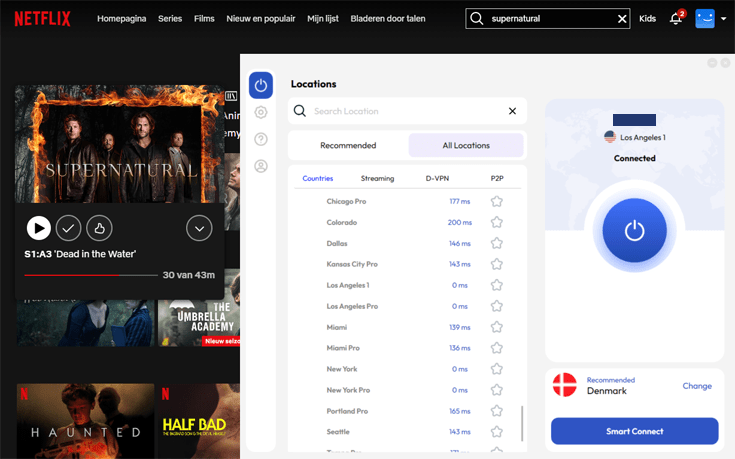
FastestVPN had no issues unblocking different international versions of Netflix for us. I could unblock American Netflix using different American servers.
The easiest way to check whether the VPN is actually working is by looking for a show that’s exclusively available on the US version of Netflix, in this case, Supernatural. As you can see, I could stream the show with a single click!
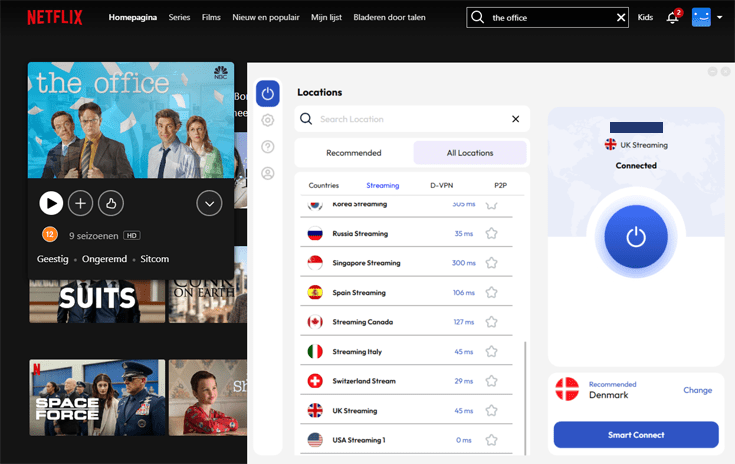
The same goes for the British version of Netflix. I could watch The Office on Netflix UK by connecting to FastestVPN’s UK streaming server.
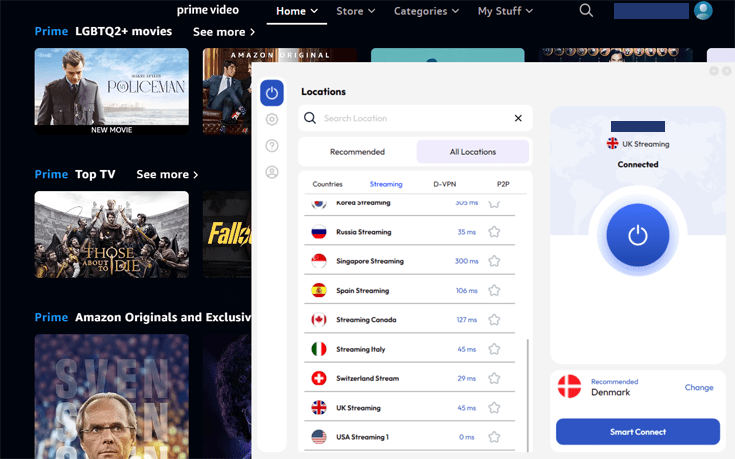
FastestVPN and Prime Video
Again, I had no issues unblocking Prime Video with FastestVPN. Streaming was a breeze!
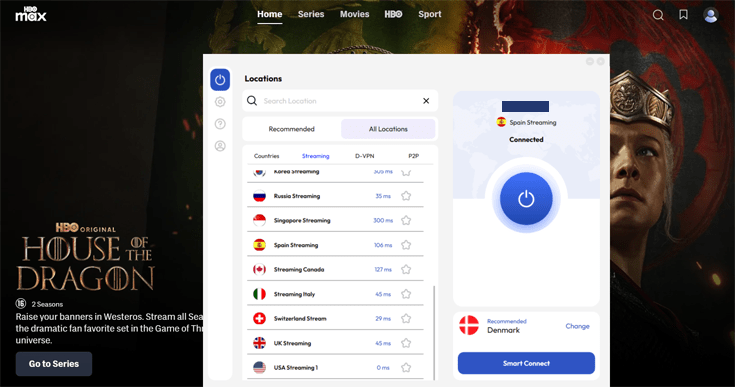
FastestVPN and HBO Max
I used the Spanish streaming server to unblock HBO Max. American viewers can watch Max via the American streaming server. I didn’t experience any issues and could easily switch between FastestVPN servers to get access to other Max content.
FastestVPN and BBC iPlayer
If you like to stream sports, British reality TV, and celebrity events, you can unblock BBC iPlayer with FastestVPN.
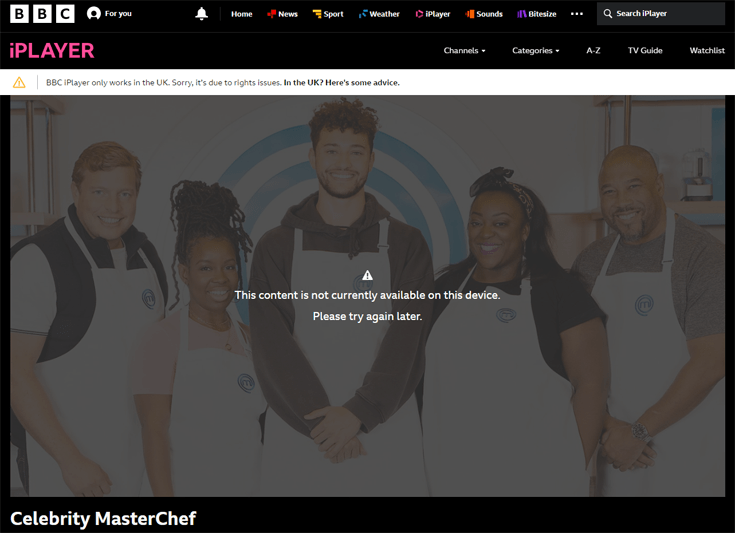
As you can see in the screenshot below, you’ll get an error message if you’re outside the UK and try to access the BBC iPlayer without a VPN: “This content is not currently available on this device. Please try again later.” On top, you’ll see a notice that BBC iPlayer only works in the UK.
However, with the UK streaming server of FastestVPN, I got access immediately and was able to watch Celebrity MasterChef on BBC iPlayer from outside the UK.
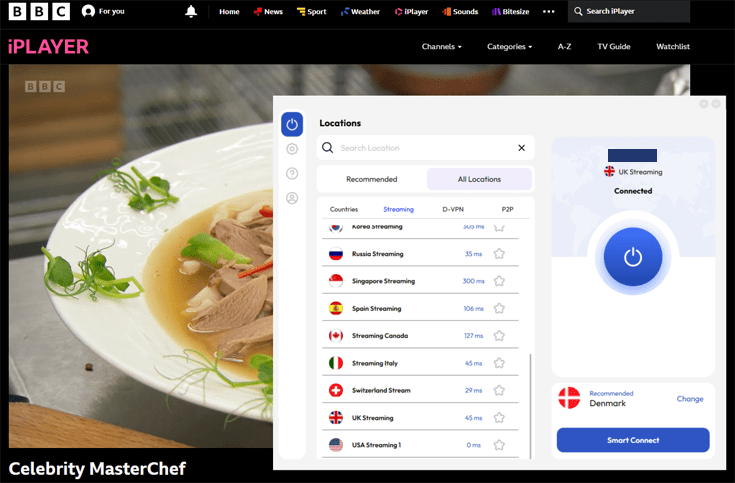
I was very impressed by the ease with which FastestVPN was able to unblock almost all streaming services. The only streaming service I couldn’t unblock was Hulu. However, a lot of Hulu’s content is available on Disney Plus in Europe, which I was able to unblock with FastestVPN.
Is FastestVPN Safe?
FastestVPN offers a solid security setup, which I thoroughly reviewed for this FastestVPN review.
- It supports the most secure VPN protocols, such as OpenVPN and WireGuard.
- FastestVPN has a strict no-logs policy that has been independently audited.
- The VPN app has a properly functioning kill switch.
- You only need an email address and a payment method to sign up.
- The VPN doesn’t leak any of your data.
Overall, I’m very pleased with FastestVPN’s security features. As a result, I have given this VPN a 9/10.
Protocols and encryption
Your VPN’s performance, security, and flexibility all depend on the VPN protocols it supports. Here are the protocols supported by FastestVPN:
- OpenVPN (TCP/UDP): This is the most popular VPN protocol with the best speed-security balance. It should satisfy the needs of the majority of VPN users.
- IKEv2: This protocol is less CPU-intensive than OpenVPN but blocked more easily. It’s perfect for mobile users and people who travel a lot.
- WireGuard: The latest addition to FastestVPN’s protocol roster, WireGuard is known for its unparalleled speed and excellent security. It’s ideal for bandwidth-hungry operations like streaming.

You can set FastestVPN to pick a protocol automatically. This beginner-friendly tool chooses the best protocol based on your location and connection speed. It’s a great help when you’re unfamiliar with the technical side of VPNs.
OpenVPN uses the AES-256 cipher to encrypt your online traffic, while WireGuard uses ChaCha20. These are the best encryption methods we have today, used by banks, hospitals, and other institutions.
If you experience connection problems, just as I did, switching from one of these protocols to another usually solves the matter.
Logging policy and privacy
FastestVPN is based in the Cayman Islands, which doesn’t have mandatory data retention laws. This means the VPN is not obligated to store user data on any of its servers. Since the Cayman Islands are outside of the Eyes Alliance, FastestVPN gets extra points for privacy!
More importantly, FastestVPN has an independently audited no-logs policy. It doesn’t log your activity, IP address, location, connection timestamps, or any other information that could trace your traffic back to you. This no-log policy was last audited in January 2023. The results of the audit are publicly available.
FastestVPN has a very clear privacy policy which indicates clearly what data the company does collect:
- Your email address
- The payment method used to subscribe, but NO other details such as credit card numbers
- The duration of the connection, but NOT the exact time, the server location, nor the band width used
- Correspondence through live chat, email or feedback forms
- VPN app statistics
All information will be deleted when you end your subscription.
Kill switch
FastestVPN comes with an automatic kill switch that will prevent any internet access outside of FastestVPN’s secured VPN tunnel. This way, you won’t accidentally leak any of your data. You can turn the kill switch on in the “Settings” menu.
I tested the kill switch, and it works fine. I got a notification when it activated, which allowed me to either choose to reconnect to the VPN or browse the internet without a VPN connection.
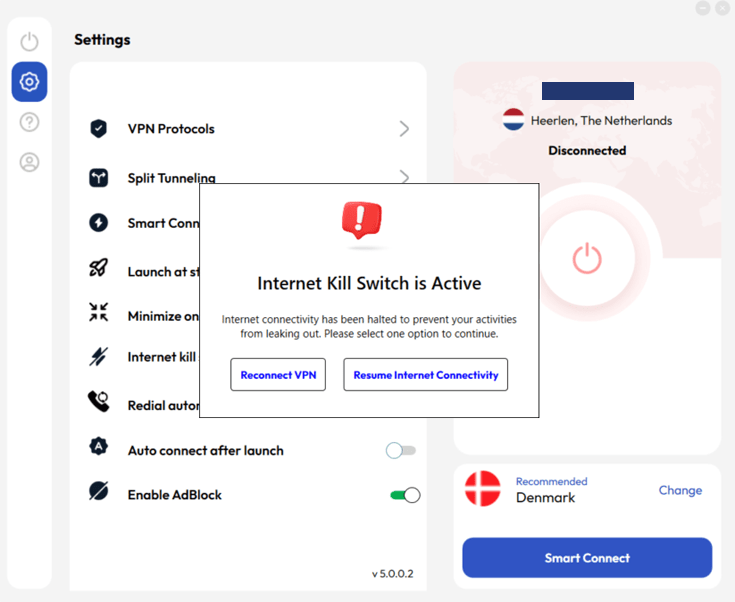
Note that FastestVPN’s kill switch is deactivated by default, and you have to turn it on manually if you wish to use it.
NAT firewall
FastestVPN has a built-in NAT firewall. It’s designed to protect you against malicious external threats. The feature is implemented server-side, meaning it is automatically enabled. You won’t find any options for it in the software you downloaded.
The NAT firewall uses “DNS blackholing” to check your DNS requests against a blacklist of known malware sites. If your request matches a domain on the list, it will be blocked.
In other words, don’t be alarmed if you can’t access a sketchy website: that just means the firewall is doing its job!
Does FastestVPN leak your data?
FastestVPN provides IPv4 and IPv6 leak protection. During my extensive testing of FastestVPN, I didn’t find any leaks.
First, I connected to a VPN server in Denmark and checked for IP leaks. It showed the IP address of the Denmark server. This means my actual IP address and location weren’t visible.
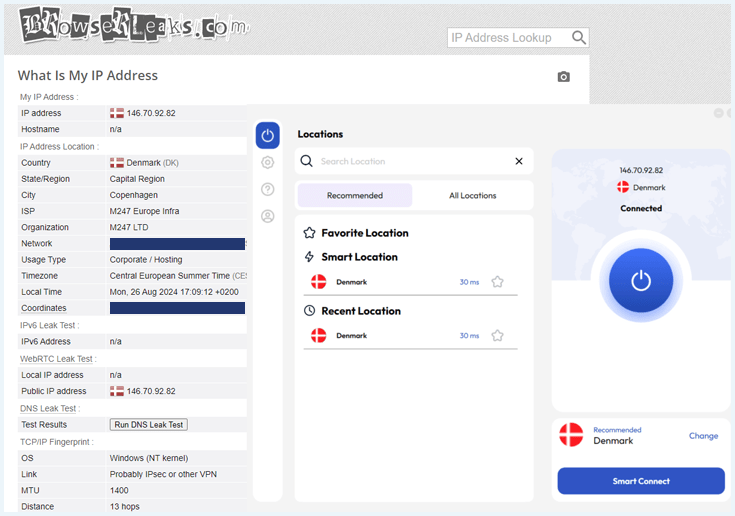
For this FastestVPN review, I ran a DNS leak test and didn’t find any DNS leaks there. Finally, I also ran a WebRTC test.
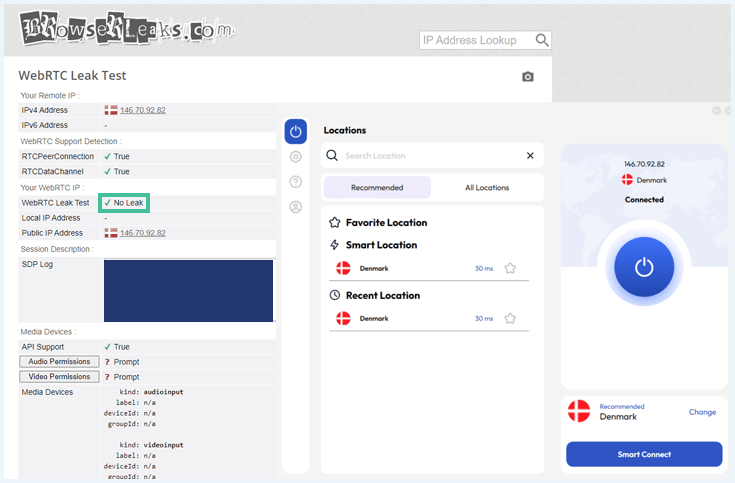
As you can see, FastestVPN didn’t leak any data I wouldn’t want to share with my ISP or any other entity lurking online.
Can you sign up to FastestVPN anonymously?
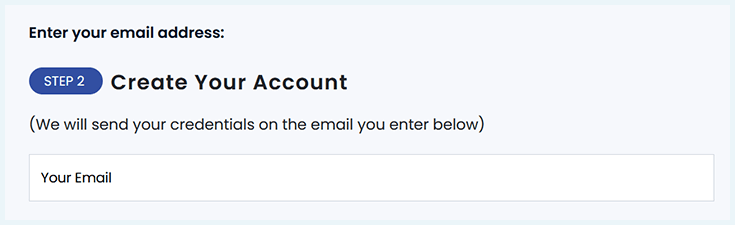
When creating an account, FastestVPN asks for your email address and payment information. The website clearly states that your email address will only be used for billing purposes and account registration.
These requirements allow you to remain as anonymous as possible during your account creation.
If you wish, you can create a new email account without any personal credentials and buy this VPN with Bitcoin or other cryptocurrencies (except the monthly subscription).
Is FastestVPN Easy to Use?
FastestVPN doesn’t have a bunch of confusing advanced options. This makes it an excellent choice if you’ve never used a VPN before. However, the lack of features is also a downside.
- I found the website easy to navigate, and installation was a quick process.
- The app offers an ad blocker and split tunneling, but no other advanced features.
- You can pay with credit card, PayPal or cryptocurrency.
- FastestVPN offers a 31-day money-back guarantee.
- Customer support is available 24/7. They offer a quick response but aren’t always helpful.
The lack of advanced features and insufficiently helpful customer service, in combination with the previously mentioned connection problems have resulted in a 6.5/10 for user-friendliness.
How to install FastestVPN
It’s easy enough to set up the VPN. Here’s how to go about it:
- Go to fastestvpn.com (the VPN’s official website) and click the “Buy Now” button in the top-right corner.

- Choose a subscription plan.
- Enter your email address.
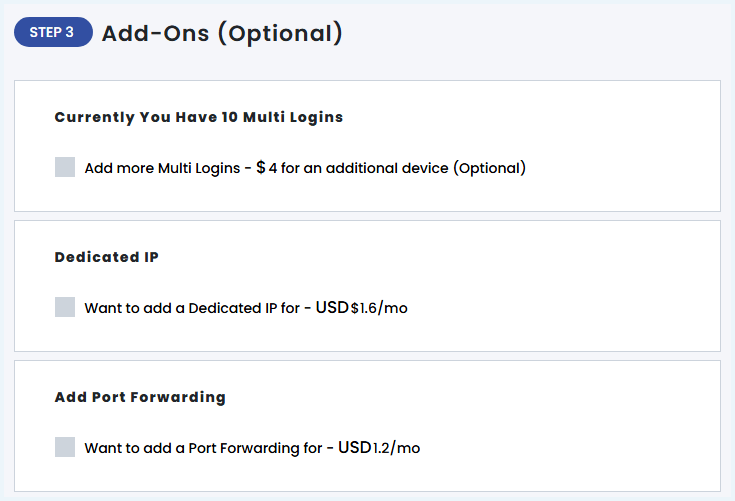
- Choose any optional add-ons.
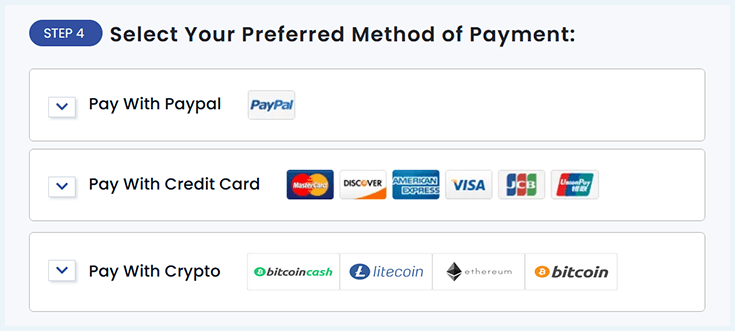
- Choose your payment method.
- Download the VPN app for your device.
When you install FastestVPN, you’ll receive an email with a password reset link that will allow you to create your password. Can’t find it? Check your spam. It might have ended up there.
This email is very important but can also be somewhat confusing. After all, you should be creating your password, not resetting it, and the wording is not very clear.
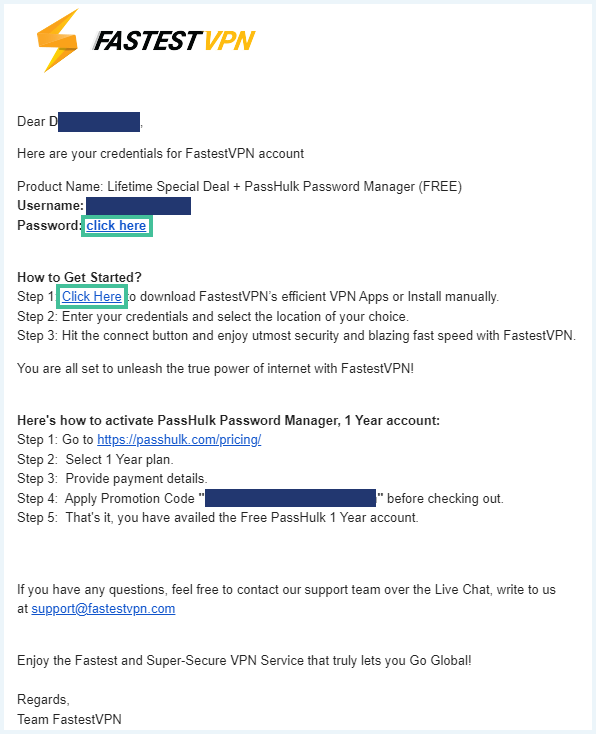
If you complete the steps and install the VPN, you’ll get a login screen that requires your registration credentials. You can log in with the account you created and start using FastestVPN.
FastestVPN availability on major platforms
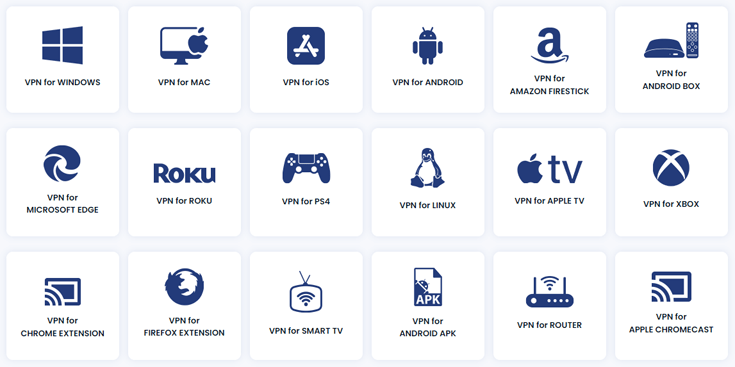
FastestVPN supports all major platforms, operating systems, and browsers. You can download software for Windows, Linux, and macOS, as well as the FastestVPN app for Android and iOS.
It even has apps for routers, gaming consoles, and more. FastestVPN also offers good Chrome and Firefox extensions. You start with 10 simultaneous device connections and can purchase additional connections. There is no limit to the number of additional devices you can add.
FastestVPN on Windows
For this FastestVPN review, I primarily tested the FastestVPN application on Windows. I found the interface of the Windows app easy enough to navigate. Whether you’re a beginner or an advanced user, you’ll be able to use the client with ease.
To connect to a chosen location, you just need to click on the button on the right. Other options in the Windows app are:
- Connect to specialty servers, such as streaming servers, P2P-server, and double VPN servers.
- Change the protocol (automatic, WireGuard, OpenVPN, IKEv2).
- Set up split tunneling.
- Turn on the kill switch.
- Turn on the ad blocker.
- Change the appearance (dark mode or light mode).
- Change the language.
- Make sure the VPN app launches when you turn on your device.

Browser extension
FastestVPN offers a browser extension for Chrome, Edge, and Firefox. It allows you to connect to a server location quickly within your browser. You can connect to the streaming servers, but if you want to use the P2P-servers or double VPN connection, you’ll need to use the app.

The settings are limited. You can activate the ad blocker and block WebRTC. WebRTC technology is used when you make a video or audio connection in your browser. This is dangerous for your privacy, as it can expose your real IP address. FastestVPN’s browser extension will prevent this.
The WebRTC leak test from browserleaks.com that I have conducted confirms that FastestVPN does this well. This makes FastestVPN’s WebRTC blocker an asset for people who want to make video calls within their browser.
Mobile apps
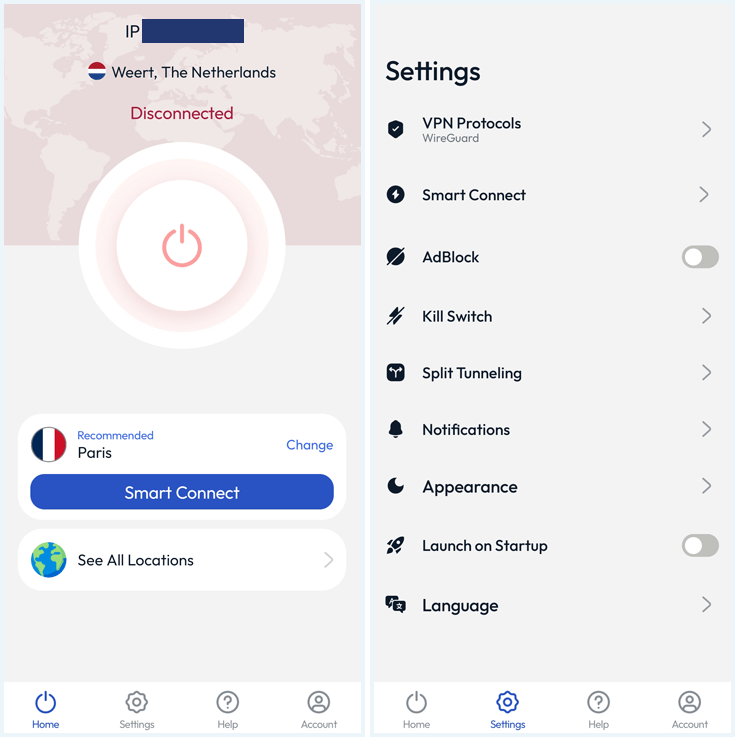
The interface of FastestVPN mobile app is very similar to the desktop app. On the home screen, you’ll find a big button which you can use to establish a connection. You can also select a server location.
The settings are concise and understandable. Except for the extended split tunneling feature, they are equal to the settings of the Windows app.
Split tunneling
FastestVPN has a split tunneling feature. On Windows, it lets you choose which websites and applications are always routed through the encrypted VPN connection.
You can select different browsers but also add apps manually. Say, you want to use your VPN for torrenting but run your browser on your regular internet connection, you can split your traffic with this feature by selecting your torrenting client in this feature.
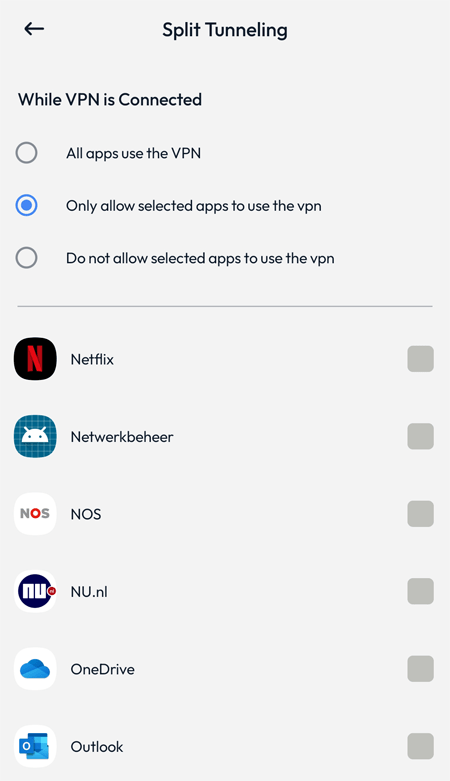
On Android, split tunneling is more extensive. Here, you can either ensure all apps go through the VPN (standard), allow selected apps to use the VPN (similar to Windows), and you can exclude apps from the VPN connection.
Ad blocker
FastestVPN offers a decent ad blocker that got rid of most unwanted advertisements and pop-ups when I was testing this provider. You can find it in the general settings.
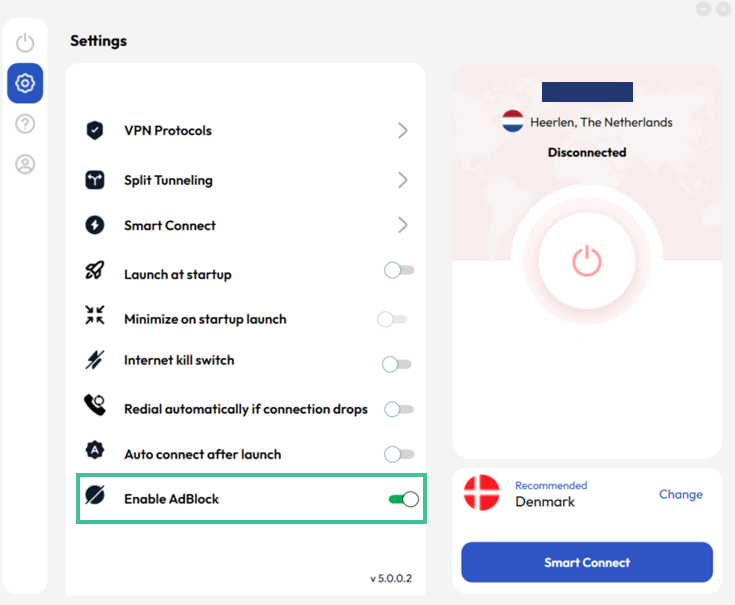
In the default settings, the ad blocker is switched on. Users have the opportunity to enable or disable it when they want.
How much does FastestVPN cost?
During my FastestVPN review, I discovered that the provider offers a regular subscription plan as well as a Lifetime Deal. When you opt for the Lifetime Deal, you purchase the VPN for life with one single payment! It’s a great option for users who want to make sure they always have a VPN.
You can also opt for a regular subscription plan if you’d rather pay month by month. These are the different plans available:

- FastestVPN Lifetime $40mth Deal View offer
- FastestVPN 24 Months $0.83mth View offer
- FastestVPN Monthly $5mth View offer
In terms of payment options, you can pay for your FastestVPN subscription with the following methods:
- Debit/credit card: MasterCard, DISCOVER, American Express, VISA, JCB, Union Pay
- PayPal
- Cryptocurrency: Bitcoin, Ethereum, Litecoin, Bitcoin Cash, Dash
As you can see, you can pay anonymously for your FastestVPN plan by using cryptocurrency. From a privacy standpoint, this is always a plus! Note: if you opt for the monthly plan, it’s not possible to pay with cryptocurrency.
When creating an account, you can choose different add-ons for your plan. For $4 a month, you can protect an additional device, on top of the 10 devices included in the plan. The number of extra devices you can add is unlimited.
FastestVPN’s money-back guarantee: How to get a refund
There’s no free trial available with FastestVPN, but you do get a 31-day money-back guarantee on any plan. This means you can try out the VPN for a month. If you’re not satisfied with the service, you can request a full refund.
I asked for a refund through the Live Chat. The agent told me to send an e-mail to support. After that, my request was submitted. My refund was processed within a few working days.
Do you get your money’s worth with FastestVPN?
FastestVPN is one of the cheapest VPNs out there, as I discovered during my FastestVPN review. It’s one of the few VPNs that allows you to get a Lifetime Deal. This makes it a great option for users who want to make a real investment in their online security.
I find that the price-quality ratio is accurate with FastestVPN. It doesn’t go above and beyond, but it’s an easy-to-use VPN that gets the job done for a very affordable price.
Customer service
When it comes to customer support, FastestVPN could improve a lot. You can contact FastestVPN in several ways, the fastest of which is their Live Chat support. This service is available 24/7 on their website and through their software. It’s also possible to send an email to FastestVPN’s customer service.
While the modest FAQ section of their website won’t be of much help if you run into issues, the setup tutorials and troubleshooting guides are quite impressive.
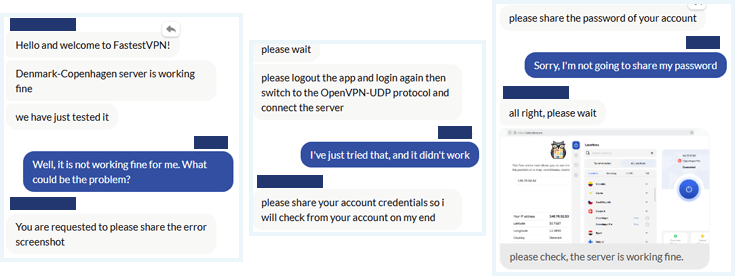
When starting a Live Chat session, you’ll have to provide your email address and type in your question. I submitted a question via Live Chat and received an immediate response. At first, the support agent didn’t believe I had connection problems. Only after I insisted, he was willing to help me out.
He asked me to sign out and sign in again. When that didn’t solve the problem, he asked for my credentials, including my password. This is very odd behavior, and it doesn’t give me confidence in the support team of FastestVPN.
FastestVPN Servers and Locations
A VPN’s server network is important. Having a vast number of servers to choose from ensures you will have enough speed, since you don’t have to share your server with a lot of other people. It’s also important for unblocking.
When it comes to FastestVPN, I can conclude the following:
- FastestVPN operates 800+ servers across 49+ countries.
- The provider offers specialty servers for streaming, multihop, and torrenting.
- Port forwarding is available at extra cost.
- FastestVPN has dedicated IP’s.
In comparison to a VPN provider like Private Internet Access, which has 35000 servers in 91 countries, the size of FastestVPN’s server network is quite modest.
Number of servers and server locations
FastestVPN has a small server network with 800+ servers across 49+ countries. The full list of server locations for FastestVPN includes the following.
| Continent | Countries |
|---|---|
| Africa | Egypt and South Africa |
| Middle East | United Arab Emirates |
| Americas | Argentina, Brazil, Canada, Colombia, Mexico, and the United States |
| Asia-Pacific | Australia, Hong Kong, India, Indonesia, Japan, Malaysia, Philippines, Singapore, South Korea, and Vietnam |
| Europe | Austria, Belgium, Bulgaria, Cyprus, Czech Republic, Denmark, Finland, France, Georgia, Germany, Greece, Hungary, Ireland, Italy, Lithuania, Luxembourg, the Netherlands, Norway, Poland, Portugal, Romania, Russia, Serbia, Slovakia, Spain, Sweden, Switzerland, Turkey, Ukraine, and the United Kingdom |
You can’t sort the servers in the FastestVPN interface, but you can create a list of favorites. The software includes ping indicators. When you use the “Smart Connect” option, the VPN should automatically pick the best server for you.
Note:
In 99% of cases, the most optimal location will be the server closest to your physical location. However, with FastestVPN, I noticed that Smart Connect, more often than not, seemed to allocate me a random location not particularly close to us.
Streaming servers
During my FastestVPN review, I found that the service has optimized servers for streaming. You can find the streaming servers next to the complete overview of server locations under “Streaming.”
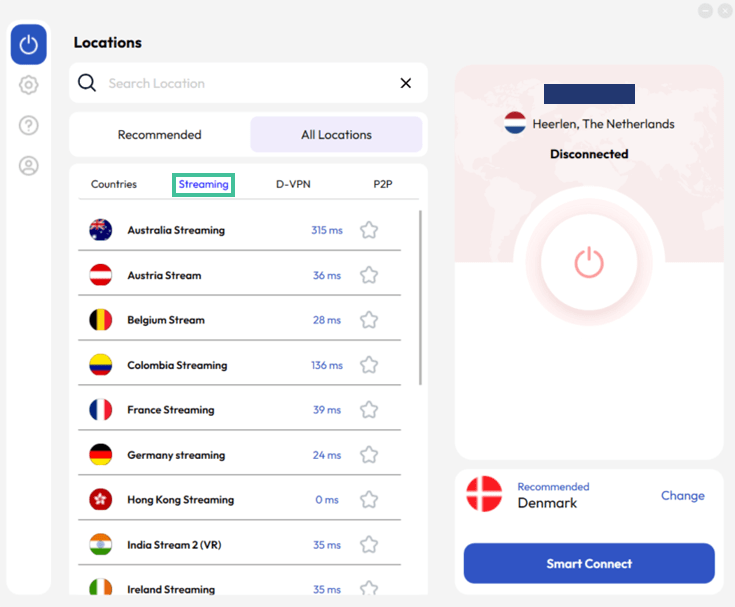
I recommend using the FastestVPN servers for streaming if you’re trying to unblock international streaming services.
Dedicated IP address
Some VPN providers offer dedicated IP addresses. This means you get a unique, static IP that only you can use. Your real IP address will remain hidden.
With FastestVPN, you can get a dedicated IP address as an add-on. You can select this feature when creating an account. It costs $1.60/month extra.
FastestVPN offers dedicated IP addresses in the United States, Russia, and Germany.
Double VPN
FastestVPN offers double VPN servers that are available under the “D-VPN” tab in your interface. By using these server connections, I could double my security by encrypting my traffic twice.
You have six different options if you opt to choose this feature, shown in the image below.

Keep in mind that heavier encryption for the Double VPN feature will result in slower speeds.
Torrenting With FastestVPN
FastestVPN allows torrenting on all servers but also has P2P-optimized locations. If you can’t imagine a day without putting your uTorrent client to work, I recommend sticking to servers closer to you. Otherwise, the speed drops will truly ruin your FastestVPN torrent experience.
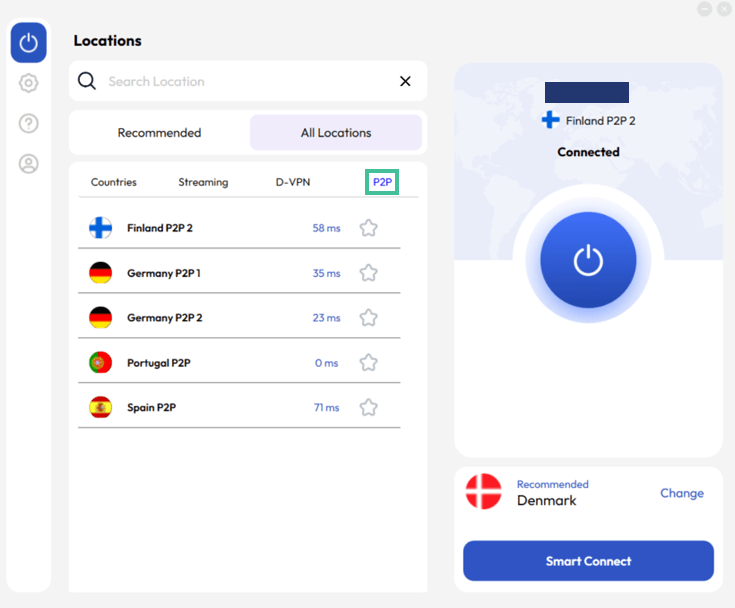
I didn’t experience any leaks when torrenting with this VPN provider as long as the kill switch was activated. In terms of speed, FastestVPN servers with lower pings provided snappy, effortless downloads, but distant locations struggled quite a bit.
I was able to download a file of 800MB in half an hour. That isn’t really quick, but it’s doable. If you want to be able to seed, you can get port forwarding as an add-on for $1.20 a month.
If you want more options, have a look at our best VPNs for torrenting to compare VPN services with specific torrenting benefits.
Comparison With Other VPNs
FastestVPN certainly offers a decent product. But how does it compare to some of the best VPNs we’ve recently tried and tested? Have a look at the comparison table below!
| Editor’s Pick | |||
| VPN | |  |  |
| Score | 7.8 | 9.3 | 9.0 |
| Servers | 500-1000 | 9000+ | 3000-5000 |
| Connections | 10 | 10 | Unlimited |
| Logs | Zero logs | Zero logs | Zero logs |
| Protocols | OpenVPN, IKEv2, WireGuard | OpenVPN, IKEv2, WireGuard, NordLynx | OpenVPN, IKEv2, WireGuard |
| Torrent options | |||
| Compatibilities | | | |
| Netflix | |||
| Payment methods | PayPal, Bitcoin, Cryptocurrency, Credit card | Sofort, Cryptocurrency, Credit card, Other | PayPal, Cryptocurrency, Credit card, Other |
| Money-back guarantee | Money-back guarantee, 31 Days | Money-back guarantee, 30 Days | Money-back guarantee, 30 Days |
| Visit FastestVPN | Visit NordVPN | Visit Surfshark |
Do I Recommend FastestVPN?
First things first: as I discovered in this FastestVPN review, this VPN is not the fastest VPN service on the market. In fact, the speed drops are pretty noticeable.
Having said that, FastestVPN does what a VPN is supposed to do: it unblocks all major streaming services and reliably encrypts your data. The VPN is easy to set up and use. It offers a decent security package that includes a NAT firewall, ad blocker, split tunneling feature, and kill switch.
One of the downsides is that FastestVPN’s server network is quite small in comparison to other VPN providers. On top of that, I experienced some issues connecting to servers.
All in all, I recommend FastestVPN to users who’d like a cheap VPN that covers the basics. The potential is certainly there, and I’m excited to see how FastestVPN continues to improve its service!
What Our Experts Think About FastestVPN


Related articles:
Still have questions about FastestVPN? Check out the FAQs below or leave us a comment.
FastestVPN offers solid security, given its strong encryption, selection of protocols (including OpenVPN, WireGuard and IKEv2), and no-logs policy. The NAT firewall, kill switch, and ad blocker help keep you safe from various threats.
FastestVPN can unblock Netflix, as well as other major streaming services. It has optimized servers for streaming in various regions.
FastestVPN is based in the Cayman Islands, which doesn’t have any mandatory data retention laws. This makes FastestVPN a good choice if you’re looking for a VPN service that values user privacy.
FastestVPN doesn’t offer a free service. However, their lifetime deal makes this one of the cheapest VPN’s available. Moreover, FastestVPN has a 31-day money-back guarantee, which you can use to try this VPN without risk.
I have a great experience with both FastestVPN Windows and android app. Unblock US Netflix and other streaming platforms as well. Highly recommended to the people who are looking for a budget-friendly VPN can buy their lifetime plan.
Windows app didn´t work, dns leaks with firefox extension !
Thank you for sharing, Mats! We didn't run into any leaks during our most recent round of testing, but will make sure to test out this particular configuration extra when we retest. It could be that the extension had a temporary blip, but even that shouldn't leave you unprotected, of course!
Their VPN app most of the times doesn't work on the Windows 11 x64 platforms. Needed to install an age old version to workaround but even that doesn't work effectively.
Connection to VPN Servers is even more horrible.
It's simply a waste of time and money.
Hi Yash!
We're sorry to hear you ran into that many problems with FastestVPN's app. Our experience with their software on Windows 11 was actually quite nice! Have you reached out to their customer service by any chance? There might be something else going on here - it might just be a problem they can easily fix. :)
FastestVPN doesn't have kill switch in Linux.
That's true. The FastestVPN kill switch works on other operating systems, like Windows and mac, but isn't available on Linux. Thank you for highlighting this - we've added it to our review!
This VPN should be in the Top 3.
It's certainly better than most of your highly reviewed VPNs.
I've used most of the VPNs and can safely say this is one of the best. ExpressVPN, Windscribe and FastestVPN