FastVPN (Namecheap) Review (2025): Cheap, but Dangerous for Your Privacy

Why trust our review process 
We may earn affiliate commissions for the recommended products. Learn more.
FastVPN is the VPN of the American web host Namecheap. FastVPN is cheap, easy to use, and gives you access to most streaming services. FastVPN is less suitable for the advanced user. I doubt whether your privacy and security are in good hands with FastVPN, which is why I ultimately do not recommend this provider.
I have thoroughly tested FastVPN for speed, security, server network, ease of use and privacy. In this review I describe the results in detail.

| 💵 Price | From $0.82 a month |
| 📱 Operating systems | Windows, Mac, iOS, Android, Linux |
| 💻 Connections | Unlimited |
| 💳 Payment methods | PayPal, Cryptocurrency, Credit card |
| 🔒 Protocols | OpenVPN, IKEv2, WireGuard |
| 📅 Money-back guarantee | Money-back guarantee, 30 Days |
| 📋 Logs | Keeps logs |
| 🌎 Servers in English | United States, Canada, India, United Kingdom, Ireland, New Zealand, Australia |
| 📥 Torrent options | |
| 🍿 Netflix | |
| 🏠 Website in English | |
| 📲 App in English | |
| 🎧 Customer Service in English | |
| 🎬 Works with |


|
What I Like:
- Provides access to Netflix and other streaming services
- Customer service is helpful
- Very cheap
- Great speeds
- Easy to use
- Server network with 100+ countries
- 30-day money-back guarantee
- Can be used on an unlimited number of devices
What I Don't Like:
- You seem to have to install the VPN multiple times
- Can only be opened via the taskbar
- Kill switch is disabled by default
- Keeps a personal VPN ID
- Headquarters are in the US, which is not great for privacy
Speed: How Fast is FastVPN?
Using a VPN can affect the speed of your internet connection. That’s why I tested the speed of FastVPN. Here are my conclusions:
- FastVPN has good speeds.
- You can browse and stream videos normally with FastVPN.
- The speed tests show a slight decrease in speed, but you won’t notice it.
Take a look at our article about the fastest VPNs to see how other services score.
Speed test results for FastVPN
I used the trusted website speedtest.net to check FastVPN’s speeds on different servers. I first conducted a test without a VPN to check my internet speed. These tests were conducted from our office in the Netherlands.
The table below shows my FastVPN speed test results.
| Server | Download (Mbps) | Upload (Mbps) | Ping (ms) |
|---|---|---|---|
| No VPN | 200.49 | 244.69 | 4 |
| US (New York) | 158.81 | 227.22 | 87 |
| US (Los Angeles) | 144.42 | 206.63 | 149 |
| UK (London) | 187.61 | 233.95 | 12 |
| Japan | 133.06 | 18.62 | 245 |
| Australia | 121.61 | 202.01 | 209 |
| The Netherlands | 184.39 | 236.65 | 4 |
| Germany | 192.57 | 235.95 | 13 |
| Brazil | 131.24 | 209.32 | 210 |
| Canada | 172.79 | 220.65 | 114 |
| South Africa | 132.28 | 211.19 | 169 |
After connecting to the VPN, I continued to have excellent speeds.
The download speed is the most important aspect of these measurements. Of course, it decreased slightly when I connected to FastVPN servers, but this difference is negligible. The ping also shows good results. A high ping is especially annoying during gaming. FastVPN only has a high ping with servers on the other side of the world, which is normal.
The figures give an idea of how a VPN performs, but to be sure, I also tested FastVPN during daily use. I will explain the results in more detail below.
Speed during daily use
I tested FastVPN from Namecheap for a few weeks, testing different servers and doing my everyday things, from browsing and streaming videos to online gaming and downloading files.
The VPN did not interfere with my browsing experience on varied websites and apps. There was no unusual lag, and I could stream videos on YouTube and Netflix as usual.
FastVPN is very fast and you won’t notice that you have a VPN on during daily use.
Does FastVPN Work With Streaming?
FastVPN unblocked multiple Netflix libraries, namely in the US, UK, Germany, India, and more. But does the Namecheap VPN work with other streaming services?
Check out the table below for a summary of what FastVPN can and can’t unblock:
| Platform | Can FastVPN unblock it? |
|---|---|
| Netflix (US) | ✔ |
| Netflix (UK) | ✔ |
| Disney Plus (US) | ✔ |
| Disney Plus (EU) | ✔ |
| Hulu (US) | ✔ |
| BBC iPlayer (UK) | ✔ |
| Prime Video (US) | ✖ |
| Prime Video (EU) | ✖ |
| HBO Max (US) | ✔ |
| HBO Max (EU) | ✔ |
Unfortunately, I couldn’t unblock Amazon Prime Video. Although I tried different servers and locations, I was unable to get past Amazon’s VPN block. However, there are a lot of other streaming services I was able to access with FastVPN.
Please note!
The VPN may indicate that you are connected to a server, while this is not the case (more on this later). You will also not bre able to access foreign streaming services, because your IP address has not changed. So check carefully whether you are actually connected to the VPN by checking your IP address.
Safety: Is FastVPN Safe?
A VPN is useful for surfing the net safely and preventing third parties from getting their hands on your data. After thorough research, I can conclude that FastVPN is not the most secure VPN. The most important points are:
- FastVPN uses industry-standard encryption and secure protocols to keep your data safe.
- This VPN service has a glaring lack of additional security features that you can find on premium VPNs. FastVPN does not offer a double VPN, GPS spoofer, or dedicated IP addresses.
- You have to install the VPN multiple times before everything works properly.
- The kill switch in the Windows app is disabled by default.
- The Auto-Protect option is not very privacy-friendly.
- FastVPN uses a VPN-specific ID, to which anonymized data is linked.
- You can enable tracking of your app usage.
- FastVPN is based in the United States, which is part of the 5 eyes alliance.
Note!
Check with our tool or another IP checker if your real IP address is still visible! Although the VPN indicates that it is connected to a server, this turned out not to be the case after the first installation. To be sure, enable FastVPN’s kill switch. This works great and blocks your internet connection if you are not connected to a server – even if the VPN itself indicates that you are.
Protocols and encryption
FastVPN from Namecheap uses AES-256 encryption, which is the same standard used by banks and the military. This wards off third parties interfering with your data and traffic while you’re connected to the VPN.
Namecheap VPN supports the following secure protocols:
- OpenVPN: Widely recognized as the standard for VPN protocols, OpenVPN is open-source and one of the most widely-used protocols among the 150+ VPNs we tested.
- WireGuard: Fast and secure, WireGuard is a promising new protocol that’s faster and safer than even OpenVPN.
- IKEv2: This protocol is ideal for mobile use, as its reconnecting abilities are lauded by tech experts.
We recommend using WireGuard as it’s the fastest and most secure VPN protocol. WireGuard is enabled as the default protocol.
Logging and privacy
Both the Privacy Policy and Terms of Service are accessible from within the VPN app. You will then be directed to the respective pages on the FastVPN website. Both documents are clear and easy to read.
We reviewed its privacy policy closely and found that the company collects the following information about users:
- A VPN-specific user ID. This is mainly for troubleshooting and feedback.
- Anonymized data for product improvements, and crash data. This data is tied to your user ID.
The privacy policy does not specify what type of data is involved, but when installing the app, you are notified that, among other things, your device type and operating system are collected.
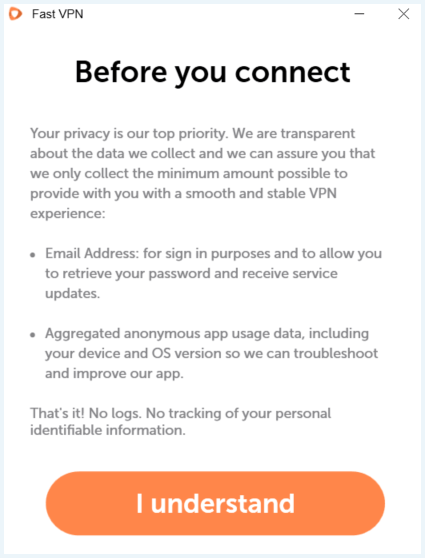
The fact that the anonymized data is linked to your user ID does not make it completely anonymous. However, FastVPN emphasizes that it does not log any user data, including emails, DNS data, or visited sites. Unfortunately, we cannot verify this, as no audits have been performed.
Additionally, in the FastVPN app settings, there’s an option to allow the company to track your usage. Although they claim to only use this information for troubleshooting, it seems uncanny for a VPN provider to want to track and store this data.
Namecheap VPN is located in the United States, which is part of the Five Eyes alliance. This alliance has been known to engage in serious spying activities and is associated with international surveillance organizations.
Kill switch
A kill switch automatically blocks all incoming and outgoing internet traffic if your VPN connection stops working. This ensures that your privacy remains protected and your IP address stays hidden when the VPN server disconnects.
FastVPN’s kill switch is pretty reliable and terminates your connection the moment your VPN becomes compromised. We were initially connected to a server that didn’t seem to work. Although this wasn’t visible anywhere in the VPN app, the kill switch responded to this.
Some VPN providers allow you to configure the kill switch to only work when the VPN is enabled, but FastVPN’s kill switch only has one option. Even if you manually and intentionally disconnect from a VPN server, you will not be able to access the internet as long as the kill switch is enabled.
FastVPN’s kill switch is disabled by default. If you don’t want to surf the internet without a VPN, we recommend enabling this feature as soon as possible.
Auto-Protect
An optional feature of FastVPN is Auto-Protect. When you enable it, the service will compare all available Wi-Fi networks with networks in your list that you already trust (this list is in the app). When you use a Wi-Fi network that you haven’t added to your trusted networks, the VPN will automatically turn on.
By analyzing your available networks, the VPN essentially has access to your location. FastVPN claims that it does not collect your GPS location; it only looks at Wi-Fi networks.
Android and Mac users must grant the app permission for this feature. Auto-Protect is disabled by default.
Can you sign up to FastVPN anonymously?
To set up FastVPN by Namecheap, you need to provide your name and email address. You can easily use a fake name and generic email ID to set this up, so you can stay anonymous.
The good news is that Namecheap accepts Bitcoin payments, so you can pay anonymously without revealing your credit card or banking details. However, keep in mind that this won’t keep Namecheap from collecting the information mentioned in the privacy policy.
Does FastVPN leak your data?
After installing FastVPN, some servers weren’t working even though the VPN made it seem like they were. So double check your IP address when connecting to a server. After completely uninstalling and reinstalling the VPN, the VPN worked fine and we didn’t encounter any more issues.
This happened to several people from our team. It is therefore very important that you check whether your IP address is being leaked. This can be done using our IP tool. Also enable the kill switch. This works perfectly and will disconnect the internet connection if you are not actually connected to the VPN.
We find it very reprehensible that you are not protected with a VPN connection, while FastVPN claims that you are.
Ease of Use: Is FastVPN Easy to Use?
Ease of use is of course very important and can be decisive in your choice to continue using the VPN or not. We will discuss different aspects of FastVPN below, but some important conclusions are:
- FastVPN is easy to download, set up and use.
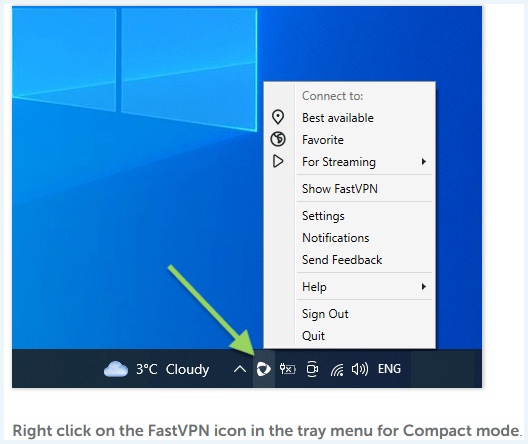
- To open the VPN app, you need to click on the icon in the taskbar, otherwise it won’t work.
- The VPN can be used on an unlimited number of devices.
- FastVPN is available for Android, Windows, Apple (iOS and macOS), routers, Linux and as a Chrome extension.
- There is a monthly and an annual subscription.
- The customer service responds quickly, competently and thinks along well.
- There are few options, but that is not necessary for the novice user.
Namecheap FastVPN website
The FastVPN website is clean and relevant information is quickly accessible.
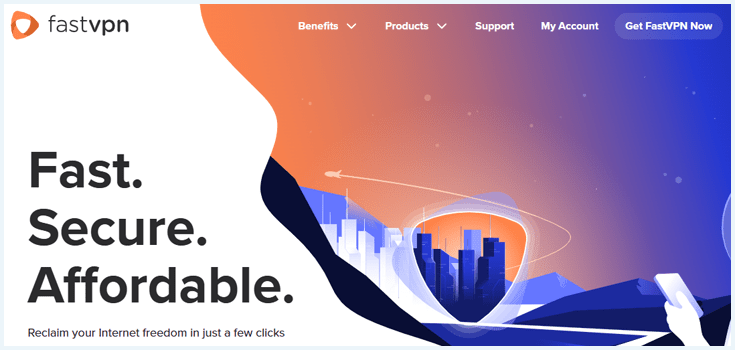
The homepage also features a handy price comparison table, pitting FastVPN against the best VPNs. There’s a video explaining the features of a VPN, but it would be more effective if there were audio explanations as well. The website – like the app – is only available in English.
How to install FastVPN
The installation process is easy to follow, even if you are not that tech savvy. Here is how to install the app:
- Navigate to the Namecheap FastVPN website.
- Click on ‘Get FastVPN‘ and choose your subscription. You can choose between yearly or monthly.
- Log in. If you don’t have an account yet, click on ‘Sign up‘ at the bottom.
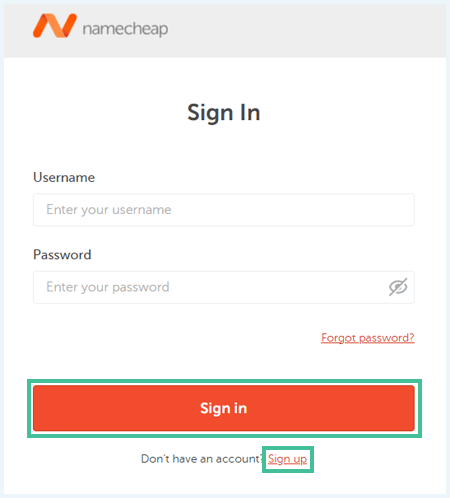
- Create an account. You may encounter a CAPTCHA after this.
- Confirm your purchase and choose a payment method.
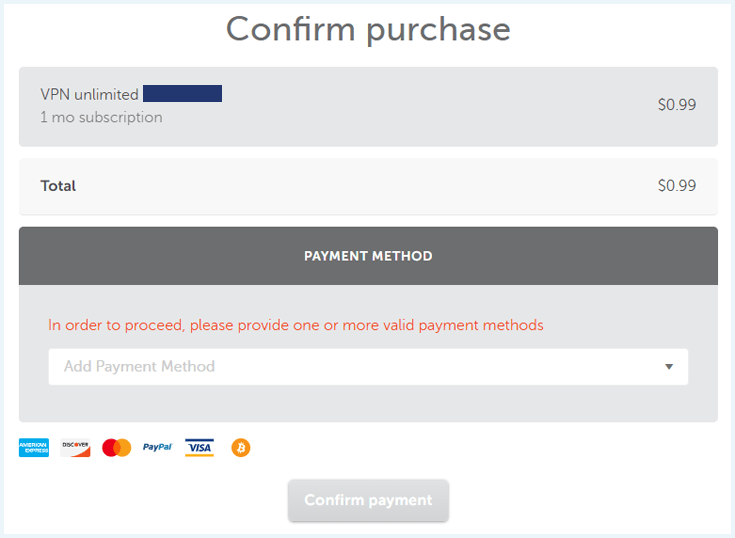
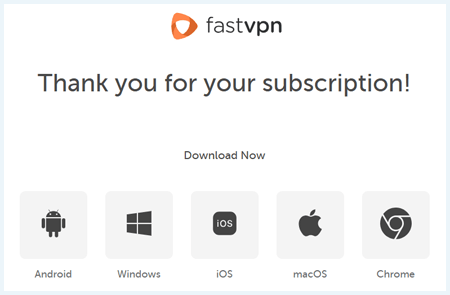
- Click on a device to download the corresponding app.
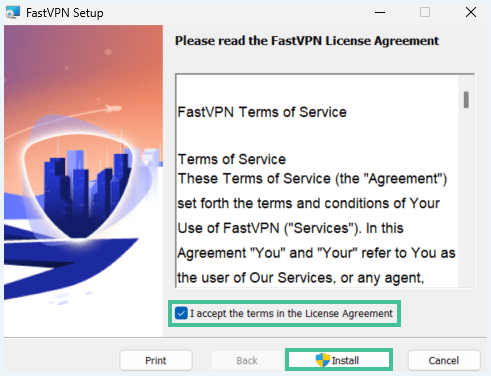
- Accept the license agreement and click ‘Install‘.
- Follow the installation procedure and click on ‘Finish‘.
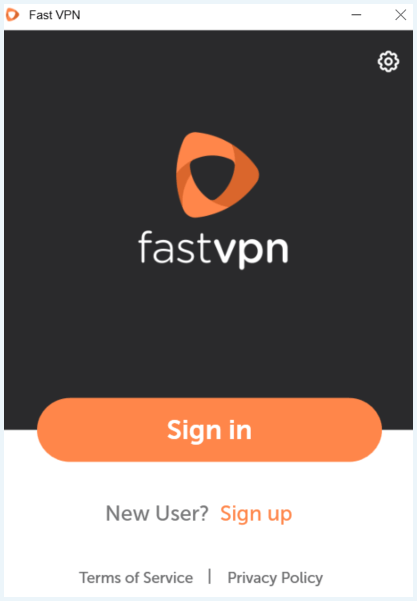
- Now click on ‘Sign in‘ and enter the details you provided when creating your account.
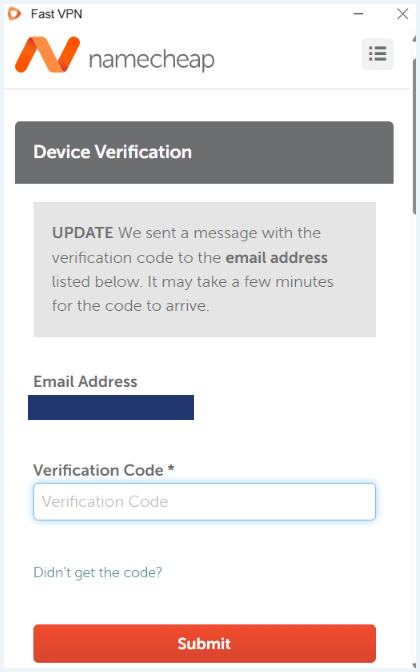
- A code will now be sent to your email address. Enter it and click ‘Submit‘.
- FastVPN explains what information is collected. Click ‘I understand‘.
- Now you can connect to a server.
FastVPN app
After downloading and installing the app, you will see a clear interface.
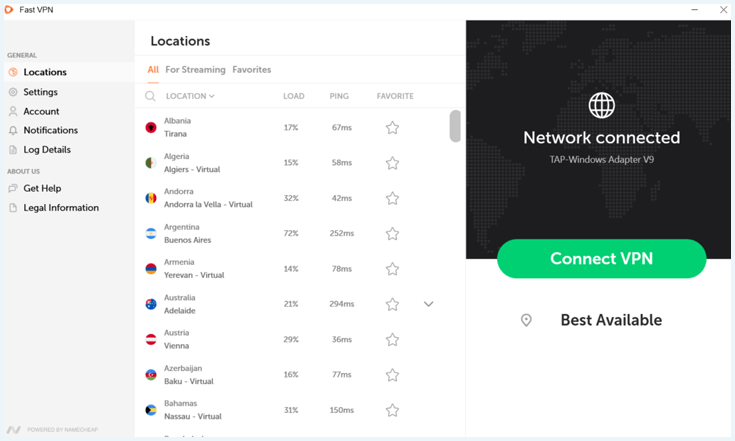
There are few settings available in the app. In the ‘General’ settings, you can choose whether the VPN opens automatically on startup. You can also adjust the protocol here and choose a theme (light or dark).
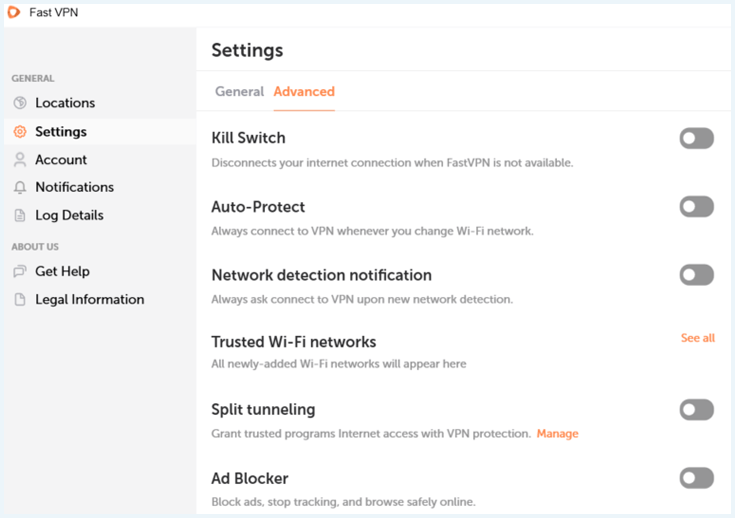
In ‘Advanced’ you can enable or disable multiple features. Everything is disabled by default.
You can use FastVPN on an unlimited number of devices. This is very useful if you want to use the VPN on multiple devices at the same time and share it with multiple people.
Please note!
To open the VPN app, you need to click on the icon in the taskbar. If you open the app in another way, FasstVPN will ask for permission to install again. Then it will crash because the app is already installed. We therefore recommend pinning FastVPN to the taskbar.
Split tunneling and ad blocker
FastVPN has few features, but that doesn’t matter to the novice user. The few options that FastVPN offers are split tunneling and an ad blocker. Both are disabled by default.
With split tunneling, you can specify which apps go through the VPN by default. Some VPNs also allow you to specify which apps are excluded from the VPN by default, but this is not the case with FastVPN.
In addition, FastVPN has an ad blocker that blocks ads, prevents tracking, and makes browsing safer. Both features are useful and help you have a smoother browsing experience.
How much does FastVPN cost?
True to its name, this Namecheap VPN is one of the cheapest VPNs you can get, at least in the beginning. This VPN offers two pricing options, both of which offer the same set of security features. Here’s an overview of the plans:
- FastVPN by Namecheap 1 year $0.82mth Deal View offer
- FastVPN by Namecheap 1 month $0.66mth View offer
The monthly subscription seems the cheapest, but after the first month, you pay a whopping $6.88/month! The annual subscription also becomes considerably more expensive after the first year: then you pay $2.88/month. However, this is still cheap for a VPN provider.
Compared to other VPNs, FastVPN doesn’t give you the best value for your money. Similarly, cheap options can unblock more streaming services and offer better security features.
Namecheap accepts the following payment methods:
- Credit or debit card
- PayPal
- Cryptocurrencies like Bitcoin
While PayPal and card payments are super convenient, cryptocurrencies let you remain completely anonymous, as you won’t need to provide any personally identifiable information.
FastVPN money-back guarantee: How to get a refund
FastVPN offers a 30-day money-back guarantee, which means you can get all your money back as long as you cancel your subscription before the 30 days are up.
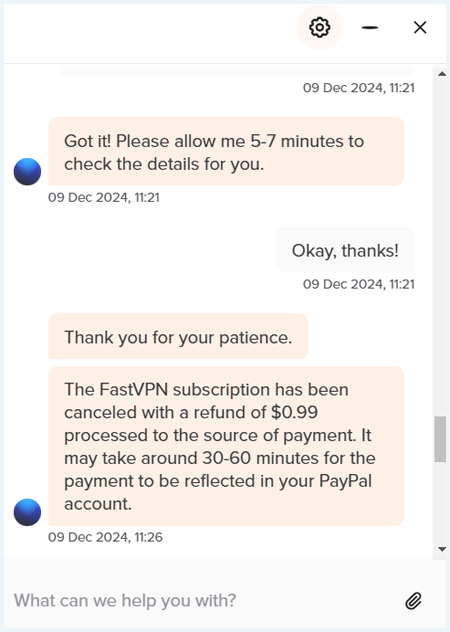
To get a refund, all you need to do is start a live chat with a support agent and let them know you’re availing of the 30-day money-back guarantee.
Of course, we tested this. Although the first employee indicated that it was not possible to get a refund, we were referred to another department. In the end, we easily got our money back.
Customer service
If you face any problems when using FastVPN, customer support can help you out. The live chat is conveniently available 24/7. Moreover, it connects you with a human rather than a chatbot to make sure your issue is understood and resolved efficiently. Note that you need to log in with your username and password to chat with a customer support agent.
When we tried contacting customer support, the experience was pretty smooth. The employee we spoke to, thought along with us, sent screenshots, and came up with solutions.
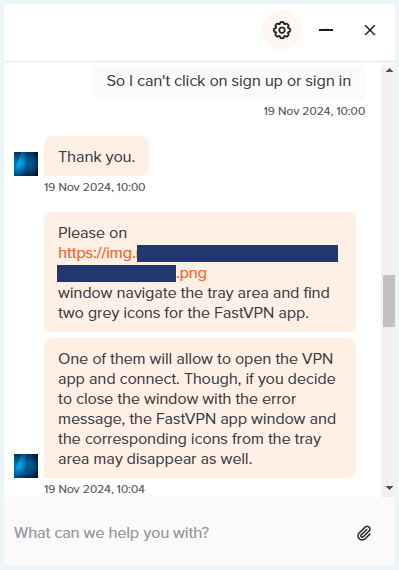
The live chat provides the quickest way to resolve any issues. but you can also choose to visit the extensive support page, where you can find various installation guides and other explanations. Moreover, the knowledge base is very useful.
Server network FastVPN
Depending on what you want to use the VPN for, it is important whether the VPN has a large server network. There may also be special servers, for example for streaming or torrenting. We tested the server network of FastVPN. These are our conclusions:
- FastVPN has 1,000+ servers in 100+ countries.
- The provider automatically chooses the best possible server for you.
- There are special servers for streaming.
- FastVPN does not offer dedicated IPs.
FastVPN servers and locations
FastVPN has a moderately sized network with 1,000+ servers in 100+ countries. The locations include the following:
- Americas: Argentina, Bahamas, Belize, Bolivia, Brazil, Canada, Cayman Islands, Chile, Colombia, Costa Rica, Dominican Republic, Ecuador, Guatemala, Honduras, Jamaica, Mexico, Panama, Paraguay, Peru, Trinidad and Tobago, United States, Uruguay and Venezuela.
- Asia / Pacific: Australia, Bangladesh, Bhutan, Brunei Darussalam, Cambodia, Hong Kong, India, Indonesia, Japan, Kazakhstan, Laos, Macau, Malaysia, Mongolia, Myanmar, Nepal, New Zealand, Pakistan, Philippines, Singapore, South Korea, Sri Lanka, Taiwan, Thailand and Vietnam.
- Europe: Albania, Andorra, Armenia, Austria, Azerbaijan, Belgium, Bosnia and Herzegovina, Bulgaria, Croatia, Cyprus, Czech Republic, Denmark, Estonia, Finland, France, Georgia, Germany, Greece, Hungary, Iceland, Ireland, Isle of Man, Italy, Jersey, Latvia, Liechtenstein, Lithuania, Luxembourg, Malta, Moldova, Monaco, Montenegro, Netherlands, North Macedonia, Norway, Poland, Portugal, Romania, Serbia, Slovakia, Slovenia, Spain, Sweden, Switzerland, Ukraine and the United Kingdom.
- Middle East / Africa: Algeria, Egypt, Ghana, Israel, Jordan, Kenya, Lebanon, Morocco, Nigeria, Saudi Arabia, South Africa, Turkey and the United Arab Emirates.
FastVPN’s server network is quite extensive. You can choose to connect to a specific server or automatically select the best possible one.
FastVPN has special servers for streaming. These are useful, but not necessary. We also get access to streaming services with the normal servers.
Dedicated IP address
When you connect to a FastVPN server, it assigns you a random IP address, masking your location and keeping your real address hidden. However, FastVPN does not offer a dedicated IP that is unique to you. Given the low price point, the lack of this extra option isn’t surprising.
If you want a dedicated IP, NordVPN is an excellent provider that offers this feature as a handy add-on.
Torrenting with FastVPN
FastVPN supports torrenting on all its servers, but we’re not convinced you should use it for that purpose.
For one thing, there are no specialized P2P servers. FastVPN also doesn’t have the strongest privacy policy and is based in the US, a region known for its online surveillance.
Do We Recommend FastVPN?
FastVPN is cheap and good at unblocking Netflix. The speed is also fine. There are few extra options, but this is not necessary for the novice user.
However, the VPN fails to provide comprehensive security and privacy features. For example, it does not seem to work during the first installation, and FastVPN pretends that you are connected to a VPN server when this is not the case. This can be very dangerous, because your real IP address leaks. Furthermore, you will of course not be able to unblock foreign streaming services.
Moreover, you can only open the app via the taskbar. If you try another way, you will get an error and you will not be able to enter the app.
In addition, FastVPN keeps a user ID and can track your location through your Wi-Fi networks. This, combined with the fact that it is headquartered in the United States, makes us concerned about our privacy. As such, we do not recommend Namecheap FastVPN, despite it being a great service when everything works fine. There are plenty of better alternatives in the VPN market.
What Our Experts Think About FastVPN

Here are some of the most common questions we hear about FastVPN. In case we haven’t covered your query, feel free to let us know in the comments below so we can get back to you.
No, FastVPN is not a free VPN. However, it’s quite affordable at just $ 0.82 for the first month. However, bear in mind that the price increases after the first month.
Yes, FastVPN can unblock several Netflix libraries including Netflix US, UK, Germany, India, and more.
FastVPN is mostly safe thanks to its strong levels of data encryption. However, Namecheap’s FastVPN logs a significant amount of user data for different purposes. Aside from that, the company is based in the United States, which is part of the Five Eyes intelligence alliance. This means the VPN may hand over user data to government authorities if asked to. In short: Namecheap VPN cannot guarantee a safe and anonymous internet experience.
It’s very easy to download Namecheap’s FastVPN. Just visit the website, select a plan, create an account, and complete your payment. Then, download the app on your devices and sign in to start using this affordable, efficient VPN service. Make sure to perform an IP check to ensure you are actually connected to a VPN server, otherwise the VPN may need to be reinstalled.