
I spent over a week analyzing and testing Norton antivirus software, as well as its various suites, for this in-depth review. I was impressed by its numerous strengths, including a rich feature set, an integrated and audited VPN, and top-notch lab test performance. However, I also noted a couple of trade-offs, including a price increase after renewal and a complex app interface that may not be friendly to inexperienced users.
| Antivirus: | Norton Antivirus |
| Rating: | 9.1⭐⭐⭐⭐⭐ |
| Price: | From $29.99 for the first year |
| Current deal: | Up to 61% off |
| Free version: | ❌No, but offers a 60-day money-back guarantee |
In this in-depth review of Norton Antivirus, ranked #1 by VPNoverview, you’ll find key information on pricing, features, test results, and my final verdict on whether it is worth it in 2026.
Norton antivirus software prices
Norton Antivirus Plus plan starts at $29.99/year and increases to $59.99/year upon renewal. The Norton 360 Standard initial subscription is priced at $39.99/year and increases to $94.99/year upon renewal. The Norton 360 Deluxe starts at $49.99/year and jumps up to $119.99/year for subsequent years. Lastly, the Norton 360 with LifeLock Select Plus is initially priced at $99.99/year and increases to $189.99/year upon renewal. Norton’s subscription auto-renewal is turned on by default, but you can turn it off in your profile settings. Before your subscription expires, you will get notified via email.
| Norton antivirus plan | Price per year | Renewal price | Devices covered | Key features |
| Norton Antivirus Plus | $29.99 for the first year | $59.99/year | 1 device | Antivirus, malware, ransomware, and hacking protection, Genie scam protection, 2GB cloud backup, password manager, deepfake protection |
| Norton 360 Standard | $39.99 for the first year | $94.99/year | 3 devices | Everything in the Norton Antivirus Plus + VPN and Dark Web monitoring |
| Norton 360 Deluxe | $49.99 for the first year | $119.99/year | 5 devices | Everything in the Norton 360 Standard + 50GB cloud backup and parental controls |
| Norton 360 with LifeLock Select Plus | $99.99 for the first year | $189.99/year | 10 devices | Everything in the Norton 360 Deluxe + 250GB cloud backup, privacy monitor, LifeLock identity theft protection, stolen wallet protection, social security & credit alerts, up to $25,000 in stolen funds reimbursement |
During the Black Friday period, Norton may offer temporary discounts on these plans, making it an ideal time to purchase or renew. Check our Norton Black Friday article regularly for the latest updates and offers.
The Norton Antivirus Plus is the cheapest available Norton Plan, suitable for casual use or when paired with other cybersecurity tools, such as VPNs. The Norton 360 Standard is a well-rounded suite that includes a VPN and Dark Web monitoring for a better approach to online safety.
Meanwhile, the Norton 360 Deluxe adds parental controls, and the Norton 360 with LifeLock Select Plus is the most comprehensive suite, which includes identity theft and restoration tools, as well as insurance. For regular users, choose either Norton Antivirus Plus and pair it with a VPN of your choice, or select Norton 360 Standard as a one-stop shop for most cybersecurity solutions. No matter which of Norton’s antivirus plans you choose, you will always be eligible for the 60-day money-back guarantee if you change your mind or find the product not suited to you.
If you’re looking to save money on Norton deals, check out out Norton antivirus coupons.
How to install Norton antivirus
Installing Norton antivirus is straightforward and follows a similar process to installing any other antivirus software. However, before you begin installing Norton, uninstall any other existing antivirus software to prevent conflicts. Additionally, you should temporarily disable Windows Defender during the installation process for a smoother installation. Lastly, ensure that your device meets the system requirements for the Norton product you are installing.
- Sign in or create a Norton account. Go to my.Norton.com and sign in with your credentials or create a new account.
- Initiate the download. In the My Norton site, select the application suitable for your device (Windows, macOS) and click Download.
- Start the installation. Head to the Get Started page, click Agree and Download to start the downloading process.
- Run the Norton installer. Once the download is complete, double-click on the file to launch the installer.
- Follow the instructions on the screen. Click on the Install Norton option and follow the instructions you see to complete the setup.
- Restart your device. After the installation is done, restart your device to complete the setup. Then, enable real-time protection and run the first scan.
If you’d like to install Norton Antivirus on your smartphone, first get the appropriate app for your device. You can get the Norton app for Android devices from the Google Play Store, and for iOS devices from the Apple App Store. Although the Android app has more features than the iOS one, the installation is very similar in both cases – simply download the app, wait for it to be installed, grant permissions if needed, launch it, and log in with your Norton account credentials.
Is Norton Security good? Our test results
In our tests, Norton scored excellent results in malware detection, phishing protection, and system performance. It also consistently ranks near the top on independent lab testing results.
Considering malware removal, Norton successfully detected and neutralized the great majority of test malware samples, which included trojans, viruses, adware, spyware, and ransomware. During our tests, Norton showed 97% accuracy, detecting 146 out of 150 malware samples. The couple of samples that it missed were deeply obfuscated and required a signature update to be detected. Independent test lab results also support Norton’s efficiency and our own test results. For example, AV-Test consistently scores Norton 360 6/6 in Protection, giving it 100% effectiveness against 0-day and widely known malware. AV-Comparatives also aligns with these findings, giving Norton near-perfect scores in its latest report.
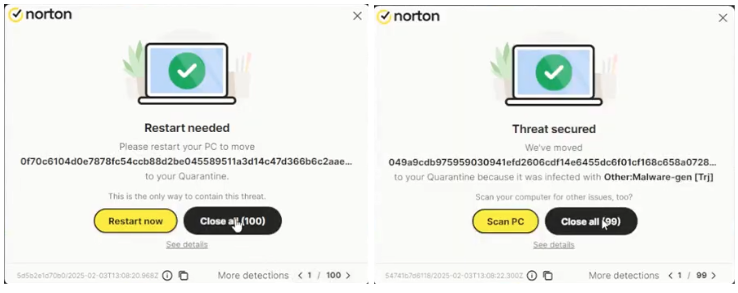
In short, while Norton does not catch every hypothetical new mutation of malware immediately, its real-world detection record is excellent. Additionally, I must stress that none of the antivirus software programs are capable of 100% accuracy in real-world tests, and a score of at least 80% is considered good enough; however, Norton significantly surpasses this threshold.
Furthermore, in our simulated ransomware attack tests, Norton intercepted and neutralized every tested ransomware payload before they ultimately took over and encrypted files. Norton relies on behavior-based protection, which has shown excellent reliability in stopping simulated attacks. Our test results match those from independent test labs and confirm Norton’s robust performance against advanced threats. For instance, during AV-TEST’s Advanced Threat Protection testing rounds, Norton ended up in the highest possible ranks.
Lastly, we conducted our browser tests using 20 known phishing URLs, with Norton blocking 19 of them and achieving a score of 95% accuracy. The antivirus software showed similar results in a lab testing environment, consistently scoring high in web protection and phishing block rates. To put it into perspective, Norton is as efficient in anti-phishing as Bitdefender and much better than McAfee, based on the most recent independent lab tests.
Once our tests were concluded, we were impressed by the results, as Norton demonstrated exceptional accuracy in detecting and neutralizing malware, a very low false-positive rate, while maintaining minimal performance impact. However, some very new or deeply obfuscated threats may still slip through Norton’s defenses until signature or heuristic updates notice them. Lastly, Norton’s detection is sometimes less accurate on mobile platforms, regarding downloaded apps.
Norton antivirus performance
In my performance tests, Norton impressed me with how efficient on system resources the program is. When idle, Norton barely touched system resources, averaging 1-2% CPU and around 120Mb RAM usage. At these levels, the continuous background protection is literally unnoticeable.
Of course, the CPU rose during Quick and Smartscans, but only moderately and with no dramatic impact on the system, typically hovering around 25-40% CPU. The Full System scan proved to be more demanding, peaking at 70-100% CPU usage at times, but that’s not unusual with an antivirus software performing a deep scan. Besides, Norton has built-in optimization tools, such as automatic tune-ups, bloatware removal, disk optimization, and browser data cleaning, that help offset performance dips. I also liked the fact that Norton automatically slowed down scans or paused background tasks when gaming or running full-screen apps, which kept the device usage smooth and uninterrupted.
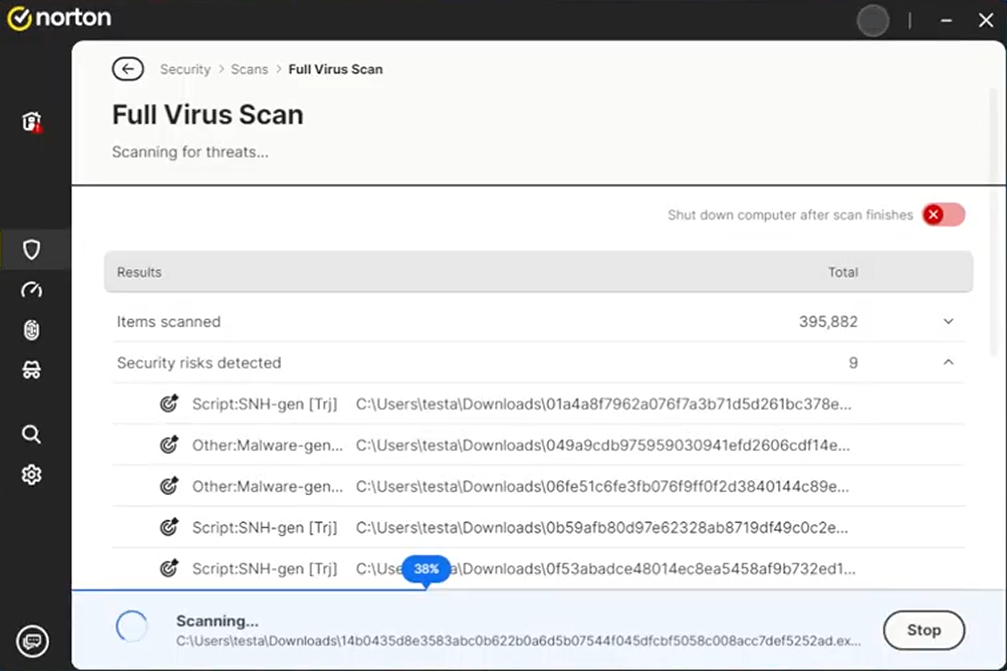
My in-house tests are confirmed by the findings of AV-Comparatives Performance Test, rating its system impact as low to very low on most everyday tasks. Additionally, AV-TEST consistently gives Norton a 6/6 score for performance. In practical terms, Norton is quiet in the background, with close to no interruptions on web browsing or work. You may only notice the impact when running intensive full scans, so my advice is to schedule them when you’re least likely to use your device.
Norton antivirus features
Regardless of the Norton antivirus plan you choose, you will get the same robust level of security against cyberthreats, thanks to the diverse tools included in the suites. However, the higher-tier Norton antivirus plans offer more features, which you might find beneficial if you’re looking for a well-rounded cybersecurity solution.
Below, you’ll find a list of key Norton antivirus features, what they do, and which problems they solve:
| Norton antivirus features | How it works | What problem it solves |
| 1. Real-time threat protection | Continuously scans files, downloads, and running processes for suspicious behavior using signature-based and heuristic detection. It updates virus definitions automatically several times per day | Stops viruses, trojans, spyware, and zero-day malware before they can execute or spread, ensuring threats are removed instantly rather than after damage occurs |
| 2. Secure VPN | Encrypts your internet traffic and routes it through a secure server, hiding your IP and online activity from trackers, ISPs, and hackers | Protects sensitive data on public Wi-Fi, prevents tracking and geo-blocking, and enhances privacy while browsing or streaming |
| 3. Dark Web monitoring | Monitors black-market and data-leak sources for your personal details (email, phone, credit card, etc.) linked to your Norton account. Sends alerts if your data is found | Helps detect identity theft early and lets you take action before stolen credentials are abused |
| 4. Smart firewall | Analyzes inbound and outbound traffic, blocking unauthorized or suspicious connections without interrupting legitimate apps. It adapts based on trusted programs and networks | Prevents hackers from remotely accessing your device or stealing data through open ports or malware backdoors. |
| 5. Anti-phishing and exploit protection | Scans websites and emails in real time, blocking fake login pages, malicious links, and exploit attempts that try to take advantage of browser or system vulnerabilities | Protects against credential theft, online scams, and drive-by downloads triggered through phishing pages or malicious scripts |
| 6. Parental controls | Lets you set screen time limits, block inappropriate content, and monitor browsing or app usage across your child’s devices via the Norton Family app | Helps parents manage children’s online safety and digital wellbeing without constant manual supervision |
| 7. Password manager | Creates, stores, and autofills complex passwords in an encrypted vault accessible across devices. Uses zero-knowledge encryption so Norton can’t see your credentials | Prevents weak or reused passwords and protects logins from keyloggers or phishing sites |
1. Real-time threat protection
Norton antivirus uses real-time protection to continuously monitor your device for malware, ransomware, spyware, viruses, and other threats, blocking and neutralizing any cyberthreats before they can do any harm. In Norton’s case, the real-time protection is highly accurate and efficient, thanks to the use of such features as the Smart Firewall.
Just recently, Norton also added AI-powered Scam Protection to its arsenal, which helps its users avoid fraud with various tools, such as Safe Web, Safe SMS, Deepfake Protection, a Scam Dashboard, and the Norton Genie AI Assistant. The latter can even answer follow-up questions about scams and provide tips on what actions to take.
To ensure robust real-time protection, Norton runs an always-on scanner in the background. This means that every file you open, download, or modify is checked instantly using a mix of signature detection, heuristic analysis, and machine learning. The software emulates suspicious files to see how they behave and uses reputation data aggregated from Norton’s global network to help decide if that particular file is safe.

During my tests and use of Norton, I noticed that the program very rarely lags when dealing with everyday files. For instance, smaller programs or documents open immediately, even with scans running in the background. I also noticed that Norton instantly noticed any suspicious files I dropped for it, flagging them within a second or two before I even attempted to open them.
Overall, I liked how responsive the Norton real-time protection is, with barely any malicious files slipping through without being flagged. It also works well with new, unknown threats via behavioral analytics.
2. Secure VPN
Norton antivirus includes Norton VPN in all its suites, starting with Norton 360 and proceeding upwards. A VPN is a crucial tool for online security, as it can encrypt your traffic to make it invisible to onlookers and mask your real IP address for anonymity. Norton VPN has a strict no-logs policy, ensuring that your data remains safe while using the service. Additionally, the VPN included in Norton’s suites does not have any data or bandwidth limits, offers a comprehensive feature set that includes split tunneling, and provides 24/7 customer support.
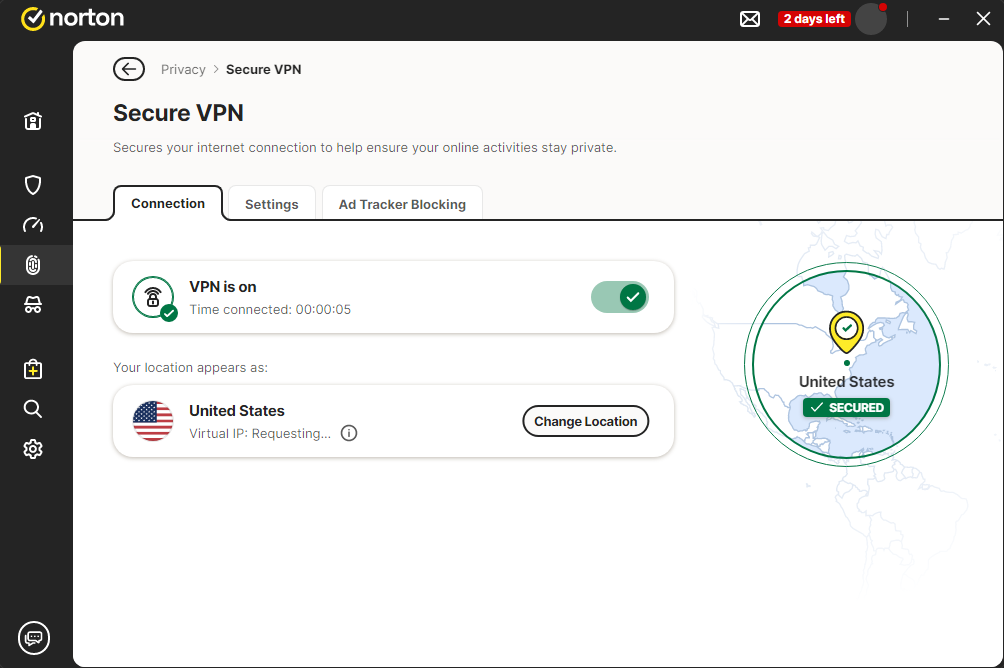
I tested Norton VPN to determine its impact on browsing speed and various online activities. First, I tested my own speed using the Ookla Speedtest tool to determine the baseline, and then connected to the suggested fastest available server, which was located in the US, and reran the speed tests. Ultimately, I got an average connection speed of around 680Mbps with a 72.36% initial speed retention rate. Overall, this is a good result, and with such speeds, I didn’t experience any noticeable slowdowns.
I also checked how well Norton VPN hides my IP address and keeps my DNS and WebRTC data within the bounds of its tunneling protocol. In such cases, I relied on our favorite testing tool, ipleak.net, and found that there were absolutely no data leaks when I used Norton VPN to encrypt and secure my traffic.
3. Dark Web Monitoring
After testing the key security features, I opened the Norton account dashboard and proceeded to test additional ones. I started with Dark Web Monitoring, which is available in all LifeLock identity plans and works by scanning the dark web for your personal information, such as email addresses, Social Security numbers, and similar details. Norton describes this feature as: Norton 360 with LifeLock’s built-in Dark Web Monitoring that carefully scans even the deepest parts of the dark web, and notifies you if your information is found.
Setting up and testing this feature was very easy, as all I had to do was provide the information I wanted to track, such as my phone number and email address, and grant permission for Norton to search for this information. Once that’s done, Norton will proceed to continuously monitor the dark web and known data breach databases, alerting you if it finds any mention of your information.

After you get the alert, you will also get guidance on how to manage the incident. In case you have the most comprehensive suite, the Norton 360 with LifeLock Select Plus, you can also benefit from the hands-on incident management by Norton’s specialists. However, this feature is only available in the US.
4. Smart Firewall
In simple words, Norton’s Smart Firewall acts as a traffic controller between your computer and the internet. Once I installed my Norton antivirus software, the Smart Firewall automatically started to monitor both inbound and outbound traffic, identifying and blocking suspicious network activity. The firewall also monitors any attempts to exploit open ports or untrusted apps sending and receiving data. I also appreciated that Norton’s Smart Firewall is highly customizable, so I could easily block or permit specific applications, adjust the sensitivity, and even hide unused ports.

I found it very refreshing that the firewall stays relatively quiet during regular internet use, and I did not experience frequent pop-ups or constant blocking of secure traffic. However, Norton is very reactive when something out of the ordinary happens, sending out alerts the instant it catches something.
Norton’s Smart Firewall works in conjunction with the Intrusion Prevention System (IPS), which means that even after traffic is allowed by firewall rules, it is further inspected by IPS for any suspicious content, activity, or behavior. If the ISP detects something the firewall has missed, it sends the files directly to quarantine before any harm can occur.
After testing and using Norton’s Smart Firewall in real-life situations, I can say that this firewall gives much more than just traffic monitoring. I found it to be proactive, intelligent, and mostly hands-off, unless you want to go deep and configure it to your own specific set of rules. So, if you’re worried about network intrusions or data exfiltration, which can easily occur using unprotected public Wi-Fi connections, the Smart Firewall + IPS combo provides robust protection without being overly intrusive. For me, the latter is a very important point, since I’ve tried several antivirus programs with firewalls that wouldn’t allow me to use my device without constant interruptions. Lastly, if you’re an experienced user, you will appreciate the level of customization Norton’s Smart Firewall allows.
5. Anti-Phishing & Exploit Protection
I was quite impressed working with Norton’s Anti-Phishing and Exploit Protection features, as they showed incredibly quick responses intercepting fraudulent websites, disallowing them to even fully load. For my tests, I visited 20 reported new phishing URLs, including fake login pages for banks, social media, and online shopping, and Norton diligently alerted me and stopped me from entering the sites. From my experience, the Norton Anti-Phishing and Anti-Exploit feature worked even faster than the built-in Chrome and Edge protections. Ultimately, Norton caught 19 out of the 20 phishing sites I baited it with, showing an excellent 95% efficiency rate.
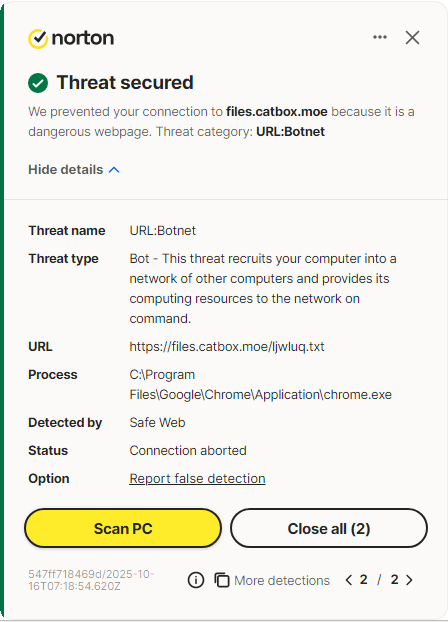
Norton’s standout feature for the anti-phishing approach is the fact that it uses blacklists and AI-driven analysis with a real-time URL reputation system that allows it to evaluate sites dynamically. That’s why Norton is so efficient in catching even the newest scam page iterations. In addition to phishing, Norton also offers Proactive Exploit Protection (PEP) to shield users against zero-day threats designed to exploit unpatched software holes to inject malware or steal credentials.
Lastly, Norton’s anti-phishing approach is nicely rounded up with its Safe Web and Scam Insight features to warn users about suspicious online stores with invalid certificates. Ultimately, I think that Norton’s anti-phishing suite is proactive and trustworthy, with a great capability to boost your online security.
Additional benefits
Besides the key features, I also tested additional tools included in Norton antivirus suites. My first impression was that the neat and intuitive design of the tools and their actual practical uses.
First on my testing list was the Notification Optimization feature, which reduced unnecessary pop-ups coming directly from the program itself. When in use, the Notification Optimization made the software feel less intrusive compared to other antivirus suites, as I was seeing only the notifications that really mattered.
Norton’s Full-Screen Mode Detection is also a handy tool, silencing background notifications the instant I launch any full-screen app, such as a game or video-editing software. This made the performance much smoother, and I did not get any distracting notifications while using the apps.
The PC SafeCam feature performed excellently when I simulated an unauthorized access to my webcam, with Norton flagging and blocking the request immediately. Plus, I liked how easy it was to customize access according to my own needs.
I found the Parental Controls tool very easy to use, allowing me to limit screen time, filter inappropriate sites, and view detailed activity reports across devices. Lastly, Norton’s Password Manager showed flawless syncing, strong encryption, and a responsive autofill feature, which I found particularly useful. To top it off, Norton’s suites come with secure Cloud Backup of varying sizes to store backup files. Although I frequently see additional antivirus suite tools as mere decoration without much actual use, Norton’s extras genuinely enhance the core protection suite. So much so that if you choose a higher-tier Norton suite with these extras included, you won’t need to worry about any additional tools or apps to secure your devices and data.
Norton antivirus customer support
Norton provides 24/7 support for clients via phone and live chat. I tested the latter myself by contacting support outside of business hours. In my experience, a representative responded in a short while after I navigated through the standard support flow.
In addition to 24/7 customer support, Norton also offers a comprehensive Help Center featuring searchable articles, setup guides, and troubleshooting tips. Lastly, you can always rely on the Community Forum to look for answers from users and experts.
I also found one unusual, but very welcome addition to Norton’s customer support – the Virus Protection Promise. If your device is infected with malware and Norton’s experts are not capable of helping you, you are actually eligible for a refund, in case you have an automatically renewing security subscription, which is very likely, since all Norton plans come with a default auto-renewal function. I tested this feature, and was impressed by the level of expert guidance without them trying to upsell Norton to me.
However, after digging around in social media and security forums, I found that some Norton customers had trouble reaching live customer support agents in their regions. However, that was the only complaint I could find, and I did not personally experience the issue.
Final verdict: Is Norton antivirus worth it in 2026?
Norton remains a strong antivirus choice in 2026, and our team of experts at VPNOverview has ranked it as the #1 choice for this year. Through my hands-on testing, real-world use examples, and comparisons with independent testing lab results, I can confirm that Norton delivers solid and reliable protection against malware, ransomware, phishing, and online threats. Norton consistently achieves near-perfect scores for performance from independent testing labs, and I couldn’t find anything to fault it during my own testing. Overall, Norton offers a comprehensive one-stop solution to most cybersecurity issues, as it includes a firewall, VPN, secure cloud backup, identity monitoring, parental control, and a password manager, providing a well-rounded approach against various threats.
That said, Norton isn’t flawless, but neither is any of the antivirus software programs I tried. For instance, Norton’s renewal prices tend to be considerably higher than the initial offers, and some users report occasional interface glitches or slower support response times.
All things considered, Norton offers excellent value and security for most users looking for complete protection with just one product. You can subscribe to Norton completely risk-free, thanks to its generous 60-day money-back guarantee, and test it thoroughly to see if it’s the right fit for you.
Norton antivirus pros and cons
Norton antivirus pros:
- Excellent malware protection. In our tests, Norton consistently detected and blocked all forms of malware, including ransomware, trojans, and spyware. Meanwhile, independent labs like AV-TEST and AV-Comparatives gave it perfect or near-perfect scores in 2026 evaluations.
- Well-rounded security suite. Norton’s higher-tier plans include unlimited VPN, password manager, parental controls, dark web monitoring, and secure cloud backup, creating an all-in-one security solution.
- Smart Firewall. Norton users a two-way intelligent firewall which effectively monitors inbound and outbound traffic, blocking unauthorized connections without being overwhelmed with alerts.
- Lightweight performance. Despite its depth, Norton maintains a minimal system impact, with Full Scans rarely causing noticeable lag when used on modern devices.
- Cross-platform compatibility. Norton works with Windows, macOS, Android, and iOS devices, syncing protection features through a unified dashboard.
Norton antivirus cons:
- Higher renewal prices. Norton’s initial price offers are fairly low, but renewal prices are significantly higher, especially when compared to other options, like Bitdefender or McAfee.
- Occasional interface lag. Although Norton runs mostly very smoothly, opening detailed settings or running simultaneous scans can sometimes cause a brief user interface slowdown on lower-end hardware.
- Limited VPN features. Norton suites include a VPN with unlimited data and bandwidth, but the VPN itself lacks some advanced features, like multi-hop, that can be found in standalone VPNs.
- Support delays in some regions. Although Norton offers 24/7 customer support, some users outside of North America report slower-than-usual response times.
You may also want to read:
- AVG review: Is it worth your money?
- Surfshark review: Is Surfshark One worth it?
- Avast antivirus review: Can you trust it?
- Intego antivirus review
- TotalAV review: Is it a safe solution?
FAQ
Norton Antivirus is owned by Gen Digital Inc., a company that was formed in 2022 after a merger between NortonLifeLock and Avast. The software company is co-headquartered in Prague, Czechia, and Tempe, Florida. Ge Digital’s portfolio includes Norton, Avast, LifeLock, Avira, AVG, ReputationDefender, MoneyLion, and CCleaner, so it’s no newcomer considering device security.
Yes, Norton is considered one of the best antivirus software programs, due to its consistently high scores in performance tests, strong features, and a well-rounded toolset. However, Norton can get a bit expensive upon renewal. Ultimately, it is up to you to decide which antivirus software is the best according to your own specific needs.
Norton 360 includes everything in the Norton Antivirus Plus suite, plus additional features. Norton Antivirus Plus includes real-time malware protection, a smart firewall, a password manager, and 2GB cloud backup for one device. The Norton 360 suite adds a secure VPN, dark web monitoring, larger cloud backup, parental controls, and covers up to 3 devices.
Yes, Norton 360 is a good choice for iPhones. The app blocks phishing sites, warns about potentially unsafe Wi-Fi, monitors the dark web, and includes a built-in VPN for online privacy. However, it cannot scan files due to iOS restrictions.
You can get Norton Antivirus with the Plus plan for around $29.99 for the first year, and it is the cheapest Norton antivirus option. A step-up is the Norton 360 Standard suite, which costs from $39.99 for the first year, while the Norton 360 Deluxe is priced at $49.99 for the first year. The highest subscription tier is the Norton with LifeLock Select Plus, which is priced at $99.99 for the first year.