- How much does Bitdefender cost per year
- Bitdefender Antivirus Free Version review
- How to install Bitdefender antivirus
- Bitdefender antivirus software features list
- Our in-house Bitdefender antivirus test
- Bitdefender performance impact
- Final verdict: Is Bitdefender a good antivirus software in 2026?
- FAQ
Bitdefender is a top-rated, robust, and reliable antivirus for 2026 that scored a perfect protection grade in the recent AV-TEST independent antivirus software testing lab evaluation. In addition to core antivirus software features, such as malware scans and real-time protection, Bitdefender also offers several standout features, including multi-layer ransomware protection, safe banking mode, and anti-identity theft tools. The well-rounded protection software offers broad platform support, suitable for Windows, Mac, Linux, Android, and iOS devices. Lastly, Bitdefender offers one of the best available free antivirus versions, which includes real-time virus scanning and anti-phishing protection.
| Antivirus: | Bitdefender antivirus |
| Rating: | 8.9⭐⭐⭐⭐ |
| Price: | From $14.99 to $119.99 |
| Current deal: | Up to 50% off on Bitdefender subscription |
| Free version: | ✅ Yes |
In this comprehensive Bitdefender antivirus review for 2026, I will cover all the key aspects, including pricing, features, installation process, and hands-on test results, such as effectiveness, performance, and ease of use. Continue reading and learn why the team of experts at VPNOverview and I recommend Bitdefender as one of the best antivirus software programs of this year.
How much does Bitdefender cost per year
Currently, Bitdefender offers six subscription offers, including the Bitdefender Free Suite. The most popular and affordable basic plan, Antivirus Plus, costs $29.99 for the first year and $69.99 for the second year. The Bitdefender Total Security starts at $59.99/year and rises up to $109.99/year. Meanwhile, the Bitdefender Premium Security plan, which covers up to 5 devices, is priced at $79.99 for the first year and $129.99 for the second year. Bitdefender Ultimate Security starts at $89.99 for the first year and goes up to $159.99/year. Lastly, the most expensive plan, Bitdefender Ultimate Security Plus, which includes up to $1 million in ID theft insurance, starts at $119.99 for the first year and increases to $189.99 upon renewal. Generally, Bitdefender offers cheaper prices than its competitors, such as TotalAV and Norton antivirus, on a per-year basis.
Linux business users can use the Bitdefender GravityZone platform or the Bitdefender Endpoint Security Tools to protect their devices and data.
Below, you’ll find a detailed table listing all key Bitdefender antivirus plans, their prices, and the features they offer:
| Bitdefender plan | Price per year | Renewal price | Works on | Key features |
|---|---|---|---|---|
| Bitdefender Free | $0.00/year | $0.00/year | Windows | Real-time malware protection, malware scans, online threat protection, email protection, and exploit detection |
| Bitdefender Antivirus Plus | $29.99/year | $69.99/year | Windows, macOS, Android, and iOS devices | Real-time malware protection, multi-layer ransomware protection, network threat prevention, web attack prevention + anti-phishing / anti-fraud, vulnerability assessment, rescue mode, privacy/banking tools, limited VPN, anti-tracker, performance modes |
| Bitdefender Total Security | $59.99/year | $109.99/year | Windows, macOS, Android, and iOS devices | Real-time malware protection, multi-layer ransomware protection, network threat prevention, web attack prevention + anti-phishing / anti-fraud, vulnerability assessment, rescue mode, privacy & banking tools, VPN (limited in base plan), anti-tracker, performance modes, firewall, parental controls, device optimization tools, password manager, webcam & microphone protection, anti-theft tools, cross-platform protection. |
| Bitdefender Premium Security | $79.99/year | $129.99/year | Windows, macOS, Android, and iOS devices | Everything from Total Security, plus unlimited VPN traffic and anti-tracker |
| Bitdefender Ultimate Security | $89.99/year | $159.99/year | Windows, macOS, Android, and iOS devices | Everything from Premium Security, plus Dark Web monitoring, identity protection score, real-time breach notification, security advice from Bitdefender experts |
| Bitdefender Ultimate Security Plus | $119.99/year | $189.99/year | Windows, macOS, Android, and iOS devices | Everything from Ultimate Security, plus $1M identity theft insurance, identity restoration, credit monitoring, medical ID fraud protection, smart SSN tracker, and more |
Currently, all Bitdefender plans for new customers are downpriced with discounts of up to 50% off, making it a good time to subscribe. Once you purchase a plan, you are eligible for a 30-day money-back guarantee, which makes purchasing a Bitdefender product completely risk-free. However, there are no money-back guarantees for the free version, since it does not require an initial payment.
Bitdefender Antivirus Free Version review
The Bitdefender antivirus free version offers basic protection features, and includes:
- Real-time malware protection
- Malware scans
- Online threat protection
- Email protection
- Exploit detection (anti-phishing/web protection)
The Bitdefender Free version is permanent, and the plan does not have an expiration date, meaning you can use it for as long as you like. However, unlike paid Bitdefender suites, the unpaid version only supports Windows PCs, making it unavailable for macOS devices.
While the Bitdefender Free suite excels at covering core antivirus features, including real-time protection, virus scanning, and anti-phishing/web protection, it lacks several premium features and does not include a firewall, multi-layer ransomware protection, or privacy tools. This means that although the Bitdefender Free version is great at catching malware and blocking suspicious websites, you won’t be able to use its SafePay browser, password manager, or vulnerability scanner. However, if you feel you’d benefit from the additional features while using the free suite, you can upgrade to a premium Bitdefender plan anytime you want.
How to install Bitdefender antivirus
The Bitdefender installation process is ordinary for any given antivirus software and takes around 5 to 10 minutes on a modern computer with a stable internet connection. Here’s how to install Bitdefender on a PC or a laptop:
- Create a Bitdefender account. Go to the official Bitdefender site, click Login, and select Create Account. You’ll need this account to manage your subscription and devices.
- Download the installer. After logging in, select My Subscriptions, go to Install Protection, and select This Device (or Other Devices to send a link). Download the installer for your operating system.
- Run the installer. Double-click the downloaded file and follow the on-screen prompts. Bitdefender will download the necessary files and begin installation.
- Sign in and activate. Once installed, sign in with your Bitdefender account credentials. Enter your activation code if you have one, or start a free trial.
- Run initial scan. Bitdefender may prompt you to perform an initial system scan to check for existing threats.
You can also install Bitdefender antivirus on your smartphone, as the software has dedicated apps for iOS and Android devices, available via the Apple App Store and the Google Play Store. The Android app is slightly more feature-rich than the iOS app, but both apps install similarly – simply log in to your Bitdefender account in the app and activate protection.
Bitdefender antivirus software features list
Both the free and paid versions of Bitdefender use the same malware database to identify potential threats. So, regardless of your budget, you will still benefit from excellent security and precise malware removal. However, the paid Bitdefender suites offer additional benefits that are worth considering for a well-rounded threat and malware protection.
Below, you’ll find my breakdown of the key Bitdefender security features, how they work, and what problems they solve:
| Bitdefender antivirus features | How it works | What problem does it solve |
|---|---|---|
| Real-time protection and malware detection | Continuously scans files and processes for viruses, Trojans, spyware, and other threats | Prevents infections and data loss from malicious software |
| Multi-layer ransomware protection | Uses behavioral detection and secure file protection to block ransomware before it encrypts files | Protects documents and photos from being locked or deleted by ransomware |
| Network threat prevention and web protection | Monitors network traffic and blocks unsafe websites, phishing attempts, and malicious downloads | Prevents hacking, phishing, and drive-by malware infections |
| Rescue environment (Rescue Mode) | Reboots the system into a clean environment to remove rootkits or advanced malware | Eliminates deeply embedded threats that can’t be removed while Windows is running |
| Privacy and browser security | Includes a secure browser (SafePay), webcam/microphone protection, and anti-tracking extensions | Safeguards online transactions and personal data from spying or theft |
| Vulnerability assessment | Scans for outdated software, missing patches, and unsafe system settings | Reduces risk of exploitation through unpatched vulnerabilities |
| Identity protection | Monitors the dark web for personal data leaks and sends alerts if information is found | Helps prevent identity theft and account compromise |
Real-time protection and malware detection
Bitdefender’s real-time protection is powered by the Bitdefender Shield technology and continuously scans every file, download, and program as it runs on your system. The Real-time protection relies on the Global Protective Network of over 500 million machines, allowing Bitdefender to recognize and respond to emerging threats instantly.
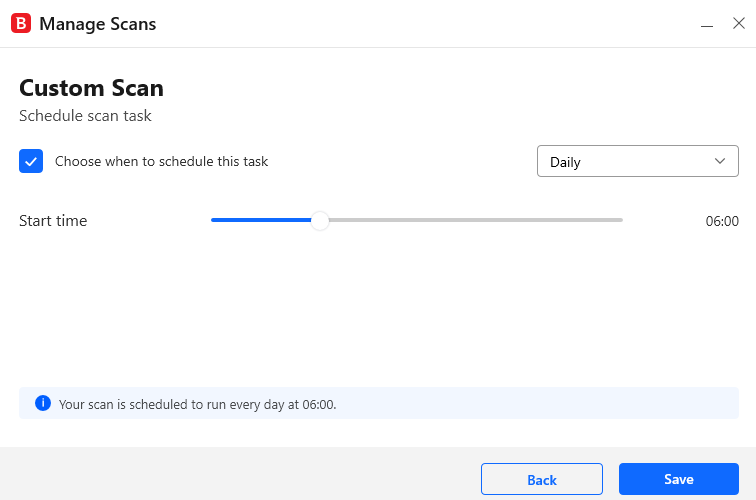
The Bitdefender antivirus engine combines cloud-based scanning with local analysis. This combination allows for minimizing system slowdowns while maintaining strong protection at the same time. The software offers several types of scans, including Quick Scan to check critical areas for active threats, System Scan for a full system inspection, and a Rescue Scan, which runs in a clean environment to remove deeply embedded malware, such as rootkits. Bitdefender offers scheduled scans and on-demand scans.
Bitdefender consistently scores 100% detection rates against widespread malware, demonstrating its reliability in AV-Comparatives and AV-Test labs’ evaluations. During my in-house tests, Bitdefender blocked 98% of the malware samples I used for testing, which is an excellent result.
Ransomware protection (multi-layered)
Ransomware is among the most severe cyberthreats that can encrypt personal and business data, potentially resulting in permanent loss or the need to pay ransom. Effective protection against ransomware is critical and requires excellent prevention and recovery mechanisms to secure your files.

In Bitdefender’s case, the software uses a multi-layer anti-ransomware strategy. For instance, its Safe Files feature allows users to designate important folders that are automatically protected from unauthorized encryption. Then the Ransowmare Remediation feature monitors for suspicious activity and can restore files affected by ransomware attacks using backup copies. Lastly, all of this works together with Advanced Threat Defense, which utilizes behavioral analysis to detect and block ransomware before files are compromised, creating a nearly impenetrable layer of security.
The results on Bitdefender Ransomware Protection, both in independent testing lab results and our own in-house research, showed high effectiveness against ransomware. Most importantly, the Bitdefender approach and the 100% accuracy I achieved during my tests prevented file encryption by ransomware and preserved data integrity before anything more serious happened.
Network Threat Prevention & Web Protection
Bitdefender offers a firewall and a web-filtering system that is designed to prevent unauthorized network access and reduce exposure to online threats. The firewall is a classic antivirus software feature that monitors inbound and outbound connections, blocking malicious traffic and potential network attacks.
As for web protection, Bitdefender uses a strong combination of real-time page scanning, an anti-phishing filter, and an anti-fraud system. All of these components work simultaneously to identify and block fraudulent or malicious websites, including phishing pages that are known to steal credentials and sensitive data. So, when a user attempts to access a potentially unsafe site, the Bitdefender system identifies it and issues a warning or prevents the user from entering the site.
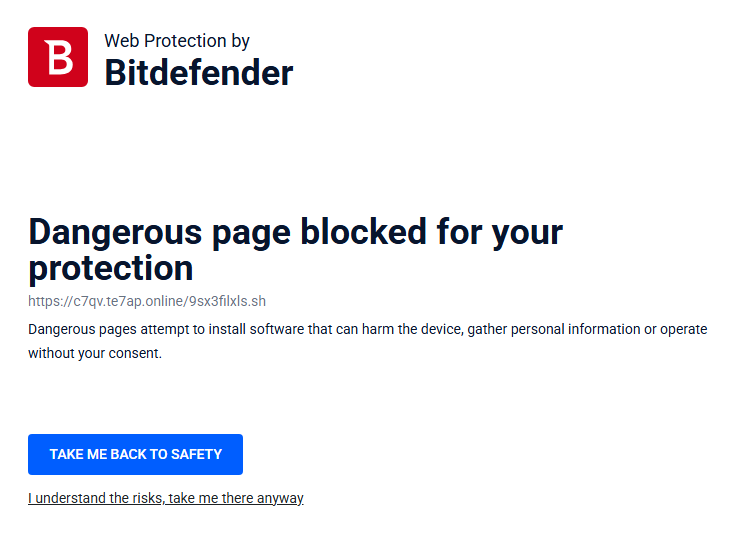
Overall, this is a good setup to ensure that browsing, online transactions, and downloads are continuously monitored. Because of this, the risk of malware infections, theft of credentials, and other web-based attacks is kept at bay without much manual intervention from the Bitdefender user.
Rescue Environment (or Rescue Mode)
All paid Bitdefender plans include a feature called Rescue Environment, also known as Rescue Mode. This feature enables a Windows PC to reboot into a secure, offline environment for removing malware. It is convenient in addressing threats, such as rootkits, that cannot be eliminated while the operating system is running due to how deeply embedded such threats are.
Once the Rescue Mode is activated, it temporarily suspends Windows, loads a minimal secure environment, and performs a full system scan. If it detects threats, they are promptly removed, and Windows restarts. The main catch of the Rescue Mode is that it runs outside the standard operating system, making it capable of accessing and cleaning files or processes that may otherwise remain hidden or protected by malware.
Ultimately, it’s a great tool for removing even the most persistent infections from the Windows operating system without compromising system stability or causing files to vanish without possible recovery.
Minimal system resource impact
Bitdefender is designed to be lightweight with minimal impact on system performance. It uses its own unique Photon technology, which is a sort of adaptive optimization that learns how each system behaves and tailors the scanning processes to specific hardware configurations. Ultimately, this approach reduces unnecessary tasks, providing smoother operation even during active protection.
At the same time, most heavyweight scanning and analysis are handled via Bitdefender’s cloud-based infrastructure, which means that a good deal of threat detection workload happens off-device. Because of this, we’ve noticed that Bitdefender keeps CPU and memory usage very low, meaning it does not interfere with how you regularly use your device.

For instance, when I ran the Bitdefender Full System Scan, the software used anywhere between 29% to 100% CPU, mostly staying at around 65% – a good result for comprehensive, real-time protection. Outside of full scans, Bitdefender showed minimal impact, with only occasional, minor slowdowns when browsing online, transferring files, and launching applications.
Privacy and browser security
Bitdefender has several tools on its roster designed to enhance online privacy and protect sensitive information. The SafePay secure browser creates a safe, isolated environment for online banking and payments. Ultimately, using the browser gives a good chance at preventing keylogging and unauthorized access when engaging in financial transactions. Meanwhile, the Anti-Tracker browser extension blocks third-party tracking scripts and cookies, which limits data collection and improves page load speed.

As for non-browser-based privacy and security tools, Bitdefender has a built-in VPN (Virtual Private Network) that encrypts your network traffic and hides your IP address. In standard plans, the VPN comes with a daily 200Mb data cap, but you can also get it with unlimited data or subscribe to the Bitdefender VPN as a standalone product. Bitdefender also has an integrated Password Manager, which safely stores credentials in an encrypted vault and syncs them across devices.
Vulnerability assessment
Bitdefender’s Vulnerability Assessment works by identifying potential system weaknesses beyond usual malware threats. The evaluation runs scans to detect inconsistencies, such as missing Windows security patches, outdated applications, unsafe system settings, and weak passwords, all of which could expose the system to easy attacks.
Once you run a Vulnerability assessment scan, Bitdefender generates a detailed report listing detected vulnerabilities with one-click recommendations or fixes where available. These recommendations might include prompts to install the application or system updates, changing passwords to safer ones, and adjusting the privacy settings.
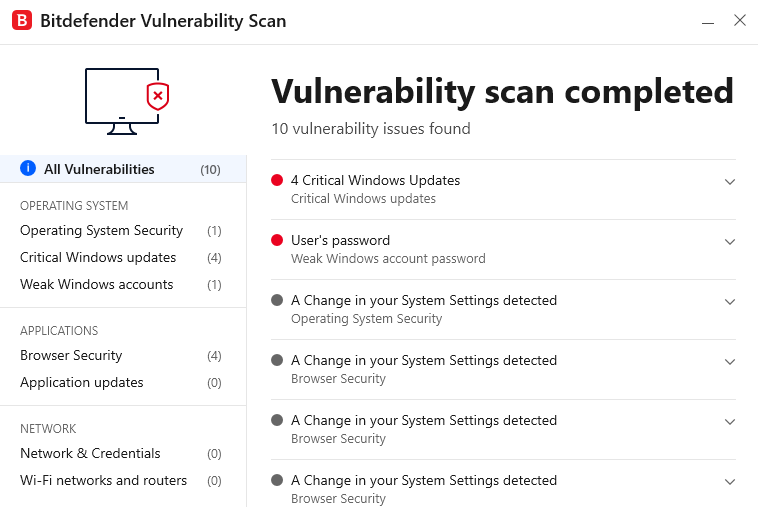
By addressing these non-malware security gaps, the Vulnerability Assessment helps reduce possible attack points and ensure that both software and system configurations remain secure. Paired with Bitdefender’s real-time protection, the combination prevents potential exploitation before the activity actually occurs.
Identity protection (in higher-tier plans)
Bitdefender includes identity protection and data breach monitoring in some of its Premium Security and mobile plans. Ultimately, the feature continuously checks your email addresses and personal information against known breach databases. If Bitdefender detects any of your data in a leak, it alerts you and guides you on securing the affected account, helping to prevent identity theft or unauthorized access.
The higher-tier Bitdefender plans also include additional tools, such as parental controls for monitoring and managing children’s device use, webcam and microphone protection to prevent unwanted access, and anti-theft features allowing users to locate, lock, or wipe lost or stolen devices remotely.
If you decide to get a higher-tier Bitdefender plan, you won’t essentially need any additional apps or software for a well-rounded protection plan, as it will cover your security beyond malware defense on so many levels.
Our in-house Bitdefender antivirus test
Our in-house Bitdefender antivirus tests were performed on Windows, macOS, Android, and iOS devices to form an in-depth review. Here are the devices and setups we used:
- Windows tests are performed on the VirtualBox VM running Windows 11 (with 4 GB RAM and 2 CPU cores allocated) installed on a Lenovo ThinkPad (AMD Ryzen 5 PRO 7540U w/Radeon 740M Graphics, 12-core processor, ~3.2 GHz, 16 GB RAM, 250GB SSD, Windows 11)
- Android tests are performed on Pixel 9, Android 14, 128GB internal storage, 12GB RAM, CPU Octa-core (1×3.1 GHz Cortex-X4 & 3×2.6 GHz Cortex-A720 & 4×1.92 GHz Cortex-A520)
- Mac tests are performed on Apple MacBook Pro (14-inch, M2, 2023), macOS Sequoia 15.6.1, Apple M2 chipset (10-core CPU: 6×3.49 GHz performance cores + 4×2.42 GHz efficiency cores, 16-core GPU, 16-core Neural Engine), 16 GB unified memory, 512 GB SSD.
- iPhone tests are performed on iPhone 12 (model A2402), iOS version 18.3.1, 64GB internal storage, 4GB RAM, CPU Hexa-core (2×3.1 GHz Firestorm + 4×1.8 GHz Icestorm)
The test on each device included real-time protection, scanning options, web protection, and evaluation of other features, such as anti-tracking and anti-phishing capabilities, as well as overall user experience. For malware scan effectiveness tests, we used malware samples downloaded from bazaar.abuse.ch, but be advised not to download the samples yourself, even if you use an antivirus software as they may impact your device’s system.
Below, I’ve documented the key findings from our Bitdefender in-house tests:
Does Bitdefender remove all malware?
Bitdefender’s system scan identified and removed 147 out of 150 malware samples we’ve planted, which translates to a 98% effectiveness rate. Although antivirus software users aim for that 100% in real-life scenarios, anything above 80% is superb and enough to ensure your security. Overall, only very few samples were missed in the Full System scan by Bitdefender.
The Full System Scan runs significantly longer than some of its competitors, taking approximately 2 hours in total with 361,669 scanned items. However, because most of the work is performed off-device, the scan maintains relatively low CPU usage and has minimal impact on the system. Meanwhile, the Quick Scan took 4 minutes 49 seconds to complete, while the Vulnerability Scan took just about 27 seconds. Overall, Bitdefender successfully identified all malware types, including trojans, spyware, and viruses.

Our own tests align closely with the findings in the latest AV-Test report, conducted in March 2026. The lab concluded that Bitdefender is capable of 100% accuracy in identifying and blocking both zero-day attacks and common malware. Naturally, this earned Bitdefender a spot among the top-rated antivirus software programs in the AV-Test list.
Does Bitdefender protect against ransomware?
Yes, Bitdefender provides robust and proven protection against ransomware through its multi-layer ransomware protection approach. Our in-house test to evaluate the software’s effectiveness included planting 10 ransomware samples and running appropriate scans. Ultimately, Bitdefender caught and neutralized all of them. Additionally, the software successfully prevented the files from being encrypted and restored the affected files.
I’ve also compared our own findings with the ones from AV-Comparatives. The independent testing lab used Bitdefender in its dedicated Ransomware Test, where the software was tested in 300 cases. Not surprisingly, the software successfully identified all the cases.
This strong ransomware defence relies on several technologies, including the Safe File feature, which blocks unauthorized access to protected folders. Additionally, Bitdefender features a unique Ransomware Remediation tool to back up and restore files automatically, while its advanced Threat Control, which utilizes behavioral analysis, detects suspicious encryption activity even before damage occurs. Overall, this combined approach enables Bitdefender to consistently perform at 100% effectiveness against ransomware, as proven in both our in-house tests and independent testing reports.
Does Bitdefender detect phishing?
Yes, Bitdefender detects phishing and has shown great results during our browser tests when we used the Mozilla Firefox extension with Bitdefender’s Web Protection and Anti-Fraud systems engaged. For the test, we used 22 newly-reported malicious URLs, covering payment fraud, credential phishing, and similar. Bitdefender blocked 21 out of the 22 links, demonstrating a slightly over 95% success rate.
Our result slightly exceeds the standard benchmarks for phishing protection among various antivirus solutions. For instance, the results in AV-Comparatives anti-phishing certification tests usually show antivirus software scoring about 89% in similar tests. Meanwhile, Bitdefender showed a higher success rate in our test than the average. However, it still does not offer 100% protection as the one malicious link it missed proceeded without interruption. So, my advice is to rely on Bitdefender’s protection but also on your critical thinking when it comes to suspicious websites.
Bitdefender performance impact
Bitdefender proved to be a relatively lightweight software with only minimal impact on system resources, even during the extensive Full System scan. During this period, the CPU usage peaked at around 65%, which is a good result compared to other antivirus solutions. For instance, Norton reached up to 93% under the same conditions. This sort of minimal impact shows that Bitdefender is good at balancing both in-depth protection and system efficiency.

From what we found, Bitdefender’s efficiency mostly stems from its unique Photon technology, which adapts scanning to your particular hardware setup and software environment. Additionally, the cloud-based scanning with its off-device processing also allows Bitdefender to cut down on system impact. However, because of this cloud-based process, Bitdefender’s full system scans take longer than average.
Ultimately, I found that Bitdefender does not slow down daily tasks and activities while running in the background, and I could use my device for browsing, streaming, and gaming without any noticeable interruptions. My claims are also backed up by AV-Comparatives’ findings, which consistently rate Bitdefender as very fast in performance impact tests.
Final verdict: Is Bitdefender a good antivirus software in 2026?
Bitdefender remains a strong antivirus choice in 2026, as proved by its top independent testing lab scores and extensive feature set that actually makes a difference in securing your devices and data. Bitdefender earns an excellent 100% efficiency rating in detecting and eliminating malware, while its suites include almost all cybersecurity tools a user might need.
At the same time, Bitdefender is not without its caveats. For one, the VPN included in basic plans comes with a 200Mb/day data cap, which is only enough for casual browsing. Additionally, the iOS app does not offer a lot of features, as it is to be expected with such apps due to the iOS architecture. Lastly, while Bitdefender offers great initial prices, they tend to jump after the first year.
With all that in mind, Bitdefender rightfully keeps its place high up on our best antivirus software list for its regularly updated engine and suite of tools that often outclass competitors at a similar or lower price. You can try Bitdefender for free thanks to its free version or get the full experience risk-free with the 30-day money-back guarantee.
Bitdefender antivirus pros
- Near-perfect malware, ransomware, and phishing protection, as per AV-Test and AV-Comparatives test results.
- Multi-layer defense mechanism with real-time protection, Rescue Mode, and SafePay secure browser.
- Lightweight with minimal system impact thanks to Photon and cloud-based scanning.
- Great cross-platform support (Windows, macOS, Android, iOS, and Linux for business users).
- Excellent suite of tools for an affordable price.
- Includes parental controls, password manager, and vulnerability assessment.
- Permanent free version for Windows users.
Bitdefender antivirus cons
- Built-in VPN is limited to 200Mb/day with standard plans.
- Renewal prices are considerably higher than initial offers.
- The iOS app has fewer tools than Android.
- Full scans take longer than average, but maintain minimal system impact.
- Linux protection is oriented toward business users.
You may also want to read:
- Surfshark Antivirus review: Is it worth it?
- AVG review: Is it worth your money?
- Avast Antivirus review: Can you trust it?
- Sophos Home Review: Fast antivirus, limited features
FAQ
Bitdefender is a privately-owned Romanian company founded in 2001 by Florin Talpeș, who is currently the CEO. The company is headquartered in Bucharest, Romania, and San Antonio, Texas, in the US, with offices in the UK, Indonesia, Australia, and other countries.
Yes, Bitdefender is legit and safe. Bitdefender is a privately-owned company with an antivirus software that has been reviewed numerous times by independent testing labs. Bitdefender is noted to consistently perform at the highest antivirus software standards, achieving close to 100% accuracy in detecting and neutralizing various cyberthreats, such as viruses, ransomware, and trojans.
Bitdefender antivirus protects your device and data from malware, such as ransomware, spyware, viruses, and trojans. The protection it offers works both in real-time, meaning the software scans every download or page you enter, preventing accidental malware downloads. Additionally, the software scans your device’s system, including files and applications, to identify any hidden malware that may affect the integrity of your system or stored information. Overall, Bitdefender can ensure better security both for your devices and your information.
No, the Bitdefender Antivirus Plus does not have a firewall. If you need this feature, you may want to upgrade to a higher-tier Bitdefender plan, such as the Bitdefender Internet Security or the Bitdefender Total Security.



You state above: You’re only in contact with Bitdefender’s servers when you visit their own or a related website. Doesn't Bitdefender run scans on files by uploading to their processing in the cloud? I read this somewhere and I might be in error but if so how does this make sense: "Bitdefender even shows the countries that host the servers that may be holding your data"?
This review seems to line up pretty closely with what I've experienced regarding BD Free and BD TS. However, one real shortcoming in BD TS is the lack of configuration options with scans. Virtually any competitor allows greater control over the behavior of scans. BD not only has fewer options but doesn't even allow you to set different options by type of scan.