- Is TotalAV a legitimate company?
- How much does TotalAV cost a year?
- In-house TotalAV test: does TotalAV remove all viruses?
- TotalAV antivirus features: detailed overview
- TotalAV antivirus performance
- TotalAV on different devices: full app reviews
- TotalAV customer service
- TotalAV reviews and complaints on Reddit
- Final verdict: is TotalAV a good antivirus in 2025?
- TotalAV antivirus pros and cons
- FAQ
TotalAV is a reliable antivirus with strong real-time malware protection, particularly for users that enjoy a simple user interface and a built-in VPN. However, you should be aware that some users report high renewal costs and poor feedback when it comes to cancelling an active account. If you want a simple, effective antivirus and aren’t concerned about difficulties with cancellations, it’s worth considering TotalAV. But if you’re more price-oriented and would rather avoid potential frustrations with support down the line, you might want to consider a competitor like Surfshark One or Bitdefender.
For more information on TotalAV, keep reading my TotalAV review for a more in-depth look at features and usability.
Is TotalAV a legitimate company?
Yes, TotalAV is a legitimate internet security software suite that offers antivirus software, malware protection, and other security features including a VPN, password manager, and ad blocker. TotalAV is owned by Point Wild, a cybersecurity firm created in December 2024 following a merger between Total Security and Pango Group. Based on my research, while TotalAV’s parent company is a legitimate company, it has a poor reputation for aggressive marketing and billing, according to Reddit opinions. The software is generally well-reviewed for being adept at stopping malware, but users report problems with recurring charges, even after cancellation, and difficulty stopping subscriptions.
| Antivirus: | TotalAV Antivirus |
| Rating: | 8.0 ⭐⭐⭐⭐ |
| Price: | From $19/year (first year) |
| Current deal: | Get TotalAV, now $19/year (first year) |
| Free version: | ✅ Yes (limited) |
To verify these claims for myself and determine whether TotalAV is a good antivirus, I tested the software on Windows, macOS, iOS, and Android. I also conducted independent lab tests from companies including AV-TEST and AV-Comparatives.
How much does TotalAV cost a year?
TotalAV costs $19 for the first year of its Premium plan, while Internet Security costs $39/year, and Total Security costs $49/year. After the first year, renewal TotalAV pricing rises to between $99-$149 per year, depending on the plan you choose.
| TotalAV plan | First-year cost | Annual renewal cost | Devices covered |
| TotalAV Premium | $29 | $99 | 3 |
| Internet Security | $39 | $129 | 6 |
| Total Security | $49 | $149 | 8 |
The Premium plan comes with real-time protection against viruses, malware, trojans, ransomware, and phishing scans or potentially unwanted applications. It also includes a disk cleaner, system tune-up tools, and a browser cleaner. Upgrading to Internet Security adds Total Adblock, while the Total Security plan adds Total VPN and a password manager.
You can get a 7-day free trial from Google Play, but all plans come with a 30-day money-back guarantee if choosing the annual or bi-annual subscription options. For users paying monthly, there’s a 14-day money-back guarantee available.
If you want to save money on TotalAV, we recommend applying one of our TotalAV coupon codes during the checkout process.
TotalAV free antivirus review
TotalAV offers a free version of its antivirus, called “TotalAV Essential Antivirus.” I downloaded the free version from the official TotalAV website for testing purposes and found it to be a stripped-back version of the full software. While it can scan for viruses, it lacks real-time protection, which means it can’t automatically scan and block threats while you’re using the internet. The free version also lacks the ad blocker, VPN, and password manager features, and the system tune-up tools were replaced by prompts recommending that I upgrade to a paid plan. Overall, I noticed that the free version served up a lot more ads and recommendations to upgrade.
| TotalAV free antivirus feature | Free version | Paid version |
| Real-time protection | ❌ No | ✅ Yes |
| On-demand scans | ✅ Yes | ✅ Yes |
| Malware, ransomware, phishing protection | ⚠️ Manual only | ✅ Yes |
| Web protection | ❌ No | ✅ Yes |
| System cleanup | ⚠️ Limited, prompts to upgrade | ✅ Yes |
| VPN | ❌ No | ✅ Yes |
| Password manager | ❌ No | ✅ Yes |
| Ad blocker | ❌ No | ✅ Yes |
| Data breach monitoring | ❌ No | ✅ Yes |
Based on my tests, I only recommend choosing TotalAV Essential Antivirus for occasional virus scans or as a secondary antivirus, but not as a full solution. With only limited and on-demand protection, it leaves your system more exposed to cyberthreats. Instead of relying on the limited free version, I recommend trying a paid plan and taking advantage of the 30-day money-back guarantee for a full refund if you’re unsatisfied.
In-house TotalAV test: does TotalAV remove all viruses?
To fully test TotalAV, I started by downloading a full sample of malware files from the EICAR website (European Institute for Computer Anti-Virus Research). These sample malware and ransomware files are well-suited to antivirus testing and should be recognized by any good antivirus software. As soon as I launched TotalAV and allowed real-time protection to run, TotalAV began identifying and quarantining the sample malware files.

Overall, TotalAV’s real-time protection immediately detected and blocked 12 out of 15 of the EICAR malware file downloads. When compared to the TotalAV test results from AV-TEST and AV-Comparatives, this seems quite low. So, I attempted to run the remaining malware files that hadn’t been detected, which saw TotalAV’s success rise to 100%, which is much more in line with the scores achieved in independent lab tests.
During my tests, I attempted to visit phishing URLs commonly affected by these threats, such as free streaming sites, and WebShield successfully prevented me from accessing many sites that were flagged as a risk.
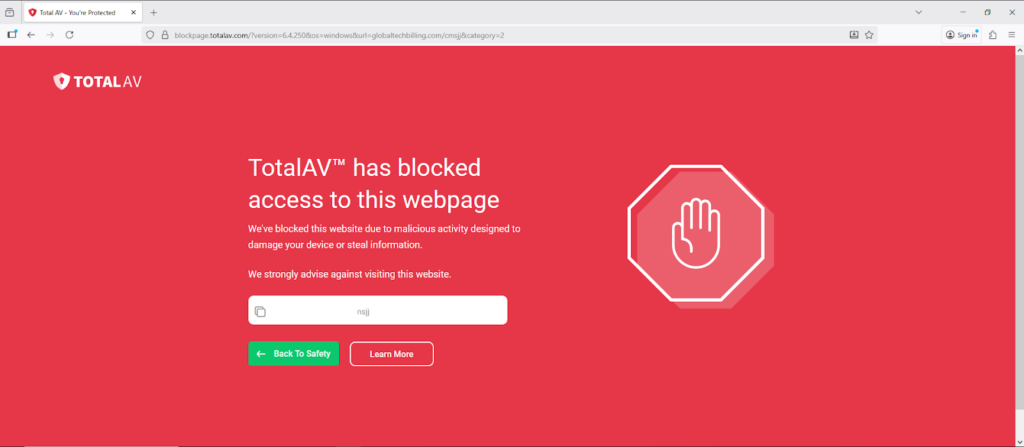
I also noted that WebShield didn’t suffer from any false positives by blocking legitimate sites, and my overall web browsing experience wasn’t impacted by any slowdowns. Overall, this makes Total WebShield a huge advantage of TotalAV, offering an extra front line of defense against malware when combined with file download scans.
Independent labs confirm TotalAV protects against malware
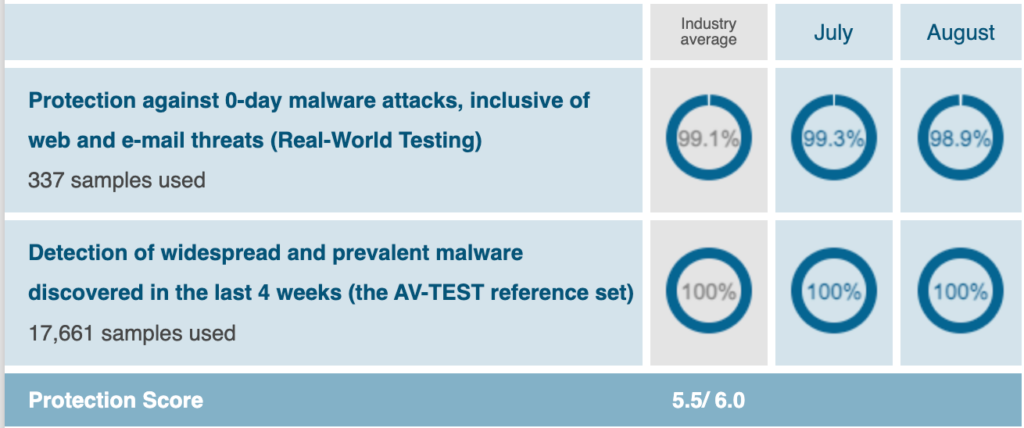
As part of my TotalAV review, I compared my own test results against those from independent labs, including AV-test and AV-Comparatives. In its most recent test circuit, TotalAV earned a real-time zero-day malware protection score of 98.9% in August 2025, and a 100% success rate at blocking known malware threats.
Meanwhile, AV-Comparatives scored TotalAV 95.8% for offline malware detection, 98.9% for online detection, and an impressive 99.97% for its online protection rate. In its most recent report, AV-Comparatives awarded TotalAV the “Approved Security Product Award.”
TotalAV antivirus features: detailed overview
TotalAV’s features include real-time virus, malware, and ransomware protection, and cloud-based scanning, all of which protect your device against malicious software, phishing attempts, and potentially unwanted programs. It also includes system tune-up tools that clean up duplicate or junk files, and extra security features such as a VPN, password manager, and data breach monitoring tool to help protect against identity theft. The latter features tend to come with the more expensive plans, and the free version cuts out real-time protection. Here’s a closer look at each feature based on my in-depth tests:
1. Real-Time Protection
Real-time protection is TotalAV’s main defense against malware, scanning files and programs as you use them or download them. This lets the software block viruses before they can run and harm your device. This feature comes with all plans except for the free TotalAV Antivirus Essentials version, and it uses up-to-date virus definitions and cloud verification to identify new threats.
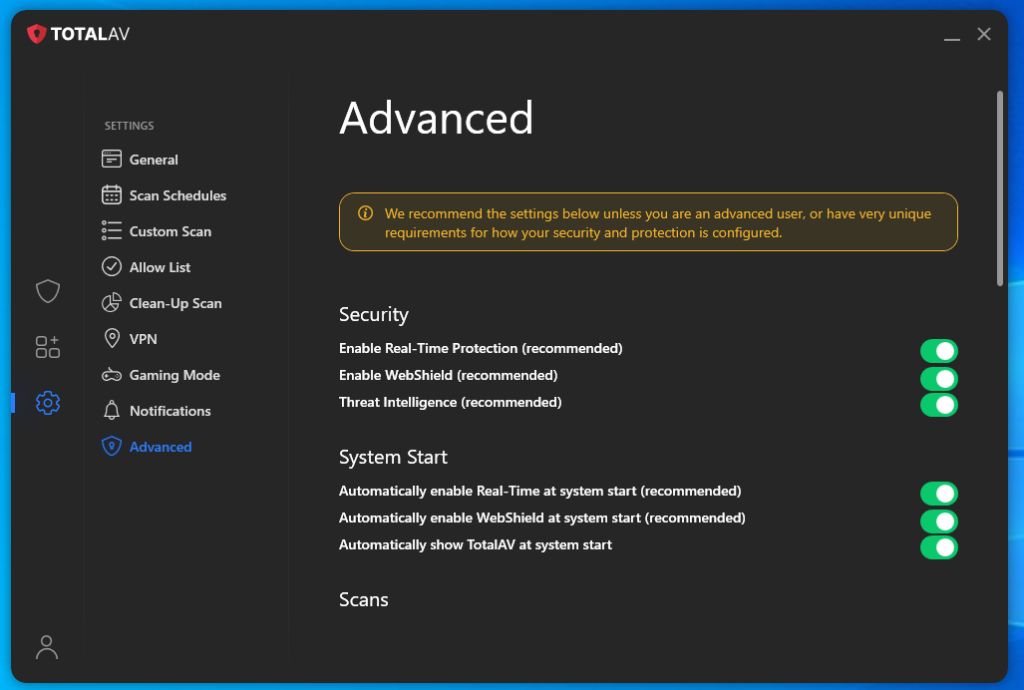
In my tests, TotalAV’s real-time protection detected sample EICAR malware files, and in some cases it detected the threat before the download had even finished. This showed me that its real-time detection engine is effective in catching threats at the earliest possible opportunity. Compared to other antivirus tools I’ve assessed, TotalAV’s real-time protection was also fast and lightweight, having minimal impact on my device CPU and performance.
2. Advanced Cloud Scanning
TotalAV’s cloud scanning functionality draws from a known threat database to detect emerging, zero-day threats without having to rely on updates to the built-in threat library. It cross-checks new files against TotalAV’s global cloud servers, which lets it identify new malware quickly. Since all of this happens in the cloud, it also minimizes any impact on your device’s CPU resources, helping maintain that low system impact. Compared with basic signature-based scanners, TotalAV’s multi-layered local and cloud-based approach means you benefit from advanced protection. In my assessment, it’s a strong advantage for anyone who downloads apps from less-trusted sources as new malware appears online.
3. Malware scanning and remediation
TotalAV offers numerous scanning options, including Quick Scan, Full Scan, Smart Scan, and Custom Scan. You can also schedule routine scans to happen at a preferred time, such as when you’re not using the device. During my tests, a Quick Scan took around 4 minutes, while a Full Scan took around 25 minutes to complete. But I found the Smart Scan particularly useful, as it addresses malware, security issues, and junk files in a single sweep. If it detects malware, TotalAV automatically quarantines or deletes the file, while offering recommendations of junk or duplicate files to remove. In my tests, it even detected and isolated a potentially unwanted program – a low-quality VPN app left over from testing.

4. Data breach monitoring
TotalAV includes data breach monitoring, which routinely checks if your email addresses or passwords have appeared within known data breaches. It compares your supplied credentials against a list of constantly updated datasets, before flagging any matches to you in your TotalAV dashboard. I found it useful that TotalAV also recommends what you should do if your details appear in a breach.
When creating my TotalAV test account, I intentionally signed up using an older email address that I know has appeared in data breaches. Once I ran TotalAV’s data breach monitoring scan, I found alerts inside my dashboard confirming that my details had been compromised. I liked that you don’t need to use a separate web-based service to check these results. Given how common leaks have become, it’s a handy feature to have so that you can change passwords before a breach becomes a bigger problem.
5. Safe Browsing VPN
TotalVPN is included as part of the Internet Security and Total Security packages. This virtual private network encrypts your internet traffic and data for privacy. Based on my tests, TotalVPN includes the most modern and secure protocols, including WireGuard and the proprietary Hydra protocol. While it used to have a relatively small server network, TotalVPN was recently bolstered to 1800 servers in 90+ countries. In my TotalVPN tests, the VPN achieved strong speeds and reliable unblocking performance, giving me access to foreign Netflix libraries and other streaming sites. Security wise, it has built-in leak protection, a kill switch, and a strict no-logs policy, making it a solid feature that’s worth the upgrade to Internet Security or Total Security.

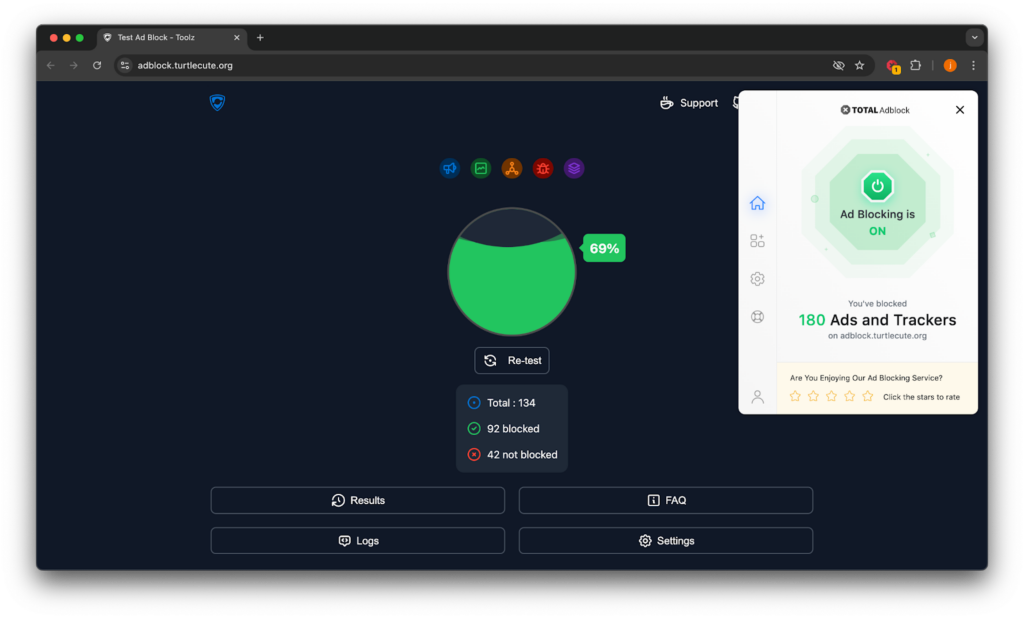
6. Total Adblock
TotalAV’s built-in ad blocker, Total Adblock, filters out annoying adverts and online trackers to give you a faster web experience. In my experience, it easily blocks pop-ups, banners, and autoplay videos when I tested it on Chrome and Safari with popular newspaper websites known for stuffing their websites with ads. This resulted in an overall more pleasant browsing experience and faster page load times. It’s also a benefit to mobile users, as reducing ad load can reduce the amount of data used to load a page. I also liked that Total Adblock is directly integrated with the TotalAV suite as opposed to being a standalone browser extension, which means it receives updates automatically and doesn’t conflict with other extensions.
7. Total WebShield
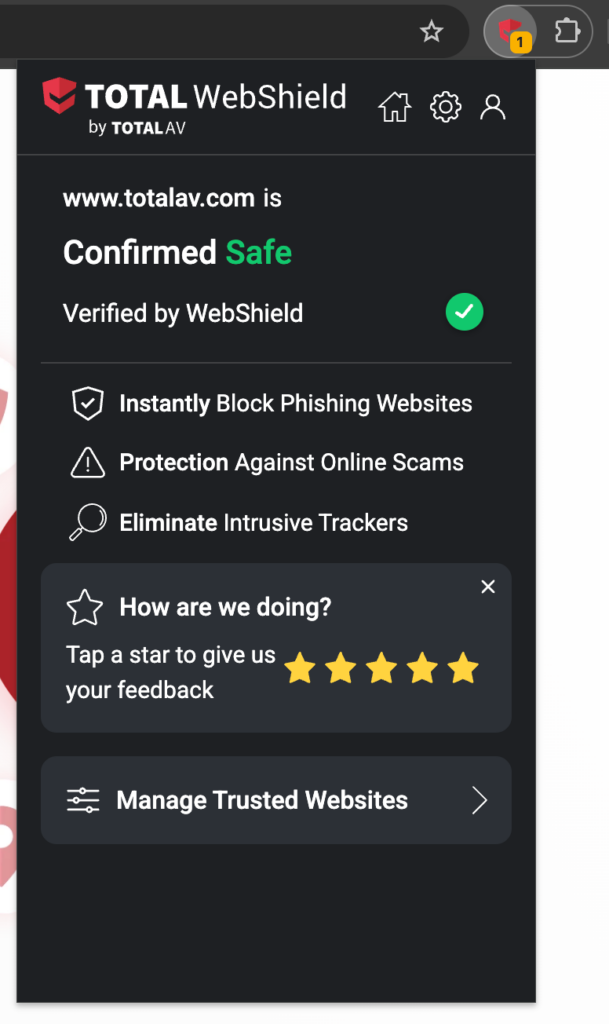
Total WebShield is TotalAV’s browser extension and protects you against phishing websites and other malicious sites by preventing them from loading. I tested it with each compatible browser, including Edge, Chrome, and Firefox. Once installed, WebShield continuously scans URLs in real time, blocking any domains it has identified as unsafe due to scams, malware downloads, or compromised servers.
8. Total Browser
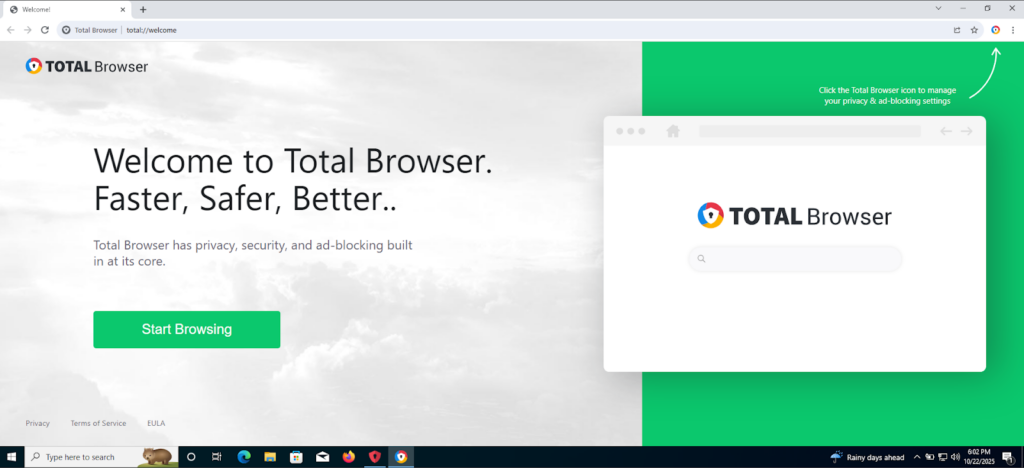
Total Browser is a new offering as part of TotalAV’s feature lineup, and I found it to be an impressive addition. Real-time threat protection is built directly into the browser alongside ad blocking and anti-tracking functionality. The browser also carries the benefits of Web Shield, blocking phishing sites and other harmful websites using cloud-based scanning. Admittedly, I can’t think of a reason to switch my main browser over to Total Browser, given that I already get all of the benefits of TotalAV by keeping the dashboard running in the background while I surf on Safari or Chrome. That said, if you’re a Chrome user, you might favor Total Browser due to Google’s often-intrusive level of marketing and data harvesting.
TotalAV antivirus performance
As part of any antivirus review, I assess how the software impacts on my device’s performance. Poor-quality antivirus programs can slow down your device during scans or even when simply running in the background. So, I tested TotalAV’s system impact and resource usage while running at rest in the background, during a scan, and when using the browser extension to see whether page load times were impacted.
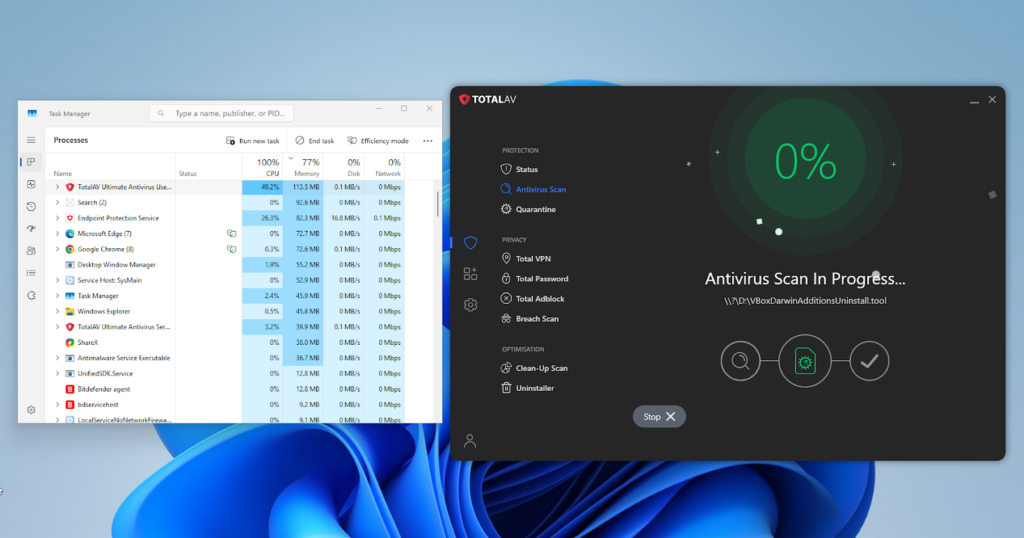
- Computer startup: After installing and configuring TotalAV, I measured the boot time of my Windows PC (Intel i5 laptop with 16 GB RAM). Before installing TotalAV, my system startup averaged around 17 seconds. With TotalAV installed and set to initiate on startup, it averaged 21.0 seconds. This extra delay suggests that the real-time protection features load at startup, so if you have older hardware, you may notice this impact a little more.
- System performance at rest: With TotalAV running in the background and real-time protection and WebShield enabled, I monitored my device’s CPU and memory usage over a 30-minute idle period. TotalAV’s CPU usage hung around 0.8 % and memory usage averaged 65 MB. During this idle period I copied a large 4 GB file in the background and didn’t see any speed reductions compared to my usual expectations. This aligns with independent lab testing that rated TotalAV’s impact at “Advanced” level for performance.
- System performance during scans: I started a full system scan of around 300,000 files across 15,000 folders to record resource use and scan duration. The scan took around 24 minutes from start to finish. During the height of the scan, my device’s CPU peaked at approximately 49 % for TotalAV, with an average of around 34%. RAM usage rose to around 113 MB. According to independent labs data, TotalAV ranks around 13th out of 18 antiviruses for performance impact in April 2025, but I still found its performance to be impressive.
- Page load times: With WebShield enabled, I ran page-load tests on 20 popular websites, including Discord, Twitch, and Reddit. My device averaged around 1.35 seconds per page, and with WebShield active, the average rose to 1.56 seconds, representing a barely noticeable impact.
TotalAV on different devices: full app reviews
TotalAV offers protection across multiple platforms, but the overall experience varied for me depending on the device type I was using. I tested TotalAV on Windows, macOS, Android, and iOS to see how consistent the experience was across each platform. Fortunately, real-time protection is available on every operating system, and TotalVPN works seamlessly across each device too.
iPhone and Android
TotalAV offers apps for both Android and iOS from the Apple App Store and Google Play Store. Installation was quick as you’d expect from an official mobile app, and the dashboard on both devices was consistent with the desktop experience, offering simple and clear interfaces that made it easy for me to navigate the app. However, while Android users have full feature access, iOS users don’t get direct malware scanning due to limitations in what Apple allows developers to achieve.
During my tests, Android malware scans completed in around 40 seconds and used around 7% CPU power. Activating WebShield didn’t really slow down page load times by any noticeable amount. On iOS, the app felt even more lightweight, most likely due to the developer limitations and slimmer feature set, and used around 50 MB RAM. Overall, while the iOS experience felt more lightweight, Android users have an advantage in gaining access to more features.
Windows and Mac
Installing TotalAV was simple on both Windows and macOS devices, with setup taking around 2 minutes on Windows 11 and a little longer on a Macbook running macOS Sonoma. Once logged in, both dashboards shared the same simple and beginner-friendly interface with status indicators and quick-access options for malware scanning, enabling WebShield, or accessing the VPN.
As with mobile versions, TotalAV for macOS lacks some features available on Windows. For example, Windows users can access a password vault and system boost feature, while these are not available to Apple device users. That said, the trade-off is that TotalAV ran a little faster when scanning on my macOS device, at around 21 minutes, than it did on Windows 11, at around 25 minutes. Again, Windows has the edge on supporting more features, while macOS is a sleeker, faster experience.
TotalAV customer service
TotalAV offers 24/7 customer support via live chat, email, and telephone, giving you numerous ways to get help if you encounter issues. During my tests, I contacted support using the live chat feature to test response times and agent knowledgeability. I was connected with an agent within a couple of minutes, and I found them to be very knowledgeable about the product and the service’s billing processes without any pauses or any need to transfer me to other departments. Meanwhile, my email received a response within around 6 hours, and the phone line connected me to a human in less than 5 minutes. Overall, the support provided felt reliable and trustworthy, leaving me confident I’d be able to address any technical issues quickly.
TotalAV reviews and complaints on Reddit
As part of any antivirus review, I also look for real-world user feedback on Reddit to understand whether users are reporting on the same advantages and drawbacks that I experienced. In terms of malware protection, some users reported similar findings in that TotalAV could prevent malware, even before it was downloaded and installed on the device thanks to powerful cloud-based scanning and detection.
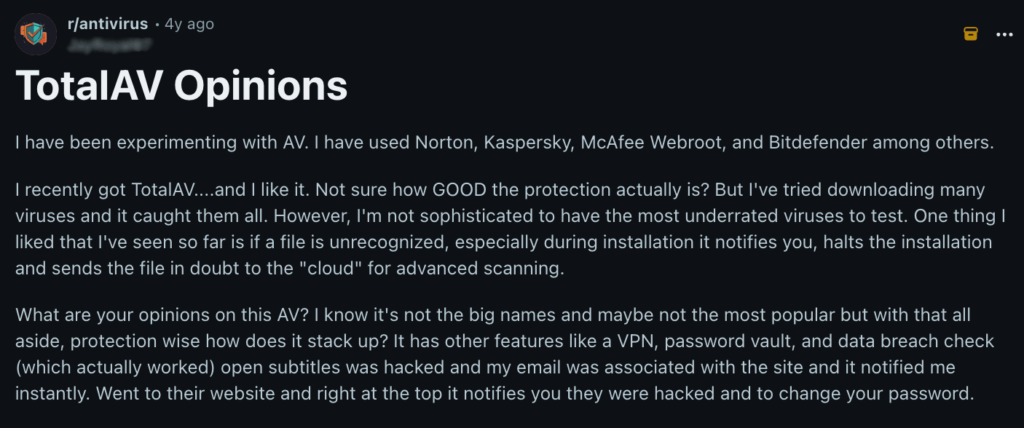
However, while TotalAV’s software scores well across independent testing, my own tests, and many users’ experiences, the company’s track record for payment management lets it down. There are numerous reports on Reddit of customers having issues with recurring billing, even in some cases where they claim to have stopped payments or switched to a free version.
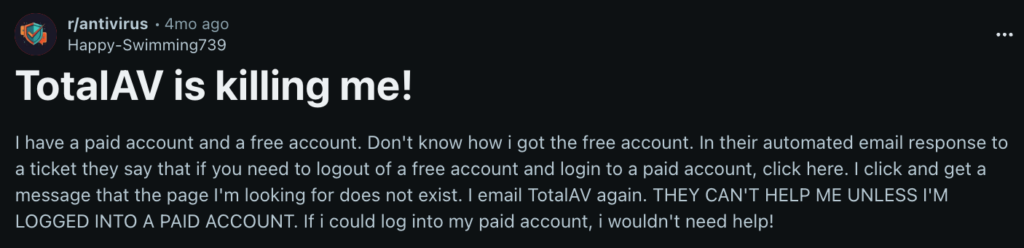
It’s important to take any Reddit feedback with a grain of salt, too. For example, while some users report unsubscribing from emails and continuing to be charged, you have to cancel through your account in order to stop a subscription. Still, the balance of Reddit reviews tends to agree with my points that while this is a solid antivirus, it loses some points for customer experience and expectations around billing.
Final verdict: is TotalAV a good antivirus in 2025?
TotalAV is a reliable antivirus that offers strong real-time malware protection, proven in both independent lab tests and my own tests on multiple desktop and mobile devices. It offers good variability in its plans, with advanced features like a VPN, password manager, and ad blocker available on premium subscriptions like the Internet Security and Total Security plans. It also offers a consistent user experience across different device types, leading to an overall polished and user-friendly experience that’s backed by strong support.
That said, it also has missing features on Apple devices, lacks a built-in firewall, and hikes subscription prices after the first year. While it’s a solid antivirus with a free version that’s well-suited to anyone looking for robust device protection, I recommend that mac users consider alternatives for a greater degree of protection. Windows users can enjoy top-notch protection when combined with a firewall like Windows Defender.
TotalAV antivirus pros and cons
- ✅ Reliable malware protection: TotalAV scores highly in independent lab tests and offers strong real-time protection that detects malware quickly, even before it’s downloaded.
- ✅ User-friendly interface: TotalAV’s user experience is consistent across platforms, albeit some features are missing on iOS and macOS.
- ✅ Low system impact: TotalAV has a minimal impact on your device’s CPU power and RAM usage when running in the background or performing scans.
- ✅ Advanced security features: Internet Security and Total Security subscribers have access to bonus features like a VPN, password manager, ad blocker, and data breach monitoring.
- ✅ Phishing protection: Unlike some antivirus software, TotalAV includes a WebShield feature that helps protect you against common phishing attacks.
- ✅ Completely free version: TotalAV Essential Antivirus is a completely free version of the antivirus software, though it lacks real-time protection.
- ❌ Higher renewal premiums: TotalAV rises in price after the first year by a considerable amount, making subsequent years worse value for money.
- ❌ No built-in firewall: Unlike some antivirus packages, TotalAV doesn’t have a built-in firewall, which can leave your network exposed to certain attacks.
- ❌ Some features absent on iOS and macOS: Due to constraints in Apple’s development ecosystem, some features like malware scanning are missing on Apple devices.
- ❌ Inconsistent parent company track record: TotalAV’s parent company has a history tied to aggressive marketing, and some users have reported issues with cancelling subscriptions.
You might also like to read:
- Surfshark Antivirus review
- AVG Antivirus review
- Norton 360 Antivirus review
- Bitdefender Antivirus review
FAQ
Yes, TotalAV is a legitimate antivirus software, though it’s owned by a company with a reputation for having used aggressive marketing tactics in the past. Some users have reported difficulties with cancellations and high renewal costs after a subscription expires. However, the software is effective and scored highly in both my tests and independent lab tests for offering a high degree of protection for your device.
No, TotalAV is not a scam. TotalAV is an antivirus software owned and operated by Point Wild, a cybersecurity firm created in 2024 following a merger between Total Security and Pango Group. It is a safe and legitimate software offered by a legitimate company, and TotalAV is owned by the same company as the popular and well-reviewed TotalVPN.
No, TotalAV doesn’t have a firewall. While the TotalAV suite includes features like malware and ransomware scanning, data breach monitoring, a VPN, and a password manager, it lacks a firewall to protect you against some network attacks. I recommend combining it with a native firewall like Windows Defender for a greater degree of protection.
Yes, TotalAV Essential Antivirus is free to use, but it lacks real-time protection and other features included in paid plans such as a password manager and VPN. However, the free version still lets you scan for malware and offers system tune-up tools. I recommend trying the full feature set by taking advantage of TotalAV’s 30-day money-back guarantee instead for better protection.
Yes, you can get a full refund from TotalAV so long as you request it within 30 days, as an annual or biannual subscriber, or within 14 days on a monthly or quarterly plan. To get a refund, cancel your subscription via your account and request a refund from support.