- Our recommended port forwarding VPNs
- What is port forwarding VPN?
- Best VPNs that allows port forwarding: detailed test overview
- Compare best VPNs with port forwarding feature
- How I tested port forwarding VPNs
- How to set up port forwarding with a VPN
- How to set up port forwarding on a router
- Is port forwarding safe?
- Can you use a free VPN with port forwarding?
- Conclusion: port forwarding VPN is safe when properly configured
- FAQ
A VPN with port forwarding lets you open specific ports on your device while connected to a VPN. This is essential if you want to host game servers, remotely access your home network, or just boost your P2P file sharing and seeding performance. With it, you can enable more direct connections, but it also comes with added risks.
Unfortunately, many VPN providers have started removing port forwarding support, primarily due to security concerns. It can expose you to hacking, DDoS attacks, and also IP leaks. On top of that, it’s also often misused for copyright infringement or illegal hosting, increasing legal risks for providers. That’s why finding a reliable port forwarding VPN is harder than ever.
I tested over 20 VPN services to find the best options for port forwarding, evaluating their stability, server control, speeds, and overall security. After extensive research, ProtonVPN, Private Internet Access (PIA), and ExpressVPN emerged as the top VPNs for port forwarding. They combine secure implementation, fast performance, and strong privacy features – making them the most reliable choices for users who need this functionality.
Our recommended port forwarding VPNs
What is port forwarding VPN?
A port forwarding VPN lets you open specific ports on your device while staying connected through an encrypted VPN tunnel. This feature enables hosting game servers, improving P2P speeds, or accessing your home network remotely – all while keeping your IP address hidden.
Normally, VPNs use NAT (network address translation) to block unsolicited traffic. While that’s great for security, it can also block legitimate requests, like torrent seeding or remote access.

That’s where port forwarding comes in. It solves these issues by creating a direct path through the VPN firewall. Your VPN provider assigns you a specific port, and you can think of it as a highly secure, private line between external services and your device. Anything that gets sent to the port is forwarded through the VPN tunnel, allowing external apps or peers to connect to you without exposing your real IP.

Please note!
Port forwarding can open doors for attacks if misconfigured. Only forward what you need, use trusted apps, and keep your system updated to stay safe.
When is port forwarding necessary?
Port forwarding is necessary when you want to make a direct connection between a remote device and something in your home network. By doing so, it allows outside services or users to reach a specific device or app on your network, even while using a VPN. That said, there are several other circumstances in which this is very handy feature:
- Hosting multiplayer games: Port forwarding allows your friends to connect to the multiplayer game you’re hosting, while your real IP address remains hidden. You could also let people access your dedicated gaming server.
- Remote access: With port forwarding you can securely access your computer, NAS, or other local devices from anywhere. It’s great for accessing remote files or managing various systems when you’re not home.
- Smart home device control: Sometimes port forwarding is needed to access some smart home devices, like security cameras, thermostats, or garage door controllers. Port forwarding allows these smart devices to work properly when you’re outside your network.
- Hosting your own VPN server: In case you’re running a VPN server at home, you’ll need to forward specific ports so remote devices can connect to it securely.
- Boost file sharing while torrenting: Port forwarding will lead to faster file exchange and will allow you to seed, which is a requirement for some P2P sites. It basically turns a one-way street into a two-way highway.
Please note!
Downloading copyrighted material is illegal in most countries. Make sure you check local rules on torrenting before you start downloading content.
Best VPNs that allows port forwarding: detailed test overview
I personally tested over 20 VPNs to find ones that offer reliable and stable port forwarding. My goal wasn’t just to confirm which services include the feature, but to see which ones deliver smooth performance, solid speeds, and proper implementation.
During testing, I checked how port assignments worked (whether they were manual or automatic), how easy setup was, and whether the VPN allowed simultaneous use of port forwarding and kill switch features. I also ran DNS/IP leak tests, reviewed encryption protocols, and confirmed whether seeding and remote access worked as expected. On top of that, I measured download and upload speeds across different server locations using WireGuard or OpenVPN, all while tracking how much speed was retained.
Once the tests were complete, I scored each VPN across key areas: port forwarding quality, speed, privacy, ease of use, pricing, and platform support.
Based on my research, our top picks for trustworthy VPNs that support port forwarding are:
Top 1. Proton VPN: best all-around port forwarding VPN
- Rating: 8.9⭐⭐⭐⭐
- Port forwarding: ✅ Yes
- P2P support: ✅ Yes
- Current deal: Get Proton VPN, now 70% off!
Proton VPN is the best VPN with port forwarding. Whether you want to game, stream, or torrent, Proton VPN has got your back. Just keep in mind: port forwarding is currently available only on Windows and Linux devices through the Advanced Settings section in the app. So if you’re using macOS, setting it up will require more steps.
Besides port forwarding, Proton VPN offers P2P-optimized servers in 120+ different countries. You can easily find these servers in the app, as they’re marked with two arrows pointing in different directions. I tested a few of them and, using both Proton’s P2P servers and port forwarding, downloaded a 1.2GB movie in under 5 minutes.
Enabling port forwarding is simple, but keep in mind that you’ll need a paid plan to access Proton VPN’s advanced features. Once connected to a P2P server, toggle Port Forwarding in the app’s Advanced Settings, and Proton will assign you a random open port. Afterwards, simply copy this port number into your torrent client or whichever app you’re using.

From a security standpoint, Proton VPN performs exceptionally well. It comes with DNS leak protection, military-grade encryption, a no-logs policy, and open-source apps for full transparency. On top of that, Proton VPN offers features like NetShield (ad and tracker blocker), VPN Accelerator (which helped push my WireGuard speeds up to 469Mbps), and even built-in Tor support for accessing onion sites. Proton VPN also offers Dedicated IP servers for business users, which can help with stable port forwarding and fewer CAPTCHAs.
Proton VPN’s pricing starts at $ 2.99/month with long-term plans. Plus, there’s a 30-day money-back guarantee, making it easy to test out the port forwarding feature risk-free.
Why I recommend Proton VPN
- Excellent speed for torrenting and gaming
- P2P servers available in 120+ countries
- Port forwarding is easy to configure
- Protection against ads, trackers and malware
- Protected by Swiss privacy laws
What I didn’t like
- Dedicated IPs are only available for business accounts

Top 2. PIA: cheapest VPN with port forwarding
- Rating: 8.6⭐⭐⭐⭐
- Port forwarding: ✅ Yes
- P2P support: ✅ Yes
- Current deal: Get PIA, now 82% off!
Private Internet Access is a privacy-focused VPN with port forwarding and P2P support on all its servers. Although it isn’t the fastest VPN around, it still offers stable connections, which work perfectly for torrenting. With port forwarding enabled, I downloaded a 2GB movie in under 15 minutes without any issues.
Configuring port forwarding on PIA is very easy. First, you’ll need to connect to a server that supports it – PIA marks unsupported ones with a crossed-out backward arrow. Once that is done, head to the Network section in the app’s settings and check the box labeled “Request Port Forwarding.” You’ll then be assigned a random port for use in your torrent client or other apps. PIA also offers a manual configuration option, for those who like to tweak the settings and have more control.
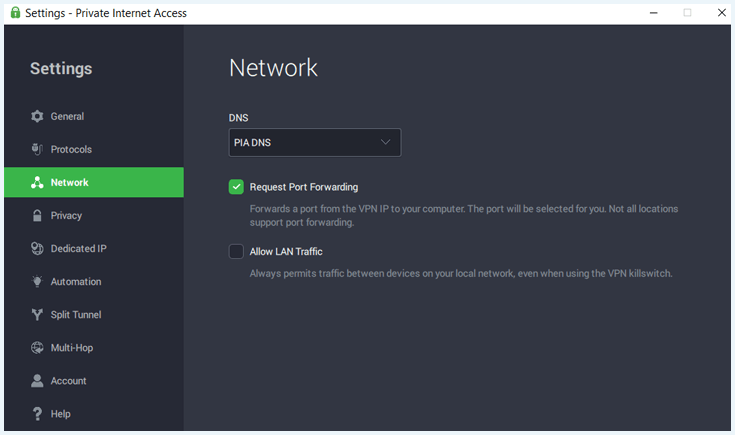
I tested port forwarding across several different locations and noted down consistent speeds around 312Mbps. While that’s not as high as Proton VPN or ExpressVPN, the speeds were perfectly usable for seeding and large file downloads.
When it comes to safety, you have nothing to worry about with PIA. An advanced kill switch will ensure your IP won’t be leaked while you are torrenting. PIA also includes DNS leak protection, and the MACE ad and tracker blocker. In addition to that, it supports dedicated IPs, multi-hop VPN routing, and allows unlimited devices on a single subscription. These security features make PIA an excellent torrenting VPN. However, while PIA is the only VPN with servers in all 50 US states, keep in mind that port forwarding is only available on international servers, so you’ll need to connect to one abroad to use the feature.
Private Internet Access is one of the most affordable VPNs with port forwarding – just $ 2.19/month gets you strong encryption, unlimited device support, and simple port forwarding setup. You can use one PIA subscription with an unlimited number of simultaneous connections.
Why I recommend PIA
- Stable P2P servers are great for torrenting
- Configuring port forwarding is easy
- Manual setup is possible
- Advanced kill switch to protect your IP
- Protection against ads, trackers and malware
What I didn’t like
- PIA isn't the fastest VPN
- US-based

Private Internet Access offers a 30-day money-back guarantee. If you want to know more, you can read our PIA review.
Top 3. ExpressVPN: reliable VPN with dedicated IP and port forwarding
- Rating: 8.5⭐⭐⭐⭐
- Port forwarding: ✅ Yes
- P2P support: ✅ Yes
- Current deal: Get ExpressVPN, now 80% off!
ExpressVPN is a fast and reliable VPN for port forwarding, making it a strong choice for gaming and torrenting thanks to its high speeds and wide device compatibility. That said, while ExpressVPN allows port forwarding, its setup is quite complicated: you’ll need to set up port forwarding on v1 or v2 routers running ExpressVPN custom firmware.
Since port forwarding is handled at the router level, you can use it for devices on which you can’t install a VPN. In other words, ExpressVPN allows you to port forward on PlayStation, Xbox, or Nintendo Switch. You’ll also find detailed setup guides on the support page, and you can manually choose which port to open and which internal device to assign it to, giving you more control and tighter security.
ExpressVPN allows P2P traffic on all its servers. Using the Lightway protocol and port forwarding enabled, my speeds averaged around 402Mbps in speed tests – more than enough for smooth downloads and uploads. Its RAM-only servers and independently audited no-logs policy ensure complete privacy, while the Threat Manager blocks ads, malware, and malicious domains while torrenting.
For added flexibility, ExpressVPN supports Device Groups, letting you assign different VPN locations per device. And if you’re in a restrictive region, its stealth servers are built to bypass VPN blocks.
ExpressVPN starts at $ /month and remains a strong overall option if you want port forwarding for gaming, torrenting, or devices that don’t support VPN apps directly.
Why I recommend ExpressVPN
- Excellent speed and performance
- Port forwarding is possible with PS, Xbox, and Nintendo
- Supports P2P traffic on all servers
- Protection against ads and malware
- You can select ports and devices manually
What I didn’t like
- Port forwarding is only available for routers, making the setup complicated

For new users, ExpressVPN offers a 30-day money-back guarantee. If you want to learn more, check out our ExpressVPN review.
Compare best VPNs with port forwarding feature
Let’s take another look at the best port forwarding VPNs and their features.
| Port forwarding VPN | Rating | Port assignment | Ease of setup | P2P support | No-logs policy | Speed | Price |
| 1. Proton VPN | 8.9⭐⭐⭐⭐ | Automatic (random port) and manual (user-selectable) | In-app toggle for port forwarding and built-in settings in the app | ✅ Yes | ✅ Yes | Fast with VPN Accelerator | $ 2.99/month |
| 2. PIA | 8.6⭐⭐⭐⭐ | Automatic (random port) and manual (user-selectable, available only on Linux) | In-app toggle for port forwarding and built-in settings in the app | ✅ Yes | ✅ Yes | Good speeds | $ 2.19/month |
| 3. ExpressVPN | 8.5⭐⭐⭐⭐ | Manual (router-level setup only) | Requires manual router setup | ✅ Yes | ✅ Yes | Excellent speeds using the Lightway protocol | $ 2.99/month |
How I tested port forwarding VPNs
Selecting a VPN for port forwarding is difficult. Since port forwarding can pose a security risk or disable your connection if it isn’t configured right. That’s why I used strict standards to make this selection.
To select the best VPNs for port forwarding, I’ve used the following criteria:
- Port forwarding feature (30%): I’ve only selected VPNs on which port forwarding works in combination with torrenting or gaming.
- Port forwarding configuration (20%): I’ve selected these VPNs based on how easy it is to set up port forwarding. I’ve opted for both VPNs with an easy setup and VPNs which let you tweak the settings.
- Speed (20%): Most tasks that require port forwarding, also require speed. For that reason, I’ve only chosen VPNs with excellent speed test results.
- Specialized servers (10%): Servers optimized for gaming and torrenting usually have better performance. I’ve checked for each VPN if they offer P2P servers and gaming servers.
- Security (10%): Since port forwarding can pose a security risk if it isn’t done right, I’ve ensured the VPNs listed above are secure and trustworthy.
- Dedicated IP’s available (10%): You might want a dedicated IP for your gaming server, web server or NAS server. For each VPN I’ve indicated if that’s possible.
Note:
After reviewing various VPN services, I removed TorGuard and PrivateVPN from this list. TorGuard doesn’t allow port forwarding on all servers and requires a complicated setup through its website or support. Meanwhile, PrivateVPN assigns a random port each session, which isn’t ideal for apps that need a fixed port. It also delivered slower speeds during repeated testing.
How to set up port forwarding with a VPN
Each VPN slightly differs in how to configure port forwarding, but for most VPNs, it’s easy and straightforward. Here’s how to set up port forwarding with a VPN:
- Pick a VPN that supports port forwarding. I recommend Proton VPN, which offers built-in port forwarding directly in its app.
- Select the port forwarding settings in the VPN app. Launch the app, head to advanced settings, and enable the port forwarding option. You can also access the port forwarding settings via a shortcut on the home screen.)

- Turn on port forwarding. Once you toggle the switch on, you will get notified when the active port number changes.

- Connect to a supported VPN server. Choose a server that allows port forwarding or supports P2P traffic (these are usually indicated clearly in the server list).
- Use the assigned port in your software. Once connected, you’ll receive a port number. Simply copy and paste it into your torrent client, remote desktop tool, or game server settings.
How to set up port forwarding on a router
Setting up port forwarding on a router allows you to make a device or service inside your home network accessible from the internet. Here’s how to do it step by step:
Step 1. Choose a VPN with port forwarding
Not all VPNs support the port forwarding feature. So, if you want to route external traffic through the VPN to specific devices on your local network, research and select a VPN provider that explicitly supports port forwarding. For that, I personally recommend Proton VPN, as it allows port forwarding on Linux and Windows with minimal setup.
Step 2. Access your router’s settings:
Open a web browser and enter your router’s IP address in the address bar, which usually looks something like 192.168.0.1 or 192.168.1.1. You may need to log in with your admin username and password – if you haven’t changed them, check the sticker on the router.
Step 3. Locate port forwarding settings:
Navigate your router’s interface and find the section labeled “Port Forwarding,” “Virtual Server,” “NAT,” or “Firewall.” Note that this varies by router model.
Step 4. Create a port forwarding rule:
Set up a new rule and fill in the fields as follows:
- Name: Something like “OpenVPN” or “Torrent Client”.
- Local IP Address: Enter the local IP address of the device running the VPN (e.g., 123.456.7.89).
- External Port: This is the port number that internet devices will use to connect to your system service, also known as a public-facing port. Choose a port number (e.g., 1194 for OpenVPN).
- Internal Port: This is the port your app or device uses on your local network. You can keep it the same as the external port, or choose a different one if needed.
- Protocol: Choose TCP, UDP, or Both, depending on the app.
Step 5. Enable port forwarding:
Make sure that the rule is enabled – some routers have a checkbox or toggle for that. Afterwards, save your changes and reboot the router if necessary.
Step 6. Configure your VPN client:
Configuring your VPN client depends on your VPN and setup:
- OpenVPN users: In your .ovpn configuration file, add the remote address and port you just forwarded.
- Other VPNs: Check your VPN provider’s documentation for specific instructions. Many offer port forwarding setup guides for routers and clients.
Is port forwarding safe?
Port forwarding can be safe when configured correctly and used with proper security measures. However, if it’s set up carelessly, it increases your chances of being exposed to cyberattacks.
This is due to the fact that port forwarding opens ports that your router’s firewall would normally keep closed. In such cases, attackers can exploit weaknesses in the services running behind those ports, especially if they’re outdated or protected with weak passwords. Once inside, the attackers can install malware, steal data, or access other devices on your network.
To prevent such threats, here’s how you can stay safe while using port forwarding:
- Only use port forwarding in combination with a trustworthy VPN, such as Proton VPN.
- Install antivirus software on your device. This will prevent malware from spreading to other devices on your network.
- Only use port forwarding when you really need it, and ensure you turn it off when you’re done, just like you make sure the windows are closed before you leave the house.
- Only open the ports you need to minimize the surface you expose. Unfortunately, not all VPNs allow you to configure this.
- Configure which IP addresses can get access if possible. In this way, you can control who has access.
If you want to use port forwarding for torrenting, you need to make sure you download anonymously. Always use a secure VPN and ensure your kill switch is turned on to avoid leaking your IP address.
Please note!
Using a VPN is completely legal in most countries. However, this doesn’t mean a VPN allows you to do illegal stuff, like downloading copyrighted material.
Can you use a free VPN with port forwarding?
Most trustworthy free VPNs don’t support port forwarding. For example, Proton VPN offers a free version of their VPN, but port forwarding isn’t available unless you upgrade to Proton Premium. The same goes for Hide.me, another freemium VPN that only supports port forwarding on their paid accounts.
If you do find a free VPN with a port forwarding feature, there is a big chance that the VPN is unreliable. Free VPNs need to make money one way or another, which can include selling your private data, on top of port forwarding posing extra security risks. Due to these potential dangers, I don’t recommend using free VPNs with port forwarding.
If you want to try port forwarding for free, I advise you to use Proton VPN’s 30-day money-back guarantee. This allows you to try Proton VPN Premium a month risk-free. If you’re not satisfied, you can ask for a refund.
Conclusion: port forwarding VPN is safe when properly configured
A VPN with port forwarding lets you boost seeding, host servers, and access devices remotely – all without exposing your real IP address. However, due to rising security concerns, many VPN providers dropped support for this feature, leaving only a handful of reliable options.
Out of the 20+ VPNs I’ve tested, Proton VPN stood out for its safe, user-friendly port forwarding, excellent speeds, and privacy tools. When combined with its P2P servers, Proton VPN is the perfect VPN for remote access, gaming, and torrenting.
A solid cybersecurity and privacy package with a whopping 70% off
FAQ
Do you have any questions about the best VPNs for port forwarding? Check out our frequently asked questions for the answers.
With static port forwarding, you create a rule that redirects traffic from a specific port to a specific device. With dynamic port forwarding, you’ll create a secure tunnel through which traffic from multiple ports can travel to various locations.
VPNs that allow port forwarding include Proton VPN, Private Internet Access (PIA), and ExpressVPN. These services let you open specific ports through your VPN connection, while keeping your IP address protected. This is especially useful for torrenting, hosting, or remote access.
NordVPN doesn’t support port forwarding due to security concerns. If you need this feature, good NordVPN alternatives for port forwarding include Proton VPN, Private Internet Access, and ExpressVPN. All three VPNs offer reliable speeds, P2P support, strong encryption, and tested port forwarding functionality.
Dedicated IP and port forwarding in a VPN means you get a consistent IP address and can open specific ports for incoming traffic. This is essential for use cases like self-hosting, remote access, or enhancing peer-to-peer sharing.
No, a VPN doesn’t mess up port forwarding if it supports the feature. In fact, port forwarding and VPNs can work together effectively to allow secure external access while still hiding your real IP address.
VPNs are dropping port forwarding because it can weaken user security. It increases exposure to threats like malware, hacking, DDoS attacks, and IP leaks. Plus, it is often misused for copyright infringement or illegal hosting.