

If you’re heading to China in 2026 and plan to use Google, Instagram, WhatsApp, or even just upload your food pics to Facebook, here’s the hard truth: you won’t get far without a solid VPN. The Great Firewall isn’t just a nickname – it’s a brutal reality. After living in China for 11 years and recently flying back to Beijing to test VPNs hands-on, I can tell you most services out there simply don’t keep up.
I ran 15 VPNs through practical, hands-on tests this July, and only a handful of providers managed to beat China’s tight restrictions and censorship. NordVPN and Surfshark came out on top, showing reliable, fast, and surprisingly consistent performance. Free China VPNs? Better skip them. They proved to be painfully slow, got instantly blocked, and even worse, posed alarming security risks. I’ve updated this guide for July 2026 to save you the trial-and-error journey. Read on and discover the best China VPN list I wish I had when I first landed.
| Best reliable China VPNs | VPNs that struggle in China | VPNs that don’t work in China |
|---|---|---|
| NordVPN – fast, obfuscated, highly reliable with NordWhisper | VyprVPN – sometimes connects, unstable | ExpressVPN – often blocked, unreliable |
| Surfshark – Camouflage mode, fast, budget-friendly | Mullvad – needs custom setup, often unstable | TunnelBear – blocked entirely |
| Proton VPN – Secure Core and Stealth protocol work with additional setup | Astrill – StealthVPN helps, but slow and pricey | Hotspot Shield – mostly blocked, Hydra protocol detectable |
| Private Internet Access – obfuscation via Shadowsocks/OpenVPN and no-logs policy | PrivateVPN – Stealth mode works, but slow | ZenMate – blocked across all networks |
| CyberGhost – successful on nearby servers | Windscribe – works occasionally with custom configs, not dependable | IPVanish – fully blocked, no obfuscation or China-specific features |
Our top 5 recommended China VPNs
My Verdict
As of July 2026, NordVPN is my number one-ranked VPN for China due to its consistently reliable obfuscated servers, strong performance across multiple Chinese ISPs, and built-in NordWhisper protocol for access and stability. With proven ability to bypass the Great Firewall without requiring complex manual setup, it’s worth trying out with the risk-free 30-day money-back guarantee.
How I tested VPNs in China
To bring you the most up-to-date and honest results, I recently flew to Beijing for a five-day deep dive into VPN testing behind the Great Firewall. This wasn’t a “run a quick speed test and leave” deal. I stayed connected on China Unicom and China Telecom networks and tested 15 VPNs on hotel Wi-Fi and mobile 4G (China Mobile), running apps morning, day, and night. Why? Because VPNs in China aren’t just unreliable – they’re constantly under pressure. What works today might not tomorrow. But after years of living here and visiting often, I’ve learned how to separate hype from reality when it comes to China VPNs.
The Great Firewall blocks almost every tool and platform Western users take for granted: Google (Search, Gmail, Maps), YouTube, Facebook, Instagram, WhatsApp, Reddit, Wikipedia, Dropbox, and even news sites like the BBC and NYT. Locals rely on Chinese alternatives like Baidu, WeChat, and Youku, but if you’re a traveler or expat, those won’t be relevant. So I tested whether each VPN could:
- Connect reliably
- Unblock major platforms
- Stay usable during regular browsing, video streaming, and calls.
Here’s what I found out – this table sums it up:
| China VPN | Google services | YouTube | Facebook/Instagram | Google Maps | Netflix (US) | |
|---|---|---|---|---|---|---|
| 1. NordVPN | ✅ Full access | ✅ Smooth streaming, some in HD | ✅ Stable messaging and calls | ✅ No issues | ✅ No issues | ✅ Unblocked, smooth streaming |
| 2. Surfshark | ✅ Full access | ✅ Smooth streaming, some in HD | ✅ Stable messaging and calls | ✅ No issues | ✅ No issues | ✅ Unblocked, smooth streaming |
| 3. Proton VPN | ✅ Reliable | ✅ Smooth streaming | ✅ Stable messaging and calls | ✅ No issues | ✅ Loaded slower | ✅ Unblocked, decent streaming |
| 4. Private Internet Access | ✅ Reliable | ✅ Smooth 720p streaming | ✅ Stable messaging, unstable calls | ✅ Loaded slower | ✅ Loaded slower | ✅ Unblocked, decent streaming |
| 5. CyberGhost | ✅ Mostly reliable | ✅ Smooth streaming | ✅ Stable messaging, unstable calls | ✅ Loaded slower | ✅ Loaded slower | ✅ Unblocked, decent streaming |
| Free VPNs | ❌ Blocked or unstable | ❌ No access or didn’t load | ❌ Doesn’t work | ❌ Fully blocked | ❌ Doesn’t work | ❌ Fully blocked |
As for connection speeds, NordVPN and Surfshark were the fastest China VPNs, giving me 90–100 Mbps downloads and 70–80 Mbps uploads on China Unicom Wi-Fi. On China Telecom mobile data, the VPNs averaged 75-80 Mbps downloads and around 65 Mbps uploads, which proved to be enough for some HD video streaming, stable voice calls, and full-on browsing.
Bottom line? Only a few VPNs consistently worked across the board, and only when configured with specific server settings and protocols.
Best VPNs for China in 2026: detailed test results
After trying to conquer the Great Firewall firsthand, I’ve narrowed things down to the VPNs that actually held up under pressure. Whether you’re streaming, calling home, or just trying to use Google services, these are the ones that worked in July 2026. My tests confirmed that NordVPN, Surfshark, Proton VPN, PIA, and CyberGhost are the best working VPNs in China at the moment.
Top 1. NordVPN – fastest and most reliable China VPN
- Rating: 9.3⭐⭐⭐⭐⭐
- Servers: 8900 servers in 149+ countries
- Price: $ 3.49/month + 3-day free trial and 30-day money-back guarantee
If there’s one VPN I’d trust with my connection in China, it’s NordVPN. Despite mixed chatter on Reddit, with some users saying it no longer works reliably or fast enough behind the Great Firewall, I wanted to see for myself. So, during my July2026 trip to Beijing, I tested it daily on hotel Wi-Fi (China Unicom) and mobile 4G (China Telecom). And I’ll be honest – it impressed me far more than I expected.
Results of my NordVPN tests in China
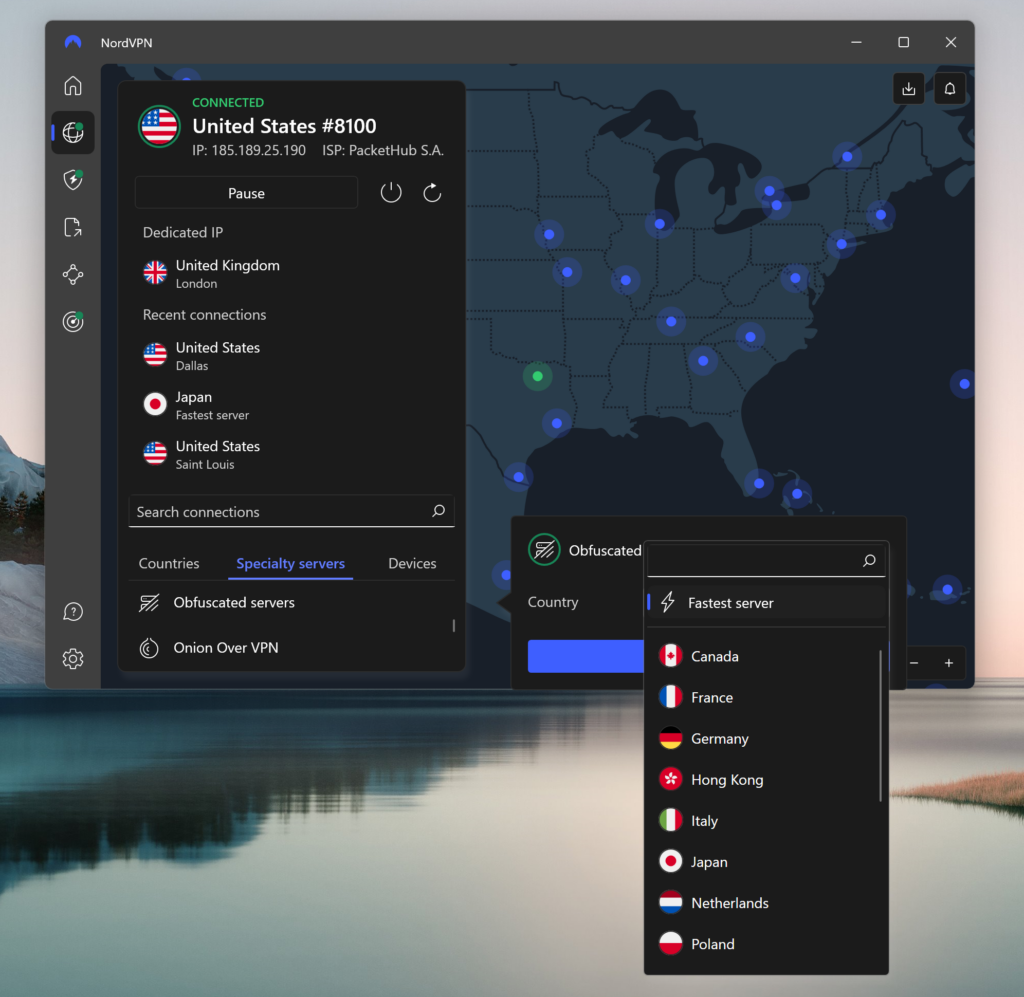
To get NordVPN running in China, I had to adjust a few settings: enabling Obfuscated Servers in the app and switching from automatic protocol to OpenVPN (TCP) made a huge difference. Once set up properly, NordVPN connected fast and held its ground, whereas many others failed. The best-performing servers during my recent tests appeared to be Japan #5392, Taiwan #1089, and Hong Kong #1234, all giving smooth, consistent speeds, at least for the time.
For streaming, NordVPN was one of the few China VPNs that consistently let me watch YouTube in HD with no buffering. Facebook and Instagram loaded without a hitch (even on mobile), and both WhatsApp and Microsoft Teams worked for messaging and calls. I did notice that Netflix sometimes needed a second server switch to avoid proxy errors, but it eventually worked with US content. Google Maps was also usable – a bit slower to load than in open countries, but completely functional with the Japan server.
In terms of performance, NordVPN, together with Surfshark, is easily the fastest VPN I tested:
- Speeds on China Unicom (Wi-Fi): 93 Mbps download, 72 Mbps upload
- Speeds on China Telecom (4G): 77 Mbps download, 63 Mbps upload
NordVPN’s security features were very useful for China. The kill switch gave me peace of mind, meaning no data gets leaked if the VPN drops (which only happened once). NordVPN’s recently audited no-logs policy adds extra reassurance for privacy-conscious users, especially in China. Plus, the Threat Protection feature blocks ads and malicious sites, which is a helpful bonus because Chinese pop-ups are often shady.
Compatibility and price
NordVPN supports nearly every device: Windows, macOS, iOS, Android, Linux, and even routers and smart TVs. Right now, NordVPN is offering 75% off on its 2-year plan. NordVPN’s pricing starts at $ 3.49/month, plus you get a 3-day free trial on Android and a 30-day money-back guarantee in case you change your mind.
What I like:
- Obfuscated servers
- Large server network near China
- Strong, audited privacy
What I don’t like:
- Occasional connection instability
Top 2. Surfshark – secure VPN to use in China
- Rating: 9.0⭐⭐⭐⭐⭐
- Servers: 4500 servers in 100+ countries
- Price: $ 2.49/month + 7-day free trial and 30-day money-back guarantee
If I had to pick a China VPN that balances speed, stealth, and value for money, Surfshark would be right at the top. Heading into my July 2026 trip through Beijing and Shenzhen, I’d read mixed reviews, with some folks on Reddit saying it stopped working after recent firewall updates, while others swore by its NoBorders mode. So, I decided to put it through my own testing and see.
Results of our Surfshark VPN tests in China
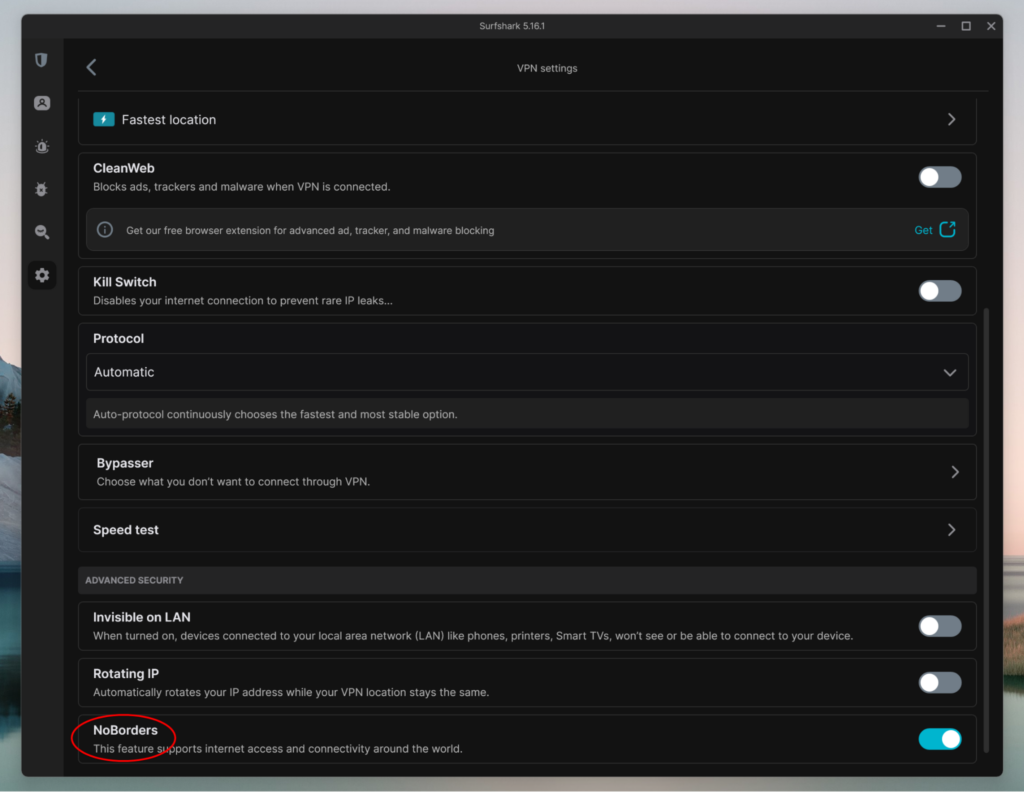
Getting Surfshark to connect reliably was pretty easy with some setting-tweaking, and it held up well throughout. I enabled the NoBorders mode in the app (designed specifically for restrictive countries) and manually selected OpenVPN (TCP) for better stability. I found that nearby servers in Japan, Hong Kong, and Singapore worked best, which I used the most during my testing. At the time, these gave me stable speeds even during peak hours.
Surfshark handled streaming surprisingly well. YouTube, Netflix US, and Instagram loaded quickly with minimal buffering after the initial server connection. Zoom calls were clear, with no sudden drops or freezes. One thing I appreciated was the kill switch feature, which came in handy once when I lost VPN connection for a moment. My apps stayed locked down until Surfshark reconnected. The VPN offers unlimited device connections, strong AES-256 encryption, and an independently audited no-logs policy.
Similar to NordVPN, Surfshark excelled at its speed performance during my testing:
- China Unicom (Wi-Fi): 97 Mbps download, 75 Mbps upload
- On China Telecom (4G): 80 Mbps download, 66 Mbps upload
The speeds kept WhatsApp, Gmail, and even Spotify working well and with short loading times.
Compatibility and price
Surfshark supports all major platforms like Windows, macOS, iOS, Android, Linux, as well as Chrome, Firefox, smart TVs, routers, and Fire TV Stick. It’s ideal for travel or sharing across multiple devices thanks to unlimited connections. Currently, it’s 85% off with the 2-year plan at $ 2.49/month, plus there is a 7-day free trial and a 30-day money-back guarantee, risk-free. For the price, it’s one of the best-value VPNs available for use in China.
What I like:
- NoBorders obfuscation
- Unlimited device support
- Fast and budget-friendly
What I don’t like:
- Some setup is manual
Top 3. Proton VPN – private VPN that works in China
- Rating: 8.9⭐⭐⭐⭐
- Servers: 20700 servers in 149+ countries
- Price: $ 2.99/month + free version and 30-day money-back guarantee
If your top priority, above speed and ease of use in China, is privacy, Proton VPN is worth a serious look. I tested it thoroughly, and while it wasn’t the fastest VPN I tried, it definitely proved itself when it came to security and reliability under Chinese digital control.
Results of our Proton VPN tests in China
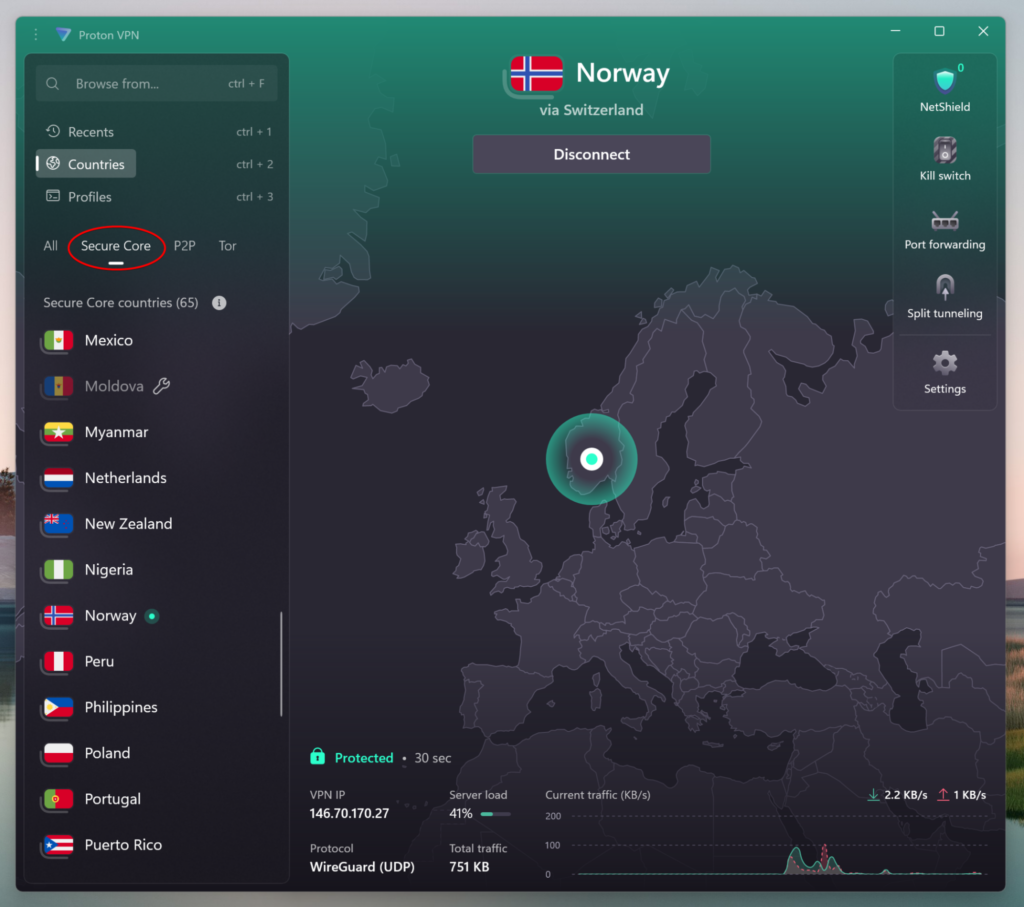
Setup took a bit more effort compared to plug-and-play services like Surfshark. I used the VPN’s Secure Core and had to manually enable the Stealth protocol, Proton’s custom obfuscation tech designed to bypass deep packet inspection. Once on, it connected reliably on hotel Wi-Fi (China Unicom) and 4G mobile data (China Telecom), though not always on the first try. I found the Japan, Taiwan, and Hong Kong servers offered the best balance of speed and uptime.
Streaming with Proton VPN in China is great, especially if you’re happy with occasional 720p settings. YouTube and Instagram Stories worked generally well once connected to a stable server, but Netflix US took a few tries and sometimes required switching servers to avoid proxy errors. That said, once it connected, I could stream without buffering, sometimes even in HD. Spotify also ran without issue on both networks.
Where Proton VPN really shines is its privacy-first approach. Based in Switzerland with a strict no-logs policy, it’s backed by independent audits and built by the same team behind the progressive Proton Mail. The VPN has a kill switch and NetShield, which helps block trackers and malware – a handy feature when browsing on sketchy Chinese sites.
Proton VPN’s performance demonstrated solid speeds:
- China Unicom (Wi-Fi): 83 Mbps download, 68 Mbps upload
- On China Telecom (4G): 74 Mbps download, 60 Mbps upload
That was enough for smooth WhatsApp messaging, web browsing, and streaming in 720p, since 1080p YouTube needed some buffering time.
Compatibility and price
Proton VPN supports Windows, macOS, Linux, iOS, Android, plus Chromebooks and routers, and has browser extensions. It allows up to 10 simultaneous connections on premium plans. Currently, its 2-year Plus plan, now 70% off, costs $ 2.99/month, backed by the risk-free 30-day money-back guarantee. Proton VPN also has a solid free tier that’s worth mentioning for casual use, but because it’s limited, it doesn’t really work for China. If privacy is your main concern, Proton offers great long-term value despite the slightly higher price.
What I like:
- Stealth protocol obfuscation
- Swiss privacy and encryption
- Stable connections
What I don’t like:
- Free version useless in China
Top 4. Private Internet Access – advanced VPN for China with strong security
- Rating: 8.8⭐⭐⭐⭐
- Servers: 35000 servers in 91 countries
- Price: $ 1.89/month + 7-day free trial and 45-day money-back guarantee
Private Internet Access (PIA) isn’t always the first name that comes up when talking about VPNs for China, but after testing it firsthand in July 2026 during my stay in Beijing, I found it to be a solid, security-focused option, especially for more tech-savvy users. It’s not as beginner-friendly as Surfshark or as fast as NordVPN, but it offers deeper customization and serious encryption options that make it a dependable pick for bypassing the Great Firewall of China.
Results of our PIA VPN tests in China
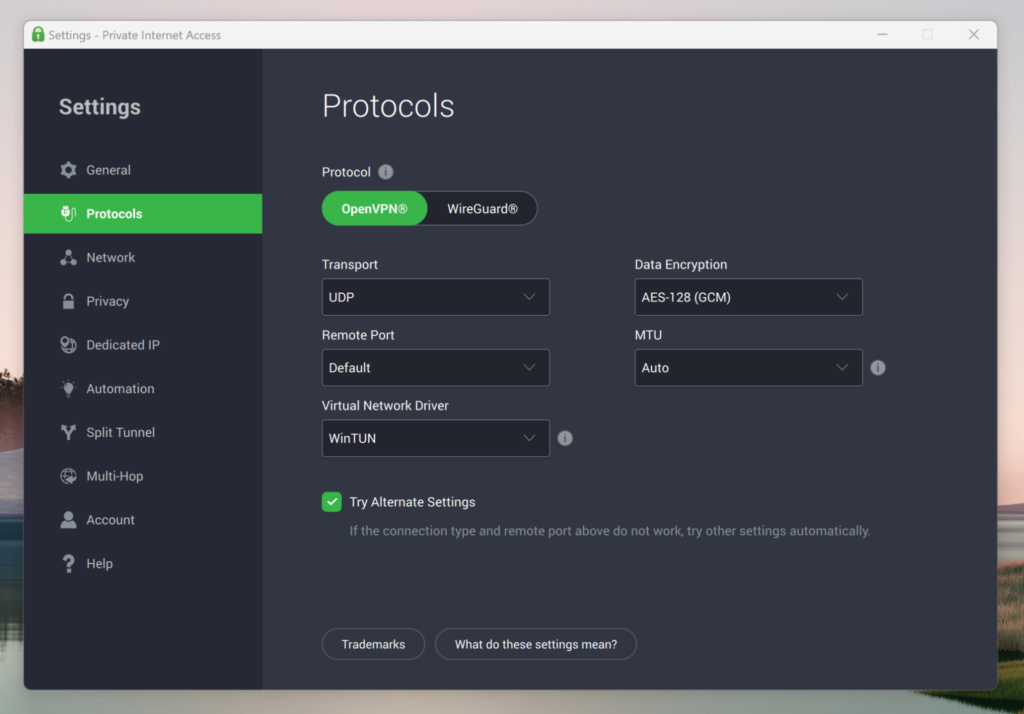
Initially, PIA didn’t connect, so I had to manually enable Shadowsocks proxy support within the advanced settings and switch to OpenVPN (TCP) for better stability under Chinese censorship. Once set up, I was able to get a stable connection using servers in Singapore and Japan, though in the beginning, there was a bit of trial and error. The WireGuard protocol, while faster elsewhere, didn’t work reliably for me in China.
What sets PIA apart is its commitment to privacy: it’s open-source, comes with a robust kill switch, MACE ad/tracker blocker, and has a proven no-logs policy that has been verified multiple times. It’s ideal if you want granular control over your VPN experience in China and don’t mind spending a few extra minutes on setup. It may take a bit more effort, but once dealt with, it works reliably and securely.
Streaming wasn’t flawless, though. YouTube worked in 720p without buffering, but Netflix required a couple of server switches to access US content, and Instagram occasionally lagged on more demanding reels and stories.
Speed-wise, PIA demonstrated some good performance:
- China Unicom (Wi-Fi): 80 Mbps download, 65 Mbps upload
- On China Telecom (4G): 71 Mbps download, 58 Mbps upload
This was still enough for emails, Google Docs, voice calls, and low-latency browsing.
Compatibility and price
PIA supports a wide range of platforms: Windows, macOS, Linux, Android, iOS, browsers (Chrome, Firefox), and also routers and smart TVs. It allows unlimited simultaneous connections, which is great for families, big households, or multi-device users. The current deal offers 84% off the 2-year plan, bringing the cost down to only $ 1.89/month. All subscriptions include a 7-day free trial on Android and iOS, and a 30-day money-back guarantee for peace of mind, which I recommend taking advantage of.
What I like:
- Customizable obfuscation options
- Proven privacy and no-logs
- Affordable
What I don’t like:
- Not always consistent without technical setup
Top 5. CyberGhost – simple and user-friendly China VPN
- Rating: 8.6⭐⭐⭐⭐
- Servers: 9800 servers in 100+ countries
- Price: $ 1.99/month + 7-day free trial and 30-day money-back guarantee
If you’re new to VPNs or just want something that works without much fiddling, CyberGhost is a solid option to consider, though it’s not without limitations when it comes to China use. During my trip through China, I tested CyberGhost across hotel Wi-Fi and China Telecom (4G). It wasn’t the fastest or most consistent service of the five, but it stood out for ease of use, clean design, and functionality.
Results of our CyberGhost tests in China
Getting started was quick, as I didn’t need to adjust many settings. That said, connections weren’t always instant, so I had to try multiple servers (Japan and Taiwan worked best). CyberGhost doesn’t have a dedicated China mode or stealth protocol like some other VPNs, so performance partially depends on timing and luck. I found OpenVPN (TCP) to be the most stable protocol in my case.
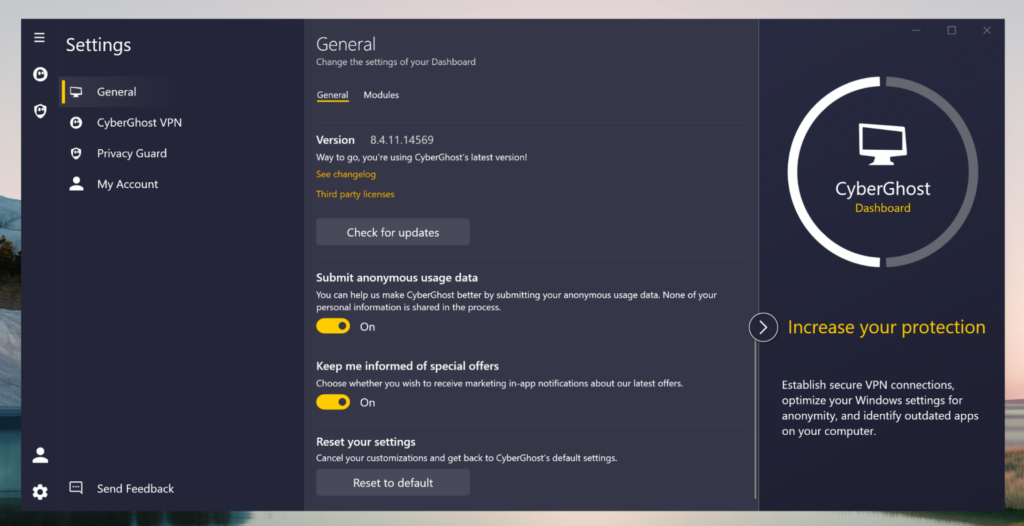
Streaming was a mixed bag, but still on the decent side. YouTube in 720p worked reliably, but Netflix US was inconsistent, with some servers triggering proxy errors or getting through after a second try. Instagram and WhatsApp were stable, and I had no issues making video calls once connected.
Once connected, CyberGhost’s speeds were decent:
- China Unicom (Wi-Fi): 75 Mbps download, 60 Mbps upload
- On China Telecom (4G): 66 Mbps download, 54 Mbps upload
On mobile, it was a bit slower but functional for browsing, email, and calling. It wasn’t the best for larger downloads, but it worked fine for day-to-day tasks.
Compatibility and price
CyberGhost supports Windows, macOS, iOS, Android, Linux, as well as smart TVs, routers, and browser extensions. You can connect up to 7 devices at once. Right now, they offer 85% off a 2-year plan, pricing it at $ 1.99/month. CyberGhost offers a 3-day free trial for Android, a 7-day free trial for iOS, and a 45-day money-back guarantee with any subscription – one of the most generous refund policies out there.
What I like:
- Large server network and China IP options
- User-friendly
- Streaming and torrenting optimization
What I don’t like:
- Sometimes blocked by the Great Firewall
Compare the best China VPN apps
| VPN for China | Rating | Works in China | Download speed | Nearby server locations | Obfuscation | Starting price | Free trial | Refund |
|---|---|---|---|---|---|---|---|---|
| 1. NordVPN | 9.3⭐⭐⭐⭐⭐ | ✅ Yes | 93Mbps | Hong Kong, Taiwan, Japan, Singapore, South Korea, Thailand, Malaysia, Philippines, Vietnam | ✅ Yes | $ 3.49/month | 3-day free trial on Android | 30-day money-back guarantee |
| 2. Surfshark | 9.0⭐⭐⭐⭐⭐ | ✅ Yes | 97Mbps | Hong Kong, Japan, Singapore, Malaysia, Philippines, South Korea, Thailand, Taiwan (Taichung) | ✅ Yes | $ 2.49/month | 7-day free trial | 30-day money-back guarantee |
| 3. Proton VPN | 8.9⭐⭐⭐⭐ | ✅ Yes | 83Mbps | Hong Kong, Japan (Tokyo & Osaka), Singapore, South Korea, Taiwan, Thailand, Malaysia, Philippines, Vietnam, Cambodia, Myanmar | ✅ Yes | $ 2.99/month | Free version | 30-day money-back guarantee |
| 4. Private Internet Access | 8.6⭐⭐⭐⭐ | ✅ Yes | 80Mbps | Virtual & physical in China, Hong Kong, Macau, Taiwan, Mongolia, Cambodia, Singapore, India, Japan | ✅ Yes | $ 1.89/month | 7-day free trial on Android and iOS | 30-day money-back guarantee |
| 5. CyberGhost | 8.8⭐⭐⭐⭐ | ✅ Yes | 75Mbps | Hong Kong, Taiwan, Japan, Thailand, South Korea, India, Indonesia, Malaysia, Philippines, Mongolia, Sri Lanka | ❌ No | $ 1.99/month | 3-day free trial on Android and 7-day free trial on iOS | 45-day money-back guarantee |
Are there any free VPNs for China?
As a rule, and from my own experience, finding a free VPN that actually works reliably in China is tough. The Great Firewall is no joke – it uses some of the most advanced tech out there to block VPN traffic, especially from free providers. Most of the free VPNs I tried either wouldn’t connect at all, were too slow to deal with, or capped data so heavily that they were basically useless.
On top of that, their security features were often pretty weak, which isn’t ideal when you’re trying to stay private online, especially in China. Free VPNs just don’t have the resources to stay ahead of China’s constant updates to its censorship tools. If you really need stable, fast, and secure access to sites like Google, YouTube, or WhatsApp, a trusted paid VPN is the way to go. I personally recommend NordVPN or Surfshark – they’ve proven very reliable for China, and both offer money-back guarantees so you can try them out risk-free.
How to use a VPN in China
Using a VPN in China is essential if you want to bypass the country’s strict internet censorship, known as the Great Firewall. It blocks access to popular sites like Google, Instagram, and WhatsApp, and other much-needed platforms. Many VPNs also get detected or disrupted. The steps below will help you set up and use a VPN effectively while in China.
Step 1: Choose a reliable VPN that is known to work well in China
First things first – pick a VPN that’s actually known to work in China. The government uses strong blocking technology and deep packet inspection (DPI) to catch and blacklist many VPNs. That’s why not all of them work there. I recommend NordVPN because it has obfuscated servers, which hide VPN traffic and help it stay under the radar. It’s fast, secure, and works consistently inside China.
Step 2: Download and install the VPN app before arriving in China
Many VPN websites and app stores like Google Play and even the Apple App Store can be blocked once you’re in China. That’s why it’s very important to download and install your VPN on all your devices (phone, laptop, tablet) before you travel.
Step 3: Open the VPN app and log in
After installing the VPN, just open the app on your device. You’ll be asked to log in using your email or username and password. Some VPNs also let you sign in with Google or other options. Once you’re logged in, you’re ready to connect.
Step 4: Connect to a VPN server outside China
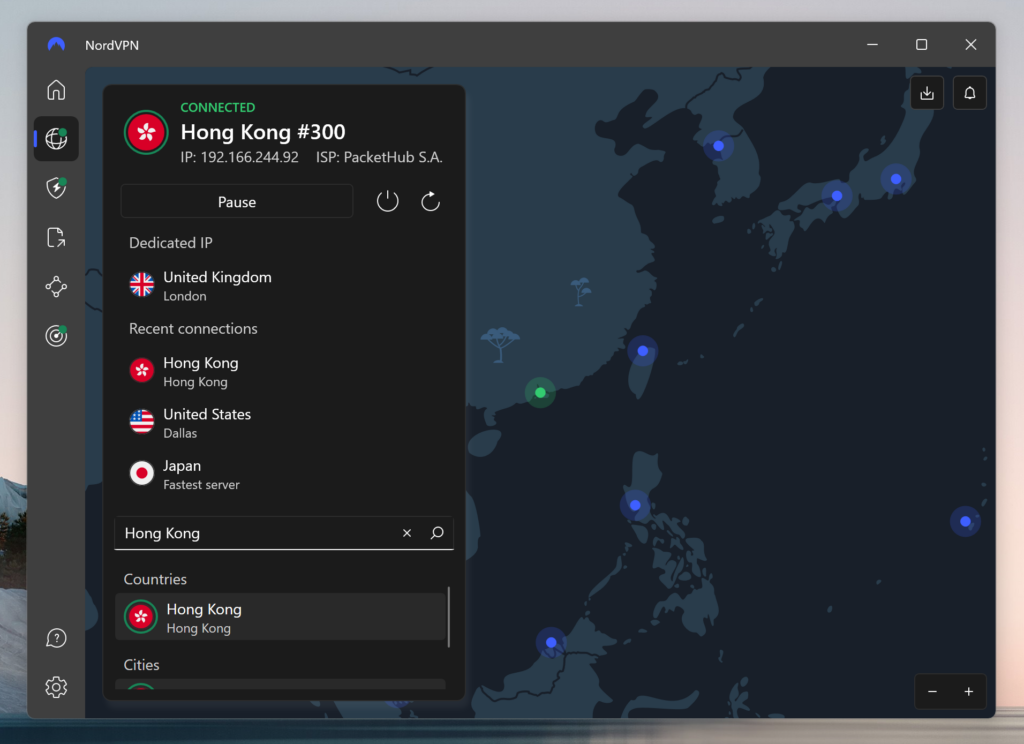
To bypass China’s internet restrictions, you’ll need to connect to a VPN server located outside the country. This lets you access sites and apps that are normally blocked. For the best speeds and reliability, try servers in the region, like in Hong Kong, Japan, Singapore, Taiwan, or South Korea.
Some VPNs even have servers optimized just for use in China, so use those if they’re available. If you’re having issues connecting, turn on the VPN’s stealth or obfuscation mode. This feature will hide your VPN traffic and make it harder for Chinese networks to detect and block the connection.
Step 5: Test your VPN connection by accessing blocked websites
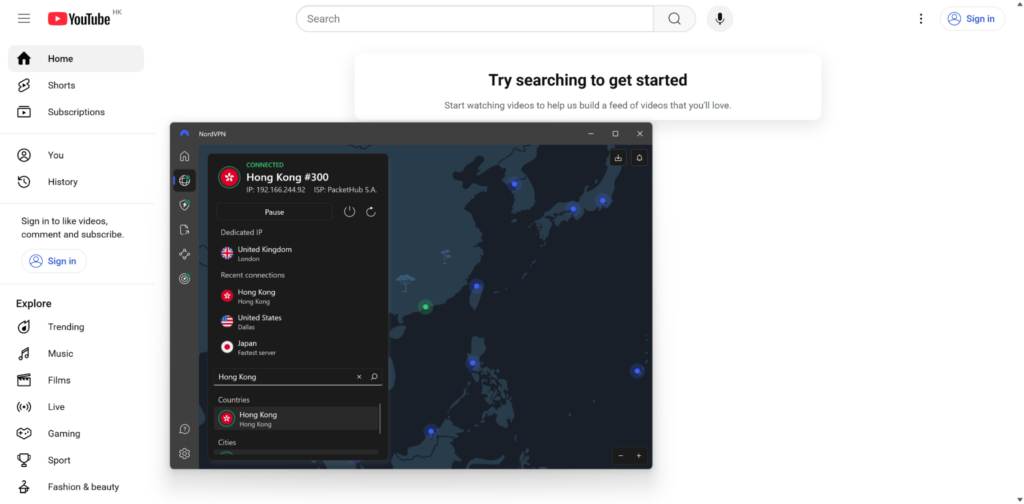
Once your VPN is connected, make sure it’s working by visiting sites that are normally blocked in China, like Google, YouTube, Facebook, or X. Try opening a few streaming services or social media apps to check full access. If a site doesn’t load, try switching to a different server, reconnecting the VPN, or turning on stealth mode.
VPN speeds can vary, so don’t be afraid to test a few servers to find the fastest one. You can also visit a site like whatismyipaddress.com to confirm that your real location is hidden and the VPN is active.
VPN not working in China: troubleshooting steps
When your VPN isn’t working in China, it’s usually because the Great Firewall is blocking VPN traffic. To fix common issues, follow these steps:
- Switch VPN servers. Servers can get blocked often, so connect to a different one, ideally one optimized for China or located nearby (in Hong Kong, Japan, or Singapore).
- Enable stealth or obfuscation mode. This hides VPN traffic from China’s DPI, making it harder to detect and block.
- Update your VPN app. Make sure you have your VPN’s latest version. Providers regularly update their apps to stay ahead of new restrictions.
- Change VPN protocols. Try changing from one protocol to another, like OpenVPN to WireGuard or IKEv2. Some protocols work better than others in China.
- Check your internet connection. Confirm you’re connected to the internet. Restart your device or router if things seem off.
- Contact customer support. If nothing helps, reach out to your VPN’s support team. Most have guides or tips specifically for users in China.
You can also check your IP on sites like whatismyipaddress.com to see if your location is hidden and if the VPN is functioning properly.
Final tips on using a VPN in China
Using a VPN in China is a must if you want to access blocked websites and keep your online activity private. From my experience, NordVPN has worked extremely well as it’s reliable, secure, and fast, making it the best VPN for China if you want uninterrupted access to blocked sites and apps. The VPN’s obfuscated servers feature simply goes past the Great Firewall consistently without issues.
Just make sure to download and install it before you get to China, since app stores and VPN websites can be cut off once you’re there. I always connect to servers in nearby places like Hong Kong, Japan, or Singapore for better speed and stability. If the connection ever acts up, I switch servers, turn on obfuscation mode, or try a different VPN protocol in the settings. Also, don’t forget to keep the app updated, since those updates often include fixes for China’s new restriction efforts. With the right setup and a reliable VPN like NordVPN, staying connected and secure in China is completely doable.

You may also like to read:
How to Access Google Gemini in China
How to Use ChatGPT in Countries Where It’s Banned
FAQ
You need a VPN in China to bypass strict internet censorship, known as the Great Firewall. It allows access to blocked websites and apps like Google, YouTube, WhatsApp, and others by encrypting your data and masking your location, ensuring secure, private browsing and unrestricted access to global online content.
Popular Western websites are restricted in China due to strict government censorship. These include Google, Facebook, Instagram, Twitter, YouTube, WhatsApp, major news outlets like The New York Times and BBC, and other popular platforms. The restrictions aim to control information flow, limiting access to foreign media, social platforms, and messaging apps.
Using a VPN in China is a legal gray area. While the government restricts unauthorized VPN services, individuals using them discreetly for personal reasons are rarely targeted. However, only government-approved VPNs are technically legal, and accessing banned content through unapproved tools may carry legal or administrative risks.
In China, a VPN works by creating a secure, encrypted connection between your device and a server in another country. This masks your real IP address, allowing you to bypass internet blocks and access restricted sites. The encrypted tunnel helps protect your data from surveillance and government filtering systems.
Only a few VPNs consistently work in China due to advanced censorship. Truly reliable options include NordVPN, Surfshark, and Proton VPN as they use obfuscation technology to avoid detection. These VPNs are known for maintaining access to blocked content, but performance can vary depending on location and government crackdowns.
Yes, NordVPN works in China and is one of the most reliable VPNs for bypassing China’s Great Firewall. It offers obfuscated servers that hide VPN traffic, helping users access blocked sites like Google, YouTube, and WhatsApp. Just be sure to install it before arriving in China.
As of 2026, ExpressVPN is not the best VPN for China due to increased firewall restrictions. While it still performs well in open countries, it’s not a dependable choice for bypassing Chinese censorship. For China, I recommend NordVPN, Surfshark, or Proton VPN – all tried and tested and confirmed to work reliably with the right settings.
As of July 2026, VPNs that are not working in China include TunnelBear, Hola VPN, Betternet, HMA, Opera VPN, Ivacy, and many others. These services consistently fail to bypass the Great Firewall due to a lack of obfuscation technology or outdated infrastructure. For reliable access, I recommend specialized VPNs like NordVPN.




ExpressVPN DOES NOT WORK in CHINA. I've lived in China for 7 years. Express used to sporadically work, but a year and a half ago, Express completely stopped working. The VPN connects, but no data comes through. The connection will then drop within 20seconds and it will never reconnect. Customer Service does not help. They simply tell you that they're aware of connectivity issues and they're working on it. Express will give you 1 month free service if you complain enough, but they won't give your money back. DO NOT USE EXPRESSVPN if you're going to China. Astrill and QuickQ are the best Chinese VPNs.
Thank you for sharing your experiences! We'll look into this and take it into account when we update our article.