
- Where to watch FIFA World Cup 2026 on CazéTV
- How to watch CazéTV World Cup 2026 in the USA for free with a VPN?
- Why you need a VPN to watch CazéTV World Cup 2026 in the USA
- How to watch CazéTV World Cup 2026 in the USA – Detailed VPN guide
- Best VPNs to watch CazéTV World Cup 2026 in the USA
- Can you watch CazéTV World Cup 2026 on mobile, smart TV, or Fire Stick?
- FAQ
CazéTV, Brazil’s YouTube-based sports broadcaster, streams all 104 FIFA World Cup 2026 matches for free in 4K quality with Portuguese commentary. The channel is geo-restricted to Brazil, so US viewers need a VPN, like NordVPN, to access the streams.

CazéTV is streaming all 104 FIFA World Cup 2026 matches free on YouTube in Brazil. The Brazilian sports platform, co-founded by streamer Casimiro Miguel, offers 4K quality streams with Portuguese commentary and no subscription required. However, CazéTV’s YouTube channel is geo-restricted to Brazil, meaning viewers in the USA cannot access the streams without changing their virtual location. A VPN solves this by connecting you to a Brazilian server, letting you watch every World Cup match for free from anywhere.
Where to watch FIFA World Cup 2026 on CazéTV
CazéTV holds the rights to all 104 FIFA World Cup 2026 matches and streams them exclusively on its YouTube channel in Brazil. The service is completely free, requires no account, and broadcasts in 4K quality with Portuguese commentary. While the platform is also available on Disney+ and Amazon Prime Video in Brazil, the YouTube channel is the primary free option for World Cup coverage.
| Country | Streaming Service | Price | Coverage | Commentary |
|---|---|---|---|---|
| Brazil | CazéTV YouTube | Free | All 104 World Cup matches | Portuguese |
| United States (with VPN) | CazéTV YouTube | Free | All 104 World Cup matches | Portuguese |
The YouTube stream is geo-restricted and only accessible to viewers with a Brazilian IP address. US viewers need a VPN to connect to a Brazilian server and unlock access.
How to watch CazéTV World Cup 2026 in the USA for free with a VPN?
CazéTV streams every FIFA World Cup 2026 match free on its YouTube channel, but the stream is geo-blocked outside Brazil. A VPN changes your virtual location to Brazil, letting you access the free 4K coverage from the USA.
Why you need a VPN to watch CazéTV World Cup 2026 in the USA
CazéTV’s YouTube channel is geo-restricted to viewers in Brazil due to FIFA’s regional broadcasting rights. When you try to access the stream from the USA, YouTube detects your IP address and blocks the content with an error message.
A VPN solves this by routing your internet connection through a server in Brazil, giving you a Brazilian IP address. This makes YouTube think you’re accessing the stream from Brazil, unlocking the free 4K World Cup coverage. The VPN encrypts your connection, ensuring secure access to the stream.
This is a legal use case for a VPN. You’re accessing an official FIFA broadcaster that streams matches for free in Brazil. CazéTV holds legitimate rights to all 104 World Cup matches, so you’re not bypassing any paid subscription or engaging in piracy.
If you’re looking for a reliable option for World Cup streaming, check our guide to the best VPNs for streaming.
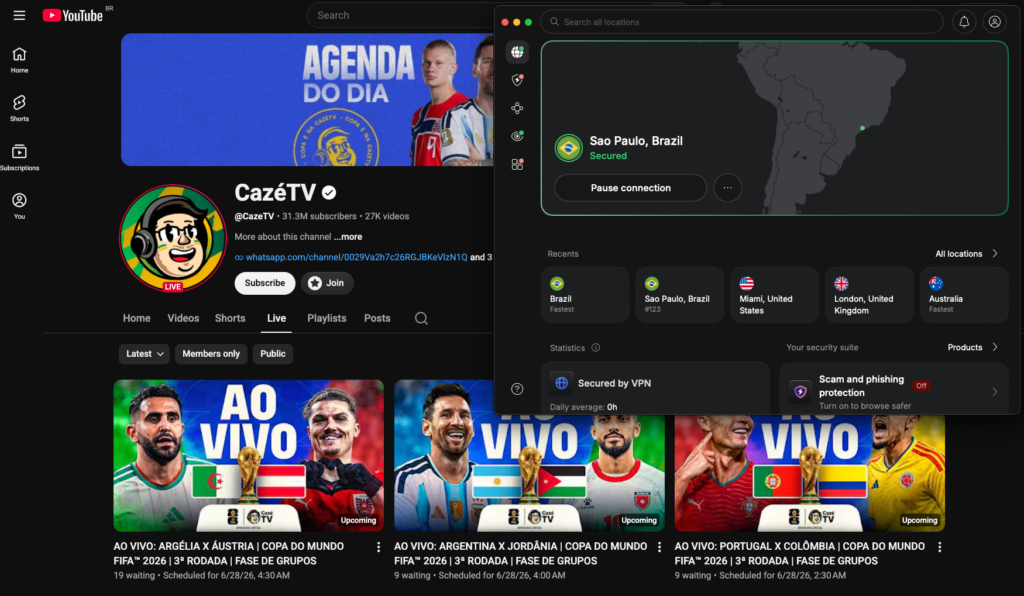
How to watch CazéTV World Cup 2026 in the USA – Detailed VPN guide
This expanded guide walks you through every step of accessing CazéTV’s free World Cup coverage from the USA, with troubleshooting tips for common issues.
Step 1. Choose a VPN with Brazilian servers
Not all VPNs work reliably with YouTube’s geo-restriction system. Choose a VPN with multiple servers in Brazil, fast speeds for 4K streaming, and a proven track record of unblocking international broadcasters. NordVPN starts at $3.39/month and operates 9,000+ servers across 130 countries, including 20+ servers in São Paulo. The NordLynx protocol delivers around 83% of baseline speeds in our tests, which is more than enough for smooth 4K World Cup streaming. NordVPN also supports Smart DNS for smart TVs that don’t have native VPN apps, making it the strongest pick for watching CazéTV across all your devices. Read our full NordVPN review for details.
Step 2. Install the VPN app on your device
Download the VPN app for your device. NordVPN supports Windows, macOS, iOS, Android, Fire TV, Apple TV, and Android TV. If you’re watching on a laptop or desktop, install the app and run it in the background while streaming CazéTV on YouTube in your browser. For mobile devices, install both the VPN app and the YouTube app.
Step 3. Connect to a server in Brazil
Open the VPN app and select a server in Brazil. Most VPNs list servers by city (São Paulo, Rio de Janeiro). Choose the server with the lowest ping for the best streaming speed. If the stream doesn’t load or you see a geo-block error, disconnect and try a different Brazilian server. For more details on how server selection works, see our guide on how to change your location with a VPN.
Step 4. Open CazéTV on YouTube
Go to youtube.com/cazetv in your browser or open the YouTube app on your device. No account or login is required to watch CazéTV’s free streams. If YouTube still shows a geo-block message, clear your browser cookies or use an incognito/private window to ensure YouTube reads your new Brazilian IP address.
Step 5. Start streaming World Cup matches
Find the live World Cup match in CazéTV’s live or upcoming streams section. Click to start watching in 4K. Keep the VPN connected throughout the match. If the stream buffers or lags, try switching to a different Brazilian server or lowering the YouTube quality setting temporarily.
Best VPNs to watch CazéTV World Cup 2026 in the USA
We’ve tested these VPNs for accessing CazéTV’s free World Cup coverage from outside Brazil. All three offer fast speeds, reliable unblocking of YouTube geo-restrictions, and stable 4K playback for live matches.
- NordVPN – Best overall for streaming CazéTV World Cup 2026.NordVPN starts at $3.39/month and runs 9,000+ servers across 130 countries, with 20+ servers in Brazil. NordLynx delivers around 83% of our tested baseline speeds, which is more than enough for smooth 4K streaming. Smart DNS support and reliable unblocking of YouTube geo-restrictions make it the strongest pick for watching all 104 World Cup matches on CazéTV.
- Surfshark– Best budget option.Surfshark starts at $2.49/month with unlimited simultaneous connections and 4,500+ servers across 100 countries, including 32 servers in Brazil. The modern WireGuard protocol holds around 82% of baseline speeds in our tests, which is enough for smooth HD and 4K coverage of CazéTV’s World Cup streams. Unlimited devices mean you can watch on your laptop, phone, and TV at the same time.
- Proton VPN – Best for privacy-focused users.Proton VPN starts at $2.99/month and operates 18,100+ servers across 129 countries, including servers in Brazil. Based in Switzerland under strong privacy laws, Proton VPN offers solid streaming performance for live World Cup matches. It even has a free plan with limited servers and speeds, though the premium version delivers better performance for 4K streaming.

Can you watch CazéTV World Cup 2026 on mobile, smart TV, or Fire Stick?
CazéTV streams on YouTube, so device compatibility depends on whether the device supports both YouTube and a VPN app.
Mobile devices (iOS, Android): Install the VPN app and YouTube app on your phone or tablet. Connect to a Brazilian server in the VPN app, then open YouTube and navigate to CazéTV. This works seamlessly on both platforms.
Fire TV and Apple TV: Both devices support VPN apps and YouTube. Install your VPN’s Fire TV or Apple TV app, connect to Brazil, then open the YouTube app to watch CazéTV.
Smart TVs (Samsung, LG, Sony): Android TV models support VPN apps directly. For Samsung Tizen and LG webOS TVs without native VPN apps, you have two options: set up the VPN on your router to cover all devices on your network, or use NordVPN’s Smart DNS feature to unblock YouTube without installing an app. Alternatively, cast the stream from your phone or laptop to your TV while connected to the VPN.
Roku and Chromecast: These devices don’t support VPN apps. Use the VPN on your phone or laptop and cast the CazéTV YouTube stream to your TV.
For more device-specific guidance, check our best VPN for iPhone and best VPN for Android guides.
Related articles:
- Top 20 free football streaming sites
- How to watch the Premier League live online
- How to watch Mexico 2026 World Cup matches on TV Azteca Deportes in the USA
- How to watch Brazil World Cup matches live on CazéTV in the USA
- Where to watch the 2026 FIFA World Cup online: live streaming services by country
FAQ
Yes, CazéTV streams all 104 FIFA World Cup 2026 matches completely free on its YouTube channel. No subscription, payment, or account is required. The stream is ad-supported and available in 4K quality.
No. CazéTV’s YouTube channel is geo-restricted to Brazil. If you try to access the stream from the USA without a VPN, YouTube will detect your IP address and block the content. You need a VPN to connect to a Brazilian server and unlock access.
Yes. CazéTV holds the rights to all 104 FIFA World Cup 2026 matches, from the group stage through the final on July 19th, 2026. Every match streams live in 4K on the CazéTV YouTube channel.
Yes. Using a VPN to access CazéTV is legal. You’re accessing an official FIFA broadcaster that streams matches for free in Brazil. CazéTV holds legitimate broadcasting rights, so you’re not bypassing any paid subscription or engaging in piracy.
No. CazéTV streams all World Cup matches with Portuguese commentary (Brazilian Portuguese). There is no English commentary option. If you prefer English commentary, you’ll need to use a different broadcaster such as BBC iPlayer or ITVX in the UK, or Fox Sports in the USA.
CazéTV streams all FIFA World Cup 2026 matches in 4K quality on YouTube. This is the highest quality available for free World Cup streaming. Your internet speed and device need to support 4K playback for the best experience.