1Password was introduced in 2006 as MacOS-software. Since 2010 1Password’s software can also be used on iOS, Android and Windows. Many customers and companies rely on 1Password to keep their credentials safe. It’s part of the Canadian company AgileBits Inc.
NordPass was launched in 2019 as part of the security company Nord Security, mostly known for its virtual private network, NordVPN. Just like 1Password, NordPass has grown popular in recent years both with customers and businesses.
For this NordPass vs. 1Password article we have put both password managers to the test.
Summary: which password manager makes security a breeze?
NordPass and 1Password are both decent choices for secure password management, but there are some small differences. That’s why we have compared 1Password and NordPass with regard to security, ease of use, price and customer support. This is a short summary of the results:
- Security: Both password managers offer military grade protection and a zero knowledge policy, but NordPass has slightly more to offer when it comes to MFA.
- Ease of use: Even though both are easy to install and use, NordPass’ browser extension and mobile app offer more features and are easier to use.
- Pricing: If you choose a 2 year plan, NordPass is the cheapest option. Moreover, NordPass offers a free version and a 30 day free premium trial, whereas 1Password only has a 14 day trial.
- Customer service: We prefer NordPass’ live chat which lets you talk to support directly, but 1Password’s large community is also helpful if you encounter any troubles.
We can conclude that both password managers offer top-notch security and have user friendly apps. Nevertheless, NordPass has slightly more to offer. This small difference has given NordPass the lead in the categories we have tested.
Yet, 1Password is a very good runner-up. Actually, it is an excellent choice if you are looking for larger encrypted storage to keep your documents safe. 1Password’s Family subscription offers up to 5GB of secure storage, while NordPass offers a maximum of 3GB.
Feature overview
Let’s sum up the basic features of both password managers:
| Password manager | 1Password | NordPass |
|---|---|---|
| Score | 8.5 | 8.8 |
| Price | $2.99 – $4.99 a month | $1.39 – $3.69 |
| Free version | ✖ | ✔ |
| Trial | 14 day trial | 30 day trial |
| Compatibility | MacOS, iOS, Windows, Android, Linux | MacOS, iOS, Windows, Android, Linux |
| Browser extensions | Chrome, Firefox, Edge, Brave, Safari | Chrome, Firefox, Edge, Opera, Safari, Vivaldi |
Security: keeping secrets a secret
A password manager basically has just one job: keep your passwords safe. Secure encryption, a zero knowledge architecture and a decent privacy policy are musts for any password manager. That’s why we have taken a deep dive into the security features of NordPass and 1Password.
Encryption
1Password uses military grade AES 256-bit encryption to protect your credentials. This is combined with PBKDF2 password hashing to protect your master password against brute force attacks.
Due to 1Password zero knowledge policy, the company doesn’t have any knowledge about the content of your password vault. Your data is encrypted locally before being sent to the cloud.
NordPass uses the modern XChaCha20-algorithm to encrypt your data. This algorithm is just as safe as AES 256-bit, but it offers more speed, allowing NordPass to decipher your credentials quicker. NordPass also has a zero-knowledge policy, which means you are the only one with access to your passwords.
To sum up, when it comes to encryption both password managers offer the highest degree of security.
Multi factor authentication (MFA)
1Password gives you the possibility to sign in to your password vault with two-factor authentication using an Authenticator app. You can also use biometric authentication, such as face of fingerprint ID. In addition, 1Password can generate one-time passwords and 1Password supports passkeys. That’s a fair amount of MFA-options.
Passkeys are a safe and easy way to sign in. Your password manager will pair a public key with a private key stored on your device. If the keys match, you get immediate access. In this way, hackers can’t get access to your account without physical access to your device.
NordPass allows you to log in to your password vault with multi factor authentication either by using an authenticator app or a physical security key. You can also use biometrics to sign in, such as face and fingerprint ID. Moreover, NordPass supports passkeys which allow you to log in to websites securely without a password.
Multi factor authentication is very important for security. With MFA you combine something you know (your password), with something you have (the device used to send the 2FA-code). This makes it very hard to hack your account. Although both password managers support MFA, NordPass has slightly more to offer by supporting physical security keys.
Audits
Both companies have regular independent security audits to check the safety of their software. 1Password’s latest audit has been done by Secfault Security in May 2024. The company is SOC 2 Type 2 certified and has an ISO/IEC 27001:2022 certification. This proves 1Password meets the highest standards for security management, privacy and cloud security.
In December 2023, NordPass passed the SOC 2 Type 2 audit, which proves NordPass security measures are effective and efficient. Moreover, NordPass is compliant with the ISO/IEC 27001:2017, an international standard for security management systems. In short, NordPass meets the highest standards for security as well.
Privacy
1Password is part of AgileBits, a tech company located in Canada. Since Canada is part of the 5 Eyes alliance, this is potentially bad news. Countries part of the 5 Eyes collect and exchange data about their civilians and might force companies to share information.
Due to the zero knowledge architecture 1Password doesn’t have any knowledge about the items stored in your vault. The company does store the type of account you have, personal information (IP address and email address) and information about the usage of their software. According to 1Passwords privacy policy this information won’t be shared with third parties.
NordPass is part of Nord Security, a company based in Panama. This means it’s located outside of the 5/9/14 Eyes and can’t be forced by governments to share any information. Just as 1Password, NordVPN has absolutely no access to your vault. It does collect information such as your email address, anonymized information about the use of their software and information about your device including your IP address.
NordPass’ and 1Password’s privacy policies are quite comparable. The big difference is that NordVPN isn’t located in a country part of the 5 Eyes. This means NordPass takes the lead again.
Head-to-head: NordPass is the most secure

When it comes to security both NordPass and 1Password offer secure solutions. They offer unbreakable encryption, have a zero-knowledge architecture, perform regular audits to put their security to the test and offer MFA allowing you to protect your account. That makes both password managers a safe choice.
However, when we look into the details, NordPass has more to offer. It’s not based within the 5/9/14 Eyes alliance and has more options for multifactor authentication. That’s why we declare NordPass the winner for this category.
Ease of Use: Features & Interface Across Platforms
We have tested the browser extension, mobile app and desktop app of each password manager to see which features are available and how user friendly they are.
Feature overview table
First, let’s have a look at the features of each password manager.
| Password manager | 1Password | NordPass |
|---|---|---|
| Number of users | 1-5 | 1-6 |
| Password sharing | ✔ | ✔ |
| Emergency access | ✖ | ✔ |
| Account recovery | ✔ | ✔ |
| Password generator | ✔ | ✔ |
| Password importing | ✔ | ✔ |
| Password autofill | ✔ | ✔ |
| Password health checker | ✔ | ✔ |
| Dark web monitoring | ✔ | ✔ |
| Encrypted file storage | 1-5GB | up to 3GB |
The most important features
Let’s dive more into detail for the most important features:
Password sharing
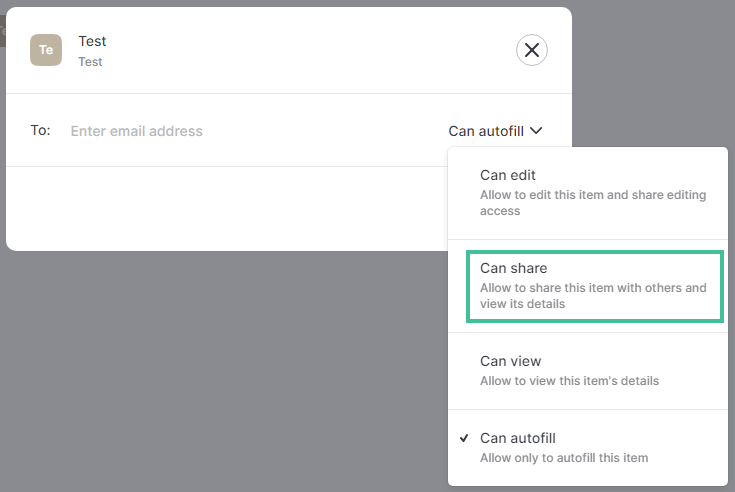
Both NordPass and 1Password give you the opportunity for password sharing in a safe way. With 1Password you can configure when the sharing link should expire and how often the credentials can be accessed.
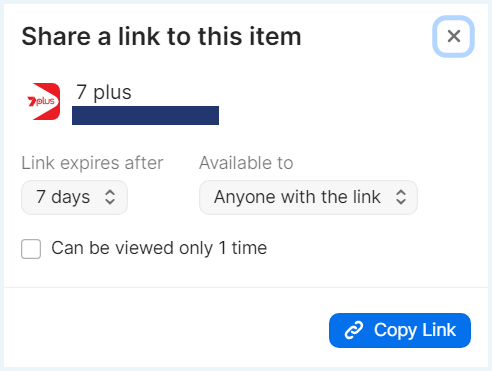
Nordpass lets you choose whether or not the receiver can see or edit the password. We prefer NordPass’ password sharing feature in which you can limit the rights of the receiver according to your needs.
Password generator
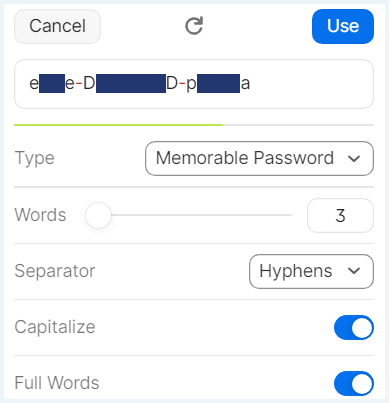
1Password’s generator lets you create password, such as random passwords, memorable passwords and pincodes. The random passwords can be up to 100 tokens long and may contain numbers and symbols. The memorable passwords consist of words, from which some words are capitalized.
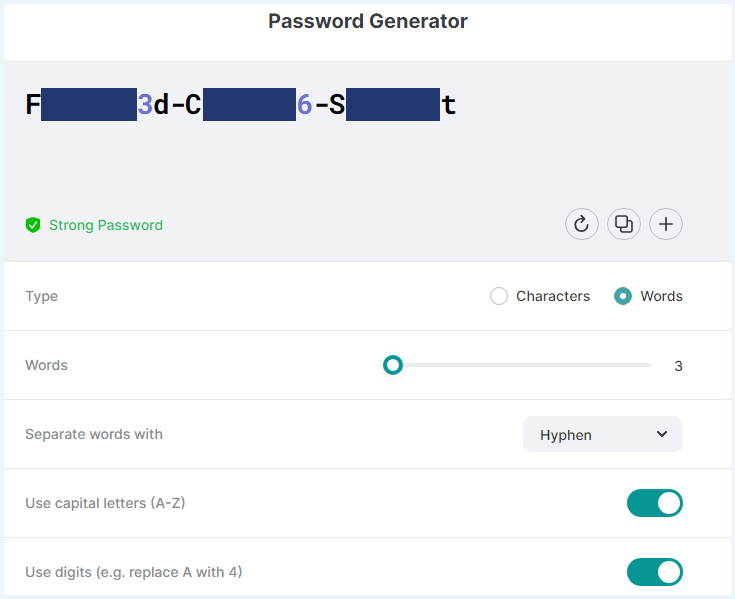
NordPass can generate safe random passwords between 8 and 60 tokens, including capital letters, digits and symbols. You can choose between passwords made out of random characters or random words. With this second option you can create strong passwords that are easy to remember.
Password importing
With both password managers you can import passwords from browsers, password managers or a CSV-file. Both password managers give instructions about how to export the credentials from another source. The export can then be uploaded to your new password manager. This makes importing passwords a piece of cake.
Autofill
The autofill options of both NordPass and 1Password work great. In each login field on your screen, you will see the icon of the password manager. Just click or tap on it to fill in your credentials automatically. If you haven’t got any credentials stored yet, you can automatically save them.
Password health checker and dark web monitoring
1Password offers a watchtowerfeature. This is a security dashboard for data breach monitoring. The watchtower also checks the strength of your passwords and indicates how many weak or reused passwords you have. In addition, the watchtower lets you know for which sites you can use 2FA.
NordPass offers a Data Breach Scanner that automatically scans leaked databases and sends you an alert if your credentials have been exposed. They also offer a Password Health feature which indicates how many weak, reused and old passwords you have. NordPass doesn’t inform you if websites offer 2FA.
The Data Breach Scanner and the Password Health Checker are premium features that aren’t available with NordPass Free.
Encrypted storage
1Password doesn’t only let you store login credentials. You can also store credit card details, crypto wallets, medical records, your drivers license, your passport, software licenses and secure notes in your vault. You can store 1 GB for each user, which means the family subscription offers 5 GB of storage room.
NordPass gives you the possibility to store credit card details, personal info and secure notes. This is slightly less than 1Password offers. NordPass offers up to 3GB of storage space.
Browser extensions: easy access to all your accounts
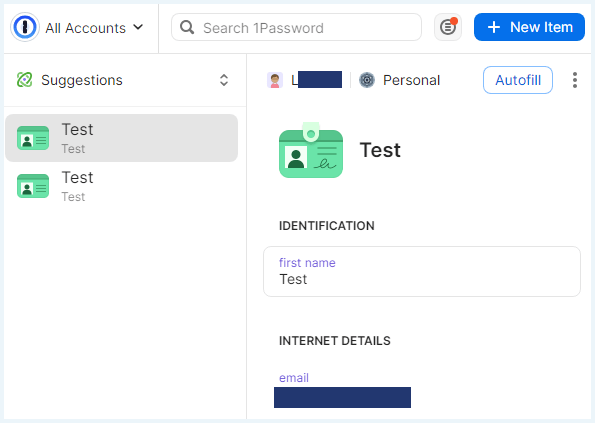
1Password’s browser extension is available for Chrome, Safari, Firefox, Edge and Brave and is easy to install. Once you haven the extension installed, you can easily autofill stored items or create new items. We also find it very convenient to use the password generator in combination with the extension.
NordPass’ extension is available for Chrome, Firefox, Edge, Opera, Safari and Vivaldi. The extension lets you autofill stored items, create new items and access tools such as the password generator and the data breach monitoring tool. Unlike 1Password, NordPass’ browser extension also gives you the opportunity to change or share passwords.

Mobile apps: access your accounts everywhere
To access your accounts everywhere, the mobile apps are a must.
We have tested 1Password’s Android app. The app lets you access favorite and recent credentials directly. Furthermore, you can access your vault, copy credentials and use the Watchtower feature in the mobile app. If you want the app to fill in your credentials automatically you need to change this in the settings.
In NordPass’ mobile app you can easily access all items in your vault. You can also use the password generator to create new items or the password health checker to improve the strength of your passwords. Filling in credentials online or in other apps goes automatically.
Desktop apps: making management easy
For more advanced features, you will need to use the desktop app or the online vault. With 1Password you will need this to access the Watchtower, to make changes to your stored items or share items with others. In short, for the management of your vault, the app is a must have.

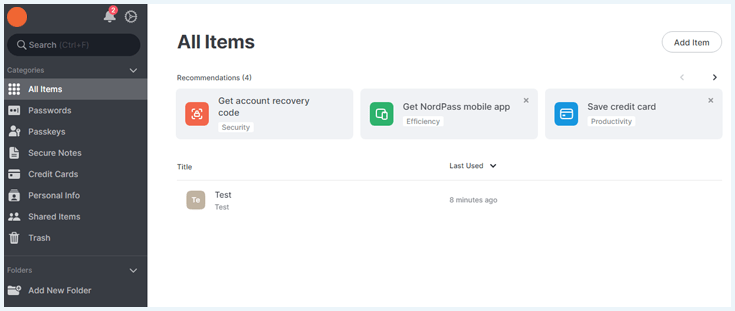
NordPass’ desktop app lets you see and manage your vault. You can use or add passwords, passkeys, secure notes and more. You can also access the password generator, email masking, password health scanner and the data breach scanner.
In other words, NordPass’ app provides a clear overview of all features. However, the app isn’t necessary for vault management, since this can also be done with the extension.
Account recovery and emergency access
When you create an account with NordPass you will get a recovery code. With this code you can regain access to your account if you forget your master password. You can download the recovery code as a PDF and store it somewhere safe.
In addition, you can give someone emergency access to your vault. This needs to be a NordPass user. This person can securely access your vault without entering your master password. This can be very convenient in case of an emergency.
1Password will create a recovery key as soon as you create an account. You should download the key as a pdf document and store it somewhere safe. 1Password doesn’t have a dedicated emergency access feature, but you could share your recovery key with someone you trust.
Head-to-head: NordPass is the most user-friendly

Both password managers are easy to install and use. They basically offer everything you need in a password manager: safe storage, easy access to your credentials and a safe way to create new items. However, when we compare the features of both password managers, NordPass has our preference.
NordPass gives you more control when you want to share passwords with others. Moreover, NordPass’ browser extension and mobile app have more options. As a result, when using NordPass, you barely have to use the desktop app, while with 1Password the desktop app is indispensable for password management.
Pricing overview
You now know all about the features of these apps but what do they cost? Let’s take a look at the prices.
1Password’s price
1Password offers a subscription for individuals and one for families. In the table below, we have listed the price per month for these two subscriptions.
| 1Password | Individual | Families |
|---|---|---|
| Price | $2.99 | $4.99 |
| Number of users | 1 | 5 |
1Password offers a 14 day trial. That gives you enough opportunity to try this password manager yourself and see if it is the one for you. Unfortunatly, there is no completely free plan available.
However, you can sometimes reduce the cost by using promo offers. 1Password frequently provides coupon codes or limited-time discounts on its deals page, so it’s worth checking for active promotions before subscribing.
NordPass’ prices
NordPass offers a premium subscription for individuals and a subscription for families. The prices per month are listed below. The prices mentioned are based on a 2-year plan. You can also choose a 1-year plan, but this subscription is more expensive.
| NordPass | Premium | Family |
|---|---|---|
| Price | $1.39 | $3.69 |
| Number of uses | 1 | 6 |
NordPass offers a free version. If you try NordPass Free you will get a 30 day trial of NordPass Premium. If you don’t upgrade, you will lose access to the premium functions after a month, such as the emergency access, the password health checker and dark web monitoring. In addition, you can’t share passwords and you can only be logged in on one device at the same time.
For some users, NordPass Free might be enough to satisfy their needs when it comes to a password manager. Others can use the free trial to try NordPass before upgrading to Premium.
Head-to-head: NordPass offers the best price

It is clear that NordPass is less expensive than 1Password. The company scores extra points by offering a 30 day free trial and by having an unlimited free version. When price is the deciding factor NordPass for sure is the winner!
Customer Support
Let’s take a look at the customer support of both services.
| Password manager | 1Password | NordPass |
|---|---|---|
| Knowledge base/FAQ | ✔ | ✔ |
| Forum/community | ✔ | ✖ |
| Live chat | ✔ (chatbot) | ✔ |
| ✔ | ✔ | |
| Phone | ✖ | ✖ |
1Password offers a support page with a lot of information. Beside the support page, 1Password has a support community. You need to make a separate account to access this community. If you like to speak to the company, you can send an e-mail to [email protected] or have a chat with the AI-assistant.
NordPass offers a knowledge base with a lot of information. If you need more help, you can submit a request to customer support, send an email to [email protected] or use the live chat. The live chat connected us immediately with an employee of NordPass. That’s very convenient if you need direct help.
Head-to-head: NordPass offers the best customer support

We really appreciate that NordPass offers direct help with a live chat. That makes it very easy to get problems solved quickly if you run into issues. 1Password has a larger community to help you out in case of problems, but it’s more difficult to have direct contact with the company. That’s why NordPass is once again the winner!
NordPass vs 1Password – which one is right for you?
We can conclude that both NordPass and 1Password are both excellent password managers with top-notch security. However, there are some small differences. Let’s break it down:
- Security: both password managers use military grade encryption and have a zero knowledge architecture. If you would like to use physical security keys for MFA or are looking for a password manager outside the 5/9/14 eyes, NordPass is the way to go.
- Ease-of-use: it’s easy to install and use the apps of both 1Password and NordPass. If you don’t like to use the desktop app, we recommend NordPass. For safe sharing of passwords, NordPass is the way to go as well. If you like a large vault for your entire family, 1Password is the best choice.
- Price: NordPass’ 2-year plan is definitely the cheapest option.
- Customer service: if you like to speak to an employee directly NordPass’ customer service is the best option. If you prefer to ask your questions to an online community, 1Password is a great choice.
Overall, NordPass is the best option. This password manager is affordable, offers decent customer support and is very easy to use.
Do you want to know more? Check out our NordPass review and our 1Password review.
How we Test Password Managers
To review and compare password managers we take the following steps:
- To see how password managers handle your information, we review the privacy policy of each password manager thorougly.
- We review security practices, such as the zero knowledge architecture and the level of encryption. We always check independent audits to see if password managers are as secure as they claim to be.
- We download the apps on laptop and mobile and test them extensively: we check all features to see if these feature function correctly and are easy to use for a regular user.
- We contact customer support to check how fast, friendly and correctly they answer our questions.
This gives us a good idea of the safety and user friendliness of each password manager. If you like to know more about which password managers are a great choice, check out the following articles:
- Keeper vs. 1Password: Safe Credential Storage Compared
- The Best Password Managers
- The Best Free Password Managers
Do you have any questions about the comparison between NordPass en 1Password? Read our frequently asked questions?
NordPass and 1Password both offer a zero knowledge architecture, military grade encryption and user friendly apps. Both are excellent choices if your a looking for a secure password manager. However, NordPass has slightly more to offer, for example when it comes to MFA and password sharing
You can import data from 1Password into NordPass by using a 1PUX or a CSV file. NordPass offers a guide about how to create a 1Pux or CSV file.
Both NordPass and 1Password are secure password managers. They offer zero knowledge architecture and military grade encryption. With these password managers you know for sure you are the only one with access to your password vault.