
Proton Pass is a safe and reliable password manager with a free tier. Pass Plus costs $ 2.49/month and adds extra features, while Proton Pass Family is $4.99/month for up to 6 users. Based on my tests, it’s one of our top-5 password managers of 2026.
Proton Pass is a premium password manager that offers a completely free tier and two premium subscriptions. Proton Pass Plus is suited to individual users, while Proton Pass Family supports up to 6 accounts with unlimited storage and secure password sharing.
In this review, I’ve broken down Proton Pass plans and pricing, examined and tested every security feature bundled into the software, and provided my verdict on whether Proton Pass is safe and trustworthy in 2026.
Proton Pass plans and pricing
Proton Pass offers a completely free tier with more limited functionality, but there are also two premium plans. Below, I’ve included a comparison of each plan and the features that they give you access to:
| Proton Pass plan | Free | Plus | Family |
| Price | $0.00/month | $ 2.49/month | $4.99/month |
| Number of accounts | 1 | 1 | 6 |
| Unlimited password storage | ✅ Yes | ✅ Yes | ✅ Yes |
| Secure password generator | ✅ Yes | ✅ Yes | ✅ Yes |
| Sync across devices | ✅ Yes | ✅ Yes | ✅ Yes |
| Pass Monitor | ✅ Yes | ✅ Yes | ✅ Yes |
| Password sharing | ✅ Yes (up to 2) | ✅ Yes (up to 10) | ✅ Yes (up to 10) |
| Email aliases | ✅ Yes (up to 10) | ✅ Yes (unlimited) | ✅ Yes (unlimited) |
| Two-factor authentication | ❌ No | ✅ Yes | ✅ Yes |
| Dark web monitoring | ❌ No | ✅ Yes | ✅ Yes |
| Proton Sentinel | ❌ No | ✅ Yes | ✅ Yes |
| Current deal | Get Proton Pass Free | Get up to 50% off Proton Pass Plus | Get up to 29% off Proton Pass Family |
The best way to lock in the lowest prices on Proton Pass is by using a Proton Pass discount code. These can save you as much as 50% on the cost of Pass Plus, with a payment of just $ 2.49/month. However, you can get big discounts on other plans too.
Proton Pass Free
Proton Pass Free gives you password management at no charge for a single user and unlimited passwords. You can still access the secure password generator, use up to 10 email aliases, and benefit from the Pass Monitor tool. However, you don’t get access to premium features like Dark Web Monitoring, two-factor authentication, or Proton Sentinel if you remain on the Free tier.
Proton Pass Plus
Proton Pass Plus costs just $ 2.49/month for 12 months with a Proton Pass coupon. This upgrade gets you unlimited email aliases, Dark Web Monitoring, 2FA, Proton Sentinel, and password sharing with up to 10 other people. With such a small monthly cost, I recommend Pass Plus to users that want enhanced but affordable security, as one of the best password managers you can get.
Proton Pass Family
Proton Pass Family costs $4.99/month and provides access for up to 6 users. You get all of the benefits of the Pass Plus tier for each user, which means each of your 6 accounts can share vaults with up to 10 other contacts. However, this is the main benefit of the Family password manager plan, otherwise I still believe that Pass Plus represents the best value.
Proton Pass Business
In addition to the three plans above that are available to everyday users, Proton Pass offers four business plans. For small teams, Proton Mail Essentials and Proton Mail Professional provide encrypted cloud storage, secure calendars, and secure email. The Proton Business Suite includes Proton VPN and Proton Pass, and the Enterprise solution gives businesses a dedicated account manager and unrestricted access to Proton cybersecurity products.
| Proton Business Plan | Mail Essentials | Mail Professional | Business Suite | Enterprise |
| Users | 3-10 | 3+ | Unlimited | Customizable |
| Cloud storage | ✅ Yes | ✅ Yes | ✅ Yes | ✅ Yes |
| Secure calendars | ✅ Yes | ✅ Yes | ✅ Yes | ✅ Yes |
| Proton Scribe | ✅ Yes | ✅ Yes | ✅ Yes | ✅ Yes |
| Workspace branding | ❌ No | ✅ Yes | ✅ Yes | ✅ Yes |
| Email groups | ❌ No | ✅ Yes | ✅ Yes | ✅ Yes |
| Proton VPN | ❌ No | ❌ No | ✅ Yes | ✅ Yes |
| Proton Pass | ❌ No | ❌ No | ✅ Yes | ✅ Yes |
| Dedicated account manager | ❌ No | ❌ No | ✅ Yes | ✅ Yes |
| Current deal | Get Proton Business | Get Proton Business | Get Proton Business | Get Proton Business |
Is Proton Pass safe?
Yes, Proton Pass is a safe password manager to trust with your credentials. It has built-in AES-256 encryption, two-factor authentication for enhanced security, and uses zero-knowledge architecture so that you’re the only one who can see your passwords. Proton Pass has also passed numerous independent audits by Cure53 to attest to its security standards.
In addition, Proton Pass has a range of built-in security features, such as Pass Monitor and Proton Sentinel, which help keep your credentials safe. Below, I’ll explore the features built into Proton Pass that offer reliable security for your passwords.
Password management tools and autofill
Proton Pass has a number of features that help you secure and manage your passwords, including a secure password generator, password sharing, and form autofill.
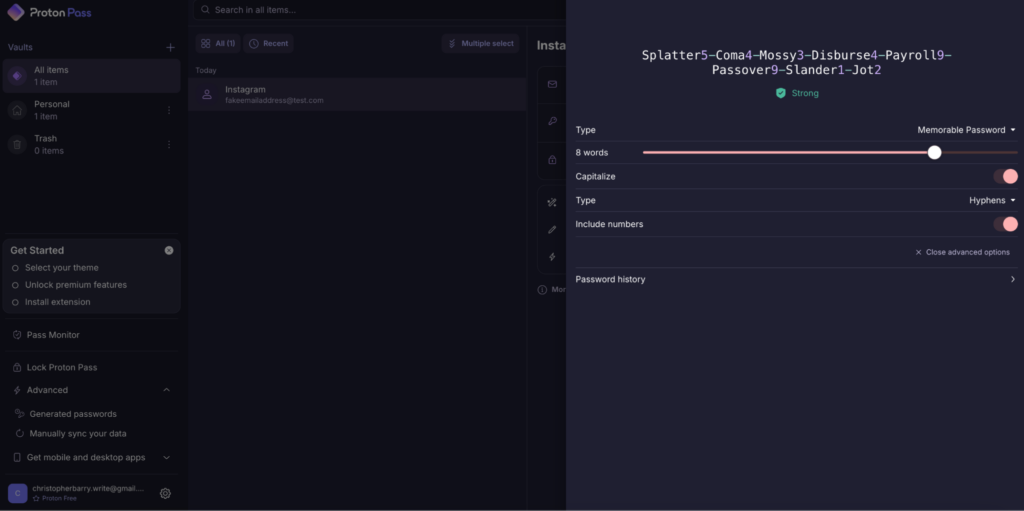
The Proton Pass password generator is useful if you tend to reuse the same passwords. It can create memorable passwords or random strings of up to 64 characters, allowing you full choice in your password’s complexity. These passwords are then immediately stored in your vault so that you don’t forget them.
I found the form autofill feature extremely useful, as it will automatically populate login forms with stored login credentials when you open a website or app that you use frequently. This works similar to Apple’s Keychain feature, automatically entering your email address or username and password when you log into a service, and I found it useful in streamlining my web experience.
Password sharing is another feature that I found useful, allowing you to generate a secure link that lets somebody else access your credentials on a one-time basis. These links can be set to expire after a specific date or when they have been viewed a number of times. While you shouldn’t share secure passwords like banking information, I liked that I could use this feature to share my Netflix login credentials with a partner, for example.
Encryption
Proton Pass employs AES-256 encryption to protect your credentials, the industry standard level of encryption used by premium VPNs and other cybersecurity software. This is end-to-end encryption, meaning that your data is encrypted on your device, and only your master password can decrypt it. Even Proton Pass employees cannot access your vault or read your credentials.
Zero-knowledge architecture
Proton Pass uses zero-knowledge architecture, which means that you are the only person that can access your data. Because encryption begins on your device, Proton Pass cannot unlock your vault or access the data stored within. If the service suffers a breach, your data would remain secure and unreadable. In the event that authorities ever seized server architecture, any data in your vault would remain encrypted.
Two-factor authentication
Two-factor authentication requires a second method of authentication to allow a successful login to your account. Proton Pass uses the 2FA authenticator to generate time-limited one-time passwords (TOTP) inside of the Proton Pass app. This removes the need for a third-party solution, such as Microsoft Authenticator.
Each time you log into Proton Pass, a one-time TOTP code ensures that you’re the only person accessing the software. This reduces the likelihood that your account can be accessed without your knowledge, even if somebody obtains your master passcode. I found this feature useful for increased peace of mind in protecting all of my online accounts.
Proton Sentinel
Proton Sentinel is an innovative and AI-driven feature that analyzes suspicious logins to ensure that you’re the only person accessing your vault. Instead of relying on basic alerts, Proton Sentinel uses behavioral analysis and machine learning to detect unusual sign-in patterns, like unfamiliar locations or devices that don’t match your normal activity. The system can then automatically block the attempt.
Pass Monitor
Pass Monitor is Proton Pass’s built-in security dashboard that regularly checks whether your stored data has been exposed in known data breaches. It routinely scans your saved email addresses and passwords and compares them against verified breach databases. Then, it alerts you if any of your accounts have appeared in a leak. I found this useful to act quickly and change compromised passwords before attackers can exploit them.

What’s more, Pass Monitor also flags weak or reused passwords inside your vault. If you tend to use the same password across numerous sites or rely on something that’s considered weak, it will recommend strengthening it. This is where I found Proton Pass’s built-in secure password generator useful, as it will generate a strong password for you.
Dark web monitoring
Dark Web Monitoring alerts you if your personal data appears on criminal sites. Instead of only checking public breach databases like Pass Monitor, this feature scans known dark web sites where stolen credentials, email addresses, and account data are bought and sold. If your information is detected in one of these places, you’ll receive an alert so you can immediately change any affected passwords.
Email aliases
Email aliases in Proton Pass generate unique, disposable email addresses for any account you create. Instead of signing up to websites with your real email, you can use an alias that forwards messages to your primary inbox while hiding your actual email address. This reduces spam and stops companies from building a profile linked to your real identity. It also helps reduce the risk of phishing and cross-site tracking.
Proton Pass setup and compatibility
When testing Proton Pass, I primarily used a MacBook Air (2024) and Windows PC, though I also tested the native apps for iOS and Android. In my case, I found the user experience consistent across all platforms without any technical issues.
Proton Pass setup
First-time setup of Proton Pass was simple. I created an account on the official website using my email address and password, and while you can download the dedicated app for your device, I signed into my account immediately within my browser.
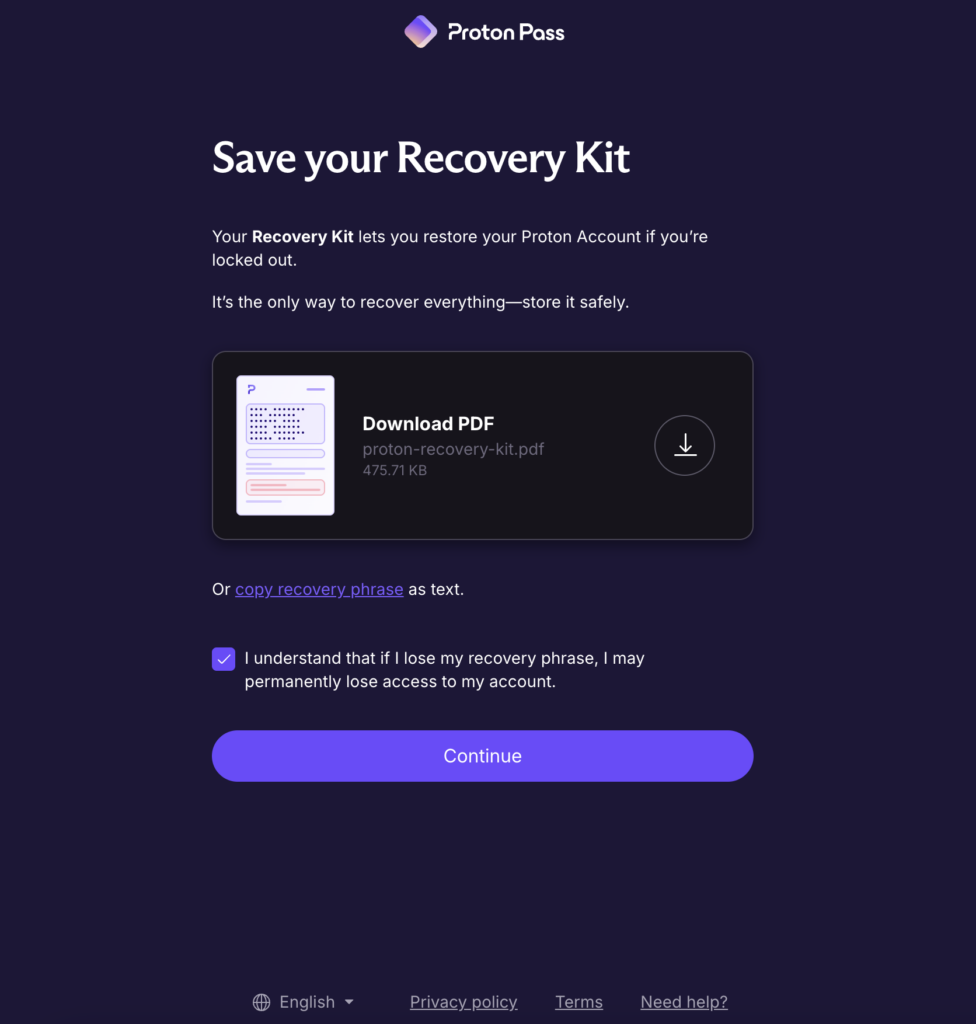
The first time you set up your Proton Pass account, you’re given a PDF download of your recovery kit, which I recommend you save in a safe place. This is the only way to get into your account if you’re ever locked out. Without it, you could lose everything you’ve stored in your Proton Pass vaults.
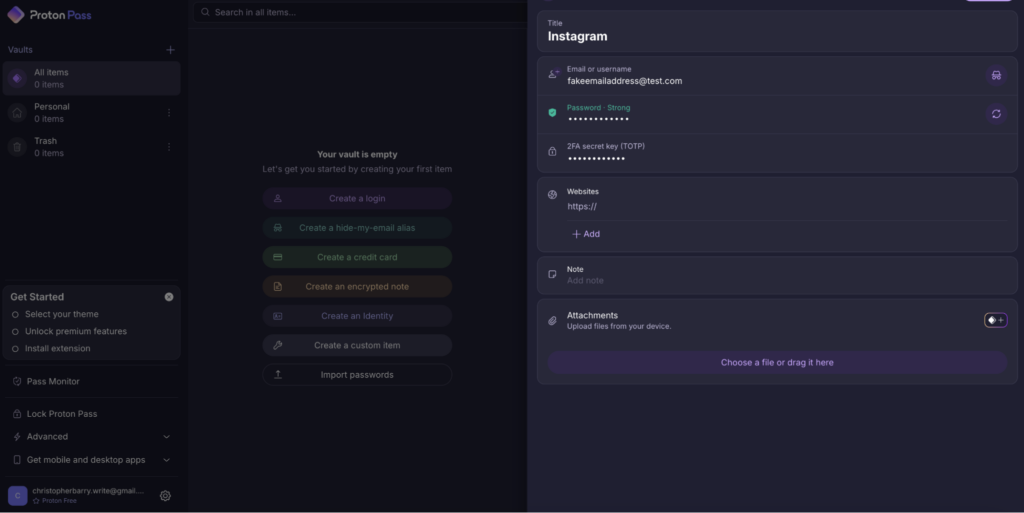
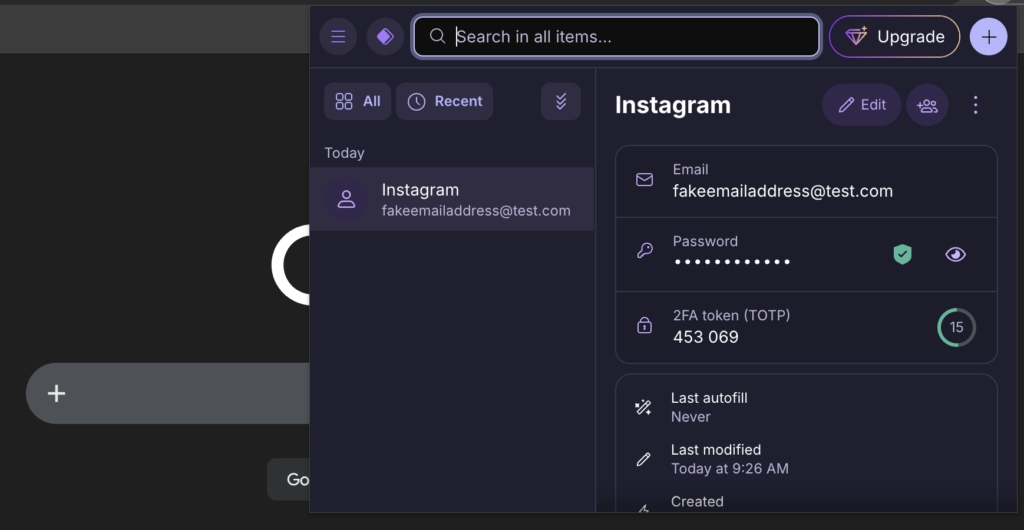
After saving my recovery kit, I opened Proton Pass in the Chrome browser extension and could immediately begin creating and storing my login credentials within my vault. This is where you can also manually create 2FA keys directly in the dashboard for enhanced security when logging in. In my experience, the dashboard is very simple to use and navigate, even for beginners.
Proton Pass desktop apps
Proton Pass performs equally well on both Windows and macOS, with the software appearing identical by design. In both cases, the interface is easy to navigate, with all features accessible in a left-aligned menu bar. In the main dashboard, you can create and manage logins, generate passwords, or review reports from Pass Monitor and Dark Web Monitoring.
While you can download a dedicated app for either operating system, you can also use Proton Pass directly in your browser. What’s more, you can install a dedicated Proton Pass extension to manage your credentials directly within your browser and streamline your secure web usage.
Proton Pass mobile apps
Similar to my experience with Proton Pass on desktop, the mobile apps provide a consistent experience across both iOS and Android. You can quickly create a new credential, alias, note, or password and manage your Pass Monitor and Dark Web Monitoring features using the tabs along the bottom of the screen.
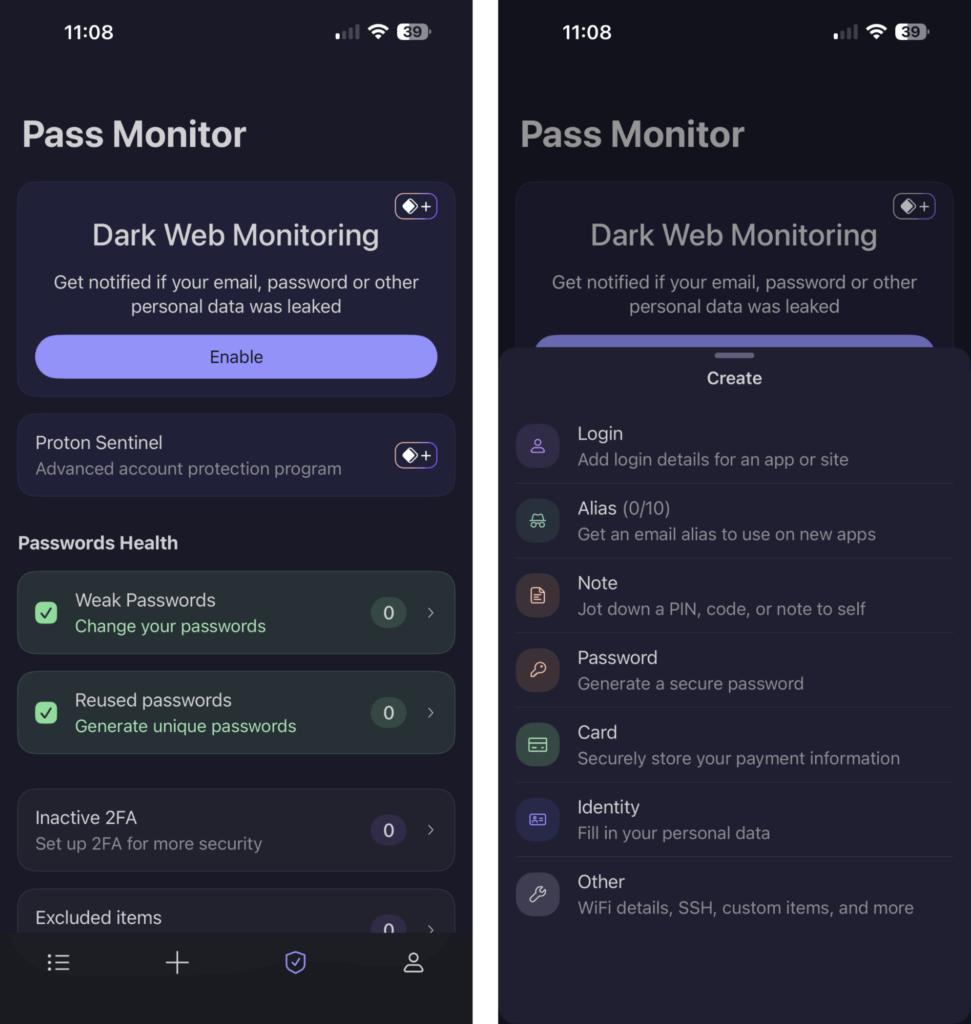
The only technical issue I encountered was when I opened and signed into Proton Pass for the first time on iOS, and the app hung for too long on the password syncing screen. However, after force-closing the app and reopening it, all of my credentials had been imported correctly.
Proton Pass customer support
| Customer support method | Available? |
| Knowledge base / FAQ | ✅ Yes |
| How-to guidance | ✅ Yes |
| Email support | ✅ Yes |
| 24/7 live chat | ❌ No |
| Telephone support | ❌ No |
Proton Pass offers support via email and Zendesk tickets, and there’s a knowledge base with how-to guides available on the website, all of which I found informative. Unfortunately, you cannot access support on the telephone or 24/7 live chat.
When I contacted Proton Pass to test the service response, I received support quickly within the same day. Later, I upgraded my free account to Premium in order to test the full range of features and produce this review. When I tried to get a refund under the 30-day money-back guarantee, the response was prompt, and I got my refund easily without any hassle.
Final verdict: is Proton Pass worth it?
Proton Pass is among our best password managers, offering a respectable free version with unlimited storage, plus affordable premium options. Features such as the secure password generator and email aliases make it simple to improve and protect your credentials and online safety when form filling.
While Proton Pass doesn’t quite beat more feature-rich password managers like NordPass, I recommend it to anyone who wants a free password vault or people looking for an affordable family solution.
Related articles:
FAQ
Yes, Proton Pass is trustworthy and has passed multiple independent audits by Cure53 attesting to its trustworthiness as a secure password manager. Proton Pass is owned by Proton AG, a Swiss company located in privacy-friendly Switzerland. The software is also open-source, which means that anybody can examine the codebase to ensure that nothing is being hidden.
Proton Pass is owned and operated by Proton AG, a cybersecurity company based in Switzerland that also owns services like Proton VPN and Proton Mail. The company has a strong track record as a provider of reputable cybersecurity software, and Swiss jurisdiction means that your data is protected by lax data retention laws.
No, Proton Pass does indeed have a free version that provides 1 user access to unlimited password storage, secure password generation, and password sharing. However, there are also paid plans, including Proton Pass Plus for $ 2.49]/month and Proton Pass Family for $4.99/month. Premium plans grant access to features such as Dark Web Monitoring and Proton Sentinel.
Proton Pass Plus costs $ 2.49/month with a Proton Pass coupon, while the Family plan costs $4.99/month for up to 6 user accounts. Alternatively, you can sign up for free and enjoy unlimited password storage without charge on the Free tier.