- Test Result: Best Password Manager For Families
- Best Family Password Managers: Detailed Results
- How We Selected the Best Password Managers for Families
- Should I Share a Password Manager With My Family?
- How Do I Convince Less Tech-Savvy Relatives to Use a Password Manager?
- In Practise: How Do I Manage a Password Manager Shared With Relatives?
- Wrap Up: Password Managers for Families?
We all know it is difficult to create and remember strong passwords. That’s why many people reuse passwords or use easy passwords such as ‘1234556’. However, simple passwords are easier to crack and can form a risk to the privacy and cyber security of your family.
Password managers are a great solution, since they offer a safe and convenient way manage passwords for your entire family. We have tested the most popular password managers extensively to find the most secure and user-friendly options for your family.
Test Result: Best Password Manager For Families
We have tested 10+ password managers extensively in order to select the best password managers for you to share your password vaults with your spouse, kids and/or parents. These are the best password managers to keep your family safe online:
Best Family Password Managers: Detailed Results
What password manager is the best for your family depends on your needs. We have tested and reviewed the four best family password managers to allow you to make a informed decision. We have tested the browser extensions, desktop apps and mobile apps of each password manager.
For each family password manager we have evaluated the security and the ease-of-use. We have focused especially on the number of users, the way of sharing passwords, user management and other additional features that are useful for families.
NordPass: the most family-friendly password manager in 2025
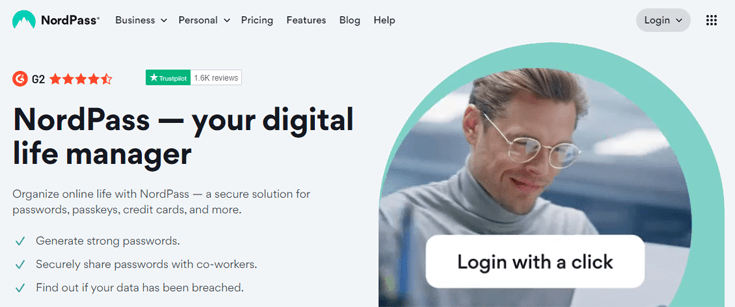
NordPass is part of the cyber security company Nord Security, known for it’s virtual private network NordVPN. NordPass offers top-notch security using the modern XChaCha20 encryption and a zero knowledge architecture. NordPass can keep all your family’s passwords safe.
With the NordPass Family subscription you can create up to 6 premium user accounts for just $2,79, making it the cheapest password manager on our list (you can also check NordPass’s coupon page to look for additional discounts). We are very fond of NordPass’ user-friendly interface that makes it super easy to store passwords. We are sure that your less tech-savvy family members will like this intuitive password manager as well.
NordPass offers a Data Breach Scanner and a Password Health Checker. These tools will help your family increase their online safety. Each family member can detect and change weak and reused passwords. If your login credentials have been compromised the Data Breach Scanner will let you know, so you can take immediate action.
If your kids easily forget their passwords, you are probably very pleased to know that NordPass supports biometric login with face of fingerprint ID. You can also restore accounts with the recovery code if one of your kids lose access.
Pros
- XChaCha20 encryption and a zero knowledge policy
- 6 premium user accounts
- User-friendly interface
- Data Breach Scanner
- Password Health Checker
- Biometric logins and recovery code
Cons
- Doesn't have a support forum
NordPass offers a 30 day money-back-guarantee on it’s family plan. You can also subscribe to NordPass free version to check out the software before you decide.
If you want to know more about NordPass, you can check out our NordPass review.
1Password: safe and user-friendly password manager for the entire family
1Password is great password manager and a secure choice if you are looking for a password manager for your whole family. 1Password’s family plan entails 5 premium accounts and 1 GB of encrypted file storage for each user. Although 5 users will be sufficient for most families, you can add additional users for only $1 a month. You can also check our coupon page for deals that may help you save even more
1Password’s app offers a clear view of the different vaults. In each password vault you can easily find the credentials you are looking for. Credentials can be copied, but you can also use the browser extension and mobile app to autofill items. After the first set up, 1Password works very intuitive.
You get unlimited shared vaults and you can manage permissions for each shared vault. You can also help other family members to recover their account if they get locked out. However, if your family uses biometric authentication, locking yourself out is basically impossible.
1Password uses military grade 256-bit encryption and has a zero knowledge policy. To increase the online safety of your family, we recommend using 1Password’s watchtower. This is a security dashboard with information about data breaches, reused or weak passwords and accounts without 2FA.
Pros
- 256-bit encryption and zero knowledge policy
- 5 premium accounts
- 1GB of storage for each user
- Possibility to add additional accounts for $1
- Biometric authentication and recovery option
- Security dashboard to increase family safety
Cons
- Autofill on mobile needs to be configured before use
You can try each 1Password plan 14 days for free. Unfortunately there is no money-back-guarantee.
Take a look at our 1Password review for more information.
Keeper: password sharing with 10 GB of encrypted storage

Keeper is a secure password manager with 256-bit encryption, a zero knowledge policy and many option for multi factor authentication including biometric authentication. If you subscribe to Keeper’s family plan, you will get 10 GB of encrypted file storage for free. That’s perfect for storing important family documents.
With the Keeper family plan you will get 5 private vaults and the opportunity to securely share unlimited folders and records with other users. In addition, each user can add 5 emergency contacts who can get access to their vault in case of an emergency.
Keeper’s software is easy to understand and use. Even kids and older family members will have no problem working with the Keeper app and browser extension. Keeper’s menu is very straightforward and gives immediate access to stored items, the security dashboard or the data breach monitor.
Keeper also offer an encrypted chat service, called KeeperChat. If you want to exchange encrypted messages with your family members this additional feature can be very convenient. KeeperChat can be used on every smartphone, tablet and computer.
Pros
- 256-bit encryption and zero knowledge policy
- MFA and biometric login
- 10 GB of encrypted storage
- 5 private vaults in one family plan
- Straightforward software with security dashboard
- Encrypted chat service
Cons
- The most expensive password manager on this list
You can give Keeper a try for free for 30 days. The free version will be downgraded to a free plan if you don’t subscribe at the end of the trial. And if you decide to subscribe, look out for Keeper coupon codes to get a discount on your plan.
Do you want to know more? Check out our Keeper review.
Dashlane: the best password manager for big families
Dashlane uses strong 256-bit encryption and has a zero knowledge architecture. You and your family members can sign in with biometric or multi factor authentication. Dashlane helps your family to generate secure passwords and offers dark web monitoring. All in all, we can state Dashlane’s security is alright.
We mainly recommend Dashlane since Dashlane’s Friends & Family plan offers 10 accounts. Each users gets 1 GB of encrypted file storage. That’s makes Dashlane a great choice if you have a big family, or if you wish to share vaults with your extended family. You can easily manage members with the Friends & Family dashboard.
Dashlane is easy to install and use. The apps and extensions are intuitive and creating new items or autofilling credentials is a piece of cake. Importing passwords from another password manager however isn’t as convenient as could be. Dashlane only accepts .csv-files.
Another downside is Dashlane’s transparency. The company does have regular independent audits, but doesn’t share audit reports. We would appreciate it if Dashlane would be more open about it’s auditing process.
Pros
- 256-bit encryption and zero knowledge policy
- MFA and biometric login
- Live dark web monitoring
- 10 premium accounts
- Friends & Family dashboard
Cons
- Importing passwords only possible with csv.-file
- Audit reports aren't available
You can try Dashlane Premium 30 days for free to see it this is the right fit for your family.
How We Selected the Best Password Managers for Families
We have tested 10+ password managers on both desktop and mobile. To select which password managers are the best options for families, we have focused on the following criteria:
- Security: we have selected password managers with military grade encryption and zero knowledge architecture, to make sure they indeed keep your family’s passwords safe. We have also checked if the password managers have regular independent audits.
- Ease-of-use: we think password managers for families should be easy to use for kids and elderly people. That’s why we have focused on the user-friendliness of each password manager.
- Unlimited password storage: the best password managers on our list offer unlimited password storage so you do’t have to worry about minimizing the number of accounts your family has.
- User management: if you share a password manager with your entire family it should be easy to share a password vault and add (or delete) users. Parental control and account recovery are additional features which can come in handy as well. Of course, we have checked if the password managers in our list offer this.
- Number of users: most password managers limit the number of users in their family plans. To make sure to have the right fit for your family we have checked how many accounts you get with each password manager.
- Operating systems: a password manager for families needs to work on all devices in your household. All password managers on our list function on MacOS, Windows, iOS and Android.
- Additional features: some password managers have additional features to increase the safety of your family, such as a password health checker, data breach monitoring, encrypted storage, or emergency access. We have checked all password managers in our list for these features.
Should I Share a Password Manager With My Family?
We recommend to share a password manager with your family to simplify and protect your families digital life. Sharing a password manager with your spouse and kids has the following advantages:
- You can safely share passwords or password vaults among family members.
- You can safe costs by sharing accounts, such as Netflix or Hulu.
- You can encourage everybody in your family to generate strong passwords or passphrases with the password generator each password manager offers.
- You can increase the password safety of your family by using the security dashboard and change old, reused or weak passwords.
- You get an alert when you have compromised passwords in your vault.
- You can set up emergency access in case something happens with a family member, for example your spouse gets hospitalized and you need access to their accounts.
Most password managers offer family plan in which sharing passwords is made easy. Each family member can access it’s own private vault and vaults which have been shared with them.
How Do I Convince Less Tech-Savvy Relatives to Use a Password Manager?
Less tech-savvy relatives such as grandpa or grandma might not be over the moon about a password manager at first. Maybe they prefer memorizing passphrases or writing down passwords. However, these methods aren’t safe and often lead to weak and reused passwords.
To increase the online safety of your family it is important to get all family members on board. You could use the following argument to convince everybody in your family of the need of one of the best password managers:
- It is easier and safer to remember just one strong master password, in stead of many weak passwords.
- A password manager makes it easy to generate strong passwords or passphrases for all of your accounts. Most password managers have a security dashboard that indicates which passwords needs to be changed. That’s great for password management.
- With autofill or passkeys signing in to your accounts will be a piece of cake. You can use these option with the browser extension or with the mobile apps.
- A password manager is the best option for secure password sharing, reducing the risks of leaked passwords. As as result, this reduces the risk of fraud or further data breaches in which sensitive information can be stolen.
- Sharing accounts can save a family a lot of money, since not every family member needs its own subscription to streaming services.
- Emergency access to family member’s private password vault can be very handy in case someone gets hospitalized or worse.
To further convince less tech-savvy family member we advise to help them with setting up their account and show them how to use the vault and it’s features. This can help them to get used to the password manager.
In Practise: How Do I Manage a Password Manager Shared With Relatives?
With a family password manager you get multiple accounts with just one subscription. Each family member should set up their own private vault. Besides this individual vault, you can create multiple shared vaults, for example for paperwork and entertainment. The most tech-savvy person in the family should be in charge of the management of the shared vaults.
Once you have got the vaults, your family can start using them. Each new item can be saved in a private or a shared vault. We advise to set clear rules about which accounts should be shared to avoid family members accessing each others private accounts.
It is also advisable to set rules about password safety. Encourage family members to create strong master passwords, use the password generator for new accounts and assess the safety of older passwords using the security dashboard.
One last tip, set up emergency access. This allows you to access the private vaults of family members in case of an emergency. This can be very convenient if something happens and you need to access their accounts.
Expert tip: how to set up your family password vaults?
If you have never shared vaults before, you might be wondering how many vaults you need. This depends of course on your family’s needs. Below we provide a example of the vaults from a regular family.
This family consist of two parents and two children. They also share passwords for streaming services with the father’s brother: uncle Bob. Besides that, they take care of grandma’s digital life because she isn’t tech-savvy and can’t do this herself.
The set up of the vaults for this family might look like this:
- A private vault for each user. This vault can contain passwords for social media, email and other private accounts.
- A paperwork vault to which only the parents have access. This vault contains the credentials for insurance companies, electricity and water suppliers, the ISP et cetera.
- An entertainment vault for the whole family containing credentials for streaming services. This vault is also shared with uncle Bob to allow him to use the family’s streaming services.
- A travel vault with copies of passports, tickets and other important documents. This vault is managed by the mother, who usually books flights and hotels. Uncle Bob also has access to this vault so he can out in case of an emergency.
- Grandma’s vault with most of Grandma’s accounts. Since grandma isn’t tech-savvy her grandson has access to this vault. He helps her out with day-to-day digital life. Her son also has access to her vault, allowing him to manage his mother’s affairs in case she is no longer able to do this herself.
Each parents can access a personal vault and the other vaults. Other family member have restricted access.
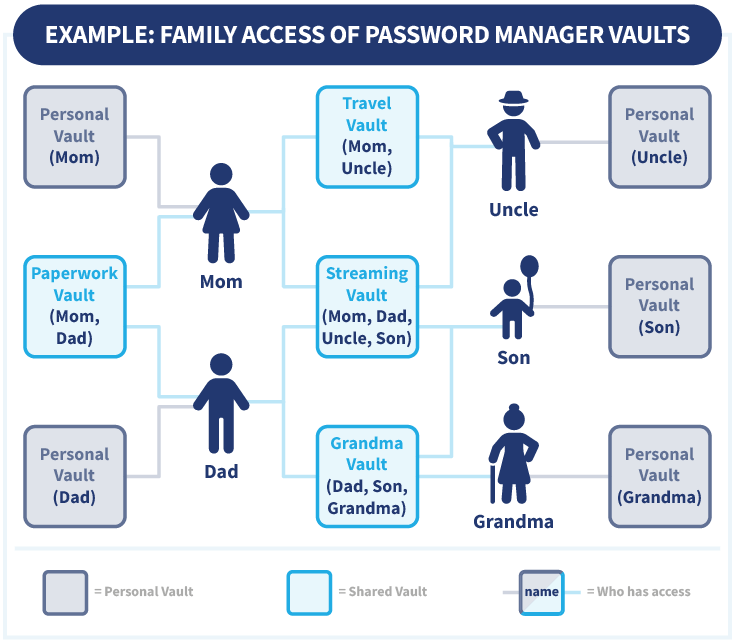
This structure can be extended with additional vaults.
Wrap Up: Password Managers for Families?
A password manager is indispensable for the online safety of your loved ones. With a password manager for your entire family each family member can easily generate strong passwords and decrease the risk of being hacked. Moreover, a password manager let’s you share account in a secure way.
Although each family’s needs are different, we recommend NordPass as the best password manager for families. NordPass’ family plan offers a military grade encryption, a zero knowledge policy and 6 premium accounts for just $2,79 a month. You can try a free version of NordPass Premium for 30 days.
Do you want to know more about the best password managers? Check out these articles:
- Best Black Friday Password Manager deals
- RoboForm password manager review
- Best Free Password Manager
- Best Password Manager for iPhone: Simple & Secure
- Keeper vs. 1Password: Safe Credential Storage Compared
- NordPass vs. 1Password: Account Security Made Easy
Do you have any questions about the best password manager for families? Check out our frequently asked questions to find the answer?
NordPass is a great password manager for families which is really easy to use. You can effortlessly create multiple folders and share them with your family members. With NordPass’ family plan you can set up 6 different accounts.
Most password managers offers family plans. With these plan you can set up multiple private vaults and shared vaults. This is a safe and convenient way to share accounts with your spouse, kids or parents.
We have tested 10+ password managers. According to our research NordPass is the best option for families. NordPass’ family plan is affordable and let’s you manage 6 accounts. Sharing vaults or setting up emergency access is simple and straightforward.
We recommend NordPass’ family plan to share password with your spouse in a secure way. You can easily create shared folders. For each new item you can decide whether you want to store it in a private or shared vault.
Older adults might not be very tech savvy. They might think setting up a password manager is difficult and feel more confident in memorizing or writing down passwords. However, these methods often lead to weak or reused password.
If you want to convince older relatives to use a password manager you should point out the benefits of it, such as:
- remembering only one strong password
- easy access to all your accounts
- securely share password with relatives
- emergency access
Most couples share at least some passwords, such as credentials for streaming services or for joint facilities, such as your ISP or electricity supplier. Besides that, you can set up emergency access with a password manager. With emergency access you can access your partners private accounts in case of an emergency.
Of course there are downsides of sharing a password with family. Sharing passwords might lead to misuse of accounts, for example by making unauthorized purchases. It might also lead to loss of privacy depending on the accounts you share with family members.