- How to access Apps in ChatGPT in the EU and the UK with a VPN?
- Why Apps in ChatGPT are geo-restricted?
- ChatGPT Apps availability by country
- How to access ChatGPT Apps in the EU and UK: a detailed guide
- Best VPNs to unblock ChatGPT Apps in the EU and UK
- Apps in ChatGPT not working with VPN: quick fixes
- Conclusion
- FAQ
In October 2025, OpenAI launched Apps in ChatGPT, a feature that plugs services like Spotify, Canva, Booking.com, Coursera, Figma, and more straight into the chat. That turned ChatGPT into a much more useful tool: create playlists, design graphics, and search travel deals without switching tabs.
Rollout is uneven, the US has the broadest coverage, and Apps in ChatGPT are not available in the EU yet, as OpenAI hasn’t rolled them out there. From the UK, Canada, and Australia, I saw partial availability. I tested this myself: the Apps tab wasn’t present on my EU account, but when I connected to a US VPN server, the Apps tab appeared and worked normally.
That means, in plain terms:
- Apps in ChatGPT are not rolled out in the EU, and they’re unavailable there right now.
- The US has the broadest coverage, and many UK, Canada, and Australia users get partial access.
- Connecting to a US VPN server will normally unlock Apps, even for EU-registered accounts.
- You may need to clear cookies, use a private window, or try a different US node if the tab doesn’t appear immediately.
The solution that worked for me was to connect to a US VPN server. Below, I explain exactly which settings I used, what worked reliably, and how you can try it too.
How to access Apps in ChatGPT in the EU and the UK with a VPN?
- Get a reliable VPN with US servers. I recommend NordVPN, now 73% off, proven to unblock ChatGPT Apps
- Download the VPN app and install it on your device
- Open VPN and connect to a US server (New York, Chicago or Los Angeles)
- Go to chat.openai.com, and sign in
- Look for the Apps tab, you should now see Spotify, Canva, Booking.com, etc.

Why Apps in ChatGPT are geo-restricted?
Apps in ChatGPT are third-party integrations that call external services from inside the chat interface. OpenAI is rolling the feature out gradually for legal, licensing, and compliance reasons, and some integrations require separate agreements with each service provider and localized support. Because of that, availability is tied to country and to account status.
I tried accessing Apps from my UK and Canadian accounts, and at first, the tab simply wasn’t there. After I connected to a US server, it appeared, but when I tried from an EU account, it was not available at all, even after multiple attempts.
ChatGPT Apps availability by country
Below is a country-first snapshot of ChatGPT Apps availability, plus the quickest, tested way I used to unlock ChatGPT apps from the UK, EU, Canada, and Australia by connecting to a US VPN server.
| Region | Apps in ChatGPT (Booking.com, Canva, Spotify, etc.) | “Coming soon” apps (DoorDash, OpenTable, Target, Uber) | Operator / AI agent (Pro users) | How to bypass restriction with VPN |
|---|---|---|---|---|
| UK | ⚠️ Partial / rolling out | ❌ Not rolled out | ⚠️ Early rollout | Connect NordVPN, US server (New York / Chicago), protocol NordLynx, enable Obfuscated servers if needed, clear cookies & re-login, Get NordVPN → |
| EU | ❌ Not rolled out (EU) | ❌ Not rolled out | ❌ Not rolled out | Connect NordVPN, US server (New York / Chicago), try Dedicated IP if standard servers are blocked, NordLynx + clear cookies & re-login, Bypass geo-block with NordVPN → |
| CA | ⚠️ Partial / rolling out | ❌ Not rolled out | ⚠️ Early rollout | Connect NordVPN, US server (New York / Los Angeles), NordLynx, incognito + re-login, Get NordVPN → |
| AU | ⚠️ Partial / rolling out | ❌ Not rolled out | ⚠️ Early rollout | Connect NordVPN, US server (closest low-latency node), enable Obfuscated servers if blocked, clear cookies & re-login, Unblock with NordVPN → |
| US | ✅ Fully rolled out | ❌ Not rolled out | ✅ Live rollout | — |
How to access ChatGPT Apps in the EU and UK: a detailed guide
The easiest way I found to access Apps in ChatGPT from the UK, the EU, Canada, or Australia is to connect to a US VPN server. Apps in ChatGPT plug services like Spotify, Canva, Booking.com, Coursera, Figma, and more directly into the chat, but rollout is uneven. The US has full coverage, and the EU has not been rolled out locally yet. I tested this flow myself, and with a US VPN server, the Apps tab appeared and worked normally, even on accounts that showed no Apps without a VPN.
Here is my step-by-step guide, with the exact steps I used to access Apps in ChatGPT from anywhere:
Step 1. Choose a trustworthy VPN provider
To unlock ChatGPT Apps from another region, you need a VPN with many US servers, fast speeds, and good anti-block features. I recommend NordVPN for reliability and consistent performance, and it worked for me during testing. NordVPN offers obfuscation and a dedicated IP option, as it helps if your ISP or OpenAI flags shared IP ranges.
Black Friday offer! Get 78% OFF NordVPN + 3 months free
Step 2. Download and install the VPN on your device
Download and install the official VPN app for your OS, and use the desktop client for the best control. Follow the provider’s installation steps and sign in. On mobile, use the App Store or Google Play version. Allow the permissions the app requests so it can create the secure tunnel.
Step 3. Launch the VPN and connect to the US server
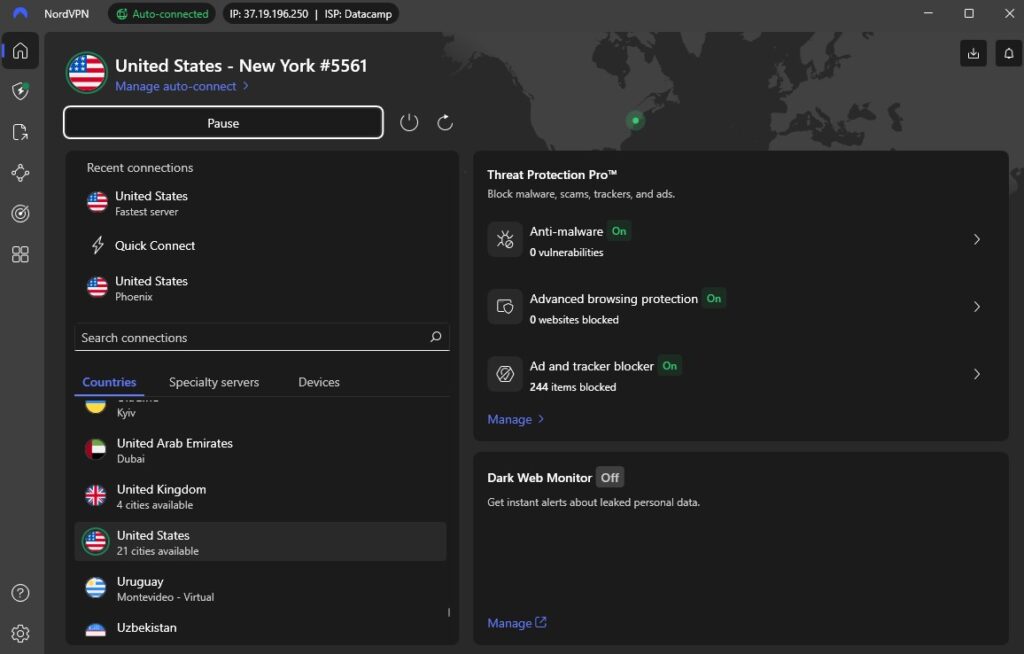
I started with New York and Chicago, and these server locations worked best for me. After the VPN shows the US IP, clear your browser cookies or open an incognito/private window, which prevents old session data from leaking your real region.
Step 4. Sign in to ChatGPT and use the Apps in your chats
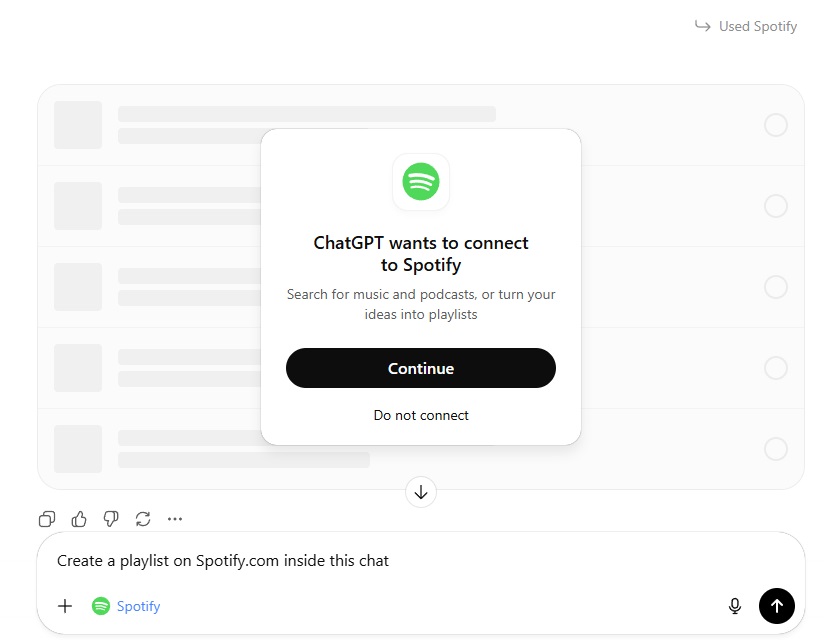
With the US VPN active, go to chat.openai.com and sign in. I asked ChatGPT to create a Spotify playlist and to open Canva, and both worked after I reauthorized the services.
Best VPNs to unblock ChatGPT Apps in the EU and UK
Not all VPNs are strong enough to bypass geo-blocks and maintain reliable connections. I tested and picked the top 3 VPN services for ChatGPT Apps in the EU, UK, Canada, and Australia. These VPNs consistently unblock Apps in ChatGPT from anywhere, and it is proven in October 2025.
- NordVPN: best overall for unlocking Apps in ChatGPT. I found NordVPN the most reliable when I tested unlocking Apps by connecting to US servers. It has a huge server network, excellent speeds (important for responsive AI sessions), and features that matter for this use case — NordLynx for performance, obfuscated servers if a node is flagged, and the option of a dedicated IP. In my tests NordVPN consistently unlocked the Apps tab and gave the fastest, smoothest experience.
- Surfshark: best value, very capable VPN for ChatGPT Apps. Surfshark is fast and affordable, and it lets you protect unlimited devices at once. It reliably unblocked Apps for me in most tests, and it’s a good budget option if you need to run ChatGPT across phone, tablet and laptop without extra licenses.
- Proton VPN: privacy-first Apps in ChatGPT VPN option with a free tier. Proton VPN is ideal if you prioritise privacy and want a no-logs provider. The free plan can work for basic unblocking tests, but paid tiers give better speeds and stability for interactive use with ChatGPT Apps.
All three providers can unlock Apps in ChatGPT by connecting to US servers, but NordVPN was the most consistent and fastest.
If you hit blocks, try NordLynx (or Surfshark’s WireGuard), enable obfuscated/stealth servers, or request a dedicated IP.
NordVPN’s trial / money-back 30-day guarantee makes it easy to test risk-free and confirm it works from your location.

Apps in ChatGPT not working with VPN: quick fixes
- Connect to a US server, try New York, Chicago, or Los Angeles, and use the fastest protocol available (I use NordLynx).
- Use a desktop browser, not the mobile app, especially from EU accounts, as the desktop web UI is more reliable for Apps.
- Open a fresh private/incognito window and clear cookies for chat.openai.com before logging in.
- Disable browser and OS location so the site can’t read your real region.
- Sign out of ChatGPT and sign back in while the VPN is active, then check the left sidebar for the Apps tab.
- If an embedded app fails to authenticate, log out of that third-party service inside ChatGPT, reconnect the VPN, and reauthorize while on a US IP.
- Try a different US server if the tab doesn’t appear, as some IP ranges get flagged more often.
- Enable obfuscated/stealth servers or switch protocol if your ISP or OpenAI flags the VPN traffic.
- Consider a dedicated IP if shared IPs keep getting blocked, as it reduces detection and fixes repeat issues.
- If performance is poor, switch to a lower-latency US node, or test from another desktop browser (Chrome, Edge, Firefox).
- Still stuck? try desktop + different US node + clear cookies + re-login in that order. If it still fails, contact your VPN support and OpenAI support for help.
- Change your VPN to a more reliable one, like NordVPN, proven to access Apps in ChatGPT as of October 2025.
Conclusion
Apps in ChatGPT are not rolled out everywhere. While the US has full access, the UK, Canada, and Australia see partial rollout, and the EU hasn’t received a local release yet. For users in those regions, that means the ChatGPT Apps tab can be missing, so you can’t create Spotify playlists, open Canva, or use other integrations from your account.
A VPN, connected to a US server, is the quickest way to access ChatGPT Apps from anywhere. In my tests, connecting to a US server (New York or Chicago), using a desktop browser, clearing cookies, and re-logging instantly restored the Apps tab. I recommend NordVPN as a reliable option that worked consistently for me. NordVPN’s large US server network, fast NordLynx protocol, obfuscated servers, and dedicated IP options made it the most dependable choice during testing.
Related articles:
- Bypass age verification for adults in UK
- How to access Sora 2 in EU and UK
- How to access ChatGPT 5 from anywhere
- How to bypass YouTube’s age verification
- How to access Grok AI Video generator from anywhere
- How to bypass Spotify age verification
FAQ
Yes, in my tests connecting to a US VPN server unlocked the Apps tab for EU-registered accounts. Make sure you clear cookies, use a desktop browser and sign in again while the VPN is active. If the Apps still don’t appear, try a different US node, enable obfuscation or request a dedicated IP.
Start with New York and Chicago, they worked best for me, and try Los Angeles if you have lower latency from your location. If one US server fails, switch to another one and re-login.
Use a desktop browser first, the web UI is more reliable for Apps and for authorising third-party integrations. Mobile can work, but I found desktop to be faster for troubleshooting.
Use a modern protocol like NordLynx or WireGuard for speed, enable obfuscated or stealth servers if you hit blocks, and consider a dedicated IP if shared IPs are repeatedly flagged.er
NordVPN gave me the most consistent results in testing, it has a large US network, very fast NordLynx performance, and built-in obfuscation plus dedicated IP options that reduce detection and improve reliability.
If you’re in the UK, Imgur images embedded on Reddit, forums, or any other site won’t load because Imgur is blocking UK IPs. Those broken image links are a result of Imgur’s UK-wide block. When you try to view an embedded Imgur picture, your browser still has to fetch it from Imgur’s servers – which refuse the request if you’re in the UK. The solution is the same: use a VPN and connect to a non-UK location. Once your IP address is outside the UK, those Imgur images will load normally on Reddit and elsewhere.