
- Our recommended VPN for Channel 4
- Why do you need a VPN to watch Channel 4 in the US?
- How to watch Channel 4 outside the UK with a VPN
- Best VPNs for Channel 4
- Compare Channel 4 VPNs
- How to watch Channel 4 in the US with a VPN: a detailed guide
- Channel 4 not working with a VPN? Here’s how to fix
- Is there a free VPN for Channel 4?
- Final thoughts
- FAQ
Channel 4 is only available in the UK because of licensing restrictions, so you’ll need a VPN to watch it in the US. Based on our tests, NordVPN is the best VPN for Channel 4, offering 440+ UK servers and strong geo-unblocking.

Channel 4 is a free UK streaming service, but it’s geo-blocked outside the UK due to licensing restrictions. For instance, if you’re in the US and try to access Channel 4, you’ll see a location error unless you use a VPN to get a UK IP address. A VPN lets you connect to a UK server, which automatically gives you a British IP address and bypasses Channel 4 geo-restrictions, allowing you to access it from abroad.
However, Channel 4 actively blocks many VPNs, so choosing a reliable service is essential. After testing 23+ VPN providers, NordVPN, Surfshark, Proton VPN, TotalVPN, and Norton VPN proved to be the best VPNs for Channel 4, offering dependable UK servers, fast speeds, and strong geo-unblocking capabilities.
Read on to find out the best VPNs for Channel 4 and how to watch Channel 4 in the US in 2026 step by step.
Our recommended VPN for Channel 4
-
1.NordVPN: best VPN for watching Channel 4 in the US with over 440 UK servers
-
2.Surfshark: affordable VPN to watch Channel 4 in the US on unlimited devices
-
3.Proton VPN: privacy-focused VPN that works with Channel 4 outside the UK
-
4.TotalVPN: cheap VPN for unblocking Channel 4 from the US
-
5.Norton VPN: easy-to-use VPN to access Channel 4 in the US
Why do you need a VPN to watch Channel 4 in the US?
Channel 4 is geo-blocked outside the UK because of licensing restrictions, so viewers in the US need a VPN to access it. If you try to access it from the US or any other unsupported country, you’ll see the error: “Channel 4 is only available in the UK.”

To bypass this restriction and access Channel 4 from the US, you need to use a VPN with servers in the UK. When you connect to a UK server, a VPN assigns you a British IP address, making it seem like you’re streaming from within the country.

How to watch Channel 4 outside the UK with a VPN
- Get a reliable VPN that works with Channel 4. I recommend NordVPN, with over 440 UK servers.
- Download and install the VPN app on your device.
- Connect to a UK server to get a British IP address.
- Open the Channel 4 website or app and sign in or create a free account.
- Start streaming Channel 4 content from outside the UK.
Best VPNs for Channel 4
The best VPNs for Channel 4 should reliably bypass UK geo-restrictions, avoid VPN detection, and deliver fast, stable streaming speeds. They also need to have a solid network of UK-based servers to prevent server overcrowding, streaming buffering issues, or access errors. After testing 23+ VPNs, NordVPN, Surfshark, Proton VPN, TotalVPN, and Norton VPN stood out as the best Channel 4 VPNs due to their stable UK connections, effective geo-unblocking, and an overall hassle-free streaming experience.
To find the best VPNs for watching Channel 4 in the US, I tested each provider against real-world streaming conditions. Every VPN had to reliably unblock Channel 4, maintain stable speeds, and work consistently without triggering geo-block errors. Only VPNs that passed all criteria made it onto this list.
- Can the VPN unblock Channel 4 from outside the UK? I tested each VPN by connecting to UK servers and accessing Channel 4 from the US. VPNs had to consistently bypass geo-restrictions without showing location errors or blocking messages.
- Does it have enough UK servers? Channel 4 actively blocks VPN IPs, so a strong UK server network is essential. I prioritized VPNs with multiple UK locations to ensure reliable access if one server was blocked.
- Is it fast enough for smooth streaming? During speed testing, I measured download speed retention and stream stability. VPNs had to deliver smooth HD playback without buffering, even during peak hours.
- Can it avoid VPN detection? I checked whether features like obfuscation, SmartPlay, or proprietary protocols helped reduce VPN detection. VPNs that required frequent reconnecting were excluded.
- Does it offer good security and value? Strong encryption, a kill switch, and a no-logs policy were mandatory. I also evaluated pricing, free trials, and money-back guarantees to ensure each VPN offers good value for watching Channel 4 abroad.
1. NordVPN – best overall VPN for Channel 4
- Rating: 9.3 ⭐⭐⭐⭐⭐
- Servers in the UK: 440+ servers in Edinburgh, Glasgow, London, and Manchester
- Price: From $ 3.49/month, 75% OFF
NordVPN is the best VPN to stream Channel 4 in the US, delivering the most reliable access during my testing. It consistently unblocked Channel 4 without errors, offered fast speeds, and avoided the platform’s strict VPN detection with ease.
NordVPN operates 440+ servers in the UK, which are spread across London, Manchester, Edinburgh, and Glasgow, giving you plenty of fallback options in case one IP gets blocked. During testing, I successfully accessed Channel 4 multiple times when switching between different UK servers, and I noticed that London-based servers worked the most consistently. Streams loaded instantly in HD, and I didn’t encounter any buffering or playback errors.
In speed tests, NordVPN retained around 91% of my base connection speed, making it slightly faster than Surfshark and noticeably more stable than TotalVPN or Norton VPN. Features like SmartPlay work automatically in the background, helping you stay undetected by Channel 4 with zero manual setup required. I also recommend keeping the NordLynx protocol enabled for the best performance.
On the security side, NordVPN includes strong AES-256 encryption, a strict, independently audited no-logs policy, and a built-in Threat Protection tool for safer streaming.
For watching Channel 4 from the US, NordVPN offers plans at $ 3.49/month and includes a 3-day free trial on Android, plus a 30-day money-back guarantee. All this and more make it the safest and most cost-effective way to watch Channel 4 from the US risk-free.
Things I like
- 440+ UK servers across London, Manchester, Edinburgh, and Glasgow for reliable Channel 4 access
- Works on a wide range of devices, including Fire TV Stick, Apple TV, smartphones, and desktops
- Consistently unblocks Channel 4 with fast, stable streaming performance using NordLynx
- Risk-free testing with a 30-day money-back guarantee and a 3-day free trial on Android
Things I didn't like
- Only 10 simultaneous connections
2. Surfshark – affordable VPN for Channel 4 outside the UK
- Rating: 9.0 ⭐⭐⭐⭐⭐
- Servers in the UK: 440+ servers in Edinburgh, Glasgow, London, and Manchester
- Price: From $ 2.49/month, 85% OFF
Surfshark is the best budget VPN for Channel 4, offering reliable unblocking at one of the lowest prices available. During my tests, I managed to access Channel 4 consistently without buffering, even when streaming during busy evening hours.
Surfshark operates over 440 UK servers across London, Manchester, Glasgow, and Edinburgh, which are essential for bypassing Channel 4’s geo-restrictions. With Surfshark, I simply connected to a UK server, opened Channel 4, and started streaming immediately – no special settings or manual tweaks needed, and no errors encountered. Overall, Surfshark handled Channel 4 well and proved to be far more reliable than many other low-cost VPNs.
In speed testing, Surfshark retained around 87% of my base speed, placing it just behind NordVPN but ahead of Proton VPN for streaming stability. HD streams played smoothly without quality drops, and I didn’t run into any buffering issues.
I especially liked Surfshark’s clean, beginner-friendly interface and its unlimited device connections, which make it an ideal VPN for families or households with multiple devices. On the security side, Surfshark includes AES-256 encryption, a strict no-logs policy, and features like Camouflage Mode to hide VPN usage. Its CleanWeb feature also blocks ads and trackers, adding an extra layer of protection while streaming.
Surfshark is one of the cheapest ways to stream Channel 4 from the US, with pricing starting at just $ 2.49/month. You also get a 7-day free trial and a 30-day money-back guarantee, so you can try it without risk.
Things I like
- 440+ UK servers across London, Manchester, Glasgow, and Edinburgh
- Beginner-friendly apps with quick server switching
- Budget-friendly pricing starting at just $ 2.49/month
- Unlimited device connections for streaming Channel 4 on multiple devices at once
Things I didn't like
- Some more advanced add-ons are priced separately
3. Proton VPN – security-focused Channel 4 VPN
- Rating: 8.9 ⭐⭐⭐⭐
- Servers in the UK: 733+ servers in Edinburgh, Cardiff, London, Manchester, and Belfast
- Price: From $ 2.99/month, 70% OFF
Proton VPN is the best privacy-focused VPN to watch Channel 4 abroad, combining strong unblocking performance with industry-leading security. During my tests, I successfully accessed Channel 4 multiple times without location errors, even when connected to stricter public and office Wi-Fi networks.
Under its Plus plan, Proton VPN operates 733+ UK servers across London, Manchester, Cardiff, Edinburgh, and Belfast. Switching between servers was quick, and when one server slowed down, I simply changed to another and continued streaming Channel 4 with zero interruptions. Also, do keep in mind that Proton VPN’s free plan doesn’t include UK servers, so a paid subscription plan is needed to unblock Channel 4.
During speed testing, Proton VPN retained around 86% of my base speed while using WireGuard and Proton’s VPN Accelerator feature. While it was slightly behind NordVPN speed-wise, it was more than enough for smooth HD streaming.
On the security side, Proton VPN stands out with its open-source apps, Swiss jurisdiction, a strict no-logs policy, and NetShield ad and tracker blocker. However, its more technical interface makes it less beginner-friendly, and it lacks Smart DNS support for some smart TVs.
For a secure and straightforward way to watch Channel 4 from the US, Proton VPN offers plans starting at $ 2.99/month, and includes a 30-day money-back guarantee for risk-free testing. It’s a strong choice for users who prioritize robust security while streaming.
Things I like
- 733+ UK servers on the Plus plan, making it reliable for unblocking Channel 4 from abroad
- Strong privacy protections with Swiss jurisdiction, a strict no-logs policy, and open-source apps
- Solid streaming performance with WireGuard and VPN Accelerator, fast enough for HD streaming
Things I didn't like
- The free version doesn’t include UK servers, so it can’t be used to watch Channel 4
4. TotalVPN – low-cost VPN for Channel 4 in the US
- Rating: 7.0 ⭐⭐⭐
- Servers in the UK: servers in Coventry and London
- Price: From $ 1.59/month, 80% OFF
TotalVPN is a solid, low-cost VPN for watching Channel 4 outside the UK, especially if you want something simple and affordable. During my testing, I managed to unblock Channel 4 most of the time, and when access failed, switching to a different UK server would fix the issue.
TotalVPN has UK servers in London and Coventry, which is quite limited compared to NordVPN or Proton VPN, especially considering its 1800+ servers worldwide. Still, I was able to access Channel 4 reliably enough for casual streaming of my favorite shows.
In speed tests, TotalVPN reached around 351Mbps, making it the slowest on this list. That said, it was still fast enough for smooth HD streaming, though speeds dipped slightly during peak hours. On the plus side, TotalVPN apps are very beginner-friendly, with a clean interface and no unnecessary settings, and I didn’t experience any random disconnects.
From a security standpoint, TotalVPN covers the basics with AES-256 encryption, a kill switch, and standard IP protection, which is enough for safe everyday streaming.
If you’re after a low-cost VPN for Channel 4, then TotalVPN might be right up your alley. Plans start at $ 1.59/month, making it one of the budget-friendly ways to stream Channel 4 from abroad. Plus, you can test it out completely risk-free with the 30-day money-back guarantee.
Things I like
- UK servers in London and Coventry
- Simple, beginner-friendly apps with no unnecessary settings
- Includes essential security features like AES-256 encryption and a kill switch
Things I didn't like
- Limited UK server locations compared to premium VPNs
5. Norton VPN – easy-to-use VPN for watching Channel 4 abroad
- Rating: 7.0 ⭐⭐⭐
- Servers in the UK: servers in Edinburgh, Glasgow, London, Manchester, and Nottingham
- Price: From $ 3.33/month, 54% OFF
Norton VPN is a beginner-friendly VPN for Channel 4, offering reliable access without complicated setup. During my testing, I managed to unblock Channel 4 consistently, and streams loaded smoothly without needing to tweak advanced settings.
Norton VPN provides UK servers across London, Manchester, Edinburgh, Glasgow, and Nottingham, which gave me enough options if one server didn’t work right away. I simply connected to a UK location and accessed Channel 4 without running into location errors. While it doesn’t offer the same server depth as NordVPN, it proved reliable for casual streaming.
In speed testing, Norton VPN reached around 365Mbps, making it slightly faster than TotalVPN but still behind NordVPN and Surfshark. That said, speeds were stable enough for HD streaming without buffering. One standout feature is Mimic protocol, which helps obfuscate VPN traffic and reduces the chance of VPN detection by streaming platforms like Channel 4.
From a security standpoint, Norton VPN includes AES-256 encryption, a kill switch, and automatic protection, covering all the essentials for safe streaming. However, it lacks advanced features and doesn’t support Android TV or Amazon Fire TV Stick, which limits its appeal for power users.
For those looking for an easy, low-risk VPN to watch Channel 4 from the US, Norton VPN is available for $ 3.33/month. It includes a 30-day free trial and a generous 60-day money-back guarantee, giving you plenty of time to test it risk-free.
Things I like
- UK servers in London, Manchester, Edinburgh, Glasgow, and Nottingham
- Mimic protocol helps obfuscate VPN traffic and reduces VPN detection issues
- Successfully unblocks Channel 4 from the US with stable UK server options
Things I didn't like
- No support for Android TV or Amazon Fire TV Stick
Compare Channel 4 VPNs
| VPN for Channel 4 | Rating | Works with Channel 4? | Servers in the UK | Speed | Price | Free version? |
| 1. NordVPN | 9.3⭐⭐⭐⭐⭐ | ✅ Yes | 440+ UK servers in Edinburgh, Glasgow, London, and Manchester | 431Mbps | $ 3.49/month | ✅ Yes, 3-day free trial / 30-day money-back guarantee |
| 2. Surfshark | 9.0 ⭐⭐⭐⭐⭐ | ✅ Yes | 440+ UK servers in Edinburgh, Glasgow, London, and Manchester | 414Mbps | $ 2.49/month | ✅ Yes, 7-day free trial / 30-day money-back guarantee |
| 3. Proton VPN | 8.9 ⭐⭐⭐⭐ | ✅ Yes | 733+ UK servers in Edinburgh, London, Manchester, Cardiff, and Belfast | 400Mbps | $ 2.99/month | ✅ Yes, free version / 30-day money-back guarantee |
| 4. TotalVPN | 7.0 ⭐⭐⭐ | ✅ Yes | An undisclosed number of UK servers in Coventry and London | 351Mbps | $ 1.59/month | ✅ Yes, 7-day free trial / 30-day money-back guarantee |
| 5. Norton VPN | 7.0 ⭐⭐⭐ | ✅ Yes | An undisclosed number of UK servers in Edinburgh, Glasgow, London, Manchester, and Nottingham | 365Mbps | $ 3.33/month | ✅ Yes, 30-day free trial / 60-day money-back guarantee |
How to watch Channel 4 in the US with a VPN: a detailed guide
If you’re in the US, a VPN lets you access Channel 4 by connecting through a UK server. The steps below show you exactly how to set it up and start streaming.
Step 1. Get a reliable VPN for streaming Channel 4
To watch Channel 4 in the US, you need to change your IP address to the UK, which you can do with a reliable VPN. Based on extensive testing, NordVPN is the best VPN for Channel 4 thanks to its large UK server network, fast speeds, and reliable unblocking abilities. It’s the most dependable option for uninterrupted streaming, even with Channel 4’s strict VPN detection.

Step 2. Download and install the VPN app
To start using your VPN, download and install the app on the device you plan to stream on. If you’re using a computer, you can get the VPN directly from the VPN provider’s official website. For mobile devices, the app is available on the Google Play Store and Apple App Store.
Step 3. Connect to a UK server to get a British IP
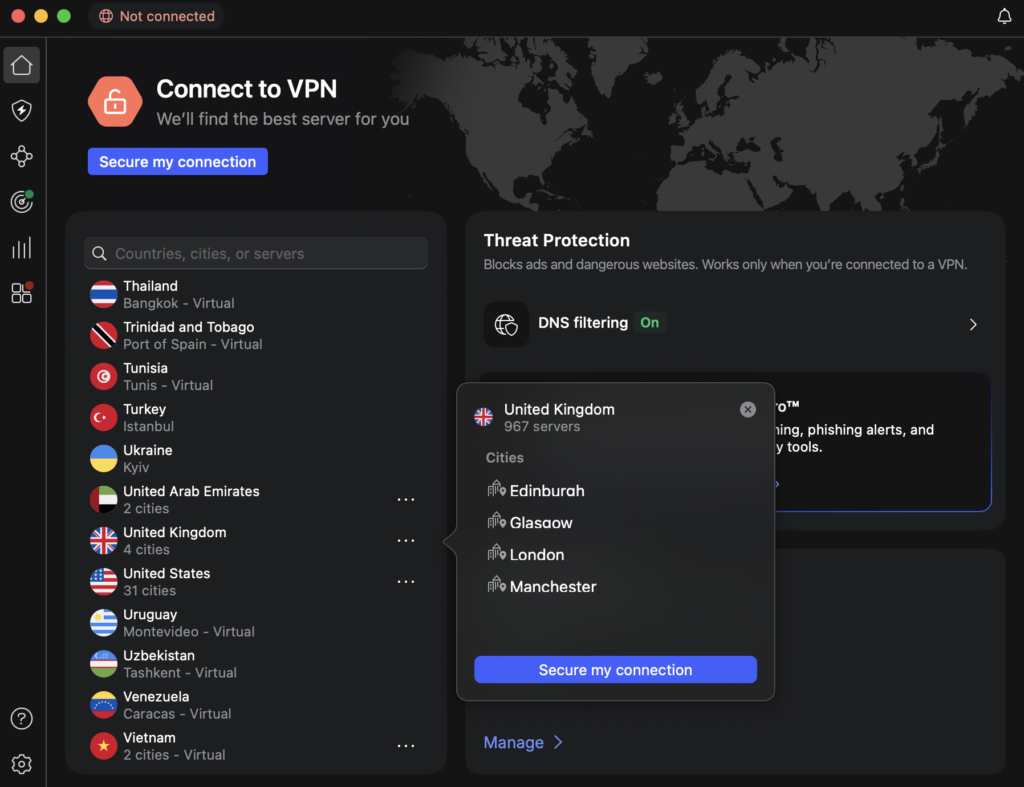
Since Channel 4 is only available in the UK, to access it from the US or anywhere else in the world, you’ll need to connect to a VPN server in the United Kingdom. NordVPN offers 440+ UK servers, giving you plenty of options if one IP gets blocked. That said, in my testing, NordVPN’s London-based servers worked the most consistently for streaming Channel 4 without errors.
Step 4. Watch Channel 4 in the US without restrictions
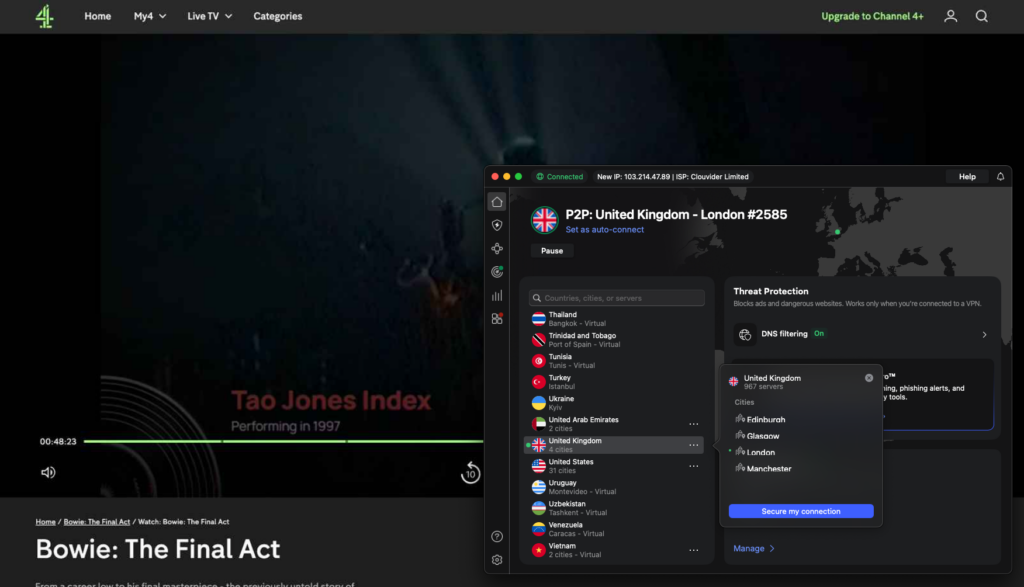
With a UK VPN connection active, head to the Channel 4 website or launch the Channel 4 app to stream your favorite content from the US. However, if the stream doesn’t load or you encounter an error, try reconnecting to another UK server. Changing the VPN protocol may also improve stability and help bypass any remaining geo-blocks.
Channel 4 not working with a VPN? Here’s how to fix
If Channel 4 isn’t working with your VPN, it usually means that the VPN IP address has been detected or blocked. The good news is that there are a few simple fixes that quickly solve the issue in most cases:
- Switch to a different UK server. Channel 4 tends to actively block known VPN IPs, so the IP that you’ve been assigned may be blacklisted. Try reconnecting to another UK server to get a fresher IP address.
- Clear your browser cache and cookies. Stored location data can reveal your true location even when a VPN is active. Clearing cookies and cache removes old data that may be triggering the block.
- Change the VPN protocol. Some protocols work better for streaming than others. Switching between protocols like OpenVPN or WireGuard can help bypass detection and improve performance.
- Disable location services/GPS. Location services can easily override your VPN location. Turning them off ensures that Channel 4 only sees your UK IP address.
- Use a reliable VPN that works with Channel 4. Free or low-quality VPNs are quickly detected and blocked. Meanwhile, premium VPNs with strong UK server networks, like NordVPN, work far more consistently.
Is there a free VPN for Channel 4?
There isn’t a free VPN that can reliably unblock Channel 4 from the US. While Proton VPN offers a free plan, it doesn’t include servers in the UK, which means that it can’t be used to access Channel 4’s UK-only content. Unfortunately, this limitation is very common among free VPNs, since maintaining streaming-friendly servers is costly.
So, instead of relying on a free VPN for Channel 4, a better option is using a premium VPN’s free trials, like NordVPN, which offers a 3-day free trial and a 30-day money-back guarantee. In my tests, NordVPN worked best thanks to its 440+ UK servers, fast speeds, and consistent unblocking performance. Besides, by combining the free trial with the refund period, you can use NordVPN for up to 33 days completely risk-free.
Final thoughts
Since Channel 4 is only available in the UK due to licensing restrictions, it isn’t accessible in the US without a workaround. That said, a VPN is the simplest and most effective way to unblock Channel 4 from the US, as it lets you connect through UK servers and bypass location-based blocks. However, since Channel 4 actively blocks many VPNs, choosing a proven provider is essential.
Based on my extensive testing, NordVPN is the best VPN for Channel 4, thanks to its large UK server network, lightning-fast speeds, and consistent unblocking performance. Using a trusted VPN makes watching Channel 4 in the US straightforward and hassle-free in 2026.
Related articles:
- How to watch British TV in the USA
- How to watch American TV abroad
- Best VPN for BBC iPlayer
- How to watch The Rookie season 8 for free
- Watch Love Island: All Stars season 3 for free
- How to Watch La Casa de los Famosos Colombia in the US
- Best free VPNs for the US
FAQ
Yes, you can watch Channel 4 in the US, but only with a VPN. Channel 4 is geo-blocked outside the UK due to licensing restrictions. By connecting to a UK VPN server, you can bypass the block and stream Channel 4 content from the US.
Channel 4 isn’t available in your location because it’s geo-blocked outside the UK due to licensing agreements. As a result, access is limited to British viewers, and streaming is blocked when you try to watch Channel 4 from abroad.
Channel 4 is free, but it’s not available in the US due to licensing restrictions. To watch Channel 4 for free from the US, you’ll need a VPN to bypass geo-blocks and connect through a UK server.
Yes, you can watch Channel 4 outside the UK, but only with a reliable VPN, like NordVPN. Channel 4 blocks access abroad due to licensing restrictions, so connecting to a UK VPN server is required to bypass geo-blocks and stream Channel 4 content from overseas.
Yes, you can use a VPN to watch Channel 4. A VPN, like NordVPN, lets you connect to a UK server and get a British IP address, which allows you to bypass Channel 4’s geo-restrictions and stream its content from outside the UK.
Channel 4 doesn’t officially allow VPNs and actively blocks many VPN IP addresses. This is done to enforce UK-only licensing restrictions. However, some premium VPNs with reliable UK servers, like NordVPN, can still bypass these blocks and access Channel 4 from abroad.
Yes, Channel 4 actively blocks VPNs to enforce its UK-only licensing restrictions. It detects and blocks shared or known VPN IP addresses, which is why many VPNs stop working. However, premium VPNs that regularly refresh UK servers (like NordVPN, Surfshark, and Proton VPN) can still access Channel 4.