
Because of licensing agreements, many UK TV channels and streaming services – like BBC iPlayer, ITVX, and Channel 4 – are restricted outside the UK. However, with a reliable UK VPN, you can mask your real location and replace your US IP address with a UK one. This tricks streaming platforms into thinking you’re in the UK, giving you full access to British content from abroad.
Here’s how you can watch UK TV in the USA with a VPN:
- Pick a reliable VPN with UK servers and strong unblocking abilities, like NordVPN.
- Download and install the VPN app on your preferred streaming device.
- Connect to a UK server to get a British IP address.
- Visit the UK streaming site, like BBC iPlayer, ITVX, or Channel 4.
- Log in or create an account.
- Start watching UK TV from anywhere in the US!

You can watch UK TV in the USA for free with NordVPN’s 30-day money-back guarantee.
Our recommended VPNs to watch British TV in 2026
British streaming services in USA
If you’re looking to stream British TV, there are several streaming services that you can use to watch your favorite content in the USA. For instance, BritBox and Acorn TV are fully available in the US, offering top-tier UK dramas, comedies, thrillers, and mysteries – no VPN required.
| Dedicated British streaming service | Type of content | Access in USA | Free or paid | VPN required |
|---|---|---|---|---|
| BritBox | Classic and current UK dramas, mysteries, comedies | ✅ Yes | Paid, about $8.99/month | ❌ No |
| Acorn TV | Crime dramas, period pieces, cozy mysteries from UK and Commonwealth | ✅ Yes | Paid, about $8.99/month | ❌ No |
| BBC iPlayer | BBC live channels, hits like Strictly Come Dancing, Happy Valley | ❌ No | Free (UK TV-licence funded) | ✅ Yes |
| ITVX | ITV live channels, Love Island UK, Mr Bates vs The Post Office | ❌ No | Free (ads) / ITVX Premium £5.99/month | ✅ Yes |
| Channel 4 (All 4) | Channel 4 live, Taskmaster, The Great British Bake Off back-catalog | ❌ No | Free (ads) / “Channel 4+” £3.99/month | ✅ Yes |
While BritBox and Acorn TV are available in the US without geo-restrictions, other UK-based platforms like BBC iPlayer, ITVX, and Channel 4 offer a much larger catalog. There, you’ll find live channels, exclusive content, and hit shows like Love Island UK, Happy Valley, and Taskmaster. However, since these platforms are unavailable outside the UK, you’ll need a strong VPN with UK servers to bypass their geo-blocks and stream from the US.
What British TV can I watch for free in the US?
If you’re trying to watch British TV from the US, there are several UK-based streaming platforms that offer free content, ranging from live broadcasts and movies to children’s programming. The downside is that almost all of them are locked behind UK-only access, and you’ll need a VPN with UK servers to actually use them.
That said, here are the best free British streaming sites and what they include:
- BBC iPlayer: basically, the BBC’s entire library in one place. That includes content from BBC One, BBC Two, BBC Three, BBC Four, CBBC, CBeebies, BBC News, BBC Parliament, BBC Alba (Scottish Gaelic), and S4C (Welsh). It’s completely free in the UK, but you’ll need a VPN to access it from the US.
- ITVX (formerly ITV Hub): offers everything from Love Island UK to ITV3 crime dramas. Includes content from ITV, ITV2, ITVBe, ITV3, ITV4, and CITV. You can watch for free with ads, or upgrade to ITVX Premium (£5.99/month) for ad-free viewing. Either way, VPN is required from the US.
- All 4: features a mix of reality shows, comedies, documentaries, and dramas from Channel 4, E4, More4, Film4, and E4 Extra. It’s free to use, but blocked in the US without a VPN.
- My5: provides access to content from Channel 5, 5STAR, 5USA, 5SELECT, and Paramount Network. Its library covers reality TV, drama, and documentaries. It’s free, UK-only, and you’ll need a reliable streaming VPN to unlock it in the US.
- STV Player: a free Scottish streaming service with dramas, news, and regional programming. Geo-restricted to Scotland, and a VPN is required for access from the US.
While BBC iPlayer, ITVX, All 4, My5, and STV Player offer a large and free variety of British TV content, none of them work outside the UK without a VPN. Hence, if you’re streaming from the US, a reliable UK VPN is essential.
How to watch UK TV in the US: 5 simple steps
The easiest and most reliable way to watch UK TV in the USA is to use a VPN. A VPN (virtual private network) masks your true location, making it seem as if you’re in the UK. This way, you can bypass geographical restrictions and access British streaming platforms – like BBC iPlayer, ITVX, All 4, and Sky Go – from anywhere in the US.
Here’s a detailed guide on how to watch live British TV in the USA:
Step 1. Choose a reliable streaming VPN with UK servers
A strong streaming VPN like NordVPN or Surfshark lets you get a UK IP when connected to a server in the region. This gives you access to major UK sites no matter where you are, including the US. You can choose from over 440 UK servers from NordVPN, or go with 212+ servers from Surfshark to get a British IP address. That said, I personally recommend NordVPN for UK TV streaming in the USA – it consistently delivered faster speeds during tests (around 465Mbps when connected to a UK server), offers more UK servers, and it comes with advanced security features for secure, everyday use.

Step 2. Download and install the VPN app on your device
After picking your UK VPN provider, the next step is to install it on a device that you’ll use for UK TV streaming. Here’s how to get started across different platforms:
- For Windows or Mac: Head to your VPN provider’s official website > Click the download button to get the app for either Windows or macOS > Open the downloaded file > Follow the installation instructions > Launch the app > Sign up or log in.
- For iOS (iPhone/iPad): Open the Apple App Store > Search for your VPN provider (e.g., NordVPN) > Tap “Get” to start downloading > Wait until installation is complete > Open the app > Sign up or log in.
- For Android: Go to Google Play Store > Search for your VPN provider > Tap “Install” > Wait for the app to download > Launch the app > Sign up or log in.
- For Smart TVs or Streaming Devices (Fire TV, Roku, etc.): Open your device’s app store (e.g., Amazon Appstore for Fire TV) > Search for the VPN app > Install it > Open the app > Sign up or log in.
Step 3. Connect to a server in the UK
To watch British TV in the USA, you’ll need to connect to a UK server via your VPN. This changes your virtual location by giving you a UK IP address, letting you bypass geo-restrictions on streaming services like ITVX, All 4, and BBC iPlayer.
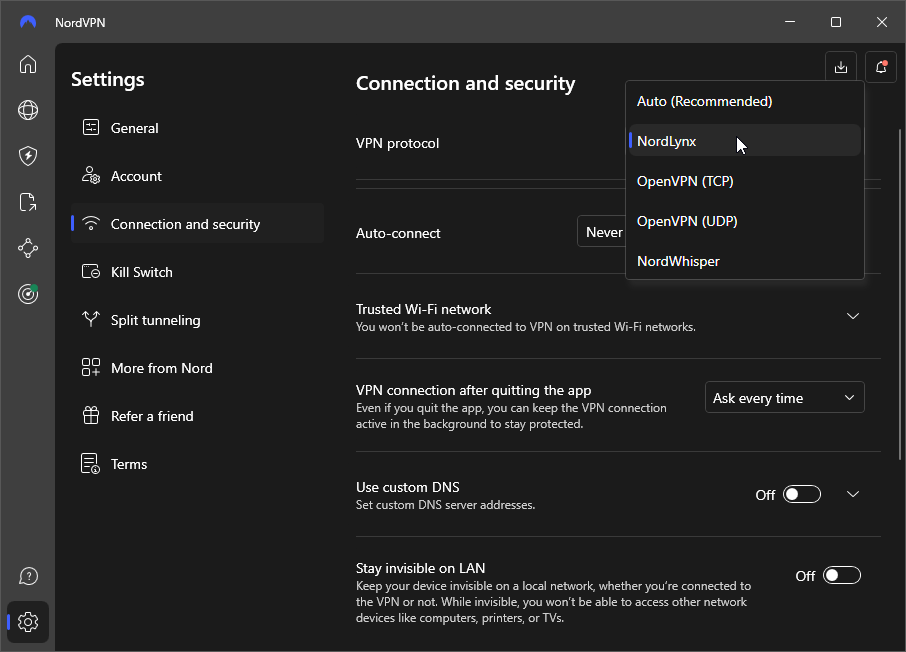
For the best streaming experience, I recommend connecting to either low-load or the newest UK servers. Some VPNs indicate this information in their apps, while others, like NordVPN, let you search for specific servers via the search bar. To further improve speed and stability, you can switch your connection protocol to WireGuard (or its equivalent, like NordLynx), and if your VPN provider offers, use their custom DNS addresses.
Step 4. Sign in to a UK streaming service and start watching
After connecting to a UK server, head to your preferred British streaming site and create an account if needed. Platforms like BBC iPlayer, Channel 4 (All 4), and My5 are completely free to use, but require you to register with a UK postcode (note, you can use a public one like SW1A 1AA). On the other hand, services like ITVX and STV Player also offer free access with ads, but there’s an option to subscribe for an ad-free experience. Plus, keep in mind that you will need a UK payment method to complete the transaction. Once you’ve signed up and logged in, start watching British live channels or on-demand content just as if you were in the UK!
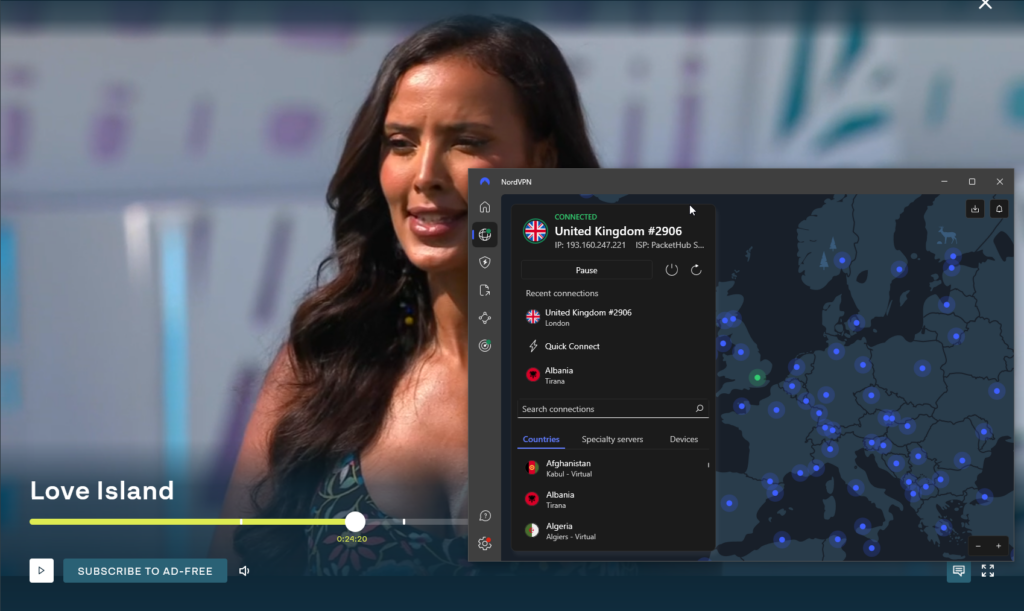
How to watch UK TV in USA for free
If you want to watch UK TV for free, you can use NordVPN’s 3-day free trial on Android or take advantage of its 30-day money-back guarantee to unlock free UK streaming sites.
To use the 3-day free trial, simply download the NordVPN app from the Google Play Store and sign up – just be sure to cancel before it renews. Alternatively, you try any of NordVPN’s plans risk-free with the 30-day money-back guarantee. Once the 30 days are up, contact NordVPN’s support with a request for a refund. Just note that the countdown starts from the first subscription day, and refund terms may vary if you subscribed through third-party platforms like Google Play or Apple.
However, if you’re still determined to try a free UK TV VPN, I would highly recommend Proton VPN: it’s the only free VPN for general everyday browsing. It’s one of the most secure VPNs out there, with strong encryption, a no-logs policy, and unlimited data – all backed by Swiss privacy laws. But it also has its downsides: it doesn’t come with free UK servers and, due to a smaller free server pool, speeds can be slower. Hence, to unblock sites like BBC iPlayer, ITVX, or All 4, you’ll need to subscribe to Proton VPN to get UK IP address.
Therefore, for reliable free access to UK TV, go for NordVPN or Surfshark. Both offer free trials and 30-day money-back guarantees, letting you test their UK servers and stream free British content from the US with no risk.
Final tips for watching British TV in USA
To access UK television from the US, a VPN is the safest, easiest, and most reliable option. Since many free UK streaming services are geo-restricted, you’ll need a UK IP address to unblock sites like BBC iPlayer, ITVX, and Channel 4.
For the best streaming experience, pick a strong VPN with fast UK servers and reliable streaming performance, like NordVPN. It’s my top recommendation, offering over 440 servers in the UK, consistently high speeds, and market-leading security features. You can use its 3-day free trial on Android, or test it risk-free with the 30-day money-back guarantee policy.
Also, remember to use a UK postcode (like SW1A 1AA) when registering for British streaming sites. For faster speeds, use low-load servers with WireGuard/NordLynx, and generally avoid free VPNs that don’t support UK streaming.
With the right setup, you can stream British TV content from anywhere in the US, be it live or on-demand.
Related articles:
- Best Free VPNs for Netflix
- Best VPN for HBO Max
- Best VPNs for Hulu
- How to watch American TV
- How to watch German TV
- Watch Made in Chelsea in the US
- Watch The War Between the Land and the Sea from anywhere
- Watch The Rookie season 8 for free
- How to watch Love Island: All Stars season 3
- How to watch I Kissed a Girl season 2 from anywhere
FAQ
Yes, you can watch British TV in the USA by using a VPN. A reliable UK VPN provider, like NordVPN, lets you change your virtual location by assigning you a British IP address. This lets you bypass geo-blocks on platforms like BBC iPlayer, ITVX, Channel 4, and other UK-only platforms.
Yes, you can use a VPN to watch British TV outside the UK. In fact, it’s one of the easiest ways to access UK-only streaming services while abroad. For example, when you connect to a NordVPN UK server, you can trick streaming platforms into thinking you’re located in the UK. This unlocks content on platforms like BBC iPlayer, ITVX, and All 4 from the US.
NordVPN is the best VPN for streaming UK TV abroad. It offers 440+ UK servers, lightning-fast speeds, and easily unblocks platforms like BBC iPlayer, ITVX, and Channel 4. Plus, you can try it risk-free with a 3-day free trial on Android or the 30-day money-back guarantee.
Yes, using a VPN to watch UK TV in the USA is legal. VPNs are legitimate privacy tools and used by many. Just keep in mind that streaming platforms may block VPN traffic or limit access based on their terms of service, not government laws.