Proton VPN Review 2026 – Is It Safe, Fast & Worth the Money?

Why trust our review process 
We may earn affiliate commissions for the recommended products. Learn more.
Proton VPN is a secure and reliable VPN service developed by a Swiss-based company, Proton AG. With a strict no-logs policy, fully open-source apps, and regular independent audits, Proton VPN has earned a strong reputation among privacy-focused users.
As of 2026, Proton VPN remains one of the few truly free VPNs that are still trustworthy – but it’s also expanded its premium offering significantly. The provider introduced several new features, such as custom user profiles, upgraded its censorship bypass capabilities, and is now offering an integration into the Vivaldi browser.
To find out how reliable, secure, and capable Proton VPN truly is, I set out to thoroughly test it. I used publicly available tools, such as the speedtest by Ookla, IP & DNS leak sites, and others, so you could freely double-check my findings. Then, I thoroughly reviewed Proton VPN’s documentation, including its Privacy Policy and no-logs claims. Lastly, I field-tested the service while streaming, gaming, downloading, and bypassing various internet restrictions.
Ultimately, I was able to form an unbiased view on Proton VPN and can easily say that it’s a highly capable VPN with iron-clad security and guaranteed privacy in all situations online. However, if you’re looking for a VPN with consistently high speeds for entertainment purposes, there might be better options for you. To find out which tests and what results exactly led me to this conclusion, take a look at my in-depth Proton VPN review below.
| ⭐ Proton VPN rating: | 8.9/10⭐⭐⭐⭐⭐ |
| 💵 Price | From $ 2.99 a month |
| 🆓 Free trial: | ✅ Yes, free version |
| 📅 Money-back guarantee: | ✅ Yes, 30-days |
| 💻 Connections: | Up to 10 |
| 🌎 Servers: | 20700 servers in 149+ countries |
| 🔒 Protocols: | WireGuard, OpenVPN (UDP/TCP), Stealth |
| 📋 Logs: | Third-party verified no-logs policy |
| 📥 Torrenting: | ✅ Yes, P2P-optimized servers |
| 🍿 Netflix: | ✅ Yes |
| 📱Operating systems: | Windows, Android, macOS, iOS, Linux |
| 🔥 Current deal: | Get Proton VPN with 64% off |
Proton VPN Security Features Overview
Proton VPN is designed by the same team of CERN scientists behind Proton Mail. Proton AG focuses exceptionally on privacy and security, basing all its business practices and goals on these two pillars. If you’re looking for a robust VPN that goes beyond basics to ensure your privacy online, here’s a breakdown of the key Proton VPN security features to protect your data online:
- AES-256 encryption paired with modern tunneling protocols. Proton VPN uses the highest-standard AES-256 encryption to secure all data transfers online. Combined with modern, secure tunneling protocols, like WireGuard, OpenVPN, and Stealth, this combination guarantees thorough protection against Man-in-the-Middle attacks and snooping.
- Yearly no-logs policy audits under Swiss jurisdiction. Proton VPN is based in Switzerland, a country known for its unyielding privacy laws. Proton VPN also lives by its strict no-logs policy, which means that none of your information, including IP address, browsing history, or connection data, is ever recorded or stored. This claim is confirmed each year by independent third-party audits.
- Secure Core servers. Proton VPN offers unique Secure Core servers to its clients. While the double-hop technology that routes your traffic via two servers, instead of one, is not exactly new, Proton VPN chooses privacy-friendly countries for its middle-point connection servers. These include Switzerland, Iceland, and other countries with strict data privacy laws. Such a setup prevents advanced malicious actors from tracing back to your original IP address, while the privacy-friendly midpoint further ensures none of your data is logged.
- Leak protection measures and a reliable kill switch. Proton VPN includes DNS, IPv6, and WebRTC leak protection measures to prevent accidental data slippage. The built-in Kill Switch and the Always-On VPN feature instantly shut down internet traffic if disruptions in VPN connection should happen, ensuring that your real IP address is never unveiled to possible onlookers.
- Open-source apps and regular security audits. Proton VPN’s core value is transparency and it is reflected in fully open-source apps that undergo regular security audits. If you know how, you can verify what’s happening in the Proton VPN backend and check if there are no hidden vulnerabilities in its code.
Is Proton VPN Safe to Use?
Yes, Proton VPN is safe to use. Besides the strict no-logs policy, Proton VPN performed exceedingly well during all my tests, including IP & DNS leak protection, Kill Switch functionality, WebRTC leak prevention, and IPv6 leaks. Here’s how I performed my tests and what were the results that I got.
- To test the reliability of IP and DNS leak protection, I went to the ipleak.net and dnsleaktest.com pages. You can freely use them to check your current IP and DNS leak situation, but when I used these tools with Proton VPN, I found that there were no discrepancies in IP and DNS leak prevention at all. In other words, my real IP address was completely safe with Proton VPN.

- For the Kill Switch test, I first toggled it on in the app settings, connected to a server, and then terminated the connection manually to check how well it would respond and how quickly it would switch off my internet connection. Ultimately, I found the Proton VPN Kill Switch to be highly responsive, and I couldn’t fault its reliability in any way. Again, this ensures that no accidental IP address slips happen.
- For a WebRTC leak test, I also used the dnsleaktest.com tool, as it displays this information on the same site. Plus, it’s a well-trusted tool. So, I looked for WebRTC leaks with Proton VPN while connected to different servers and using different tunneling protocols, and each time, the service kept it safe and hidden.
- Lastly, if you’re interested in IPv6, I’ll begin by reminding you that only Proton’s browser extension, the Android app, and the Linux app run on this protocol. Be as it may, I also checked for IPv6 leaks for you on the dnsleaktest.com site while running an extended test available there and couldn’t find any data leaks concerning IPv6.
Does Proton VPN Keep Logs?
No, Proton VPN does not keep any logs. I reviewed Proton VPN’s privacy policy and audit reports – the documentation on it is very extensive, but here are the key things I took away that reflect on Proton’s privacy commitment pretty clearly:
- Swiss jurisdiction. Proton VPN is based in Switzerland, a country known for its strong privacy laws and strict data protection regulations. Switzerland has some of the most robust privacy protections in the world and is not part of any international intelligence-sharing agreements like the 5 Eyes, 9 Eyes, or 14 Eyes alliances. This means that even if some of your data were ever logged, none of it would reach any government.
- No-logs policy. Proton VPN adheres to a strict no-logs policy, which means none of your data or information regarding your activities online is ever tracked or logged.
- Independent audits. Independent audits further verify the no-logs policy claims. Proton VPN submits to a third-party no-logs policy each year, with the last review in late 2024. As for security audits, the last was done in early 2025, and you can easily find the report on Proton’s official website.
You will need to use an email address when creating your Proton VPN account. However, you can use Proton Mail for that if you’d rather keep it low profile. Additionally, Proton VPN accepts Bitcoin payments, so you can register and pay for the service while keeping your personal information private.
Does Proton VPN sell your data?
No, Proton VPN does not sell your data. The service does not track or log any of your data. And, since it does not log any of it, there’s nothing to sell.
Proton VPN Pricing
Proton VPN offers three main pricing plans: Free, Plus, and Unlimited, with a 30-day money-back guarantee. Pricing for the Plus plan starts at $9.99 per month if you pay monthly, dropping to $3.99 per month with the annual subscription or $3.59 per month with the two-year plan. The Unlimited plan costs $12.99 per month when billed monthly, $9.99 per month for a yearly subscription, or $7.99 per month over two years. Any available discounts or coupons typically apply to longer subscription periods and can further reduce the monthly Proton VPN cost.
The Free plan offers basic VPN features, 100+ servers in 5 locations, and unlimited data, while Plus and Unlimited provide users with more advanced features, such as ad & malware blocking, multi-device protection, and a more extensive server list.
The most popular, and in my opinion, best-price plan choice is the VPN Plus, as it gives you access to all advanced Proton VPN features, including its powerful ad blocker, called NetShield. Below, you can find more information on the Plus plan pricings, depending on the length of the plan you choose.

- Proton VPN 2-year $ 2.99mth Deal View offer
- Proton VPN 1-year $ 3.99mth View offer
- Proton VPN 1-month $ 9.99mth View offer
With prices starting at $ 2.99/month for a 2-year Plus plan, Proton VPN is competitively priced compared to premium VPNs like ExpressVPN (around $4.99/month). However, NordVPN starts lower at $3.09/month, and Surfshark offers even more affordable plans from just $1.99/month, making them better options for budget-conscious users. You can also check the best VPN deals to find even bigger savings.
I always pay the most attention to price-to-feature and performance ratio when considering VPN prices, and in my opinion, Proton VPN is absolutely worth the cost. For it, you get a reliable, privacy-first VPN that can be used for all sorts of online activities. Still, some users might find the steeper price unsatisfactory, so I cannot give Proton VPN a 10/10 score on this point.
Proton VPN Free Trial and Money-Back Guarantee
Proton VPN does not offer a free trial; instead, the provider has a free VPN version and a 30-day money-back guarantee for paid customers.
The Proton VPN free version is truly free, and you do not need to enter payment details to use it. The only thing you need to do is create an account with your email address. However, as I mentioned earlier, you can use Proton Mail if you want to keep things anonymous.
For paid customers, Proton VPN offers a 30-day money-back guarantee. All customers are liable for it, but if you’d like to get your money back, you should contact Customer Support within 30 days of purchasing the product. This will grant you a full refund, and the procedure itself is straightforward with no hoops to jump through.
I must note that the Proton VPN money-back guarantee is not available if you paid for it by cash or bank transfer. Lastly, just to make things abundantly clear, the refund policy only applies to the VPN Plus and Ultimate plans, since the free version does not even require your payment details.
Proton VPN Free vs Paid Plans Compared
The Proton VPN free version has no data or bandwidth caps; however, it does come with some restrictions. With the free version, you only get to access around 100 servers in 5 countries, and you cannot choose a connection point yourself, as it is assigned to you automatically when you connect. The Proton VPN free version can only be used on one device and comes without any advanced features, such as Secure Core servers, NetShield ad blocker, and is not suitable for streaming or torrenting. However, the Kill Switch and the Stealth protocol are available for free users.
In comparison, the paid Proton VPN plans unlock the full server fleet, and you can access 20700 servers in 149+ countries. Besides that, one subscription can be used on up to 10 devices, which can benefit from advanced features, like the NetShield ad blocker, Secure Core servers, P2P servers, streaming compatibility, Tor over VPN, and Split Tunneling. Plus, when I recently tested Proton VPN’s speeds, I found the paid servers much faster than the ones available on the free version.
| Feature | Proton VPN Free | VPN Plus | Ultimate |
|---|---|---|---|
| Price | Free | $ 2.99/month | $7.99/month |
| Server locations | 5 countries (US, Japan, Poland, Romania, the Netherlands) | 149 countries | 149 countries |
| Total servers | 100+ | 20700 | 20700 |
| Speed | Average | Fast | Fast |
| Simultaneous connections | 1 device | 10 devices | 10 devices |
| Streaming support | ❌ No | ✅ Yes (Netflix, Hulu, Disney+, BBC iPlayer, etc.) | ✅ Yes (Netflix, Hulu, Disney+, BBC iPlayer, etc.) |
| P2P/torrenting | ❌ No | ✅ Yes (on P2P servers) | ✅ Yes (on P2P servers) |
| Secure Core servers | ❌ No | ✅ Yes | ✅ Yes |
| Tor over VPN | ❌ No | ✅ Yes | ✅ Yes |
| NetShield | ❌ No | ✅ Yes | ✅ Yes |
| Split Tunneling | ❌ No | ✅ Yes | ✅ Yes |
| Kill Switch | ✅ Yes | ✅ Yes | ✅ Yes |
| Stealth protocol | ✅ Yes | ✅ Yes | ✅ Yes |
| Customer support | ✅ Yes (email only) | ✅ Yes (email, 24/7 live chat) | ✅ Yes (email, 24/7 live chat) |
| Additional Proton services | ❌ No | ❌ No | ✅ Yes (Mail, Drive, Calendar, Pass) |
Based on my testing, the Proton VPN free version is best suited to those who simply want to encrypt and secure their network traffic while casually browsing or performing basic banking tasks. On the other hand, the free version makes for a good trial version, as you can test how well the interface works for you and if it is compatible with your needs. However, if you upgrade to the paid version, you will unlock Proton VPN’s full potential and could use the service’s advanced features, benefit from the excellent geo-unblocking capabilities, P2P file-sharing servers, and use the Tor over VPN servers for complete anonymity. Lastly, the Ultimate subscription gives access to the full Proton suite, including Mail, Drive, Calendar, and Pass, in addition to VPN, which will ensure thorough security online.
Proton VPN Servers and Locations
In total, Proton VPN operates 20700 servers in around 149 countries. A wide server distribution and a reasonable server headcount are important factors for connection speed, accessing geo-restricted content, and server load balancing. Here, Proton VPN shows is advantages with a massive server fleet, located both in popular spots and in exotic locations. In regards to connection speeds, the closer the server is to your original location, the better speeds you will get. And that’s usually the case for me with Proton VPN – I go the best connection speeds when on nearby servers, while farther connections weren’t as stable or as fast. So, a good global distribution ensures you’ll always find a server near you.
In the table below, you’ll find a full Proton VPN server locations list:
| Continent | Server count | Countries |
|---|---|---|
| North America | 2664 | Canada, Costa Rica, El Salvador, Mexico, Puerto Rico, United States |
| South America | 266 | Argentina, Brazil, Chile, Colombia, Ecuador, Peru, Venezuela |
| Asia | 598 | Afghanistan, Azerbaijan, Bahrain, Bangladesh, Bhutan, Cambodia, Georgia, Hong Kong, India, Indonesia, Iraq, Israel, Japan, Jordan, Kazakhstan, Kuwait, Lebanon, Malaysia, Maldives, Mongolia, Myanmar (Burma), Nepal, Pakistan, Philippines, Qatar, Saudi Arabia, Singapore, South Korea, Sri Lanka, Syria, Taiwan, Tajikistan, Thailand, Turkmenistan, United Arab Emirates, Uzbekistan, Vietnam, Yemen |
| Europe | 2902 | Albania, Austria, Belarus, Belgium, Bulgaria, Croatia, Cyprus, Czechia, Denmark, Estonia, Finland, France, Germany, Greece, Hungary, Iceland, Ireland, Italy, Latvia, Lithuania, Luxembourg, Malta, Moldova, Montenegro, Netherlands, North Montenegro, Norway, Poland, Portugal, Romania, Russia, Serbia, Slovakia, Slovenia, Spain, Sweden, Switzerland, Turkey, Ukraine, United Kingdom |
| Africa | 322 | Algeria, Angola, Chad, Comoros, Egypt, Eritrea, Ethiopia, Kenya, Libya, Mauritania, Mauritius, Morocco, Mozambique, Nigeria, Rwanda, Senegal, Somalia, South Africa, South Sudan, Sudan, Togo, Tunisia |
| Oceania | 169 | Australia, New Zealand |
As for geo-unblocking, it’s important to have a good server count in the most popular locations, such as the US and Europe, to access local geo-restricted content. The more servers are in these popular locations, the better the chance of accessing restricted content. Lastly, 20700 servers is quite a lot, and with this many, you can expect the load balance to be in your favor, as there are a lot of servers to choose from, and it is doubtful that one of them gets overcrowded when you need it.
Proton VPN does not have a clear schedule of server updates, but over 2024, it has almost doubled its server count. Interestingly, Proton VPN does not use any virtual or RAM-only servers and relies only on bare-metal hardware with full disk encryption. As per the provider, such servers are more reliable than RAM-only, but some raise questions about their security. The truth is, both RAM-only servers and bare-metal servers with full disk encryption are similarly secure and reliable, and it’s mostly a matter of preference.
Not all Proton VPN servers are the same, and some of them are specialty servers, including P2P servers, Tor over VPN, Secure Core, Dedicated IP (available to business clients), streaming-optimized servers, called Plus servers, and regular VPN servers. Each specialty server has its specific use, but more on that later.
What is Secure Core in Proton VPN?
Secure Core is a Proton VPN feature that routes your network traffic through two servers, instead of one. It works identically to the multi-hop or double-hop feature you can find on other VPN services, like NordVPN and Surfshark, but in Proton VPN’s Secure Core case, the midpoint connection runs through a country with strict privacy laws. The Secure Core privacy-friendly country list includes:
- Iceland
- Switzerland
- Sweden
Using the Secure Core feature, you can first choose your privacy-friendly country and then your exit point country. In the end, your IP will correlate with the exit point country. Such a setup makes it much harder for attackers or compromised exit servers to trace back your real IP address. Plus, the secure midpoint ensures none of your data is logged under any circumstances.

The Proton VPN Secure Core servers offer several benefits, including strong untraceability and protection against network-based attacks, such as traffic correlation. Secure Core is particularly useful in scenarios such as bypassing government surveillance, using public unsecured Wi-Fi connections, and for activists working in high-risk regions. Plus, if a hacker might be surveilling your exit point server, the midpoint connection won’t allow them to trace back to your real IP.
However, Secure Core setup also has one main disadvantage – speed reductions. Because your traffic is routed through two servers, it is very likely you will experience significant slowdown while using this feature. Such servers are the most suitable for browsing, and not data-heavy activities like streaming.
Does Proton VPN have a Dedicated IP?
Yes, Proton VPN offers Dedicated IP addresses, but they are only available to business users. Dedicated IPs are mostly used for accessing geo-restricted government sites from abroad, because the Dedicated IP address is harder to identify as VPN traffic. However, even though some may recommend using a Dedicated IP address for a better chance to access geo-locked streaming platforms, I’d like to deny the statement. The streaming platforms that use rigorous VPN detection methods can also figure out the use of a Dedicated IP. Since this feature usually costs additional money to the already mid-priced subscriptions starting at $ 2.99/month and can only be changed once, there’s no need to get one solely for streaming. Another scenario where a Dedicated IP is used often is for remote work, to access company-related sites and documents.
If you’re looking for a freely available Dedicated IP option for regular users, then Proton VPN is not an ideal choice for you. Here, I can recommend NordVPN, as this provider offers the Dedicated IP option for anyone who needs it, not just business users.
Is Proton VPN Good for Torrenting?
Yes, Proton VPN is great for torrenting. However, Proton VPN does not allow P2P/torrenting activities on all its servers. For torrenting, you have to choose one of its Plus servers, which can be used for P2P file sharing and are better suited for other activities, like streaming and gaming.
That said, even though you have to use the specific Plus servers available with the paid subscriptions, there are a lot of them to choose from:
| Plus server locations for P2P torrenting | Afghanistan, Albania, Algeria, Angola, Argentina, Australia, Austria, Azerbaijan, Bahrain, Bangladesh, Belarus, Belgium, Bhutan, Bosnia & Herzegovina, Brazil, Bulgaria, Cambodia, Canada, Chad, Chile, Colombia, Comoros, Costa Rica, Croatia, Cyprus, Czechia, Côte d’Ivoire, Denmark, Ecuador, Egypt, El Salvador, Eritrea, Estonia, Ethiopia, Finland, France, Georgia, Germany, Ghana, Greece, Hong Kong SAR China, Hungary, Iceland, India, Indonesia, Iraq, Ireland, Israel, Italy, Japan, Jordan, Kazakhstan, Kenya, Kuwait, Latvia, Libya, Lithuania, Luxembourg, Malaysia, Malta, Mauritania, Mauritius, Mexico, Moldova, Montenegro, Morocco, Mozambique, Myanmar (Burma), Nepal, Netherlands, New Zealand, Nigeria, North Macedonia, Norway, Oman, Pakistan, Peru, Philippines, Poland, Portugal, Puerto Rico, Qatar, Romania, Russia, Rwanda, Saudi Arabia, Senegal, Serbia, Singapore, Slovakia, Slovenia, Somalia, South Africa, South Korea, South Sudan, Spain, Sri Lanka, Sudan, Sweden, Switzerland, Syria, Taiwan, Tajikistan, Tanzania, Thailand, Togo, Tunisia, Turkmenistan, Türkiye, Ukraine, United Arab Emirates, United Kingdom, United States, Uzbekistan, Venezuela, Vietnam, Yemen. | 10,340 in total |
Because I’m all about using VPN within legal boundaries, I tested Proton VPN by downloading files from the Internet Archive site. First, I connected to one of the Plus servers in the Netherlands, grabbed several movies, got the torrents, and the downloading of the 20k-30k files was done in under 10 minutes.
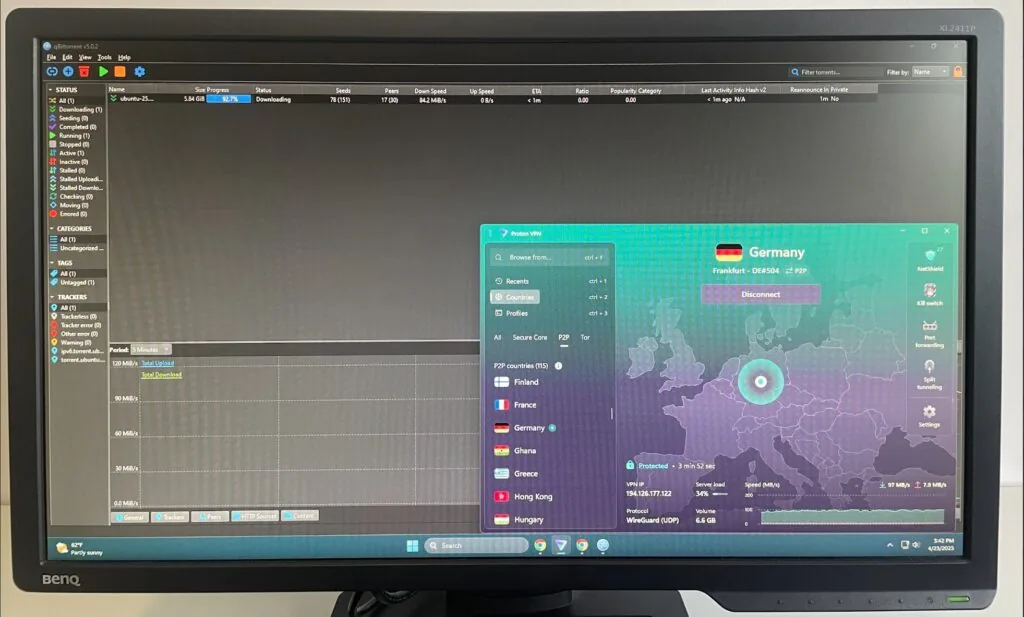
If you’re an experienced VPN user, you can also enable the Port Forwarding feature that Proton VPN has. While the feature can improve connection speeds and seeding efficiency, please use it carefully with the right configuration, as it can also make your connection vulnerable to attacks if done improperly. As for SOCKS5 proxy servers, Proton VPN has stated it does not plan to ever include such an option in its roster, deeming that such servers are inherently unsafe to use.
Is Proton VPN Good for Streaming?
Yes, Proton VPN is great for streaming. The provider has over 20700 servers in around 149 countries, including its Plus servers, which are streaming-optimized. With this huge fleet and servers in strategically important locations like the US, UK, Japan, and UK, you can easily find a server to access any geo-locked content with a local IP address. If you’re trying to access restricted content in a faraway location, then Proton’s built-in VPN Accelerator feature may come in handy, boosting your connection speeds up to 4 times.
During my recent tests, Proton VPN easily unblocked popular streaming platforms like USNetflix, Disney+,AmazonPrimeVideo, Hulu, HBOMax, BBCiPlayer, ITVX, RTE, ESPN, and plenty more.
| Streaming service | Does Proton VPN unblock it? |
|---|---|
| Netflix (US, Japan, UK, Germany, France, and others) | ✅ Yes |
| Hulu | ✅ Yes |
| HBO Max | ✅ Yes |
| ESPN | ✅ Yes |
| SkySports | ✅ Yes |
| BBC iPlayer | ✅ Yes |
| Paramount+ | ✅ Yes |
| Disney+ | ✅ Yes |
| ITVX | ✅ Yes |
| RTE | ✅ Yes |
| Amazon Prime Video | ✅ Yes |
Testing the geo-unblocking capabilities of VPNs is my favorite part and is done in a straightforward manner. First, I have to figure out in which locations certain streaming platforms are available, then connect to servers in corresponding locations (I used Proton’s Plus servers), and then check how easily I get into each of the platforms. Interestingly, with Proton VPN, I was able to get into the platforms on the first try. However, if you’re unsuccessful with your first try, just switch to another server in the same location, and it usually unlocks the geo-blocked content with several attempts.
Unfortunately, I was not able to access any of the geo-blocked platforms with the free Proton VPN version. My guess as to why is the likelihood of these servers having blacklisted IP, so it’s easy for the platforms to see you’re trying to access them via a VPN connection.
Does Proton VPN Work with Netflix?
Proton VPN works well with Netflix, unblocking various libraries, including UK, Japan, Germany, and US Netflix. I tried the Netflix geo-unblocking capabilities by connecting to servers in the countries with libraries I wanted to access – it wasn’t hard to check how well Proton VPN handled the task.
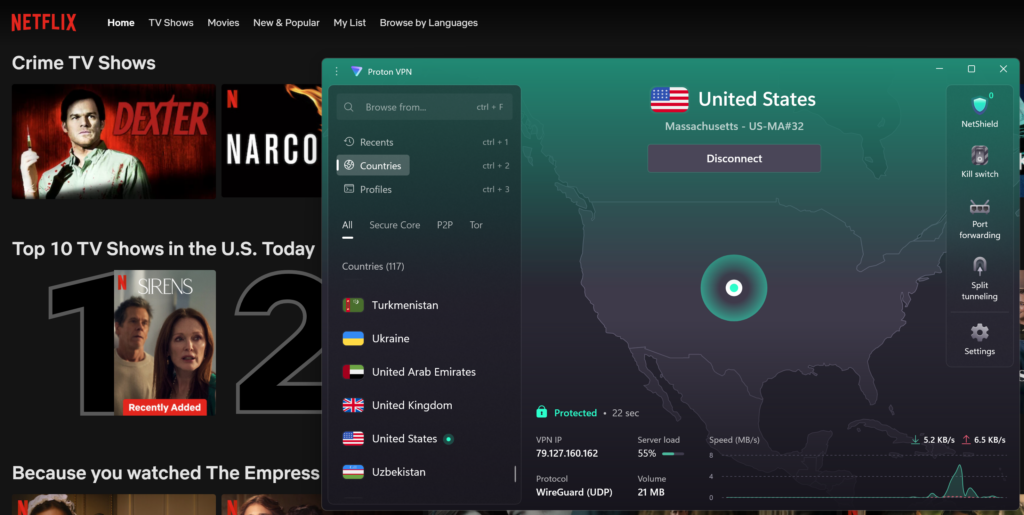
On the downside, Proton VPN’s free version servers do not unblock Netflix, and you must use the Plus servers available with the paid plans to access the platforms. However, when I used the Plus servers, I got into each of Netflix’s libraries on the first try, and because of Proton’s great connection speeds and initial speed retention rate, I streamed my shows buffer-free in HD quality.
With all that in mind, Netflix can sometimes identify VPN use. If it does, you’re not going to be reprimanded for it and won’t get banned from using the platform. Instead, it won’t show you some geo-locked content while you’re connected to the VPN. This is unlikely to happen while using Proton VPN, but in case of detection, simply try another server in the exact location, or switch around the tunneling protocols, as OpenVPN might work better in some cases than WireGuard.
Is Proton VPN Good for Gaming?
Proton VPN is quite suitable for gaming, but remember that using any VPN might increase latency and ping due to your network traffic’s extra routing and encryption. That was the case for me when I connected to faraway servers to access some of the online games, but when connected to nearby servers, I did not experience any slowdowns or lag.
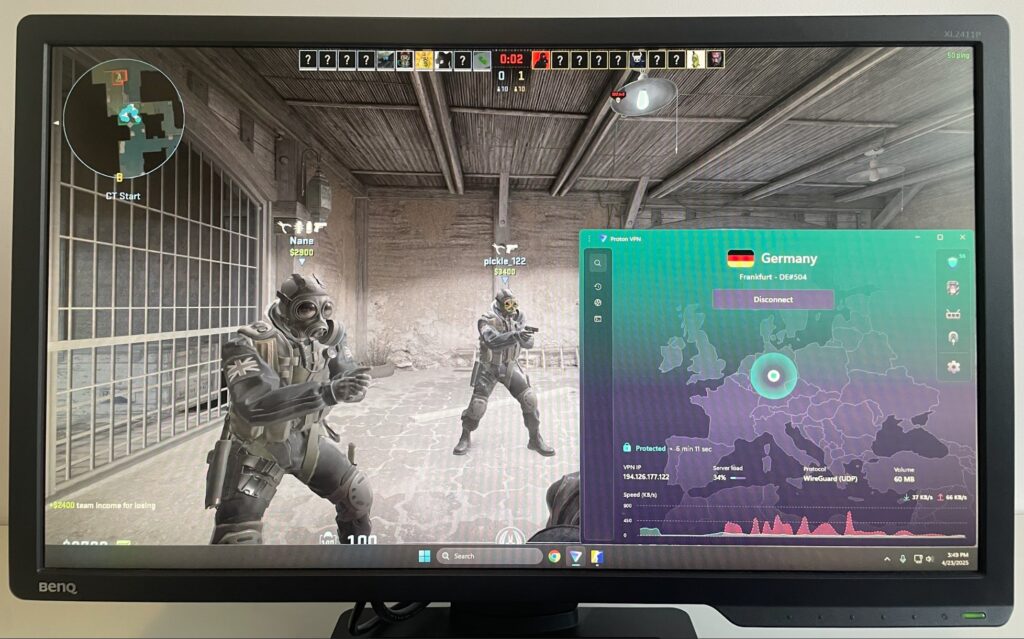
Proton VPN does not have servers branded as optimized for gaming, but I got the best experience using the low-latency Plus servers paired with the WireGuard tunneling protocol. Another gaming benefit is the huge Proton VPN server fleet, which allows gamers to connect to the low-latency Plus servers in different regions to access region-locked lobbies or earlier game releases. However, for the optimal performance, I still recommend selecting servers as close to you as possible. With Proton, that shouldn’t be hard, as you can choose from city-level servers in several countries, such as the US, UK, Germany, France, and others.
Although Proton VPN does not advertise itself as having a dedicated anti-DDoS server infrastructure, but its reliable encryption and robust security features can easily protect gamers from connection disruptions. Lastly, if you’re worried about NAT (Network Address Translation) type restrictions while using VPN for gaming, Proton is quite a good choice in this case, as it has the Port Forwarding feature to bypass such restrictions.
With all that in mind, I cannot give Proton VPN a 10/10 score for gaming, as some gamers might find the slower faraway connections an issue, plusthe free version is not suitable for gaming at all, due to the slower available servers.
Proton VPN Speed Test Results
Based on my testing, Proton VPN is a fast VPN with a reasonable initial speed retention rate and ping. I tested the service’s speeds connected to several servers in different locations, including the US, UK, Germany, and Singapore, as my faraway connection.
- Before connecting to the VPN, my baseline was 1ms ping, 500Mbps download, and 500Mbps upload
- Connected to the US servers, I got 105ms ping, 444Mbps download, and 189Mbps upload speed. That’s an 88% initial speed retention rate for download speed
- Connected to the UK servers, I got 36ms ping, 358Mbps download, and 455Mbps upload speed. That’s a 71,6% initial speed retention rate for download speed
- Connected to the Germany servers, I got 33ms ping, 459Mbps download, and 455Mbps upload speed. That’s a 91.8% initial speed retention rate for download speed
- Connected to the Singapore servers, I got 192ms ping, 379Mbps download speed, and 103Mbps upload speed. That’s a 75.8% initial speed retention rate for download speed
Remember that the speeds vary greatly depending on the proximity of the server you are connected to, your initial network connection speed, the hardware you are using, the time of day, and other factors.
My tests revealed what I already suspected – my closest connection spot was Germany, so I got the best speeds, retention rate, and the lowest ping while connected to it. You can also expect that while using Proton VPN yourself. However, when I connected to Singapore, the furthest location from me, I instantly got much lower speeds and higher latency. Still, I found Proton VPN usable for browsing and gaming, though not without occasional lag.
I used the WireGuard tunneling protocol for my Proton VPN speed tests, which is generally considered the fastest. If you were to use OpenVPN, your speeds would drop somewhat, but with the Stealth protocol, which is meant to mask your VPN traffic as regular HTTP traffic, you are likely to truly feel the speeds dropping. Proton VPN also has the VPN Accelerator feature, which works automatically when connected to distant locations and boosts your connection speeds up to 4 times. To use this feature, you don’t have to do any specific actions as it’s an always-on feature.
Although my Proton VPN speed tests showed quite good results, I cannot give it a higher score because there are simply faster VPNs than Proton available today. While it’s definitely speedier than CyberGhost or TotalVPN, Proton VPN is still quite a bit slower than similarly priced NordVPN and more affordable Surfshark. So, considering the speed test results and the steeper subscription price, I can only give Proton VPN 8.6 out of 10 for speed.
Overview of the Proton VPN App Interface
Proton VPN apps have an intuitive, well-designed, modern look with dark and light mode options. Like some other VPN apps I’ve used, Proton VPN also has an interactive world map interface that lets you select servers visually. However, if you prefer a list when picking a server, Proton VPN also covers that neatly. I really liked the oversized toggle switch on the app, which makes connecting and disconnecting intuitive.

Overall, I’d say that Proton VPN apps are pretty beginner-friendly, but they also include advanced features, such as protocol selection, Secure Core, split tunneling, and port forwarding, for more VPN-savvy users.
I also found the settings menu structure easy to navigate with categories like quick settings which include things like Kill Switch and Split Tunneling, and advanced settings to fine-tune your VPN connection. Plus, the server list is nicely categorized into regular and the Plus servers. Lastly, if you simply want to encrypt your traffic and not bother yourself with all the nitty-gritty, you can use the Quick Connect button which will either pair you with the fastest available servers or a server you previously marked as favorite.
Proton VPN apps are available on Windows, macOS, Linux (including GUI), iOS, Android, AndroidTV, Chromebook, and browserextensions. I liked the consistent design across the platforms, which made it easy to use Proton VPN on different devices without having to figure out the layout anew each time. However, I must note that somefeatures, such as Split Tunneling and Kill Switch are not available on Proton VPN iOS apps, but that’s nothing unusual considering how it generally is with VPN iOS apps.
Proton VPN for Business
Proton VPN provides a dedicated solution for businesses. It offers flexible per-user pricing with no long-term commitments, making it a good fit for every team, no matter the size. Built with a privacy-first approach, Proton VPN for Business protects company networks and remote work environments with enterprise-grade encryption and centralized administration. The plan includes a unified management dashboard, fast and reliable VPN access through Proton’s worldwide server infrastructure, and core security features such as AES-256 encryption, DNS leak prevention, a kill switch, and a verified no-logs policy to safeguard sensitive business data and reduce the risk of exposure. In addition, Proton VPN offers advanced capabilities tailored for organizations, including single sign-on (SSO) and SCIM for efficient user and identity management, mandatory two-factor authentication (2FA), gateway monitoring, and the ability to deploy dedicated servers and static IP addresses for controlled access to internal resources. For teams that also need secure password management, Proton Pass can be bundled with Professional-level business plans. Across all plans, administrators can define security policies, oversee usage, and ensure secure connectivity for remote, hybrid, and traveling employees. Businesses can explore the service risk-free with a 14-day free trial and request a demo before committing to a subscription.
Proton VPN Customer Support Options
The official channels to reach out to Proton VPN customer support include a live chat, email tickets, a knowledge base, and a phone line for business accounts. While that may seem like a good lineup, there’s one huge caveat – the customer support live chat is only available for paid users and it only operates between 9:00 AM to 12:00 AM Central European Time (CET). So, if you’re not a paid user or a paid user who got an issue after the live chat operating hours, your best chance to get it fixed is via the email ticket system.
To test out the customer support quality, I first went to the live chat. I had to schedule my request to their working hours, but I was thoroughly impressed with how quickly I got my answer and that I broke through the bot wall almost immediately. Then, I tried the email tickets – here, I got my answer a bit slower, but still within the first hour. It might take longer, though, if you fill in your ticket during the night, as it seems like the customer support is not working then. Lastly, I browsed around the FAQ/knowledge base section of the official website, and enjoyed how well-structured and informative the articles are. Sadly, I did not test the phone line, as I’m not a business customer and cannot comment on the situation concerning it.
If you prefer other channels to look for information on your selected VPN, Proton VPN has a lively community on Reddit, with a lot of people participating in the r/ProtonVPN channel.
Proton VPN Reddit Reviews: What Real Users are Saying
Reddit users typically view Proton VPN as a highly reliable service, which works perfectly for unblocking geo-locked content while also providing strong security and privacy. Here’s one of the positive Proton VPN reviews I found on Reddit:

However, not everyone is happy about Proton VPN, especially with its free version. Here, I found quite a few complaints about the free tier servers being unsuitable for unblocking restricted sites and the connections being, in some cases, significantly slower than with the paid subscription.
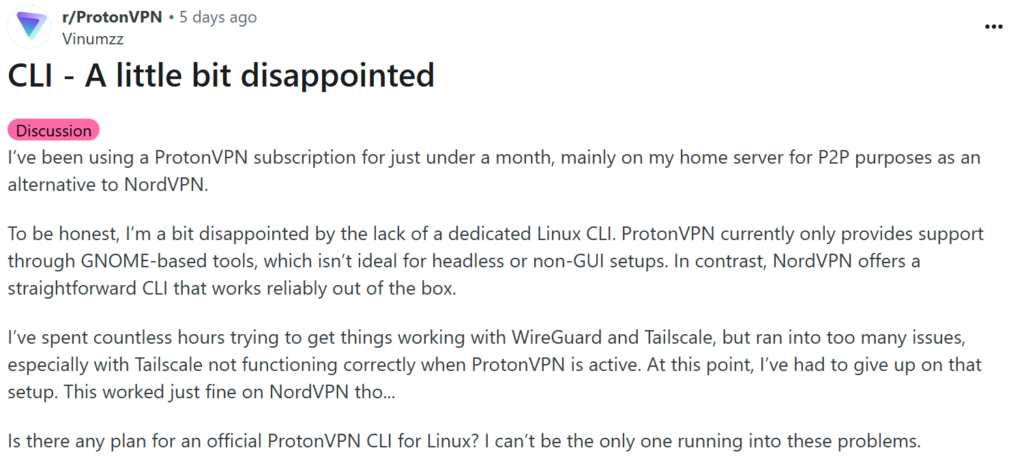
Looking at the reviews, I can easily draw a conclusion that there’s a quite noticeable quality gap between the Proton VPN free and paid version. While there aren’t a lot of complaints from subscribers and they mostly comment on the service’s reliability in all sorts of situations, the free version gets all the complaints for unstable connections and poor unblocking capabilities.
Conclusion: Should you Use Proton VPN in 2026?
In my opinion, you should use Proton VPN in 2026 if you’re looking for a highly reliable, truly private, and secure VPN and do not mind the slightly slower speeds you get to exchange for that. Below, you’ll find my key takeaways on Proton VPN strengths and downsides in 2026:
| Key Proton VPN strengths | Proton VPN downsides |
|---|---|
| ✅ Strong security and privacy. Proton VPN is a Swiss-based provider that adheres to the country’s strict privacy policy laws. Plus, the service undergoes yearly no-logs policy audits. As for security, this VPN uses robust encryption and modern tunneling protocols. | ➖ Free version does not work for geo-unblocking. The servers available on Proton VPN free version are usually flagged by streaming platforms and other sites and do not work for unblocking them. |
| ✅ User-friendly interface. The multi-platforms app is very intuitive and easy to use even for beginners. | ➖ Inconsistent speeds. While Proton VPN performs quite well in my speed tests, the service may slow down during peak hours or within specific locations. |
| ✅ Free version. Proton VPN offers a secure free version with no data limits that works great for encrypting network traffic. | ➖ Limited customer support to non-premium users. Clients using the free version can only access Proton VPNs email support and FAQ/knowledge base. |
| ✅ Paid subscriptions. Premium plans offer a wide selection of advanced features, access to the full Proton VPN server fleet, and faster connection speeds. | |
| ✅ Streaming support. Proton VPN easily unblocks geo-restricted platforms such as Netflix, Hulu, HBO, and more. Plus, the stable connection speeds are perfect for smooth streaming. | |
| ✅ Integration with other Proton services. Proton VPN works seamlessly together with other Proton services, like Mail, Drive, Calendar, and Pass. |
Overall, Proton VPN is a powerful VPN that spares no costs at keeping your online activities truly private and secure. The Swiss-based provider undergoes yearly third-party no-logs policy audits and relies on the highest industry standards concerning encryption, tunneling protocols, and advanced features. It works great for browsing, streaming, gaming, and torrenting, as well as in situations requiring extreme privacy. However, the free version is mostly useful just for browsing, while the connection speeds with the paid subscriptions sometimes show inconsistency.
You might also like to read:
FAQ
Yes, Proton AG, the company behind Proton VPN is a legitimate company. It was created by a group of CERN scientists, is based in Switzerland and operates as a non-profit organization. Besides Proton VPN, the company also own Proton Mail, Proton Pass, and other cybersecurity tools, which are all regarded as highly secure and reliable.
To use Proton VPN you will first need to download its app. You can do that on the official website, Google Play Store, or Apple App Store, depending on your device. Once you have the app, install it, log in with your credentials, and connect to a server in a chosen location. After that, your traffic will be encrypted and your real IP address hidden.
Yes, Proton VPN free version is completely safe. The free version relies on AES-256 encryption and works with modern tunneling protocols. Additionally, the free version has a reliable kill switch and comes with no data caps. However, with it, you canonly access around 100 servers in 5 locations.
Currently, you can subscribe to Proton VPN for $ 2.99/month if you choose the 2-year Plus subscription. With this Proton VPN subscription, you’ll get to access all of its advanced features, the Plus servers for streaming, torrenting, and gaming, and the full fleet of 20700 servers in 149+ countries.
Yes, Proton VPN works in China. However, due to the Chinese government’s strict internet censorship measures, none of the VPN services can guarantee consistent performance in the country. That said, user reviews considering Proton VPN’s capabilities in China are generally favorable.