
IPVanish VPN review 2026

Why trust our review process 
We may earn affiliate commissions for the recommended products. Learn more.
What is IPVanish VPN: overview
IPVanish is a well-known VPN (virtual private network) provider that adds an extra layer of privacy online. The service was first introduced in 2012 and is based in the US. As of 2019, IPVanish is owned by Ziff Davis Inc. as part of their NetProtect business. IPVanish ensures online security by encrypting your traffic and changing your IP address. This protects your online identity, prevents ISP monitoring, and can even help to avoid hacker attacks or similar threats, especially if you’re using public Wi-Fi. It also allows you to browse the internet freely, meaning that you can bypass geo-restrictions and enjoy your favorite content from anywhere.
| IPVanish rating: | 8.5 ⭐⭐⭐⭐ |
| Price: | $ 2.19/month, $3.33/month with the 12-month plan ($43.54/year), or $2.19/month with the 24-month plan ($57.22/year), with both annual plans renewing at $89.99/year |
| Free trial: | ✅ Yes, 7-day free trial on iOS and Android |
| Servers: | 3400 servers in 113 countries |
| Good for streaming? | ✅ Yes – works with Netflix, Hulu, Prime Video, HBO Max, Disney+, and BBC iPlayer |
| Good for torrenting? | ✅ Yes – P2P allowed on all servers, with no bandwidth caps |
| Good for gaming? | ✅ Yes – thanks to recently improved server fleet |
| Current deal: | 85% off the 24-month plan |
While it’s a popular VPN provider, there are various opinions on the service. Some users do not trust it due to some older allegations that IPVanish provides users’ data to the government. Other users say that they were initially hesitant but were very happy with the service when they tried it. Since users have shared different experiences online, I decided to test IPVanish myself and see how it changed over a year, which I hope will help you make a well-informed decision. Continue reading this IPVanish review to learn more about the service and its benefits in 2026.
🔥Limited offer: Get a special IPVanish discount deal with 85% off!🔥
How much does IPVanish cost?
IPVanish has two different plans: Advanced and Essential. During my testing, I found that the Essential plan is more than enough for users who are looking for an everyday VPN service for online privacy and streaming. I would recommend the IPVanish Advanced plan if you’re looking for comprehensive security, as it provides other benefits alongside the VPN.
The starting price for IPVanish is only $ 2.19/month for a 2-year plan. However, the price depends on the plan that you choose and the duration, as there are shorter-term plans available. As of July, IPVanish VPN costs:
- 2-year plan: $ 2.19 per month, billed $57.22 for the first 24 months
- 1-year plan: $3.33 per month, billed $43.54 for the first 12 months
- Monthly plan: $12.99 per month
For this IPVanish review, I’m mostly interested in the VPN service, which is why I took the 2-year Essential plan for my testing. It also offers the best pricing, which was also a huge factor. The whole process was extremely easy, as I quickly purchased the subscription using my credit card. After that, I downloaded the app from the provider’s official website for my MacBook Air device, running Sonoma 14.7.6, created an account, and I was all set.
IPVanish Essential vs Advanced
To get a better understanding of what each IPVanish plan offers, I compared them side by side. Once I gathered information about both plans and what they offer, it’s clear that the IPVanish Advanced plan definitely has more value as it includes additional security tools, such as Headless Browser, Cloud Backup, and File Sync & Share. Even though the Essential plan doesn’t have these extra security tools, you still get quite a few useful features together with the VPN. You’ll be able to customize your VPN connections by using Double Hop, Threat Protection, kill switch, and split tunneling.
| Feature | Essential plan | Advanced plan |
|---|---|---|
| VPN | ✅ Yes | ✅ Yes |
| Threat Protection | ✅ Yes | ✅ Yes |
| Double Hop | ✅ Yes | ✅ Yes |
| Automatic Startup | ✅ Yes | ✅ Yes |
| KIll Switch | ✅ Yes | ✅ Yes |
| 24/7 Live Support | ✅ Yes | ✅ Yes |
| Unlimited Devices | ✅ Yes | ✅ Yes |
| Split Tunneling | ✅ Yes | ✅ Yes |
| QR Code Checker | ✅ Yes | ✅ Yes |
| Link Checker | ✅ Yes | ✅ Yes |
| Headless Browser | ❌ No | ✅ Yes |
| Cloud Backup | ❌ No | ✅ Yes |
| File Sync & Share | ❌ No | ✅ Yes |
| Phone Support | ❌ No | ✅ Yes |
IPVanish is a subscription-based service, but you will need to pay up front for the whole duration at once, no matter which plan you choose. While other VPN providers have more payment methods available, you can get a subscription using PayPal, Google Pay, and credit or debit cards, so you should be able to find a suitable option for yourself. However, I noticed that the provider no longer accepts cryptocurrency, which would be beneficial as you don’t need to provide any financial details.
IPVanish occasionally has some discounts and coupon codes and currently you can get it with a 85% discount. Other special deals are mostly available during the holidays or special events like Back Friday or Cyber Monday.
IPVanish free trial hack
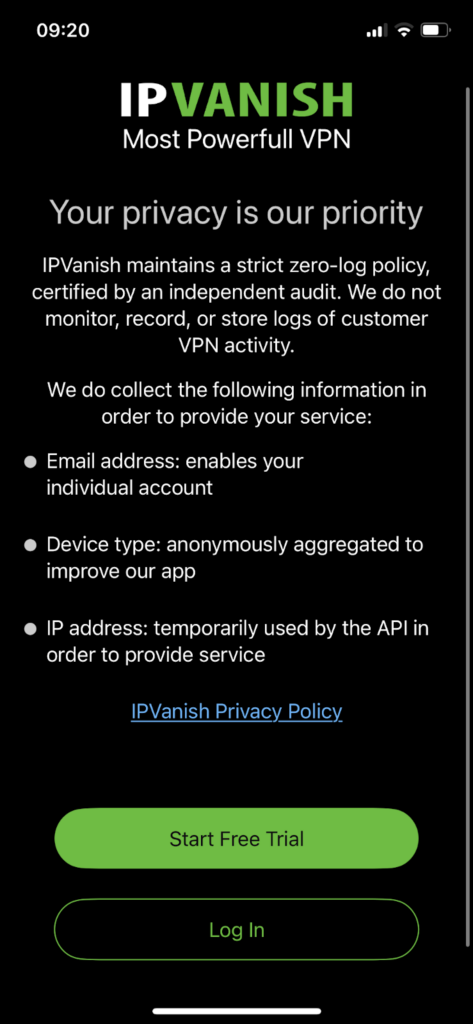
When I reviewed IPVanish’s Terms of Service, I noticed some changes regarding their free trial and money-back guarantee. As of 2026, IPVanish now offers a 7-day free trial for 1-year plans. However, it’s only available for iOS and Android devices, as you can get it from either the Apple App Store or the Google Play Store.
- Download IPVanish on your mobile device.
- Launch the app and press the Start Free Trial button.
- Choose the yearly plan, which offers a 7-day free trial on iOS and Android.
- Create an account and enjoy IPVanish completely free for a week.
- Cancel the subscription within the first 7 days to avoid getting charged.
If you would like to use it longer but still risk-free, you can get a 1-year or 2-year plan from the official website, as these plans come with a 30-day money-back guarantee. Just be sure to get the yearly plan from the official website, as the money-back guarantee is not applicable for plans bought from the Apple App Store. Unfortunately, monthly plans are not protected with a money-back guarantee, so I would advise getting a long-term plan.
Does IPVanish work with Netflix and other streaming sites?
I tested IPVanish to see if it works with various streaming platforms, and I can confirm that the provider indeed works well with Netflix and some other popular services. While Netflix is available in many countries, each region has different titles. Unfortunately, other Netflix libraries are geo-restricted, meaning they only work in specific countries. Luckily, IPVanish granted me access to many different Netflix libraries, including the US, UK, Japan, India, Thailand, Philippines, and Vietnam. I didn’t encounter any issues switching between different libraries, and I was able to stream content without any lag issues.

| Netflix region | Works with IPVanish |
|---|---|
| US | ✅ Yes |
| UK | ✅ Yes |
| India | ✅ Yes |
| Japan | ✅ Yes |
| Thailand | ✅ Yes |
| Philippines | ✅ Yes |
| Vietnam | ✅ Yes |
I also tested IPVanish in terms of unblocking geo-restricted content, and I was surprised to see that it easily unblocked quite a few other services. With IPVanish, I was able to watch content on Amazon Prime Video, HBO Max, Hulu, Disney+, and BBC iPlayer. This proved that IPVanish successfully bypasses geo-restrictions, meaning that you’ll be able to enjoy your favorite shows and movies from anywhere, even if you’re traveling abroad. While the speed did decrease a little when connecting to servers in further locations, it didn’t noticeably affect my streaming experience, so I was able to enjoy my favorite TV shows and movies buffer-free.
Is IPVanish good for torrenting?
IPVanish is a suitable VPN for torrenting privately. While it doesn’t offer specialized servers for torrents, it allows P2P traffic on all its servers. It’s also a great choice for torrenting as it uses all necessary security measures, such as robust encryption, IP and DNS leak protection, and a strict no-logs policy. I would also advise enabling IPVanish’s kill switch when torrenting. I always do that to ensure that my real IP address is not visible in case of any VPN connection issues. What I like the most is that IPVanish also has a free SOCKS5 proxy, which can lower latency.
I put IPVanish to the test, and I was quite happy with the results. Due to its fast speeds and security measures, I was able to torrent without major issues. I downloaded a 5.27 GiB Ubuntu 24 client in only 3 minutes. The download speed reached 36MiB/s at its peak. I also wanted to check the process of configuring the SOCKS5 proxy, so I tested it on my Windows device with uTorrent. Since IPVanish has a detailed guide on how to do that, I was able to set it up quickly. All I had to do was launch uTorrent, select Connection in the menu, and configure some preferences. Once I did everything, I quit and restarted uTorrent. I also liked that the guide has some steps in case of any issues, which is very helpful to have.
Is IPVanish good for gaming?
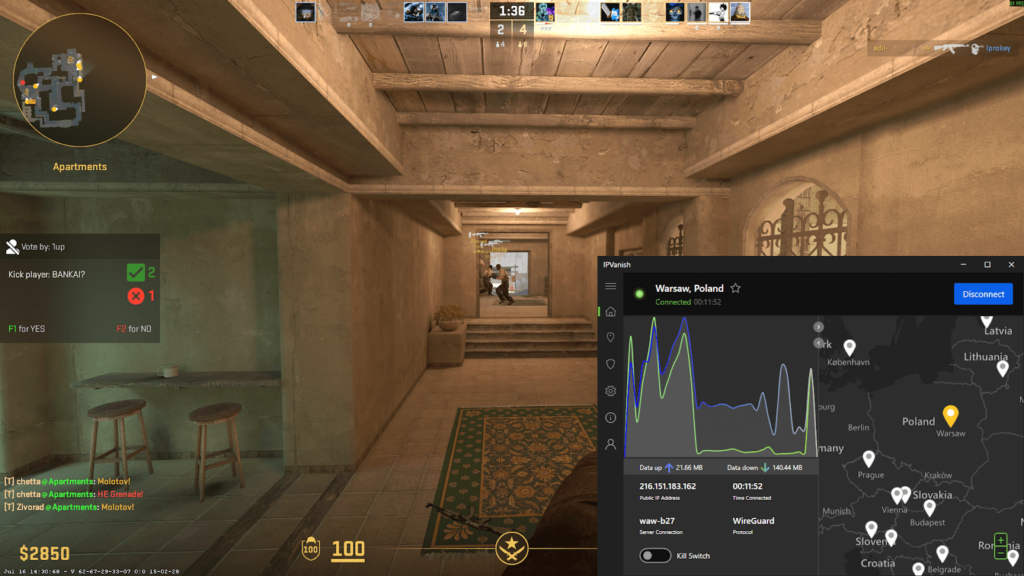
Unfortunately, if you’re interested in gaming with a VPN, IPVanish may not be an ideal choice, as I found it to be a bit slow. Generally, IPVanish delivers fast speeds with WireGuard protocol, and it doesn’t limit bandwidth or throttle speeds. It’s even possible to game with your friends or family, as IPVanish doesn’t have any device limits. However, I was a bit disappointed when I tested IPVanish and tried to play Counter-Strike 2 with the Poland server. My speed stayed at 255Mbps, retaining 31% of my baseline speed. This greatly affected my speed, which is not ideal for gaming. On the other hand, while the speed did slow down quite a bit, I was still able to play Counter-Strike without major issues.
Using a VPN is also beneficial for a secure and uninterrupted gaming experience. Changing your IP address reduces the risk of potential DDoS attacks, which are very common when gaming. Since IPVanish guarantees IP and DNS leak protection, you’ll be able to avoid such issues. If you only need a VPN for gaming, you can use IPVanish’s split tunneling feature, as it will route only the game through the VPN tunnel.
How fast is IPVanish?
IPVanish is a generally fast VPN, almost as fast as top providers like NordVPN and Surfshark. During my testing, the average download speed of IPVanish was 459Mbps. The results are very similar to NordVPN’s (468Mbps) and Surfshark’s (466Mbps). However, it’s important to remember that while the VPN’s speeds are good for streaming and everyday browsing, they might not be as good for gaming and torrenting.
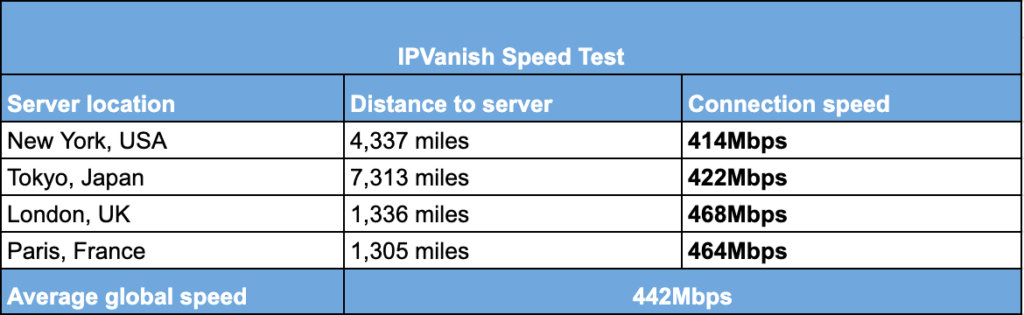
Various factors can affect the speed, including your overall network speed, the device you’re using, and the server you’re connected to. If you connect to a server closer to your actual location, you shouldn’t notice any difference in terms of initial connection speed. If you connect to a more distant server, you might experience some slowdowns. When I connected to an IPVanish server in the UK, which is not that far from my real location, my speeds stayed at 468Mbps, but it decreased to 402Mbps while connected to Australia, since it is further away.
If you want to improve your speed while connected to IPVanish, I recommend using its WireGuard protocol as it’s the most stable and fastest protocol available. You could also use the Best Available Server option, which will connect you to the fastest server based on location and load. Additionally, you could disable additional features like the kill switch, as they also sometimes affect your speed.
IPVanish server locations
When looking for the best VPN service, the list of servers is one of the most important criteria for me. Since I use a VPN mainly for streaming, bypassing blackouts, and even purchasing cheaper flight tickets, having a wide selection of servers in different countries is a must. IPVanish has 3400 servers in 113+ countries, including 1,020+ servers in the US. I was very impressed with the number of US servers, which I often use for streaming or online shopping. There are definitely providers that have even more servers, but IPVanish’s servers are enough for everyday browsing. Additionally, I liked that, recently, IPVanish added 568 RAM-only servers across 19 locations. These servers offer added privacy, and you can filter them out by clicking the Location tab in iOS, macOS, and Android apps. As far as I know, IPVanish plans to add this feature for Windows, too.
| Country | IPVanish servers |
|---|---|
| USA | 1020+ |
| Canada | 50+ |
| UK | Servers in 4 locations |
| Australia | Servers in 5 locations |
| Brazil | Servers in 1 location |
| Switzerland | Servers in 1 location |
| Germany | 50+ |
| France | 30+ |
After thoroughly checking IPVanish’s server list, I didn’t notice any important countries missing from the list. You can find servers in Europe, Asia, Africa, North America, South America, and Oceania. Having servers in different regions ensures access to your favorite content from anywhere in the world.
While IPVanish has a solid server list with more than enough servers for streaming, gaming, and everyday browsing, other services, like Proton VPN, offer more. Proton VPN has 20700 servers in 149 countries, which is way more than IPVanish offers.
Is IPVanish safe?
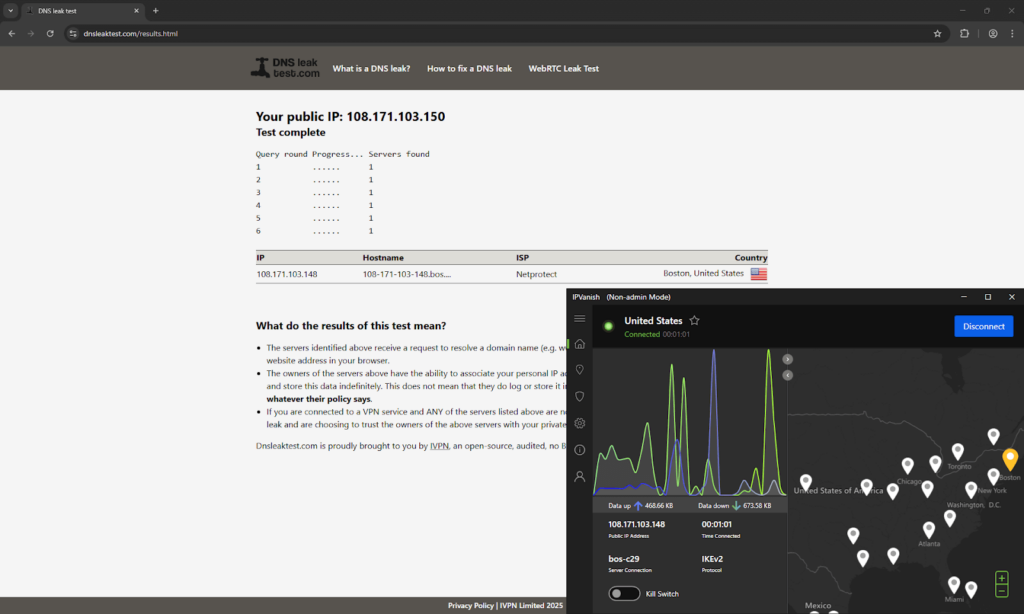
IPVanish is a safe VPN provider that uses all the necessary security measures and even has some extra privacy features. The provider uses the military-grade AES-256 encryption, which guarantees protection against data breaches and surveillance. Your private information will also stay secure as IPVanish has a strict and recently audited no-logs policy, which I found to be trustworthy. There are even a couple of additional security features to enhance your privacy, such as a kill switch, which will disable the internet in case of any VPN connection issues. IPVanish also guarantees IP and DNS leak protection. I tested it using ipleak.net, and it proved to work reliably as I didn’t encounter any leaks.
I also checked what protocols IPVanish supports, and I found that you can choose from WireGuard, OpenVPN, and IKEv2/IPSec protocols, which is standard for most VPN providers. Unfortunately, what IPVanish is missing is RAM-only servers, which top providers like Surfshark and NordVPN offer. However, I found that IPVanish is already implementing such servers, and it currently has them in 10 locations. You can also connect to Double VPN servers for extra security, as they will route your traffic through two locations simultaneously.
While there are a few key features missing, especially important for users in restricted countries, in my opinion, IPVanish is a safe everyday VPN that is always improving its services.
Who owns IPVanish?
IPVanish has been owned by Ziff Davis, a digital media and internet company, since 2019. The provider is a reliable and secure VPN service, but I discovered it went against its no-logs policy in the past while operating under a different company. In 2016, IPVanish provided user data to the Department of Homeland Security in a case where an IPVanish user was using the VPN for criminal activity. After the incident, IPVanish was soon acquired by a new company and underwent independent audits, which confirm that IPVanish no longer stores user data.
While IPVanish has an audited no-logs policy, it’s also based in the US, which is part of the Five Eyes surveillance alliance. Countries in the Five Eyes surveillance alliance are in agreement to share data between them, potentially including data about your VPN activity. Due to this, many privacy-conscious users are sceptical about IPVanish and other providers that are in Five, Nine, or Fourteen Eyes alliance countries.
Does IPVanish keep logs?
IPVanish’s no-logs policy is clear and highlights the most important parts. After carefully reading through it, I found that IPVanish doesn’t log traffic destination or content, IP addresses, connection time stamps, DNS inquiries, search history, app usage data, or upload and download activity. This means that IPVanish does not monitor your digital footprint and overall browsing habits, so you’ll be able to stream, play games, and browse the internet in total privacy. However, there are a few things that IPVanish logs, such as your email address and billing information, as this is necessary for operational purposes.
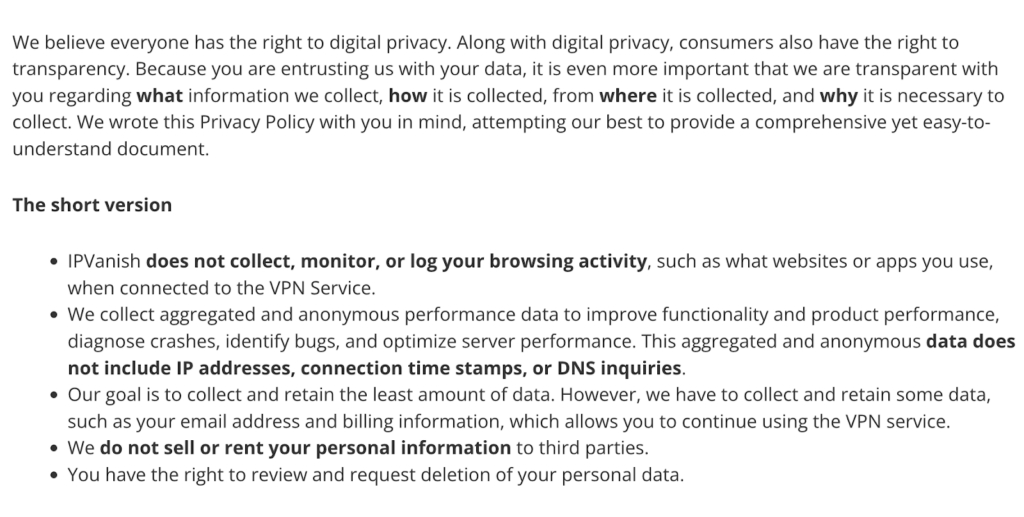
To see if the IPVanish no-logs policy is indeed trustworthy, I investigated it further and found that it was last audited in February 2025. It was audited by Schellman Compliance, LLC, which is a leading CPA company that specializes in cybersecurity and IT audits. To conduct the audit, IPVanish granted the audit company full access to its infrastructure. The audit confirmed that IPVanish is a no-logs VPN that doesn’t store any user data, traffic logs, or user online activity. This makes me believe that IPVanish is indeed a trustworthy service that takes user privacy seriously.
How many devices does IPVanish support?
One thing that makes IPVanish a top VPN provider is that it doesn’t limit the number of simultaneous connections. This means that you can use your IPVanish account on all personal devices without any limits. You’ll be able to set it up on various computers, mobile phones, tablets, smart TVs, consoles, and routers. IPVanish supports all major operating systems, including Windows, macOS, Linux, Android, iOS, Fire TV, and Apple TV.
To test the service, I first had to install the app on my devices, which was way easier than expected. For my iOS device, I simply downloaded the IPVanish app from the Apple App Store. To get it on macOS, I installed IPVanish through the official website. No matter which device I used, the setup was quick and easy. The mobile app and desktop app interface were clean, minimalistic, and easy to navigate. Core features like server selection and one-tap connect are consistent across all platforms.
IPVanish Reddit reviews: what real users are saying
When choosing a VPN, I always advise searching for real user reviews to understand how the service works and if it has any flaws. To better understand IPVanish, I browsed through Reddit and read quite a few IPVanish reviews, which revealed that users have mixed opinions on the service.
Most users indicated that the main reason they decided to use IPVanish is the affordable pricing and unlimited simultaneous connections. I definitely understand the reasoning, as this is indeed quite rare. Not many VPN services offer unlimited simultaneous connections, which is a huge advantage as it allows you to protect all personal devices and even share your account with a family member.

There were some contradicting opinions about streaming with IPVanish. While many users said that they use IPVanish for streaming and have no issues, some indicated that they’re unable to bypass geo-restrictions on some services. During my in-house tests, I had no issues accessing various streaming websites, but it is common for such services to block VPNs, including IPVanish. If you encounter similar issues, it’s usually easy to solve them by simply connecting to a different VPN server.
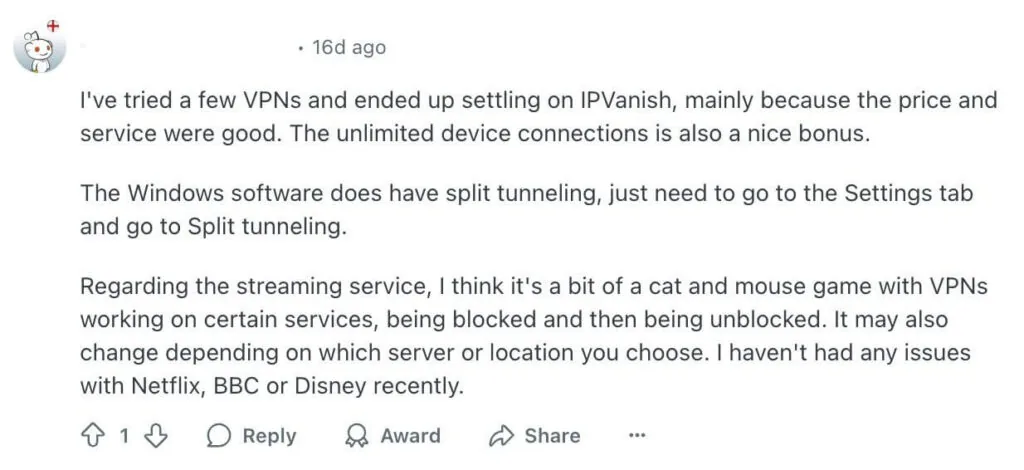
I also noticed a few comments about the speed. One user said that they switched to NordVPN, and the speed was way better. While my in-house tests also proved that NordVPN is a bit faster than IPVanish, the difference was not that noticeable. Additionally, it’s important to note that there are many factors that could affect your speed, including the device you’re using and server load.

Final verdict: should you use IPVanish VPN in 2026?
IPVanish is one of the top VPN providers in 2026, as it offers fast speeds, unlimited simultaneous connections, and a user-friendly interface. It’s an excellent choice for both beginners and tech-savvy users who are looking for a reliable everyday VPN. But just like other VPNs, it has some limitations, which are important to consider. Below, you can find my key findings about IPVanish:
IPVanish pros
- Unlimited device connections: IPVanish has no connection limitations, meaning that you can secure all personal devices. Not many VPNs offer this, so it’s a huge advantage compared to other providers.
- Over 1020 servers in the US: IPVanish offers a wide selection of US servers, which is especially useful for streaming and online shopping. It’s an impressive number that’s even higher than NordVPN or Surfshark offer.
- Recently audited no-logs policy: While many VPNs claim that they don’t log any user data, not all of them can prove this. I found out that IPVanish underwent an independent audit, which proved that the service does not log any user data.
- Compatible with all major operating systems: You’ll be able to set up IPVanish on various phones, tablets, computers, smart TVs, consoles, and routers. It supports Windows, macOS, Linux, Android, iOS, Fire TV, and Apple TV, and also provides an intuitive app interface.
- Unblocks geo-restricted services: My in-house testing revealed that IPVanish is capable of bypassing geo-restrictions on popular streaming services like Amazon Prime Video, Hulu, Disney+, and HBO Max. You’ll also be able to easily change your Netflix region and enjoy exclusive content from anywhere.
IPVanish cons
- Limited international servers: While IPVanish has 3400 servers in 113 countries, it’s a bit less compared to NordVPN or Proton VPN. Additionally, it lacks servers in countries such as China, which Surfshark offers.
- Based in the US: IPVanish is a reliable no-logs VPN, but it’s based in the US, which is part of the Five Eyes surveillance alliance. Privacy-oriented users might want to look for a VPN service that is headquartered outside of such alliances.
- Speed drops when gaming: IPVanish proved to be a fast VPN, almost as fast as NordVPN and Surfshark. However, during in-house tests, the speed was affected when gaming, which might have a huge impact on your gaming experience.
You may also want to read:
What Our Experts Think About IPVanish

FAQ
Yes, IPVanish is a legitimate VPN service that guarantees online privacy. It uses all the necessary security measures, such as robust encryption, IP and DNS leak protection, and an audited no-logs policy, which makes it a reliable VPN provider. Additionally, IPVanish delivers fast speeds, has a wide selection of servers in 113 countries, and offers extra features, so you can use it for multiple use cases.
Yes, IPVanish is considered a good VPN, especially for users who are looking for fast speeds and privacy. IPVanish proved to be one of the fastest VPNs, which is a huge plus for streaming and overall browsing. Additionally, it offers a simple app interface together with necessary security features, which makes it a good service for both beginners and tech-savvy users.
IPVanish is used for online privacy and security. IPVanish is a well-known and trustworthy VPN provider that encrypts your traffic and changes your IP address. By doing so, your online identity will stay anonymous, which makes it almost impossible for anyone, including your ISP, to monitor your online activity.
IPVanish changes your IP address and encrypts your online traffic, which adds an extra layer of protection to your digital footprint. This ensures that you stay private while using apps and visiting sites online. Additionally, IPVanish’s servers bypass geo-restrictions, meaning that you can enjoy your favorite content without any issues from anywhere in the world.
To be sure with IPVanish, be sure to stay connected to the VPN at all times. If you often use public Wi-Fi, IPVanish will add an extra layer of protection, which will help to prevent possible hacker attacks and data breaches. Additionally, to stay secure, it’s important to ensure that your VPN connection is successful. You can do that by using ipleak.net, which will indicate if your data is leaking.
Yes, IPVanish does block ads. While IPVanish is a VPN service, which mainly protects your identity by encrypting your traffic and changing your IP address, the provider also has some additional features, including an ad blocker. By enabling IPVanish’s Threat Protection feature, you will be able to enjoy a smooth browsing experience as the feature will block any malicious ads, websites, and trackers.
IPVanish costs $12.99/month if you choose the monthly plan. However, if you want to save money and are looking for a long-term plan, you can get the 2-year plan for only $ 2.19/month. If you’re not yet sure if you want a long-term plan, you can still use it risk-free, as IPVanish has a 30-day money-back guarantee.