
- Top 5 Chromebook antivirus services
- Does a Chromebook need an antivirus?
-
Best antivirus for Chromebook: detailed overview
- 1. Norton 360 – best overall antivirus for Chromebook
- 2. Bitdefender – lightweight Chromebook antivirus software
- 3. Surfshark Antivirus – affordable antivirus for Chromebook with VPN
- 4. TotalAV – beginner-friendly virus protection for Chromebook
- 5. Avira – best security for Chromebook against viruses and malware
- Comparison of the best antivirus for Chromebook
- What is the best free antivirus for Chromebook?
- How to get rid of a virus on a Chromebook with antivirus software
- Which antivirus programs don’t work with Chromebook?
- Final tips on what to look for in an antivirus for Chromebook
- FAQ
While Chromebooks come with built-in antivirus protection, it isn’t designed to handle today’s advanced threats. Many users still encounter malware, phishing scams, and data-tracking attempts, proving that ChromeOS’s default protection isn’t enough to stay fully secure online.
Chromebooks run on ChromeOS, and unlike Windows or macOS, the system doesn’t natively support most traditional antivirus programs. However, since ChromeOS is based on the Android operating system, many Android antivirus apps can work seamlessly on it, giving you broader protection options.
That’s why I personally tested multiple antivirus providers for malware detection, phishing prevention, and performance speed, as well as for extra features like built-in VPNs and password managers that enhance privacy and online safety. After extensive testing, Norton 360, Bitdefender, Surfshark Antivirus, TotalAV, and Avira stood out as the best antivirus software for Chromebooks, all offering stronger, more reliable protection for torrenting, streaming, and everyday browsing.
Top 5 Chromebook antivirus services
-
1.Norton 360: All-in-one Chromebook antivirus with VPN
-
2.Bitdefender: Lightweight virus protection for Chromebook
-
3.Surfshark antivirus: Unlimited-device antivirus for Chromebook with VPN
-
4.TotalAV: Beginner-friendly Chromebook virus protection with simple setup
-
5.Avira: Free antivirus for Chromebook with optional premium upgrades
Does a Chromebook need an antivirus?
Yes, Chromebooks need antivirus software, despite being inherently more secure than operating systems, like Windows and macOS. While ChromeOS includes built-in protections, such as automatic updates, sandboxing, a verified boot, and basic virus defense, it isn’t completely immune to threats. For example, malware, phishing scams, and malicious extensions can still slip through. That’s why using a reliable antivirus for Chromebook is highly recommended to strengthen your security and privacy against evolving online risks. However, nothing is bulletproof, and real-world cases prove ChromeOS has vulnerabilities too, and here are some examples:
- Emergency Chrome update (Forbes, Aug 2025): Google rushed patches for critical browser flaws that affected millions of users.
- Malicious extensions (Malwarebytes, 2025): Security researchers found Chrome/Edge extensions with over 2 million installs spying on users.
- User report (Reddit): A Chromebook owner reported getting infected after downloading a shady photo app.
- Malware removal request (Reddit): Another ChromeOS user asked for urgent help after suspicious behavior on their device.
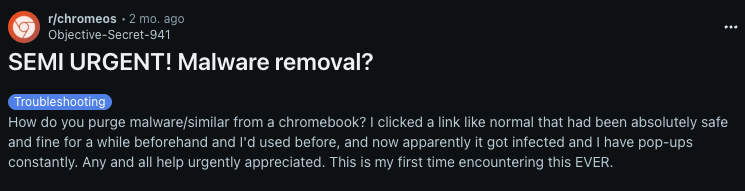
These examples show where threats sneak in: phishing sites, unsafe Android apps, malicious Chrome extensions, spyware, and even via Linux apps (if the option is enabled). Unfortunately, the built-in virus protection for Chromebook doesn’t always catch them.
Not every Chromebook user needs an antivirus, but for those who download files frequently, install Android or Linux apps, or handle work and banking data, extra protection is essential. You can increase Chromebook security with phishing protection, real-time malware defense, and useful extras like VPNs if you use a trusted third-party antivirus.
Best antivirus for Chromebook: detailed overview
| Chromebook Antivirus | Best for | Jump to review |
|---|---|---|
| 1. Norton 360 | Overall protection and premium features (VPN, ID monitoring) | Go to Norton 360 review |
| 2. Bitdefender | Lightweight and easy-to-use security | Go to Bitdefender review |
| 3. Surfshark Antivirus | Affordable all-in-one bundle (antivirus + VPN) | Go to Surfshark Antivirus review |
| 4. TotalAV | Beginner-friendly with optimization tools | Go to TotalAV review |
| 5. Avira | Free protection with essential security | Go to Avira review |
To find the best antivirus for Chromebook, I tested over 14 apps from the Google Play Store. For each one, I ran full scans using EICAR samples, measuring scan time, detection accuracy, and overall system performance. I also evaluated their anti-phishing protection in Chrome, compared price-to-value ratios, and checked for extra features like built-in VPNs for added privacy.
1. Norton 360 – best overall antivirus for Chromebook
- Rating: 8.7 ⭐⭐⭐⭐
- Free version: No free version, but there’s a 7-day free trial
- Max. devices: 5 devices
- Starting price: From $29.99/year
- Current deal: Get Norton 360, now 58% OFF
Norton 360 is the best antivirus for Chromebook thanks to its dependable real-time protection for apps, downloads, and browsing. Plus, it includes a bundled VPN and identity tools, all while delivering 100% detection in my tests.
Key features. To keep you safe, Norton 360 scans Android apps, downloads, and browser activity for ransomware, spyware, and scams. You also get a secure VPN (which is unlimited on premium tiers), Wi-Fi security alerts, a password manager, and dark web monitoring. With higher-tier plans, you can also get access to LifeLock identity protection and parental controls.
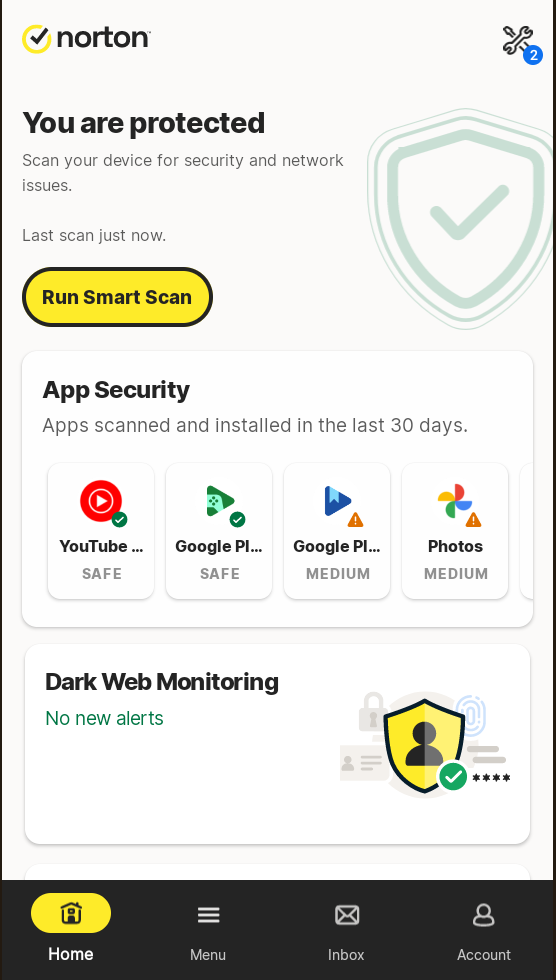
In-house test results. To challenge Norton’s detection capabilities, I placed 50 known-infected files within my Chromebook’s Android container. Norton 360’s Smart Scan flagged all 50 files in just over a minute, proving how accurate it is. In addition, AV-TEST’s May 2025 Android evaluation is highly reassuring: Norton 360 received an outstanding $6.0/6.0 protection score, demonstrating a 100% malware detection rate against widespread threats. The only trade-off is that Norton 360 can feel slightly heavier than competitors like Bitdefender, but this minor trade-off is worth the stronger privacy protection and robust, verified security.
Pricing. Norton 360 is a top Chromebook antivirus, starting at $29.99 per year for the Standard plan and backed by a 60-day money-back guarantee. For higher security and protection, the Deluxe plan adds more device coverage, cloud backup, and parental controls, while the Select Plus plan includes LifeLock identity theft protection on top of everything else. Lastly, keep in mind that while Norton prices may differ in the Google Play app, in-app purchases don’t qualify for Norton’s extended refund policy.
Things I like
- 100% detection in my tests
- VPN, password manager, dark web monitoring
- Parental control for families
Things I didn’t like
- Can feel slightly heavier when compared to Bitdefender
Verdict. All in all, Norton 360 is the best overall anivirus for Chromebook users who want robust protection and premium privacy features, all in one suite.
2. Bitdefender – lightweight Chromebook antivirus software
- Rating: 8.4 ⭐⭐⭐⭐
- Free version: Yes, free version included
- Max. devices: 3 devices
- Starting price: From $24.99/year
- Current deal: Get Bitdefender, now 50% OFF
Bitdefender is one of the best lightweight antivirus apps for Chromebook, well-regarded for its simplicity and strong protection. During my tests, it had almost no impact on day-to-day performance.
Key features. When installed and active on your Chromebook, Bitdefender provides on-demand scanning of installed apps, automatic scans of freshly installed ones, and storage scans of files/SD cards. Plus, you also get Web Protection against phishing, and features like Scam Alerts and Anomaly Detection that flag suspicious app behavior. Extras include Account Privacy checks, App Lock, and an Anti-Tracker. All paid plans include a VPN, but it’s capped at 200MB/day, which is barely enough for data-hungry activities, like streaming. The only way to raise the data cap is to subscribe to Bitdefender VPN’s services separately.
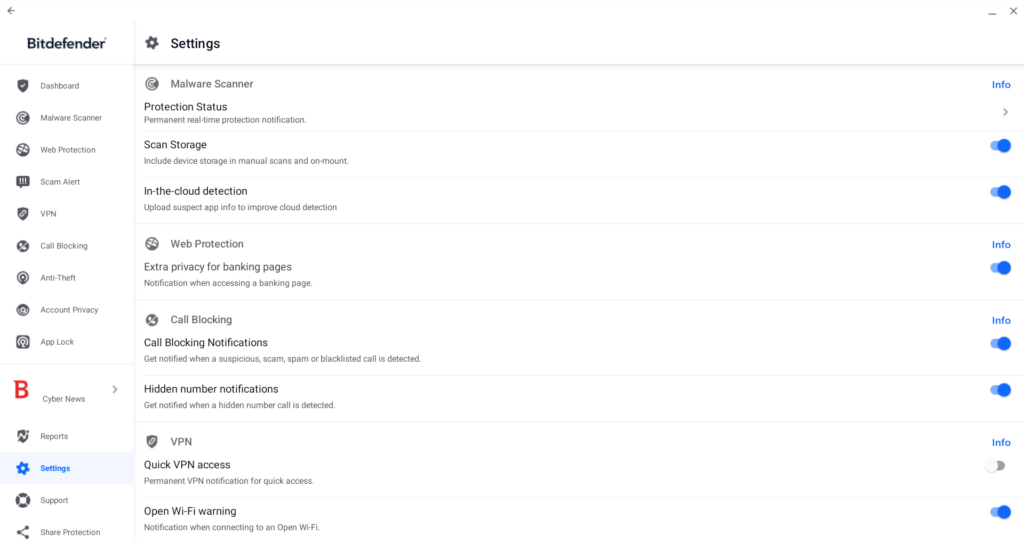
In-house test results. In my Chromebook tests, Bitdefender detected 100% of threats (50/50 infected samples) inside the Android container. The initial scan finished in under five minutes, and real-time protection quickly flagged risky apps upon installation. Additionally, Bitdefender scored a perfect 6/6 in protection and usability for Android devices in AV-TEST’s May 2025 results. All in all, Bitdefender’s system performance remained smooth and light, making it one of the most efficient options compared to heavier tools like Norton 360.
Pricing. While limited, you can use Bitdefender’s free antivirus for Chromebook. Alternatively, via the official site, paid plans start at $24.99/year for one device or $29.99/year for three. Also, do note that the 30-day money-back guarantee only applies to purchases made through the website.
Things I like
- Detected 100% of threats during tests
- Lightweight, minimal slowdown
- Free version available
Things I didn’t like
- VPN capped at 200MB/day
- Limited coverage on lower plans
Verdict. If you’re looking for lightweight and easy-to-use virus protection for Chromebook without slowing your device, Bitdefender might be just right for you.
3. Surfshark Antivirus – affordable antivirus for Chromebook with VPN
- Rating: 8.3 ⭐⭐⭐⭐
- Free version: No free version, but there’s a 7-day free trial
- Max. devices: Unlimited devices
- Starting price: From $59.13/year
- Get Surfshark Antivirus, now 88% OFF
Surfshark Antivirus is an ideal Chromebook antivirus if you want security bundled with one of the best VPNs for Chromebook. It delivers reliable virus protection for Chromebook plus privacy tools under one subscription.
Key features. With Surfshark Antivirus, you get real-time malware protection, quick/full/scheduled scans, and external storage scanning. And since it’s part of Surfshark One and Surfshark One+ bundle packs, you get access to a VPN with features like Kill Switch, Bypasser, and MultiHop for added privacy. Moreover, CleanWeb blocks phishing and malicious sites, while cloud-based extras like Surfshark Alert (data breach monitoring), Surfshark Search (ad-free private search), and Alternative ID/Incogni help you manage personal data.
In-house test results. When testing Surfshark Antivirus on a Chromebook, it detected 100% of threats (50/50 samples) inside the Android container. Scans finished in just over one minute, but I did notice that full scans caused more slowdown than, for example, Bitdefender. Meanwhile, real-time protection flagged risky apps upon installation, and it also blocked phishing attempts.
Pricing. Plans start at $59.13/year, and include not only Surfshark Antivirus but a plethora of advanced security features. While there isn’t a free version that you can test out, there’s a 7-day free trial via the Google Play Store, and a 30-day money-back guarantee.
Things I like
- 100% detection rates
- Unlimited devices + VPN
- Extra privacy tools (Alert, Search, CleanWeb)
Things I didn’t like
- No firewall or parental controls
- Slightly heavier full scans
Verdict. If you’re looking for an all-in-one affordable protection, Surfshark is the best antivirus for Chromebook, and with unlimited devices, it can cover the whole household.
4. TotalAV – beginner-friendly virus protection for Chromebook
- Rating: 8.0 ⭐️⭐️⭐️⭐️
- Free version: Yes, free version included
- Max. devices: 8 devices
- Starting price: From $19.00/year
- Current deal: Get TotalAV, now 80% OFF
TotalAV is a straightforward antivirus for Chromebook, which includes a strong VPN with its premium subscription plans. It’s beginner-friendly, and while the free version has certain limitations, it’s overall a great introductory virus protection software for ChromeOS users.
Key features. TotalAV provides access to features like real-time malware protection, Safe Browsing VPN, and Total Adblock to block ads and trackers. While it doesn’t have parental control options, it includes a feature called App Lock, which restricts access to specific apps and requires a PIN or pattern to unlock them. For personal data protection, there’s a data breach monitoring feature, and device optimization tools like a junk cleaner. However, unlike Norton or Bitdefender, TotalAV doesn’t include extras like cloud backup or a password manager.
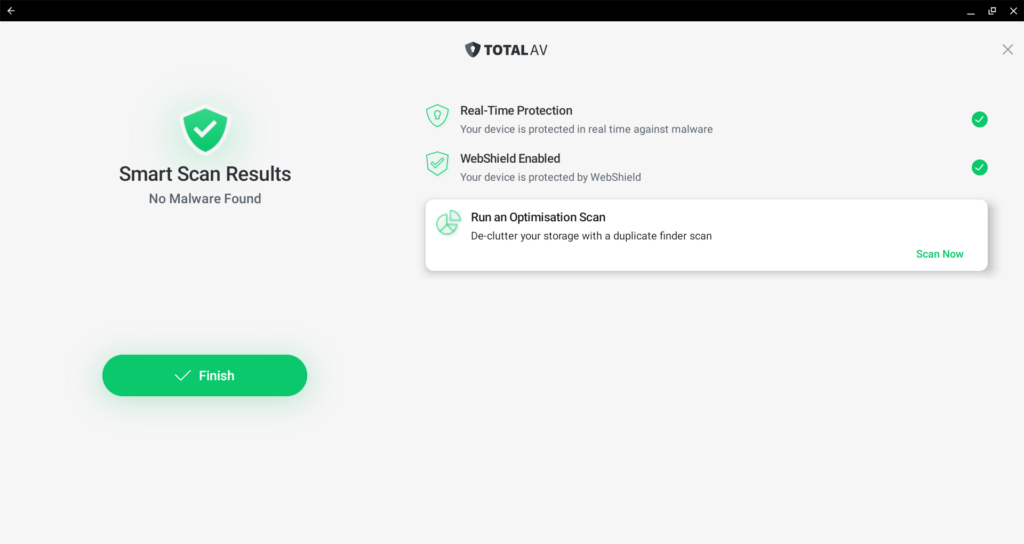
In-house test results. During testing on Chromebook, TotalAV detected 49 out of 50 test samples I placed. The Quick Scan finished in just a few minutes, while the Smart Scan took longer as it also cleaned junk files and cookies. A Full System Scan was completed in under 30 minutes without major performance drops. Nevertheless, my Chromebook stayed responsive, and scans caused only slight slowdowns, showing its strength in low system impact. According to AV-TEST’s May 2025 results, TotalAV earned top marks for protection and usability, while AV-Comparatives’ Real-World Protection Test confirmed its strong defense against web-based threats. Overall, it’s a reliable and efficient antivirus option for Chromebook users.
Pricing. You can get TotalAV for $19.00/year and cover up to 8 devices. There’s also a limited free version for basic scanning; however, it doesn’t include real-time protection. But if you want to test all features of this service risk-free, there’s a 30-day money-back guarantee on website purchases.
Things I like
- Simple, beginner-friendly interface
- Includes extra features like VPN, Adblock, and cleaners
- Offers a free version
Things I didn’t like
- Full scans are slower than lightweight rivals
- Fewer advanced features than the top options
Verdict. If you want easy, set-and-forget virus protection for Chromebook with handy tune-up tools, TotalAV is a solid, user-friendly choice.
5. Avira – best security for Chromebook against viruses and malware
- Rating: 7.2 ⭐️⭐️⭐️
- Free version: Yes, free version included
- Max. devices: Unlimited with the free version; 25 with paid subscriptions.
- Starting price: From $59.99/year
- Current deal: Get Avira, now 45% OFF
Avira stands out as one of the best free Chromebook antivirus options with a low system impact. It offers solid day-to-day protection, with the option to upgrade for unlimited VPN and advanced features.
Key features. Avira comes with real-time malware protection and a fast Smart Scan to find out any security or performance issues. There’s phishing protection available via the Avira Browser Safety extension, and it even includes a VPN (however, it’s capped at 100MB/day on the free version, yet unlimited on Prime). On the other hand, the password manager offers unlimited entries and sync even on the free tier. With Avira Antivirus Pro, you get full access to things like malware protection, ransomware protection, ad blocking, and tracker blocking. Unfortunately, there’s no cloud backup or parental controls.
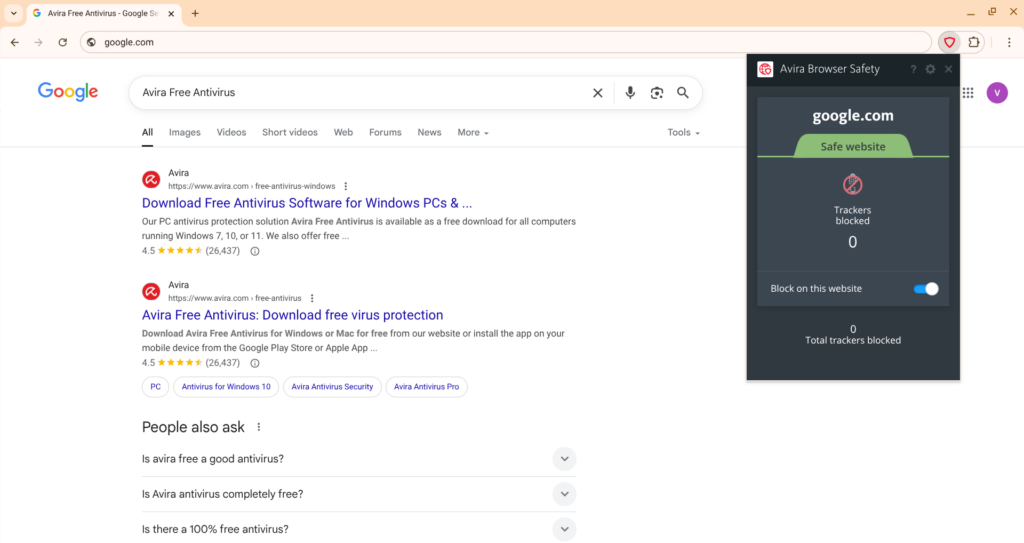
In-house test results. When tested on Chromebook, Avira successfully detected 100% of threats (50/50 samples) inside the Android container. Avira ran with almost no impact on the Chromebook’s performance, even during full system scans, and the Smart Scan completed in under a minute. I noticed only occasional false positives during app installation, but they were rare and easy to dismiss. However, according to AV-TEST’s May 2025 results, Avira achieved perfect scores for protection and usability. This confirms it as one of the most lightweight yet powerful antivirus options for Chromebook users who value both speed and accuracy.
Pricing. You can use the limited Avira version for free or subscribe to the service for $59.99/year. With the paid subscription tier, you get access to unlimited VPN data and features that are absent on the free subscription. On top of it all, Avira comes with a 60-day money-back guarantee on website purchases.
Things I like
- Strong free version
- Lightweight performance
Things I didn’t like
- VPN capped at 100 MB/day on free
- No cloud backup or parental controls
- Occasional false positives
Verdict. For those looking for budget-friendly virus protection for Chromebook, Avira is a practical pick. It comes with genuinely useful free extras while keeping the impact on system speed very low.
Comparison of the best antivirus for Chromebook
| Antivirus software for Chromebook | Antivirus rating | Compatible with Chromebook? | VPN included? | Max devices | Free version | Price | Money-back guarantee |
|---|---|---|---|---|---|---|---|
| 1. Norton 360 | 8.7 ⭐⭐⭐⭐⭐ | ✅ Yes | ✅ Yes | 10 devices | ❌ No, but there’s a 7-day free trial | From $39.99/year | 60-day money-back guarantee |
| 2. Bitdefender | 8.4 ⭐⭐⭐⭐ | ✅ Yes | ✅ Yes | 3 devices | ✅ Yes | From $24.99/year | 30-day money-back guarantee |
| 3. Surfshark Antivirus | 8.3 ⭐⭐⭐⭐ | ✅ Yes | ✅ Yes | Unlimited devices | ❌ No, but there’s a 7-day free trial | From $59.13/year | 30-day money-back guarantee |
| 4. TotalAV | 8.0 ⭐️⭐️⭐️⭐️ | ✅ Yes | ✅ Yes | 8 devices | ✅ Yes | From $19.00/year | 30-day money-back guarantee |
| 5. Avira | 7.2 ⭐️⭐️⭐️ | ✅ Yes | ✅ Yes | Unlimited (free version) or 25 devices (paid version) | ✅ Yes | From $59.99/year | 60-day money-back guarantee |
What is the best free antivirus for Chromebook?
Based on my tests, the best free antivirus for Chromebook is Bitdefender. Its Android app runs smoothly on ChromeOS, delivering reliable real-time anti-malware and anti-phishing protection. While extras like unlimited VPN data or parental controls aren’t included in the free plan, the software is lightweight, accurate, and provides solid everyday virus protection for Chromebook users.
Other notable antivirus apps are TotalAV and Avira Free Security – they both offer free versions of their services. Unfortunately, they’re a bit limited when compared to their paid versions, but they still provide essential malware detection tools. For example, TotalAV has a handy Smart Scan feature, which clears junk files and duplicate data, while Avira includes a password manager and a VPN in its free version. Even with restrictions, both TotalAV and Avira are user-friendly and good starting points if you want more than just malware detection.
Lastly, if you’re looking for a free antivirus for Chromebook, you can try premium options like Norton 360 and Surfshark Antivirus, both offering free trials and money-back guarantees. Norton offers a 7-day free trial and a 60-day money-back guarantee on annual plans, while Surfshark provides a 7-day free trial and a 30-day money-back guarantee.
How to get rid of a virus on a Chromebook with antivirus software
If you suspect your Chromebook has been affected by malware, don’t worry – it’s easy to fix. Infections usually come from Android apps or malicious browser extensions, and you can remove them quickly with an Android-based antivirus like Norton 360. To do so, follow these steps:
- Download and install Norton 360 Android app. You can find its antivirus app on the Google Play Store, simply install it on your Chromebook.
- Launch Norton and log in or create a new account.
- Grant the requested permissions so that the service can properly scan your device.
- Click “Smart Scan” to start a security check that scans your Chromebook’s apps for malware and network vulnerabilities.
- Review the list of security risks and uninstall suspicious apps.
- Enable real-time protection, anti-phishing features, and the built-in VPN to prevent any future infections.
Note:
Traditional desktop antivirus software (Windows or Mac versions) cannot be installed on ChromeOS. On a Chromebook, antivirus apps like Norton 360, Bitdefender, and others are installed as Android apps from the Google Play Store, which protect within ChromeOS’s sandboxed environment.
Which antivirus programs don’t work with Chromebook?
Since Chromebooks run on ChromeOS, traditional desktop antivirus programs are incompatible with Chromebooks. In other words, apps that you install on Windows or macOS devices will not work on ChromeOS, and system-level scanning tools can’t run in Chromebooks’ sandboxed environment.
Instead, the additional virus protection comes through Android apps from the Google Play Store. That’s why most well-known providers like Bitdefender, Norton, Surfshark, TotalAV, and Avira offer Android versions for their services that work with Chromebooks. With them, you can scan Android apps and files and, with some, get access to extras like VPNs or password managers.
The only antivirus program that won’t work with Chromebook is Kaspersky. Due to US government restrictions, Google removed Kaspersky’s apps from the Play Store and also terminated its developer account near the end of 2024. Hence, there’s no official way to install Kaspersky on a Chromebook.
Final tips on what to look for in an antivirus for Chromebook
When choosing an antivirus for your Chromebook, make sure it’s fully compatible with Chrome OS and available on the Google Play Store. While Chromebooks already include strong built-in protections like sandboxing and a verified boot, a lightweight antivirus adds an extra layer of security with real-time malware and phishing defenses without slowing down your device. To maximize your digital protection, prioritize comprehensive security suites that bundle valuable extras like an integrated VPN or a robust password manager for securing sensitive data on any public network.
Based on my testing, Norton 360 is the best all-around antivirus for Chromebook, providing complete malware protection along with a VPN and password manager. Additionally, Bitdefender is an excellent choice for those seeking a fast, efficient, and lightweight solution. However, if you want an antivirus bundled with a market-leading VPN for safer browsing, Surfshark Antivirus is the top option.
You may also like to read:
- The Best Antivirus for Windows 11
- The Best Antivirus for Mac
- 8 Best Antivirus for PC (Free and Paid Options)
- Best antivirus software for iPhone
FAQ
Yes, Chromebooks can get viruses, yet it’s uncommon. ChromeOS is mostly safe from malware thanks to its Linux-based design and built-in protections like sandboxing and a verified boot. However, users can still encounter phishing attempts, unsafe Android apps, and malicious Chrome extensions. That’s why adding a reliable antivirus, such as Norton 360 for Chromebook, provides an extra layer of protection, helping to block these threats and strengthen your overall online security
Yes, Chromebooks come with built-in antivirus protection as part of ChromeOS. Security layers include sandboxing, verified boot, and automatic updates that safeguard from many malware threats. However, this built-in protection isn’t foolproof, and adding antivirus for Chromebook, like Norton 360, helps block phishing, spyware, and other online risks.
I recommend Norton 360 as the best antivirus for ChromeOS. It provides the most comprehensive security features available for your Chromebook. The software runs a deep scan of your entire system to detect any existing malware or vulnerabilities in your Android apps and files. If threats are found, Norton removes them and provides immediate, robust protection against new attacks. Plus, Norton 360 bundles essential features like a VPN, a password manager, and dark web monitoring, enhancing its malware protection capabilities.
To install antivirus software on a Chromebook, open the Google Play Store, search for your chosen provider (like Norton, Bitdefender, or Surfshark), and tap Install. Once installed, sign in, allow permissions, and run a quick scan. Also, keep in mind that only Android-based antivirus apps are compatible with ChromeOS.
Chromebooks don’t have a built-in manual virus scan, but you can run one with an Android antivirus app. Install a trusted antivirus app like Norton 360 from Google Play, open it, grant permissions, and select Scan to detect and remove suspicious apps and files.