

- Best Free VPN for iPhone
- Is There a Good Free VPN?
- Best Premium VPNs With Free Trial
- The Best Free VPNs for iPhone – Detailed List
- How We Picked the Best Free VPNs for iPhone
- The Best Free iPhone VPNs – Comparison
- Limitations of Free VPNs
- Best Cheap VPN for iPhone: Surfshark (Affordable Alternative!)
- Privacy Tools on iPhone 15: What’s Missing?
- How to Install a Free VPN App on iOS
- Free VPNs to Avoid for iPhone
- Start Using a VPN for iPhone Today
2026 is the year of the iPhone 17 series. Apple has worked tirelessly to improve iOS security with each new version. However, if you want to really protect your data, you’re going to need to use a VPN.
We like saving money as much as the next person! That’s why we’ve tested 25+ free VPN services to find the best free VPNs for iPhone. Keep in mind that even the best free VPN services come with hefty limitations — more often than not the features you actually need are behind a paywall.
Keep reading to see what you can get out of a free VPN for iPhone in terms of functionalities and speed, and how it compares to a premium VPN.
Best Free VPN for iPhone
Different iOS users have different needs. Chances are that you’re looking for a free VPN with specific features. Below you can find a list with the best free VPNs for iPhone and for which activities they are the most suited.
Top 5 Best Free VPNs for iPhone
- Proton VPN: Best free VPN iOS (iPhone and iPad)
- PrivadoVPN: Secure VPN for streaming on iPhone
- Windscribe: High-speed VPN with many servers
- Hide.me: Free VPN for iOS with great customer support
- TunnelBear: Free iPhone VPN with many servers
To select the best VPNs for iPhone, we have judged them on the following criteria:
- Compatibility with iOS: all the VPNs in this list can be installed on an iPhone.
- Server network: the bigger the server network, the better. That why we have selected VPNs with as much servers as possible.
- Unblocking: we have tested if the VPNs on our list can unblock popular streaming sites.
- Privacy and security: we have selected VPNs that value your privacy and keep you safe online.
Is There a Good Free VPN?
Yes, there are various good free VPNs you can get your hands on. Based on extensive testing, PrivadoVPN takes the #1 spot. With a decent amount of server locations for a free VPN, Privado is a good bet. It can unblock most streaming sites and comes with a great set of features.
However, it still only covers the basics. If you want a high-speed VPN for streaming, Privado is a bit of a risky choice, since it doesn’t offer the fastest speeds. On top of that, you’ll miss out on advanced features such as a password manager or a dark web monitor.
For full coverage, you’re better off checking out a premium VPN with a free trial. This gives you a chance to see how the best free VPN services compare to a paid service.
Best Premium VPNs With Free Trial
Some of our favorite premium VPNs we’ve tested offer up a free trial or money-back guarantee. You don’t have to risk your money in order to try out a VPN service like NordVPN or Surfshark. Here are some great options:
- Surfshark: You can try Surfshark for free for 7 days on Android, iOS or macOS. There’s also a 30-day money-back guarantee that will give you a full refund. Chances are you won’t want to cancel your Surfshark subscription though since this VPN can unblock anything and keeps your data safe.
- NordVPN: Unfortunately, NordVPN doesn’t have a free trial for iOS. But if you’ve got an old Android lying around, you can get a 7-day free trial. This fast, reliable and feature-rich VPN also comes with a 30-day money-back guarantee on all plans, so make sure to check it out.
- CyberGhost: CyberGhost has a 24-hour free trial on macOS and Windows, which gives you a solid introduction to the VPN. Not enough time? All plans are also covered by a 45-day money-back guarantee.
The Best Free VPNs for iPhone – Detailed List
Keep reading below to find out more about our best free iOS VPNs.
1. Proton VPN: Best free VPN iOS (iPhone and iPad)

If you’re looking to optimize your iOS security with a free VPN, Proton is an excellent choice. Browsing with this free VPN app was smooth and lag-free. More importantly, Proton is the only free VPN in this list without a data cap. Useful for browsing and streaming!
In fact, Proton is a solid choice if you’d like to unblock streaming services with your free iPhone VPN. Most of the time, you’ll be able to enjoy your favorite TV shows and movies on services like Netflix, Amazon Prime Video, and BBC iPlayer.
Proton VPN also has a strict no-logging policy, which is one of the reasons it is #1 on our best free VPN for iPhone list. Using Proton, we were impressed by its “Always On” mode for iOS users which protects your iPhone at all times. You also have full DNS protection and secure VPN protocols.
When testing Proton VPN Free on iPhone, we found the app to be easy to use. Do keep in mind that you’ll only get access to the full suite of features with the Proton VPN Premium plan. This includes Proton Mail, Proton Calendar, and Proton Drive (cloud storage).
Pros
- Unlimited data to protect your iPhone at all times
- No logs policy to protect your privacy
- Always-on mode for iOS
- High-level privacy and security: AES 265-bit encryption
- OpenVPN, WireGuard, IKEv2 and Stealth protocols
- Free servers actually unblock streaming services
- You can upgrade to a premium plan easily
Cons
- Torrenting is not allowed
- You can't select a specific server

Do you want to know more about this provider? Check out our Proton VPN review.
2. PrivadoVPN: Secure VPN for streaming on iPhone

When testing PrivadoVPN, we were impressed by the high standard of security and privacy it provides. This zero-logs VPN doesn’t store any private information and offers AES 256-bit encryption. It’s also a safe VPN for torrenting and P2P file sharing.
With the exception of Netflix, PrivadoVPN managed to unblock big streaming sites for us. PrivadoVPN has servers in 10 locations, including the United States, The Netherlands, Canada, Mexico, UK, and more. This gives you plenty of options to unblock international services with your iPhone.
There are even some advanced security features: with SmartRoute (split-tunneling), PrivadoVPN distinguishes itself from most free services. This allows you for example to visit Netflix with a US server, while you can also access the Apple App Store with your own IP address.
The biggest limitation to PrivadoVPN is that the free version has a 10GB data limit. After this, free users can still access the VPN, but your speeds will be abhorrent (1 Mb/s speeds).
Pros
- No logs policy to protect your privacy
- High-level security encrypts all online iPhone traffic
- Great VPN for streaming with your iPhone
- Torrenting allowed
- 10 free server locations available
- SmartRoute (split-tunneling) available
Cons
- 10GB data cap for free users
- Very slow speeds after 10GB cap
Check out our PrivadoVPN review for more information.
3. Windscribe: High-speed VPN with many servers

After evaluating Windscribe extensively, we certainly recommend it as one of the best free iPhone VPNs. It’s the only VPN in this list of free iPhone VPN apps that offers unlimited simultaneous connections. That’s means you can protect your iPhone and Mac with just one free account.
Despite the fact that Windscribe is located in Canada (part of the 5 Eyes), it has a strict no-log policy. The VPN service provided us with a stable VPN connection with great speeds and could actually unblock various streaming apps, including Disney Plus, Amazon Prime Video, and the Netflix US library.
Windscribe offers a very secure free iPhone VPN app. With AES 256-bit encryption, a wide range of protocols, a built-in ad blocker, and DNS leak protection, Windscribe will certainly optimize your online security.
This provider also provides iPhone users of the free plan with access to a VPN server in 10 countries. Downside is the data limit of 2GB, which can be upgraded to 10 GB if you verify your email address.
Pros
- High-speed servers to unblock Netflix with your iPhone
- No logs policy to protect your privacy
- DNS leak protection to hide your IP address at all times
- Many free server locations (incl. US, UK, Canada)
- Includes a free ad blocker
- Unlimited simultaneous connections to protect your MacOS as well
Cons
- 2GB – 10GB data limit
- Located in Canada (5 Eyes country)

You can read more about this provider in our Windscribe review.
4. Hide.me: Free VPN for iOS with great customer support

Hide.me is an easy-to-use VPN with a solid iOS version. Their website offers a comprehensive guide on how to set up a VPN on iOS so you can get started easily. It has a limited number of free VPN servers available, but locations include Canada, the United States, the Netherlands, and Germany.
Hide.me has a strict no-logs policy that has been independently audited. It offers various VPN protocols, including OpenVPN and WireGuard. We were impressed by the expertise of the Hide.me customer support agents when we tested Hide.me. This makes it a fantastic free beginner VPN.
When testing Hide.me, we were able to safely torrent, which was a pleasant surprise. Unfortunately, we struggled to unblock Netflix with Hide.me, which makes it unsuited for streaming. Considering the 10GB data limit, you wouldn’t have been able to binge-watch a new show either way.
Want to see what it’s like to try a premium VPN? Hide.me lets you use their premium plan for seven days when you create an account.
Pros
- Easy to use iOS VPN
- Expert customer support team and set-up guides for iOS available
- No logs policy to protect your privacy at all times
- Solid privacy features to protect your iPhone
- Offers 8 free server locations
- Supports torrenting
- You can try the premium features one week for free
Cons
- Can't bypass Netflix
- 10 GB data limit per month
- Pushes premium plan with ads

5. TunnelBear: Free VPN for iPhone with many servers
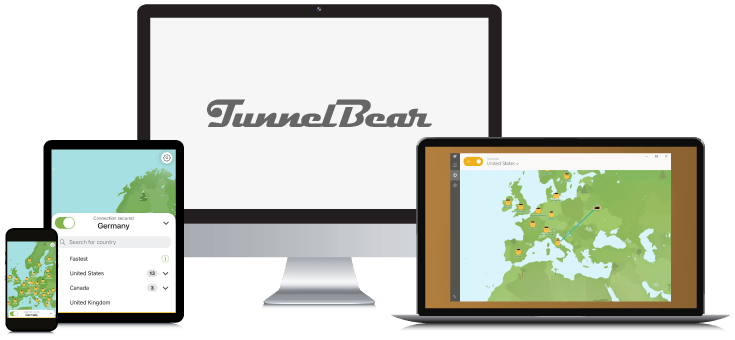
If it were not for the fact that TunnelBear has a devastatingly low data limit of 2 GB, this would be our best free VPN for iOS. It offers unlimited simultaneous connections and is very fun to use. The software is very intuitive and engaging.
In terms of security, TunnelBear also has your back. The VPN offers a kill switch, split tunneling and high-end encryption. They even have obfuscation to hide the fact that you’re using a VPN. This is rare for a free VPN.
TunnelBear is one of the best VPN providers that lets you stream with a VPN for free. You have access to servers in 45+ countries and TunnelBear lets you unblock multiple streaming services, so you can stream on your iPhone without issues. Unfortunately, torrenting is not allowed.
It’s also a shame that customer support is quite limited with TunnelBear: priority is given to paying customers. Even so, it’s a fun VPN to try that certainly has a good deal to offer!
Pros
- Unlimited simultaneous connections to protect both iOS and MacOS
- Intuitive interface is easy to use
- Solid security and encryption for your iPhone
- Offers obfuscated servers
- Unblocks streaming platforms (incl. Netflix)
- Servers in 45+ countries (incl. US and UK)
Cons
- Very low data cap: 2 GB a month
- Torrenting not allowed
- Customer service gives priority to paying customers

Do you want to know more? Check out our TunnelBear review.
How We Picked the Best Free VPNs for iPhone
Not every free VPN is worth your time. That is why we thoroughly tested and researched the VPNs in this article to ensure you do not waste any time looking around.

So, to give you the best recommendations for a free iPhone VPN, we’ve taken the following factors into account:
- Compatibility with iOS: You’ll want a VPN with a great iOS app that is easy to install and navigate. Ideally, you don’t even have to create an account to use a free VPN.
- Server network size: The bigger a VPN’s server network, the more opportunities you have for bypassing geo-restrictions. We always make sure to test multiple servers to review their performance.
- Unblocking capabilities: Can the free VPN unblock the best streaming services? We test the VPN for various platforms, including Netflix, Hulu, HBO Max, Prime Video, and Disney Plus.
- Privacy and security: When assessing iPhone VPNs, we examine a provider’s privacy policy thoroughly to make sure it treats your data with care.
It’s important to keep in mind that free VPNs come with various risks and limitations. Whether you want to use a VPN to stay anonymous online or to unblock foreign streaming services, you’re generally better off with a premium VPN.
Don’t want to pay too much money? With the best VPN deals and coupons, you can enjoy a premium experience without breaking the bank.
The Best Free iPhone VPNs – Comparison
For a quick overview of how each free VPN provider compares to the others, check out the table below.
| Feature | #1 Proton VPN | #2 PrivadoVPN | #3 Windscribe | #4 Hide.me | #5 TunnelBear |
|---|---|---|---|---|---|
| Unlimited speeds | ✔ | ✖ | ✖ | ✔ | ✔ |
| Free data per month | Unlimited | 10 GB/month | 2 GB -10 GB/month | 10 GB/month | 2 GB |
| Number of server locations | 1 | 10 | 9 | 8 | 47 |
| Countries with servers | Connects automatically with the best server depending on your location | Argentina, Brazil, Canada, France, Germany, Mexico, The Netherlands, Switzerland, United Kingdom, United States | Canada, France, Germany, The Netherlands, Norway, Romania, Switzerland, United Kingdom, United States | Canada, France, Germany, The Netherlands, Singapore, Spain, United Kingdom, United States | Australia, Canada, Ireland, France, Germany, Japan, New Zealand, Singapore, United States, United Kingdom, and many more |
| Works with Netflix | ✔ | ✖ | ✔ | ✖ | ✔ |
| Works with other streaming services | ✔ | ✔ | ✔ | ✖ | ✔ |
| Protocols | OpenVPN, WireGuard | OpenVPN, IKEv2, WireGuard | OpenVPN, IKEv2, WireGuard, Stealth, Wstunnel | OpenVPN, IKEv2, WireGuard, SSTP, SoftEther | OpenVPN, IKEv2, WireGuard |
| Download | Get Proton VPN | Get PrivadoVPN | Get Windscribe | Get Hide.me | Get TunnelBear |
Our best free iOS VPN is Proton VPN, thanks to its secure encryption and ability to unblock streaming services.
Limitations of Free VPNs
While it’s tempting to get a free virtual private network for your iPhone or iPad, there are several limitations you should be aware of.

These are the restrictions of a free VPN:
- Data caps: Most free VPNs cap data available to users on a daily or monthly basis. This limits your ability to game, stream, or browse extensively.
- Poor unblocking capabilities: Unfortunately, free VPN services tend to lack robust unblocking capabilities. This means you won’t easily access local iPhone apps or services.
- Security vulnerabilities: Free iPhone VPNs are audited less frequently than premium providers and may even infect devices with malware and malicious code.
- Private data collection: Due to lower security standards, some free VPNs inadvertently log, leak, or sell user data.
- Limited server locations: Free VPN apps generally only offer a handful of free servers, which get crowded easily.
- No unlimited simultaneous connections: While there are some free services that offer unlimited simultaneous connections (Windscribe, TunnelBear), it’s generally unlikely you’re able to use your free VPN service on more than one device at once.
For these reasons you might be better of a premium VPN for iPhone.
Best Cheap VPN for iPhone: Surfshark (Affordable Alternative!)

If you’re looking for a premium VPN for iPhone, look no further! Surfshark VPN is highly effective on iOS and offers unlimited connections. For a low price of only $ 2.49 a month you can protect your iPhone and all other devices in your house.
Surfshark is one of the fastest VPNs; you won’t ever experience any speed throttling. This VPN provider can bypass even the strongest geo-blocks. With 4500 servers across 100 countries, you get yourself worldwide coverage.
Unlike some free VPNs, Surfshark has never had security vulnerabilities that could put your privacy at risk. RAM-only servers prevent your data from being stored. Surfshark’s Cleanweb also protects your iPhone from ads and trackers and you can even top this with Surfshark One’s antivirus.
There’s a 30-day money-back guarantee on all plans. Of course, you’re also more than welcome to use Surfshark’s 7-day free trial first.
Pros
- Low price
- Unlimited number of connections
- Certified no logs policy and RAM only servers
- Cleanweb protects your iPhone from ads and trackers
- Extremely fast connections
- Bypasses the strongest geo-blocks
- 30-day money-back-guarantee
Cons
- Based in the Netherlands (part of the 14 Eyes alliance)

Do you want to know more first? Check out our Surfshark review.
Privacy Tools on iPhone 15: What’s Missing?

The iPhone 15 series includes the iPhone 15, iPhone 15 Plus, iPhone 15 Pro, and the iPhone 15 Pro Max.
Compared to other smartphones, Apple is known to provide its iPhone users with more robust security measures as long as they know how to optimize their iOS privacy settings. Although that’s great, iOS doesn’t offer the same level of protection as a VPN does.
A VPN encrypts all your data, ensuring third parties like hackers or your ISP can’t see what you are doing online. And only a VPN will let you unblock foreign streaming services, apps, and websites.
The privacy tools included on the iPhone 15 models are:
- iMessage Contact Key Verification: Ensures communication without external interference.
- Biometric authentication: An updated version of Face ID recognition will be introduced.
- Enhanced privacy controls: Hide your email address, monitor insecure passwords, and keep track of app permissions.
We’re big fans of seeing these privacy features included and have high hopes for the iPhone 16 series. Even so, the drawback of these features is that none fully encrypt your traffic. You will need to download a VPN for iPhone.
How to Install a Free VPN App on iOS
Installing a free VPN on your iPhone is quick and easy! Even though the process may seem daunting, there are some simple steps to follow.
You can download a VPN for iOS by following these instructions:
- Go to the App Store.
- Search for the VPN app you’d like to install. We use Proton, the best free iPhone VPN as an example.

- Click on the “Get” button next to the app.

- Authorize the download using FaceID or your passcode.
- Open up the VPN app once the download is complete.
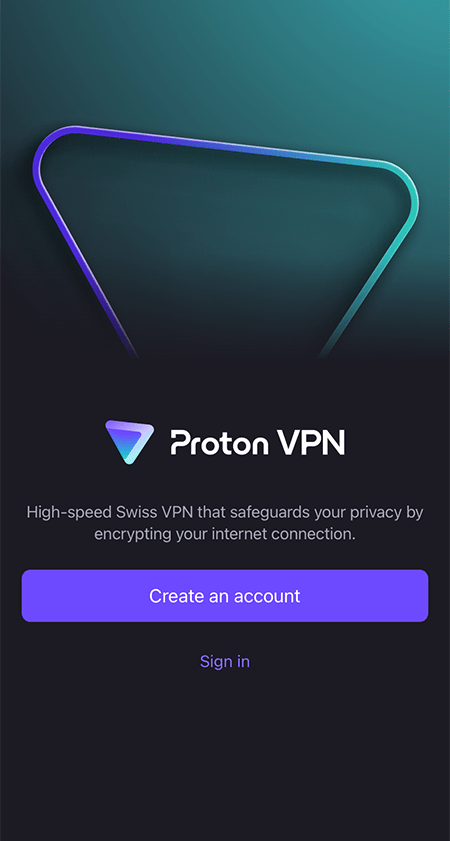
- Create an account if it is required. Some VPN apps may require you to sign up or create an account.
- Complete the steps, then turn on the VPN by toggling the on/off button or power button.
Once you’ve finished setting up the VPN client, iOS is fully protected by your VPN!
Free VPNs to Avoid for iPhone
There are several free VPNs that you should avoid for iPhone or iPad, either because they’re not compatible with iOS or because they’ve got security vulnerabilities.
We’ve listed a few of them in the table below.
| VPN Provider | Why You Should Avoid It |
|---|---|
| Betternet VPN | Betternet has slow download speeds and a flawed privacy policy; the Android version has been found to infect devices with malware. |
| Hola VPN | Hola VPN has been accused of planting a “trojan horse” on user devices to log user information. |
| VPNBook | Very slow VPN that can’t unblock any services. |
| VPN Gate | A free provider that gathers a lot of user data, including IP address. |
Start Using a VPN for iPhone Today
If you want to enhance your iPhone’s privacy and security without spending any money, we recommend downloading the best free VPN for iPhone: Proton VPN. This free service has some of the best encryption protocols, can actually unblock Netflix, and has unlimited data.
Try out Proton VPN with this unlimited free version!
The downside of a VPN like Proton is that you only get access to three server locations. This limits how much content you can unblock! On top of that, you don’t get any of the additional security tools that come with a premium VPN.
If you’d rather fully optimize your online experience and you don’t mind paying a couple of bucks a month, we recommend Surfshark as the best alternative to a free iPhone VPN.
Surfshark has a huge server network and a fantastic iOS app! On top of that, there’s a 7-day free trial and a limited offer that gets a whole 85% off your plan! This makes Surfshark a super cheap alternative to a free VPN service.
Want to know more about free VPNs for different operating systems? Check out our guides below:
- The Best Free VPNs for Android
- The Best (Truly) Free VPNs for Linux
- Top Free VPNs for PC: Best No-Cost Options for Windows
- Best Free VPNs for Mac
If you’d like answers to some of the most common questions about using a free VPN on an iPhone, check out the FAQ section below!
After testing 25+ VPNs, we recommend Proton VPN as the best free VPN for iPhone. It is the only free VPN that offers unlimited data, can unblock streaming services, and has top-notch security features.
iPhones do not have a built-in VPN. With the iOS 15 update, Apple has introduced a feature called Private Relay, which assigns users an IP address different from the one their ISP has given them. While this helps protects your identity online, it doesn’t unblock sites. You’ll need a VPN for that.
Some free VPNs use secure encryption protocols and don’t log your data. However, most free services you’ll come across have security vulnerabilities and sell your data to third parties. If you’re looking to keep your iPhone secured, check out our best premium VPNs for iPhone.
The best VPN for iPhone 15 and iPhone 15 Plus is NordVPN. From testing NordVPN extensively, we know that this VPN can unblock any streaming service, has 8900 VPN servers worldwide, and is highly compatible with iOS.
A cheaper alternative is Surfshark, which has plans starting at $ 2.49.



Thanks for the detailed comparison. I think many users focus only on monthly data limits, but connection stability, battery usage, and how well a VPN handles public Wi-Fi are just as important on iPhone. It would be interesting to see those included in future updates