Based on my tests, Proton VPN is the best free VPN for Mac in 2026. It offers unlimited data, strong security, a strict no-logs policy, and no bandwidth restrictions. However, like most free VPNs, it offers fewer server locations and slower speeds than the paid version. If you want premium security and performance, NordVPN is the best choice, offering a 30-day money-back guarantee for users who need fast, secure access to streaming and global content.
While Macs are generally safer than PCs and less often targeted by malware, they’re not immune to online threats. That’s where a reliable VPN makes a real difference, but after testing hundreds of VPNs for Mac, I found that many free options pose serious privacy and security risks. That’s why I have included only safe, effective, and reliable free VPNs that provide strong protection without compromising your data.

Our recommended free Mac VPNs
After testing several VPNs for Mac, NordVPN’s 30-day money-back guarantee stood out as the best alternative to unsafe free Mac VPNs. The VPN provided fast streaming speeds even on long-distance servers, and unblocked Netflix, Hulu, and BBC iPlayer. I found its robust security features consistent while browsing. To use NordVPN on a Mac for free, simply download and install the app, create an account, connect to any server, and use the VPN as you normally would. However, if you’re not satisfied, you can cancel within 30 days and receive a full refund.
However, if you want a free option, the best free VPN for Mac is Proton VPN. Proton’s free version offers unlimited data, strong security, no ads, and no logs, but it’s limited in server locations and slower than its paid version. PrivadoVPN, on the other hand, is another free Mac VPN option, offering 10GB of monthly data, decent security, and easy-to-use apps, but it also has limited server selection and bandwidth restrictions. Both options are safe and effective for casual browsing, but heavy streaming or global access may require a paid VPN.
I also considered other free VPNs for Mac, such as Hide.me, TunnelBear, and Windscribe. Unfortunately, my latest testing showed that these alternatives have strict limitations, making them less practical for most Mac users. TunnelBear, for instance, provides only 2GB of data per month, which is far too low for regular use. Moreover, Hide.me and Windscribe offer more data but deliver inconsistent streaming performance and more limited server access than the NordVPN, Proton VPN, and PrivadoVPN recommendations.
Best free VPNs for Mac: a detailed overview
Below, I’ve rounded up the best free VPNs for Mac that’ll let you browse the internet with protection. With a VPN, your internet connection becomes encrypted, and your IP address stays hidden from prying eyes.
Most free VPNs are just free versions of premium services that provide some level of protection for you and your data.
| Free VPN for Mac | Rating | Data limit | Server locations (free) | Speed cap | Add-free | Unblocks Netflix? |
|---|---|---|---|---|---|---|
| 1. NordVPN | 9.3⭐⭐⭐⭐⭐ | Unlimited | 8900 servers across 149 locations | No | ✅ Yes | ✅ Yes |
| 2. Proton VPN | 8.9⭐⭐⭐⭐⭐ | Unlimited | 10 servers in the Netherlands, Romania, Japan, Poland, Canada, Mexico, Norway, Singapore, Switzerland, and the US | No | ✅ Yes | ❌ Not on free plan |
| 3. PrivadoVPN | 7.8⭐⭐⭐⭐ | 10GB | 10 servers in Canada, Mexico, France, Brazil, Germany, Argentina, Switzerland, the Netherlands, the UK, and the US | ✅ Yes, 1Mbps | ✅ Yes | ✅ Yes |
After testing 24 VPN options, I’ve narrowed it down to the best free VPNs that deliver solid security and performance on macOS. Let’s take a closer look at the top 3 options.
Top 1. NordVPN – best free Mac VPN in 2026
- 30-day full access to all servers and features
- Unlimited bandwidth during the trial period
- Fastest VPN speeds tested on Mac
- Strong security features, including AES-256 encryption and a reliable kill switch
- Unblocks Netflix, Hulu, BBC iPlayer, and more streaming platforms
NordVPN is the best free VPN for Mac. It stands out for its fast speeds, strong security, reliable streaming performance, and a wide selection of servers. These features make it ideal for browsing, streaming, and staying private and anonymous online. You can also try it risk-free with a 30-day money-back guarantee, giving you full access to premium protection at no cost.
Although NordVPN is technically a premium Mac VPN service, you can use it for free for 30 days with no risk. Besides, if you also have an Android device, you can activate a 3-day free trial and use the same account across devices, including your Mac.
After extensive testing, I found NordVPN offers everything that most free Mac VPNs can’t: full-speed access to 7400+ servers across 118+ locations, powerful streaming capabilities, and advanced privacy features. Thanks to its NordLynx protocol, based on WireGuard, speed remained sharp during all tests. It retained 96% of my base connection, which is far better than any free VPN I tested.
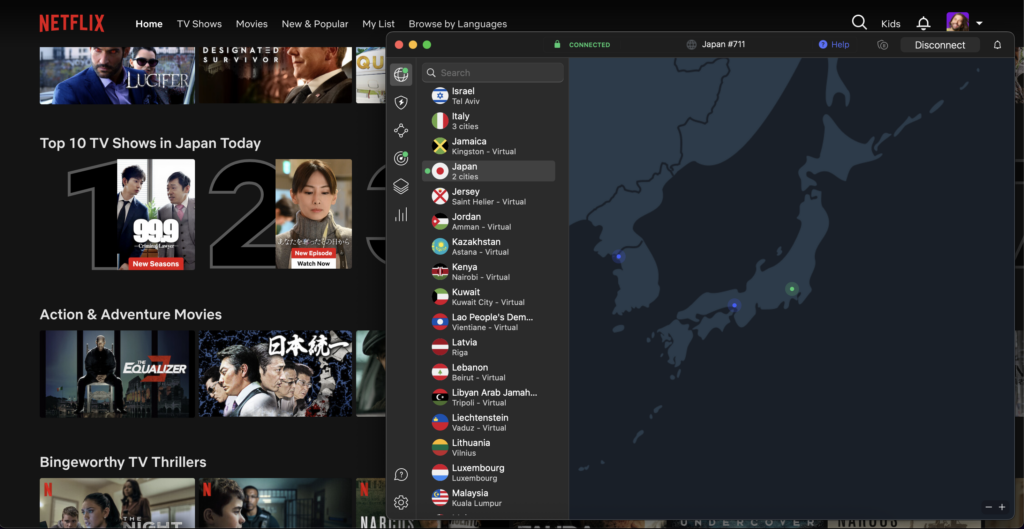
NordVPN’s streaming performance stood out the most. I was able to unblock Netflix, Hulu, BBC iPlayer, and more, all in HD and even 4K, something neither Proton VPN nor PrivadoVPN could do reliably in my tests on Mac.
On the security front, NordVPN offers all the essentials, including AES-256 encryption, a kill switch, and DNS leak protection. It also offers advanced features, like Double VPN (multi-hop) for routing your connection through two secure servers, Onion over VPN for added anonymity with Tor integration, and the option to get a dedicated IP address. Although Proton VPN and PrivadoVPN offer strong foundational security (such as encryption and no-logs policies), neither offers multi-hop, Tor routing, or dedicated IP addresses in their free plans, so NordVPN is your best free VPN for Mac option if you value advanced privacy and flexibility.
NordVPN is the best VPN for Mac, offering a 30-day money-back guarantee across all plans. You can use it risk-free with a 3-day free trial on Android and a 30-day refund option on Mac and other platforms. Plus, the subscription only costs $ 3.49 a month.
For more information on this VPN provider, check out our detailed NordVPN review!
Top 2. Proton VPN – best free VPN for Mac without data limits
- Free servers in the US, Netherlands, Poland, Romania, Canada, Mexico, Norway, Singapore, Switzerland, and Japan
- Unlimited bandwidth with no data limits
- No ads or logging
- Strong security with AES-256 encryption and Secure Core servers
- 1 simultaneous connection for the free plan
Proton VPN is the best free VPN for Mac with unlimited data and advanced security. It doesn’t cap your monthly bandwidth, blocks ads, and still performs well, making it ideal for private browsing and daily internet use.
After extensive testing on macOS, I found that Proton VPN outperformed most free competitors, including PrivadoVPN, in terms of connection stability and long-term usability. Proton VPN’s free plan had lower speeds than NordVPN’s, but it’s still solid for a free service. With the WireGuard protocol and built-in VPN Accelerator, I retained around 40Mbps of my base connection speed on the US server. I could still browse, stream Netflix, and work online without noticeable delays.
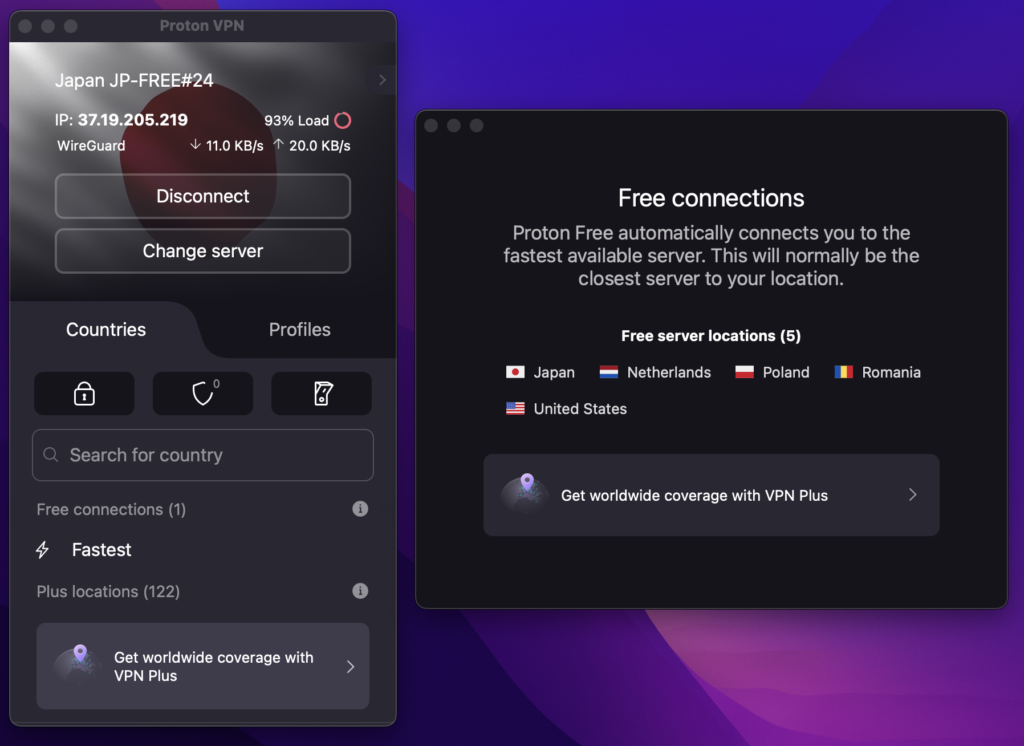
Proton VPN offers free servers in 10 locations: the US, the Netherlands, Poland, Romania, Canada, Mexico, Norway, Singapore, Switzerland, and Japan. While that’s more limited than paid Mac VPN options, these servers consistently delivered solid performance in my tests.
Proton VPN includes AES-256 encryption, a kill switch, DNS leak protection, and even Secure Core servers, which route your traffic through multiple hardened data centers for better anonymity. It also maintains a strict no-logs policy, so your activity is never tracked or stored. One drawback is that the free plan allows just one simultaneous connection, which is less flexible than PrivadoVPN’s offering.
To get Proton VPN for Mac for free, first download the app, create an account, and start using the free plan with unlimited data. However, you’ll have access to a limited number of servers, but it’s fully safe and reliable for casual browsing. If you want full access to all Proton VPN servers, you can upgrade to the Proton VPN premium subscription for $ 2.99 per month, which also includes a 30-day money-back guarantee. This gives you faster speeds, more server locations, and better streaming performance.
Detailed analysis of Proton VPN can be found in our comprehensive review.
Top 3. PrivadoVPN – free unlimited VPN for Mac with a speed cap
- Free servers in 10 server locations, including the US, UK, Canada, Germany, Mexico, France, Brazil, Argentina, Switzerland, the Netherlands, and the UK
- 10GB of data per month
- Based in privacy-friendly Switzerland
- No-logs policy and advanced security
- 1 device connection
PrivadoVPN is a reliable free VPN for Mac that offers robust privacy features, 10GB of high-speed data per month, and access to free servers in 10 countries, including the US, UK, Canada, and Germany. In my tests, it delivered solid performance for general browsing and even some light streaming. This makes it one of the few free VPNs that can unblock services like Netflix US, though consistent playback isn’t guaranteed once the data cap is reached.
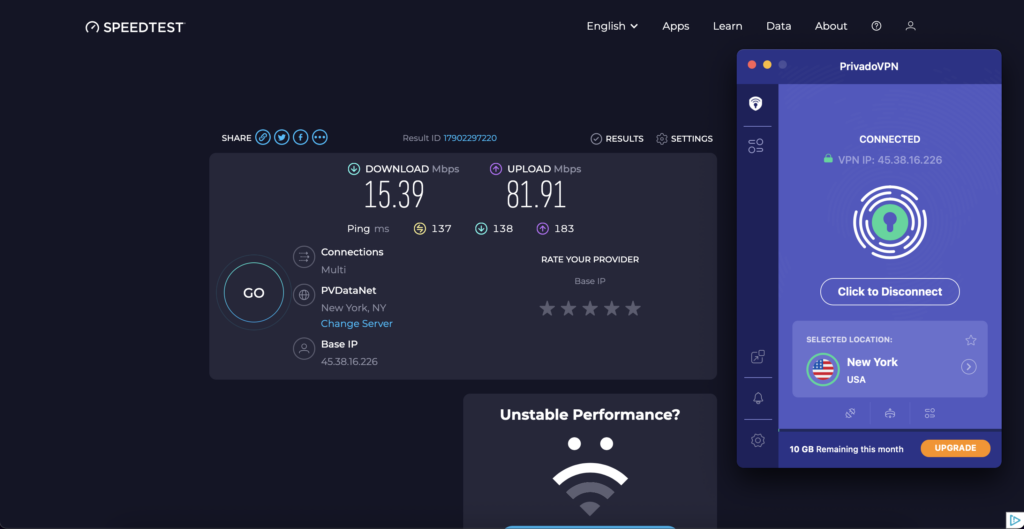
Within the 10GB allowance, I could stream Netflix in HD on my Mac without buffering. Speeds were stable enough for daily tasks such as browsing, video calls, and messaging. After reaching the limit, speed throttling reduces the connection to 1Mbps, which is still fine for email and basic browsing but too slow for high-quality video.
What sets Privado free VPN for Mac apart are its built-in ad blocker, Threat Protection, and Control Tower, all of which help prevent malware and block unsafe websites. It also includes 256-bit AES encryption, a kill switch, a strict no-logs policy, and a SOCKS5 proxy for manual configuration.
To get PrivadoVPN for Mac for free, start by downloading the app and creating a free account. You’ll receive 10GB of data per month and access to a selection of servers for secure browsing and casual streaming. However, for users who want unlimited data and faster speeds, a subscription costs only $ 1.11 per month and includes a 30-day money-back guarantee. This unlocks all servers and premium features, giving your Mac full protection.
Check out our full review of PrivadoVPN for more information about this provider!
How to use a VPN on Mac for free
The easiest and fastest way to install a VPN is to use a Mac app from your VPN provider of choice. While you can set up a VPN manually on a Mac, pre-packaged software removes any guesswork or troubleshooting. Follow these quick steps to install a paid or free VPN on Mac:
- Choose a free VPN provider. I recommend NordVPN, which offers a 30-day money-back guarantee so you can try it risk-free. However, Proton VPN is also an ideal choice if you prefer a completely free option, but with limited server access.
- Download and install a free VPN app for Mac. If required, create an account.
- Open the VPN app, choose a server location, and tap “Connect.”
- Start browsing securely!
Things to consider when choosing a free VPN for macOS
To find the best free VPNs for Mac in 2026, I tested 24 different providers on my MacBook Air running macOS Sonoma. I focused on what truly matters for Mac users: speed, data limits, privacy, ease of use, and streaming capability. Here’s how I evaluated each one:
- Installation and Mac compatibility. I installed each VPN from the official website or the Mac App Store, checking for a native macOS app that didn’t require complicated setup or terminal commands. I eliminated any services that crashed, froze, or lacked proper Apple support.
- Connection speed. Speed was a major factor. I used Speedtest.net to measure download and upload speeds across multiple servers in the US and Europe, both with and without the VPN active. In this way, I was able to identify which free Mac VPNs actually provided usable speeds versus those that heavily throttled them.
- Streaming support. I tested each VPN’s streaming support by accessing Netflix, BBC iPlayer, and YouTube while connected. Since many free services struggle to bypass geo-restrictions, I specifically noted those that did.
- Privacy and security features. I checked the privacy policies of the providers to confirm that they had a no-logs policy. I also looked for core security features, such as AES-256 encryption and a functioning kill switch. A VPN that collected too much user data or lacked essential protections was not considered.
- Data limits and ads. I tracked data caps (e.g., 500MB per day, 10GB per month) and whether the app or browsing experience was cluttered with ads. Naturally, unlimited data and ad-free services scored much higher in my evaluation.
If you’re looking for a free VPN for Mac, NordVPN is the best option to start with. You can use it for free on Mac by downloading the app, creating an account, and requesting a refund within 30 days if you’re not satisfied. This lets you enjoy premium speeds, strong encryption, and access to global streaming sites. However, Proton VPN is another option for a free Mac VPN. My tests showed it to be a legit free VPN with unlimited data, strong security, a no-log policy, and no bandwidth limitations. Both NordVPN and Proton VPN are safe and reliable choices for Mac users who want to protect their data and browse securely in 2026.
Free VPNs Mac users should avoid
The above VPNs have been thoroughly tested on a Mac, and based on my experience, I can confidently recommend them as safe options. Unfortunately, there are free VPNs for Mac that don’t quite meet the same expectations.
You have to be careful on the Mac App Store, as there are many free VPNs that show up in there, but they are low quality and simply try to get your attention with their naming scheme while not being safe or endorsed by Apple. Here, I list the free VPNs for Mac you should avoid below:
| Free Mac VPN | Why you should avoid it |
|---|---|
| Fresh VPN | Only offers a 5-minute trial, which isn’t enough time to test the software thoroughly. |
| GoVPN | No longer operational, and some reviews say it doesn’t work properly. Some users also report that their IP address was still available. |
| Opera free VPN | Its Privacy Policy states that data needs to be collected to honor partnerships with advertisers. |
| MacVPN.app | A malware masquerading as legitimate software, MacVPN.app is dangerous and shouldn’t be installed on any Mac device. |
| Hide.me | I had frequent connection drops and struggled with streaming during my tests. I also noticed DNS leaks and background activity that raised privacy concerns. |
| TunnelBear | It was easy to use but unreliable, disconnected without warning, and the 2GB monthly limit makes it impractical for regular use on the Mac. |
| Windscribe | It had noticeably slow connections and struggled to maintain stable performance. Streaming was unreliable, and I found the user experience clunky. I also tested its subscription and found the auto-renewal process unclear and difficult to manage. |
Conclusion: Download a free VPN for Mac today
While macOS offers solid built-in protection, it’s not immune to online threats. During my tests, I found that public Wi-Fi networks, phishing sites, and unsafe app configurations can still expose Mac users to privacy risks. Even Apple’s Gatekeeper and XProtect can’t fully safeguard your data when your internet traffic is unencrypted, especially while traveling or handling sensitive information.
That’s why a VPN for Mac is essential in 2026. Based on my research, NordVPN is the best free Mac VPN for fast speeds, advanced security, and smooth streaming performance. You can also try it risk-free with its 30-day money-back guarantee, making it ideal for anyone who wants premium protection. Moreover, Proton VPN provides unlimited data, strong encryption, and no ads for users looking for a completely free VPN for Mac. Alternatively, PrivadoVPN is a free Mac VPN offering 10GB of data per month and an intuitive app if you prefer simplicity with decent speed.
If you’re interested in exploring more free VPN options for other devices or specific needs, you might also like to read:
- 5 free VPNs for PC
- Free VPNs for Windows 11
- Free Android VPNs
- Free iPhone VPNs
- Top free VPNs for Linux
- Best Free VPNs for Chrome
FAQ
If you’re still on the fence with regards to choosing one of the best free VPNs for Mac, check out our frequently asked questions below.
No, MacBooks don’t come with a built-in VPN app. While macOS supports manual VPN configuration through system settings, it doesn’t include an actual VPN service. If you want to encrypt your internet traffic, protect your privacy, or access region-locked content, you’ll need to install a VPN app, like NordVPN.
No, Safari doesn’t include a built-in free VPN. If you want to secure Safari browsing, you can use a free VPN for Mac, such as Proton VPN. However, its free plan has limitations, so you might consider upgrading to Proton VPN’s paid plan or choosing a low-cost VPN such as NordVPN, Surfshark, or CyberGhost.
Yes, there are free VPNs for Mac, like Proton VPN. It offers unlimited data, strong security, and no ads, but limited server options and slow speeds. Moreover, PrivadoVPN is another solid choice, with 10GB of monthly data and a simple, user-friendly Mac app. For faster speeds, more server options, and smoother streaming performance, NordVPN offers a risk-free 30-day money-back guarantee.
The fastest free VPN for Mac is NordVPN, thanks to its advanced NordLynx protocol. During my testing, I reached 782Mbps while connected to a US server, making it ideal for streaming, gaming, and secure browsing. While NordVPN isn’t completely free, you can try it risk-free with its 30-day money-back guarantee.
Yes, Proton VPN offers a free plan with unlimited data on Mac. That said, it offers free access to only a limited number of servers across 10 locations and doesn’t support streaming platforms like Netflix. If you’re looking for unlimited data and premium features like faster speeds, full streaming access, and stronger security, I recommend NordVPN. It’s not completely free, but with its 30-day money-back guarantee, you can test it without any risk.
Yes, several VPNs offer free trial or risk-free options for Mac users. I recommend NordVPN because it offers a 30-day money-back guarantee to test all its premium features without any commitment. During my testing, it delivered the fastest speeds, reliable macOS compatibility, and full access to streaming services like Netflix and Hulu.
NordVPN is one of the best free options for Mac users in 2026. It has an extensive server network, fast speeds, and strong security features. During my tests, I reached 782Mbps on a US server, making it excellent for streaming and secure browsing. Plus, you can try it risk-free with the 30-day money-back guarantee.
No, most free VPNs for Mac struggle to unblock Netflix. In my testing, even the best free options like Proton VPN and PrivadoVPN couldn’t consistently access Netflix libraries. If streaming is your priority, I recommend trying NordVPN, as it has worked flawlessly with Netflix. You can test it risk-free for 30 days with its money-back guarantee.