PrivadoVPN Review (2026): Strong privacy and solid free VPN version

Why trust our review process 
We may earn affiliate commissions for the recommended products. Learn more.
When I tested PrivadoVPN, it proved to be a trustworthy, legit VPN. I was impressed by how much it offers, even on its free plan. You get 10 GB of data every 30 days, full no-logs policy protection, ad-free browsing, and access to reliable servers – all at no cost. The VPN clearly prioritizes privacy and security, using top-tier encryption to protect your data. Its network isn’t as large as some big-name competitors, but the clean interface and affordable plans make it a strong contender for users who value simplicity and safety. Still, it leaves one important question: is PrivadoVPN truly secure enough, and does the Premium version justify the upgrade?
In this PrivadoVPN review, I take a critical look at the security of this VPN. I also test its speed and features. What are the download speeds of this VPN, and how does Privado perform during daily use? You can read this and more in this review!
| PrivadoVPN rating: | 7.8⭐⭐⭐⭐ |
| Based in: | Switzerland |
| Price: | $10.99/month for a month, $1.33/month for a year, $ 1.11/month for 2 years |
| Free trial: | ✅Yes, free plan (10GB of unlimited speed data every month) |
| Simultaneous device connections: | 10 |
| Servers: | Hundreds (undisclosed) across 50 countries |
| Does VPN keep logs? | No |
| Official website | www.privadovpn.com |
Limited offer: Enjoy 90% off PrivadoVPN!
Our verdict
What I liked:
- Excellent free version
- Reliably unblocks streaming services
- 10 simultaneous device connections
- Backed by Swiss privacy laws
What I didn't like:
- Not audited independently
- Less advanced features than the competition
- Smaller server fleet
PrivadoVPN is a strong choice for users seeking a secure, budget-friendly VPN, offering a good free plan with 10 GB of monthly data and access to 13 global servers. Its paid plan suits casual users, especially those looking to browse securely or stream content across regions. The service enforces a strict, independently audited no-logs policy and supports P2P traffic on select servers, making it a good pick for torrenting.
I rated PrivadoVPN 7.8 out of 10 stars because, despite its modest server network compared to big VPN providers, it still delivers reliable privacy features, solid speeds, and a very easy-to-use app across devices. At the same time, the smaller server fleet and fewer advanced extras than top-tier competitors keep it from scoring higher, so it lands as a very good, but not elite, all-around VPN.
Speed – how fast is PrivadoVPN?
Based on my testing, PrivadoVPN delivers reliable connection speeds, reaching averages around 180Mbps when using server connections between the US and the UK. Such speed is suitable for most online activities, including high-definition streaming, secure browsing, and P2P file sharing and torrenting.
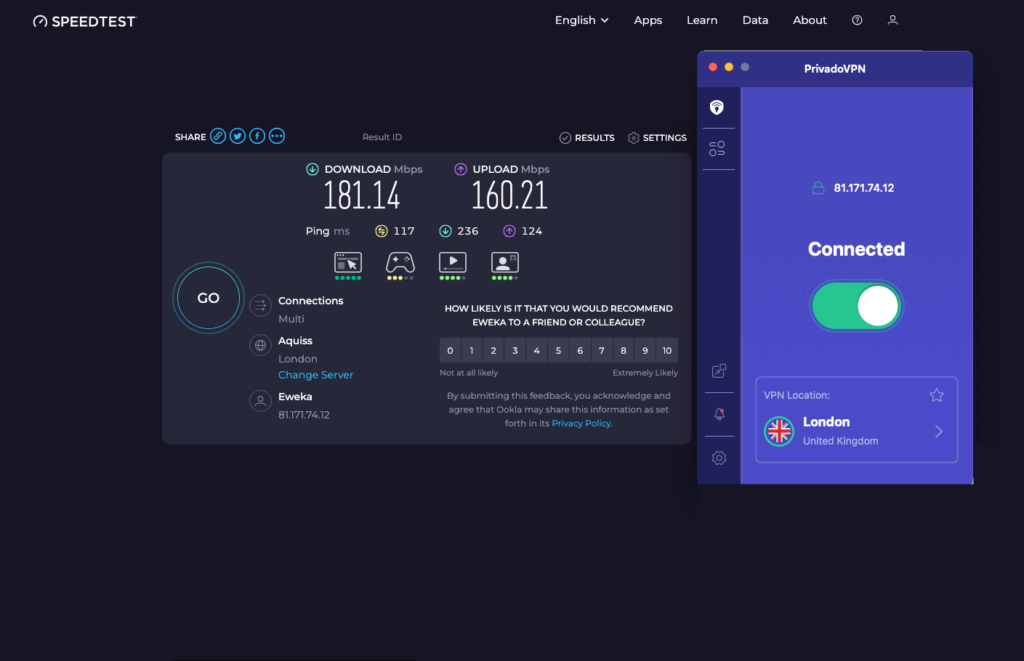
While it’s not the fastest provider on the market, PrivadoVPN maintains stable performance across various locations, especially when using the WireGuard protocol, supported alongside OpenVPN and IKEv2. I never experienced major slowdowns during everyday use, and in most cases, the difference in speed is barely noticeable.
Overall, I rated PrivadoVPN an 8 out of 10 for speed. It provides more than adequate performance for typical user needs, though the experience can still vary slightly based on server distance, network load, and user demands.
Speed test results for PrivadoVPN
I performed speed tests using speedtest.net as a measuring tool. I conducted my speed tests from my US location, using a Windows laptop. I ran the VPN using the WireGuard protocol.
First, I recorded my speeds without a VPN to get baseline values. I then connected to PrivadoVPN servers in different countries across various continents to estimate the speed drop-offs.
| PrivadoVPN server | Download speed | Upload speed | Ping |
|---|---|---|---|
| No VPN | 201.21Mbps | 244.48Mbps | 3ms |
| US East (New York) | 192.11Mbps | 230.93Mbps | 15ms |
| US West (Los Angeles) | 190.15Mbps | 222.96Mbps | 22ms |
| Canada (Toronto) | 189.58Mbps | 220.28Mbps | 25ms |
| The Netherlands (Amsterdam) | 180.49Mbps | 162.25Mbps | 32ms |
| The UK (London) | 181.14Mbps | 160.21Mbps | 30ms |
| Germany (Berlin) | 179.49Mbps | 158.28Mbps | 34ms |
| Japan (Tokyo) | 144.85Mbps | 29.23Mbps | 242ms |
| Australia (Sydney) | 148.53Mbps | 39.5Mbps | 273ms |
| Brazil (Sao Paulo) | 126.08Mbps | 200.12Mbps | 175ms |
| Brazil (São Paulo) | 150.54Mbps | 27.68Mbps | 169ms |
Important!
Your own speed test results may vary, depending on your location, internet provider and the time of testing.
As you can see in the table, PrivadoVPN’s download speeds are impressive enough. My closest-tested locations (the US and Canada) maintained around 95% of my download speeds. This is the standard among most of the fastest VPNs. Other than that, PrivadoVPN demonstrated about 20–25% download speed drops when I connected to distant international servers. Such performance levels fall well within the expected range of a VPN, even with higher-tier providers.
My download speeds were slower in remote locations, but that’s to be expected. The farther you are from a server, the slower your speeds.
PrivadoVPN’s upload speeds were quite disappointing for remote countries such as Japan and Australia. However, PrivadoVPN’s ping resembles what most good VPNs offer.
Torrenting with PrivadoVPN
PrivadoVPN ranks first in our list of the best free VPNs for torrenting. It supports P2P traffic on all servers (even for free users) and works seamlessly with popular torrent clients like qBittorrent, uTorrent, and Deluge. The free plan includes 10 GB of data each month, which is great for occasional use, although it runs out quickly if you download larger files. Still, connection stability and ease of use make it one of the most capable free VPNs for light torrenting.
That said, PrivadoVPN isn’t the best torrenting VPN overall. While speeds are decent, encryption overhead causes minor slowdowns, and the lack of port forwarding can slightly limit performance for some users. Premium subscribers can switch to a SOCKS5 proxy for faster downloads, but since SOCKS5 doesn’t encrypt your data, it trades a bit of privacy for speed. In my tests, downloads were much slower than without a VPN, but still smooth enough for everyday torrenting.
Streaming with PrivadoVPN
During my tests, PrivadoVPN successfully unblocked major streaming platforms, including Netflix, BBC iPlayer, and Amazon Prime Video – all without much buffering or lag. Even the free version performed better than I would expect, offering stable connections and smooth HD playback. However, it’s available on fewer servers and comes with a 10 GB monthly data cap.
Although a decent contender, PrivadoVPN isn’t the top VPN for streaming. Its speeds can’t quite match premium competitors like NordVPN or Surfshark, and the limited server network means fewer regional libraries are accessible. While the free plan provides excellent value for light streaming, it’s not ideal for anyone who watches regularly or in 4K.
Overall, streaming with PrivadoVPN is surprisingly reliable for casual viewers who want a secure, no-cost option. The Premium version unlocks faster servers and broader access, making it a solid mid-tier VPN for entertainment – just not the fastest or most versatile one available.
Which streaming services does PrivadoVPN unblock?
We have tested PrivadoVPN with all the major streaming services. In the table below, you’ll find a summary of PrivadoVPN’s streaming ability.
| Streaming platform | Can PrivadoVPN unblock it? | Can free PrivadoVPN unblock it? |
|---|---|---|
| Netflix (US) | ✔ Yes | ✔ Yes |
| Netflix (UK) | ✔ Yes | ✔ Yes |
| Disney Plus (EU) | ✔ Yes | ✔ Yes (throttled) |
| BBC iPlayer (UK) | ✔ Yes | ✔ Yes (throttled) |
| Prime Video (EU) | ✔ Yes | ✔ Yes |
| HBO Max (EU) | ✔ Yes | ✔ Yes |
| Hulu | ✔ Yes | ✔ Yes (throttled) |
| Youtube TV | ❌ No | ❌ No |
Does PrivadoVPN unblock Netflix?
As part of my PrivadoVPN review, I was able to unblock different Netflix librariesm including the US, the UK, Australia, Brazil, and Japan – something other VPNs would often struggle with. For example, while connected to the VPN’s Chicago server, I streamed several seasons of shows like Supernatural, which is exclusive to Netflix US. I also enjoyed Doctor Who when connected to UK Netflix with no major slowdowns.
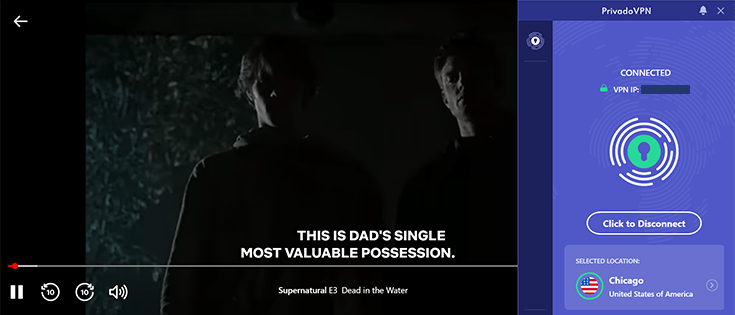
Overall, I rated PrivadoVPN a 7 out of 10 for streaming. Although watching Netflix with PrivadoVPN was generally a smooth experience, it wasn’t entirely perfect or lag-free. Connections weren’t perfect on distant servers, too. With the free version, I was able to access Netflix US and stream with minimal lag or buffering, but the 10 GB data cap meant I could only watch a limited amount before hitting the limit. I also sometimes had to switch servers when one stopped working with Netflix. So yes, the free plan can unblock Netflix, but it’s better suited for occasional streaming than for binge-watching entire seasons.
PrivadoVPN and Disney Plus
PrivadoVPN also gave me access to Disney+. When I connected to the VPN’s US server (New York), I instantly had access to the website and could stream any movie of our choice. I also tried a UK server (London) and also got access to Disney Plus.

It’s also worth noting that I didn’t get any buffering wheels while streaming.
PrivadoVPN server locations
PrivadoVPN currently runs hundreds of servers across roughly 49 countries on its paid plans. The free version gives you access to only 13 server locations, which is fairly limited for a modern VPN. I rated its server network 6.5/10 because, during my tests, I noticed that popular locations were crowded at peak times. Plus, the relatively small server fleet means you have fewer alternative routes if a server is slow or blocked. On the good side, PrivadoVPN relies heavily on its own physical infrastructure in key regions, which is reliable for consistency and security. Still, I can’t compete with the scale and flexibility of a giant like NordVPN, which offers thousands of servers worldwide and far more options for specialized tasks like streaming, P2P, and double VPN routing.
PrivadoVPN server list
PrivadoVPN does not disclose its exact number of VPN servers but says that there are “hundreds across 49 countries.” This is a more limited coverage than what some of the best VPN providers, such as NordVPN, Surfshark, and CyberGhost, offer.
Below are the countries with PrivadoVPN servers:
| Region | Countries |
|---|---|
| America | Asia and the Pacific |
| Europe | Australia, Hong Kong SAR, India, Indonesia, South Korea, Japan, Malaysia, New Zealand, Philippines, Russian Federation, Singapore, Thailand, and Taiwan. |
| Asia and Pacific | Israel, Türkiye, and South Africa. |
| Middle East and Africa | Asia and the Pacific |
Dedicated IP address
PrivadoVPN doesn’t offer dedicated IP addresses, which was a bit of a letdown for me. Because a dedicated IP gives you your own unique address, it’s easier to avoid blacklists, cut down on constant security checks, and securely access work resources from home.
If you need a VPN that offers dedicated IP addresses, I recommend NordVPN.
Security – is PrivadoVPN safe?
PrivadoVPN strikes me as a genuinely safe and privacy‑focused service, especially given its base in Switzerland. Strong Swiss privacy laws back up its strict no‑logs policy and ownership by an established cybersecurity company. It secures your traffic with 256‑bit encryption and modern VPN protocols like OpenVPN, WireGuard, and IKEv2, and you only need an email address and payment method to get started, which keeps sign-up fairly minimal.
That said, I couldn’t rate it as the safest VPN available, mainly because it hasn’t undergone an independent security or no‑logs audit yet. Top competitors now treat those third‑party audits as standard practice, so without that extra layer of verification, PrivadoVPN earns a strong but not perfect 8.5/10 for security from my side.
Protocols
There are different types of VPN protocols available. PrivadoVPN supports the following VPN protocols:
- Automatic: The app itself chooses the best protocol for your connection and device.
- IKEv2: Faster than OpenVPN protocols, but may not work on some networks.
- WireGuard: The latest VPN protocol that is super fast and secure.
- OpenVPN (TCP/UDP): By far the strongest combination of speed and security. Works on almost any network.
In particular, WireGuard and OpenVPN are modern, secure protocols. For the ordinary user, you get fine results by leaving the setting on ‘Automatic’.
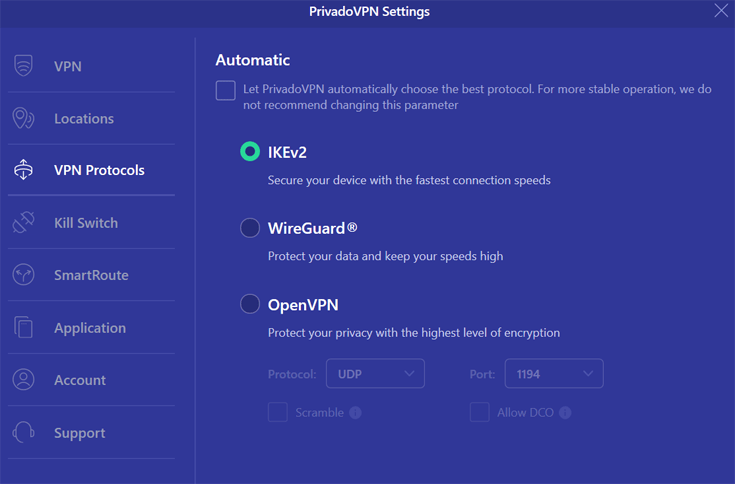
You can change the protocol in the “Settings” section of the app. In addition, PrivadoVPN also offers a SOCKS 5 proxy. This is useful for hiding your IP address from online services. The SOCKS5 proxy is faster than a VPN connection and hides your IP, but doesn’t encrypt your traffic. When I tried it, the proxy did speed things up noticeably for tasks like torrenting, but I always switched to the full VPN when I needed encryption and stronger privacy.
PrivadoVPN uses AES 256-bit encryption. This is the strongest option for encryption.
Log policy and privacy
PrivadoVPN lives up to its name with its focus on privacy. PrivadoVPN has a strict no-log policy and does not store sensitive information about users’ online activities. This includes IP addresses, browser history, traffic destination, data content, and DNS queries.
PrivadoVPN logs the following information to provide its services:
- Email address and username
- Payment information
- Information you share with customer service
- Anonymous aggregated statistics, such as frequently used operating systems and devices, installations, and deletions
According to their team, they’re also in the process of transitioning from traditional servers to RAM-only infrastructure. In other words, as soon as this happens, PrivadoVPN won’t be able to track user logs even if they wanted to.
The VPN service knows that users are connecting to the network, but they have no data that tells them who is connected, where they are, or what they are doing.
Independent security audit
PrivadoVPN clearly states in its privacy policy that it is a strict no-logs VPN, meaning it never records users’ IP addresses or online activity. However, this claim has not yet been verified through an independent third-party audit, so for now, users have to take the company at its word. Although the company holds certain authority and is trusted, I would still like to see this. This involves a specialized company testing whether all security measures are working properly.
Such audits lend credibility to a VPN’s strict no-logs claims. This is why VPNs with the highest rating, such as NordVPN, have undergone multiple independent audits.
In any case, PrivadoVPN must also abide by Swiss law; it has very strong privacy rules that offer consumers a lot of protection.
Kill switch
PrivadoVPN has a kill switch for its desktop apps. During our PrivadoVPN review, I discovered that this kill switch immediately shuts down your internet connection when your VPN connection is interrupted, so your information won’t be leaked online.
PrivadoVPN’s kill switch is a system-wide kill switch, so your entire device will be disconnected from the internet when the VPN disconnects. Other VPNs, like NordVPN, have app-level kill switches that only affect specified apps or URLs.
The kill switch function can be found in the dashboard of PrivadoVPN’s macOS and Windows apps, so you can easily enable or disable it.

PrivadoVPN’s Email Relay
PrivadoVPN’s Premium plan includes Email Relay, a privacy tool that lets you create unique email aliases to protect your real address. These temporary addresses forward legitimate messages to your main inbox while blocking ads, trackers, and other hidden data collection.
It’s a simple way to manage signups, newsletters, and app trials without flooding your inbox or exposing personal information. Integrated into PrivadoVPN’s Control Tower suite alongside Ad Blocker, Threat Protection, and Secure DNS, Email Relay gives you effortless control over your online identity. With it, you can create, delete, or rotate aliases anytime for added safety and privacy.
Does PrivadoVPN leak your data?
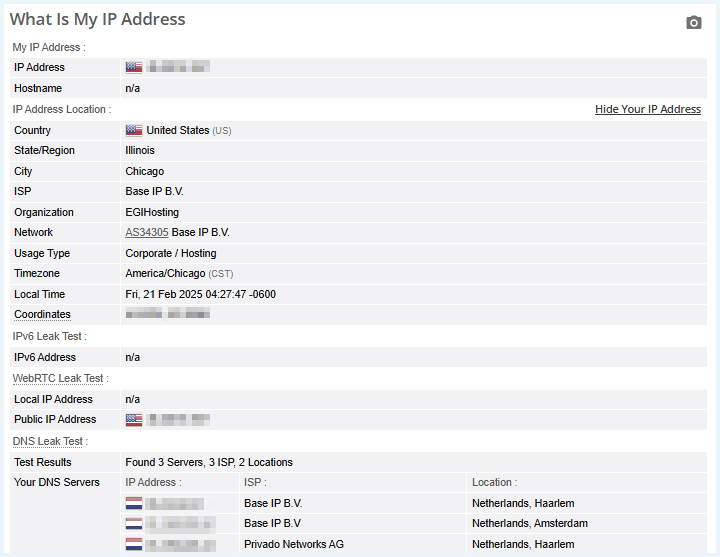
My PrivadoVPN review revealed that the provider doesn’t leak your data. To verify this, I connected to the VPN’s servers and checked my IP address using our IP address tool. The results showed that PrivadoVPN successfully spoofed my virtual location.
I also ran further tests using browserleaks.com. First, I checked our IP address to see if PrivadoVPN suffers from IPv4/IPv6 leaks. I also checked if it has any DNS or WebRTC leaks. The results showed that PrivadoVPN has strong DNS leak protection.
What information does PrivadoVPN require?
To create a PrivadoVPN account, you must provide your email address. You can use an anonymous email address to create an account if you wish.
For a paid account, you must also provide your payment information. With a free PrivadoVPN account, this is obviously not necessary. You can buy the VPN anonymously by paying with crypto such as Bitcoin.
Usability – how user-friendly is PrivadoVPN?
Based on my experience, PrivadoVPN is generally very user-friendly, which is why it earns a solid 8/10 for usability. The apps are quick to install, the layout is intuitive even if you’re new to VPNs, and getting securely online only takes a couple of minutes. However, there are a few rough edges that separate PrivadoVPN from a perfect score. For instance, the desktop app window can’t be resized and tends to stay docked near the taskbar, and the overall interface feels a bit more basic and less customizable than what you get with top-tier providers. These are definitely not deal-breakers, but they do hold PrivadoVPN back from a 10/10 in day-to-day ease of use.
The PrivadoVPN website
PrivadoVPN’s homepage is easy to navigate. You’ll see an attractive VPN deal in big letters on the screen with a button you can click to sign up immediately.
This button takes you to a page where you can choose between three different subscriptions. When you select a subscription, you are immediately redirected to the payment page.
On the PrivadoVPN homepage, you’ll find information about the general benefits of a VPN as well as PrivadoVPN’s different features. The homepage also shares positive reviews from well-known tech websites. The website is available in 15 languages, including English.
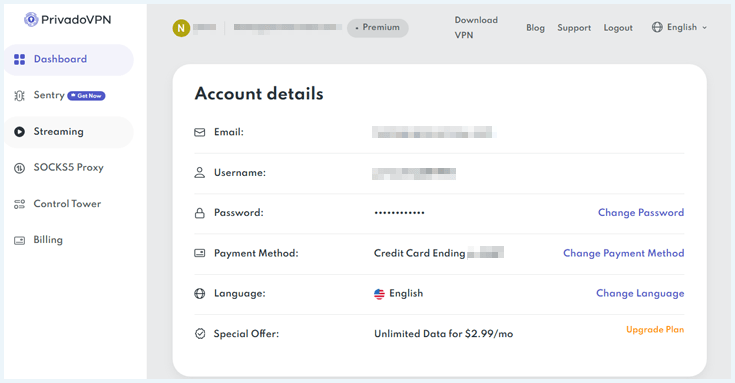
After creating your account, you get access to the PrivadoVPN dashboard. Here you can view and upgrade your subscription. You can also change your login details, download PrivadoVPN apps for your devices, and much more.
Installation process PrivadoVPN
PrivadoVPN has desktop and mobile apps for various operating systems, including Windows, macOS, Android, iOS, FireTV, Android TV, Linux, and routers. It also offers 10 simultaneous device connections, which is more than enough for most users. I tested it on Windows 11 and found it easy to install and use.
I found PrivadoVPN’s Windows app very user-friendly. I was able to install it in less than two minutes. Here are the steps to follow:
- Go to PrivadoVPN homepage and click the orange button “Get deal“.
- Choose the duration of your subscription (24 months, 12 months, 1 month).
- Enter your email to create an account, then select a payment method and click “Get Now”.
- A unique username and password will be automatically generated for you. You will also receive these details of your PrivadoVPN account by email.
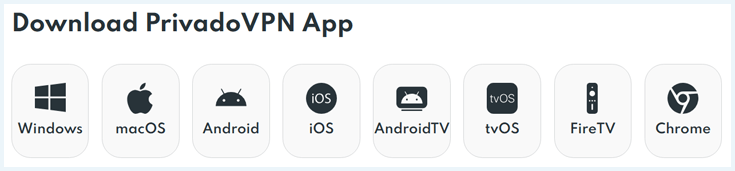
- Log in to your PrivadoVPN account on the website, scroll down to “Download PrivadoVPN App”, download for your device, and install the app by following the on-screen instructions.
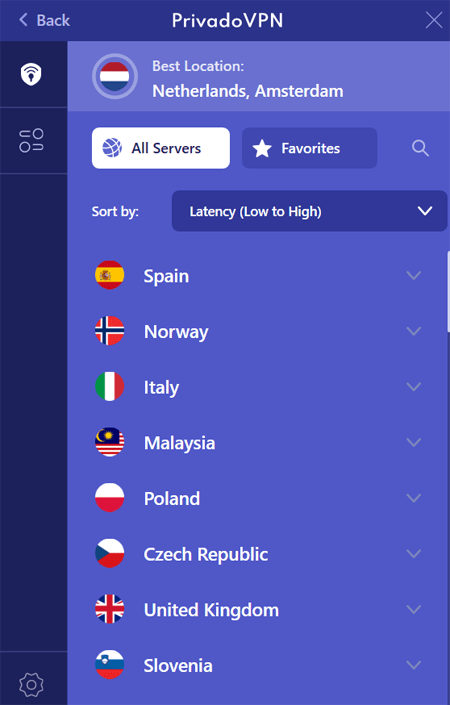
- Open the app, log in, and you’ll see the dashboard with your nearest server and the “Click to Connect” button.

PrivadoVPN’s appearance and ease of use
Overall, the PrivadoVPN app is well-designed and easy to navigate. The app is quite user-friendly and works well even when using the free version.
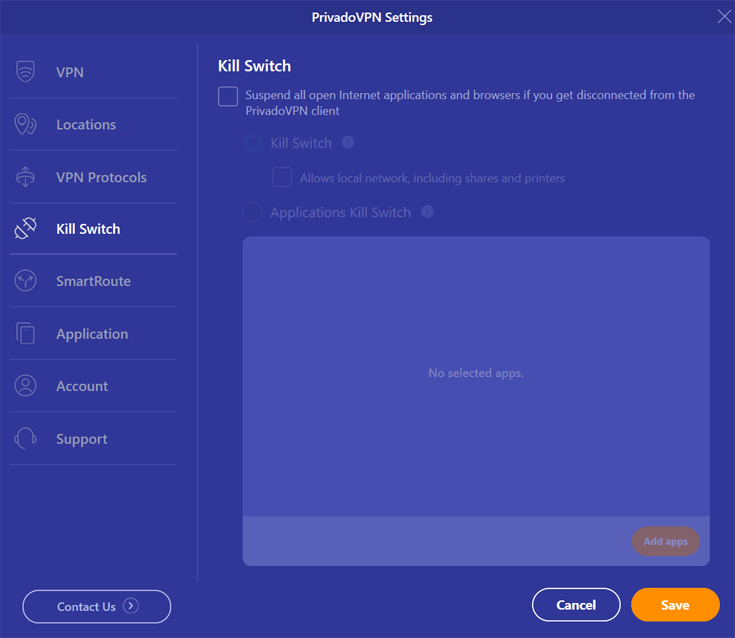
First-time VPN users should have no problems navigating through this service. Connecting to servers was a breeze, and all the settings were easy to find. At the bottom of the screen is an option to enable the kill switch and change protocols.
You can click on the location to see a full list of servers and select where you want to connect.
To access the settings, click the gear icon. Here, you can customize options like selecting a protocol and enabling the kill switch.
A critical note I want to make is the fact that you can’t make the interface window larger on Windows. It’s stuck to the taskbar by default. Connecting to the servers also takes a relatively long time. With many other VPN providers, this process is a lot faster.
Mobile apps
PrivadoVPN offers apps for Android and iOS for securing your mobile connection. The mobile apps are easy to use. Click “tap to connect” to connect to the fastest server.
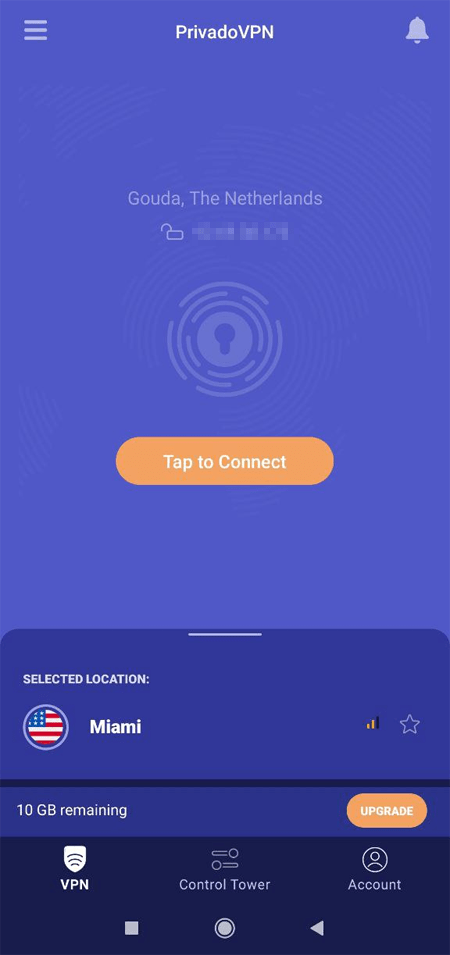
Scroll down to the “All servers” to connect to a server in another country.
Split tunneling
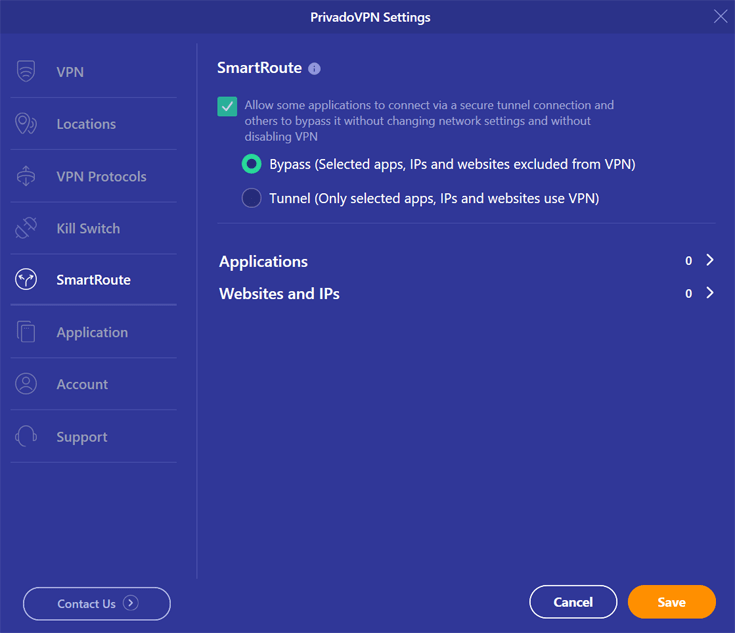
PrivadoVPN offers split tunneling, which enables users to decide which apps are routed through the VPN tunnel. PrivadoVPN calls its split tunneling feature SmartRoute. This feature is handy if you only need VPN protection for specific apps.
I used PrivadoVPN’s split tunneling, and I can confirm that it works as advertised. For instance, I was able to get the VPN to only work on Netflix and leave the other apps to run normally.
Customer service
PrivadoVPN’s website has a knowledge base containing answers to a lot of frequently asked questions. If your question isn’t listed there, you can always contact customer service via email. I tested customer support during my PrivadoVPN review and received clear answers to our questions within an hour.
Unfortunately, PrivadoVPN doesn’t have a live chat feature. This would definitely make their customer support even better. However, despite the lack of a live chat, I received a very quick response to my email.
PrivadoVPN pricing and payment methods
PrivadoVPN offers affordable plans, with bigger savings on long-term options. The one-month plan is $10.99, but you can pay as little as $ 1.11/month with the two-year subscription ($30 total, including 3 extra months). The annual plan costs $1.33/month ($15.96 total, also with 3 free months). There’s also a free version with limited data, but the same solid security and speeds.

- PrivadoVPN 24 Months $ 1.11mth Deal View offer
- PrivadoVPN 12 Months $1.33mth View offer
- PrivadoVPN 1 Month $10.99mth View offer
Privado has a variety of payment options, including some privacy-friendly options such as crypto. You can pay with:
- iDeal
- PayPal
- Direct debit & Credit card (Visa, Mastercard, AMEX, etc.)
- Crypto (Bitcoin, Ethereum, etc.)
- Mint, Sofort
I recommend using cryptocurrency if you want to remain as anonymous as possible. This makes this VPN provider rub shoulders with our best VPNs for crypto trading.
Money-back guarantee
PrivadoVPN offers a 30-day money-back guarantee on all plans. This means that you can get a refund within 30 days of purchasing a subscription.
To get your money back, simply contact PrivadoVPN’s customer service representatives and ask for a full refund.
After finishing my review, I requested a refund. Impressively, the refund process was easy, and I was able to cancel and receive my money back on the same day.
PrivadoVPN Free
Privado offers both a free and paid VPN. The free version of PrivadoVPN does have a data limit and fewer servers. The free version offers 10 GB of data every 30 days and access to the 13 most popular servers. These are part of the same network as the premium servers.
As an example, with 10 GB of data, you can watch roughly between 3 (1080p) and 10 hours (720p) of Netflix. If you’re not an avid streamer, 10 GB of data per month will get you a long way. You can use a free account to determine if PrivadoVPN is the VPN for you.
Final thoughts: Do I recommend PrivadoVPN?
I do recommend PrivadoVPN, particularly if you want an affordable VPN with a genuinely usable free plan for privacy protection and access to popular streaming platforms. In my tests, it delivered a strong mix of security, ease of use, and decent speeds, backed by a 10 GB free tier that’s good for light users and generous discounts on long-term subscriptions.
Here’s a quick summary of my experience with PrivadoVPN:
- Affordable pricing. At $ 1.11/month with a 2-year plan, PrivadoVPN is one of the most cost-effective VPNs I’ve tested. The free plan is also a solid option for casual use, with 10GB of data per month and access to 13 global server locations.
- Strong privacy and security. PrivadoVPN uses AES-256 encryption, has a kill switch, and a strict no-logs policy, though it hasn’t been independently audited yet. Being based in Switzerland is a bonus, thanks to strong local privacy laws.
- Good for streaming. It consistently unblocked Netflix (US/UK), BBC iPlayer, Disney+, Hulu, and even HBO Max during my tests. For a VPN with a free plan, that’s rare.
- Decent speeds. Using WireGuard, speeds were solid overall, but I did notice some slower upload rates and buffering on distant servers during busy times.
That said, PrivadoVPN is good but not perfect. The server network is smaller than top-tier rivals, speeds can’t always match the fastest providers, and there’s no dedicated IP option or independent security audit yet. If you can live with those drawbacks and mainly care about solid private browsing on a budget, PrivadoVPN is definitely a worthy choice.
What Our Experts Think About PrivadoVPN
Related articles:
FAQ
Do you have a question about PrivadoVPN? Take a look at some of our frequently asked questions below. Click on the question to see our answer.
Once you’ve used up the 10 GB of data on PrivadoVPN’s free plan, your connection stops working until your data resets for the next 30‑day period. You can still log in and manage your account, but you’ll need to wait for the reset or upgrade to a paid plan to continue using the VPN without interruptions.
PrivadoVPN is owned and operated by Privado Networks AG, a company based in Switzerland. This location is beneficial for privacy because Switzerland has strong data protection and privacy laws
PrivadoVPN offers a free plan and several paid subscriptions, with pricing that’s on the low end of the market. Its long‑term plans get as cheap as $ 1.11/month, while the monthly plan costs more overall but gives you maximum flexibility.
PrivadoVPN Free gives you access to a set of 13 locations compared to the paid version. Free users can connect to a limited selection of servers spread across multiple countries. That’s generally enough for basic browsing, streaming, and torrenting tests, but not for broad global coverage.
No, PrivadoVPN states that it follows a strict no‑logs policy and does not sell your browsing data or online activity. Because it does not record your traffic or IP address, there is no usage data to monetize or hand over to third parties.