

- The Best VPNs Linux VPNs: A Quick Overview
-
Best VPNs for Linux: Detailed Overview
- 1. Surfshark VPN: A solid VPN with a graphical user interface (GUI), perfect for Ubuntu users
- 2. NordVPN: A fast and secure Linux VPN with many features
- 3. Proton VPN: Privacy-friendly open-source Linux VPN
- 4. Private Internet Access (PIA): A feature-rich Linux VPN client with GUI
- 5. CyberGhost: Best VPN for Linux-beginners
- 6. ExpressVPN: A reliable Linux VPN that supports many distros
- 7. Mullvad VPN: User-friendly Linux VPN for privacy-conscious users
- Comparison: The Best VPNs for Linux
- How I Picked the Best VPNs for Linux
- Setting up a VPN on Linux
- Conclusion: What is the Best VPN for Linux?
Linux is a top favorite among programmers, scientists, and security-conscious users because it’s open source, less prone to viruses, and rarely crashes. However, once you go online, your data and traffic are at the mercy of third parties.
A VPN protects you from online threats by masking your identity and encrypting your traffic. The bad news? Only a handful of VPN providers have a dedicated Linux app. Even when you find a VPN with a Linux client, some don’t support certain Linux distros or function well.
I took time to examine and test over 20 Linux VPN services. I looked for VPNs with a working Linux app, robust security and privacy features, fast speeds, an extensive server network, and excellent unblocking ability.
The Best VPNs Linux VPNs: A Quick Overview
Here’s an overview of the seven VPNs that met our criteria.
| VPN | App | Summary | Compatible with |
|---|---|---|---|
| 1. Surfshark | GUI | Best graphical user interface for Linux | Ubuntu, Debian, and Linux Mint |
| 2. NordVPN | CLI | Secure Linux VPN with many features | Ubuntu, Debian, Linux Mint, Fedora, CentOS, Qubes OS, openSUSE and Elementary OS |
| 3. Proton VPN | GUI | Open-source Linux VPN | Debian, Ubuntu and Fedora |
| 4. Private Internet Access | GUI | Feature-rich Linux GUI | Ubuntu, Mint, Debian, Fedora and Arch |
| 5. CyberGhost | CLI | Beginner-friendly Linux VPN | Ubuntu, Fedora, Mint, Kali, CentOS and PoP!_OS |
| 6. ExpressVPN | CLI and GUI | Linux VPN that supports many distros | Ubuntu, Debian, Fedora, Raspberry Pi OS, Linux Mint and Arch |
| 7. Mullvad VPN | GUI | Privacy-friendly Linux VPN | Ubuntu, Debian and Fedora |
I have selected these VPNs based on their functionality, the Linux distros they support, their customer service for Linux, their server network, their security features, their speed and unblocking abilities. These VPNs will offer you the best experience when it comes to streaming, torrenting and online privacy.
Best VPNs for Linux: Detailed Overview
All these VPNs offer rock-solid AES encryption, various protocols, a kill switch and a strict no-logs policy. Let’s look at each one, starting with Surfshark, the overall best Linux VPN.
1. Surfshark VPN: A solid VPN with a graphical user interface (GUI), perfect for Ubuntu users

If you’re not a fan of operating apps via commands, Surfshark is the VPN service for you. It has a dedicated Linux app with a graphical user interface (GUI). This app has been available in the Snap Store since February 2024. The Surfshark Linux app works like its Windows and Mac apps. You can access Surfshark’s myriad features, choose servers, change protocols, activate multi-hop, NoBorders mode and much more.
I recommend Surfshark for Ubuntu users since the GUI was designed primarily for that distro. However, it’s also available for Debian 11 and newer, as well as Mint 20 and newer versions. You will need Network Manager 1.20.0 or higher.
Surfshark offers a lightning-fast connection and has a worldwide server network. This makes this VPN provider a great choice if you want to unblock international streaming services. The provider is also a great choice for online security. It offers many security tools such as CleanWeb, which blocks ads and pop-ups.
Starting at $ 2.49 per month for two years, Surfshark isn’t very expensive. You can even drive the cost down by sharing your account and splitting the cost, since Surfshark supports unlimited simultaneous connections per account.
Pros
- Dedicated Linux app with GUI
- Compatible with Ubuntu, Debian, and Linux Mint distros
- Lightning-fast connections
- 4500 servers in over 100 countries
- OpenVPN and WireGuard protocols
- Unlimited number of connections
Cons
- A tad slower than NordVPN

Read our in-depth Surfshark review to learn more about this VPN and how it performed in our tests. Surfshark offers a 30-day money-back guarantee, which means you can try it risk-free.
2. NordVPN: A fast and secure Linux VPN with many features

NordVPN is our overall best VPN. However, it’s not number one on this list because while it has a dedicated Linux app, it doesn’t have a graphical interface. Still, it’s easy to install and use NordVPN on Linux with the clear instructions on NordVPN’s website.
NordVPN’s Linux app is compatible with all the major Linux distros. This includes Debian-based and RHEL-based systems. NordVPN offers three secure protocols: OpenVPN, NordLynx and NordWhisper. NordWhisper, a custom protocol which hides VPN traffic, was introduced for Linux in February 2025.
What makes this VPN provider stand out from other Linux VPNs are its security tools. Not only will NordVPN’s Threat Protection protect you from malware and ads, special servers, such as P2P servers, Tor servers and obfuscated servers can cater for all your needs.
Moreover, NordVPN’s Meshnet function allows you to connect devices safely. This is a perfect solution to share files, access your home computer from abroad, or share your Netflix account with others. It’s also great for multiplayer gaming. Not to mention, NordVPN is reasonably priced.
Pros
- Compatible with Ubuntu, Debian, Linux Mint, Fedora, CentOS, Qubes OS, openSUSE and Elementary OS
- Threat Protection protect you from malware and ads
- Special servers for obfuscation, P2P sharing and Tor
- Includes Meshnet function to connect to other devices
- 8900 servers with excellent speed
- 10 simultaneous connections
Cons
- Doesn't offer a GUI for Linux

We’ve put NordVPN through the wringer and assessed every aspect of its performance. To learn more, check out our NordVPN review. You can try NordVPN 30 days for free.
3. Proton VPN: Privacy-friendly open-source Linux VPN

Proton VPN is a Swiss-based non-profit company which offers an audited open-source no-log VPN. Due to the privacy-friendly laws in Switzerland, Proton VPN is an excellent VPN service for those who value their privacy.
Proton VPN has an official Linux app which can be used on Debian, Ubuntu and Fedora distros in combination with a GNOME desktop environment. Proton VPN’s website offers full setup instructions, making installation fairly easy. You could use the app on other distros, although support for this is limited.
The Linux app will give you access to all of Proton’s advanced features, such as an ad blocker, a kill switch and port forwarding. Proton is one of the few trustworthy VPNs which supports port forwarding, making this a great choice for gamers and people who like to torrent.
Proton VPN offers 20700 servers in 149 countries. Although Proton VPN is a tad slower than NordVPN, it still offers excellent speeds. During our test, I didn’t notice any difference in speed while browsing the internet. I could also stream movies in HD quality without any hiccups.
Short on cash and don’t want to get a Proton VPN premium subscription? Proton also offers a free version of their VPN, which is arguably the best free VPN for Linux.
Pros
- Open-source no-log VPN
- Official Linux app for Debian, Ubuntu and Fedora
- Intuitive GUI lets you access all features
- Supports port forwarding
- OpenVPN and WireGuard protocol
- Free (limited) Linux app available
Cons
- Limited support if you use the app on other distros
- Stealth protocol isn't available for Linux

We’ve detailed all of Proton VPN’s features and capabilities in our Proton VPN review. Proton VPN offers a 30-day money-back guarantee.
4. Private Internet Access (PIA): A feature-rich Linux VPN client with GUI
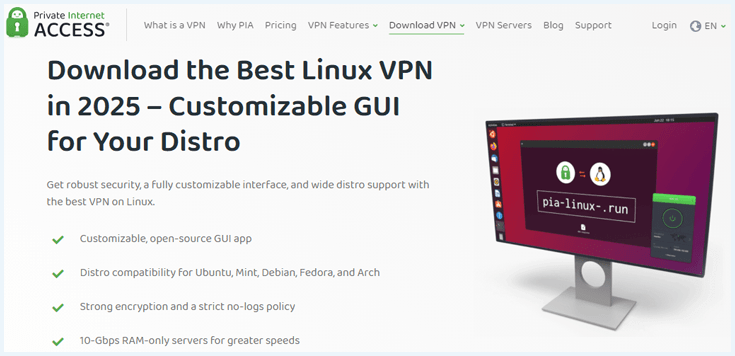
Private Internet Access is one of the best VPNs for Linux because of its open-source app with a graphical interface. The PIA app is compatible with major Linux distros, including Ubuntu, Mint, Debian, Fedora, and Arch.
You can install PIA’s VPN for Linux using OpenVPN and Terminal, or Network Manager. You can find clear and extensive manuals on PIA’s website. Although installation took me more time than the previous VPN’s on this list, it is still easy to do.
Thanks to its GUI, PIA is very easy to use. You can fiddle with the settings of the Linux PIA app, just like on Windows and macOS. You can easily activate features such as split tunneling and configure your DNS servers from the app. This is not easy to do with many Linux apps.
PIA’s vast server network of 35000 servers is its biggest selling point, but there’s more to this VPN. It offers special streaming servers and has 50 servers in the US, one in each state. That makes Private Internet Access a great choice for unblocking. It supports unlimited simultaneous connections too!
Pros
- Compatible with Ubuntu, Mint, Debian, Fedora, Arch, and other distros
- Adjustable open-source GUI
- Easy activation of advanced features
- OpenVPN and WireGuard protocols
- 35000 servers in 91 countries
- Unlimited simultaneous connections
Cons
- Installation takes a bit more time

Read our PIA review for a deep dive into this VPN. You could use PIA’s 30-day money-back guarantee to give this VPN provider a try!
5. CyberGhost: Best VPN for Linux-beginners
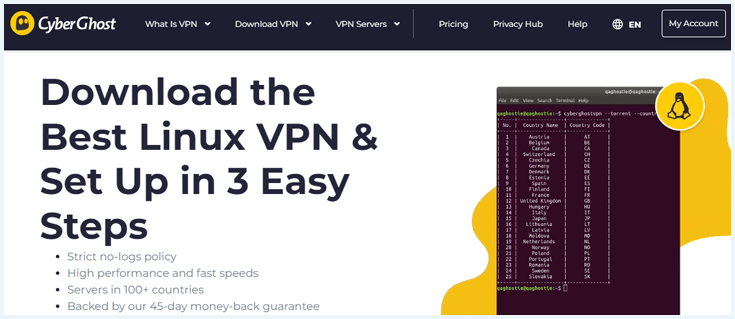
CyberGhost has a reputation for being a beginner-friendly VPN. While the CyberGhost Linux app doesn’t have a GUI, it’s still easy to use. I could install the VPN on Ubuntu, Fedora, and Mint using a few commands. After installation, you can see the list of available commands for the CLI app.
CyberGhost supports five Linux distros: Ubuntu, Fedora, Mint, Kali, CentOS, and PoP!_OS. CyberGhost is one of the few VPNs that supports PoP!_OS — a Linux distro popular among STEM and creative professionals.
With CyberGhost you will have access to 9800 servers in 100 countries. Some of these servers are optimized for streaming, torrenting and gaming. No matter why you want to use a VPN, CyberGhost has got you covered.
The CyberGhost Linux app doesn’t get updated frequently. One of the last big changes was in January 2023, when the WireGuard protocol was made available for Linux users.
Pros
- Compatible with Ubuntu, Fedora, Mint, Kali, CentOS, and PoP!_OS
- Beginner-friendly CLI
- Special server for P2P, streaming and gaming
- WireGuard, OpenVPN, and IKEv2 protocols
- 45-day money-back guarantee
Cons
- Doesn't offer a GUI

If you’re still unsure about CyberGhost for Linux, read our CyberGhost review. Otherwise, you can take CyberGhost for a test run using its 45-day money-back guarantee.
6. ExpressVPN: A reliable Linux VPN that supports many distros

ExpressVPN was one of the earliest VPNs to launch a command-line interface for Linux in 2016. Since then, it has expanded to cover a wide range of Linux distros, including Ubuntu, Debian, Fedora, Raspberry Pi OS, Linux Mint, and Arch. You can also use ExpressVPN on lesser-known distros such as Lubuntu, Korora, Zorin, and Maui Linux, although ExpressVPN doesn’t offer support for these distros.
During our tests, it was easy to install ExpressVPN on Linux using the detailed installation guides on the provider’s site. The CLI app is also easy to use: there are no bells and whistles, just a couple of commands that allow you to choose your server and connect.
Since February 2025, ExpressVPN offers a Graphical User Interface for beta testing. This interface makes it easier to use the app. It’s available in 17 languages and includes an advanced kill switch, split tunneling, an ad blocker, and access to live support with just one click.

ExpressVPN offers thousands of servers in 113 countries. These servers offer excellent speed and are suited for streaming, torrenting, and gaming.
Pros
- Compatible with Ubuntu, Debian, Fedora, Raspberry Pi OS, Linux Mint, and Arch distros
- Also functions with lesser-known distros
- Easy to install and use with a few commands
- Browser extension can be used as a GUI
- OpenVPN and Lightway protocols
- Excellent speed for streaming
Cons
- Doesn't offer a GUI

Check out our ExpressVPN review to learn more.
7. Mullvad VPN: User-friendly Linux VPN for privacy-conscious users
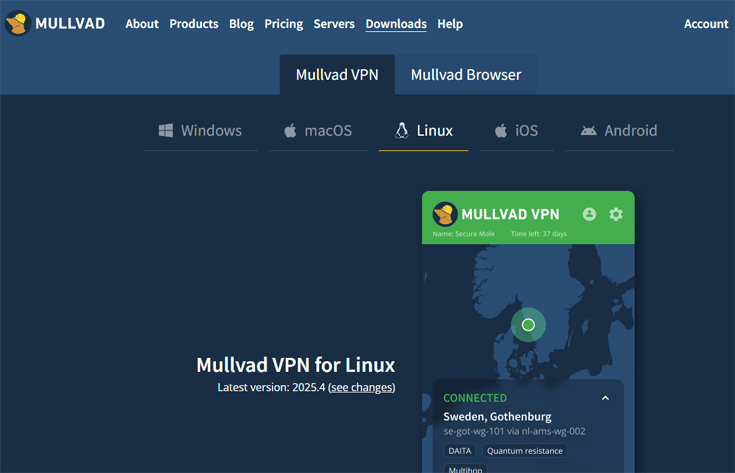
Mullvad is a privacy-focused Linux VPN. This no-log VPN collects barely any data about you. In fact, you don’t even need an email to sign up, and you can pay with cryptocurrency. This is why Mullvad is one of the top VPNs Reddit users recommend. It is a great choice if you want to stay completely anonymous.
It doesn’t offer much in the way of distros; it only supports Ubuntu, Debian, and Fedora. You can also install it on unsupported distros based on Ubuntu 22.04 or higher. Installing and setting up Mullvad VPN on Linux is easy. Mullvad’s website offers clear instructions about how to install the VPN with just a few commands.
Mullvad’s user-friendliness makes this VPN ideal for newbies to Linux. The GUI is just as easy to use as the Windows app and offers many security features such as split tunneling, an advanced kill switch, obfuscation and multi-hop.
Mullvad is a great Linux torrenting VPN, since it supports port forwarding to make seeding possible. Downloading torrents with this VPN is fast, and it comes with instructions on how to secure your BitTorrent client.
Pros
- Compatible with Ubuntu, Debian, and Fedora distros
- Privacy friendly: anonymous sign up possible
- Beginner friendly GUI
- A popular choice for torrenting
- OpenVPN and WireGuard protocols
Cons
- Can't always unblock streaming services
- Fairly expensive

For more pros and cons of this VPN, check out our extensive Mullvad review.
Comparison: The Best VPNs for Linux
Let’s take a closer look at the assets of the best Linux VPNs:
| VPN | Linux app | Supported distros | Protocols | Servers | Price |
|---|---|---|---|---|---|
| Surfshark | GUI | Ubuntu, Debian, and Linux Mint | OpenVPN, WireGuard | 4500 servers in 100 countries | $ 2.49 |
| NordVPN | CLI | Ubuntu, Debian, Elementary OS, Linux Mint, Fedora, RHEL, CentOS, Qubes OS, and openSUSE | OpenVPN, NordLynx, NordWhisper | 8900 servers in 149 countries | $ 3.49 |
| Proton VPN | GUI | Ubuntu, Debian, and Fedora | OpenVPN, WireGuard | 20700 servers in 149 countries | $ 2.99 |
| PIA | GUI | Ubuntu, Mint, Debian, Fedora and, Arch | OpenVPN, WireGuard | 35000 servers in 91 countries | $ 2.19 |
| CyberGhost | CLI | Ubuntu, Fedora, Mint, Kali, CentOS, and PoP!_OS | OpenVPN, WireGuard, IKEv2 | 9800 servers in 100 countries | $ 2.19 |
| ExpressVPN | CLI and GUI | Ubuntu, Debian, Fedora, Raspberry Pi OS, Linux Mint, and Arch | OpenVPN, Lightway | 3000 servers in 113 countries | $ 2.99 |
| Mullvad | GUI | Ubuntu, Debian, and Fedora | OpenVPN, WireGuard | 649 in 40 countries | $ 5.49 |
How I Picked the Best VPNs for Linux

I assessed more than 20 VPNs to determine the best Linux VPNs. For every VPN I examined, I asked the following questions:
- Easy-to-use Linux app: Most Linux VPNs are operated via Linux command line (CLI). I checked how easy it was to install and use these VPNs using commands. It’s even better if a VPN app has a graphical interface (GUI) because you control it easily without entering commands.
- Support of Linux distributions: The best Linux VPNs support popular distros, including Ubuntu, Debian, and Fedora. They are also available for lesser-known ones, including OpenSUSE and PoP!_OS.
- Customer support: I checked if customer support is knowledgeable about Linux and can help with problems regarding Linux apps. I also checked if manuals and installation guidelines are available on the provider’s website.
- Privacy: a Linux VPN must protect your privacy with a strict no-logs policy and security measures such as RAM-only servers. Each VPN in this list has an independently audited no-logs policy.
- Server network: Any VPN worth its salt should have hundreds of servers in multiple countries. This gives you multiple IP choices and reduces the chances of server congestion.
- Security features: AES encryption, a kill switch, and OpenVPN protocol are the bare minimum. Other helpful features include double VPN servers, obfuscation, and an ad/tracker/malware blocker.
- Speed: Every VPN will reduce your internet speed, but the best ones have negligible impact. With a slow VPN, you’ll experience slow-loading pages and seemingly endless buffering.
- Unblocking and torrenting: I ran tests to see which VPNs could unblock major streaming providers like Netflix, Hulu, and Disney Plus. I also checked to see if they allow torrenting.
Setting up a VPN on Linux
I’ll walk through how to install a VPN on Linux. The installation steps might vary depending on the VPN and your Linux distro. For this setup process, we’ll use Linux Mint. These steps are generally the same regardless of the VPN you’re installing.
Graphical user interface app installation
Follow the steps below to install Surfshark’s GUI app on Linux:
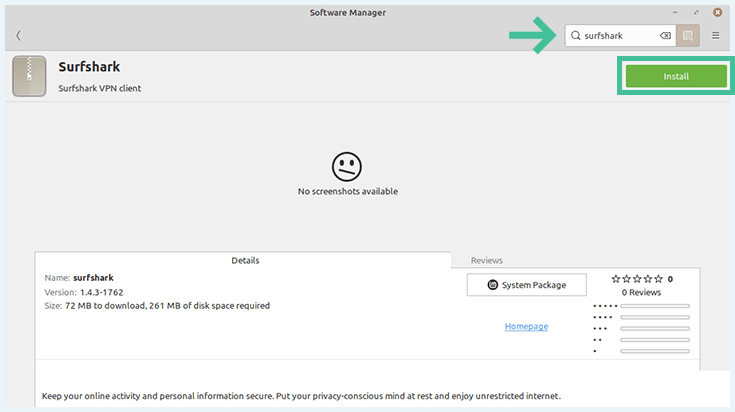
- Open the Software Manager from the menu on the toolbar.
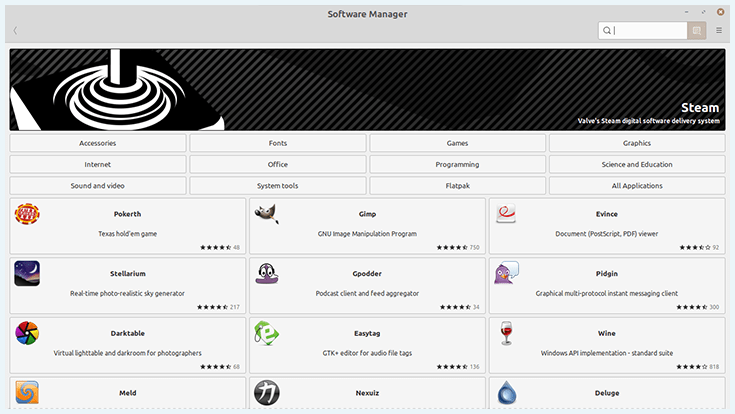
- Search for “Surfshark” and click “Install“. You’ll need to provide your password to approve the installation.
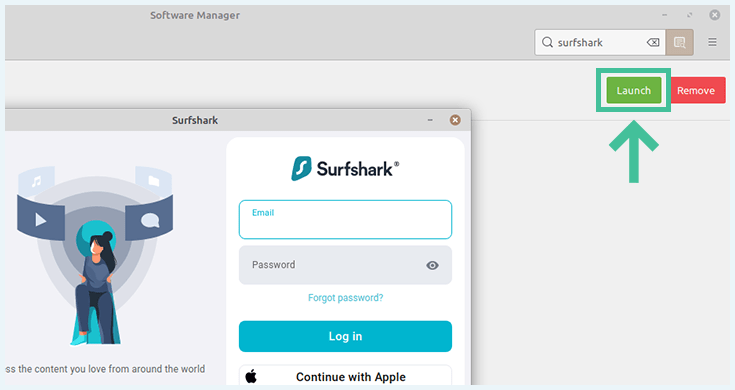
- When it’s done, you should be able to click “Launch” from the Software Manager page to open the app.
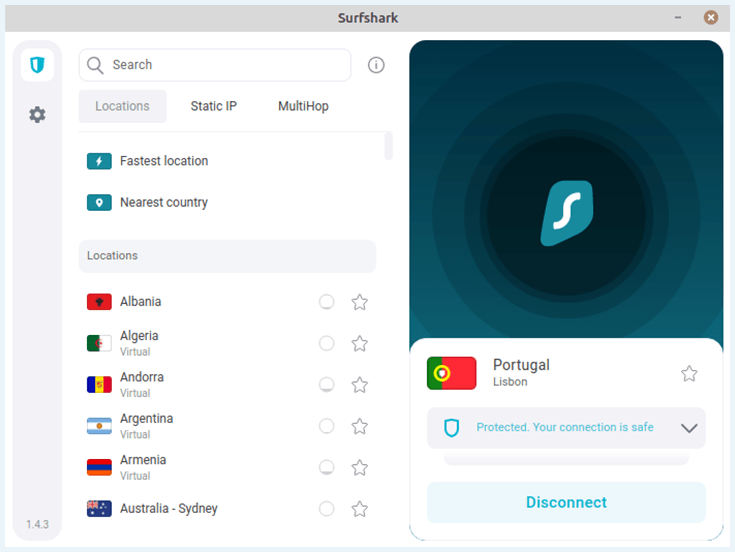
- Once you log in, you can connect to a server within seconds.
Command-line interface
Here’s how to install NordVPN on Linux using commands. The steps below are specifically for installing NordVPN’s CLI app on Linux Mint.
- Install the app by opening the Linux terminal window and typing in the following command “sh <(curl -sSf https://downloads.nordcdn.com/apps/linux/install.sh).”

- If it installs successfully, there should be a NordVPN app on your device. When you click it, this page should appear.

- If you get an error message when you click the NordVPN app, Nord recommends doing this: “Additionally, if you receive the following issue: Whoops! Permission denied accessing /run/nordvpn/nordvpnd.sock, all you need to do is write the following command: sudo usermod -aG nordvpn $USER and then reboot your device.” This worked for us!
- Click enter to close that terminal window.
- Open a new terminal window and type “nordvpn login.” You should see the page below.
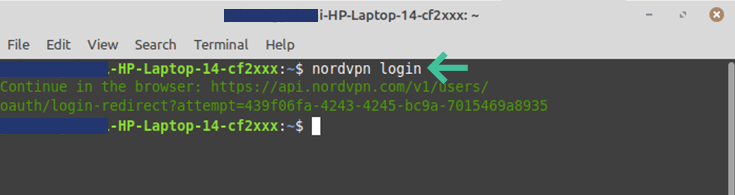
- When you copy the link and paste it into a browser, you should see the NordVPN login page. Enter your details to log in to your account.
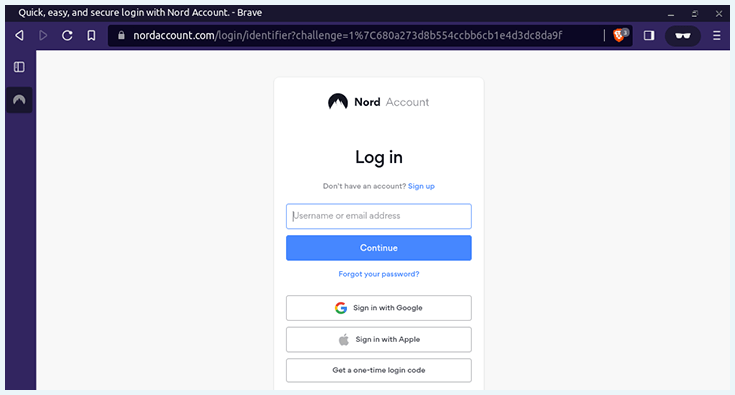
- You can either open a Linux terminal window or click the NordVPN app to open it. When you type “nordvpn connect,” you’ll be automatically connected to the fastest server.

Other settings
You can activate various features as well. Here are a few examples:
- Type “nordvpn disconnect” to disconnect the VPN.

- Type “nordvpn set killswitch on” to activate the kill switch.

- Type “nordvpn c double VPN” to use NordVPN’s double VPN feature. In our case, our traffic was routed through the UK and France.
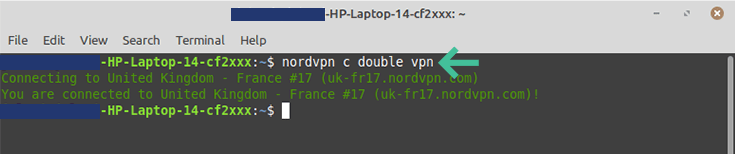
- To connect to any NordVPN server, type the country’s initials after “nordvpn connect.” For example, write “nordvpn connect uk” to connect to a server in the United Kingdom.
You can find other commands, including switching between protocols, in NordVPN’s support page’s guides.
Conclusion: What is the Best VPN for Linux?
Most websites you visit track you to deliver ads. Your ISP, hackers, and other third parties also track you across the web. Using a VPN is a great way to protect your privacy and avoid falling into the snare of threat actors.
With a simple graphical user interface app, excellent security features, an affordable price tag, and support for unlimited devices, Surfshark is easily the best Linux VPN. Plus, it can unblock streaming services and bypass censorship in repressive countries.
You’ll find our top VPN picks for other operating systems in the articles below:
- The Best VPN for Windows
- What is the Best VPN for Mac?
- The Best VPNs for Android
- Best VPNs For iPhone and iPad (iOS)
Do you have a question about the best VPNs for Linux? Check out the FAQ section below for answers.
Surfshark is the best Linux VPN. It offers an easy-to-use GUI and has many advanced features, such as NoBorders mode, multi-hop, and CleanWeb which blocks ads and pop-ups. Surfshark’s servers have excellent speed and the app can be installed on an unlimited number of devices.
Linux doesn’t have a built-in VPN, so you have to download one. In our experience, Surfshark is the best VPN for Linux. The GUI of the Surfshark Linux app makes it very user-friendly. Plus, the VPN offers fast speeds, top-notch encryption, many protocols, fast speeds, and plenty servers.
Although NordVPN doesn’t offer a GUI for Linux, it is still an excellent Linux VPN. NordVPN’s CLI lets you use a myriad of features, such as double VPN, multi-hop and obfuscation. Moreover, you can also use NordVPN’s Meshnet function on Linux.
To install and setup a VPN on Linux, follow these steps:
- Download the VPN from Snapcraft, Flathub or the VPN provider’s website.
- Install the VPN using the software manager or the Linux terminal window.
- Setup your preferred settings using the GUI or CLI.
Most premium VPNs for Linux offer extensive step-by-step manuals on their website.





I've been using Linux as long as I can remember and I couldn't imagine using any other operating system now. Although as probably any other user of technology gadgets I was concerned about not getting hacked and keeping my info safe (and also being able to torrent movies in high quality), which is the main reason I decided to get a vpn. My friend was using Surfshark and he recommended for me to try it out from his account, which of course I couldn't refuse. After reading more about it (and trying it out) I decided that it worked quite decently for torrenting and it claimed to have advanced security systems, which is why I ended up getting the subscription. So far so good, haven't had any major problems!
Thank you for sharing! We have nothing but good experiences with Surfshark, so we can only agree with you. It's definitely one of the top VPN providers we've tried!