- The Best YouTube VPN – Quick Overview
- Why You Need a VPN for YouTube
-
The Best VPNs for YouTube – Detailed Overview
- 1. NordVPN: The overall best VPN for YouTube
- 2. Surfshark: YouTube VPN for unlimited devices
- 3. ExpressVPN: YouTube premium VPN with fast speeds for streaming
- 4. CyberGhost: Beginner-friendly VPN for YouTube with dedicated streaming servers
- 5. Private Internet Access: Powerful YouTube VPN with the most affordable subscription plans
- How I Chose the Best VPNs for YouTube
- The Best YouTube VPNs – Comparison
- How to Use a VPN for YouTube – Step by Step
- Is Using a VPN for YouTube Legal?
- Countries That Have Blocked YouTube
- Conclusion: Best VPN for YouTube
YouTube is by far the largest video-sharing platform in the world. However, many videos are country-locked due to distribution rights and contracts with creators. YouTube is even completely blocked in some countries, including China and Iran.
To bypass YouTube censorship and the geo-restrictions on specific videos, I recommend using a VPN (virtual private network). By connecting to a server in a country where a YouTube video is available, users can bypass the restrictions and access the video they want.
In this article, I take a deep dive into the best VPNs for YouTube and which providers offer you maximum privacy and the most robust unblocking features.
The Best YouTube VPN – Quick Overview
A VPN can change your IP address (which discloses your location) and allow you to unblock the YouTube content you want. After extensively testing 70+ VPNs, here’s our top five best VPNs for YouTube:
Top 5 YouTube VPNs
- NordVPN: The overall best VPN for YouTube
- Surfshark: YouTube VPN for unlimited devices
- ExpressVPN: VPN with fast speeds for streaming YouTube videos
- CyberGhost: Beginner-friendly VPN for YouTube with dedicated streaming servers
- Private Internet Access: Powerful YouTube TV VPN with affordable price plans
If you are in a country where some or all YouTube content is restricted because of copyright laws or censorship, you will need a VPN to watch YouTube videos. I recommend a VPN with a large worldwide server network, since this will enlarge your unblocking possibilities.
Your VPN must also offer excellent speed. This will allow you to stream YouTube videos without any buffering. It is also important that the VPN of your choice has additional features to avoid being blocked, such as obfuscated servers, stealth protocol or even dedicated IP addresses.
Why You Need a VPN for YouTube
The best VPNs for YouTube will allow you to watch content that’s blocked in your region for one of the following reasons:
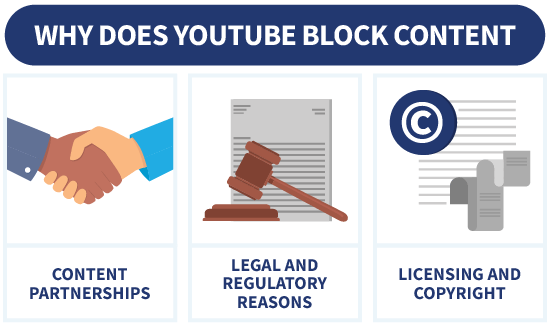
- Content partnerships: YouTube has partnerships with media companies and creators that may restrict content to the countries specified by the creators.
- Legal and regulatory reasons: Certain videos might contain content that is deemed inappropriate or illegal in specific countries.
- Licensing and copyright: Content creators and copyright holders may choose to restrict access to their videos based on licensing agreements or copyright restrictions.
- Age-verification bypass in Australia: From December 10, 2025, Australia’s strict age-verification laws can block users from watching certain YouTube content unless they provide ID. A VPN helps you access YouTube normally by connecting through countries without mandatory age checks.
The Best VPNs for YouTube – Detailed Overview
Based on my tests, NordVPN stood out as the best VPN for YouTube thanks to its user-friendliness, obfuscated servers that avoid VPN detection, and extensive server network.
However, there are several other VPN providers that are capable of unblocking YouTube videos and keeping your data private. I’ll delve into each VPN provider and their ability to unblock YouTube TV and YouTube content.
1. NordVPN: The overall best VPN for YouTube

At VPNOverview, we tested 80+ VPNs and concluded that NordVPN is the best VPN for accessing YouTube. Why? It has over 8900 servers scattered across 149 worldwide locations. Such diverse servers ensure you can bypass online censorship and access country-locked content on YouTube.
To bypass censorship, NordVPN has obfuscated servers that hide the fact you’re using a VPN. This means users can use a VPN even in highly censored countries where YouTube and VPNs are blocked. Additionally, NordVPN has a strict no-logs policy, so it does not retain any of your data.
I fired up NordVPN and watched various YouTube videos to test NordVPN’s streaming speeds. The streaming and quality were both superb, and I experienced no hiccups. I especially liked how easy it is to use the VPN app. It only took my one click to connect to the nearest, most optimal server for YouTube.
When watching YouTube, I am also really pleased with NordVPN’s Threat Protection feature. This feature doesn’t only protect you from malicious files but also blocks trackers and ads. Although it won’t stop all YouTube ads, it does limit the amount of trackers YouTube will place on your device.
NordVPN price starts from $ 3.49/month, and it offers a 30-day money-back guarantee on all subscriptions.
Pros
- 8900 servers in 149 countries
- Obfuscated servers for unblocking YouTube
- Strict no-logs policy to protect your privacy
- Fast streaming speeds
- Blocks trackers and ads with Threat Protection
- 30-day money-back guarantee
Cons
- Windows app opens the browser to log in

If you want to know more about this provider, check out our NordVPN review. If you have a YouTube TV subscription, you can also use NordVPN for unblocking YouTube TV. NordVPN is also the best VPN for YouTube TV.
2. Surfshark: YouTube VPN for unlimited devices

Surfshark is packed with features such as NoBorders Mode that presented us with a selection of servers with the best performance if you want to access restricted videos. The rotating IP feature works to avoid being blocked by YouTube.
The vast network of servers consisting of 4500 servers in 100 countries gives you ample options to bypass the “This video is unavailable” YouTube error.
In my Surfshark tests, the VPN only lost 3% of my base speeds, which is sufficient to watch YouTube videos in 4K and HD. It’s loaded with secure and fast protocols like WireGuard and OpenVPN. With Surfshark I had a stable and secure VPN connection while browsing YouTube.
Surfshark packs a punch when it comes to offering users a great deal. Surfshark’s CleanWeb feature offers an excellent ad blocker. Moreover, you get to protect unlimited devices under one super affordable subscription. Surfshark also has a 30-day money-back guarantee you can use to test the VPN on YouTube and other major streaming platforms.
Pros
- 4500 servers in 100 countries
- NoBorders Mode to bypass censorship
- Rotating IP to avoid being blocked
- CleanWeb blocks trackers and ads
- Unlimited simultaneous connections
- 30-day money-back guarantee
Cons
- No options to manually select a server

You can find out more in our Surfshark review. You might also be interested in Surfshark YouTuber codes to get the best deal for Surfshark.
3. ExpressVPN: YouTube premium VPN with fast speeds for streaming

ExpressVPN stands out as the best VPN for YouTube thanks to its fast streaming speeds. There was no noticeable change in my speed during daily use. The same applied when I tried to unblock YouTube videos when I ran tests for this article. I was nothing short of impressed with the seamless stream and HD quality. It was the same as when I’m not using a VPN.
ExpressVPN boasts features such as MediaStreamer that is incredibly useful for streaming, as you can use it on devices that normally don’t accommodate VPNs, such as gaming consoles, Apple TV, and Android TV. ExpressVPN is also easy to install on routers and offers unified protection to all your devices when streaming YouTube and Amazon Prime Video and browsing online.
For beginners, ExpressVPN has an appealing and intuitive interface that makes using the VPN easy. Furthermore, it protects your privacy with an independently audited no-logs policy. ExpressVPN’s Threat Protection can block malicious sites, trackers and ads, which makes it handy when accessing sites like YouTube.
Pros
- 3000 servers in 113 countries
- Super-fast speeds even when streaming in HD quality
- Easy to install on routers
- MediaStreamer for dedicated streaming
- Threat Protection to keep you safe from trackers and ads
- 30-day money-back guarantee
Cons
- Smaller server network than some competitors

Do you want to know more? Check out our ExpressVPN review.
4. CyberGhost: Beginner-friendly VPN for YouTube with dedicated streaming servers

CyberGhost is one of the best VPNs for YouTube, thanks to its streaming optimized servers. The 9800 servers are spread out across 100 countries. The speeds and ample servers around the globe are sufficient for bypassing censorship to access YouTube.
The user interface is aesthetically pleasing, which makes it easy to use CyberGhost. Furthermore, it has apps for all your favorite devices and operating systems, such as Windows, Linux, Android, and iPhone. You’ll be pleased to know CyberGhost accommodates up to six devices per subscription.
In my CyberGhost speed test, I reached speeds of 168.28 Mbps on a 170.05 Mbps connection. With such speeds, I could accomplish almost everything on YouTube – stream movies, listen to music, watch YouTube TV, and more. This is also one of the reasons CyberGhost is a strong contender in the best VPN for YouTube list.
The no-logs policy and AES-256 encryption ensure your privacy, while the OpenVPN, IKEv2, and the WireGuard protocol ensure security for your data online. You can also block ads and trackers based on DNS domains.
Pros
- Thousands of servers spread across 100 countries
- Dedicated streaming servers
- Excellent streaming speeds
- Blocks DNS domains used for ads, trackers and malware
- Strict no-logs policy
- 45-day money-back guarantee
Cons
- Logs the number of connections

Do you want more information? Check out our CyberGhost review.
5. Private Internet Access: Powerful YouTube VPN with the most affordable subscription plans

Private Internet Access (PIA) is constantly improving its service, making it a great YouTube VPN in my eyes. For instance, they allow unlimited simultaneous connections per subscription. Moreover, PIA’s Shadowsocks feature provides obfuscation and helps you watch YouTube wherever you are.
Considering how affordable Private Internet Access is, this is fantastic news for YouTube TV fans who would like to stream videos on multiple devices. You can also share your subscription with family and friends at no extra cost.
With this secure YouTube TV VPN, you don’t have to worry about anyone gaining access to your personal information. PIA has RAM-only servers, which discard all your data every time they are rebooted. To protect your privacy even more, you can turn on PIA MACE. This blocks malware, trackers and ads.
In my test, I streamed YouTube Live, and the results were fantastic. I didn’t experience any buffering or lag. I even watched videos in HD quality with seamless streaming. PIA has 35000 servers worldwide, so you will have no problem unblocking YouTube content in any region you want.
Pros
- 35000 servers in over 91 countries
- Unlimited device connections
- Shadowsocks (obfuscation technology) to unblock YouTube
- RAM-only servers to protect your privacy
- PIA MACE blocks malware, trackers and ads
- 30-day money-back guarantee
Cons
- Dashboard disappears if you don't adjust the settings

Check out our PIA review if you want to know more.
How I Chose the Best VPNs for YouTube
When choosing the best VPN for YouTube, you must consider factors such as streaming capabilities, the size of the server network and whether there is a no-logs policy that protects your data from being collected. Here are some important factors I considered while choosing the best YouTube VPN:
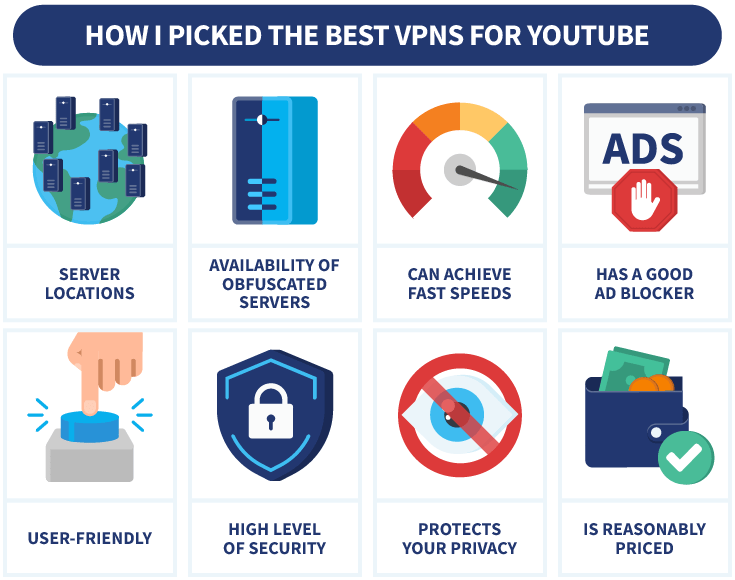
- Server locations: YouTube uploaders reserve the right to region-lock their content. The VPNs I listed here have servers spread out across the world to bypass almost any geo-locked content.
- Obfuscated servers: I ensured the VPNs had obfuscated servers or other features that evade VPN detection and also bypass censorship in countries that have blocked YouTube.
- Fast speeds: VPNs tend to slow down your internet speeds. In my list, I included the fastest VPNs that only lost a small (almost negligible) fraction of my raw speeds during my tests.
- Ad blocker: A good VPN for YouTube will also have ad blocking features to block the many YouTube ads and protect you from potentially harmful software if you happen to click on an ad.
- User-friendliness: I went with VPNs that have an intuitive interface and make it easy to connect to the best YouTube server for you.
- Security: The YouTube VPNs listed here employ cutting-edge encryption like AES-256 and secure protocols like OpenVPN, WireGuard, IKEv2, and others.
- Privacy: The whole point of a VPN is to provide you with bulletproof privacy. In my tests, I uncovered VPNs that have features like a kill switch, Smart DNS to mask your true location, and a strict no-logs policy.
- Price: I picked VPNs that are affordable and also offer 30-day money-back guarantees (or 45 days for CyberGhost) for you to use temporarily or test them out before committing long-term.
The Best YouTube VPNs – Comparison
I have outlined the five best YouTube VPN providers and their key features in the table below.
| Editor’s Pick | |||||
| VPN |  |  |  |  |  |
| Servers | 9000+ | 3000-5000 | Unspecified | 5000+ | Thousands |
| Connections | 10 | Unlimited | 14 | 7 | Unlimited |
| Protocols | OpenVPN, IKEv2, WireGuard, NordLynx | OpenVPN, IKEv2, WireGuard | OpenVPN, IKEv2, Lightway | OpenVPN, IKEv2, WireGuard | OpenVPN, WireGuard, L2TP/IPsec |
| Operating systems | Windows, Mac, iOS, Android, Linux | Windows, Mac, iOS, Android, Linux | Windows, Mac, iOS, Android, Linux | Windows, Mac, iOS, Android, Linux | Windows, Mac, iOS, Android, Linux |
| Logs | Zero logs | Zero logs | Zero logs | Zero logs | Zero logs |
| Money-back guarantee | Money-back guarantee, 30 Days | Money-back guarantee, 30 Days | Money-back guarantee, 30 Days | Money-back guarantee, 45 Days | Money-back guarantee, 30 Days |
| Price | $ 3.49 | $ 2.49 | $ 2.99 | $ 2.19 | $ 2.19 |
| Visit NordVPN | Visit Surfshark | Visit ExpressVPN | Visit CyberGhost | Visit Private Internet Access (PIA) |
How to Use a VPN for YouTube – Step by Step
If you’re a beginner, you may get caught up with all the VPN servers and privacy options. But fret not. Below are step-by-step instructions on how to access YouTube using a VPN.
- Visit NordVPN and sign up for a subscription. In my tests, I found it to be the best VPN for YouTube TV because of its fast streaming speeds and top-notch security.
NordVPN
Black Friday offer! Get 78% OFF NordVPN + 3 months free
- Download and install the app. NordVPN has an app for all major devices.

- Log in with your credentials from Step 1.

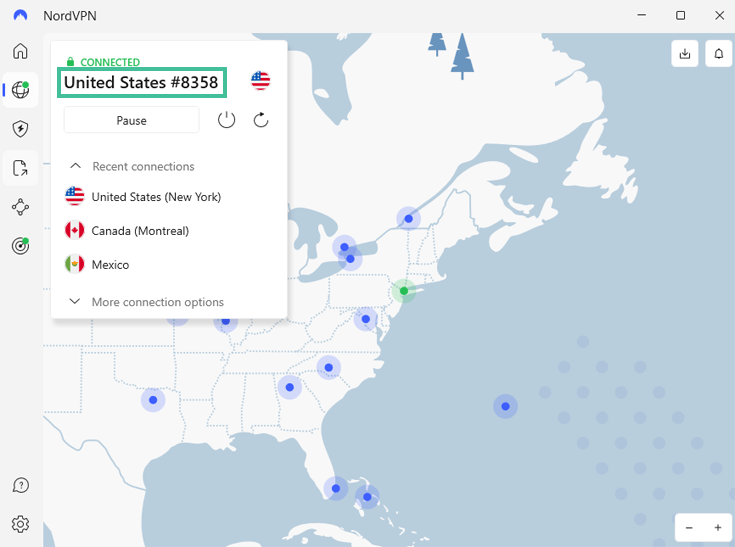
- Connect to a server in a country in which the YouTube video you want to watch is available. In the example below I have chosen a server in New York.
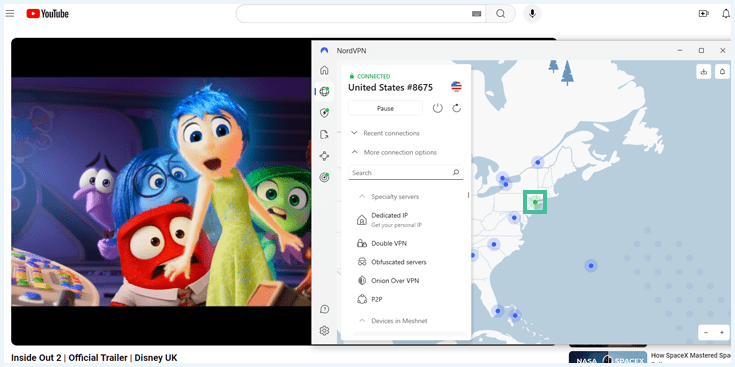
- Open an incognito screen in your browser and go to YouTube.com. In the example below I am watching the Inside Out 2 trailer on YouTube.
If you don’t get access to YouTube immediately, you can reconnect to switch servers. In my experience, this will usually solve the problem. If not, try one of NordVPN’s obfuscated servers. You can find them if you click on ‘More connection options’.
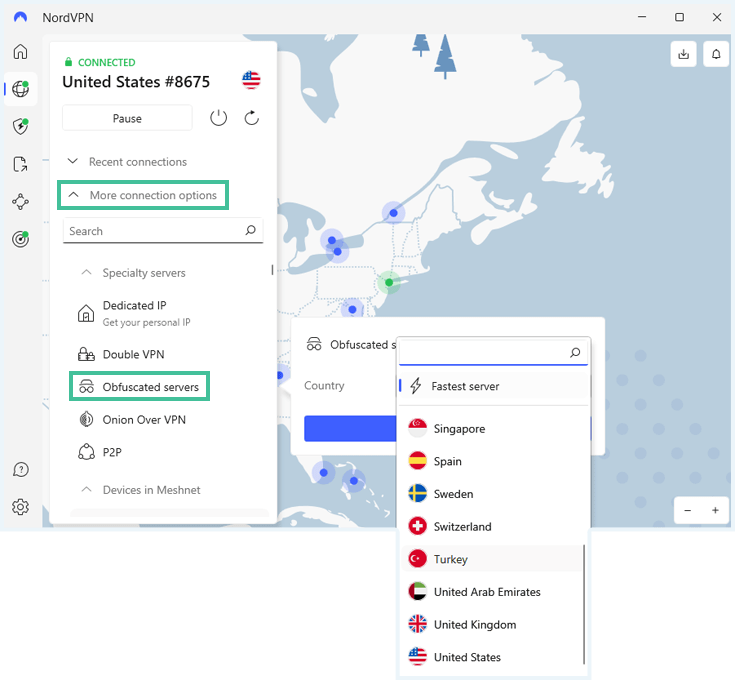
Select the right VPN server to unblock YouTube
If you come across YouTube content that is blocked in your region, you will get this message: ‘Video unavailable. The uploader has not made this video available in your country.’
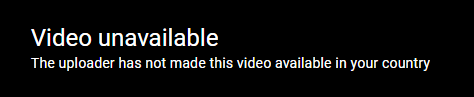
You might wonder which server you need to unblock it. You can use this YouTube Video Restriction Checker to find out in which regions the video is available. Just past the URL in the Checker and pick a server in a green country to unblock the video.
Is Using a VPN for YouTube Legal?
Using a VPN for YouTube is legal. YouTube does not restrict the use of VPNs in its terms and conditions like Netflix, Amazon Prime, and other streaming platforms. However, in countries such as Russia and Iran, using a VPN is a restricted and punishable offense.
Hence, if you are in a country where using a VPN is regulated by law, you should get updated with that country’s regulations. Moreover, don’t forget that legislation can frequently change.
Nonetheless, if you are in a region where using a VPN is not prohibited, but you still cannot access YouTube, I wholeheartedly recommend NordVPN as the best VPN for YouTube to ensure you have a smooth and uninterrupted streaming experience.
Countries That Have Blocked YouTube
If you’re in one of the countries below, you should know you won’t be able to access YouTube without a VPN. Here’s the list of countries where YouTube is blocked:
- China: YouTube has been blocked by the Great Firewall of China since 2009, hence why you need one of the best VPN providers for China.
- Iran: Due to several controversies, YouTube has been permanently censored in Iran since 2012.
- Eritrea: It’s unclear whether YouTube is blocked in Eritrea or if its inaccessibility is caused by low bandwidth. Either way, it’s inaccessible in this authoritarian state.
- North Korea: YouTube has been blocked since 2016 under the country’s internet laws.
- Turkmenistan: Here, the streaming provider has been blocked since 2009, citing security reasons.
- Russia: Mid 2024 the video loading speed on YouTube decreased by 70%. RadioFreeEurope announced on August 8, 2024, that YouTube stopped being accessible from Russia.
It’s crucial to note YouTube is not only blocked by authoritarian states but also by certain schools, corporations, establishments, and more.
Conclusion: Best VPN for YouTube
Due to distribution rights and agreements with creators, users around the world are blocked from accessing all the content available on YouTube. With the best VPN for YouTube, you can bypass censorship and geo-restrictions on the platform and access whatever content you like from anywhere.
In addition, YouTube is riddled with ads that increase in frequency all the time. By using a premium VPN provider that comes with ad blocking features, you will both secure your online data and prevent malicious actors from accessing your device and installing harmful software.
I recommend NordVPN as the best VPN for YouTube thanks to its user-friendliness, fast streaming speeds, strong encryption for protecting your data online, and obfuscated servers that bypass censorship and geo-blocks.
Black Friday offer! Get 78% OFF NordVPN + 3 months free
If you want to know more about how to access different streaming platforms with a VPN, check out our articles below:
- The Best VPN for HBO Max: Watch Max From Anywhere
- Best Hulu VPN: Our Best Tested VPNs for Hulu
- The Best VPN for Netflix: Our Top Picks
Do you have a specific question about the best VPNs for YouTube or how to access this great streaming service in blocked countries? Check out the FAQs below to see if we’ve answered your question.
You can use a VPN with YouTube TV. If you want to watch YouTube TV while you are traveling and the service is not available to you all you have to do is subscribe to a good VPN service and select a VPN server location where YouTube TV is not blocked.
You can access other streaming services with a YouTube VPN as a VPN provider can bypass geo-restrictions by changing your IP (virtual location). So, you make any streaming service think you are in the location of the VPN server you have chosen.
YouTube may not work with a VPN because of several reasons:
- The IP address of the server you are using may be blocked
- YouTube has accessed your cookies which can show your real location
- The specific VPN protocol your provider is using may no longer match with YouTube’s requirements
However, if you choose a premium VPN provider, you should have no problems at all getting your VPN to work with YouTube.