- My recommended Hulu VPNs for 2026
- The easiest way to watch Hulu outside the US using a VPN
- Best VPNs for Hulu in 2026: detailed review
- Compare our top 5 Hulu VPN providers
- Can you use Hulu with a VPN?
- How to watch Hulu with a VPN
- VPN not working with Hulu? Try these Hulu VPN block workarounds
- Can you use a free VPN for Hulu?
- How I tested VPNs with Hulu
- Final thoughts on using Hulu with a VPN
- FAQ
Hulu is one of the most popular streaming services, offering a wide range of content – from hit shows like Love Island and The Handmaid’s Tale to movies like Outbreak and Fresh. Personally, I also use Hulu + Live TV to catch live coverage from CBS, NBC, FOX, and major sports events like NFL and NBA games. But when I traveled abroad, I quickly discovered that Hulu doesn’t work outside the US.
Due to licensing agreements, Hulu is geo-restricted to the US only, meaning its content is unavailable from overseas. Even worse, when I tried accessing Hulu + Live TV from a different network than my home Wi-Fi, I was hit with the “Live TV home location error”, which blocks access unless you’re streaming from your original home location. It was frustrating to see the error message:
“Hulu is not available in your region, or you may be using a VPN.”
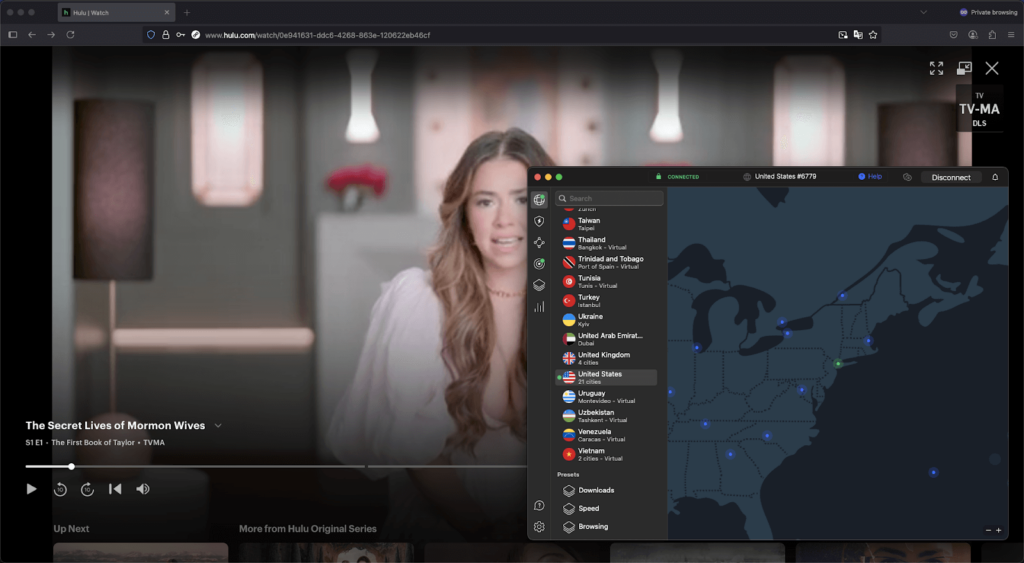
To get around this, I found the most effective solution was to use a streaming VPN, which changes your IP address and tricks Hulu into thinking you’re watching from home in the US. This allowed me to access both Hulu and Hulu + Live TV without any issues – no matter where I was.After testing over 30 VPNs, I can confidently say that NordVPN is the best VPN for Hulu. It offers fast, stable US connections, consistently unblocks Hulu, and avoids the annoying region and home location errors altogether.

My recommended Hulu VPNs for 2026
The easiest way to watch Hulu outside the US using a VPN
To access Hulu outside of the US, you’ll need a reliable streaming VPN that will change your IP address to one from the US. While almost all providers offer servers in the US, not all of them work with Hulu, as the service actively blocks VPN IP addresses. This happens due to Hulu’s geo-restrictions. Since Hulu is only available in the US due to licensing agreements, it cannot legally grant access to viewers from other countries, including those using a VPN. I tested multiple VPN providers by connecting to their US servers and accessing Hulu outside the US. The testing proved that not all VPNs are capable of bypassing Hulu’s geo-restrictions:
| VPNs that work with Hulu | VPNs that don’t work with Hulu |
|---|---|
| ✅ NordVPN | ❌ Betternet |
| ✅ Surfshark | ❌ Hola VPN |
| ✅ Proton VPN | ❌ TunnelBear |
| ✅ Private Internet Access | ❌ Hide.me |
| ✅ CyberGhost | ❌ Proton VPN (free version) |
Watching Hulu + Live TV outside of the US is even more difficult, as it determines your home location by checking your home network’s IP address and your device’s GPS. While a VPN will change your IP address, it cannot hide your GPS data. Additionally, you can only change your Hulu home location four times per year. However, there are a couple of important steps that could help you to watch Hulu + Live TV outside the US without restrictions:
1. Get a VPN that offers GPS spoofing
Since Hulu checks your GPS location to determine your region, you’ll need to spoof your GPS location in order to bypass geo-restrictions. You can do that by using a VPN provider that offers a GPS spoofing feature, but only a few have this. The easiest and quickest way to do this is by using NordVPN, which offers a GPS spoofing feature on its browser extension.
2. Set up a VPN directly on your Wi-Fi router
One way to stay connected to a consistent IP address is to set up a VPN on a router. By connecting to a server in the US on your router, the VPN will cover all devices connected to the same network. This way, when Hulu tries to determine your location, it should detect the location of the US server that is enabled on your router.
Best VPNs for Hulu in 2026: detailed review
To identify the best VPNs for Hulu in 2026, I extensively tested over 30 VPN providers by looking into their server list and Hulu unblocking capabilities. I also tested each provider’s speed and overall ease of use. Lastly, I compared all providers’ pricing and checked if they have free trials or money-back guarantees for risk-free testing. After the testing, I was able to find the top 5 VPNs for Hulu.
Top 1. NordVPN – best overall VPN for Hulu + Live TV
- Rating: 9.3 ⭐⭐⭐⭐⭐
- Unblocks Hulu: ✅ Yes
- US servers: 2745+ servers in 12 states
- Price: $ 3.49/month and a 3-day free trial
NordVPN is the best VPN for Hulu as it has fast and stable US servers that guarantee access to Hulu outside the US. The provider offers 2745+ US servers in 12 states, including Texas, California, Florida, Arizona, Colorado, Utah, Illinois, Massachusetts, Missouri, Nebraska, Tennessee, and Virginia. A wide selection of US servers in different states is beneficial, as you can access different regional sports channels. This means you can catch all the action, including La Liga matches, live on Hulu + Live TV, no matter where you are. You should also expect a lag-free streaming experience as NordVPN is one of the fastest VPNs on the market. During my testing, the average download speed stayed at 468Mbps, and I could stream content in HD.

You can set up NordVPN on up to 8 devices, including various computers, mobile phones, smart TVs, and routers. It also has a MediaStreamer feature, which allows you to stream content on your smart TV, even if it doesn’t support traditional VPN connections. NordVPN also offers various security features, like a kill switch, split tunneling, and Threat Protection, which will block malicious ads, trackers, and websites when streaming content online.
You can get a NordVPN subscription for $ 3.49/month, with a 30-day money-back guarantee. While it’s not the cheapest Hulu VPN available, it offers excellent value for money. Besides, a 3-day free trial is available, so you can test it risk-free before committing. To learn more about NordVPN, read our NordVPN review.
Top 2. Surfshark – budget-friendly Hulu VPN
- Rating: 9.0 ⭐⭐⭐⭐⭐
- Unblocks Hulu: ✅ Yes
- US servers: 600+ servers in 16 states
- Price: $ 2.49/month and a 7-day free trial
Surfshark is another top Hulu VPN that successfully bypasses geo-restrictions and allows unlimited VPN connections for an affordable price. With Surfshark’s 600+ servers in 16 states (Arizona, California, Colorado, Florida, Georgia, Illinois, Massachusetts, Michigan, Missouri, Nevada, New York, North Carolina, Oregon, Texas, Utah, and Washington), you’ll have no issues accessing local channels. Surfshark is also almost as fast as NordVPN as the average download speed was 466Mbps when I tested it. This guarantees a smooth streaming experience without buffering issues.
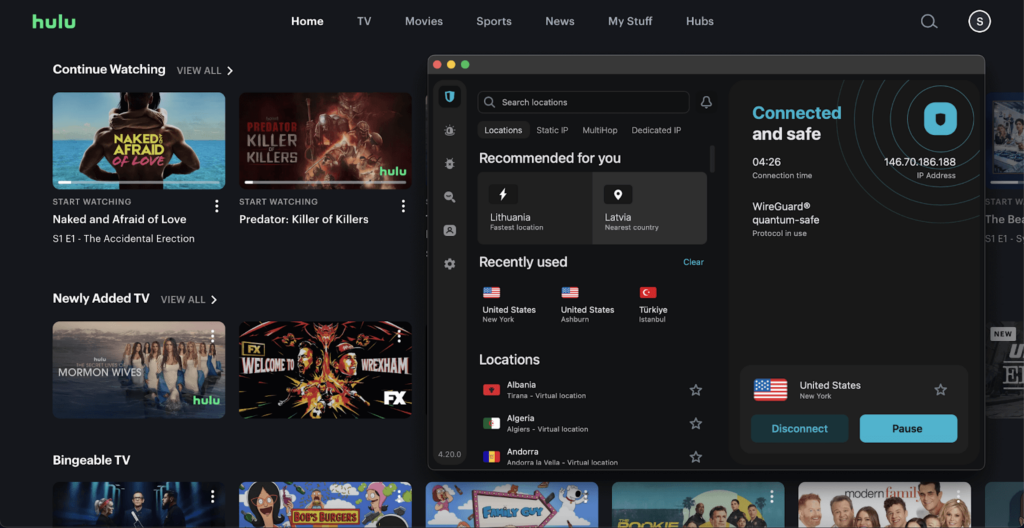
Surfshark doesn’t limit the number of simultaneous connections, so you’ll be able to use it on all personal devices. You can even set it up on devices such as Fire TV Stick, various consoles, or routers, as Surfshark is a user-friendly VPN. If your smart TV doesn’t support VPNs, you can use Surfshark’s Smart DNS feature, which will change your DNS addresses to US ones. Additionally, Surfshark offers many additional features that will enhance your VPN experience. Surfshark’s CleanWeb feature will block harmful ads, websites, and trackers. If you’re streaming content on an Android device, Surfshark is also one of the VPNs that has an Override GPS location feature.
Surfshark is one of the cheapest VPNs for Hulu. The starting price for Surfshark is only $ 2.49/month, and it comes with a 30-day money-back guarantee. There is also a 7-day free trial that allows you to test the service first. For a more detailed description, check out our Surfshark review.
Top 3. Proton VPN – freemium VPN that works with Hulu
- Rating: 8.9 ⭐⭐⭐⭐⭐
- Unblocks Hulu: ✅ Yes
- US servers: 3576+ servers in 19 cities
- Price: $ 2.99/month or a free version
Proton VPN is another reliable Hulu VPN that offers a wide selection of US servers and even has a free version. It has 3576+ US servers in 19 cities, including Denver, Atlanta, Secaucus, San Jose, Los Angeles, Dallas, New York, and more. While the free Proton VPN version has a server in the US, it’s important to note that it didn’t work in unblocking Hulu during my tests. Despite this, premium Proton VPN uses 10Gbps servers, so you should be able to stream content without any slowdowns. At the same time, it’s not as fast as NordVPN or Surfshark, the average download speed was 428Mbps.

The paid Proton VPN subscription can be used on up to 10 devices, including computers, phones, smart TVs, routers, and consoles, while the free version is available for one device only. Proton VPN is also a secure VPN that offers additional features, such as the NetShield Ad-blocker, which will block malicious ads and websites for a smooth streaming experience. If you only need a VPN for Hulu, you can use its split tunneling feature, which allows you to choose which traffic to route through the VPN tunnel.
If you decide to get a paid Proton VPN subscription for Hulu, you can get a Proton VPN subscription for $ 2.99/month, which also comes with a 30-day money-back guarantee. While a free trial is unavailable, you can test it out by using the free version first.To learn more about Proton VPN, read our Proton VPN review.
Top 4. CyberGhost – easy-to-use VPN to watch Hulu outside the US
- Rating: 8.6 ⭐⭐⭐⭐⭐
- Unblocks Hulu: ✅ Yes
- US servers: Servers in 11 locations
- Price: $ 2.19/month and 24-hour, 3-day, or 7-day free trials
CyberGhost is a user-friendly Hulu VPN that offers specialized streaming servers for a smooth Hulu experience. The provider offers a wide selection of US servers in 11 locations, but the exact number is unspecified. You’ll be able to connect to servers in Atlanta, Chicago, Dallas, Las Vegas, Los Angeles, Miami, New York, Phoenix, San Francisco, Seattle, and Washington, which will allow you to bypass blackouts and regional restrictions on Hulu. Besides, during my testing, CyberGhost proved to be a fast provider with an average download speed of 456Mbps, faster than Proton VPN.
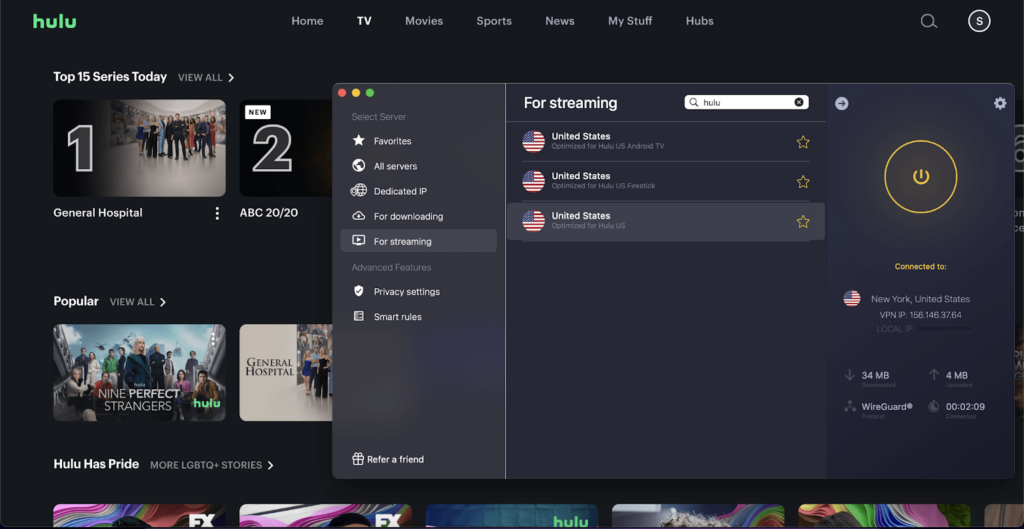
CyberGhost is an excellent choice for beginners as it offers an easy-to-navigate app across different gadgets, including various computers, phones, tablets, smart TVs, and routers. You can use CyberGhost’s subscription on up to 7 devices. What I liked the most about CyberGhost is the streaming-optimized servers, which ensure access to your favorite content without any slowdowns. The provider also offers other benefits, such as a kill switch, split tunneling, and Content Blocker, which will help to avoid malicious ads and websites.
CyberGhost costs only $ 2.19/month, which is an excellent price for the value that you get. If you want to test it first, you can get a 24-hour, 3-day, or 7-day free trial. All paid subscriptions also come with a 45-day money-back guarantee. If you want to read more about CyberGhost, check our CyberGhost review.
Top 5. Private Internet Access – privacy-focused VPN for Hulu
- Rating: 8.6 ⭐⭐⭐⭐⭐
- Unblocks Hulu: ✅ Yes
- US servers: Servers in 50 states
- Price: $ 2.19/month and a 7-day free trial
Private Internet Access is another trustworthy VPN for Hulu that guarantees bypassing geo-restrictions without any errors. While the exact number of US servers is undisclosed, PIA has servers in all 50 US states. There is even an additional server in Washington, D.C., making it a total of 51 different US locations that you get access to. By having such a wide selection of servers, you should be able to enjoy any NFL, MLB, or NHL games, no matter where you’re located. While it offers many servers, the speed was not as impressive as other top Hulu VPN providers, with the average download speed of only 316Mbps.

You can use PIA on an unlimited number of devices, including Windows, macOS, Linux, Android, and iOS. It’s also easy to set it up on Android TV, Apple TV, Amazon Fire TV devices, and routers. The provider is also a secure VPN that offers extra features, such as Multi-hop, kill switch, and split tunneling. I found the PIA Mace to be an especially handy feature as it blocks malicious content when browsing online.
You can get PIA VPN for $ 2.19/month, which comes with a 30-day money-back guarantee. If you don’t want to commit to a long-term plan just yet, you can try it by using the 7-day free trial.Check our PIA review to learn more about the provider.
Compare our top 5 Hulu VPN providers
| VPN for Hulu | Rating | Unblocks Hulu | Servers in the US | Obfuscated servers | Speed retention | Price | Free trial |
|---|---|---|---|---|---|---|---|
| 1. NordVPN | 9.3 ⭐⭐⭐⭐⭐ | ✅ Yes | 2745+ servers | ✅ Yes | 93% | $ 3.49/month | ✅ Yes, 3-day free trial |
| 2. Surfshark | 9.0 ⭐⭐⭐⭐⭐ | ✅ Yes | 600+ servers | ✅ Yes | 93% | $ 2.49/month | ✅ Yes, 7-day free trial |
| 3. Proton VPN | 8.9 ⭐⭐⭐⭐⭐ | ✅ Yes | 3576+ servers | ✅ Yes | 85% | $ 2.99/month | ❌ No, but has a free version |
| 4. CyberGhost | 8.6 ⭐⭐⭐⭐⭐ | ✅ Yes | Servers in 11 locations | ❌ No | 91% | $ 2.19/month | ✅ Yes, 24-hour, 3-day, or 7-day free trial |
| 5. PIA | 8.6 ⭐⭐⭐⭐⭐ | ✅ Yes | Servers in 50 states | ✅ Yes | 63% | $ 2.19/month | ✅ Yes, 7-day free trial |
Can you use Hulu with a VPN?
Yes, you can use Hulu with a VPN, but it’s important to choose one that guarantees access to the service, as not all of them can bypass geo-restrictions. Although Hulu blocks VPN connections, it doesn’t ban users from using such services. Due to licensing agreements and copyright laws, Hulu is geo-restricted to US viewers only. Hulu only blocks VPNs because it cannot legally stream content outside of the US. To comply with the licensing agreements, Hulu monitors users’ IP addresses and blocks those associated with VPN services.
PRO TIP:
To ensure that Hulu doesn’t detect your VPN’s IP address, be sure to switch between servers regularly or use a VPN that updates its servers often (like NordVPN). This will help, as you’ll be able to connect to different US servers and be assigned a new IP address. By using different IP addresses, you’ll be able to stream Hulu from anywhere without it detecting the VPN.
How to watch Hulu with a VPN
Hulu is only available in the US due to the service’s geo-restrictions, but you can enjoy the content from anywhere, as long as you’re using a reliable streaming VPN that will change your IP address to a US one. It’s important to choose a robust VPN, as not all of them are capable of unblocking Hulu since the service checks users’ IP and device’s GPS location to ensure that you’re in the US. While accessing on-demand content should be easy using a VPN, it’s not enough for Hulu + Live TV, as it also requires a US home network. Even though accessing Hulu outside the US might be a challenge, it’s possible by following a few simple steps.
Step 1: Subscribe to a VPN that works with Hulu
Since Hulu actively blocks VPNs, not all providers are suitable for streaming Hulu outside the US. Many VPNs are quickly detected by Hulu, leading to error messages such as “Hulu is not available in your region, or you may be using a VPN”. For a smooth streaming experience, I recommend using NordVPN. With its wide selection of fast US servers, you’ll be able to stream Hulu from anywhere without any restrictions or slowdowns. Even if you decide to choose a different provider, I advise against free VPNs as they’re usually already blocked by Hulu.
Black Friday offer! Get 78% OFF NordVPN + 3 months free
Step 2: Connect to a US server
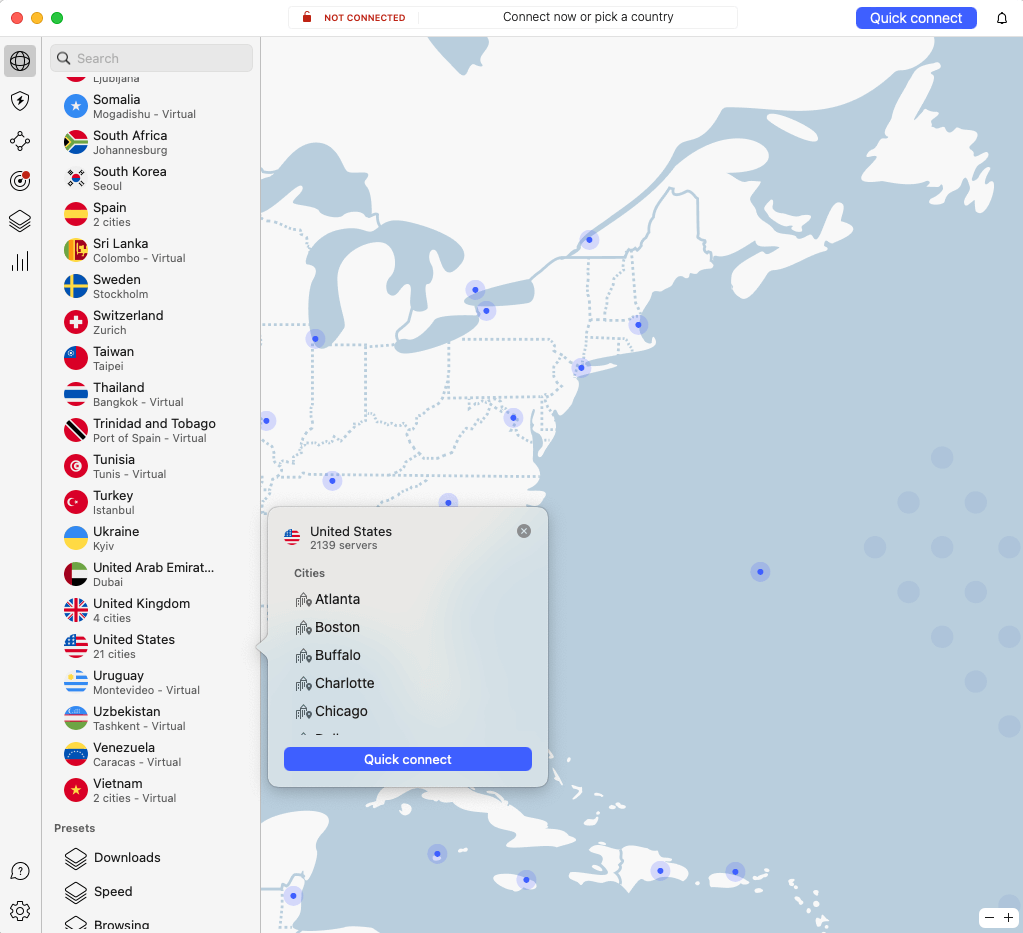
To start using your VPN for Hulu, download and install the app from the official VPN website. Launch the app and create or log in to your account. Once that is done, simply connect to a server in the US to get a US-based IP address. For the best experience, I recommend connecting to a streaming-optimized server if your VPN provider offers such servers. In case Hulu detects and blocks the connection, simply switch to a different US server.
Note:
Be sure to stay connected to the VPN the whole time while streaming content on Hulu to ensure a smooth streaming experience without interruptions.
Step 3: Access Hulu as usual
Since Hulu is a streaming service for US viewers only, you will need a US-issued credit card to create an account. If you don’t have one but still want to access the service, you can use a Hulu gift card, which will help to bypass payment restrictions. You can purchase a gift card from authorized retailers such as MyGiftCardSupply and redeem it by visiting hulu.com/start/gifting. However, it’s important to note that this will only grant you access to on-demand content. For Hulu + Live TV, you’ll also need to change your home network, which is only available within the US a couple of times per year.
VPN not working with Hulu? Try these Hulu VPN block workarounds
Due to geo-restrictions, Hulu actively blocks VPN providers, which leads to error messages such as P-EDU101, which informs users that Hulu is unavailable outside the US. If you’re using a robust VPN and still encounter such issues, you can try a few easy steps that should help:
- Connect to a different US server. In case you’re connected to the VPN and still receiving Hulu error messages, try switching to a different US server in a different location. It might be that the IP address that you used previously is already blocked, so connecting to a different one should solve the issue.
- Check for IP and DNS address leaks. Once you connect to a VPN server, it’s a must to ensure that the connection is indeed successful by visiting sites like ipleak.net and dnsleaktest.com. If your IP or DNS addresses are leaking, Hulu will be able to track your real location.
- Clear your browser’s cache and cookies. It might be that the website has previously tracked your actual location, which is why you’re unable to stream Hulu even connected to the VPN. By simply clearing your browser’s cache and cookies, you should be able to avoid such issues.
- Contact customer support. If you tried the steps above and the issue still persists, I recommend contacting your VPN provider’s customer service. Customer support will be able to provide further troubleshooting steps and guide you through them, so you should be able to solve the issue.
Can you use a free VPN for Hulu?
Theoretically, you can use a free VPN for Hulu, but I don’t recommend it as it will most likely not work. Free VPNs usually have limitations and do not have the necessary measures to bypass geo-restrictions. Additionally, such VPNs are not secure to use, as some free services might collect user data and even sell it to third parties. The only reliable free VPN that I could suggest using is Proton VPN, but during my tests, it did not work with Hulu. While the free version was enough for basic online privacy, it was not able to bypass Hulu’s geo-restrictions. Instead of using free VPNs, I recommend trying a premium VPN that has a free trial or a reliable money-back guarantee, such as NordVPN or Surfshark. Both VPNs are advanced providers that are capable of bypassing geo-restrictions, and both of them offer free trials and money-back guarantees, which you can take advantage of.
- NordVPN: The starting price is $ 3.49/month, but it has a 3-day free trial and a 30-day money-back guarantee.
- Surfshark: The starting price is $ 2.49/month, but it has a 7-day free trial and a 30-day money-back guarantee.
How I tested VPNs with Hulu
To find the best VPNs for Hulu in 2026, I extensively tested over 30 providers. To do so, I connected to each provider’s US servers (I tried multiple servers in different states) and tried accessing Hulu while outside the US. Later, the VPNs that successfully unlocked Hulu were further examined in terms of a few crucial factors:
- US servers (30%). It’s important to have US servers in multiple locations, as some Hulu content (especially sports matches) is only available in certain states. That is why I reviewed all top providers and chose those with servers in at least 10 different locations.
- Speed (30%). To ensure a smooth streaming experience without lag or buffering issues, it’s important to choose a fast VPN provider. I tested each provider by visiting speedtest.net and only selected VPNs with an average speed of at least 300Mbps.
- Compatibility (20%). To guarantee that you’ll be able to stream Hulu on different gadgets, including smart TVs, I checked each provider’s compatibility. I also checked what extra features they offer that could be useful for streaming.
- Price (20%). Since many VPNs are available, it’s essential to compare the price for the value they offer. I also only chose providers offering free trials, free versions, or a reliable money-back guarantee to ensure you can test it before committing to a long-term plan.
Final thoughts on using Hulu with a VPN
Hulu is a well-known streaming service that offers many popular movies, TV shows and sports matches, but it’s only available in the US. Due to content licensing agreements and copyright laws, Hulu is geo-restricted to US viewers. The only way to enjoy your favorite content outside the US is by using a robust streaming VPN. By connecting to a VPN server in the US, you’ll be assigned a US-based IP address, which will grant you access to Hulu from anywhere. Unfortunately, Hulu actively blocks VPNs, so it’s important to choose a reliable provider. To find the best option, I tested over 30 providers and found NordVPN to be the best Hulu VPN in 2026. It offers 2745+ US servers, which guarantee access to Hulu. Additionally, it’s one of the fastest VPNs on the market, so you’ll be able to stream Hulu without any lag or slowdowns.
Black Friday offer! Get 78% OFF NordVPN + 3 months free
We’ve also tested and reviewed the top VPNs for other streaming providers and various devices. Take a look at the articles below for our detailed guides:
- How to watch Hulu in Mexico
- VPNs to watch British TV in the US
- How to watch The Rookie for free
- Best VPN for YouTube
- Best VPNs for HBO Max
- Best Netflix VPNs
- Paramount Plus VPNs
- Kodi VPNs
- Sling TV VPN
FAQ
Yes, Hulu blocks VPNs to enforce its geo-restrictions. Hulu is geo-restricted to the US only due to licensing agreements and copyright laws. This means that the service can only legally stream content to US viewers. If you’re outside of the US and want to watch Hulu, the only reliable way to do that is by using a reliable VPN provider. A VPN will change your IP address, which can trick Hulu into thinking that you’re located in the US.
NordVPN, Surfshark, and Proton VPN work with Hulu. While a few other providers can also unlock Hulu, these top providers guarantee access to Hulu from anywhere as they have a wide selection of US servers. Additionally, all top providers provide fast speeds and stable connections, so you should expect nothing less than a smooth and lag-free streaming experience.
Hulu might be buffering with a VPN due to issues with the VPN or an overall slow internet speed. Using a VPN can affect your speed by up to 30%. If your internet speed is not very fast, using a VPN can have a huge impact on the streaming quality. On the other hand, if you previously did not have slow speed issues, it might be that there are some issues with the VPN server. In such cases, the easiest way to solve this is by switching to a different VPN server or changing the connection protocol.
Hulu knows that you’re using a VPN by checking your IP address. Since Hulu is geo-restricted to the US only, it checks the user’s IP address to determine the location. This way, Hulu is able to detect IP addresses that are associated with VPNs. Additionally, the service might know that you’re using a VPN if the IP address doesn’t match the device’s location.
To get Hulu to work with a VPN, subscribe to a reliable streaming VPN with US servers, like NordVPN. NordVPN has a wide selection of US servers, which will grant you access to Hulu from anywhere. Additionally, it’s a fast and secure VPN provider, so you will not experience any slowdowns when streaming, and your identity will be protected online at all times.