The Geek Squad scam involves cybercriminals pretending to be a legitimate business and sending fake emails to obtain your personal information and payment details through a false sense of urgency. Luckily, you can get rid of the Geek Squam scam by using a trustworthy antivirus software, such as Norton AV, or removing it manually.
Emails claiming to be from Geek Squad are a common tactic used by cybercriminals. Typically, such Geek Squad fake emails are designed to appear very professional, making it more difficult for you to determine whether they are genuine or a scam. Falling for fake emails can get you into real trouble – in 2023 alone, the FTC received over 330,000 reports of scammers impersonating legitimate businesses, with reported losses topping $1 billion. The number of scam emails has increased more than three times since 2020, and they remain a significant threat in 2025, with no signs of abating in 2026.
The Geek Squad email scam is designed to trick you into sharing personal or payment details by creating a false sense of alarm with alleged subscription renewal payments and unpaid bills. In this article, I’ll share my findings on how these email scams work, the telltale signs to watch for in fake emails, and how to get rid of the Geek Squad email scam once and for all.
A trustworthy antivirus software can easily detect and block Geek Squad scam emails, malicious links, and phishing websites before they cause harm. Norton Antivirus stands out as the best Geek Squad removal tool, by offering real-time threat detection, advanced phishing protection, and automatic email scanning. This multi-pronged approach helps prevent scam-related malware, data theft, and unauthorized access.
What is the Geek Squad scam
The Geek Squad scam is a phishing impersonation scheme targeting individuals by exploiting the name of Best Buy’s legitimate tech support service. In these fake emails, cybercriminals impersonate Geek Squad representatives to trick victims into sharing personal information, payment details, or even making direct payments.
The Geek Squad fake emails typically claim there is a problem with your account, such as an unexpected subscription renewal or an unauthorized charge. The scam emails are usually designed to create a sense of urgency, forcing you to act quickly. For example, you may receive an email or a text stating you were charged for a Geek Squad membership you never purchased, along with instructions to click on a link or call customer support to cancel the charge. However, once you engage with this message, scammers will attempt to steal your sensitive data, request remote access to your device, or pressure you into paying fake fees.
Types of Geek Squad scams
There are a few different types of fake emails you might receive as part of the Geek Squad scam. I’ve documented the most common ones, which range from tech support scams to password reset scams:
- Membership and subscription renewal scams. In these Geek Squad membership scam emails, fraudsters may claim you have (or almost have) a Geek Squad subscription that’s about to expire, or the renewal fees will be charged automatically. The message may urge you to cancel or dispute the charge, often via a fake, phishing link. The Geek Squad renewal scam message may also claim that you are about to be billed hundreds of dollars unless you act immediately, exploiting the sense of urgency and supposed financial loss.

- Tech support scams. In these emails, cybercriminals may pretend to be Geek Squad technicians, claiming that your device has issues and they need remote access to fix it. If you were to give them remote access, the Geek Squad tech support scam artists would likely install malware or demand payment. To protect yourself from this scam, remember that real Geek Squad technicians never reach out to their clients uninvited.
- Fake antivirus scams. In this case, scam victims may receive virus alerts or offers for free antivirus software. If they click on the link and begin downloading, they actually install malware, and not an antivirus software. The legitimate Geek Squad will never offer any antivirus downloads, so if you receive such an email, treat it as a red flag immediately.

- Password reset scams. This is probably the most common type of scam email, claiming there is suspicious activity in your account and prompting you to reset your password through a link included in the message. In reality, the link leads to a fake phishing Best Buy site – if you enter your details on it, they will be stolen by scammers.
- Invoice, refund, and payment scams: These emails show fake invoices or PayPal receipts for Geek Squad services you didn’t buy. The Geek Squad invoice scam email senders ask you to dispute charges or provide payment information to cancel them. To not fall for this scam, always double-check any order details against your actual purchases.

- Prize or order scams. Some scammers may send phony “You won a prize” or bogus order confirmation emails from Best Buy or Geek Squad to lure clicks. Again, once you click on a link included in such a Geek Squad order scam message, your details will be stolen.
How to recognize a fake Geek Squad email scam
Although the Geek Squad scam emails are designed to look like the real thing, there are usually quite a few noticeable red flags that may indicate it is a Geek Squad fake email scam:
- Sender’s email or contact info. Check the email address and domain, as scammers often use lookalike or random domains (for example, @bestbuy-support.com or extra numbers) rather than official Geek Squad or Best Buy domains.
- Spelling and grammar. Legitimate companies rarely send messages with typos or awkward phrasing. If the email has mistakes or unusual language, view it as suspicious.
- Generic greetings. Beware of greetings like “Dear Sir/Madam” or no name at all. Legitimate Geek Squad emails should address you personally or include order or account details.
- Urgent or threatening tone. Scam emails often pressure you with urgent deadlines, such as noting you only have 24 hours to cancel your subscription renewal. They may also use threats, such as closing your account or imposing hefty charges, to prompt you to act quickly without double-checking.
- Unexpected requests for information. Legitimate companies will never ask for passwords, Social Security numbers, or payment information via email. Any request to “confirm your credit card,” share SSNs, or buy gift cards is a scam.
- Suspicious links or attachments. To check if the links included in your message are not fake, hover over them before clicking. If the URL doesn’t clearly direct you to bestbuy.com or a trusted security site, it’s likely malicious. Additionally, avoid opening unexpected attachments, such as .zip, .exe, and similar.
- Mismatched transaction details. If the email shows an amount or currency you don’t recognize, such as $425.99 for a “subscription”, or a transaction ID that doesn’t match your records, it’s probably a Geek Squad fake email scam.
How to report a fake Geek Squad email
If you receive what you suspect is a fake email, immediately report the Geek Squad scam by first notifying your email provider. You can do this by using the Report Scam or Report Phishing option in the email menu. By doing so, you will help block similar scam messages and protect your account, as well as the accounts of other users.
Once you complete this initial step, contact the real Geek Squad to report the impersonation attempt. You can forward the suspicious email to Best Buy’s official abuse reporting address, at [email protected]. Alternatively, you can submit the email details through Geek Squad’s official reporting channels on the Best Buy website. Make sure not to click on any links included in the fake message before reporting the scam.
Taking these steps may help disrupt the Geek Squad scam email campaigns and reduce the risk of others falling victim to similar scams.
How to get rid of the Geek Squad email scam
The most effective method to get rid of the Geek Squad email scam is to use a trusted antivirus software, which will remove the fraud and protect you against similar campaigns in the future. There’s also the option of removing the Geek Squad scam manually, but this method requires more time and effort, while also leaving room for error.
Method 1. Remove the Geek Squad scam using antivirus software
The easiest way to fix a Geek Squad scam is to run a well-trusted antivirus software program. For the best results, choose only a reputable software company, and my recommendation is Norton. The software offers real-time email scanning, advanced phishing protection, and automatic threat removal. All of these features get rid of the Geek Squad email and significantly reduce the risk of exposure to similar scams in the future. For more information on this top-rated antivirus software, read our Norton Antivirus review.
-
- Install a trusted antivirus, such as Norton.
- Update the virus definitions by going to Settings > Live Update and clicking Run Live Update. Restart your device if prompted.
- Run a full system scan.
- Allow the software to remove all detected threats.
- Enable real-time protection to prevent future scams.
Method 2. Remove the Geek Squad scam manually
If you prefer not to use antivirus software, you can also remove the Geek Squad scam manually. However, the manual removal requires much more time and effort. By using this method, you will need to remove any software, browser add-ons, or system changes that may have been installed on your device through the fake Geek Squad emails.
Here’s how to remove the Geek Squad scam manually:
Step 1. Remove suspicious applications
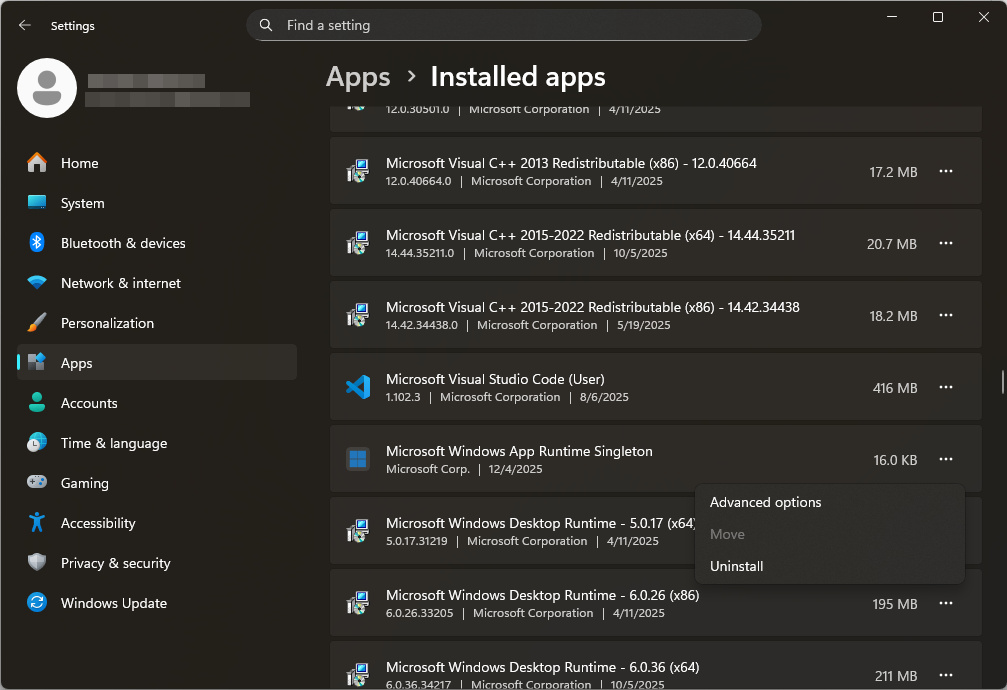
First, you will have to erase all unwanted programs that may display scam messages, redirect your browser, or collect data. Removing any unknown apps cuts off the scam’s ability to run in the background. Here’s how to do it:
- Open the Control Panel or Applications on Windows or macOS.
- Review all installed programs.
- Uninstall anything unfamiliar or recently added.
- Restart your device.
Step 2. Remove malicious browser extensions
Scam extensions can display fake warnings or redirect your searches to phishing websites. Clearing all bogus extensions will restore normal browser behavior. Here’s how to do it:
- Open your browser settings.
- Look for extensions or addons.
- Remove anything you find suspicious.
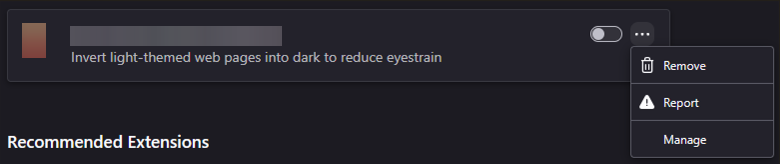
It’s also a good idea to uninstall browser extensions. In Chrome, you’ll find them under More Tools in the three-dot menu. In Firefox, go to Add-ons and Themes. In Safari, open Preferences and select Extensions.
Step 3. Remove any registries created by Geek Squad
Some scams may create registry entries to persist on device startup. Deleting these entries prevents the scam from reappearing. To get rid of the registry entries, follow these steps:
- Open the system registry editor.
- Search for suspicious entries.
- Remove related keys carefully.
- Reboot the system.
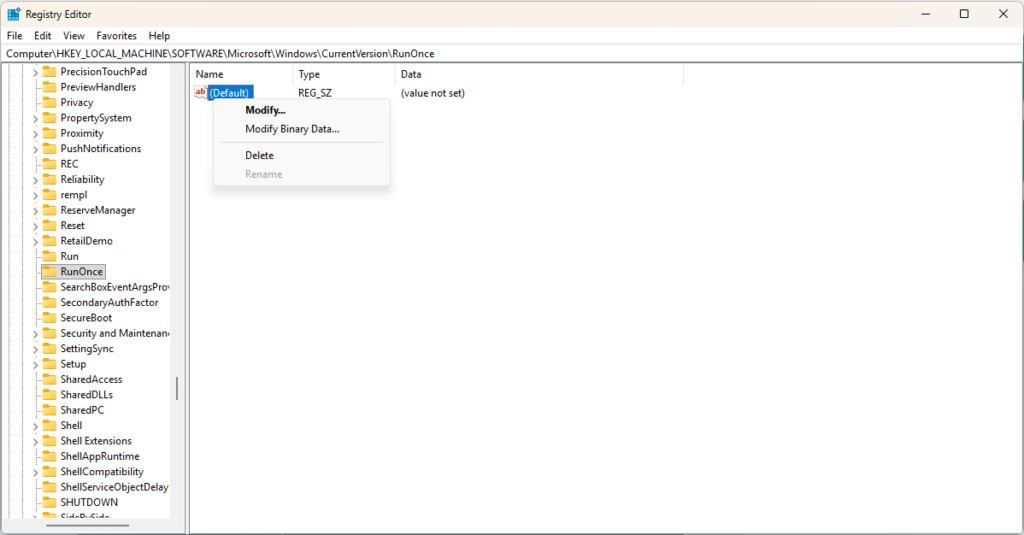
Please note that editing registries incorrectly can cause system issues. If you choose to do this on your own, proceed with caution.
How to prevent Geek Squad email scams in the future
You can lower the risk of future Geek Squad email scams by following a few simple recommendations, such as avoiding clicking suspicious links and using strong passwords to protect your emails. Below, you’ll find detailed steps on the preventative measures you can take against scam emails:
- Install reliable security software. Download and install a trustworthy antivirus, such as Norton, and keep it running and regularly updated. Security tools can detect and block scam sites and malware before they harm your system.
- Don’t click or call unsolicited messages. If you get an unexpected email or call about Geek Squad, ignore it. A well-respected VPN, NordVPN, warns that even opening a scam email can expose you to tracking pixels.
- Verify before trusting. Take the time to double-check the contact details displayed in emails you receive, such as phone numbers and email addresses, through official sources before taking action. Search online for the number or email; if it isn’t on Best Buy’s site, it’s likely a scam.
- Be cautious with links and attachments. Never click links or download attachments from suspicious emails. If needed, you can rely on Norton Antivirus to real-time check your emails and included links.
- Use strong passwords and two-factor authentication. Secure all your accounts with complex passwords and enable two-factor authentication (2FA). Remember that no legitimate company will ever ask you to share your passwords via email or over the phone.
- Keep your device software updated. Make sure to install the latest OS and app updates in a timely manner. System updates typically include security patches that can prevent scammers from exploiting previous security flaws.
- Educate yourself on phishing. Try to memorize the most common phishing red flags, such as misspellings, unfamiliar senders, urgent demands, and suspicious payment requests.
- Block repeat offenders. If you see repeated scam emails from the same sender, block the address. Most email systems let you filter or blacklist addresses and domains.
Final thoughts
Although the Geek Squad is a legitimate service, scammers are exploiting its name by sending fake Geek Squad emails that demand subscription payments or remote access to your device. If you receive an email allegedly from the Geek Squad that appears suspicious, trust your instincts and follow the safety steps outlined in this article. Swift action, such as reporting the scam and cleaning the device, can prevent financial loss or identity theft. Remember that such scams are much more common than one might think, with over 50,000 people reporting Geek Squad fake email scams to the FTC in 2023 alone.
To protect yourself against Geek Squad or similar email scams, it is essential to stay vigilant while online and use antivirus protection to ensure data and device security. For the best results, use a trusted security software, such as Norton Antivirus.
Related articles:
- Top 15 Facebook Marketplace scams
- 15 common Amazon scams
- How to get rid of fake McAfee virus pop-ups
- 15 PayPal scams and how to avoid them
- How to remove Apple security alert scam from your iOS
- How to remove Google Lead Services malware
FAQ
No, Geek Squad itself is a legitimate business, but scammers abuse its name for data and financial extortion. If you receive unsolicited emails from Geek Squad, treat them with caution, as they may be from scammers attempting to defraud you. Always report suspicious emails, do not click any included links, and use a trusted antivirus software, such as Norton, to prevent any malware or phishing attempts from infecting your device.
If you open a Geek Squad scam email and click on any links included in the message, or download attached files, your device may be infected with malware, or you may fall victim to a phishing attack. If you suspect an email from Geek Squad is a scam, immediately report it and clear your device. I also recommend installing a trusted antivirus software, such as Norton, and running a full system scan to remove all malware. Additionally, enable real-time threat protection to prevent further incidents.
If you fall for the Geek Squad scam, report the fake email first. Then, run a full system scan using a trusted antivirus software, such as Norton, to remove any malware from your device. Next, change all your passwords to new, complex ones, and use two-factor authentication for added security.
A legitimate email from Geek Squad will address you by your name, will use a legitimate email address and domain, which you can find on the Best Buy or Geek Squad site, and will come with no urgent demands or misspelled words. If you find any inconsistencies in the email you’ve allegedly received from the Geek Squad, treat it as a scam and report it immediately, without clicking on any link or downloading any files included in the message.
You can report Geek Squad scams directly to your email provider or by forwarding the email to [email protected]. Alternatively, you can report the email details through the official reporting channels on the Best Buy website. Make sure not to click on any links before reporting the fake Geek Squad email, as they may infect your device or redirect you to a phishing website.