

- The Best Free VPNs for Chrome
- The Best Free VPNs for Your Chrome Browser
- What You Should Look For in a Chrome VPN Extension
- What’s the Difference Between a VPN and a VPN Chrome Extension?
- How to Install a Free VPN on Chrome
- How I Picked the Best Free VPNs for Chrome
- Comparison table: The best free VPNs for Chrome
- Limitations of Free VPNs
- Warning! Free VPNs Can Be Dangerous
- Is a Free VPN on Chrome Worth It?
Finding a solid, reliable, free Chrome extension VPN in the Chrome store can be difficult if you don’t know what to look for. Many free VPNs are bloated with malware, unwanted ads, and trackers. That doesn’t mean there are no good free VPNs out there.
At VPNOverview, we’ve been testing VPN providers for years. I’ve found a few unique VPNs that offer great security features and a solid privacy policy for Chrome users – all completely for free. Curious? Here’s my list of the best free Chrome VPNs available today.
The Best Free VPNs for Chrome
Would you rather use a limitless premium VPN? I recommend Surfshark.
I tested each of these providers myself, paying attention to key factors for Chrome users. Does the VPN have a Chrome extension? Is it easy to use? Does the free service give you enough data to work with (preferably limitless)? Does it work with streaming services like Netflix? Only the VPNs that offer the best and most features without compromising on your safety made my list.
The Best Free VPNs for Your Chrome Browser
A virtual private network (VPN) reroutes your internet connection through an external server, so websites and apps don’t see your real IP address. Since your IP address can be linked to your identity, VPNs are essential if you want to protect your online privacy.
Most good VPNs are paid, but a few trustworthy premium VPN providers offer limited free versions of their service, which work very well with Chrome. Below are my favorites.
1. TunnelBear: Best for unblocking multiple server locations on Chrome
TunnelBear is my #1 top choice for anyone in need of a completely free VPN for Chrome. The Chrome extension is easy to add through their website or the Chrome Web Store: just three clicks and a log in, and you’re good to go.
Once you start “bear-owsing”, as TunnelBear calls it, you’ll be protected by the VPN’s AES 256 military-grade encryption and no-logs policy, meaning it’s pretty much impossible for websites, your internet provider, your boss, and TunnelBear themselves to see what you do online.
With the free plan, you get 2 GB of monthly data. Admittedly, this isn’t a lot, but it is perfectly suited for your daily browsing needs. Just keep in mind you won’t be able to watch endless YouTube videos with TunnelBear Free, as you’ll run out of data quickly!
One of the best things about this VPN is that both premium and free TunnelBear users have access to server locations in 47+ countries. This means you’ll be able to unblock websites, streaming services, and other content from all of those countries. Unfortunately, it can’t unblock Netflix, but TunnelBear did help me unblock Channel 4 in seconds.
Want more data? You can upgrade to TunnelBear Premium to use it without limitations on multiple devices. Check out our full TunnelBear VPN review for more information.
Pros
- Access to servers in 47+ countries for more unblocking options
- Fun and user-friendly Chrome extension
- Strong, military-grade encryption to keep your Chrome data safe
- No-logs policy (they won't see your browsing history)
Cons
- Data limit: 2 GB of free monthly data

2. Proton VPN: Best free Chrome VPN with unlimited data

If you’re looking for a company that really puts your privacy first, you’ll find it in Proton. Proton VPN Free offers a great Chrome extension that’s easy to use. Not only is it fast and secure, but this free VPN is also among the very few that offer unlimited bandwidth data usage. This means you can use it constantly, every day, without paying anything!
Proton’s mission is all about making sure everyone has the opportunity to enjoy a free and private internet. They have an impeccable no-logs policy and military-grade AES-256 encryption, which will keep your connection secure while browsing with Google Chrome. Since Proton is headquartered in Switzerland, you’ll even enjoy extra privacy protection through their local laws.
With Proton VPN Free, you get access to servers in five countries, including some very popular locations like Japan and the USA. However, Proton Free doesn’t allow you to choose a particular location. You will automatically connect to the fastest server.
On top of that, you’ll find no ads in the app or extension, which makes for a great user experience. A nice final extra: Proton Free even gives you access to Proton’s other products, like a free version of their email service and online cloud storage!
If you want more servers and options, you can upgrade to Proton VPN’s premium tier (starting at $ 2.99 per month). For more information on the premium version, check out our Proton VPN review.
Pros
- Free servers in five countries (USA, Netherlands, Japan, Romania, and Poland)
- No data limits
- No-logs policy and Swiss privacy
- Completely ad-free app and Chrome extension
- Extras: Free private email and private storage on your Chrome browser
Cons
- No option to choose server location

3. Windscribe: The best for unblocking Netflix

Windscribe offers servers that can unblock Netflix. In fact, it is one of the few free VPNs that is able to do so, and I wholly recommend it if you’re looking for a free streaming VPN. It works consistently well and can access up to six libraries, including UK Netflix.
Although it can’t beat Proton in terms of privacy and security, it does allow free users access to servers in 10 different countries, namely the USA, Canada, the UK, Hong Kong, France, Germany, the Netherlands, Switzerland, Norway, and Romania.
Windscribe allows any free user 2 GB of data per month. However, if you confirm your email address, you get 10 GB of data per month. On top of that, if you’re willing to spread the message about them on social media (X), you get an extra 5 GB of data! More than enough for streaming some Netflix.
Windscribe users browse safely and securely with military-grade encryption and very limited logging. They don’t store any personally identifiable information. Finally, the free version also comes with limited access to R.O.B.E.R.T., a blocking tool that also works on Chrome. This means ads and trackers will get blocked, even while you’re enjoying your exclusive Netflix shows!
If you’re happy with Windscribe Free but want to unblock even more streaming for a longer time, Windscribe Pro might be perfect. If you want to learn more about this VPN, check out our Windscribe VPN review.
Pros
- Servers available in 10 countries (including USA, Hong Kong, Germany)
- Unlimited connections: use it on your Chrome browser, but also on your phone!
- No identifying logs
- Access to blocking tool R.O.B.E.R.T. for an ad-free Chrome experience
Cons
- Data limit: 2 GB of monthly free data (or 15 GB if you confirm your email and share on socials)

4. Hotspot Shield: Lightning-fast free VPN for your Chrome extension

Hotspot Shield is a veteran when it comes to free VPN services. It’s still well worth its spot in our top 5, with its free version offering servers in the United States and, since recently, no data limit. The narrow server offer does mean free users are limited when it comes to unblocking opportunities.
However, Hotspot Shield’s security features, which include military-grade encryption and a kill switch feature, make it a good option for Chrome users. You’ll encounter ads in the apps, but the Chrome extension is very easy to work with, even for those with less VPN experience.
If you’re looking for fast connections, Hotspot Shield is a great choice. The company created its own unique VPN protocol, called Hydra, which ensures speed. Unfortunately, this fast connection isn’t guarantied to work while streaming and gaming. For that, you’ll need to upgrade to their premium version.
The premium Hotspot Shield option will not only provide unlimited bandwidth but also access to over 115 server locations. Curious? Our Hotspot Shield VPN review will tell you everything you need to know.
Pros
- Unique VPN protocol (Hydra) for fast connections and no lag on Chrome
- 256-bit AES encryption and kill switch for extra security
- No data limit
Cons
- Only one VPN server location (USA)
- Ad-supported app and Chrome extension
5. Hide.me: Feature-packed free VPN proxy for Chrome

Closing off our top 5 is Hide.me, which is known for its many features and user-friendliness. Its Google Chrome browser extension, although basic, provides a reliable level of protection that is identical to what Hide.me offers its paid customers. This means a strict no logs policy, AES-256 encryption, and multiple VPN protocols.
The Hide.me Chrome extension is great for beginning VPN users, but those with more experience might want to download the app. There, you’ll find many more security options, like StealthGuard, which can help you maintain your security while downloading, and split tunneling.
Hide.me, like some other VPNs on this list, also does not have a data limit. In other words: you can use it as often as you like for as long as you like, completely for free! You’ll get access to VPN servers in 8 countries. While this is great, it doesn’t work with Netflix. Streaming sites will remain blocked, unless you’re lucky or you subscribe to premium.
Want to see what else you’ll get with a premium Hide.me account? Check out our extensive Hide.me VPN review.
Pros
- Unlimited data
- No logs and same level of anonymity as paid users
- Free servers in 8 countries (Finland, USA, UK, France, Netherlands, Germany, Switzerland)
Cons
- Can't unblock Netflix on Chrome
- Restricted speeds

What You Should Look For in a Chrome VPN Extension
Would you rather do your own research? Here are some of the things you should look for in a Chrome VPN extension.
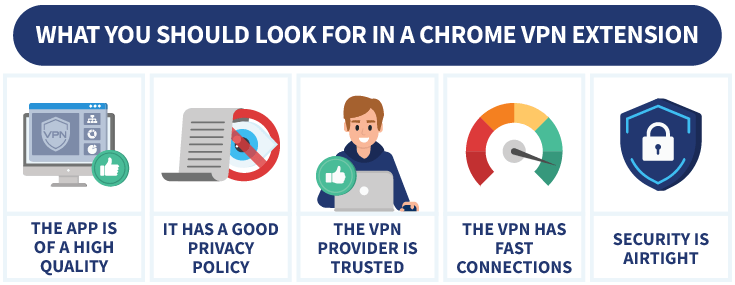
- High quality app: Most Chrome extensions from VPNs are quite simple. You’ll want to find an app that works well and is easy to use, but offers all the features you want.
- Strong privacy policy: Chrome doesn’t guard your privacy well, so you’ll need a VPN extension with a rigid no-log policy that doesn’t keep or share records of your browsing data.
- Trusted provider: There are a lot of dangerous Chrome extensions that might infect your browser and device with malware, so always make sure you opt for a well-known and trustworthy VPN provider.
- Fast connections: For seamless browsing and streaming on Chrome, you’ll need a fast VPN that doesn’t throttle your speed.
- Airtight security: A VPN that offers high levels of security, like AES-256 encryption and DNS leak protection, will ensure that you stay completely safe on Chrome.
If the entries in my top 5 free Chrome extension VPNs are not up to your standards, I recommend downloading a full VPN client like Surfshark. This VPN won’t just allow you to protect your Chrome data, but will encrypt and protect all your web browsing, gaming, torrenting, and streaming — and you can try it for free.
What’s the Difference Between a VPN and a VPN Chrome Extension?
VPNs can be set up in different ways. If you download a Chrome extension, your abilities will be limited compared to downloading a full VPN service for your desktop. The VPN services recommended on this list offer both options, with their Chrome extension counterparts often working as a proxy.
The differences between and capabilities of the two are discussed in the table below.
| Feature | VPN Chrome Extension | VPN |
|---|---|---|
| What data does it encrypt? | Only data going through Chrome | All data leaving the device |
| What is it compatible with? | Only Chrome browser | Various browsers, apps, and devices (like your phone) |
| Does it protect my torrents? | No | Yes (depending on the VPN) |
| What does it offer? | Limited protection | Complete device protection |
How to Install a Free VPN on Chrome
Although a full VPN client provides more complete protection, having a Chrome extension can be very helpful for quick unblocking and localized security. Want to install one? Here’s how you can install our #1 free Chrome VPN, TunnelBear, on your Chrome browser:
- Go to the Chrome Store and type in “TunnelBear VPN” in the search bar at the top.

- Click “Add to Chrome.”
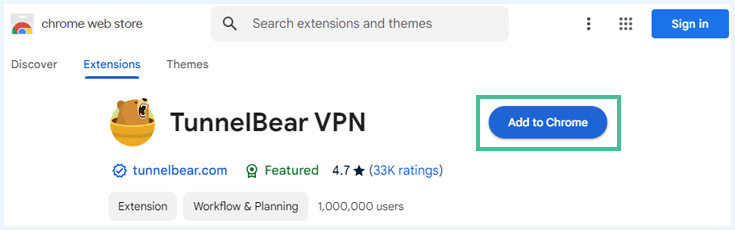
- Click on “Add extension.”
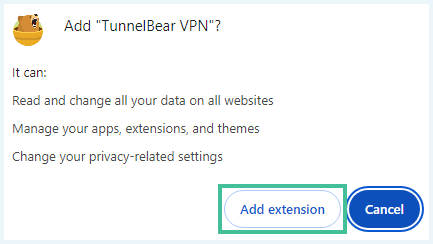
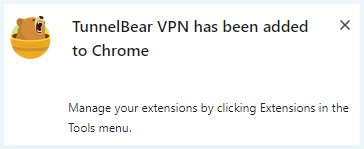
- A prompt will appear noting that TunnelBear has been installed.
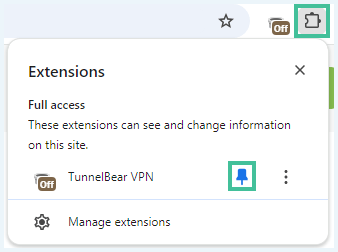
- (Optional) Click on “Extensions” in the right top corner of your Chrome browser (the puzzle piece) and click the pin next to the TunnelBear extension to pin it to your address bar for easy access.
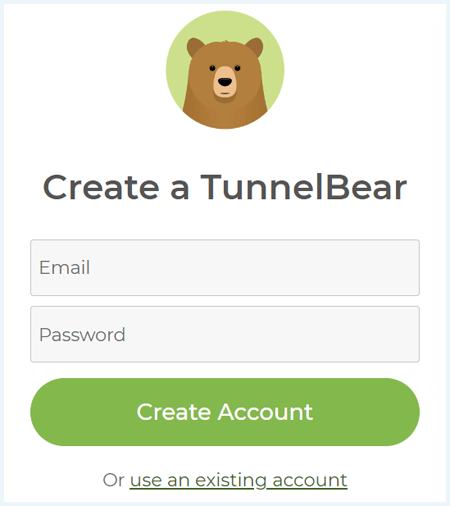
- Click on the TunnelBear extension. This will take you to the “Create a TunnelBear” page.

- Create an account by entering your email address and choosing a password.
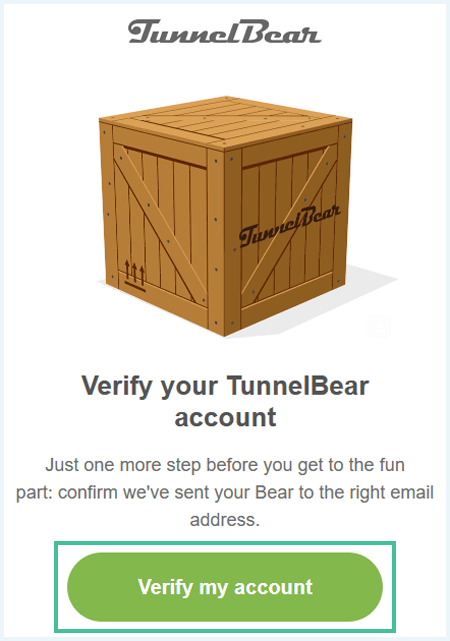
- Go to your email. You should have received a confirmation from TunnelBear. In that email, click “Verify My Account.”
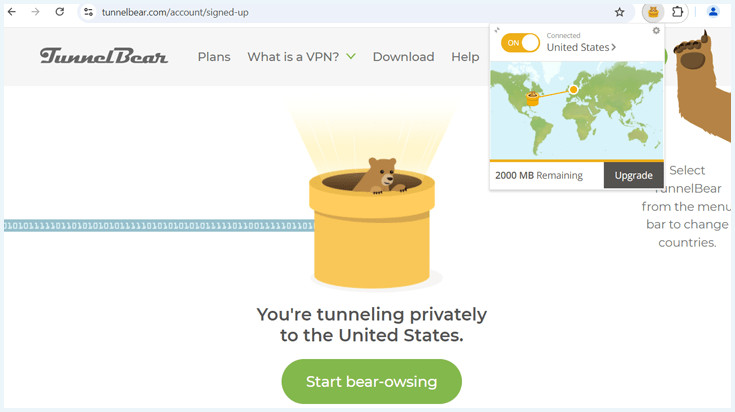
- Click on the TunnelBear browser extension. You are now automatically connected. If you want to choose a different location, click on the country at the top of the popup. If you want to turn off the VPN, switch the “On” button to “Off.”
How I Picked the Best Free VPNs for Chrome
The services I’ve picked for my top 5 don’t just offer excellent Chrome VPN extensions (although they have that, too), they also each have a full VPN service you can use for free.
If you look for free VPNS for Chrome and beyond, you’ll find tons of options. However, many of them contain malware or log your data. That’s why I follow a strict process when choosing the best free VPNs for Chrome. Here’s what I look for:
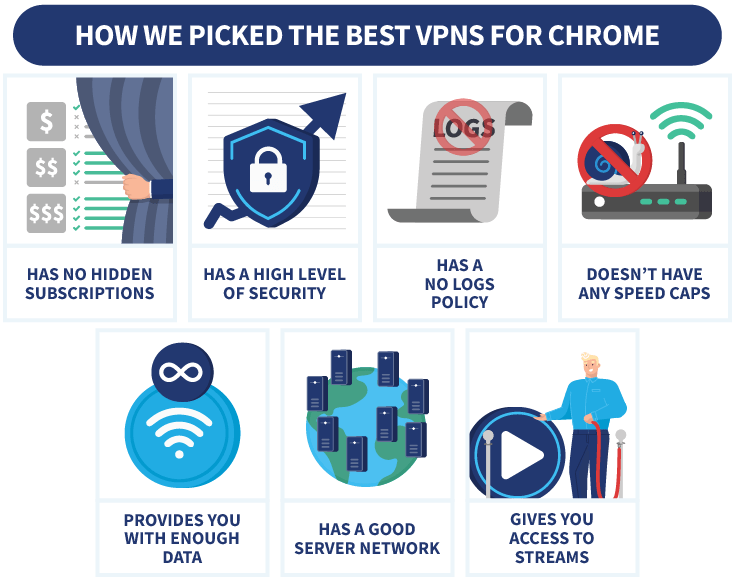
- No hidden subscriptions: A free VPN should allow you to experience the free plan without trying to trick you into paying for a paid subscription. In my research, I made sure only VPNs that are truly free made it onto my list.
- Strong security: I dove into the security offered by each VPN I tested. The best free Chrome VPNs should provide military-grade encryption to keep your data safe and secure.
- No logs policy: Even if it’s free, a VPN company shouldn’t breach your privacy by logging or sharing your data. I investigated all privacy policies of the free VPNs mentioned to ensure they really put your privacy first.
- No speed caps: You need decent speeds to satisfy your daily browsing needs, and I selected VPNs with fast servers that can assure you of this, testing multiple of their servers to ensure the connection remains stable and fast.
- Enough data: Many free VPNs work with data limits. Only VPNs that offer a reasonable amount of data per month (and follow through on that promise) make it to my top 5.
- Decent server network: The more free servers a VPN offers, the better your connection and options are. I look for free VPNs that give you as big a server network as possible.
- Streaming access: Finding a free VPN that allows you to unblock streaming platforms like Netflix US is rare, so when I do find one, it definitely counts as a plus. I tried to watch a US-exclusive Netflix show with every VPN on this list to test them out!
Comparison table: The best free VPNs for Chrome
After my research, I listed my top 5 free Chrome VPNs. Want to compare the different options? Check out all of them in the table below.
| Editor’s Pick | |||||
| VPN |  |  |  |  |  |
| Price | $ 0.00 | $ 0.00 | $ 0.00 | $ 0.00 | $ 0.00 |
| Servers | 5000+ | 1-100 | 1-100 | 1-100 | 1-100 |
| Connections | 1 | 1 | Unlimited | 1 | 1 |
| Netflix | |||||
| Logs | Zero logs | Zero logs | Connection Logs | Connection Logs | Zero logs |
| Protocols | OpenVPN, WireGuard, L2TP/IPsec | OpenVPN, IKEv2, WireGuard, Proprietary | OpenVPN, IKEv2, WireGuard | OpenVPN, IKEv2, WireGuard, Catapult Hydra | OpenVPN, IKEv2, SSTP, WireGuard |
| Visit TunnelBear VPN (Free Version) | Visit Proton VPN (Free Version) | Visit Windscribe VPN (Free Version) | Visit Hotspot Shield (Free Version) | Visit Hide.me VPN (Free Version) |
Limitations of Free VPNs
While free VPNs with Chrome extensions might seem like a bargain, free VPNs almost always come with limitations. VPN companies can’t provide the same level of quality that you’d see with a premium VPN, since it costs money to offer their service. Here are some of the inconveniences you might run into, even with a good free VPN for Chrome:

- Slower speeds: You may experience slower speeds due to over-congestion of servers available to free users.
- Data caps: It isn’t easy to find a free VPN with unlimited data, as many of them restrict you to just a few GB of data for a whole month.
- Limited features: Free users often have limited access to the features a paid VPN would provide, such as a kill switch or split-tunneling.
- Fewer server locations: Most free plans come with few server locations, preventing you from bypassing multiple geo-restrictions.
- Less powerful unblocking capabilities: Because the servers aren’t optimized, you may not be able to unblock popular streaming websites like Netflix, Hulu, and Disney.
When testing the best free VPNs for Chrome, I made sure the entries in my top 5 featured the best combinations of excellent security and free features. Don’t want to be bothered by the limitations that come with a free VPN? You can always try out one of the best premium VPNs for Chrome for free for a limited time.
Try a premium VPN trial: Surfshark
Why choose Surfshark?
- Super fast Chrome extension that doesn't lag
- Can unblock streaming sites like Netflix and Hulu with ease
- Offers 4500 servers in 100 countries
- Has AES-256-GCM encryption (twice as fast as regular AES-256)
- Free trial possible
Disadvantages of Surfshark
- Paid subscription (but very cheap!)
- You'll get your free trial refund after the trial has ended
If you want to go all-out and get the best Chrome VPN, I recommend Surfshark. It offers a huge array of features, including a smooth Chrome extension and Clean Web (which blocks ads and pop-ups).
Surfshark’s 4500 servers allow you to unblock popular streaming platforms like Netflix and BBC iPlayer with just one click. This VPN is also one of the fastest I’ve tested: I didn’t experience any lag and had stable and fast connections constantly!
The best part? Surfshark is one of the cheapest VPNs on offer. You can even test it out for free with its 30-day money-back guarantee. Cancel your subscription within 30 days, and you’ll get a full refund, basically earning you a free Surfshark trial!

Warning! Free VPNs Can Be Dangerous

A free virtual private network is tempting, but choosing one without the proper research can carry as much risk as not having a VPN at all. Here are a few of the dangers that a free Google Chrome VPN service might have:
- Selling your data: Even free VPNs need money to keep their services running – and they might earn that through collecting and selling your personal information and traffic data to third parties.
- Malicious ads: If your data is sold to third parties, those parties might use it for targeted ads, which could be intrusive (pop-ups) and dangerous, opening back doors for potential viruses on your device.
- Malware: Some so-called free VPNs that you find in the Play Store are actually malicious programs in disguise, which could infect your computer with a virus or worse.
- Trackers: Like free VPNs that hide as malware, some free VPN apps come with automatically installed trackers that will log your searches, browsing, location and other sensitive data.
- Out-of-date software: Free VPNs might not be updated as frequently with the latest security protocols, which hackers will happily take advantage of.
To avoid all of these potential dangers, I recommend using a freemium VPN provider. These are fully-fledged VPN services that offer a limited free VPN alongside their paid services, like TunnelBear and Proton VPN. All top 5 entries on my best free Chrome VPN list are owned by providers like this, which bolsters your privacy and security.
Is a Free VPN on Chrome Worth It?
Free VPNs can be very convenient when you need basic online protection and options. Since they come without costs, the threshold to try them out is very low. You can try out TunnelBear VPN free right now!
However, free VPNs don’t perform as well as premium VPNs, since they come with data limits, a small number of available servers, and minimal features. They are not made for consistent use but rather for the occasional social media scroll or Google search.
If it’s within your budget, I highly recommend seeking out a premium VPN like Surfshark. Surfshark provides its users with unlimited data usage, a large server network, and amazing protection and reliability — all at an affordable monthly price. Not only that, but Surfshark offers a 30-day money-back guarantee so you can try it for yourself. This makes it an excellent choice with an easy opt-out option.
Do you still have questions about the best free Chrome extension VPNs? Check out the FAQ section below. Just click a question to view the answer.
My recommendation for the best free Chrome extension VPN is TunnelBear. It offers a very generous amount of server locations (just as many as the premium version!), fast and secure connections, and a very secure no-logs policy. TunnelBear’s free version gives you 2 GB of data every month! If you want to learn more about some of our favorite options, check out our top 8 of free VPNs for everyday use!
Yes, there is a 100% free VPN for Chrome. I recommend using a freemium VPN, meaning a free version of a paid VPN provider. These VPNs tend to come with some limitations, like data limits or a smaller choice of server locations. However, they are much safer and less likely to include harmful data policies or malware. If you’re looking for the best and most secure free VPN for Chrome, I recommend TunnelBear VPN. Its free version is truly free and gives you access to servers in 45 countries.
Yes, free VPNs for Chrome work well with light browsing activities, such as browsing and scrolling through social media. However, if you require more features like optimized servers for unblocking your favorite streaming sites or more privacy and security, I recommend investing in a paid option like Surfshark VPN.




Hello!
Thanks for your article.
I've tried to install Proton VPN "for Chrome" but I can't find a Chrome browser extension but a Windows and other systems apps.
Is there a version for Chrome?
Thanks
Hi! Thank you for your comment! There is no specific browser extension for ProtonVPN, since protection for Chrome is already included within the general VPN. If you install the free version of Proton, connect to a VPN server, and open Chrome then, you'll automatically be protected within your browser (and outside of it, so it's actually safer and more complete than a browser extension!).