

- Our recommended free VPN apps
- What is the best free VPN in 2026?
- Best free VPN alternatives: NordVPN and Surfshark
-
Best completely free VPNs: detailed list
- 1. Proton VPN: best totally free VPN with unlimited data
- What makes Proton VPN one of the best free VPNs?
- What are the drawbacks of Proton Free VPN?
- Who should use Proton VPN Free?
- Top 2. PrivadoVPN: fast free VPN with excellent streaming unblocking
- What makes PrivadoVPN one of the best free VPNs?
- What are the drawbacks of free PrivadoVPN?
- Who should use PrivadoVPN Free?
- 3. Windscribe: best free VPN for torrenting
- What makes Windscribe one of the best free VPNs?
- What are the drawbacks of Windscribe free VPN?
- Who should use free Windscribe VPN?
- 4. Hide.me: top free VPN for privacy and security online
- What makes Hide.me one of the best free VPNs?
- What are the drawbacks of free Hide.me?
- Who should use Hide.me Free?
- 5. TunnelBear: free VPN with many server locations
- What makes TunnelBear one of the best free VPNs?
- What are the drawbacks of free TunnelBear?
- Who should use free TunnelBear?
- How I tested and selected the best 100% free VPNs
- Compare best free VPN services of 2026
- Is a free VPN safe?
- Is there any fast free VPN?
- Can I use a free VPN for streaming services?
- Can I use a free VPN for torrenting?
- Free vs paid VPN differences
- Free VPNs I recommend avoiding
- Conclusion: What is the best free VPN in 2026?
- FAQ
My in-house tests found that Proton VPN is the best free VPN in 2026, offering stable performance and excellent security. PrivadoVPN comes in close second as it proved to be a perfect free VPN for streaming, yet it does have a fast data cap. Lastly, Hide.me is also worth considering in 2026 if you’re looking for a reliable free VPN for browsing and torrenting, but it’s important to note that it might not be the best choice for streaming.
Free VPNs can provide a secure VPN connection and encrypt your data at no cost. However, even the best free VPNs come with limitations, including data and speed caps.
You also have to be careful of security vulnerabilities that may put your private data at risk or could expose you to malicious software. More importantly, most of the necessary features a VPN requires to do its job properly are locked behind a paywall.
To ensure you can make an informed choice, I have thoroughly tested each free VPN in this article to see if it manages to keep your data as safe and private as a premium provider.
🔄 Recent updates.
To provide you with the most up-to-date information, together with the VPNOverview research team, I again tested free VPNs. After my tests, it seems that Proton VPN and PrivadoVPN remain the best free VPNs in 2026 as they were in 2025. However, Windscribe moved up to third place, while Hide.me is in fourth, and TunnelBear is in fifth.
Our recommended free VPN apps
What is the best free VPN in 2026?
My tests revealed that Proton VPN is currently the best free VPN in 2026, offering reliable service with no ads and no speed or data limits. While it’s a free service, Proton VPN guarantees total privacy online. The provider uses all necessary security measures, including robust encryption and a strict no-logs policy. However, even Proton VPN has some limitations, such as only 10 server locations and a one-device limit. With a premium Proton VPN plan, you would get access to 20700 servers in 149 countries.

Best free VPN alternatives: NordVPN and Surfshark
While free VPNs might be tempting, they usually come with limitations such as a limited number of servers and data caps. If you’re looking for a more advanced option with fewer restrictions, you could get a premium VPN that has a money-back guarantee. Most top providers offer 30-day money-back guarantees, allowing you to use a premium VPN for up to a month at no cost:
- NordVPN: the overall best VPN that has a 3-day free trial and a 30-day money-back guarantee. Our latest tests during the NordVPN review showed that the provider guarantees total privacy with advanced security features. It also proved to be the fastest VPNs on the market, making it a perfect choice for streaming, gaming, and everyday browsing. After the risk-free trial, you can subscribe to the premium version, as NordVPN costs only $ 3.49/month.

- Surfshark: our #2 premium VPN that has a 7-day free trial and a 30-day money-back guarantee. The provider offers premium services with extra features and stable connections. The best part about Surfshark is that it doesn’t limit the number of devices, meaning that you can protect all your personal gadgets at once. Surfshark’s pricing is also very affordable – just $ 2.49/month.

Best completely free VPNs: detailed list
Our team at VPNOverview has been testing and covering VPN for over 11 years. We test and use free and paid VPN products ourselves, performing real-life user testing of each VPN. Analyzing their privacy policies, communication, and other users’ opinions is also included in the research. We dig into the software ourselves on four major platforms (Android, iPhone, Mac, and Windows), sometimes including other platforms, such as Linux, ensuring that each VPN performs as it should, testing its servers, speed, and security. Based on our latest tests, Proton VPN, PrivadoVPN, Windscribe, Hide.me, and TunnelBear are the best free VPNs in 2026
1. Proton VPN: best totally free VPN with unlimited data
- Rating: 8.9 ⭐⭐⭐⭐⭐
- Servers: Servers in 10 locations
- Data limit: Unlimited
- Available on: Windows, macOS, Android, iOS, and Linux
My extensive in-house tests revealed that Proton VPN is the best free VPN in 2026. Proton VPN is a premium provider that guarantees security with robust encryption and a strict no-logs policy. It’s an ad-free service without any data limits, meaning that you’ll be able to securely browse the internet without interruptions. With Proton VPN, I was able to game and browse without delays, as it consistently delivered solid speeds during my exams.
What makes Proton VPN one of the best free VPNs?
- Strong privacy and security: Free Proton VPN doesn’t keep any logs of user data, which was verified by Securitum in August 2025. Besides a kill switch, Proton VPN offers secure VPN protocols, including OpenVPN, WireGuard, and Stealth. During my tests, I was especially impressed by its Stealth protocol, which provides obfuscation, making it easier to bypass geo-restrictions without detection. Having such features is essential, especially in countries with more strict internet restrictions, like Uganda. As of early 2026, Proton VPN signups in Uganda increased by more than 8,000% due to recent internet restrictions, as using a reliable VPN is the only way to browse the internet freely.
Note
Proton VPN is one of the few open-source VPN apps, which means that a community of developers works to improve the software. This process makes Proton VPN safer and more transparent. Proton VPN apps are also audited by cybersecurity experts to guarantee the safety of users.
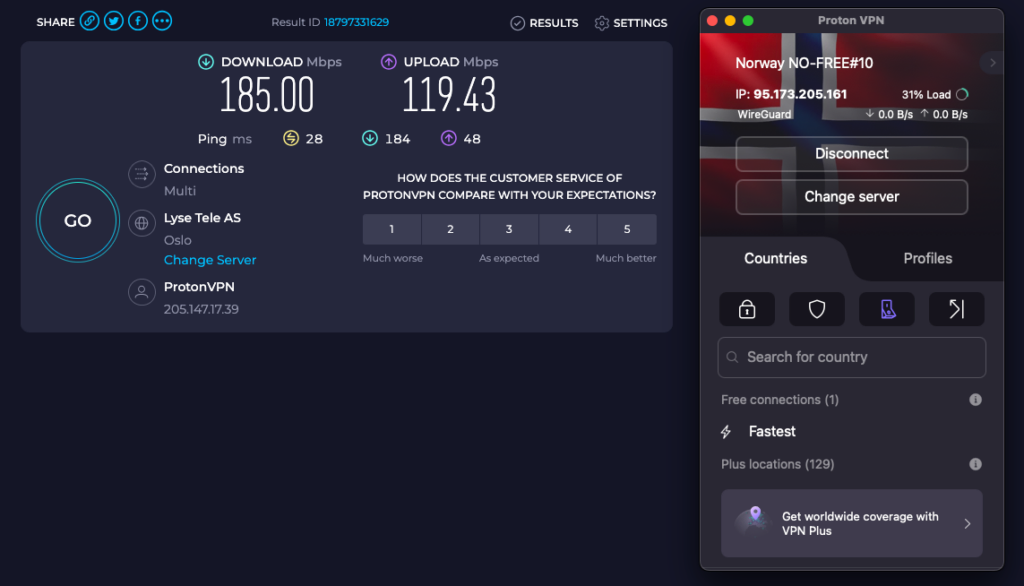
- Unlimited data and bandwidth. Proton VPN Free is one of the fastest free VPNs, consistently delivering solid speeds and stable connections. During my tests, the average download speed was 185Mbps while connected to the free Norway server. While it’s not as fast as its paid version (the average download speed with Proton VPN Plus was 737Mbps during in-house test), it’s still more than enough for browsing, gaming, torrenting, and streaming. Additionally, there are no data limits, so you’ll be able to use the VPN whenever you like.
- Open-source and audited apps. Both paid and free Proton VPN services are open source across all apps, including Windows, macOS, Linux, Android, and iOS. Since Proton VPN allows public inspection by making its source code open, it makes me believe the provider is transparent and trustworthy. Additionally, I reviewed Proton VPN’s policy and found that it doesn’t track or retain any user logs. This was also approved by independent audits, the latest of which was conducted in August 2025 by Securitum.
- Advanced features for free. Even though it’s a free version, Proton VPN Free offers quite a robust security toolkit. Not only can you use the free version without data or speed limits, but you can also add an extra layer of security with a kill switch and split tunneling, both of which worked exceptionally well during my tests. The provider also guarantees total anonymity by offering IP and DNS leak protection. To test it out, I used reliable sites like ipleak.net and dnsleaktest.com, and I didn’t experience any leaks.
- Expanded server network: Proton VPN free version offers 2300 servers in five locations: the US, the Netherlands, Poland, Romania, and Japan. Unfortunately, free users are not spoiled for choice when it comes to Proton’s server location. Proton connects automatically to the nearest server and doesn’t let you choose a server location. This makes unblocking international streaming services difficult.
- Add-free experience. Unlike many other free VPN providers, Proton VPN is ad-free. Since the service offers a paid version, Proton VPN Free can remain completely ad-free. Since I have tried ad-supported VPNs, using a free VPN like Proton VPN without ads ensures a smoother, uninterrupted user experience.
Good to know
You can use Proton for free on one device at a time. On Android, you can use “Guest Mode,” which means you don’t need to create an account to use the free VPN! This feature will be developed for iOS in 2026. Want to protect different devices? Use different email addresses to create multiple accounts.
What are the drawbacks of Proton Free VPN?
- No Manual Server Selection. Proton VPN Free offers servers in 10 locations, including the US, Canada, Norway, Japan, Poland, the Netherlands, Romania, Singapore, Mexico, and Switzerland. While I found the selection to be great, I was disappointed to learn that you can’t choose the server yourself. By using the free version, you’ll be connected to the fastest server. While this will not be an issue for users seeking security, it might not be ideal for streaming geo-restricted content.
- Single Device. With Proton VPN Free, you’ll be able to use the service on one device only. If you’re mainly using a single device, this will not be an issue. However, I found it a bit inconvenient as I use several devices, and I had to switch the VPN multiple times a day. A one-device limit means you can secure only one device, leaving the others unprotected.
- Restricted Streaming and P2P. Unfortunately, Proton VPN Free doesn’t support torrenting. Even the best torrent sites are not accessible with this VPN unless you upgrade to the premium version. Additionally, since you can’t choose the server location, I found Proton VPN’s free plan not the best option for streaming. While I was able to access popular streaming sites like Netflix with Proton VPN Free, not being able to choose a server location limits its streaming capabilities.
Who should use Proton VPN Free?
Based on my in-house testing, Proton VPN Free is the best option for users looking for a simple yet reliable VPN for everyday browsing. With stable connections, an ad-free app, and fast speeds, you’ll be able to enjoy a smooth and uninterrupted VPN experience. Proton VPN Free is also an excellent choice in 2026 for privacy-oriented users. During my tests, I found that Proton VPN uses robust encryption, offers open-source apps, includes advanced features, and regularly undertakes independent audits.
While Proton VPN Free is the best free VPN for security, it might not be the best choice for streaming. I found that Proton VPN can bypass geo-restrictions, but it doesn’t allow changing the server location, which limits its streaming capabilities. To avoid this issue, you can get a premium version, which is quite a good investment as Proton VPN costs just $ 2.99/month.
Things I liked
- Audited no logs policy
- Kill switch available
- Based in Switzerland, it is reputable for privacy and security
- Unlimited data usage: no caps
- No speed limit
- Works well on most operating systems (Windows, macOS, iOS, Android, Linux, and Chromebook)
Things I didin't like
- You can't select a server location
- Downloading torrents is not possible
- Only one simultaneous connection
Want to know more? Read our full Proton VPN review to see our testing results or check out our comparison between NordVPN and Proton VPN!
Top 2. PrivadoVPN: fast free VPN with excellent streaming unblocking
- Rating: 7.8 ⭐⭐⭐⭐
- Servers: Servers in 13 locations
- Data limit: 10 GB
- Available on: Windows, macOS, Android, iOS, and Linux
PrivadoVPN is one of the best free VPNs on the market, based on my tests in 2026. It keeps your identity safe with a user-friendly interface and solid security features, including a zero-logs policy. With 13 server locations to choose from and great unblocking features, I had no issues streaming content online, but it only allows streaming. On top of that, you get 10GB of unlimited speed data every month, and you can use PrivadoVPN on an unlimited number of devices, including Windows, macOS, Android, iOS, Android TV, and Fire TV.
What makes PrivadoVPN one of the best free VPNs?
- Privacy and security: I found PrivadoVPN Free to be a reliable and secure provider as it uses robust encryption, guarantees IP and DNS leak protection, has a strict no-logs policy, and offers highly secure VPN protocols. It will also add more security with extra features like split tunneling and a kill switch. During my tests, PrivadoVPN’s kill switch effectively disconnected the internet when the VPN connection was interrupted, proving that the provider offers solid protection
Note
PrivadoVPN recently improved its kill switch feature on Windows. You can now select which apps are affected by the kill switch and which aren’t.
- Server network: PrivadoVPN has free servers in 13 locations, situated in 10 different countries, namely Argentina, Brazil, Canada, France, Germany, India, Mexico, the Netherlands, the United Kingdom, and the United States. Having servers across different continents allowed me to access various services online without geo-restrictions. When testing PrivadoVPN, I could easily choose a server and switch between them, which makes it more customizable than Proton VPN.
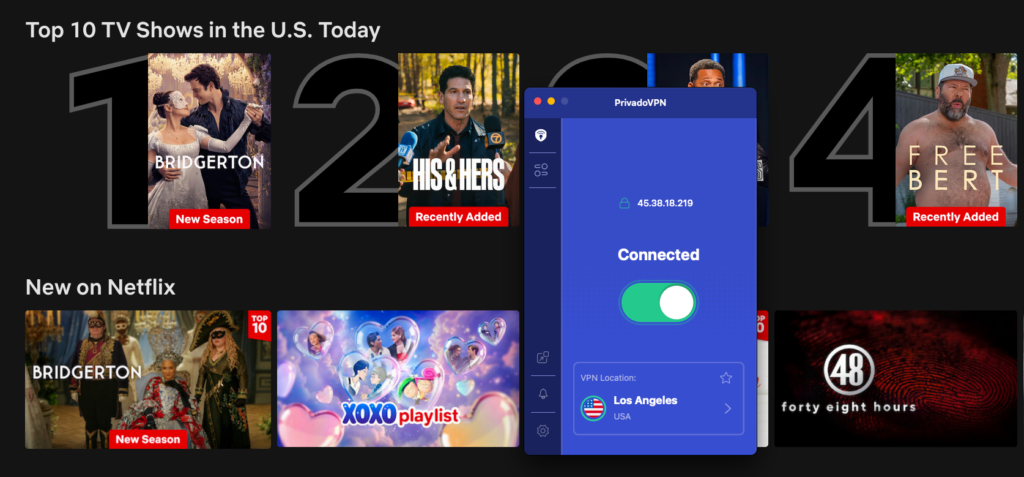
- Streaming: I found PrivadoVPN Free to be a reliable VPN for streaming. In my most recent tests, watching Netflix USA was no problem. I was also able to watch Pluto TV with its Canada server and enjoy watching The Traitors on BBC iPlayer connected to the UK server. However, its 10GB monthly bandwidth limit makes consistent unblocking of streaming services challenging.
- Torrenting: Unlike many free VPNs, PrivadoVPN explicitly supports P2P on its free plan. I tried downloading some torrents and didn’t encounter any throttling, which is rare for a free VPN. Since it is based in Switzerland, it follows solid privacy laws, which are also great for torrenting. However, once you reach 10GB data limit, you will need to update the plan or wait for a monthly reset if you want to keep torrenting.
Good to know
Besides the 10 GB data cap, PrivadoVPN has no dedicated Linux app. However, if you’re not a Linux user, you’ll be able to protect all personal devices with PrivadoVPN Free, as it doesn’t limit the number of devices.
What are the drawbacks of free PrivadoVPN?
- Limits on speed and data. While PrivadoVPN doesn’t limit speeds, I found it a bit slower than other free VPNs. During my tests, I used speedtest.net, and the average download speed was 103 Mbps, which is slower than Proton VPN or Windscribe. Additionally, there’s a 10GB data limit, which is more than enough for simple browsing but can be used up quickly when streaming, torrenting, or gaming.
- No independent audits. Based on my findings, PrivadoVPN Free uses all necessary security measures and offers additional features for even greater security. However, while it claims to be a no-logs VPN, I didn’t find any published third-party audits. Since online privacy is a VPN’s main purpose, I find the lack of independent audits a huge disadvantage.
- App interface. After testing multiple free VPNs, I noticed that PrivadoVPN’s apps are not as convenient as those of other providers, especially compared to Proton VPN. Additionally, Linux users won’t be able to use a dedicated app and will need to configure OpenVPN to connect to PrivadoVPN.
Who should use PrivadoVPN Free?
PrivadoVPN Free is best for users looking for a free streaming VPN. The provider offers servers in 13 locations across different continents and allows users to switch between servers. During my tests, the provider unlocked Netflix, Sling, Pluto TV, and BBC iPlayer without issues. It’s also an excellent choice for users who want to protect multiple devices, as PrivadoVPN allows unlimited connections.
However, keep in mind that PrivadoVPN is a bit slower compared to other providers and has a 10GB data limit. While this will be enough for everyday use, you might experience some slowdowns when torrenting, gaming, or streaming if you do so often.
Things I liked
- Has a strict zero-logs policy
- 13 server locations available to free users
- Unblocks streaming services easily
- Torrenting allowed
- Kill switch and split tunneling available
- Web proxy extension for Chrome available
- Unlimited speed for the first 10 GB
Things I didn't like
- No Linux application
- Speed throttling after 10 GB
- Not great for extensive streaming sessions

Check out the results of our tests on the premium version of PrivadoVPN to learn more about this service. You can also temporarily get a 7-day free trial of premium features.
3. Windscribe: best free VPN for torrenting
- Rating: 7.4 ⭐⭐⭐⭐
- Servers: Servers in 10 locations
- Data limit: 2-10GB
- Available on: Windows, macOS, Android, iOS, Linux
Windscribe is another top free VPN in 2026 that proved worthy and moved up this list based on my recent tests. When I tested the provider, I found that it’s the fastest free VPN. Apart from stable and fast connections, Windscribe Free also ensures privacy with a robust security toolkit. I especially liked that the free version allows unlimited simultaneous connections. Even though there is a 2-10GB data limit, I had no issues using the VPN on all personal devices, as it works on almost all operating systems and devices, including Linux.
What makes Windscribe one of the best free VPNs?
- Privacy and security. Windscribe offers world-class security features, including a kill switch, an ad blocker, and a split-tunneling option. I was surprised by its toolkit, as you rarely see this many security features in a free VPN. The provider has a strict no-logging policy, which I found trustworthy based on independent audits by PacketLabs. Windscribe also offers multiple strong security protocols, including WireGuard, which ensures fast speeds and stability.
- Server network. The free version of Windscribe has fewer options than the paid package. Using the free Windscribe version, I was able to use servers in 10 countries (the US, Canada, the UK, Hong Kong, Germany, France, Switzerland, the Netherlands, Norway, and Romania). However, distinguishing free servers from premium ones was a bit of a challenge during my tests. I had to click around a bit to find a free connection.
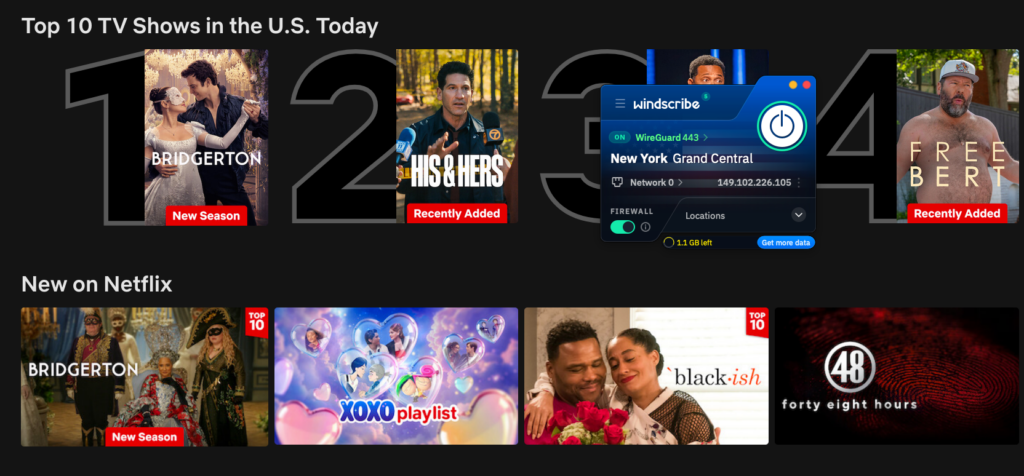
- Streaming. Windscribe is one of the better free VPNs for streaming that I have tested. During my examination of the service, I was able to unblock Netflix US, Sling, Pluto TV, BBC iPlayer, and CBC Gem without any issues.
- Speed. Even though the free Windscribe VPN comes with data limits, I found it to be the fastest free VPN in 2026. When I tested the provider using speedtest.net, the average download speed with the Norway server was 234Mbps. Keep in mind that my baseline speed during the tests was 25Mbps, so the VPN did not affect my speed that much.
Good to know
Windscribe is not as easy to use as some of the other free VPN providers listed above. It can be a challenge to identify which servers are free. Most of the buttons in the software also take you to your account page. I would prefer it if you could change your account settings in the VPN application itself.
What are the drawbacks of Windscribe free VPN?
- Torrenting. While the free Windscribe version offers a decent number of servers, delivers very fast speeds, and supports P2P file sharing, I would not recommend it for streaming. The provider should theoretically work for torrenting, but I found that a 2-10GB data limit is just too little for torrenting.
- Limits on data. There is a data limit of 2 GB per month, which is not enough if you plan to use the VPN often. However, I found a few ways you can get more data. You can get 10GB of data if you choose to share your email address with Windscribe and verify your account. You can also get 5 GB of free data by posting a tweet on X or 1GB by referring a friend. Unfortunately, Windscribe may use this data for marketing, so I recommend using a throwaway email address.
Who should use free Windscribe VPN?
Windscribe Free is the best free VPN for streaming in 2026. My tests revealed that it successfully bypasses geo-restrictions and works with major streaming services like Netflix and BBC iPlayer. Additionally, it delivers fast speeds, which allowed me to watch content without any delays or lags. Not only will you be able to watch content without restrictions, but also secure your privacy with robust security features.
However, keep in mind that Windscribe limits the data to 2-10GB, depending on several factors. Limited data is not ideal if you plan to use the VPN every day or torrent.
Things I liked
- One of the best free VPNs in terms of security and privacy
- Includes a free ad blocker
- Offers really fast connection speeds
- Torrenting is allowed
- Unblocking streaming services is possible
- Unlimited number of simultaneous connections
Things I didn't like
- Data cap of 2-10 GB a month
- Interface could be improved

We conducted a thorough Windscribe review and found that the free version holds up well!
4. Hide.me: top free VPN for privacy and security online
- Rating: 7.4 ⭐⭐⭐⭐
- Servers: Servers in 8 locations
- Data limit: Unlimited
- Available on: Windows, macOS, Android, iOS, Linux
Hide.me is a trustworthy VPN that has 8 server locations, zero logs, and unlimited data. What I liked most about the provider was that no sign-in is required, making it a simple and beginner-friendly option. However, it is available on one device only, which I found a bit limited, since I use several devices daily. The VPN has an app for most major operating systems, including Windows, iOS, macOS, Android, Linux, and even Fire TV Stick.
What makes Hide.me one of the best free VPNs?
- Privacy and security: I found Hide.me to be a trustworthy zero-logs VPN that has been independently certified, most recently by Securitum, which is good news for privacy-conscious users. Hide.me is based in Malaysia, which is outside of the 14-Eyes Alliance, so you won’t have to deal with invasive privacy legislation. I also liked that the free version offers additional features for enhanced privacy, such as a kill switch and split tunneling. During my tests, I used the split-tunneling feature, and it indeed let me choose which apps would be routed through the VPN connection.
- Server network: The free version of Hide.me VPN gives you access to servers in eight countries: Finland, France, Germany, the Netherlands, Switzerland, the United Kingdom, and the United States. Although the website mentions eight different locations, only these seven are specifically named. However, I found that this coverage still provides a good range across Europe and the US, which was enough for me during my tests.
- Torrenting: In the past, Hide.me didn’t allow free users to download torrents. Luckily, the provider changed this policy, and I was able to download files safely via torrent sites. However, it’s important to note that port forwarding isn’t available for free users and that the speed is not ideal for torrenting.
Good to know
During the first week of your free membership, you’ll be able to use Hide.me Premium with a seven-day free trial. After that, you’ll be limited to the free features. You can use Hide.me on one device at a time.
What are the drawbacks of free Hide.me?
- Speed limitations. The free Hide.me version doesn’t have any data limits. However, my in-house tests revealed that Hide.me Free is the slowest free VPN on this list. During my tests, the average download speed with the German server was only 1.3Mbps while my baseline speed was 250Mbps.The free version of Hide.me doesn’t have any data restrictions. When testing the VPN, I found that speeds varied quite a bit. If you don’t want to deal with these restrictions, have a look at our best VPNs for streaming.
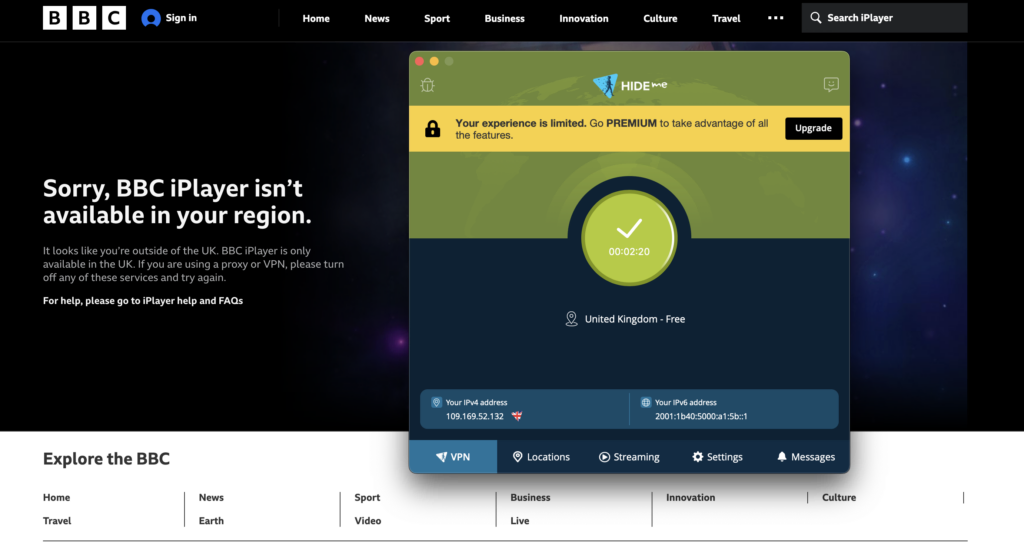
- Streaming. Unfortunately, while the provider has servers across different continents, it doesn’t work well for bypassing geo-restrictions. I tested several Hide.me Free servers, and I wasn’t able to access Netflix UK, Tubi TV, Sling, or BBC iPlayer.
- Intrusive upselling techniques. During the time that I used Hide.me, I did find its upsell campaign quite invasive. There was always a button urging me to switch to the premium version, which was a bit annoying.
Who should use Hide.me Free?
Hide.me Free is an excellent free VPN for beginners who are just learning about VPNs. The service doesn’t require any registration, making the whole process very quick and easy. Additionally, it’s a good free VPN for simple everyday use if you want to protect your digital footprint.
On the other hand, if you’re planning to stream, game, or torrent, there are better free VPNs available. Unfortunately, my tests showed that Hide.me Free is quite slow and cannot bypass geo-restrictions.
Things I liked
- Strong privacy protection and encryption for your data
- Free servers in 8 countries available
- Stealth protocol and split tunneling available
- Free premium trial during first week
- Incredibly helpful customer support, even for the free version
Things I didn't like
- Can't unblock many streaming services
- Pushes its premium version through ads
- Only 1 simultaneous connection
- Slow speeds

We’ve tested all of Hide.me’s features. Read our Hide.me review to learn more about what this VPN can offer.
5. TunnelBear: free VPN with many server locations
- Rating: 7.4 ⭐⭐⭐⭐
- Servers: Servers in 47 countries
- Data limit: 2GB
- Available on: Windows, macOS, iOS, Android
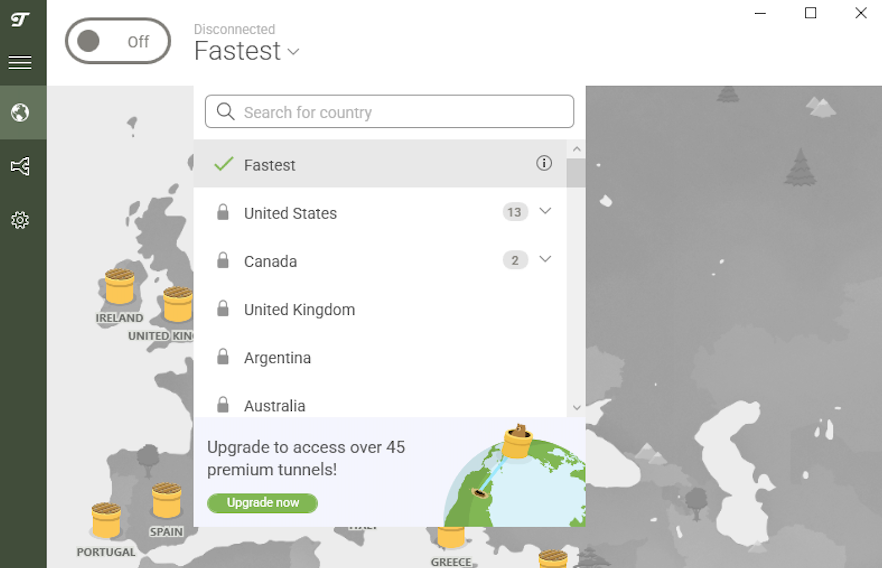
TunnelBear is a free VPN with the most servers (5000+ servers in 47 countries), which I found especially useful for unrestricted browsing. While TunnelBear’s free version has a small data limit (2GB), it’s great for users looking for plenty of server locations and a well-designed app. TunnelBear Free is available for Windows, macOS, Android, and iOS, and can be used on unlimited devices simultaneously. During my tests, I had no issues using the VPN on several devices at once.
What makes TunnelBear one of the best free VPNs?
- Privacy and security. In comparison to other free VPN services, I noted some great extra features, like a kill switch (VigilantBear) and obfuscation technology (GhostBear). It also uses robust AES-256 encryption and supports secure VPN protocols like OpenVPN, IKEv2, and WireGuard. In terms of privacy, TunnelBear has a no-logs policy. I was also pleasantly surprised that to register, you only need to provide an email address, which reduces the risk of any data breaches.
- Server network. Even with the free version, I was able to access all TunnelBear’s available servers in 47 countries, including the United States and the United Kingdom. These servers give you almost the same experience as the Premium TunnelBear servers, which is unique among free VPNs.
- Unlimited devices. Unlike other free VPNs, TunnelBear doesn’t limit the number of devices. This allows users to protect multiple devices for free. When I tested the provider, I had no issues downloading, installing, and setting up the free TunnelBear version on my iOS mobile phone and macOS laptop.
Good to know
Who said VPNs are boring? TunnelBear is one of the most fun VPN apps to use! The visual style is unique and engaging, and the software is full of bear-related puns.
What are the drawbacks of free TunnelBear?
- Streaming. I tested TunnelBear free VPN to see if it could unblock online streaming sites. Our past tests show that the free TunnelBear can bypass geo-restrictions and work with popular sites like Netflix. However, during my recent in-house tests, I wasn’t able to properly test it because the free version doesn’t let you choose the server location. While this doesn’t affect your privacy, streaming with TunnelBear Free might not be so smooth.
- Torrenting. Unfortunately, I found that there are some torrenting restrictions, since TunnelBear doesn’t allow P2P traffic on its servers. Additionally, since it only allows 2GB of traffic, it will not work properly for torrenting.
- Limits on speed and data. The biggest disadvantage I found when using TunnelBear is the data limit, as you only get 2GB per month. During my tests, I found that it’s just enough for two hours of streaming.
Who should use free TunnelBear?
TunnelBear will be a great free VPN for anyone who wants to protect their digital footprint. Even with the free version, TunnelBear provides all necessary security measures and additional features. Besides, it allows unlimited simultaneous connections, meaning that you’ll be able to safeguard your privacy no matter which device you use.
While TunnelBear is a reliable and secure free VPN, it will not work for streaming or torrenting. Additionally, it only offers 2GB of data, so if you plan to use the VPN every day, you should look for better alternatives.
Things I liked
- Big server network: 47 locations all over the world
- Cute bear-themed design
- Strong security and extra features like obfuscation (rare for free VPNs)
- Unlimited simultaneous connections
- No speed cap
Things I didin't like
- Very limited data: 2GB
- Doesn't work with torrenting
- Doesn’t allow choosing the server location
- Limited customer support for free users

You can find more details and our personal testing experience in our TunnelBear review.
How I tested and selected the best 100% free VPNs
My top criteria for these best 5 VPNs were that they had no direct or hidden subscription costs. VPNs with free trials that automatically turn into a paid subscription were not included in the list.
Additionally, I wanted VPNs on the list that did not collect your information extensively. This is a common problem with free VPNs, so I disqualified any app I found that didn’t take data protection seriously. Here are the other criteria I considered during my research:
- Encryption: A VPN provider needs to have secure encryption protocols and be able to safeguard your data effectively.
- Data limits: If you use the internet frequently and for data-heavy activities like gaming, you must ensure that a free VPN provider will offer an acceptable data limit to cover your daily needs.
- Speed caps: Decent speeds are important for most online activities as they give you an uninterrupted experience. A free VPN service that offers that is a winner.
- Server network: The more servers and locations, the better. This will allow you to access websites that may be unavailable in your location, like a specific streaming platform.
- The number of simultaneous connections: If you want a free VPN for all your family members, one that offers you the choice to connect many devices at the same time is a sure winner.
Note
Proton VPN has outranked PrivadoVPN as the best free VPN due to its unlimited data, speeds, and bandwidth. We also removed ZoogVPN, Hotspot Shield, and Opera VPN as they can no longer compete with other options and have too many limitations.
Compare best free VPN services of 2026
If a totally free VPN is what you’re looking for, I rounded up the most reliable options in one list. You don’t even have to provide your payment information or make use of a money-back guarantee. Free really means free with these VPN providers.
| Free VPN service | Rating | Free servers | Can I manually select a server in the free version? | Data cap | Speed | Simultaneous connections | Logging policy | Unblocks streaming services | P2P | Website |
| 1. Proton VPN | 8.9⭐️⭐️⭐️⭐️ | Undisclosed number of servers in 10 countries | ❌ No | Unlimited | 185Mbps | 1 | No-logs | ✅Yes | ✅Yes | protonvpn.com |
| 2. PrivadoVPN | 7.8⭐️⭐️⭐️ | Undisclosed number of servers in 13 countries | ✅ Yes | 10GB | 103Mbps | 1 | No-logs | ✅Yes | ✅Yes | privadovpn.com |
| 3. Windscribe | 7.5⭐️⭐️⭐️ | Undisclosed number of servers in 10 countries | ✅ Yes | 10GB | 234Mbps | Unlimited | No-logs | ✅Yes | ✅Yes | windscribe.com |
| 4. Hide.me | 7.4⭐️⭐️⭐️ | Undisclosed number of servers in 8 countries | ✅ Yes | Unlimited | 1.3Mbps | 1 | No-logs | ❌No | ✅Yes | hide.me |
| 5. TunnelBear | 7.0⭐️⭐️⭐️ | 5000+ servers in 47 countries Yes, 47 countries | ❌ No | 2-10GB | 138Mbps | Unlimited | No-logs | ❌No | ❌No | tunnelbear.com |
Is a free VPN safe?
While some free VPN options may be acceptable for basic use, many pose significant risks to your online privacy and security. This is certainly the case with free virtual private networks, as they might log your data or leave your IP address exposed.
Here are some of the biggest risks and limitations associated with free VPNs:
- Data logging and monitoring: A virtual private network should be private. However, the majority of free VPN services log your data and share it with third parties. This can include monitoring your internet traffic and the websites you visit. For example, many free VPNs are owned by China, which are legally obligated to share user data with the Chinese government.
- Infecting your device with malware: Certain free VPN providers have been found to contain adware, malware, and even spyware in their software. A notable example includes VPN apps linked to the FBI’s 911 S5 botnet investigation, where malicious VPNs were used to covertly infect devices, allowing attackers to control them remotely and engage in illegal activities. Using such VPNs puts your device and personal data at significant risk.
- Leak user data: Free VPNs are more vulnerable to data breaches since they’re usually not up to the security standards of premium VPNs. This can lead to compromised user data.
- P2P server networks: Some free VPNs plug you into peer-to-peer networks, which might expose your data to other users.
For these reasons, I recommend trying an affordable premium VPN. With a free trial or a 30-day money-back guarantee, you can try a premium VPN for free as well.
Which free VPN is safe to use?
I found that Proton VPN is the safest free VPN in 2026. Proton VPN is based in Switzerland, a country with strict privacy laws, ensuring that your security is the provider’s top priority. Apart from robust encryption and a strict no-logs policy, Proton VPN Free offers some additional features. During my tests, Proton’s kill switch quickly disabled the internet when the VPN connection was interrupted, ensuring anonymity at all times. Besides, the provider doesn’t have any data limits, so I was able to securely browse the internet every day.
Given Proton VPN’s robust security measures and my in-house testing, I consider it one of the best free VPNs. During the recent Uganda internet shutdown on January 13th, 2026, which left the country’s citizens without internet, Proton VPN’s signups increased by 8000%. This proves that many internet users seeking a reliable yet free VPN often choose Proton VPN.
Is there any fast free VPN?
While free VPNs are usually quite slow, the best free VPNs, like Proton VPN and Windscribe, deliver solid speeds. During my tests, Windscribe proved to be the fastest free VPN in 2026, with an average download speed of 234Mbps. I also didn’t notice any major delays with Proton VPN Free, as the download speed remained around 185Mbps. However, while these speeds are sufficient for everyday browsing, paid versions offer even faster speeds. In comparison, Proton VPN Plus allowed me to browse at an average download speed of 737Mbps, which is way more than its free version delivers.
Even though there are a few fast free VPNs on the market, most cannot compare. During my tests, TunnelBear’s average download speed was 138 Mbps, which is still sufficient but lower than Proton VPN’s or Windscribe’s. PrivadoVPN’s average download speed was 103 Mbps, while Hide.me was the slowest at 1.3 Mbps. Unfortunately, such slow speeds will not work well for streaming, torrenting, or gaming.
| Proton VPN | PrivadoVPN | Windscribe | Hide.me | TunnelBear | |
|---|---|---|---|---|---|
| Average download speed | 185Mbps | 103Mbps | 234Mbps | 1.3Mbps | 138Mbps |
Can I use a free VPN for streaming services?
Yes, you can use a free VPN for streaming, but it can be tricky. Firstly, I noticed that some free VPNs have data caps, making it hard to stream for hours or more. Another case is a limited server fleet. For example, Hide.me, while having unlimited data and speed caps, has servers in only eight countries. To add more, some free VPNs don’t even allow you to select the country you wish to connect to.
Proton Free VPN performed the best during my tests. It successfully unblocked Netflix, Hulu, Disney+, and other streaming platforms with the US servers. Meanwhile, TunnelBear has a bigger server network, but it has data limits, and overall underperforms for streaming. For a better streaming experience, I recommend opting for a free trial and money-back guarantees from premium VPN service providers.
| US | UK | Canada | Netherlands | Australia | France | Germany | Hong Kong | Switzerland | Brazil | Mexico | Japan | Norway | |
|---|---|---|---|---|---|---|---|---|---|---|---|---|---|
| 1. Proton VPN | ✅Yes | ✅Yes | ✅Yes | ✅Yes | ❌No | ❌No | ❌No | ❌No | ✅Yes | ❌No | ✅Yes | ✅Yes | ✅Yes |
| 2. PrivadoVPN | ✅Yes | ✅Yes | ✅Yes | ✅Yes | ❌No | ✅Yes | ✅Yes | ❌No | ✅Yes | ✅Yes | ✅Yes | ❌No | ❌No |
| 3. Windscribe | ✅Yes | ✅Yes | ✅Yes | ✅Yes | ❌No | ✅Yes | ✅Yes | ✅Yes | ✅Yes | ❌No | ❌No | ❌No | ❌No |
| 4. Hide.me | ✅Yes | ✅Yes | ❌No | ✅Yes | ❌No | ✅Yes | ✅Yes | ❌No | ✅Yes | ❌No | ❌No | ❌No | ❌No |
| 5. TunnelBear | ✅Yes | ✅Yes | ✅Yes | ✅Yes | ✅Yes | ✅Yes | ✅Yes | ❌No | ✅Yes | ✅Yes | ✅Yes | ✅Yes | ✅Yes |
Can I use a free VPN for torrenting?
Yes, you can use a free VPN for torrenting. However, the same problem arises as with a streaming question. Data caps and speed limits can significantly disturb your torrenting experience. I found PrivadoVPN to be the best free VPN for torrenting. I had sufficient yet slightly slower speeds, but torrenting was manageable.
Windscribe and Hide.me also support P2P file sharing, but during my tests, I found that they are not the best options for torrenting. Even though they support P2P, Windscribe’s 2-10GB data limit and Hide.me’s slow speed make it almost impossible to download torrents. Some other free VPNs, such as Tunnelbear and Proton VPN, don’t allow torrenting, as they don’t allow P2P traffic on their servers.
If you need a VPN for torrenting, I encourage you to try a premium VPN service. If you don’t want to pay, it is alright, since you can take advantage of free trials and money-back guarantees.
Free vs paid VPN differences
Free VPNs and paid VPNs differ primarily in security, speed, features, and reliability. Paid VPNs generally offer stronger encryption, faster speeds, more server locations, and better customer support. Meanwhile, free VPNs may expose users to security risks, have slower speeds, and have limited functionality. Here’s a brief overview of the main differences and similarities between paid and unpaid VPNs.
| Free VPNs | Paid VPNs |
|---|---|
| Don’t always hide your IP address properly | Will hide your IP address |
| May have limited encryption or VPN protocols available | Solid encryption (256-bit) and multiple VPN protocols |
| Often enforce data limits between 2 GB and 10 GB per month | No data limits |
| Speed caps are generally enforced | Don’t actively enforce speed limits |
| Often have a relatively small server network with few locations | Massive server networks, often with thousands of servers |
| Very low speeds (server overcrowding, limited choice) | Excellent speeds due to high-performance server infrastructure |
| Often only allows one connection at a time | Tend to offer more extra features |
| Often only allow one connection at a time | Allow for multiple simultaneous connections |
| Usually can’t unblock popular streaming services such as Netflix US | Can easily unblock all major streaming services |
| Might sell your data or have questionable data logging practices | Unlikely to sell your data, and many have a strict no-logs policy |
As you can see, premium VPNs often offer features and options you’re not likely to get even with one of the best free VPNs.
To make things clear, I compared our top free VPN, Proton VPN, with our top premium VPN, NordVPN. In the table below, I highlighted the biggest differences.
| Feature | Proton VPN (Free) | NordVPN |
|---|---|---|
| Countries with servers | 10 in the US, the Netherlands, Poland, Romania, Canada, Norway, Singapore, Switzerland, Mexico, and Japan | 8900 servers in 149 countries |
| Data | Unlimited | Unlimited |
| Speed cap | None | None (retained 95% of my usual speed) |
| Always unblocks Netflix? | ✖ No | ✔ Yes |
| Works for torrenting? | ✖ No | ✔ Yes |
| Simultaneous connections | 1 | 10 |
| Money-back guarantee | N/A | 30 days |
| Price | Free | $ 3.49/month |
| Website | Get Proton VPN | Try NordVPN |
You can get a NordVPN free trial by taking advantage of the 30-day money-back guarantee. Just ask for a refund before those 30 days are up, and the subscription won’t cost you a dime.
Plus, NordVPN offers a pretty good deal if you decide to invest in a trustworthy VPN: for only $ 3.49 per month, you get all the advantages of a premium VPN.
Free VPNs I recommend avoiding
There are also numerous free VPNs out there that you should avoid. Many aim to track or sell user data to others. Some free VPNs even sell your connection to other users. Your bandwidth is given to premium users of the service who, in turn, use your connection and IP address as their very own “VPN server.”
Below, you’ll find an overview of some unsafe free VPNs that are relatively popular and why you should avoid them.
| Free VPN | Why it’s best not to use it |
|---|---|
| Hola VPN | Hola VPN sells your bandwidth to paying users. This enables paying users to use your internet connection to access the web. As a result, your IP address could end up being connected to suspicious activities. |
| SuperVPN | SuperVPN keeps track of your data to fulfill DMCA (Digital Millenium Copyright Act) requests. If you’re looking for a way to download anonymously, you’ll be better off with a different VPN. |
| Psiphon Pro | Psiphon Pro allows partner companies to track users. It also shares data with commercial partners, other partners, and the Psiphon Pro parent company. In other words, you’ll have a hard time staying anonymous with this VPN. |
| Touch VPN | Touch VPN adds different types of trackers (cookies, pixel tags, web beacons) to a user’s browser and shares data with third parties. |
| Betternet | Betternet allows advertisers, among other third parties, to track user data. |
| AnonyTun | AnonyTun allows advertisers to place cookies and build user profiles. |
| Turbo VPN | The free version of Turbo VPN is filled with adware and allows advertising partners to place cookies and track users. |
| Tuxler VPN | Tuxler VPN’s free version is very unsafe. It collects user data and shares that with third parties. On top of that, it’s also incredibly slow. |
These aren’t the only unsafe free VPN providers out there. Many VPNs in the App Store and on Google Play don’t have clear policies regarding data processing and privacy. I recommend sticking to tried and tested VPN providers that our cybersecurity experts have vetted.
If you come across such a VPN yourself, be careful. Don’t assume you’ll be able to browse the internet anonymously with these VPNs.
Feel free to leave us a comment about (potentially) unsafe VPNs, and we’ll make sure to review them.
Conclusion: What is the best free VPN in 2026?
If you’re looking for a simple VPN for everyday use, you might consider trying a free VPN. Unfortunately, many free VPNs are not secure and cannot offer the same benefits as paid services. That’s why I performed extensive testing and found that Proton VPN is the best free VPN in 2026.
Proton VPN is known for its robust security measures and a strict no-logs policy. During my tests, I was also impressed with its solid speeds and unlimited data, which allowed me to browse privately at all times. Additionally, Proton VPN offers servers in 10 locations, is easy to navigate, and doesn’t have any ads, guaranteeing a user-friendly experience.
Try out Proton VPN with this unlimited free version!
While this is all well and good, keep in mind that you’ll likely run into data limits and speed caps, not to mention potential security vulnerabilities.
For that reason, I do recommend choosing a cheap paid VPN. You can experiment a little bit with different free VPN trials. NordVPN is the best choice in this regard.
FAQ
Do you have a question about free VPNs? Click on one of the frequently asked questions below to read the answer.
Yes, Proton VPN is a reliable free VPN service. The provider uses all necessary security measures, offers additional features, and doesn’t keep logs. Based on my tests, Proton VPN delivers solid speeds and stable connections, as I didn’t experience any IP or DNS leaks. Additionally, I was impressed with how effective Proton VPN’s kill switch feature was during my tests.
Some potential risks of using a free VPN include intrusive ads, malware, and data leaks. Many free VPNs are often not secure because they don’t use all necessary security measures, which can lead to malware-related issues. Additionally, I found that some free VPNs are not transparent about their logging policy, meaning that your data might be stored and even sold to third parties.
PrivadoVPN and Windscribe work with Netflix. Both providers offer servers in multiple locations, allowing you to choose the one that delivers the best speeds. During my tests, I didn’t experience any issues and was able to unblock Netflix US. I also found that Proton VPN Free can bypass geo-restrictions on services like Netflix, but it doesn’t allow changing the server location, which makes it inconvenient for streaming.
Proton VPN, PrivadoVPN, Windscribe, Hide.me, and TunnelBear can change location for free. I tested all of them myself, and they all successfully changed my IP address without any IP or DNS leaks, ensuring total privacy. Even though some of them have data limits, I was able to browse the internet and even stream content privately during my tests.
Based on my in-house tests, Windscribe and Proton VPN have the fastest speeds in 2026. During my examination, the average download speed of Windscribe was 234Mbps and Proton VPN’s was 185Mbps, making them the fastes free VPNs on the market. At these speeds, I was able to browse and stream content without lag with both Windscribe and Proton VPN.




I think this is among the most important information for me.
And i'm glad reading your article. But should remark on some
general things, The web site style is great, the articles is really great
: D. Good job, cheers
Can I just say what a relief to discover someone who actually understands what they're discussing on the web.
You definitely know how to bring an issue to light and make it
important. More and more people need to read
this and understand this side of the story.
I can't believe you aren't more popular since you certainly have the gift.