
- RoboForm pros and cons
- RoboForm pricing 2025
- RoboForm compatibility
- Recent RoboForm improvements
- Roboform password management software features
- Roboform Business password management features
- Roboform password manager interface
- RoboForm alternatives compared
- Final verdict: Is RoboForm a good password manager?
- FAQ
RoboForm is a solid option for anyone needing a secure, budget-friendly, and easy-to-use password manager. Even though it doesn’t have a lot of flashy features, RoboForm remains a strong password manager that won’t let you down.
There are a lot of password managers available for both personal and business needs. But after testing the best ones, RoboForm emerged as a strong contender due to its low price and ease of use.
| Roboform rating: | 9.3⭐⭐⭐⭐⭐ |
| Website: | roboform.com |
| Passkey support: | ✅ Yes |
| 2FA support: | ✅ Yes |
| Encrypted storage: | ✅ Yes |
| Price: | Premium at $11.90/year, Family at $19.10/year, and Business at $39.95/year |
Keep reading to learn about the pros, cons, features, and pricing of RoboForm, as well as get answers to frequently asked questions.
RoboForm pros and cons
Even after more than 25 years on the market, RoboForm remains a top choice for password managers, particularly for its security features, low price, and ease of use. While it doesn’t have a flashy design or extra convenience features, RoboForm is a strong password manager that won’t let you down.
It’s a solid option for everyone, from individuals and families to businesses looking to scale their password security. Here’s a closer look at its pros and cons:
- ✅ Excellent security – it uses gold-standard AES-256 encryption, which is virtually unbreakable. It also operates on a zero-knowledge architecture, meaning even RoboForm can’t see your passwords. Its strong reputation backs this all up, as RoboForm hasn’t had any data leaks as of yet.
- ✅ Affordable pricing – RoboForm offers the best value for an affordable price. It has some of the lowest prices for both individuals and families.
- ✅ Unlimited devices – no device limit on a single account is a unique advantage compared to many other competitors. This makes it perfect not only for individuals but for families and teams as well.
- ✅ Easy to use – RoboForm has a simple, straightforward interface that makes features effortless to find. No bells or whistles – just a streamlined, enjoyable user experience.
- ✅ Autofill capabilities – RoboForm handles complex forms and logins for you. It saves and fills in personal information, making browsing and shopping online easier and safer. But note that to use it, you have to install a browser extension.
- ❌ Limited flexibility – password sharing is only possible between users of RoboForm. If you want to become one, you can choose between a free version with limited features or a long-term paid subscription plan. That said, RoboForm has a 30-day free trial and a 30-day money-back guarantee, so you can try it risk-free.
- ❌ Clunky design – compared to browser extensions, desktop and mobile apps might seem a little outdated. However, RoboForm’s functionality is not affected by this in the slightest.
RoboForm offers flexible plans for everyone. Individuals can use a free version or an unlimited-device plan starting at just $ 0.99 per month. Meanwhile, families can secure up to five accounts with unlimited device allowance, and small businesses benefit from cost-effective group security features designed for multiple users.
RoboForm pricing 2025
As of 2025, RoboForm offers a Free plan, a Premium plan starting at $11.90 per year (or $ 0.99/month on an annual basis), and a Family plan starting at approximately $19.10 per year (or $1.59/month). Business plans are also available at $39.95/year (or $3.33/month). Below you’ll find a table summarizing RoboForm pricing, including each plan’s key features:
| RoboForm plan | Price (billed annually) | Users/devices | Key features |
|---|---|---|---|
| Free | $0 | 1 user, 1 device | Unlimited password storage, password generator, autofill, password audit |
| Premium | ~$11.90/year ($ 0.99/month) | 1 user, unlimited devices | Everything in Free, plus secure password sharing, data breach monitoring, emergency access, and priority support |
| Family | ~$19.10/year ($1.59/month) | 5 users, unlimited devices | All Premium features for up to five separate family accounts |
| Business | ~$39.95/year($3.33/month) | Unlimited users and devices | Centralized management system, help with onboarding and troubleshooting, custom security policies |
Is RoboForm free?
Yes, RoboForm offers a lifetime free plan, but it has significant limitations compared to the paid versions. RoboForm’s free password manager is limited to one device and doesn’t include features like web vault access or shared folders. Plus, free customers can only get help from RoboForm’s support team via email.
However, despite some of its shortcomings, it includes all the necessary features to keep your passwords organized and extra safe. This covers unlimited password storage, password generator, autofill, monitoring for compromised passwords, and an integrated TOTP authenticator.
If the free version isn’t enough for you, RoboForm offers a 30-day free trial for its paid subscriptions. Once your free trial expires, the premium perks disappear, and the vault reverts to a free account, complete with the device limitation.
RoboForm compatibility
RoboForm is highly compatible and works across all major operating systems, including Windows, macOS, Android, and iOS, as well as a wide range of popular web browsers via extension (Chrome, Firefox, Safari, Edge, Opera, Internet Explorer, and Brave).
However, it’s worth mentioning that RoboForm mainly operates through its browser extension. It embeds itself into any web browser, with a dashboard accessible within the browser itself. Although you can get a free RoboForm application, it strongly encourages using the browser extension. In fact, for the app to function properly, it additionally requires installing the browser extension.
Between the browser extension and application functionality remains similar, though the interface is a bit different. I personally preferred the browser extension, as it has a more modern design than the desktop version. That said, mobile apps look updated and sleek.
Recent RoboForm improvements
This year, RoboForm introduced quite a few improvements to strengthen password security and elevate user experience. One of the changes is the expansion of authentication options for Passwordless Unlock and 2FA. Prior to this year, its authentication methods mainly included passwords and basic 2FA (emails and SMS). Now it has expanded to Passkeys, biometrics, and OS login methods.
Another upgrade is RoboForm’s expanded data breach monitoring across additional platforms and email accounts. Now, RoboForm quickly warns you if your information is compromised and provides data breach monitoring for 5 emails.
It also introduced silent background auto-updates for Windows apps, which ensures users stay on top of the latest updates without interruptions. Meanwhile, Safari Import on iOS lets you seamlessly transfer saved credentials from Apple’s native browser into RoboForm.
Other improvements concerned with autofill function made logins and form fillings smoother, while app interface improvements resulted in easier navigation and a more overall pleasant experience on mobile devices.
Roboform password management software features
RoboForm is a comprehensive password manager offering features like unlimited password storage, one-click login/form filling, strong password generation, and cross-platform sync. Key security features include AES-256 encryption, zero-knowledge architecture, data breach monitoring, secure sharing, TOTP authenticator, and emergency access, working across all major browsers and devices, even in private modes.
It also manages bookmarks, SafeNotes, and local application logins, with advanced options like passkeys and passwordless unlock in newer versions. Together, all these features ensure comprehensive protection and convenience for users looking to manage their passwords hassle-free.
To test its main features, I installed RoboForm on my personal laptop and phone. Below you’ll find my honest opinion on whether these features work and how functional and user-friendly they are.
1. Password generator
RoboForm password generator comes up with unique passwords for each site, so you don’t have to. It automatically generates strong and random passwords that include a combination of numbers, uppercase and lowercase letters, and special characters.
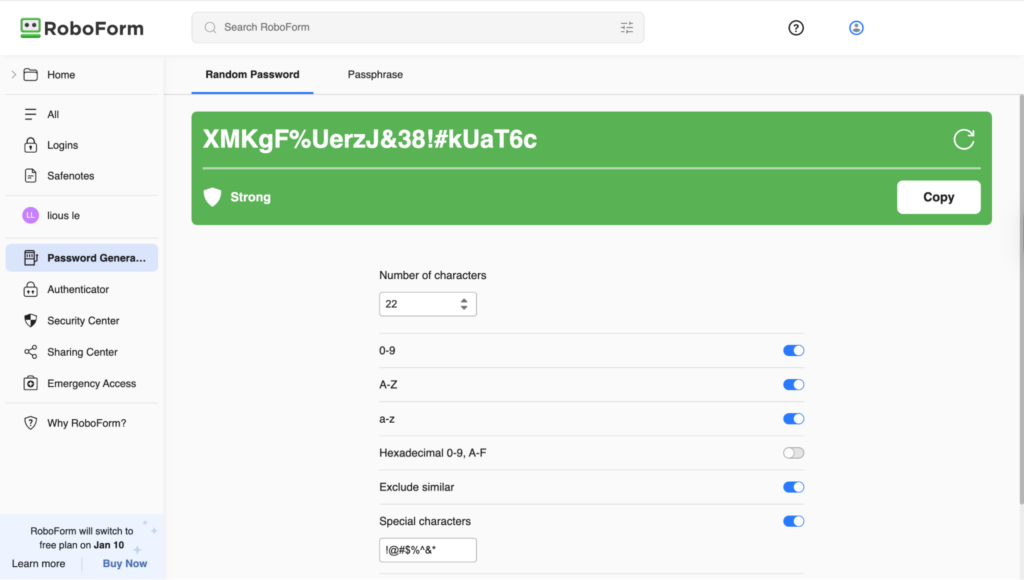
While testing this RoboForm feature, I found it to be both user-friendly and versatile. It allows users to switch between generating a random character string and a passphrase. I particularly appreciated the options of customization available: you can define the exact length and character types to include. For passphrase passwords, you can choose how to separate the words, whether to include or not include numbers, the number of words, and if you wish to capitalize the first letter.
2. Autofill & form filling
Autofill and form-filling tool saves you from typing the same information over and over again. RoboForm’s form filler appears where you need it to and offers to fill in information like payment and address details with a single click.
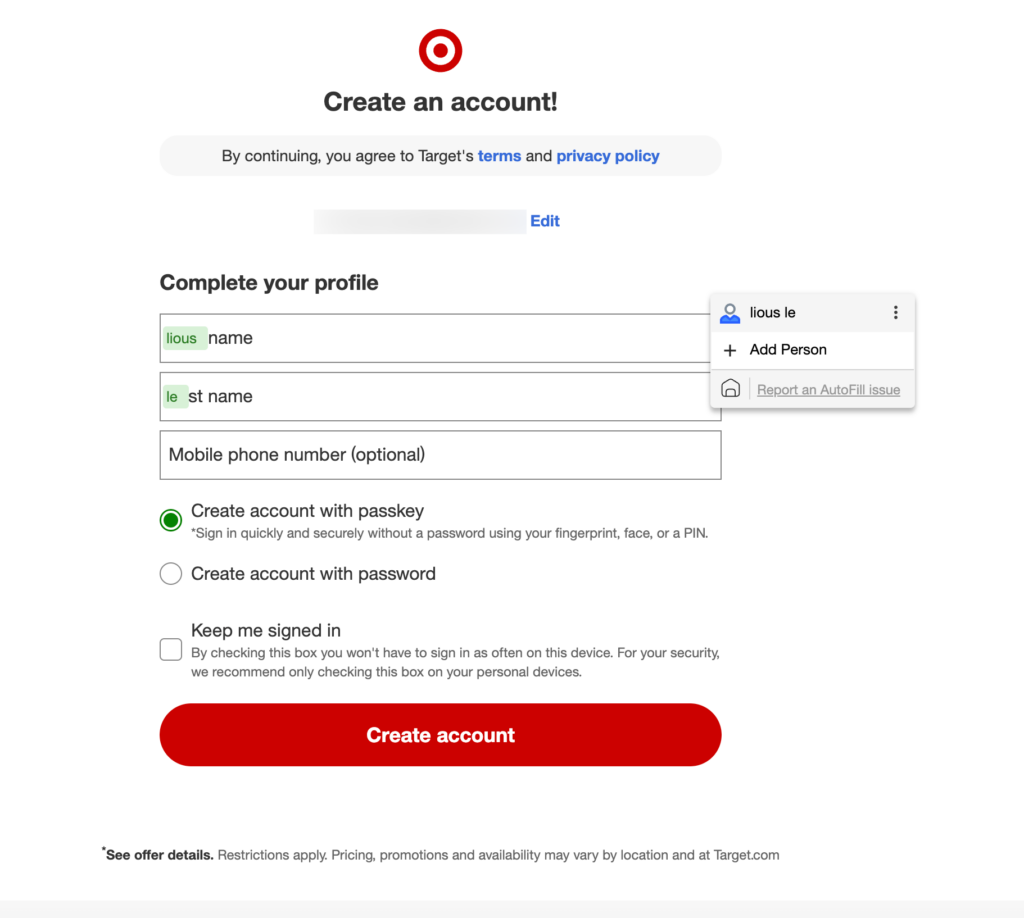
For me, the autofill feature worked as expected, and the form filling was seamless. However, one thing to note is that you must input your information into the RoboForm settings beforehand for it to fill the required fields correctly.
Also, a nice addition is the option in the auto-fill setting to choose how RoboForm should offer to fill online forms from already saved Logins and Identities (e.g., Do not Offer to AutoFill, Offer to AutoFill, AutoFill without Asking)
3. Secure storage
RoboForm achieves secure storage through strong encryption and strict login requirements. The system guards against attacks using AES256-bit encryption and PBKDF2 SHA256. To ensure only the correct user accesses this data, it supports extensive 2FA options, such as passkeys, authenticator apps, and hardware keys.
It’s also based on zero-knowledge infrastructure, which means all encryption and decryption happens on your device and not RoboForm’s servers, so it has no way of knowing or accessing your data. On top of that, your data is encrypted with your personal secret key – the Master Password. If it gets lost, your encrypted data becomes inaccessible, as Roboform doesn’t have access to it and can’t recover it.
4. Password auditing
RoboForm’s security center helps to identify weak, reused, or compromised passwords and provides suggestions to replace them with strong, unique alternatives. Compromised passwords are marked with a red exclamation mark in both the RoboForm extension and the Security Center within the app. RoboForm finds these compromised passwords by scanning passwords exposed in data breaches.
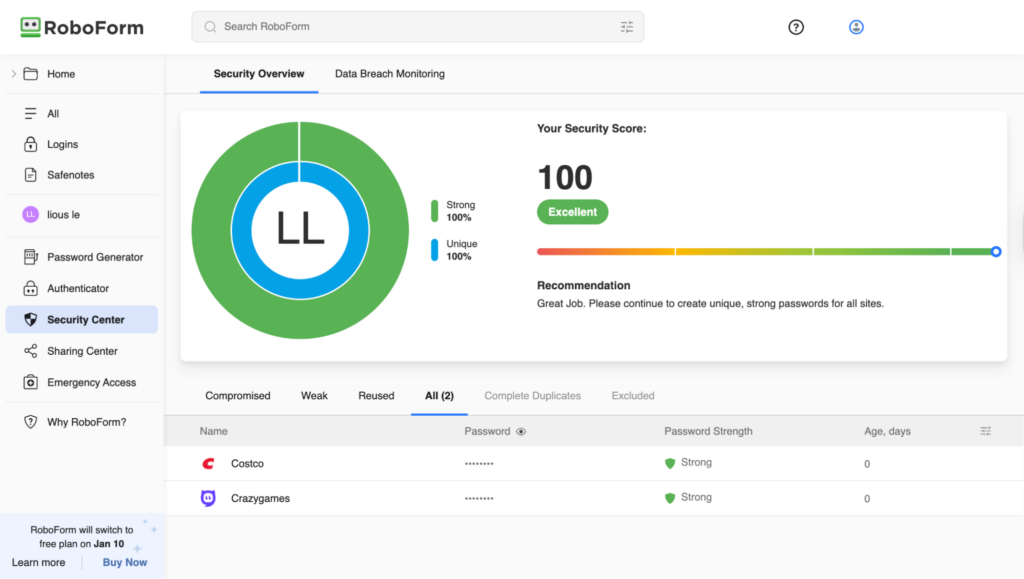
Personally, I really liked the visual presentation of the password monitoring tool. It continuously checked my saved data, alerted me about weak passwords with suggestions for improvement, and provided me with an overall security score.
5. Sync & multi-platform
A paid RoboForm subscription offers sync and multi-platform support, which ensures that any changes you make, such as altering or adding a new password, are automatically updated across all your other devices.
With a Premium or Family plan, RoboForm syncs smoothly across PC, Mac, iOS, and Android. I noticed that the process is automatic: as long as you enable auto-sync and log in, your encrypted data and form details are instantly available on every device.

6. Security features
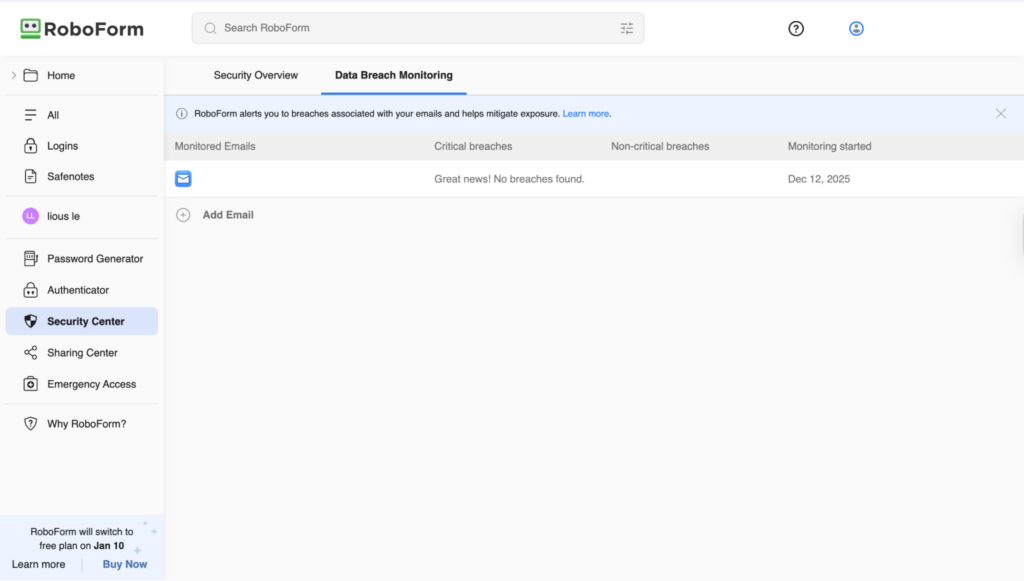
Besides the already mentioned secure storage features, RoboForm has a few other security measures, including proactive monitoring. The Breach Alerts feature monitors up to five emails, notifying users of compromised accounts so they can create secure replacements immediately.
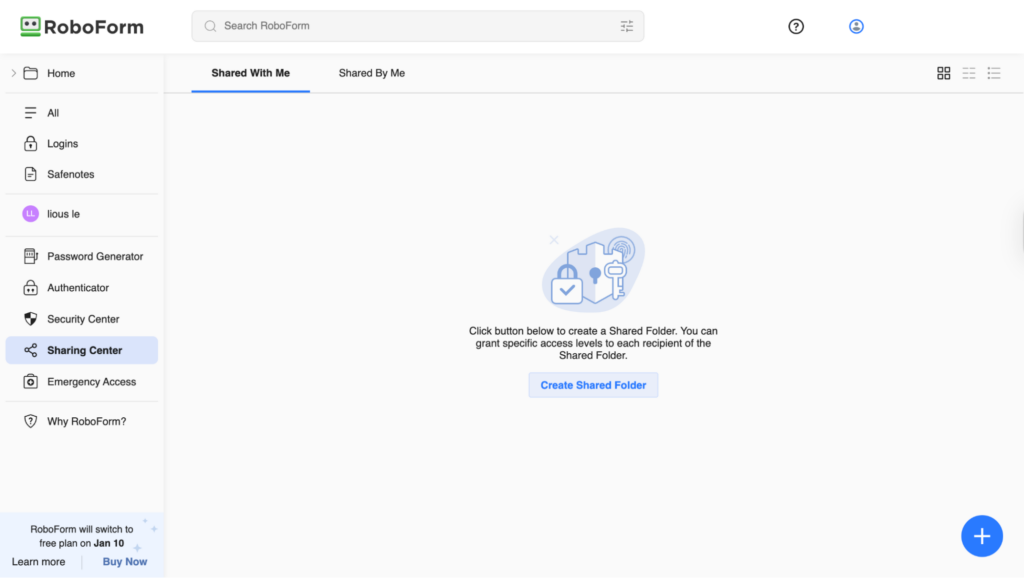
In addition, RoboForm’s Secure Sharing feature allows users to securely share Logins, Identities, or Safenotes. But please note that this can only be done between RoboForm users. Meanwhile, the Emergency Access feature lets you select a trusted contact to securely obtain access to your personal data in the event of an emergency. Emergency Access uses public-private key encryption, which allows for secure access by the recipient without the grantor’s Master Password.
Roboform Business password management features
RoboForm’s Business plan is designed for teams and organizations needing secure and organized password sharing. RoboForm Business plan has added Centralized admin, SSO & SCIM, Role-based access, and Activity logs & reports, which makes onboarding, support, auditing, and offboarding simple and secure. Below, you’ll find a detailed breakdown of these features.
1. Centralized admin
Admin Center allows you to take full control over user onboarding, company settings, security policies, data management, reporting, and audits, all from one central hub. Administrators with full control of the organization’s password management can add or remove users, assign roles, and manage permissions for individuals or teams. It also lets you securely share credentials and supports shared vaults for departments or projects. On top of that, admins can enforce company-wide security policies such as mandatory strong master passwords and two-factor authentication, while audits help to assess security and draw attention to any existing safety vulnerabilities.
2. SSO & SCIM
RoboForm’s SSO (Single Sign-On) and SCIM (System for Cross-domain Identity Management) features simplify user authentication and management for organizations. SSO lets employees access RoboForm using their existing corporate credentials, through providers like Okta, Azure AD, or Google Workspace, which improves security by centralizing login credentials.
Meanwhile, SCIM automates provisioning and deprovisioning, which ensures that employees automatically gain access to logins and other needed data when onboarded and immediately lose it when offboarded. Overall, I found that these features streamline administrative processes, apply consistent access policies, and reduce security risks.
3. Role-based access
Role-Based Access Control (RBAC) offered by RoboForm allows organizations to manage access to passwords based on user roles instead of assigning permissions individually. This feature ensures that employees receive access to the credentials and vaults that are necessary for their role, minimizing the risk of unauthorized access to sensitive information and simplifying administration for IT teams. For instance, using RBAC, managers could access team vaults, while regular employees would only see their personal credentials, thus enhancing security.
4. Activity logs & reports
RoboForm activity logs show a record of each time a user’s account has been accessed or had its key settings changed. This allows to spot unauthorized logins or unusual activity and helps IT teams to quickly secure a compromised user’s account. Meanwhile, the Reports Center generates a visual presentation of what groups employees are in, what responsibilities they have been assigned, and gives an overall view of their RoboForm security. Employees can also find a security score for passwords at the top of their report, as well as suggestions on how to improve them.
Roboform password manager interface
I found RoboForm’s extension interface clear and simple to use, and the initial setup guide makes it easy to learn the features. All features, such as Logins, Safenotes, Security Center, and Password Generator, are conveniently lined up in the sidebar and are easily accessible. I would say that the RoboForm browser extension is rather intuitive and user-friendly.

On the downside, the design of the macOS app and the autofill pop-ups looks a bit outdated. However, it seems like RoboForm is aware of this since it encourages users to use its browser extension and even redirects you to it if you try to complete an action via its desktop app. Even on the RoboForm’s website, the standalone app is hidden as though the company itself prefers you use the browser extension.

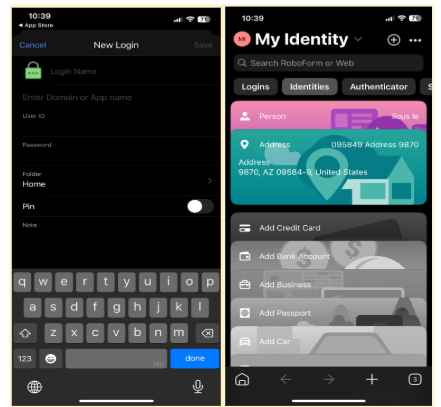
I also found the iOS app harder to get used to, requiring more time to figure out the navigation. However, this can be solved by switching off the ‘Switch to Old RoboForm’ toggle in the app’s settings. This activates the Browser Centric Mode for iOS and allows you to use RoboForm more seamlessly as your web browser and password manager.
RoboForm alternatives compared
Even though RoboForm is a strong contender for password management and certainly one of the best cheap password managers out there, competitors, including NordPass, ProtonPass, and 1Password, could be a better fit for you if you’re looking for a password manager with more convenient features. See below how RoboForm compares to other top-tier password managers:
| Provider | Rating | Pricing | Supported Platforms | Password Storage & Sync | Autofill & AutoSave | 2FA | Browser Integration | Password Sharing | Emergency Access | Unique Features |
|---|---|---|---|---|---|---|---|---|---|---|
| 1. RoboForm | 9.3 ⭐⭐⭐⭐⭐ | $11.90/year (or $ 0.99/month) | Windows, macOS, iOS, Android, Linux, Web | Encrypted vault with cross-device sync (paid) | Strong autofill and form filling | ✅ Yes (TOTP, hardware keys) | All major browsers | Secure sharing with access controls | ✅ Yes | Advanced form filling, strong business admin tools |
| 2. NordPass | 8.5 ⭐⭐⭐⭐ | $34.8/year (or $ 1.39/month) | Windows, macOS, Linux, iOS, Android, Web | Encrypted cloud sync | Reliable autofill | ✅ Yes | All major browsers | Secure sharing (paid) | ✅ Yes | XChaCha20 encryption, Nord ecosystem |
| 3. Proton Pass | 8 ⭐⭐⭐⭐ | $23.88/year ($ 2.49/month) | Windows, macOS, Linux, iOS, Android, Web | End-to-end encrypted sync | Simple, clean autofill | ✅ Yes | All major browsers | Secure sharing (paid) | Limited | Open-source, privacy-first Proton ecosystem |
| 4. 1Password | 7.5 ⭐⭐⭐⭐ | $35.88/year (or $ 2.99/month) | Windows, macOS, Linux, iOS, Android, Web | End-to-end encrypted sync | Highly polished autofill | ✅ Yes | All major browsers | Advanced vault and team sharing | ✅ Yes | Travel Mode, advanced family & business features |
Final verdict: Is RoboForm a good password manager?
The past of RoboForm, being a form-filling software, still seems to linger, as it has been trying to catch up with the competition in terms of password manager-specific features since it became a password management app. For instance, it would benefit from a more inclusive sharing system, file storage options, and an interface design refresh.
That said, its security reputation is excellent, data breach monitoring is effective, and advanced form-filling is a huge time saver. Besides, the helpful yet non-obtrusive tips that accompany all the major features are a nice touch. Overall, if you’re looking for a budget-friendly and secure password manager and aren’t too fussy about flashy design, RoboForm is perfect for that.
Looking for more information on password managers? Explore our in-depth articles below:
- Best Cyber Monday Password Manager deals
- Keeper password manager review
- LastPass review
- NordPass vs 1Password
FAQ
RoboForm is a password manager that primarily functions to store, generate, organize, and autofill passwords across multiple devices. It enhances security, saves time, and removes the hassle of keeping up with countless passwords, making online life simpler.
Yes, RoboForm supports passkeys, which are a passwordless way to sign in to websites and apps, using your device’s built-in security measures, such as fingerprint, face scan, or PIN. While passkeys aren’t as common as passwords yet, their adoption by companies is growing.
Yes, RoboForm is safe and secure, as it uses AES-256 encryption, a zero-knowledge architecture, two-factor authentication (2FA), and data breach monitoring for ultimate security. Its reputation speaks for itself – RoboForm has a clean history of no data breaches.
No, RoboForm has never been hacked or had a major data breach, maintaining a flawless security record for over 25 years, unlike some of its competitors.
RoboForm offers a free version, while its paid Premium plan starts at $10.68 per year (or $ 0.99/month on an annual basis). It’s a truly budget-friendly option for anyone looking to secure and manage their passwords and simplify their online life.