
F1 TV Pro no longer works in the US since Apple won the rights to exclusively broadcast F1 late 2025. As a result, all races, qualifying, and practice sessions can now be found on the Apple TV app. Fortunately, you can use a reliable VPN, like NordVPN, to watch F1 TV Pro outside the US or access free Formula 1 broadcasts on platforms such as RTBF Auvio (Belgium), ServusTV, and ORF (Austria).

From October 16, 2025, F1 fans in the USA will no longer have access to new F1 TV Pro or Premium subscriptions. Apple TV has taken over the exclusive rights to stream all F1 sessions in the USA starting in 2026 onward. This replaces the older ESPN/F1 TV agreement for complete coverage, making Apple TV the new home of F1 in North America.
Fortunately, a VPN (virtual private network) can help you bypass restrictions and watch F1 TV Pro from anywhere in the world – even in blocked countries. A VPN can also help you access free F1 streaming sites or sign up for F1 TV at a cheaper price if you live in an area where subscriptions cost more.
I tested more than 20 VPNs to find the top VPN provider for unblocking and streaming Formula 1.
How to watch F1 in 2026 without Apple TV
Starting in 2026, Apple TV is the new home and exclusive broadcaster for F1 coverage in the US. If you want to watch F1 without an Apple device, you can instead access the F1 TV app via Android TV, Google Play, Roku, or Amazon Fire TV, using an Apple TV+ subscription. Or, you can simply access F1 international streams by using a VPN to change your IP address.
F1 TV Pro is still available in some other countries, including Canada, UAE, India, Ukraine, and Zimbabwe. If F1 TV Pro isn’t available in your region, you can use a VPN to change your IP address, making it appear as if you’re physically located in a country where F1 TV Pro is available. This way, you can access F1 streams in US without Apple TV.
This table explains how to watch Formula 1 live streams on F1 TV Pro using a VPN:
- Get a reliable premium F1 TV VPN. Our team has tested more than 70 VPNs, and NordVPN performed best in our tests with F1 TV.
- Download and install the VPN software.
- Connect to a VPN server in a country where F1 TV is available – like Canada or the Netherlands.
- Navigate to the F1 TV Pro website.
- Enjoy streaming Formula 1 without restrictions!
Note
There are some free F1 streaming sites, such as Austria’s ServusTV/ORF, Luxembourg’s RTL Zwee, and Belgium’s RTBF, which you can also access using NordVPN. Connect to a VPN server in the country that corresponds to the platform you want to use to watch F1 free. For example, use NordVPN to connect to an Austrian VPN server and stream F1 free on ServusTV.
F1 TV Subscriptions: Is the new F1 TV Premium worth it?
There are three subscription models available with F1 TV that offer varying levels of service at a different price point. Here’s an overview.
| F1 TV package | F1 TV Access | F1 TV Pro | F1 TV Premium |
|---|---|---|---|
| 4K streaming | ✖ No | ✖ No | ✔ Yes |
| Live F1 race streaming | ✖ No | ✔ Yes | ✔ Yes |
| F2, F3 & F1 Academy Races | ✖ No | ✔ Yes | ✔ Yes |
| Live onboard cameras | ✖ No | ✔ Yes | ✔ Yes |
| Live team radio chatter | ✖ No | ✔ Yes | ✔ Yes |
| Race highlights | ✔ Yes | ✔ Yes | ✔ Yes |
| Race replays | ✔ Yes | ✔ Yes | ✔ Yes |
| Exclusive documentaries | ✔ Yes | ✔ Yes | ✔ Yes |
| Price | $29.99/year | $84.99/year | $129.99/year |
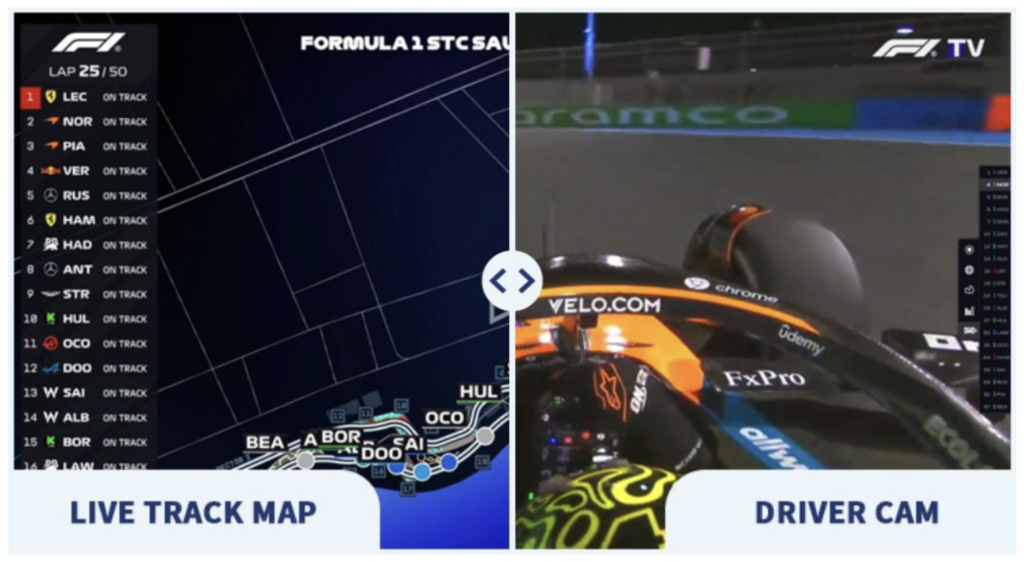
Some of the exclusive features included in F1 TV Pro can be seen down below. Here’s an example of what you can expect of the driver cams with team radios, as well as the live map and real-time data during races.
F1 TV price: which country is the cheapest?
F1 TV Pro subscription prices are different from one country to the next due to local broadcasting rights and differences in local economy.
In regions where F1 TV Pro stands alongside established Formula 1 broadcasters, the service can be more costly. Similarly, in countries with lower average incomes and less broadcasting competition, F1 TV Pro is able to offer cheaper subscription rates.
Below, I’ve included a comparison of F1 TV Pro pricing in different countries.
| Country | Annual Price (USD) | Price Difference From Apple TV ($99/year) |
|---|---|---|
| United States | Discontinued | – |
| India | $29.99 | -69.7% |
| Brazil | $39.99 | -59.6% |
| South Africa | $44.99 | -54.6% |
| Turkey | $64.99 | -34.4% |
| Belgium | $72.15 | -27.1% |
| Netherlands | $86.99 | -12.2% |
| Kuwait, Oman, Qatar | $131.88 | +33.3% |
Note
By using a VPN to change your IP address, you can get F1 TV Pro cheaper when you subscribe in another region. For the biggest savings, connect to a VPN server in India, where the annual cost is $29.99 compared to paying $99.99/year for Apple TV.
Best F1 TV Pro VPNs
I tested more than 20 premium VPNs to see which were most effective at unblocking F1 TV Pro in other countries with fast speeds. This included testing each provider’s ability to bypass geo-blocks, provide high-speed streaming connections without lag, and ensure access to a large number of worldwide servers. Based on my tests, NordVPN, Surfshark, and Proton VPN stood out as the best F1 TV Pro VPNs.
1. NordVPN – best VPN for watching F1 TV Pro without restrictions
- Rating: 9.8⭐⭐⭐⭐⭐
- Servers: 8900+ servers in 149+ countries
- Price: $ 3.49/month, now 75% off
NordVPN is the best VPN for watching F1 TV Pro from anywhere thanks to its broad server network and the fastest streaming speeds available. During my tests, NordVPN easily unblocked F1 TV Pro in the USA while using servers in India, Brazil, and Belgium. Belgium is among NordVPN’s 8900+ servers in 149+ countries that allow you to watch free F1 streams, and I did so by accessing RTBF Auvio with my Belgian IP address.
I benchmarked NordVPN’s speeds to ensure that my connection wouldn’t lag, and I saw average speeds of up to 756 Mbps. I achieved these speeds by connecting with the NordLynx protocol, the industry’s fastest secure protocol. NordVPN also has dedicated streaming servers that optimize your speeds for the best F1 TV performance.
NordVPN offers robust security features that help you remain undetected by websites so that you won’t be blocked when accessing F1 TV Pro streams. AES-256 encryption maintains your anonymity, while leak protection is built in. I tested for leaks and found that NordVPN doesn’t suffer IP or DNS leaks, so you’ll remain undetected.
I also tested device compatibility and was impressed with NordVPN’s broad support for various operating systems. In addition to native apps for Windows and macOS, NordVPN has polished iOS, Android, and smart TV applications. You can also install NordVPN on your router and other smart devices, such as the Amazon Fire TV Stick.
NordVPN is the best VPN for F1 TV Pro with a starting price of $ 3.49/month, a 3-day free trial on Android, and a 30-day money-back guarantee. Combining the cost of your VPN and a cheaper subscription to F1 TV Pro in another country, you’ll still pay less than the annual cost of Apple TV to watch F1 in the USA.
| Pros | Cons |
|---|---|
| Unblock F1 TV Pro anywhere | 10 simultaneous connections max |
| Fastest F1 TV streaming speeds | |
| 30-day money-back guarantee |
2. Surfshark – most affordable F1 TV Pro VPN
- Rating: 9.5⭐⭐⭐⭐⭐
- Servers: 4500 servers in 100 countries
- Price: $ 2.49/month, now 85% off
Surfshark is one of the best F1 TV Pro VPNs because it allows streaming on unlimited devices while offering the most affordable pricing from a reliable F1 streaming VPN. My tests confirmed that Surfshark can unblock F1 TV Pro in all available regions, and I accessed free F1 streams in Austria on ServusTV and ORF.
Surfshark’s performance in my speed tests impressed, with an average of 466.6 Mbps, though these peaked at 869 Mbps on the fastest server. I recommend using the WireGuard protocol because this gave me the best results when using Ookla Speedtest.
Surfshark also has built-in AES-256 encryption and leak protection, both of which ensured that I remained undetected when unblocking F1 TV Pro streams abroad. The Camouflage Mode feature also helps disguise VPN traffic, which can be useful when accessing platforms that attempt to block VPN connections.
With support for unlimited devices, Surfshark really shined in my compatibility tests. I could connect Android, iOS, Windows, macOS, and smart TV devices simultaneously without ever risking a hard limit. Surfshark also supports other smart devices like the Roku and Amazon Fire Stick, plus router installations.
Surfshark is the best, most affordable F1 TV Pro VPN at $ 2.49/month, with a 7-day free trial for mobile devices and a 30-day money-back guarantee. Download the mobile app from your app store to start your free trial and get cheaper F1 TV Pro access risk-free.
| Pros | Cons |
|---|---|
| Reliably unblocks F1 TV Pro platforms | Dedicated IP addresses charged extra |
| Fast speeds for HD streaming | |
| Unlimited simultaneous connections |
3. Proton VPN – privacy-focused VPN for free F1 live streaming
- Rating: 8.6 ⭐⭐⭐⭐
- Servers: 20700 servers in 149 countries
- Price: 70%/month, now 70% off
Proton VPN is one of the best VPNs for F1 TV Pro regardless of country, with the biggest server network available for unblocking F1 streams worldwide. This vast server network helped me avoid congestion during tests, resulting in high-speed streams on servers in locations like Turkey and South Africa, while unblocking free F1 streams in Belgium and Austria.
During my speed benchmark tests, Proton VPN achieved average speeds of 428.9 Mbps. This ensured that I always had lag-free streams without buffering. However, I saw peak speeds of up to 880 Mbps on many European servers where F1 streams are available, such as Austria.
Proton VPN’s security features ensure you avoid detection for VPN usage on platforms that discourage it, including leak protection and AES-256 encryption. I was never detected nor blocked during my tests with this provider. What’s more, Proton VPN has multi-hop connections that further obscure your VPN traffic and ensure anonymity when accessing geo-blocked F1 TV platforms.
Proton VPN is one of the best F1 TV Pro VPNs with support for iOS, Android, Windows, macOS, and a range of smart devices. While there’s no free trial due to the completely free and unlimited tier, you can get a 30-day money-back guarantee on all new subscriptions regardless of device type.
| Pros | Cons |
|---|---|
| Completely free version for risk-free testing | Free version not reliable for F1 TV Pro |
| Unblocks F1 TV Pro in all locations | |
| Lightning-fast streaming speeds |
F1 TV Pro available countries
F1 TV Pro is available in many countries, including the US, Canada, UAE, India, Ukraine, Spain, Netherlands, New Zealand, Poland, South Africa, Brazil, and numerous others. However, it is unavailable in certain countries, such as the UK, Germany, Ireland, and France, due to exclusive broadcasting contracts in place with local companies. Since they have rights to broadcast Formula 1 racing, F1 TV Pro is prohibited from streaming races in these regions.
That said, the F1 TV Access subscription is often still available because it doesn’t stream live content – only historical race replays and highlights.
Here’s a table highlighting countries in which F1 TV is unavailable.
| F1 TV Pro unavailable countries | Official broadcaster |
|---|---|
| United States | Apple TV has exclusive rights |
| United Kingdom | Sky Sports and Channel 4 have exclusive rights |
| Ireland | Sky Sports and Channel 4 have exclusive rights |
| Germany | Sky Deutschland has exclusive rights |
| France | Canal+ has exclusive rights |
| Italy | Sky Italia has exclusive rights |
| Spain | Movistar+ and DAZN have exclusive rights |
| Australia | Foxtel, Kayo, and Channel 10 have exclusive rights |
| New Zealand | Sky NZ has exclusive rights |
| Middle East & North Africa | beIN Sports has exclusive rights |
If you live within one of these countries or are simply visiting, you can still watch F1 TV Pro by using a VPN to connect to a country where the service isn’t blocked. I successfully unblocked F1 TV with NordVPN, which has the kind of connection speeds you’ll need to stream Formula 1 racing in 4K resolution.
How to watch F1 with a VPN: detailed guide
Using a VPN to unblock F1 TV Pro is incredibly straightforward. Once connected to a VPN server in a country with access to F1 TV Pro, you will have instant access to the platform without being blocked, as if you were located in that region. The same applies to any other streaming platform that uses geo-restrictions. Here’s how you can use a VPN and start streaming F1 races within minutes:
Step 1. Select a reliable VPN for streaming
To watch F1 TV Pro without restrictions, NordVPN is the best VPN you can choose. You get the best streaming speeds and server reliability, security features that help you dodge blocks, and servers in all F1 TV Pro supported countries.
I recommend choosing NordVPN Basic, as it’s the cheapest plan and worked best during my tests. If you have an Android device, make sure you sign up on Google Play for a 3-day free trial. All subscriptions get a 30-day money-back guarantee regardless of your device type.
Step 2. Install the VPN app on your device
Smart TVs and TV sticks: Install your VPN’s native app from the app store for your smart device, or install your VPN on your router to share the connection with all household devices, including your TV stick or smart TV.
Mobile devices: The easiest way to install a VPN on your mobile device is using the Apple App Store or Google Play Store.
PCs and Macs: Download the VPN provider’s application from the official website and follow the on-screen prompts to install the software.
Step 3. Connect to a server in a country where F1 is available
To access F1 in a country where it’s available, you’ll need to use your VPN to connect to a server in a region with F1 TV Pro support. For example, choose Belgium, the Netherlands, or Brazil, or access free F1 streams with Austria’s ServusTV. Here’s a more extensive list of options:
- Canada: F1 TV Pro, TSN (English), RDS (French)
- USA: Apple TV (exclusive from 2026), former standalone F1 TV Pro
- Germany/Austria: F1 TV Pro, ServusTV (free in Austria), Sky Deutschland (pay)
- UK/Ireland: Sky Sports F1 (pay)
- France: Canal+
Step 4. Access streaming service and start watching
Now, you can access F1 streaming services in countries where you would ordinarily be blocked due to your region. If you encounter issues in getting around these blocks, I recommend clearing your browser’s cookies and cache, restarting your VPN, and trying a new server. You may also need to try an incognito browser.
F1 TV Pro alternative: watch official F1 streams for free
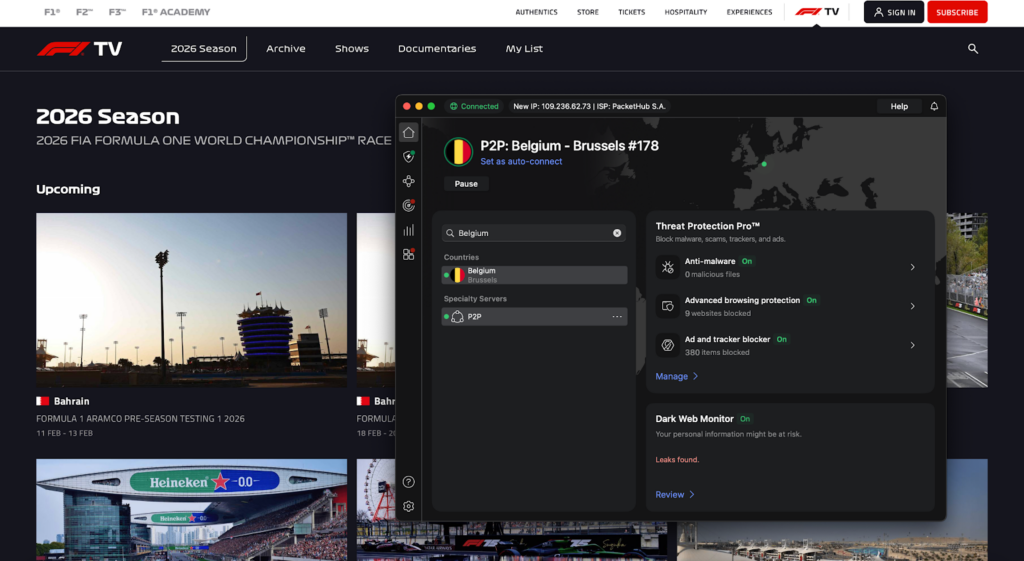
Free F1 race streams in 2026 can be found on select international broadcasters’ platforms, including Austria’s Servus TV/ORF, Luxembourg’s RTL Zwee, and Belgium’s RTBF. I recommend using a VPN to unblock these platforms and access Channel 4 highlights (UK) and Kayo Freebies (Australia) for the best legal and free way to watch F1 without charge.
- Get a reliable streaming VPN. NordVPN performed best in our tests.
- Install the VPN application on your device.
- Connect to a VPN server in Austria (ORF or Servus TV), Belgium (RTBF), or Luxembourg (RTL Zwee) to watch all 2026 F1 races live for free.
- Go to the free broadcaster’s website.
- Enjoy watching F1 for free!
Wrap up: get the best F1 experience for superfans worldwide
F1 TV offers the most seamless experience for Formula 1 aficionados with access to live streams, highlights, in-car footage and team radio chatter, and other features you won’t easily find anywhere else. However, it’s also region-locked to specific parts of the world, meaning you’ll only be able to watch from certain countries.
That said, you can easily bypass restrictions to unblock F1 TV and watch from restricted countries, giving you a way to keep up with the action when you’re away from home.
If you’re wondering how to watch F1 TV Pro with a VPN, I recommend choosing NordVPN and connecting to a Belgian VPN server. With the fastest-available VPN speeds and support for up to 10 simultaneous devices, NordVPN came out in pole position during our tests.
You might also like to read:
- How to watch F1 races for free online
- How to watch MotoGP for free
- The best VPNs for streaming
- Best Hesgoal alternatives for streaming sports
- How to watch F1 TV Pro in Japan 2026
- Where to watch the Kentucky Derby 2026 live
FAQ
Still have some lingering questions about F1 TV Pro and streaming worldwide? I’ll answer the most frequently asked ones for you below!
The cheapest F1 TV Pro subscription in 2026 comes from India, costing $29.99/year. A little behind this is Brazil, costing $39.99/year. If you’re in another country, you can change your IP address with a VPN to access cheaper pricing. Based on my tests, I recommend NordVPN, now 70% off, which offers servers in both countries with the fastest speeds for streaming.
No, F1 TV Pro is not officially available in the United Kingdom. This is because Sky Sports holds exclusive live Formula 1 broadcast rights in the UK. As a result, only limited F1 TV features like highlights and replays are available, without live race streams. To access F1 TV Pro in the UK, use a VPN like NordVPN to connect to a country where F1 TV Pro is available. I recommend connecting to Belgium, which worked well in my tests.
While F1 TV Pro isn’t sold directly in the UK, you can use a VPN to connect to a region where the service is available, such as Canada or Belgium. A VPN changes your IP address, tricking the platform into thinking you’re located in the supported country. I tested 20+ VPNs and recommend using NordVPN, which has the best HD and 4K streaming speeds.
No, since Sky Deutschland has exclusive rights to F1 in 2026, F1 TV Pro is unavailable. If you want to access F1 TV Pro in Germany, I recommend changing your IP address to a supported country using a VPN. For example, during my tests, I unblocked F1 TV Pro using NordVPN to connect to a nearby VPN server in Belgium.
No, F1 TV Pro does not work in Australia because exclusive broadcast rights are held by Foxtel and its streaming platform Kayo. To watch F1 TV Pro in Australia, get a reliable streaming VPN like NordVPN and connect to a server in a country where the service is available. During my tests, I used servers in locations like Belgium and Canada to unblock the website.
Yes, F1 TV Pro works with a VPN if you connect to a country where the service is available. This changes your IP address, which tricks the website into thinking you’re located in a supported region, thereby unblocking the site. I tested this in real time using a server in Belgium while located in the UK, and I was able to get F1 TV Pro working. I used NordVPN, which offers the fastest streaming speeds and broad server availability in F1 TV Pro-friendly countries.