Surfshark VPN review June 2026: fast, safe, and low-cost VPN

Why trust our review process 
We may earn affiliate commissions for the recommended products. Learn more.
Surfshark routinely appears as one of the best VPNs in VPNOverview’s rankings. Every time I conduct a Surfshark review, I’m impressed by its speed, unblocking capabilities, and, best of all, its low-cost subscription model.
With Surfshark, I can unblock Netflix from anywhere in the world. The speeds never fail to deliver high-quality, lag-free streams. Pair this with robust security features and unlimited simultaneous connections, and it’s easy to see why so my team and I favor this VPN, as well as many other VPN users and experts.
This Surfshark review contains all the information you’ll need to determine whether this VPN is right for you. Right now, you can grab a discount on Surfshark to make those minute subscription fees even smaller!
Limited offer: Get Surfshark for 85% off plus up to 3 MONTHS FREE!
Surfshark: pros and cons
What I liked
- Unblocks streaming services like Netflix, Hulu, Sling TV with ease
- Retained up to 92% of original speeds in testing
- Unlimited simultaneous connections
- FastTrack technology, which improves connection up to 70%
- Easy to install and use, perfect for beginners
- Unique and proprietary Everlink software guarantees connections
- Servers in 100 countries
- Doesn't block torrents – fast enough to download large files
- 30-day money-back guarantee allows you test it risk-free
What I didn't like
- Speeds can dip on faraway servers
Surfshark is an excellent choice if you’re looking for a strong all-round VPN. You can hide your online identity, unblock streaming platforms, stream live sports, and play online games — all without breaking the bank. I’ve put this VPN through its paces in all these areas, and the results are impressive.
Though based in the Netherlands (a Nine Eyes country with data-sharing agreements), Surfshark’s architecture offers reassurances. RAM-only servers completely wipe themselves with every reboot. In other words, none of your data is stored, and thus, no data can be shared with authorities.
Surfshark is also a great VPN for the whole family. You can use one subscription on an unlimited number of devices. Your $ 2.49 per month will cover everyone’s phones, laptops, tablets, smart TVs, and more. In other words, you’ll spend less time worrying about your kids’ online security.
Surfshark can also unblock any streaming site, from Netflix to Disney Plus. Surfshark’s speeds also ensure that you won’t experience any lag while binge-watching your favorite shows.
Visit Surfshark to learn more about its unblocking ability and performance or to grab your limited-time discount.

| 💵 Price | From $ 2.49 a month |
| 📱 Operating systems | Windows, Mac, iOS, Android, Linux |
| 💻 Connections | Unlimited |
| 💳 Payment methods | PayPal, Cryptocurrency, Credit card, Other |
| 🔒 Protocols | OpenVPN, IKEv2, WireGuard |
| 📅 Money-back guarantee | Money-back guarantee, 30 Days |
| 📋 Logs | Zero logs |
| 🌎 Servers in English | United States, Canada, India, United Kingdom, Ireland, New Zealand, Australia |
| 📥 Torrent options | |
| 🍿 Netflix | |
| 🏠 Website in English | |
| 📲 App in English | |
| 🎧 Customer Service in English | |
| 🎬 Works with |


|
How much does Surfshark VPN cost?
The cheapest Surfshark price is a two-year subscription, coming in at $ 2.49 per month. This is a great deal for a premium VPN!
Other Surfshark pricing plans include a monthly and annual plan, as seen below. Personally, I recommend opting for a one-year subscription ($3.19/mo) or a two-year subscription ($ 2.49/mo) to enjoy the cheapest long-time protection.

- Surfshark 24 months $ 2.49mth Deal View offer
- Surfshark 12 months $ 3.19mth View offer
- Surfshark 1 month $ 15.45mth View offer
Surfshark also boasts extra security tools. Surfshark One, starting at $ 2.79 per month (two-year plan), includes Surfshark Antivirus, webcam protection, and real-time email and ID breach reports.
Alternatively, you can get Surfshark One+, which includes Surfshark Incogni, a data removal tool. The two-year subscription starts at $ 4.49 per month. Data removal tools purge personal information from invasive data brokers’ websites.
Surfshark payment options
Right now, Surfshark allows various payment methods, including:
- Credit card (Mastercard, Visa, American Express, and Discover Card)
- PayPal
- Google Pay
- Amazon Pay
- Cryptocurrencies (Bitcoin, Ethereum, Ripple, Dogecoin, Tether, Beam, Monero, and Tron)
To further increase your privacy, Surfshark lets users pay anonymously with cryptocurrencies like Bitcoin via CoinGate and Coin Payments. There are also local payment options, such as Direct Debit, which means you can simply pay using your local bank.
In this regard, I feel that Surfshark really goes the extra mile to make everything as convenient as possible.
Note:
On Surfshark’s website, its prices are available in euros, AUS/CAN dollars, Chinese yuan, and pound sterling. Surfshark VPN uses the US dollar as its main currency, so prices in other currencies may vary. Appropriate VAT/sales taxes may also be added to the final costs depending on your location.
Do you get your money’s worth with Surfshark?
Yes, Surfshark provides excellent value for money. At VPNOverview, we’ve tested 70+ VPNs and easily agree that Surfshark offers a real bargain, considering the features and performance you get in return. Additionally, Surfshark offers military and student coupons that can further reduce the subscription cost.
It’s no wonder that many of the VPN experts on my team choose this provider as their personal, out-of-office VPN service for surfing the web at home.
Read on to learn how Surfshark performs for different purposes. I’ll take a deep dive into streaming, security, and speeds!
Does Surfshark work with streaming?
Yes, Surfshark can unblock all major streaming services. You can count on Surfshark to perform well in the future, too: in all the years we’ve been testing VPNs for streaming, Surfshark’s servers have bypassed streaming geo-blocks with ease.
Here’s a summary of how Surfshark fared with streaming services in our detailed test circuit:
| Platform | Can Surfshark unblock it? |
|---|---|
| Netflix (US) | ✔ |
| Netflix (UK) | ✔ |
| Disney Plus (EU) | ✔ |
| Hulu (US) | ✔ |
| BBC iPlayer (UK) | ✔ |
| Prime Video (EU) | ✔ |
| HBO Max (EU) | ✔ |
It’s not every day that a VPN can unblock every service available. Netflix, in particular, has been cracking down on VPN connections. Yet Surfshark continues to give me unwavering access to Netflix TV shows from around the world!
Most recently, Surfshark added an Apple TV app, so you can now use Surfshark on your Apple TV, as well as other smart TVs.
Surfshark and Netflix
Since Netflix implemented VPN and proxy bans, many VPNs have a hard time unblocking the streaming service. This is often why free VPNs fail to work with Netflix.
In my years of testing VPNs, Surfshark has always performed at the top of the game when it comes to bypassing Netflix geo-blocks. I can easily get access to Netflix US-exclusive shows like Supernatural without any buffering.
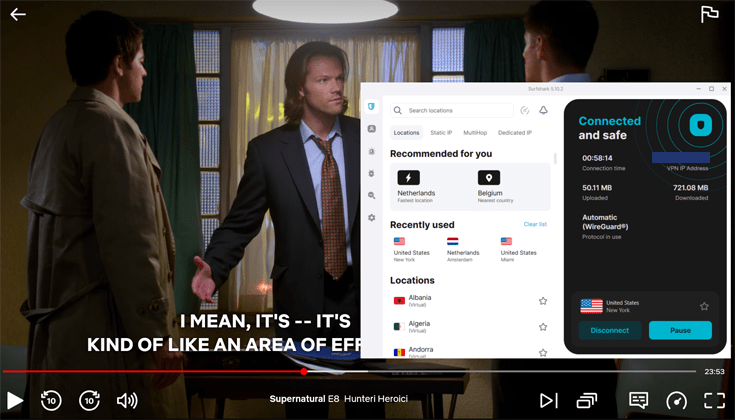
Surfshark can also unblock Netflix libraries from the following countries: United Kingdom, Canada, Germany, France, Japan, Norway, Netherlands, Italy, India, Turkey, Sweden, Australia, South Korea, Poland, Taiwan, Portugal, Thailand, and Singapore.
During testing, I also checked out the offerings on Netflix UK. Among other things, I easily accessed the British comedy series The Other One on Netlfix UK.
Having issues after all? Simply change your protocol to WireGuard in the VPN’s app settings and reload the Netflix app or page. Then you should be good to go!
Wrong Password?
Sometimes, Netflix (temporarily) blocks IP addresses that are used for brute force attacks. Because of this, you might find that, when you try to log in to Netflix while connected to Surfshark, you’re told you’ve entered the wrong password, even though you didn’t. To solve this, simply connect to a different Surfshark server in the same country and try again!
Although Surfshark doesn’t have specialized streaming servers like CyberGhost, its 600+ US servers and fast speeds make it one of the best VPNs for Netflix.
Surfshark and Hulu
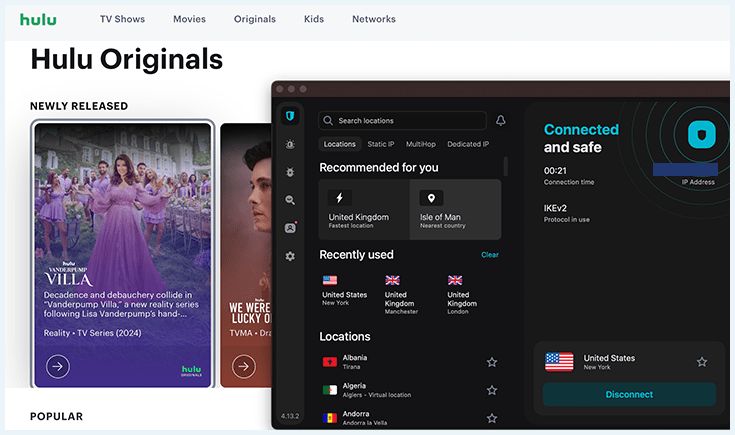
Hulu’s a great hub for sports fans, so it’s one of my regular tests when I try out a VPN. If you’re not in the US, you can only access the site with a reliable VPN service.
I’m happy to say that Surfshark can unblock Hulu, no matter where you are in the world!
Surfshark and HBO Max
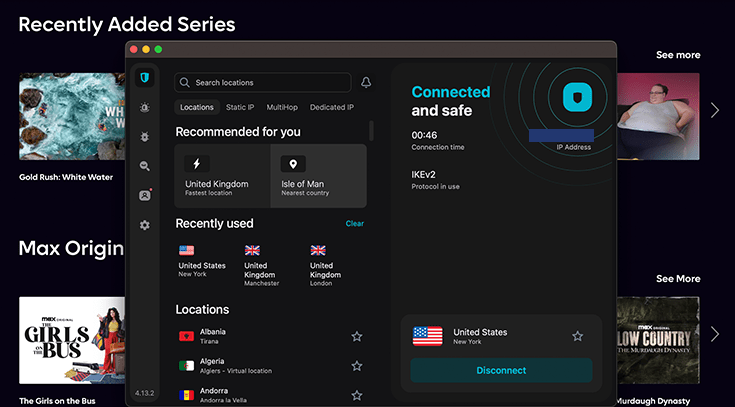
Surfshark rarely struggles with unblocking a website, so I wasn’t too surprised to find that Surfshark will unblock HBO Max US as well. This gives you access to exclusive American-aired TV series and movies!
Torrenting with Surfshark
Unlike other providers, Surfshark doesn’t have specialized P2P servers for torrenting. However, during my tests, I confirmed that Surfshark’s servers are optimized for anonymous torrenting. In fact, it has a spot on VPN Overview’s best VPN for torrenting list.
I was able to access and download content from Internet Archive, Project Gutenberg, and other popular torrenting sites. Most importantly, my real IP address wasn’t exposed while torrenting. This is vital to avoid the inherent risks of torrenting, such as exposing your location and identity to other users in your torrent swarm.
Surfshark servers and locations
Surfshark has a great server infrastructure that includes 4500 servers across 100 countries. If you’re looking for a specific IP address, you can find Surfshark server locations in the following countries:
- Americas: Argentina, Bahamas, Belize, Bolivia, Brazil, Canada, Chile, Colombia, Costa Rica, Ecuador, Mexico, Panama, Paraguay, Peru, Puerto Rico, United States, Uruguay, and Venezuela
- Asia Pacific: Australia, Bangladesh, Bhutan, Brunei, Cambodia, Hong Kong, India, Indonesia, Japan, Laos, Macau SAR China, Malaysia, Mongolia, Myanmar (Burma), Nepal, New Zealand, Pakistan, Philippines, Singapore, South Korea, Sri Lanka, Taiwan, Thailand, and Vietnam
- Eurasia: Azerbaijan, Kazakhstan, and Uzbekistan
- Europe: Albania, Andorra, Armenia, Austria, Belgium, Bosnia & Herzegovina, Bulgaria, Croatia, Cyprus, Czech Republic, Denmark, Estonia, Finland, France, Georgia, Germany, Greece, Greenland, Hungary, Iceland, Ireland, Isle of Man, Italy, Latvia, Liechtenstein, Lithuania, Luxembourg, Malta, Moldova, Monaco, Montenegro, Netherlands, North Macedonia, Norway, Poland, Portugal, Romania, Serbia, Slovakia, Slovenia, Spain, Sweden, Switzerland, Turkey, Ukraine, and the United Kingdom
- Middle East and Africa: Algeria, Egypt, Ghana, Israel, Morocco, Nigeria, Saudi Arabia, South Africa, and the United Arab Emirates
Note that some of Surfshark’s server locations are virtual. This means the server could appear to be in a particular country, although the physical infrastructure is situated in another country. Surfshark has about 40 virtual servers in countries such as India, Ghana, Mexico, Monaco, and Laos.
The main challenge of using a virtual server is that you might face slower response times compared to physical servers.
Dedicated IP addresses
Surfshark offers dedicated IP servers as well as static IPs. A static IP server will give you the same IP address each time you connect. However, other people can use this server as well.
Dedicated IPs, on the other hand, are unique IPs assigned to only one user. In other words, if you purchase a dedicated IP, nobody else can use it. Currently, Surfshark has dedicated IP addresses in the US, the UK, The Netherlands, Germany, France, Australia, Japan, Italy, Canada, Singapore, and Hong Kong.
Here are some benefits of using dedicated IPs:
- Improved unblocking: Some websites may block or limit access from shared IP addresses. Having a dedicated IP address can help you bypass those types of restrictions.
- Less likely to be blacklisted: Shared IP addresses can get blacklisted due to the actions of other users who may have used that IP address to commit illicit activities. With a dedicated IP address, your online activities are isolated from others, reducing your risk of being affected by IP blacklisting.
- Reduces the number of CAPTCHA requests: Using a dedicated IP address cuts down the number of CAPTCHA prompts you get on Google and other sites.
Note that dedicated IP addresses are more traceable than shared IP addresses. However, Surfshark has users covered with their anonymous dedicated IP option, which deletes all information about your dedicated IP address stored in their database.
How fast is Surfshark?
I tested Surfshark VPN while browsing, watching videos, downloading torrents, and playing online games, and it provided a fast, stable connection every time. Many of our experts use Surfshark in their daily life and leave it running without experiencing any lag or slow connections.
During my Surfshark VPN review, I didn’t notice the VPN’s effect on my internet speeds at all. Loading websites, emailing, downloading attachments, and browsing social media went very smoothly. I had no issues watching videos on YouTube or streaming the best shows on Netflix, either.
On top of this, I didn’t experience any lag while gaming. I tested graphics-intensive, first-person shooting games like Battlefield 2042 to see how Surfshark VPN would hold up. There was a slight latency drop, but it was marginal. Gameplay wasn’t affected at all.
Speed test results for Surfshark (2026)
I regularly run speed tests with Surfshark from our base in The Netherlands. The aim is to try different Surfshark servers and evaluate the impact on download and upload speeds.
First, I check latency, upload, and download speeds without a VPN connection. Next, I test Surfshark’s speeds in at least one country on each continent. This gives me a bird’s-eye view of how Surfshark performs. I’ve summarized my latest results in the table below.
Note:
Your actual speeds might differ depending on various factors, including your starting speed, internet connection, and location. The results from my tests serve as an indicator of potential speeds.
| Server | Download (Mbps) | Upload (Mbps) | Ping (ms) |
|---|---|---|---|
| No VPN | 500 | 500 | 1 |
| The Netherlands | 434 | 149 | 6 |
| UK (London) | 468 | 453 | 19 |
| Germany (Frankfurt am Main) | 469 | 473 | 16 |
| United States East (New York) | 414 | 196 | 84 |
| Canada (Montreal) | 468 | 141 | 102 |
| Singapore | 425 | 96 | 211 |
| Sweden | 473 | 473 | 122 |
| Japan (Tokyo) | 422 | 83 | 241 |
| Australia (Perth) | 402 | 69 | 292 |
When I connected to servers close to my testing location, I did not experience a significant impact on my upload and download speeds. I was able to maintain at least 92% of my initial speeds on the nearby servers I tested. My latency on those servers increased, but not by much.
For distant servers in countries such as Brazil, Australia, and South Africa, my speeds dropped more, and my ping increased. However, compared to other VPNs that I tested, Surfshark’s latency is better than most.
To improve faraway connections and speed, Surfshark introduced a new FastTrack technology. It currently works only on macOS and is set to optimize users’ traffic to enhance speeds and performance. Rather than using one direct route, FastTrack routes traffic through multiple servers. This way, you can expect up to 70% improved connection. FastTrack servers in Sydney, Seattle, and Vancouver are marked with the FastTrack icon. If you don’t see one, it means that at the time of connecting, the best route is the direct one and FastTrack is not necessary.
Overall, Surfshark’s upload and download speeds are some of the best and fastest speed test results of any of the VPNs I’ve tested, making it one of the fastest VPNs on the market.
Is Surfshark safe?
Surfshark is a safe and reliable VPN that can easily keep your data safe. After analyzing its security features, I’m confident that Surfshark can offer you a high degree of protection. From hiding your true IP to encrypting your traffic and not storing personal data, Surfshark passes every test with flying colors.
Does Surfshark leak your data?
Surfshark passed all of my IP leak tests with ease. A VPN leak can allow data to slip through the encryption protocol, potentially exposing your real identity, location, or browsing activity. As part of this Surfshark VPN review (and all of our VPN reviews), our team always tests for common data leaks.
First, I checked for IP leaks using our custom-built IP address verification tool. By using the VPNOverview tool, you can double-check that your VPN connection is correctly cloaking your real IP address.
We’re based in The Netherlands, so Surfshark passed this test when showing my VPN server’s IP address in France.

Next, I used a different service to test for DNS and WebRTC leaks. It’s good news all around: Surfshark didn’t leak my data.


Regardless of the location I tested, Surfshark kept both my original IP address and VPN use secret. The following image gives an overview of the effectiveness of Surfshark VPN at keeping me hidden in different countries worldwide.

Can you sign up to Surfshark anonymously?
Yes, you can subscribe to Surfshark anonymously. Using a private and secure email address and paying for a VPN with cryptocurrency can further conceal your identity. You can also use an alias to sign up instead of your real name.
Surfshark only requires the following information to create an account:
- Email address
- Payment details
Logging policy
Surfshark VPN also has a strict no-logs policy and makes every effort to record as little personal information as possible. Here is the information Surfshark collects about you when you use its services:
- Email address
- Payment details
- Account registration date
- Information about subscription
- Encrypted password
Note:
During my research, I asked Surfshark about their logging policy. Surfshark confirmed that they log connected IP addresses for 15 minutes, but delete those afterward. This is done to make sure that users don’t abuse the unlimited connections feature, potentially reselling connections. It’s no cause for concern.
Surfshark’s strict no-logs policy was verified by independent security audits in 2018 and 2021. In December 2022 and 2024, Deloitte once again audited and confirmed the legitimacy of Surfshark’s policy.
In January 2024, Surfshark also passed the MASA (Mobile App Security Assessment) audit. This backs up the VPN’s commitment to processing sensitive data, offering strong encryption, and more. With all of this in mind, I’m confident that your data is safe with Surfshark.
Where is Surfshark based?
Surfshark is based in The Netherlands. The country is part of the Nine Eyes, which is a global surveillance and data-sharing alliance.
However, since Surfshark uses RAM-only servers, which wipe on every reboot, the chances of your data being accessed are very low.
Protocols and encryption
Under the hood, Surfshark packs AES-256-GCM encryption (which is faster than regular AES-256 encryption) and uses some of the safest VPN protocols currently available to VPN providers. Here’s a list of the protocols you can use:
- OpenVPN (TCP/UDP): This protocol is open-source and widely used among VPN providers. As a result, it has constant improvements and patches that deliver consistent speed and security, making it one of my favorites.
- WireGuard: This protocol is incredibly fast and uses a secure ChaCha20 encryption algorithm. WireGuard has under 4,000 lines of code (OpenVPN has 400,000+), which reduces loading times and vulnerabilities hackers might exploit.
- IKEv2/IPsec: This protocol is best suited for mobile users because of its reconnection capabilities. I recommend it if you’ll be switching between mobile networks and Wi-Fi networks often.
Surfshark also offers perfect forward secrecy, no matter which protocol you choose. Forward secrecy constantly changes encryption keys, so if there’s ever a breach, the stolen keys become useless once you turn your VPN off.
If you want to find out more about Surfshark’s protocols or take advantage of its high-level security service, head on over to the Surfshark website!
Kill switch and Surfshark Everlink
Surfshark has a built-in kill switch on Windows, macOS, iOS, and Android. A kill switch is an essential security feature for any VPN. As the name suggests, it instantly “kills” your internet connection if your VPN disconnects unexpectedly for whatever reason. This prevents data leaks and keeps you protected should your VPN falter. I tested the feature and confirmed that it works seamlessly – the moment my connection dropped, Surfshark ensured my traffic stayed safe.
You can enable the option by going into the settings on your Surfshark app. Bear in mind that on your first use, you might need to install Surfshark’s kill switch helper tool. This is harmless, and I encourage you to follow the steps so that your connection can be fully protected.
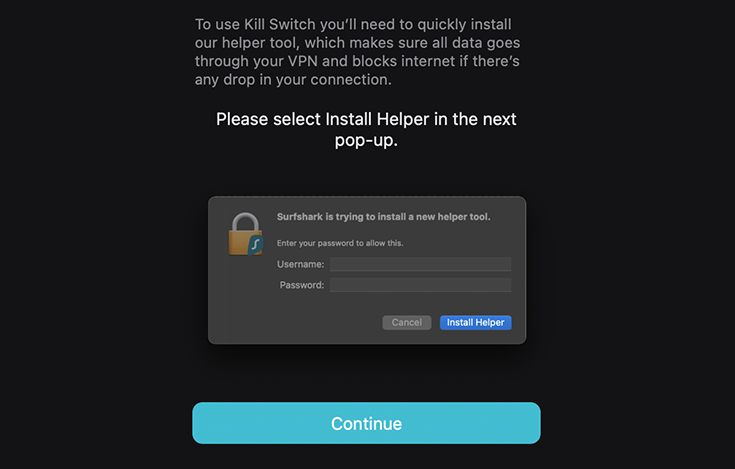
Surfshark’s capability here goes further, with both a soft kill switch and a strict kill switch. The soft kill switch will disconnect your internet access whenever the VPN connection is interrupted. On the other hand, the strict kill switch is a system-wide kill switch that doesn’t allow your device to connect to the internet, unless you’re connected to a VPN.
What’s more, in 2025 Surfshark released a unique and proprietary feature not seen in other VPNs – Everlink. Whereas the kill switch disconnects your internet and requires you to manually reconnect to the VPN, Everlink automatically recovers your dropped VPN connection.
The feature has a “self-healing” mechanism, allowing it to diagnose and reconfigure your VPN behind the scenes, before reconnecting you to your VPN server without requiring any input from yourself. This means you can continue using your VPN unimpeded while enjoying even greater protection against IP leaks.
Surfshark Nexus
Surfshark Nexus is the VPN’s latest upgrade to improve security and user experience. You’ll be able to rotate between servers without losing your VPN connection, protecting your real IP address from being intercepted.
Nexus connects users to the VPN’s entire network of servers instead of to an individual location (or subgroup of servers). It has two key features:
- IP Rotator: Automatically changes your IP address every five to 10 minutes while your VPN location stays the same
- Dynamic MultiHop: Allows you to pick your own entry and exit points for MultiHop
You can activate the IP Rotator feature by following these steps:
- Go to “Settings” in the Surfshark app.
- Click on “VPN Settings.”
- Scroll down and enable “Rotating IP.”

MultiHop
MultiHop (also known as “double VPN”) allows you to “hop” from one VPN server directly to another, giving you extra security. Basically, all of your traffic now goes through two encrypted connections, so your VPN IP address continually changes.
Unfortunately, this does have a slight negative impact on your internet speeds, although in practice, this is negligible.
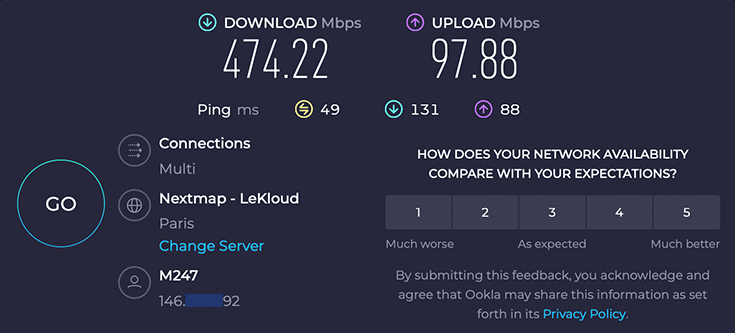
When connecting to a server in Paris from the UK, one of my fellow VPN experts saw download speeds of 479.52 Mbps on a 500 Mbps baseline connection. After switching to MultiHop, on a Paris server routed via London, it dropped a tad to 474.22 Mbps. In reality, you won’t even notice this.
Bypasser
If you’re looking for a split tunneling feature in Surfshark VPN, you’ll be happy with their Bypasser. This tool lets you connect to specific apps and websites using your own IP address instead of that of the VPN server.
I found this useful for using services that are already based in my country; this way, you don’t need to suffer a speed drop (even if it’s minimal). Recently, Bypasser has also been made available for iOS.
CleanWeb 2.0
CleanWeb 2.0 is Surfshark’s powerful ad blocker, which performed surprisingly well during my tests.
CleanWeb is currently one of the only VPN ad blockers that can bypass YouTube ads! In fact, because of the CleanWeb feature, Surfshark is one of our top ad blocking VPNs.
I put CleanWeb to the test, launching a film trailers summary. These kinds of videos tend to be packed with ads that pop up at the start and partway through the video. Here’s me watching the video without a VPN – I saw ads immediately.

Once I connected to Surfshark, CleanWeb blocked the YouTube ads. Few ad-blockers can boast of this achievement, which highlights the quality of Surfshark’s blocker software.

Note:
I saw consistent results blocking YouTube ads in Firefox and Safari. Since Google Chrome is a Google product, just like YouTube, the browser managed to defeat my efforts to block YouTube ads. So, use Firefox of Safari – they’re both excellent and secure browsers.
Bear in mind that blocking YouTube adverts is against the site’s terms of service. The website’s terms of service state that they may block your video playback if you try to circumvent advertising, so do so at your own risk.
NoBorders and Camouflage Mode
Surfshark has two additional VPN modes on top of its regular VPN service. Camouflage Mode is Surfshark’s version of “obfuscation.” It’s designed to disguise your VPN traffic so you can bypass any content filtering, making it more difficult to monitor your activities. Camouflage Mode runs automatically when you pick OpenVPN (TCP or UDP) as your protocol.
If you’re located in a region with restricted internet, NoBorders Mode can get you past even the strictest internet blocks. When Surfshark detects any kind of restrictions on your network, it automatically enables the NoBorders mode. This gives you a selected list of servers that perform well despite network censorship.
Unlike Camouflage Mode, you’ll have to enable NoBorders yourself via your VPN Settings menu, as seen in the screenshot below.

While traveling through China, I was impressed by the NoBorders feature, as it seamlessly detected restrictions on my network and recommended the most optimized servers. However, I did have to try many different servers, considering the power of the Chinese Firewall.
GPS spoofing
Surfshark also has a GPS spoofing function. GPS spoofing allows your phone’s location to match your VPN server’s. This feature is useful if you want to cloak your real GPS location on apps, such as if you’re worried about privacy on Tinder or BeReal.
Surfshark’s GPS spoofing option is only available on Android right now. Setting up this option also takes some time, but I’ve summarized the process below based on my own experience:
- In the Surfshark software, go to “Settings” in the bottom right corner, then click on “VPN Settings.”
- Scroll down and click on “Advanced Settings.”
- Click the slider next to “Override GPS Location” so it turns green.

- Likely, Surfshark VPN will tell you that you need to adjust your phone’s settings to allow you to override your GPS. If so, go to your phone’s “Settings” and scroll down to “About Phone” at the very bottom.
- Scroll to the bottom of the “About Phone” menu until you see “Build number,” and tap this option seven times. Once done, your device will tell you you’re a developer.
- Go back to your phone’s “Settings,” click on “System,” and unfold the “Advanced” menu at the bottom.

- Tap “Developer Options.”
- Scroll down and tap on “Select Mock Location App.” When prompted, choose “Surfshark.”

- Go back to the Surfshark app and tap “VPN” in the bottom left corner.
- Connect to a server of your choice.
You’ll now be connected to the VPN server of your choice, and your GPS will match the location of that server.
Surfshark Alternative ID
As if all of the above wasn’t enough, Surfshark also offers Alternative ID, which allows you to create a new online profile with a new name, age, gender, and email address. This feature is useful if you visit sites with shady privacy practices or you simply want extra protection for your identity.
Rather than sharing your real name and email address, you can use your alternative ID details, which is essentially a fake ID to shroud your real one. There’s no need to remember your details, as auto-fill will help you out!
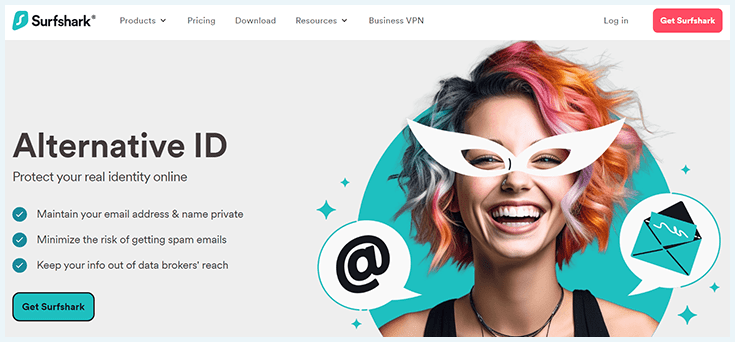
Using an alternative ID also keeps your email away from data brokers and reduces the chances of spam or promotional emails. You can set up the Alternative ID to forward emails to your actual email address.
Best of all, this feature is available to every Surfshark user. Previously, it was bundled with Surfshark One – the company’s excellent antivirus solution. This change reassures me of Surfshark’s ongoing commitment to providing top-tier cybersecurity protection on a budget.
Update:
Surfshark offers a similar feature called Alternative Number, which similarly creates a virtual phone number, masking your real one. This is a paid addition to Alternative ID.
Surfshark One exclusives: Surfshark Alert and Surfshark Search
Surfshark Alert and Surfshark Search are only available with the Surfshark One package, which is an all-in-one solution that includes more than just the VPN service, as I discovered during this Surfshark VPN review.
Surfshark Alert will notify you when your email or passwords might be in danger of being compromised. Surfshark Search is Surfshark’s answer to the anonymous search engine, DuckDuckGo.

On top of these smaller tools, Surfshark One also includes a separate antivirus program. The Surfshark One package costs $ 2.79 per month and includes the VPN.
Is Surfshark easy to use?
Surfshark excels at user-friendliness. Its website and desktop and mobile apps are very easy to use, and the installation process is quick and effortless. Among the VPN companies I’ve reviewed, this is one of the most beginner-friendly tools.
All the features are right at your fingertips, whether you’re a newcomer to VPNs or an advanced user. Once you’ve signed in, you won’t be overwhelmed by countless options and settings. Instead, you’re only shown settings that matter to the average VPN user.
All options and settings include a clear description, and the different menus are easy to navigate. Plus, the customer support team is quick to respond and ever-ready to help, making Surfshark a very user-friendly VPN.
How to install Surfshark
I found the Windows installation process simple and straightforward. Here’s a step-by-step guide for installing Surfshark on Windows:
- Head over and choose a Surfshark subscription, then follow through with the sign-up process.
- Log in to the Surfshark VPN website and click on the Windows icon to download the software.

- Open the .exe file you downloaded.
- Go through the steps of the installation wizard to install Surfshark VPN.

- Open the Surfshark app once it’s installed.
- Log in with the Surfshark login information you created for your account.

- Select a server, then enable Surfshark.

Surfshark on Windows
As expected, the Surfshark user experience is seamless, making this VPN one of the best VPNs for Windows. I tested the app on both Windows 10 and Windows 11. The app dashboard is clean and well-organized, with the features within reach.
I also found Surfshark’s server list very easy to navigate. It allows you to pick and choose exactly which server location to connect to, a feature that, by comparison, is rarely seen in free VPNs.

A recent Windows update includes Web Protection, which you can access through the antivirus settings if you have Surfshark One. It protects you against malicious sites while navigating the web.
Surfshark’s Windows client is available for download from your account dashboard.

Surfshark on Mac
Many service providers tend to falter when it comes to installing their VPN on macOS, but Surfshark rides the wave pretty well. The installation process is nearly identical to the process for Windows above.
During this Surfshark VPN review, I tested Surfshark’s 2026 VPN package on a brand-new MacBook Air, and the software worked perfectly with macOS. Surfshark VPN also works perfectly with the latest Apple M1 Pro chip, so you don’t need to worry about tinkering in the Command Terminal to get it running properly on macOS.
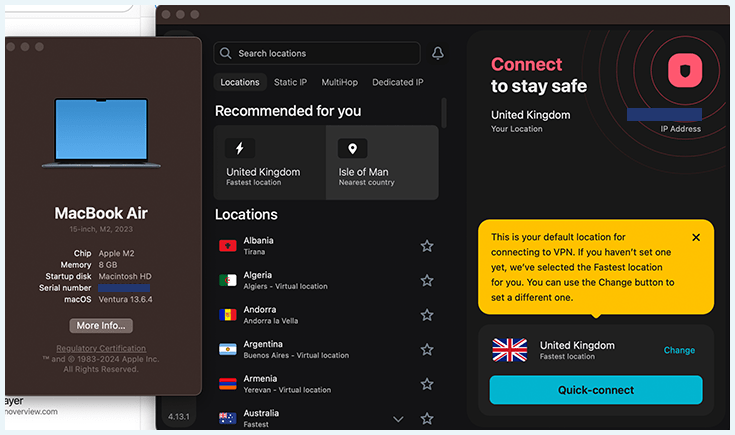
You can also take advantage of a seven-day free trial on Mac. If you need a robust VPN for Mac, you can’t go wrong with Surfshark.
Note!
Surfshark has announced that, going forward, it will only support macOS 11 (Big Sur) and up. Make sure to keep your devices up to date to avoid any issues!
Surfshark on Linux
Surfshark has an excellent dedicated graphical user interface (GUI) app for Linux. I tested the app and found it exceptionally easy to use. The selection of commands you have to learn is limited, making Surfshark VPNOverview’s top VPN for Linux.
Surfshark VPN on Linux also includes a number of neat extra features, such as an automated selection of the best available servers, a kill switch, MultiHop, and the ability to switch between UDP and TCP servers easily.
The app is available on Debian 11 and Mint 20 distros, but you’ll enjoy it most on Ubuntu. That said, the likes of NordVPN support more distros, including CentOS, Elementary OS, OpenSUSE, and RHEL.
Surfshark’s browser extension
Surfshark’s dedicated browser extension works for Chrome, Firefox, and Edge and allows you to use the VPN exclusively within your browser. I only needed a few minutes to install Surfshark’s Chrome extension, and it was a breeze.
Surfshark’s extension comes with some useful extra options, such as:
- Netflix VPN blocks bypassing: In the rare case that Surfshark’s software doesn’t work with Netflix, the browser extension provides a simple solution. Clear your cookies, connect to a server, and enjoy your favorite Netflix show.
- Ad blocker: Instead of downloading a separate ad blocker extension, you can use Surfshark to block advertisements and trackers within your browser.
- Pop-up blocker: Use Surfshark’s blocker to stop annoying cookie consent pop-ups while browsing.
- Data breach alert: While the extension is active, Surfshark will warn you about sites with a history of data breaches by displaying a thin red line at the top of the screen.
- Malware alert: Similar to the data breach alert, Surfshark will monitor malicious activity and warn you if it finds anything suspicious.
The browser extension works well for its purposes. Moreover, it’s an especially good solution for getting around streaming blocks.
Surfshark’s unlimited simultaneous connections
One of Surfshark’s unique features is that you can use it on an unlimited number of devices. This is perfect if you need a VPN for multiple devices or if you want to share your subscription with friends and family.
Surfshark’s unlimited connections offer is impressive because most top VPNs cap the number of devices you can connect to at the same time. For example, you can use NordVPN on only 10 devices simultaneously, while ExpressVPN caps it at eight.
Customer Service
During this Surfshark review, I discovered that Surfshark VPN provides multiple support options, including:
- Knowledge base
- Live chat
- Email support
You can find the knowledge base tucked away under the “Resources” section of the website. It covers everything from installation guides to connectivity issues, with plenty of FAQs. I was quickly able to locate answers to my questions.

You can reach out to Surfshark’s customer support agents by emailing [email protected].
If you want real-time support, you can use the live chat function. Note that you’ll have to go through a chatbot first. However, you can switch to a live agent whenever you want.
I was assisted by an actual employee within a minute. I reached out because of initial problems with watching American Netflix, and customer service was able to help me fix my issue in no time.
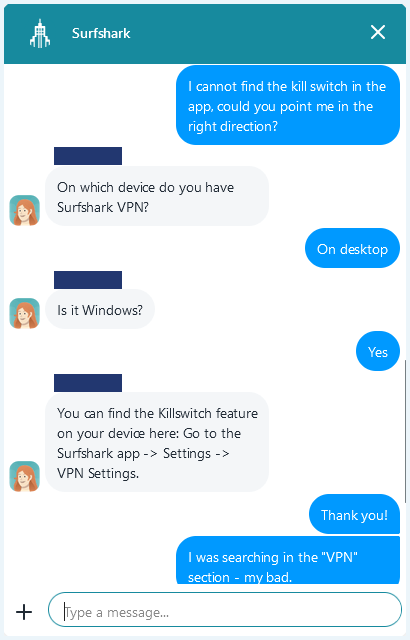
The support agents were patient, kind, and helpful, and I was able to resolve the problem.
Surfshark’s money-back guarantee: how to get a refund
Surfshark offers a 30-day money-back guarantee as long as you abide by its terms of service. You can use this refund option to try Surfshark for free for a full month. After that, you can cancel Surfshark and will get your money back. Moreover, this subscription can be used on unlimited devices.
To ask for a refund, simply send a message to [email protected] or get in touch with any of the live chat agents.
Surfshark also offers a seven-day free trial for its macOS, iOS, and Android app. All you have to do is download the Surfshark VPN app from the Apple App Store or the Google Play Store, sign up for an account, register your payment method, and start the trial.
Your card will be charged after seven days unless you choose to cancel. In case you accidentally keep a subscription, you’re still eligible for Surfshark’s 30-day money-back guarantee, so it’s a win either way.
Get Surfshark for free, for longer!
Did you know that you can use Surfshark for free for up to two years? While the money-back guarantee is great, you’ll have to subscribe to use the service for longer than 30 days. Luckily, Surfshark’s refer-a-friend program lets you extend your free period.
When you subscribe, you’ll receive a custom link, which you can find under the “Settings” menu in your app. If your friend signs up with the link and sticks around for a month, you’ll earn 3 free subscription extensions. The more friends you invite, the longer your free extension.
Recently, Surfshark announced that the Refer & Earn program will have even more reward options! Besides free months, you’ll also be able to receive a PayPal payout.
Comparisons with other VPNs
How does Surfshark measure up against other VPNs? Check out this table below:
| Editor’s Pick | |||||
| VPN | |  |  |  |  |
| Score | 9.0 | 9.3 | 8.9 | 8.8 | 8.6 |
| Price | $ 2.49 | $ 3.49 | $ 2.99 | $ 2.19 | $ 2.19 |
| Payment methods | PayPal, Cryptocurrency, Credit card, Other | Sofort, Cryptocurrency, Credit card, Other | PayPal, Cryptocurrency, Credit card, Other | PayPal, Cryptocurrency, Credit card, Other | PayPal, Cryptocurrency, Credit card, Other |
| Operating systems | Windows, Mac, iOS, Android, Linux | Windows, Mac, iOS, Android, Linux | Windows, Mac, iOS, Android, Linux | Windows, Mac, iOS, Android, Linux | Windows, Mac, iOS, Android, Linux |
| Servers | 3000-5000 | 9000+ | 10000+ | 5000+ | Thousands |
| Connections | Unlimited | 10 | 10 | 7 | Unlimited |
| Logs | Zero logs | Zero logs | Zero logs | Zero logs | Zero logs |
| Protocols | OpenVPN, IKEv2, WireGuard | OpenVPN, IKEv2, WireGuard, NordLynx | OpenVPN, WireGuard, Stealth | OpenVPN, IKEv2, WireGuard | OpenVPN, WireGuard, L2TP/IPsec |
| Compatibilities | | | | | |
| Money-back guarantee | Money-back guarantee, 30 Days | Money-back guarantee, 30 Days | Money-back guarantee, 30 Days | Money-back guarantee, 45 Days | Money-back guarantee, 30 Days |
| Visit Surfshark | Visit NordVPN | Visit Proton VPN | Visit CyberGhost | Visit Private Internet Access (PIA) |
NordVPN remains VPNOverview’s highest-rated VPN, thanks to its advanced security features. However, Surfshark is the clear option if you’re prioritizing affordability. The $ 2.49/mo price tag is hard to beat, especially when you factor in its unlimited simultaneous connections.
I recommend picking Surfshark if you want a premium VPN on a budget. While other premium VPNs can match its ease of use, they can’t match its killer combination of speed, features, and affordability.
What do Reddit users think about Surfshark?
During my Surfshark VPN review, I thoroughly checked over 100 Reddit reviews. Many Redditors are impressed with Surfshark’s prices and security features. In fact, Reddit seems to largely agree with me —Surfshark is one of the best VPNs, according to Reddit users.
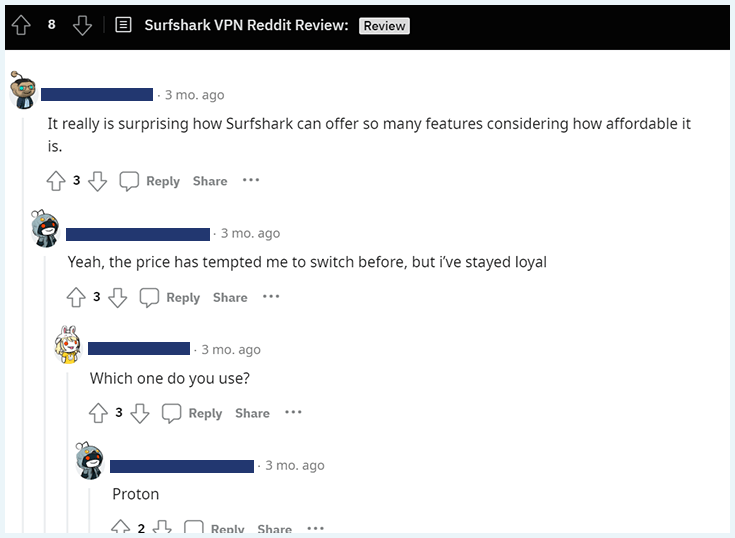
It’s true that Surfshark packs a lot of value into an inexpensive subscription. It’s regularly one of the cheapest premium VPNs while offering some of the best possible speeds. Value for money has only improved with the addition of the Alternative ID feature to all user plans. Previously, it was only available to Surfshark One antivirus subscribers.
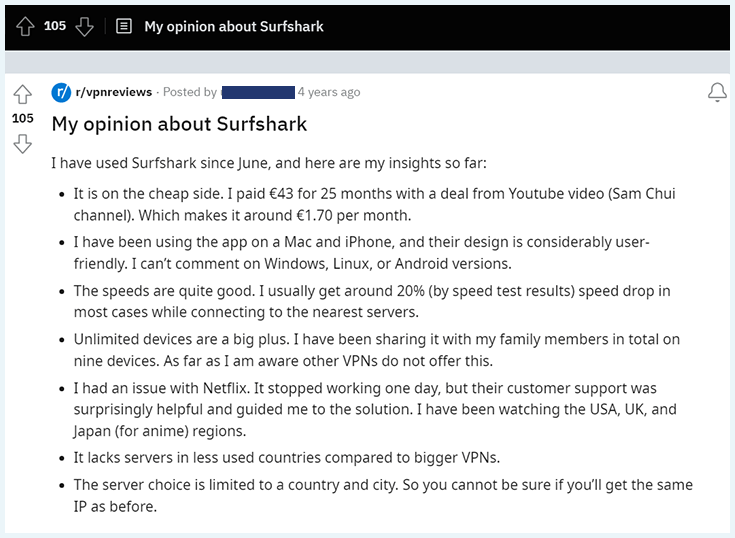
These points mirror my experience, too. I’ve seen consistent and positive results across every device we tested, including Windows, Linux, Android, and iOS versions thanks to unlimited devices. The comment on customer service is particularly accurate too. Recently, I’ve seen Surfshark helping Russian Redditors to overcome geo-blocks with manual setup.
Of course, not all the reviews were singing Surfshark’s praise. Some redditors raised concerns about Surfshark’s speeds.

In my opinion, this shouldn’t raise a red flag; VPN servers can experience slowdowns because of server congestion. In this case, you can opt for a dedicated IP or simply try a different server. Surfshark’s customer service should also be able to offer help in these cases.
Do I Recommend Surfshark?
Based on my Surfshark VPN review, I can confidently say that Surfshark is a reliable VPN for most things you’ll want to do online. It’s reliable, secure, fast, can connect to unlimited devices, and works well for browsing, streaming content, downloads, and torrents.
It’s one of the cheapest premium VPNs around but boasts great security features like a kill switch and Everlink, dedicated IP addresses, ad blocking, GPS spoofing, and access to varied Netflix libraries. Want to watch videos on YouTube instead? Surfshark’s the best VPN for blocking YouTube ads.
On top of that, its affordability makes it a great alternative to using free VPN services that often come with limitations and security issues. All this for just $ 2.49 per month — with a full refund if you’re unhappy within 30 days.
It’s no surprise that Surfshark is currently the second-best VPN in our books. Check out the comparison guides below to see how Surfshark fares against NordVPN and other top VPN providers:
- Surfshark vs. ExpressVPN
- Surfshark vs. NordVPN
- Surfshark vs. CyberGhost
- Surfshark vs. NordVPN vs. ExpressVPN
- Surfshark vs IPVanish
Do you have a question about Surfshark? I’m here to help. Simply click the question you’re interested in, and the answer will appear.
Surfshark is a very secure provider. It uses the two safest and most well-known protocols: OpenVPN and WireGuard. This VPN does not keep logs and only requires your email address in order to create an account. Moreover, it offers countless additional security features to protect your online presence.
Surfshark works with Netflix perfectly. When you use their servers, you’ll be able to access the Netflix library of dozens of different countries, including the US, the UK, France, Germany, and Turkey. If you use a Surfshark server that isn’t located in one of these countries, you’ll automatically be sent to the American version of Netflix.
Surfshark is, without a doubt, one of the best Netflix VPNs out there.
Surfshark is one of the cheapest VPN providers out there. You’ll be able to get a two-year subscription for just $ 2.49 a month. A 12-month subscription comes down to $3.19 a month, while a monthly subscription will cost you $15.45.
Surfshark is very fast, achieving 92% speed retention in our tests, and barely affects your internet speed during daily use. In fact, it is one of the fastest VPNs on the market. Surfshark does cause a minor decrease in download and upload speeds, but that does not affect browsing, streaming, or downloading activities, which makes Surfshark a good VPN for everyday use.
Surfshark is a powerful, reliable VPN and is VPNOverview’s number two pick for overall best VPN. Between the kill switch, AES-256 bit encryption, split tunneling, and its ability to unblock Netflix and other streaming platforms, the Surfshark VPN is a great pick for most users.
Yes, Surfshark and other VPN services are perfectly legal in most countries, including the United States, most of Europe, and other Western nations. However, some countries such as China, Russia, and Iran may have bans and restrictions on VPN usage.
Personal Opinions From VPNOverview Experts
